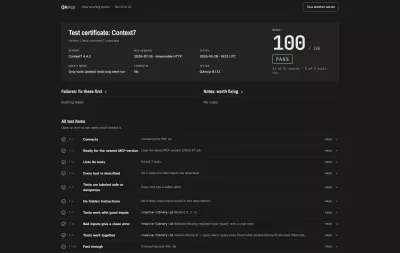

Claude Code harness for long-running agents: an alternative to Claude Code context compaction that clears and resumes with persistent memory.
aigent-OS is an open-source (MIT) Claude Code harness that replaces Claude Code context compaction with auto-clear and resume, for one long-running Claude Code session with persistent memory in git. With Managed Auto-Refresh, when context reaches a threshold it saves a verified capsule, runs /clear, and resumes the work in a fresh session. No summary of a summary, no re-briefing. Around that loop sits an operator layer: skill routing, guarded memory and specialist sub-agents that help with the work itself.
What I actually run every day: four Claude Code agents on aigent-os. Titus is the overseer, Pheme owns the newsletter business, Davinci is the builder and architect, and Metis handles job task assignments and clerical work. They write The AIgent newsletter every day (close to 9,000 subscribers), build my courses, run a video engine that posts to Instagram, set up ad deals and build email funnels. aigent-os is what keeps them from forgetting: at 80% context each one writes a capsule, runs /clear and picks up right where it left off. (Will)
Install · Demo · Evidence and limits · Operator · What it changes · Uninstall · FAQ · Alternatives · Docs



Stop re-briefing your AI every morning.
From the team behind The AIgent, a free media project for people building with AI.
What it does, in plain English: Claude Code context compaction vs. clear and resume
Claude Code has a fixed context window. When it fills, the usual options are to let it auto-compact (the model summarizes the conversation and keeps going on the summary) or to /clear and re-explain everything yourself. aigent-OS takes a third path. Before the window fills (default 80%, configurable with AIGENT_PRESSURE_THRESHOLD_PCT), it asks Claude to write a resume-ready checkpoint file (a "capsule"). It waits for Claude to confirm the capsule is complete, sends exactly one /clear, checks that a fresh session started, and tells that new session to load the capsule and carry on. No confirmation, no clear. Your notes, decisions and open threads live in plain markdown files you keep in git (aigent-OS commits and pushes them at each capsule cycle when the install folder has a git remote), so you can read, diff and roll back exactly what your agent remembers. It runs on your machine; aigent-OS has no server of its own.
Install
Requires Claude Code, Node.js 18+ with npm, and bash (on Windows, Git Bash from Git for Windows).
git clone https://github.com/wrg32786/aigent-os.git && cd aigent-os && bash install.sh --dry-run
The dry run prints the planned changes and writes nothing. When the plan looks right, run bash install.sh in the same folder, open a new terminal, and run aigent. The first launch runs guided setup.
To install into an existing project instead of the cloned folder, run bash install.sh --target <dir> from the clone (preview it with --dry-run first). Before you start working, read What this changes on your machine, including the note on vault sync and git remotes. More options: Quick Start.
Claude Code plugin: context-capsule
Don't want the full install? context-capsule is the portable, manual-trigger half of Auto-Refresh as a plain Claude Code plugin. Run /capsule or /refresh to write a resume-ready capsule of your session, run /clear yourself (or let auto-compact happen), and the next session gets a short pointer to the capsule so /resume picks up where you left off. Plain Node scripts, zero npm dependencies, no network.
/plugin marketplace add wrg32786/aigent-os
/plugin install context-capsule@aigent-os
Evidence and limits
- What has been shown publicly: 11 of 11 observed Auto-Refresh cycles on one Windows reference seat, in one live run during release testing for v1.1.0-rc.1. Each cycle had one capsule request, one acknowledgement, one
/clear, and one fresh session, with zero stranded acknowledgements and zero duplicate clears. Write-up: the companion paper, governed-agent-organizations, hypothesis H2, and its continuity and Auto-Refresh case study. More detail: Release evidence. - What it is not: this is single-seat evidence, not a fleet or reliability claim, and not a claim that this approach beats compaction. It is a different trade-off: an explicit, inspectable checkpoint and a clean window instead of a model-written summary.
- Known limitation (v1.1.0-rc.1): on the rc.1 release, a long session on a managed install can stop at the clear step and need a manual
/clear. The fixes for that are merged onmaster(#62, #78, #79) and ship in v1.1.0. Two narrower ack edge cases, #90 (a relaunch can miss an ack already on disk) and #91 (an unspent ack can authorize a later clear after pressure drops), are now closed and fixed onmastervia #97. All of these ship in v1.1.0. If you ever clear by hand, check that the latest capsule and any work in flight are saved first. See the v1.1.0-rc.1 release notes. - Release status: Managed Auto-Refresh first shipped in the v1.1.0-rc.1 pre-release and is stable in v1.1.0, the current Latest release.
Operator
Auto-Refresh is what keeps a long-lived agent going. The rest of aigent-OS is about what that agent does with the time. It keeps working across days: each refresh resumes from a checked capsule, and it will not resume into one that recorded no next step. It remembers what matters: memory is markdown in git, a fact whose validity window has ended ranks below the current one, and guards keep always-loaded memory small and hold planted instructions for review. Live failures turn into guardrails: when the seats we run hit a problem, the fix comes back to this repo with a test. And on every prompt, it is pointed at the skill in your catalog that fits what you asked.
| Capability | What it does | Status |
|---|---|---|
| Live failure to fix loop | Problems found on the maintainers' live seats come back to this repo as fixes and regression tests, gathered in a weekly fleet-to-product port sweep (for example PR #69). A Stop hook also flags turns whose confident claims ("fixed", "verified") went unrecorded. |
On by default (the fixes and the hook ship in the core; the sweep is how we maintain the repo) |
| Failure-to-fix procedure | A written procedure asks the agent to turn a failure seen twice into a skill, a check or a routing rule. No code forces it, and the ledgers ship empty. | Experimental (a skill the agent follows) |
| Memory guardrails | A size budget on always-loaded memory files, staged memory that tries to give instructions is held for review, anything read back from memory is treated as data and never as an instruction, and folders you mark confidential stay out of search | On by default |
| Skill caddy | A hook matches each prompt against your skill catalog and suggests the skill that fits. It never blocks the turn, and when nothing fits it points at /skill-recall so the gap gets logged. |
On by default |
| Nine named specialist agents | A builder, a read-only scout, a researcher, a design spec writer, a memory architect, a critic, a vault custodian, an architecture reviewer and a prompt writer, each with a fixed model tier and tool set (roster). A hook checks every dispatch against the agent's declared tier (details). | On by default (warns); block is opt-in with AIGENT_MODEL_GUARD=enforce |
| C2 temporal supersession | A note can carry a validity window. Once it ends, search ranks the note below current ones instead of deleting it (details). | On by default for notes with a validity line; in v1.1.0-rc.1 |
| Hindsight and Jev memory bridge | Explicit retain, recall, reflect and ranking against providers you configure, with every result checked against a local source (details) | Opt-in; on master, not in a release, not verified against the live services |
| Gateguard | The first edit of each file in a session waits until the agent names what depends on it, what the change affects and the instruction it is following | Opt-in with AIGENT_GATEGUARD=enforce |
| Codex adapter | Routes one bounded, mechanical task type to codex exec and writes a diff for review; never commits or pushes (details) |
Opt-in when you invoke it; one task type |
| fleet-band and fleet-delivery mods | A status line above the prompt, and delivery of messages and scheduled job results into an idle session, once each (mods) | Opt-in pilot (fleet-delivery runs on one seat); on master, not in a release. Delivery needs a message room and a job-results source that are not in this public repo yet |
| Agent teams ("crews") | Guidance on when to run a standing team, a one-shot fan-out or a solo agent | Guidance only; no code |
| Self-testing of its own operating rules | Testing a seat's behavior against its own rules | Roadmap |
In production
Four aigent-OS seats, Titus, Pheme, Davinci and Metis, run The AIgent, a newsletter for people building with AI with close to 9,000 subscribers. When those seats fail in live use, the failure comes back to this repo as a fix and a test. One example: daemons/tests/capsule-sentinel-selection.test.mjs records a check of the four live seat vaults on Aug 1, 2026, which found that three of the four would have resumed into a checkpoint with no actionable content. The capsule selector now refuses that kind of checkpoint, and the test defends it. This is operating experience, not a measured outcome. We do not claim that aigent-OS grew the newsletter, reduced operator effort or improved business results; the companion paper lists those as not established in its limitations and non-claims.
See it resume itself
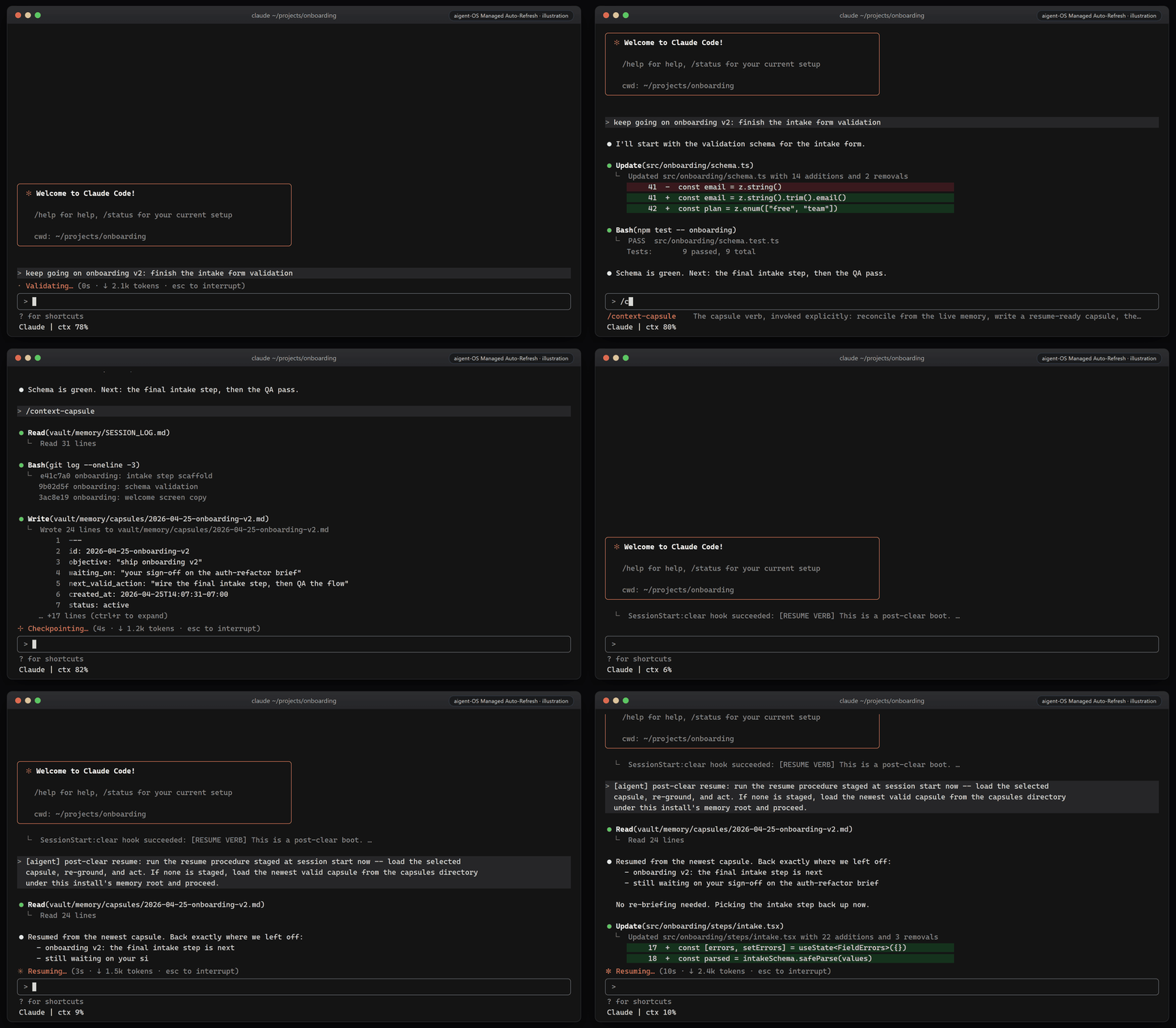
The animation is a scripted illustration of the lifecycle, not a screen recording. In the shipped default, Managed Auto-Refresh is designed to run the whole boundary without operator input: at the configured context threshold (default 80%) it requests a capsule, waits for the exact completion acknowledgement, submits one /clear, binds the fresh session, and submits one resume wake. The shipped settings also set "idleCompaction": false, so Claude Code's own idle compaction (which can summarize a quiet session after about 55 minutes once it holds 200k tokens) cannot replace that boundary. In v1.1.0-rc.1 a long session can still stop at the clear step and need a manual /clear; see Evidence and limits.
What this changes on your machine
Run bash install.sh --dry-run first; it lists the planned changes and writes nothing. Below, <target> is the folder you install into: the cloned aigent-os folder by default, or the directory you pass with --target. The installer does not edit your user-level ~/.claude/settings.json or ~/.claude/CLAUDE.md.
| Where | What the installer does | How to undo |
|---|---|---|
<target>/.claude/settings.json |
Creates it, or merges into your existing file and saves a backup in <target>/.aigent/backups/. Adds hooks on seven Claude Code events (SessionStart, UserPromptSubmit, PreToolUse, PostToolUse, PreCompact, Stop, SessionEnd), a statusLine command, and the AIGENT_ROOT and AIGENT_VAULT env values. If your existing file is not valid JSON, it is left untouched and the new settings are written to .claude/settings.aigent.json for you to merge. |
Restore the backup, or delete the file if the installer created it |
<target>/.claude/skills/, .claude/agents/, .claude/skill-index.json, .claude/rules/post-compact-critical.md, .claude/settings.json.template |
Copies the skill folders from skills/, the agent definitions from vault/agents/, the skill index, a starter rules file (only if you have none), and the settings template |
Delete what was added |
<target>/CLAUDE.md |
--target installs only: creates the file, or appends one block between <!-- aigent-os:start --> and <!-- aigent-os:end --> and saves a backup. Your text outside the markers is kept. In the cloned folder, CLAUDE.md is the repo's own file and is not edited. |
Delete the block between the markers |
<target>/system/, vault/, memory/, hooks/, skills/, daemons/, scripts/, docs/, evals/, launcher/ |
--target installs only: copies framework files that are missing and never overwrites yours silently. vault/ and memory/ hold your memory as plain markdown. |
Delete the folders aigent-OS created. If your project already had a folder with one of these names (docs/ and scripts/ are common), remove only the added files; git status lists them |
| Files that differ from the framework copy | Under system/, skills/, hooks/, daemons/, scripts/, launcher/, .claude/skills/ and .claude/agents/, an existing file that differs from the framework version is moved to <target>/.aigent/quarantine/ and replaced, because Claude Code would trust it. --trust-existing keeps them instead. |
Copy the file back from .aigent/quarantine/ |
<target>/.aigent/ |
First-run state (state.json), backups and quarantined files |
Delete, after restoring anything you need from it |
<target>/.gitignore |
Adds a block between # aigent-os:generated-state:start and # aigent-os:generated-state:end covering local state such as .aigent/, node_modules/, .obsidian/ and the prompt journal. Saves a backup if the file existed. |
Delete the block |
<target>/daemons/semantic-search/node_modules/ and <target>/daemons/transport-deps/node_modules/ |
Runs npm ci --ignore-scripts for local semantic search (@xenova/transformers) and the refresh runner (node-pty, rebuilt for your platform). --no-deps skips this and falls back to an unmanaged launch without automatic clear. |
Delete the two node_modules/ folders |
~/.local/bin/aigent (macOS, Linux) |
Symlink to <target>/launcher/aigent.sh. --no-launcher skips all launcher wiring, and a target under the system temp directory skips it automatically. |
rm ~/.local/bin/aigent |
~/.bashrc (macOS, Linux) |
Appends export AIGENT_HOME=<target> and export PATH="$HOME/.local/bin:$PATH" if they are not already there. The launcher installer runs under bash, so it writes ~/.bashrc even when your login shell is zsh. |
Delete those lines (keep the PATH line if other tools rely on ~/.local/bin) |
~/Applications/AIgent.app (macOS) |
An app bundle that opens Terminal and runs aigent |
Delete the app |
Git config of <target> (macOS, Linux) |
Sets core.fileMode false if <target> is a git repo, so the launcher's executable bit never blocks a git pull |
git -C <target> config --unset core.fileMode |
| Windows user environment | Sets the AIGENT_HOME user variable, writes %USERPROFILE%\.aigent\bin\aigent.cmd, adds that folder to your user Path, and creates AIgent shortcuts on the Desktop and in the Start Menu |
See Uninstall |
~/.claude/ctx-refresh/ (while running) |
The status line writes one small JSON file per session with the current context percentage, which the refresh runner reads | Delete the folder |
Network and data. aigent-OS has no server of its own. What does use the network:
npmdownloads packages during install.- Semantic search downloads the
all-MiniLM-L6-v2model files from Hugging Face the first time it runs. Embedding and search then run on your machine. - Vault sync: when a capsule cycle closes and
<target>is a git repo with a remote, aigent-OS commits the memory folder and pushes it to that remote. No repo or no remote means no push. If you installed in the cloned folder, itsoriginis this public GitHub repo, so pointoriginat your own private repo (git remote set-url origin <your-private-repo>) or remove it (git remote remove origin) before you start working. - The optional Hindsight and Jev memory bridge does nothing until you configure it in
.aigent/memory-bridge.json, and then calls only the providers you set. - The optional Codex adapter runs your Codex CLI only when you invoke it.
- Claude Code itself sends your conversation to Anthropic as usual.
Uninstall
There is no uninstall script. Removal is manual and mirrors what the installer did. Save anything you want to keep from vault/ and memory/ first: that is your agent's memory.
- Remove the
aigentcommand and shortcuts.- macOS and Linux:
rm ~/.local/bin/aigent, then delete theexport AIGENT_HOME=...line (and the~/.local/binPATH line, if nothing else needs it) from~/.bashrc. On macOS, also delete~/Applications/AIgent.app. - Windows (PowerShell): delete
%USERPROFILE%\.aigent\bin, remove that fold
- macOS and Linux: