amőba
Online five-in-a-row on an infinite board. Amőba is the Hungarian name for the game also known as gomoku. The code was written with AI under my direction.
Features
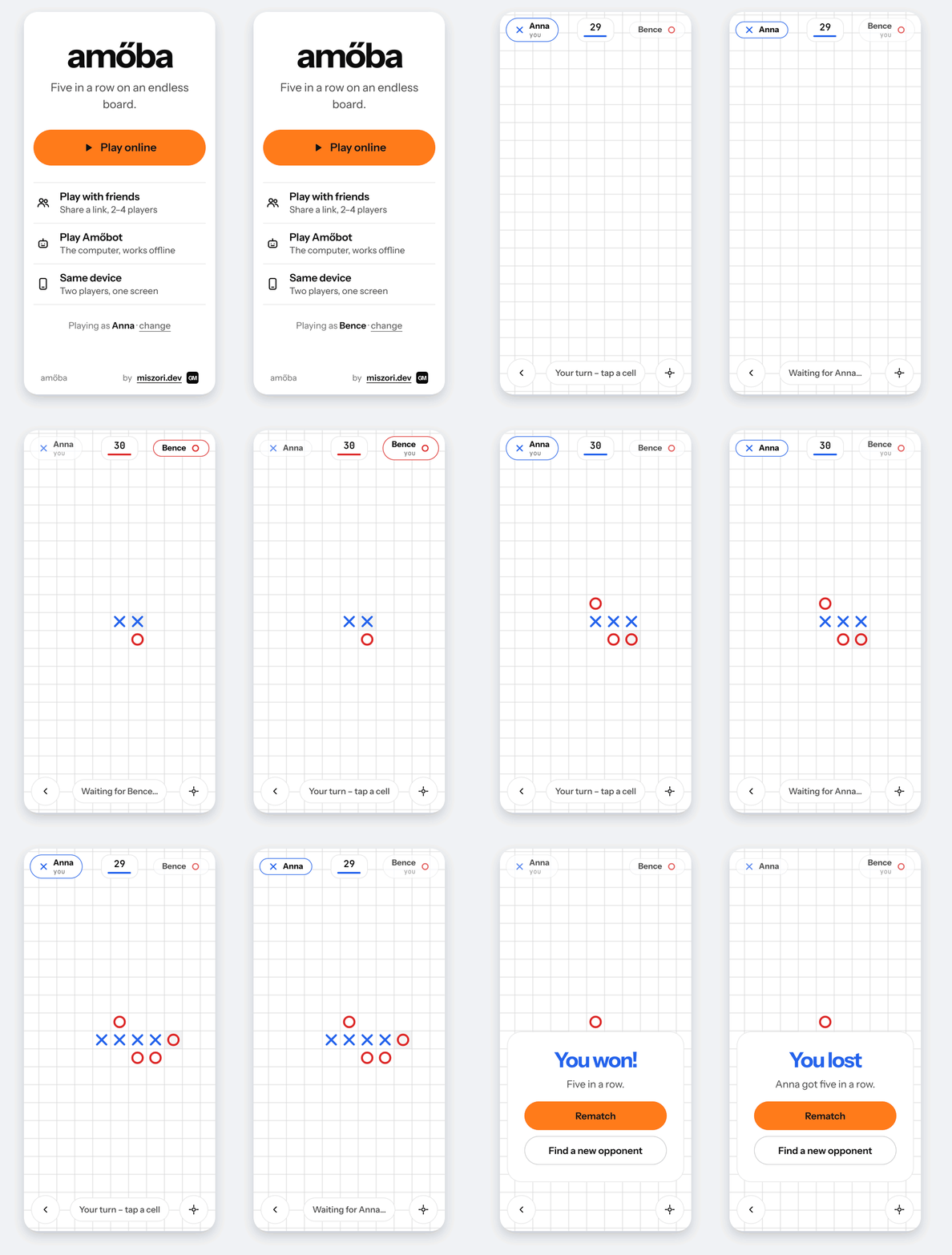
- Online matchmaking. Pick a username and you're paired with the next player waiting. The home screen shows how many players are online. If no one turns up within 5 seconds, you're offered a game against Amőbot.
- Play with friends. Open a room and send its link (
/r/<code>) to up to 3 friends; the host starts the game once at least 2 players are in. With more than two, the players get ✕, ◯, a green △ and an amber □, and a player who runs out of time or leaves drops out: their marks stay on the board and the last player left wins. After each game everyone goes back to the room for the next one. Friends who open the link during a game take a free seat and play in the next one. - Amőbot. A computer opponent that runs in the browser, so it works offline too, with no turn clock. It blocks and finishes fours and open threes, but looks only one move ahead, so a double threat beats it.
- Infinite board. Pan and pinch-zoom freely. Blue ✕ always moves first, and five or more in a row (horizontal, vertical or diagonal) wins. Each mark goes within 5 cells of another, so the game stays in one place.
- Turn clock. Each move has 30 seconds. If you run out, you lose.
- Mobile-first. On touch screens, the first tap shows a dashed preview and a second tap places the mark, so you don't misplace moves on a phone.
- Installable. It's a PWA: add it to the home screen and it opens like an app, offline too (same-device and Amőbot games). Shared links show a preview card (Open Graph).
- Same-device play. "Same device" starts a local game for two people sharing one screen. It needs no username, no timer and no server.
- Rematches and reconnects. A dropped connection can rejoin with its session token and carry on.
- Clean usernames. Names are 1–16 characters and are checked against an English and Hungarian bad-word list.
Quick start
Everything runs in Docker. You don't need Go or Node installed.
docker compose -f docker-compose.dev.yml up --build --watch
Open http://localhost:8080. To play against yourself, open a second browser profile or a private window, because tabs in the same browser share an identity. Client changes reload in the browser instantly, and server changes rebuild the Go container.
To test from a phone on the same network, set HTTP_BIND=0.0.0.0 in .env
(copy it from .env.example) and open http://<your-computer-ip>:8080.
Run the server tests with:
docker build --target test server
How it works
Browser ─► [webserver proxy :80/:443] ─► [web: Caddy, automatic HTTPS] ─┬─ static site
                                                                        └─ /ws ─► [server: Go :8080]
| Directory | What |
|---|---|
server/ |
Go WebSocket server: sessions, matchmaking queue, rooms for friends, game rules, turn clock. All state is in memory, and the server is authoritative. |
client/ |
Plain index.html + CSS + TypeScript (canvas game), bundled by esbuild (build.mjs), plus the service worker (sw.js). Amőbot lives in src/scripts/bot.ts; npm test runs its tests. tsc only type-checks. Also holds the Caddyfile; the production image is Caddy serving the build. |
client/art/ |
Sources for the app icons and the link preview image. client/art/render.sh renders them into client/public/ with a headless Chrome, Brave or Chromium. |
docs/protocol.md |
The WebSocket message protocol. |
The bad-word list is plain text in server/internal/hub/badwords.txt. Add
words there and rebuild the server.
Deploying
Production runs behind a shared TCP proxy from webserver-proxy, which owns host ports 80 and 443 so several sites can share one server. The proxy passes TLS through untouched, and this repo's Caddy holds the certificate.
- Point your domain's DNS
Arecord (andAAAA, if the server has IPv6) at the server. - Open inbound TCP 80 and 443, and start the webserver proxy with
AMOEBA_DOMAINset to your domain. - On the server:
git clone https://github.com/gmiszori/amoeba && cd amoeba
cp .env.example .env   # set DOMAIN=your.domain
docker compose up --build -d
Caddy requests a Let's Encrypt certificate on first start (check with
docker compose logs web) and renews it automatically. Certificates live in
the caddy_data volume, so they survive rebuilds. To update, run
git pull && docker compose up --build -d. Restarting the server ends
running games, because game state is kept in memory.
If the domain's DNS is on Cloudflare, use "DNS only" (grey cloud). With the orange-cloud proxy every player would appear to come from a Cloudflare address, and they would all share one per-IP connection limit.
To run the production stack locally, start the webserver proxy with
PUBLIC_BIND_IP=127.0.0.1 and AMOEBA_DOMAIN=localhost, set
DOMAIN=localhost in this repo's .env, and run docker compose up --build.
Then open https://localhost. The certificate is self-signed, so the browser
warns once.
Configuration (.env)
| Variable | Default | |
|---|---|---|
DOMAIN |
localhost |
Domain Caddy serves and gets a certificate for. Must match AMOEBA_DOMAIN in the webserver proxy. |
TURN_SECONDS |
30 |
Seconds per move. |
ALLOWED_ORIGINS |
– | Extra WebSocket origins, only needed if the page is served from a different host. |
HTTP_BIND / HTTP_PORT |
127.0.0.1 / 8080 |
Dev stack only: where its Caddy is published. |
Security
- Server-authoritative. The server decides every move, the clock and the winner, so clients can't cheat by editing the page. Session tokens are 128-bit random values.
- Limits. WebSockets only accept the site's own origin. Messages are capped at 1 KB and 10 per second per connection, and connections (50 per IP, 5000 total), sessions and moves per game are limited.
- Headers. Caddy sends a strict Content-Security-Policy (only the site's own scripts, styles and WebSocket), HSTS, and headers that stop other sites from framing the game.
- HTTPS everywhere. Caddy redirects HTTP to HTTPS and manages certificates.
- Hardened containers. Every container runs as a non-root user with a read-only filesystem, no Linux capabilities and memory/process caps. Nothing is published on the host: Caddy is reachable only through the webserver proxy, and the game server only through Caddy.
- Trusted proxy only. Caddy trusts the client address in a PROXY header
only from the proxy's fixed address (
172.31.250.2), so other containers can't fake one.
When deploying, don't publish the server's port 8080, because its per-IP
limit trusts the X-Forwarded-For header that Caddy sets. Rebuild now and
then (docker compose build --pull) to pick up base-image security fixes.