

CCEM
One control center for Claude Code, Codex, OpenCode and every model behind them.




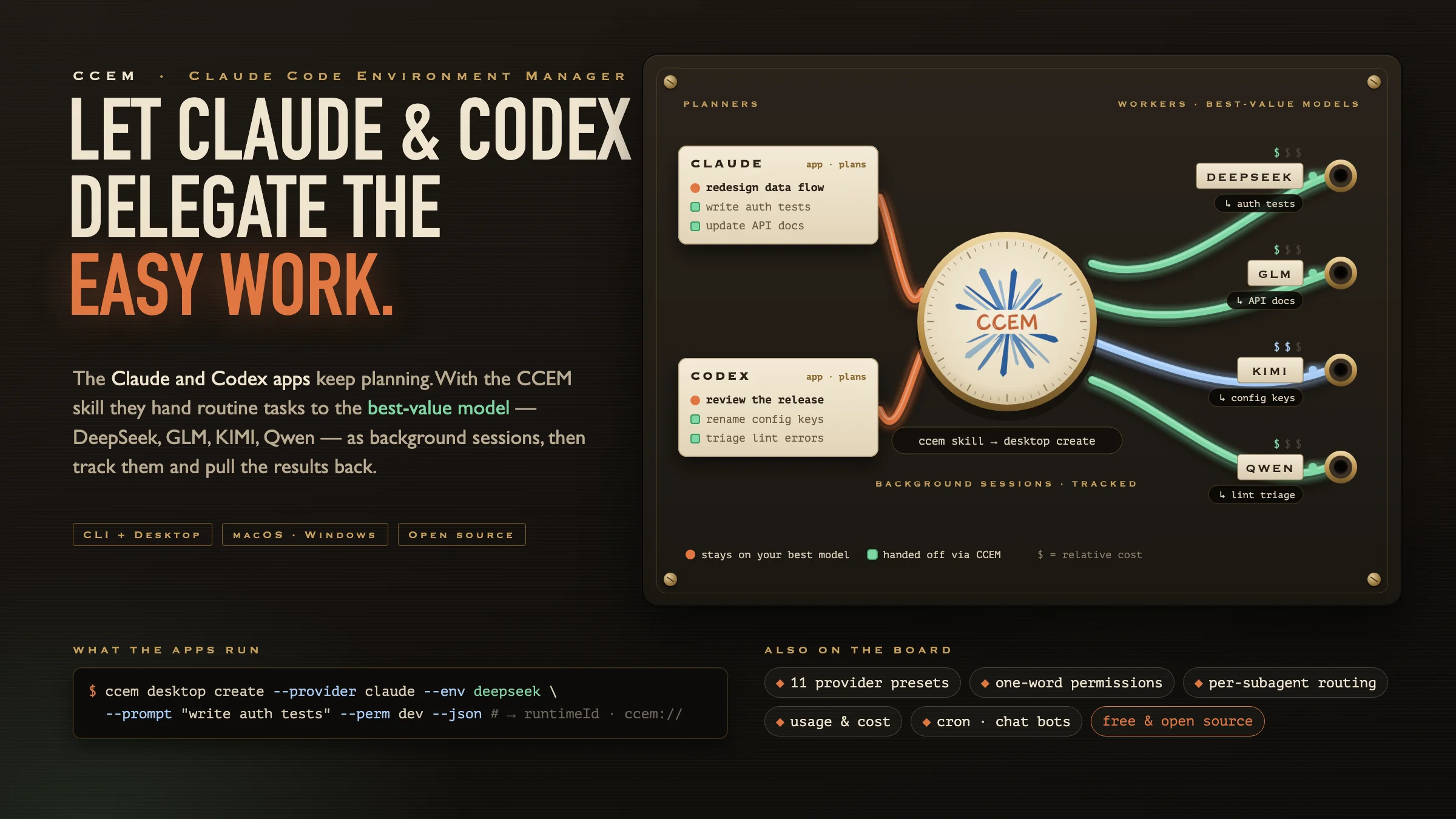
Table of Contents
- Why ccem
- Highlights
- Quick Start
- CLI
- Desktop App
- External Control: JSON-RPC, Deeplinks & CLI
- How ccem Compares
- Data Storage
- Agent Data & Sign-in
- Tech Stack
- Contributing
- License
Why ccem
Claude Code is great. Using it seriously every day is where things get messy.
- Model sprawl. KIMI for frontend, DeepSeek for scripts, GLM for refactors, a local Ollama model on the plane. Each switch means hand-
exporting env vars, and eight terminal tabs later nobody knows which tab talks to which provider. - Your best model doing busywork. Claude or Codex burns top-tier tokens renaming config keys and writing boilerplate tests.
- Permission fatigue. Clicking Approve 200 times a day wears you out.
--dangerously-skip-permissionsfeels like a bad idea next to your.env. - No idea what you spent. Claude Code, Codex and OpenCode each keep their own logs. Nothing adds them up.
- You're away from your desk. You're out getting coffee, a test is red, and your laptop is at home.
- The work that should run itself. Nightly test runs, a Monday PR sweep, a changelog every Friday, with the results sent to your phone.
ccem handles all of it. It's a free, open-source CLI plus a native Tauri desktop app that switches models in one keystroke, sets permissions with one word, lets the Claude and Codex apps hand routine tasks to cheaper models, routes subagents the same way, tracks every token, runs cron jobs, and lets you continue a session from Telegram, WeChat, WeCom or Feishu.
Highlights
| CLI | Desktop | |
|---|---|---|
Let Claude & Codex delegate: with the bundled ccem agent skill they start background sessions on best-value models, then track them and follow up |
✅ ccem desktop create |
✅ Settings → Agent Skill |
| 11 provider presets (GLM, KIMI, DeepSeek, Qwen/Bailian, MiniMax, MiMo, OpenRouter, Ollama, …) with Opus / Sonnet / Haiku tier mapping | ✅ | ✅ |
5 permission modes: yolo · auto · dev · readonly · safe |
✅ | ✅ |
| Separate agent profiles: CCEM's Claude Code data stays apart from the official app; Codex can opt in | ✅ ccem auth |
✅ |
| Usage & cost analytics with a calendar heatmap | ✅ | ✅ Claude + Codex + OpenCode |
| Skill installer: 20 curated presets + any GitHub URL | ✅ | ✅ Streaming search |
Encrypted team config sharing (ccem load) |
✅ | ✅ |
DeepSeek Harness (dsh): run a ccem environment through DeepSeek's agent harness |
✅ ccem dsh |
✅ History source |
| tmux-backed sessions: list and attach from any terminal | ✅ ccem sessions / attach |
✅ |
| Cron automation: create, list, delete, trigger | ✅ | ✅ Scheduler, templates, AI generation, run history |
| Drive Desktop from scripts: sessions, input, events, routing | ✅ ccem desktop … |
✅ 20-method JSON-RPC |
| Three agents in one workspace: Claude Code, Codex, OpenCode | — | ✅ |
| Per-subagent model routing through a local routing proxy | — | ✅ |
| Built-in browser side panel the agent can drive, with you able to pause it | — | ✅ |
| Steer a running turn, fork from any turn and rewind to file checkpoints | — | ✅ |
| Session Review: diffs, todos, artifacts, subagent traces | — | ✅ |
| Chat bots: Hermes-powered WeCom & Feishu, plus Telegram / WeChat / WeCom bridges | — | ✅ |
| Tray cockpit, Proxy Debug, share posters, auto-update | — | ✅ |
The CLI and Desktop read the same config file (~/.ccem/config.json), so an environment you add in one shows up in the other immediately.
Quick Start
CLI: 30 seconds, no install
npx ccem # Interactive menu
Or install it globally:
npm install -g ccem
ccem add kimi         # Name it, pick the KIMI preset, paste your key
ccem use kimi         # Switch to it
ccem dev              # Launch Claude Code in "dev" permission mode
Desktop
Download from GitHub Releases:
- macOS:
.dmgfor Apple Silicon (aarch64) and Intel (x86_64) - Windows:
.exeinstaller (x64)
Open it, add an environment, pick Claude, Codex or OpenCode, describe your task, and press Cmd+Enter.
CLI
Everything you need from the terminal: environments, permissions, usage, skills, cron, DeepSeek Harness, tmux sessions, and remote control of a running Desktop app.
Install
npm install -g ccem
# or: pnpm add -g ccem
# or just: npx ccem
Environment Management
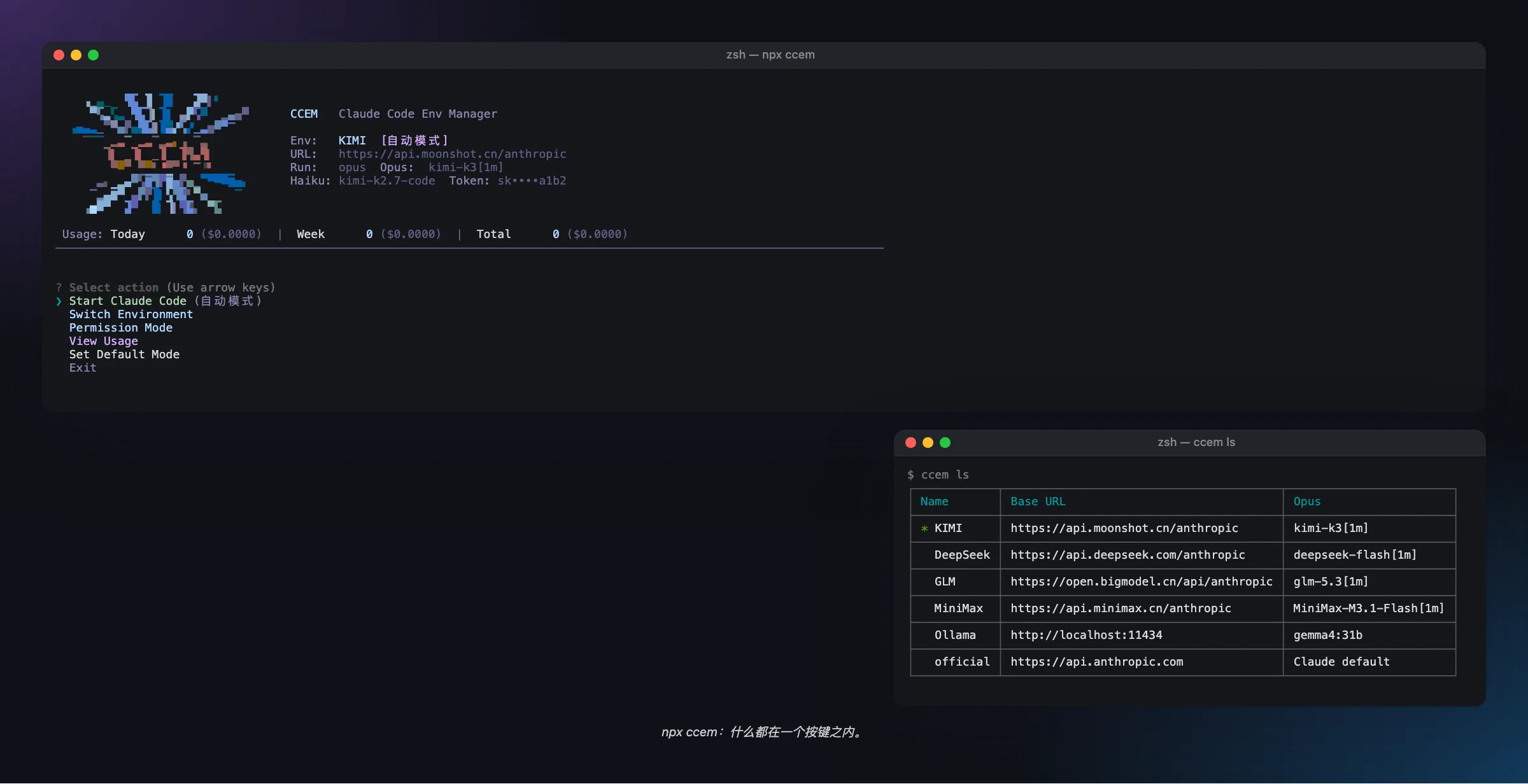
ccem              # Interactive menu
ccem add kimi     # Name an environment, then choose a preset or enter settings
ccem use kimi     # Switch environment
ccem ls           # List all environments
ccem current      # Show active environment
ccem env          # Print export commands (pipe-friendly)
ccem env --json   # Same, as JSON
ccem run <cmd>    # Run any command with the env vars injected
ccem del <name>   # Delete
ccem rename <a> <b>
ccem cp <src> <dst>
Built-in Presets
Each preset fills in the base URL and maps Claude Code's Opus / Sonnet / Haiku tiers to that provider's models (ANTHROPIC_DEFAULT_OPUS_MODEL, …_SONNET_MODEL, …_HAIKU_MODEL), with ANTHROPIC_MODEL=opus. Claude Code's /model picker and its subagents then use the right model for each tier.
| Preset | Base URL | Opus tier | Sonnet tier | Haiku tier |
|---|---|---|---|---|
| GLM (Zhipu) | https://open.bigmodel.cn/api/anthropic |
glm-5.3[1m] | glm-5.3[1m] | glm-5.3-flash |
| KIMI (Moonshot) | https://api.moonshot.cn/anthropic |
kimi-k3[1m] | kimi-k3[1m] | kimi-k2.7-code |
| Kimi Code Plan | https://api.kimi.com/coding/ |
k3[1m] | k3[1m] | k3[1m] |
| MiniMax | https://api.minimax.cn/anthropic |
MiniMax-M3.1-Flash[1m] | MiniMax-M3.1-Flash[1m] | MiniMax-M3.1-Flash[1m] |
| DeepSeek | https://api.deepseek.com/anthropic |
deepseek-flash[1m] | deepseek-flash[1m] | deepseek-flash |
| Bailian (Aliyun) | https://dashscope.aliyuncs.com/apps/anthropic |
qwen3.7-max | qwen3.7-max | qwen3.6-flash |
| Bailian Coding Plan | https://coding.dashscope.aliyuncs.com/apps/anthropic |
qwen3.7-plus | qwen3.7-plus | qwen3.7-plus |
| OpenRouter | https://openrouter.ai/api |
~anthropic/claude-opus-latest[1m] | ~anthropic/claude-sonnet-latest[1m] | ~anthropic/claude-haiku-latest |
| Ollama (local) | http://localhost:11434 |
gemma4:31b | gemma4:26b | gemma4:e4b |
| MiMo (Xiaomi) | https://api.xiaomimimo.com/anthropic |
mimo-v2.6-pro | mimo-v2.6-pro | mimo-v2.6-pro |
| MiMo Token Plan | https://token-plan-cn.xiaomimimo.com/anthropic |
mimo-v2.6-pro | mimo-v2.6-pro | mimo-v2.6-pro |
Any other Anthropic-compatible endpoint works too: just enter the base URL, key and models yourself. API keys are encrypted at rest.
Shell Integration
ccem use can't change the env vars of the shell you're already in. Either prefix commands with ccem run, or add this to ~/.zshrc:
ccem() {
  command ccem "$@"
  local exit_code=$?
  if [[ $exit_code -eq 0 ]]; then
    if [[ "$1" == "use" || -z "$1" ]]; then
      eval "$(command ccem env)"
    fi
  fi
  return $exit_code
}
Then source ~/.zshrc.
Permission Modes
Five presets that sit between "approve everything" and "approve nothing".
| Mode | What it allows | Use it for |
|---|---|---|
| yolo | Everything | Your own project, full trust |
| auto | The model judges each action's risk and lets low-risk ones through (Claude Code's Auto mode) | Long runs where you don't want to babysit approvals |
| dev | Normal development, sensitive files blocked | Daily work |
| readonly | Reading and searching only | Code review, audits, learning a codebase |
| safe | Restricted network and writes | Unfamiliar or untrusted repos, automation |
ccem yolo | auto | dev | readonly | safe           # Apply temporarily; reverted when Claude Code exits
ccem setup perms --dev                           # Write it into the project's .claude/settings.json
ccem setup default-mode --dev                    # Make it the default
ccem --mode                                      # Show the current mode
ccem --list-modes                                # Show all modes
The retired ci and audit modes still resolve: saved defaults and API callers that use them get safe and readonly.
Usage Analytics
ccem usage          # Interactive view with a calendar heatmap
ccem usage --json   # Machine-readable
ccem parses Claude Code's JSONL logs from the CCEM profile (~/.ccem/agents/claude/projects/) and the official ~/.claude/projects/, and calculates tokens and cost from cached LiteLLM model prices.
Skill Management
ccem skill add              # Interactive picker (Tab switches groups)
ccem skill add <name>       # Install a preset
ccem skill add <github-url> # Install from any GitHub repo or subfolder
ccem skill ls               # List installed skills
ccem skill rm <name>        # Remove
Official presets (16): frontend-design, skill-creator, web-artifacts-builder, canvas-design, algorithmic-art, theme-factory, mcp-builder, webapp-testing, pdf, docx, pptx, xlsx, brand-guidelines, doc-coauthoring, internal-comms, slack-gif-creator
Curated community skills: superpowers, ui-ux-pro-max, Humanizer-zh, skill-writer
ccem also ships skills that teach Claude Code to use ccem itself:
ccem setup cron       # Installs the ccem-cron skill: Claude can schedule tasks for you
ccem setup bot-bind   # Installs the ccem-bot-bind skill: Claude can attach a session to a chat bot
Agent Profiles & Sign-in
Claude Code launched through ccem uses its own profile, so your official Claude Code setup is left alone. Codex shares the official profile by default. See Agent Data & Sign-in for details.
ccem auth claude      # Sign in to the CCEM Claude Code profile (for an official subscription)
ccem auth codex       # Sign in to whichever Codex profile is selected
API keys from your ccem environments work without signing in.
DeepSeek Harness (dsh)
Run a ccem environment through DeepSeek Harness, a separate agent runtime. ccem converts your environment into a dsh provider config, mapping the Opus/Sonnet/Haiku tiers to models, so the same keys work in both runtimes.
ccem dsh doctor                       # Offline readiness check: binary, versions, config
ccem dsh inspect --env deepseek       # Preview the dsh provider config (secrets redacted)
ccem dsh run --tier sonnet "fix the flaky test in auth.spec.ts"
run accepts --env, --tier opus|sonnet|haiku, --model, --cwd and --permission read-only|workspace-write|danger-full-access. Desktop release builds bundle dsh, and its sessions appear in the History page under DeepSeek.
tmux Sessions
When tmux is installed, interactive sessions run inside tmux, so you can pick them up from any terminal:
ccem sessions         # List tmux-backed interactive sessions
ccem attach [id]      # Attach to one in your terminal
Team Config Sharing
Distribute API configurations to your team over an encrypted channel:
ccem load https://your-server.com/api/env --key YOUR_KEY --secret YOUR_SECRET
# or keep secrets out of shell history:
echo '{"key":"…","secret":"…"}' | ccem load https://your-server.com/api/env --credentials-stdin
A ready-to-deploy server lives in server/. It uses AES-256-GCM authenticated envelopes and rate limiting, and ships with an example config and a PM2 ecosystem file.
Scheduled Tasks from the CLI
ccem cron create --name weekday-review --schedule '0 9 * * 1-5' \
  --prompt 'Inspect this project and summarize issues that need attention' \
  --execution-profile conservative --disabled --json
ccem cron list --json
ccem cron trigger weekday-review      # Run it now via the running Desktop app
ccem cron delete weekday-review
ccem cron notification-targets        # Show where results can be delivered
Other options: --working-dir, --env-name, --max-budget-usd, --allowed-tools, --disallowed-tools, --timeout-secs, --template-id, --from-json, and --wecom-result / --wecom-bot-id / --wecom-peer-id to send results to WeCom. Scheduled runs fire from the Desktop scheduler. The CLI writes the task record, and trigger asks the running Desktop to run it.
Drive Desktop from the CLI
This is also how the Claude and Codex apps delegate work. Install the CCEM agent skill (Settings → Agent Skill) and they run these commands themselves: keep planning in the app you're talking to, start a session on a cheaper environment for the routine part, then read its events and send follow-ups.
With the Desktop app running:
ccem desktop health --json
ccem desktop create --provider claude --cwd "$PWD" --env deepseek \
  --prompt "write auth tests" --perm dev --json        # Start a background session
ccem desktop sessions --cwd . --status running --json
ccem desktop status <runtimeId> --json
ccem desktop events <runtimeId> --since 0 --limit 50 --json
ccem desktop send <runtimeId> --text "now add tests"   # Send input, idempotent with --message-id
ccem desktop routes <runtimeId> --set Explore=glm      # Re-bind a routing key mid-session
ccem desktop open 'ccem://workspace/session?…'         # Focus a session in Desktop
CLI Command Reference
All commands
| Command | Description |
|---|---|
ccem |
Interactive menu |
ccem ls / use <name> / add <name> / del <name> |
List, switch, add, delete environments |
ccem rename <a> <b> / cp <src> <dst> |
Rename / copy an environment |
ccem current |
Show active environment |
ccem env [--json] |
Print env vars |
ccem run <cmd> |
Run a command with env vars injected |
ccem load <url> |
Load encrypted remote config |
ccem yolo/auto/dev/readonly/safe |
Launch Claude Code with a permission mode |
ccem auth claude|codex |
Sign in to the CCEM agent profile |
ccem --mode / --list-modes |
Current mode / all modes |
ccem setup perms --<mode> / --reset |
Write project permissions |
ccem setup default-mode --<mode> |
Set the default mode |
ccem setup init [--chrome] |
Initialize Claude Code (skip onboarding, disable telemetry; optionally add chrome-devtools MCP) |
ccem setup migrate [--clean] [--force] |
Migrate legacy config |
ccem setup cron / setup bot-bind |
Install the ccem-cron / ccem-bot-bind skills |
ccem usage [--json] |
Usage stats |
ccem skill add/ls/rm |
Skill management |
ccem dsh run/inspect/doctor |
DeepSeek Harness integration |
ccem sessions / attach [id] |
tmux-backed interactive sessions |
ccem bot-bind |
Bind the current session to a chat-bot target |
ccem cron create/list/delete/trigger/notification-targets |
Scheduled tasks |
ccem desktop health/create/sessions/status/events/send/routes/open |
Control a running Desktop app |
Desktop App
A native app built on Tauri 2 (a Rust backend and a React frontend, not an Electron wrapper) for macOS and Windows. Everything the CLI does, plus a full workspace for running agents.
Workspace: Claude Code, Codex & OpenCode in One Place
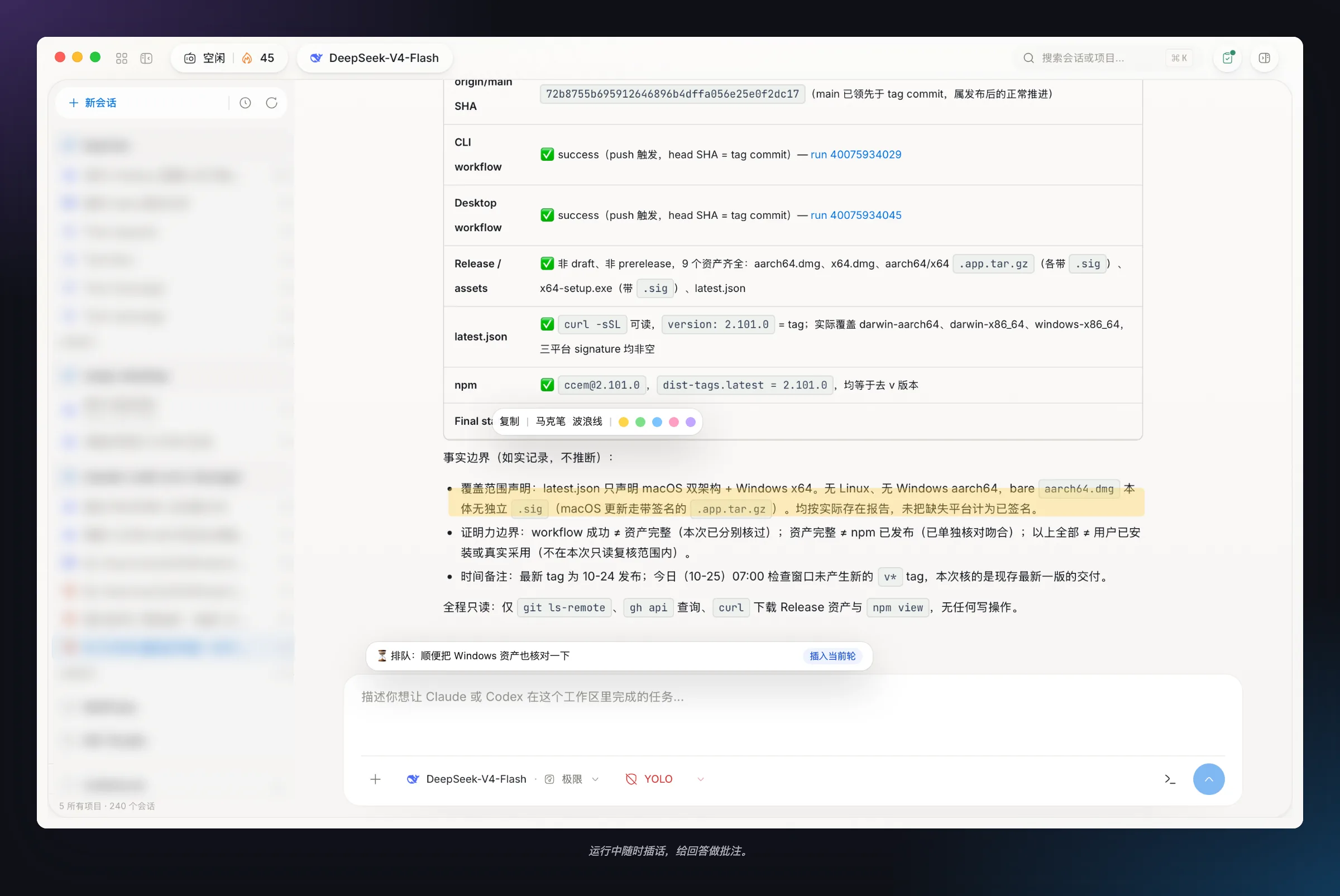
The Workspace isn't just a launcher. It's where you start, steer and review agent runs.
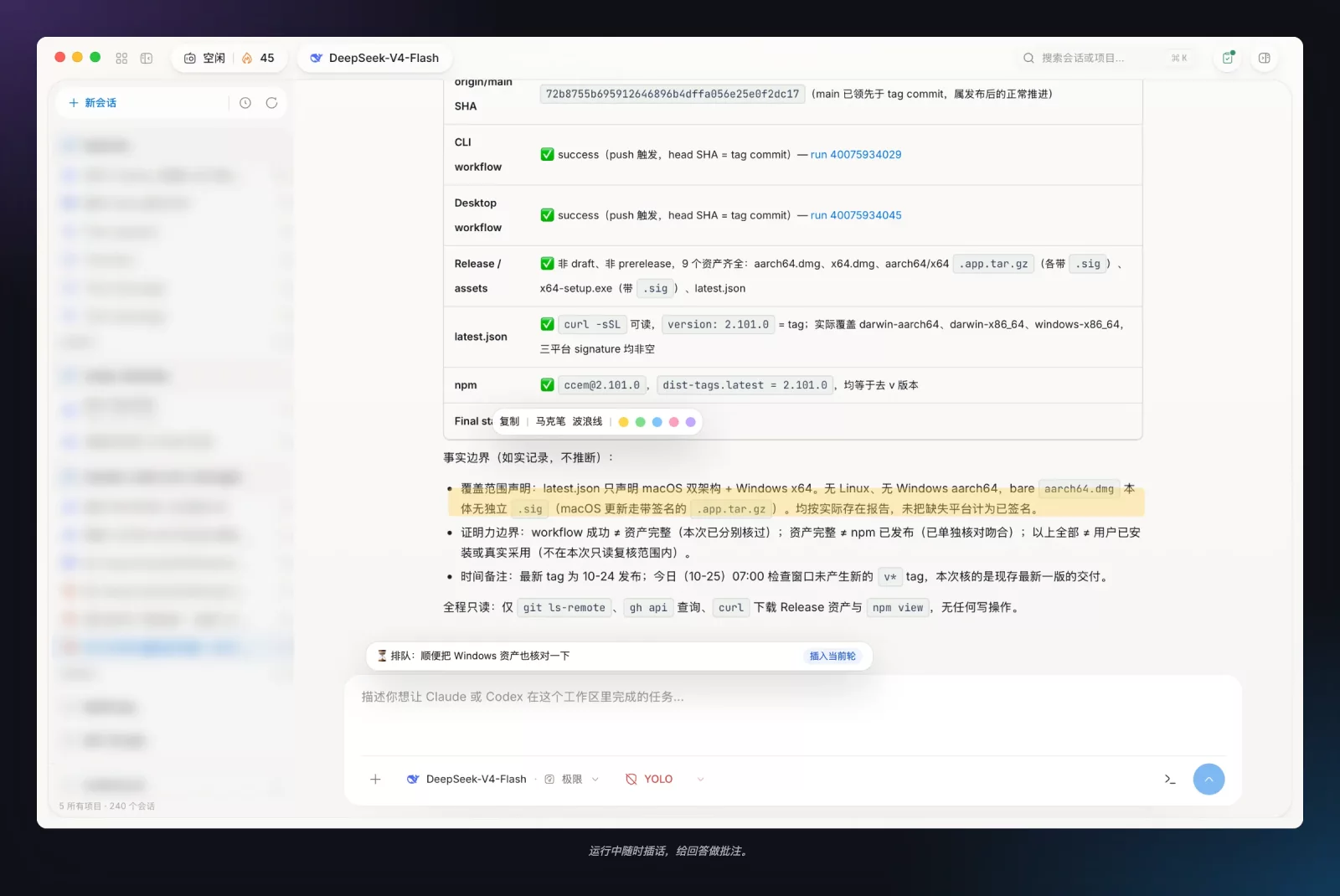
- Three agents: start a Claude Code, Codex or OpenCode session from the same composer. Claude and Codex run in the native GUI. OpenCode sessions open in OpenCode Web.
- A detailed composer:
$skilltokens,/slashcommands (scanned from your installed Claude Code commands and.claude/commands/),@filementions, image and file drops, and model, provider and effort selectors. - Steer mid-turn: send a message while Claude is working and it is delivered into the running turn without an interrupt. Stop still cancels.
- Todo card & next steps: the agent's todo list stays at the bottom of the transcript. When a turn ends, ccem suggests up to two follow-ups that you can run here or as a new session.
- Annotations: highlight any part of a reply in five colors and attach notes to it.
- Fork from any turn: branch a new Claude session that keeps the full context up to that turn, leaving the original unchanged.
- File checkpoints & rewind: restore the working tree to any Claude file checkpoint from the transcript.
- Built-in browser side panel: an embedded browser with isolated login profiles, so your own Chrome data stays untouched. The agent can drive it. You can pause it, take over, and review its screenshots, console logs and an action audit trail. The same side panel has Changes, Browse and Agents tabs.
- Global search (Cmd+K): search every project and past conversation.
- Hand off to a bot: attach a running session to a paired chat bot. Hermes decides which updates are worth sending, and replies from chat continue the session.
Per-Subagent Model Routing
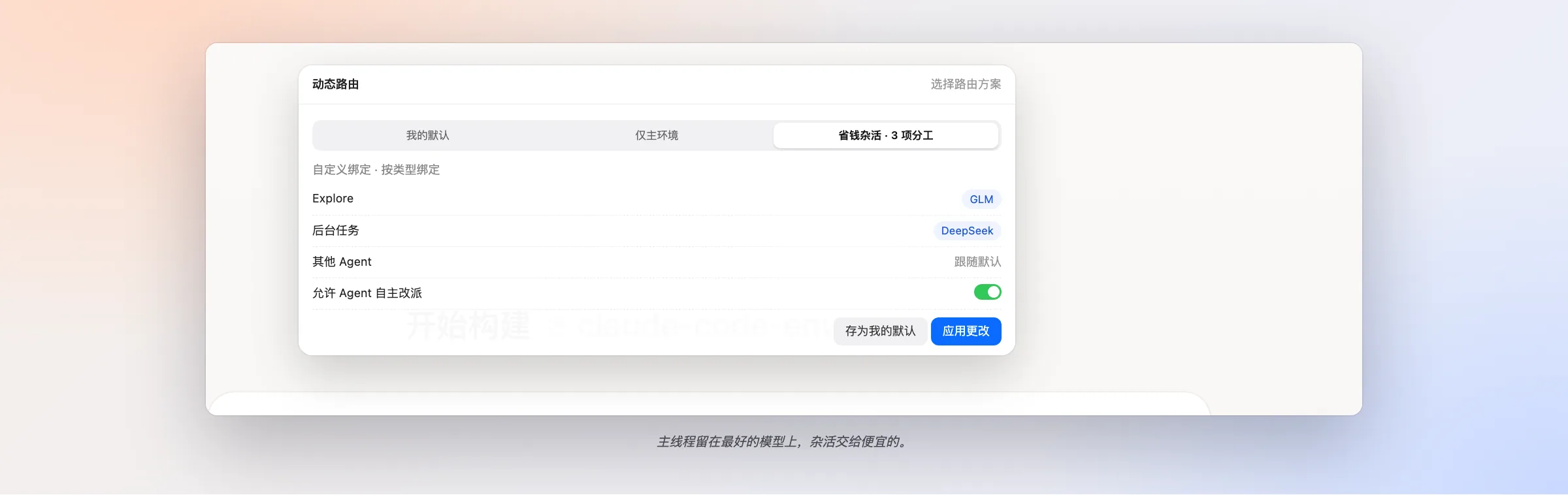
Why pay top-model prices for grep? Turn on Dynamic routing for a Claude session and ccem runs it through a local routing proxy (bound to 127.0.0.1) that splits the work across environments:
- Bind subagent types (for example
Explore) and background tasks to different environments. The main thread follows the composer's environment. - Save reusable route profiles, or generate them from templates: Budget chores (send Explore and the background model to a cheaper environment) or Specialty split (bind one subagent type to a specialist).
- Optionally let the agent re-route itself to an allow-listed environment.
- Change bindings mid-session. Changes apply from the next request.
- See which environment handled what in the session's routed usage breakdown.
Routing is opt-in for each session, and sessions that don't use it run direct. The routing chip in the top bar shows Direct or Routed and opens the routing popover.
Sessions & Session Review