Daybar
Your calendar, tasks, and focus tools — always one click away
daybar.app · Releases · Issues · Privacy
Daybar is a lightweight macOS and Windows app that puts your calendar, tasks, Pomodoro timer, and world clock a single click away — without ever leaving what you're working on.
Think Fantastical, but without the annual subscription. $14.99, once, forever.
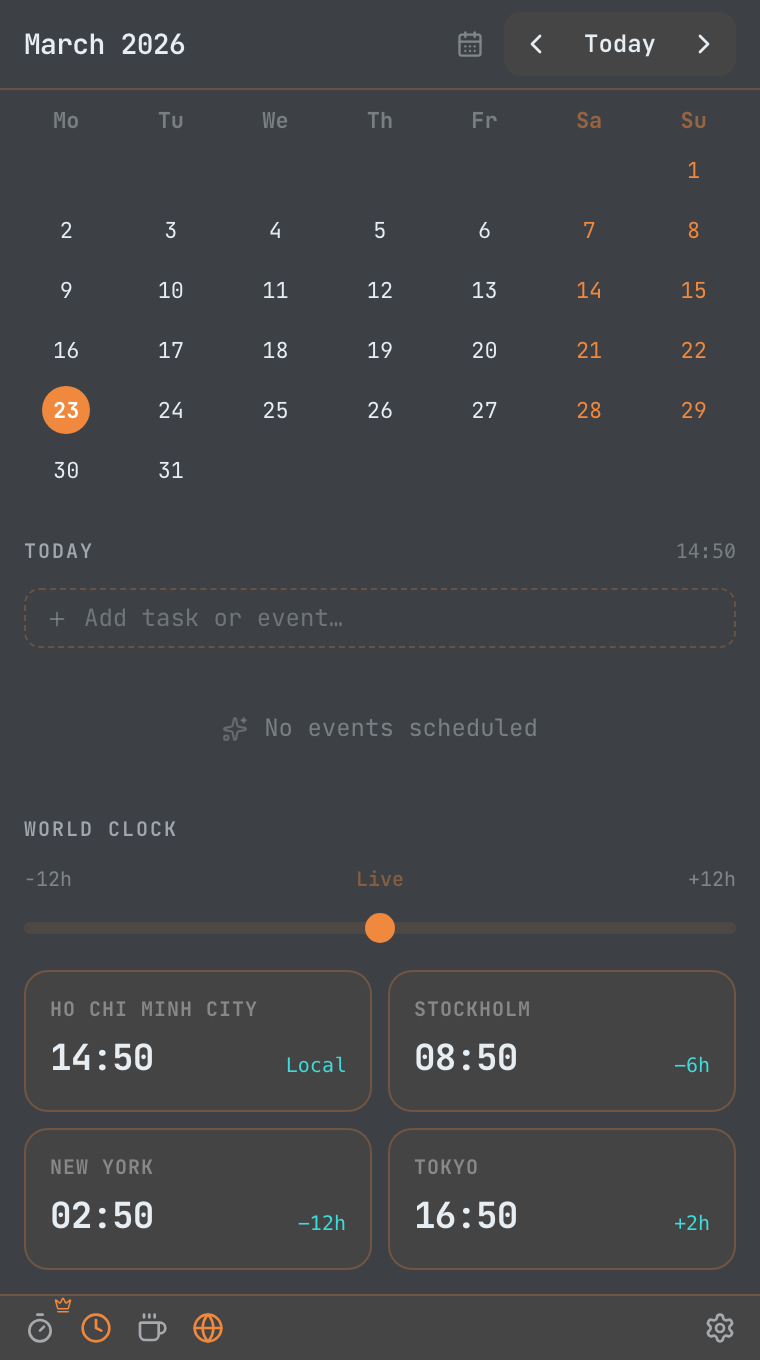
Screenshots
 |
 |
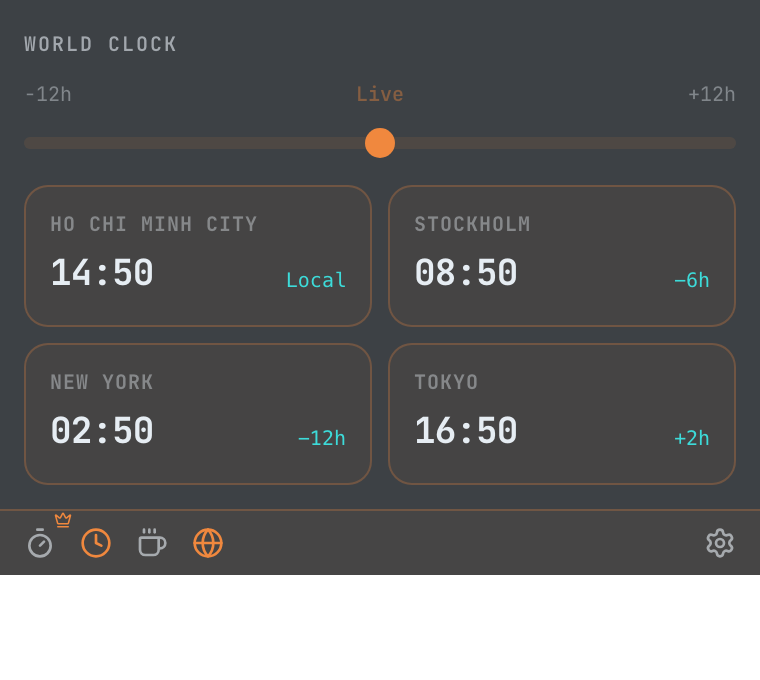 |
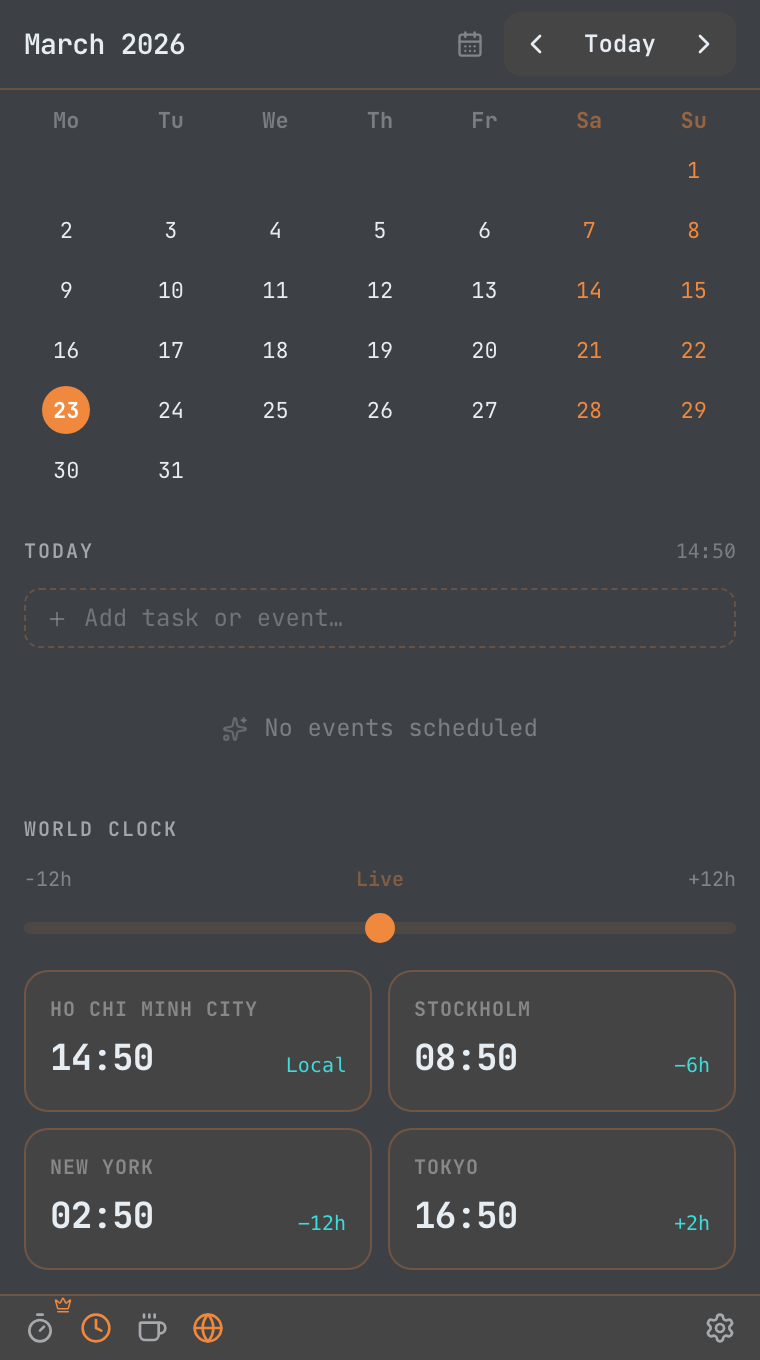
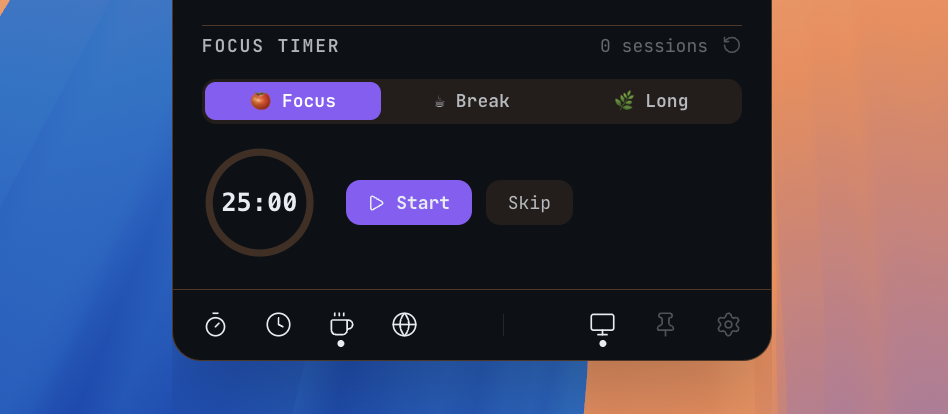
| Calendar & Timeline | Pomodoro Timer | World Clock |
Features
📅 Calendar & Sync
- Monthly grid with week numbers, event dots, and today highlight
- Google Calendar — read and write, encrypted token storage
- Apple Calendar & Reminders — reads directly from your Mac, no extra account needed
- Microsoft Outlook — full sync, supports multiple accounts
✅ Tasks & Unified Timeline
- Add tasks from the menu bar with a single keystroke
- Unified Timeline — your events and tasks sorted together by time of day
- Check off tasks with one click
🌍 World Clock
- View two cities side by side at a glance
- Scrub through time to preview cross-timezone overlap
- 24-hour format
🍅 Pomodoro Focus Timer
- Built-in 25/5 Pomodoro timer linked to your task list
- Start a focus session on any task to stay on track
- Live countdown shown in the macOS menu bar
☕ Caffeinate
- Prevent your Mac from sleeping — ideal for long calls and downloads
- Presets: 30 min, 1 h, 2 h, or until you turn it off
🎨 Themes
- Auto — follows macOS Light / Dark system setting automatically
- Light and Dark — clean, minimal, distraction-free
- AI Dark (Pro) — high-contrast dark theme with JetBrains Mono and a signature orange accent
🔔 Persistent Meeting Alerts (Pro)
- A banner appears on screen when a meeting is about to start — you won't miss it
- One-click Join for Zoom, Google Meet, and Microsoft Teams
Free vs Pro
| Feature | Free | Pro |
|---|---|---|
| Monthly calendar grid | ✅ | ✅ |
| Local tasks + unified timeline | ✅ | ✅ |
| World clock + time scrubber | ✅ | ✅ |
| Pomodoro focus timer | ✅ | ✅ |
| Caffeinate | ✅ | ✅ |
| Auto / Light / Dark themes | ✅ | ✅ |
| Launch at login | ✅ | ✅ |
| Google Calendar sync | ❌ | ✅ |
| Apple Calendar & Reminders | ❌ | ✅ |
| Outlook Calendar | ❌ | ✅ |
| AI Dark theme | ❌ | ✅ |
| Persistent meeting alerts | ❌ | ✅ |
| Price | Free | $14.99 (Lifetime) |
No subscription. No renewal. Pay once, own it forever.
Privacy
Daybar has no telemetry and no cloud backend. Your calendar data never leaves your machine. OAuth tokens for Google and Outlook are encrypted and stored in the macOS Keychain — the same secure store that protects your passwords.
Read the full Privacy Policy →
Download
| Platform | Requirement | Status |
|---|---|---|
| macOS | macOS 12 Monterey+, Apple Silicon or Intel | ✅ Available |
| Windows | Windows 10+ (x64) | 🧪 Beta |
Support & Feedback
Roadmap
- Natural language event creation ("lunch with Sarah tomorrow at noon")
- Multiple Google account support
- Live meeting countdown in the menu bar ("Standup · 3m")
- Daily agenda morning notification
- Customizable world clock cities
- Week view with time-block layout
- Event write-back to all calendar providers
- macOS Notification Center widgets
- Windows: full feature parity with macOS
Have a feature request? Open an issue →
© 2026 Daybar. macOS is a trademark of Apple Inc.