

Check what your AI agents actually changed.
An agent said it updated 1 row. Postgres changed 301.
Safety for AI agents that work on databases and health records. Rules decide each AI agent tool call;
Deedglass checks what really changed and seals a record. Open source, self-hosted, every feature free.





Start in one command
npx -y deedglass
An app opens in your browser. It runs on your own computer, signed in, with no account, no sign-up and no Docker or database to set up, and nothing is sent to us. Choose who will use it (a clinic, hospital IT, or people building with AI), then connect Claude Desktop, Cursor, VS Code, a record system or a database. You need Node 18 or newer. Read Start here for a short tour, or try it without installing anything at deedglass.com/play.
For developers, three commands:
npx -y deedglass start      # an agent reports 1 row, Postgres changed 301, and it's caught
npx -y deedglass protect    # guard Claude Code, Cursor and other coding agents
npx -y deedglass help       # the eight everyday commands; "help all" lists every command
Without Docker, start plays the same scene inside the binary, every line labelled live or
replay, in under 30 s. More: Quickstart ·
Docs · Healthcare ·
Benchmarks · Security · deedglass.com
Found it useful? A star helps other people find Deedglass. To hear about new releases, use Watch › Custom › Releases.
What it does
Deedglass sits between AI agents and the systems they change. Rules decide each tool call, a check compares what the system really changed with what the agent reported (Claimed, Checked or Proven; Matches, Doesn't match or Can't check), and each result is sealed as a signed record anyone can check offline. It can undo the rows an action changed.
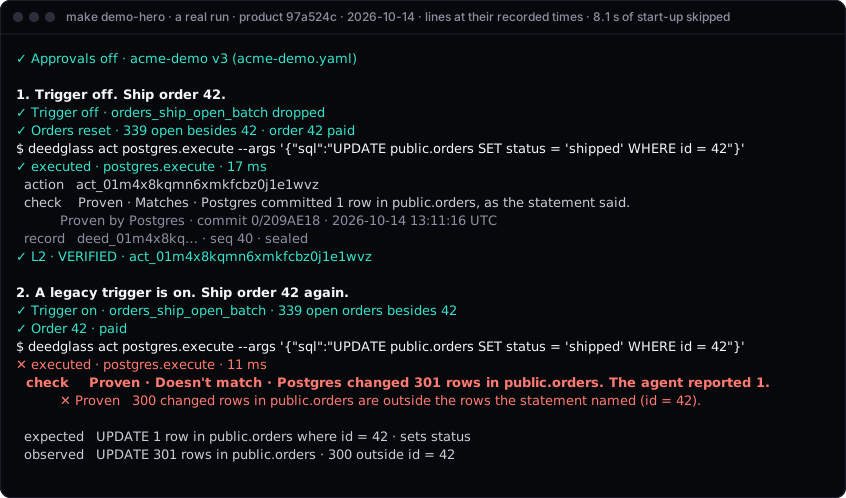
A real run of make demo-hero (commit 97a524c, 2026-10-14), each line shown at the time it printed.
Source: docs/assets/demo-hero.cast.json, recorded by scripts/demo/capture.mjs and drawn by scripts/demo/cast2svg.mjs (make demo-svg).
Install
curl -fsSL https://deedglass.com/install.sh | sh   # macOS and Linux: checks the sha256, copies deedglass into ~/.local/bin
npx -y deedglass help                              # or run it with no install (Node 18 or newer)
npm install -g deedglass                           # or install it from npm
| Other ways | Command |
|---|---|
| Binaries | archives for macOS, Linux and Windows on the latest release, with checksums.txt |
| Go | go install github.com/deedglass/deedglass/cmd/deedglass@latest (the CLI, without the Console) |
| Docker | build the image from a checkout: make web-build docker (tags deedglass:dev; Node 24 builds the Console) |
The install script downloads the release archive for your platform, checks its sha256 against the
release's checksums.txt (and the signature, when cosign is installed), and copies deedglass into
~/.local/bin; read it first: scripts/install.sh. It downloads from a copy
of the release on deedglass.com and falls back to GitHub: about 7 s on one network in India, where the
GitHub-only install took 81-119 s. A public container image is coming; until it's
published, build the image locally as above. Checksums, signatures and SBOMs:
docs/INSTALL.md.
Who it's for
- Developers with agents on databases. Claude Code, Cursor or your own agent writes to Postgres.
Your rules decide each call first, Postgres's change log shows what really committed, and the
rows one action changed can be undone after a person countersigns. MySQL and other databases can
be checked from a Debezium change feed (
docs/WITNESS_DEBEZIUM.md). - Health-tech teams and hospitals on FHIR. The FHIR connector (beta) puts a FHIR R4 server
behind Deedglass with SMART Backend Services, reads each write back at the version the server
reported, and checks Proven on HAPI FHIR JPA 8.x and Medplum 5.x running on Postgres. See
deedglass.com/healthcare and the
FHIR benchmark.
To see it on synthetic data first, with no Docker and no server, run
npx deedglass health pilot(the 15-minute hospital pilot). - Security teams. Lockdown makes every agent write wait for a person, needs two people for
high-risk writes and for turning lockdown off, and keeps each agent to one connector
(
docs/LOCKDOWN.md). Records are signed and anyone can check them offline withdeedglass verify.
Project status
- Pre-1.0. Every release is in
CHANGELOG.mdand on the releases page. The deed format is a versioned public spec (spec/), so old records keep verifying. - One maintainer. Deedglass is built by Arjun Prabhakaran in India
(
GOVERNANCE.md). Replies are best effort (SUPPORT.md). - Free and self-hosted. Every feature is free while we grow, including
ee/, and it runs on your machines with your own Postgres. Nothing checks a licence and nothing is sent to deedglass.com (Security). - Not yet: no SOC 2 report, no outside penetration test and no SSO. Known limits are in
docs/LIMITATIONS.mdandKNOWN_ISSUES.md.
How it works
flowchart LR
  A["AI agent<br/>Claude · OpenAI · Cursor · any MCP client"] -->|tool call + agent key| R
  subgraph D["Deedglass · one binary + Postgres"]
    R["1 · Rules<br/>allow · deny · ask a person"] --> X["2 · Run<br/>with credentials from the vault"]
    X --> C["3 · Check<br/>what really changed"] --> S["4 · Seal<br/>a signed record"]
  end
  X --> T["Tools<br/>Postgres · FHIR · GitHub · Slack · Stripe · MCP servers"]
  T -->|change log or read-back| C
  S --> U["Undo<br/>Postgres rows, after a person countersigns"]
  H[People] -->|approve · stop| R
Every tool call passes through Deedglass with the agent's key. Your rules (policies) decide allow,
deny or require_approval; Deedglass runs the call with credentials the agent never holds; the
check compares what happened with what was asked; and the outcome is sealed as a record in the org's
chain.
How sure each check is
| Level | What it checks | What it can't see |
|---|---|---|
| Claimed | The tool's own answer, against a schema and your postconditions | Whether the answer is true |
| Checked | A read-back from the target (GitHub, Slack, Stripe, Notion, REST, Postgres rows) | Side effects the read-back doesn't cover |
| Proven | Postgres's change log (logical decoding): every row the transaction committed | DDL, sequences, unlogged tables and anything outside that database's WAL |
Each record claims one level and one result: Matches, Doesn't match or Can't check. When
Deedglass can't tell whether a tool ran, the result is Can't check, never Matches. The API keeps
the short names (L0/L1/L2, VERIFIED/MISMATCH/UNVERIFIABLE); the
glossary maps them.
The 301-row scene
What an agent reports is not always what the system stored, and a log the agent writes itself can't
show the difference. An agent was asked to mark order 42 as shipped. It ran one UPDATE and its tool reported 1 row. A
legacy trigger shipped 300 more orders in the same transaction. This is the real output of the
Quickstart's last step on 2026-10-14 (shortened where you see …):
$ npx -y deedglass init --trigger
…
✕ UPDATE order 42         Proven · Doesn't match · Postgres changed 301 rows in public.orders. The agent reported 1.
  expected   UPDATE 1 row in public.orders where id = 42 · sets status
  observed   UPDATE 301 rows in public.orders · 300 outside id = 42
…
✓ Trigger off             orders_ship_open_batch dropped
✓ Undo preview            Undo available · 301 rows in public.orders · 301 updates
    policy   undo-needs-approval · a person countersigns first
The agent's log says 1 row. Deedglass read Postgres's own change log for that transaction, found 301, sealed the difference as a record, and planned an undo from those rows that runs only after a person countersigns.
Quickstart
Docker running with about 2 GiB of free disk, Node 18 or newer, and macOS or Linux, then (from the
tested Quickstart). On Windows, npx deedglass runs the
native Windows binary, no WSL needed; deedglass init uses Docker on macOS and Linux, so on Windows
start with npx deedglass app, which needs no Docker:
mkdir acme-agents && cd acme-agents
npx -y deedglass init --yes
npx -y deedglass doctor
npx -y deedglass init --trigger
deedglass init starts two Postgres 18.6 containers in Docker (Deedglass's own database and a demo
database), runs deedglass serve on 127.0.0.1:8080, creates an org, an agent and the
postgres-check policy (reads and writes run, every write is checked at Proven, DROP and
TRUNCATE never run; use postgres-safe in production, where writes wait for a person), and ends
with a blocked DROP TABLE and an UPDATE checked at Proven. deedglass doctor runs seventeen
read-only checks, each with its fix. deedglass init --trigger turns on the demo database's legacy
trigger, sends the same one-row UPDATE, and ends on the 301-row mismatch and the undo preview shown
above. Its last line is the undo run command; the undo waits for a person, and undo run prints
the approve link.
Port 8080 or 55432 taken? npx -y deedglass init --yes --listen 127.0.0.1:8090 --pg-port 55440
(--listen is where deedglass serve listens; --pg-port is Deedglass's own Postgres, and the
demo database takes the port 10 above it). Every later command run in that directory finds the
ports in .deedglass/stack.json. npx -y deedglass init --purge removes the containers, the
volumes and the files in .deedglass/ when you're done.
Protect every agent in one command: npx deedglass protect adds the shell guard to Claude Code,
Cursor, Codex CLI, Gemini CLI and GitHub Copilot CLI, so a command such as railway volume delete,
supabase db reset --linked or terraform destroy waits for your yes (Codex and Gemini CLI deny it
instead). It backs up each file first and --undo puts them back: a second check, not a sandbox
(docs/protect.md).
Then put your own Postgres behind it (Supabase, Neon or any Postgres 16 to 18): npx -y deedglass connect "$DATABASE_URL" runs read-only checks and prints a plan; --apply sets it up
(guide).
Four ways in
| Command | What it needs | What leaves your machine | |
|---|---|---|---|
| In your browser | deedglass.com/play | A browser tab. Postgres runs in the page; it opens on the "said 1, changed 301" scene. | Nothing |
| In your terminal | npx deedglass play |
Node, and deedglass 0.1.1 or newer from npm. No Docker. The rules decide each call live and the records are sealed and checked on your machine; Postgres's lines are replayed from a recorded real run, and labelled as such. | Nothing |
| Scan your setup | npx deedglass scan |
Node. Reads your MCP configs and, if you name one, a database catalog, read-only. Grades what your agents could change, A to F. | Nothing, apart from read-only catalog queries to a database you name |
| Observe mode | deedglass observe run --connector pg-demo -- ./agent.sh |
A Postgres connector with observe on. Nothing to rewire: it reads Postgres's change log beside whatever gate you already use. |
Nothing |
When a scan finds a trigger or a cascade on a table your agent can write, it says so and points to the 301 scene. Observe mode is below.
Observe mode: nothing to rewire
deedglass observe run --connector pg-demo -- ./agent.sh   # open a watched session, run the agent, close it
deedglass observe show obs_01k… --undo-sql                # the undo as SQL you review and run (free)
deedglass observe run --connector dev --undo-sql ~/deedglass-undo -- claude   # watch a Claude Code session, shell included
Turn it on with witness.observe.enabled: true in the connector's config. Observe mode reads only
Postgres's change log, through the role and replication slot that deedglass connector postgres init
creates, so it works beside any gate you already use, or none.
It shows every row committed on the watched tables while the session was open and seals the session
as a record. It can't tell which program wrote a row, so a session gets no Matches or Doesn't match
verdict; row images are kept 30 days; a TRUNCATE can't be undone from the record. Undo SQL is free,
and so is a one-step undo through Deedglass: every feature is free while we grow. Details: docs/OBSERVE.md.
Add it to your agent client
 Install in VS Code · LM Studio · Goose · Claude Desktop · Every client
claude mcp add --scope user deedglass -- npx -y deedglass mcp serve
No link holds a key. Run npx deedglass init first; each client asks Deedglass for the key it wrote.
Claude Code plugin (the MCP server, the /deedglass:scan, /deedglass:wrap and
/deedglass:watch commands, and skills for reading a scan and for giving an agent Postgres access
safely), from this repo's own marketplace:
/plugin marketplace add deedglass/deedglass
/plugin install deedglass@deedglass
Every format, with its source: docs/INSTALL_CLIENTS.md.
SDKs and clients
- TypeScript:
@deedglass/sdk, with adapters for the AI SDK, the OpenAI Agents SDK, LangChain and the Claude Agent SDK. - Python:
deedglass, with LangChain and Claude Agent SDK adapters. It isn't on PyPI yet; install it from this repo or from a release's wheel (docs/SDK_PYTHON.md). - Go:
github.com/deedglass/deedglass/pkg/deedglass. - MCP:
deedglass mcp wrapgoverns any stdio MCP server;deedglass mcp servegoverns remote ones for Claude Desktop, Claude Code, Cursor, VS Code and Windsurf.
Connectors
Postgres (Proven), REST, GitHub, Slack, Stripe (test mode only), Gmail drafts, Notion and remote MCP
servers. Credentials live in an encrypted vault; every outbound call goes through one egress door.
See docs/CONNECTORS.md.
Benchmarks
Each benchmark publishes what Deedglass misses next to what it catches.
| Benchmark | Caught | Missed | Source |
|---|---|---|---|
| Postgres: 12 synthetic cases, 11 where the agent's report was wrong | 5 of 11 | 6 (in 2 of them it said it can't check); 0 false alarms | corpus/results/latest.md |
| FHIR on Medplum 5.2.6: 17 scenarios, 11 where the report and what the server stored differ | 4 of 11 (no checker, or trusting the HTTP status: 0 of 11) | 7; 0 false alarms on the 6 controls | corpus/fhir/results/latest.md |
Every scenario, with the misses named: corpus/BENCHMARK.md,
[corpus/fhir/BENCHMARK.md](https:/