A 3D wave-survival action RPG that runs in your browser. Hold the arena against endless waves, and after every wave make the call: bank your spoils and walk away, or push on for better loot — knowing that if you fall, everything you haven't banked is lost.
Everything is procedural: models, animation, textures, VFX and sound are generated at runtime. There are no downloaded models, textures or audio files. The exceptions are the painted skill icons (src/ui/skillArt/) and the music (src/audio/music/).
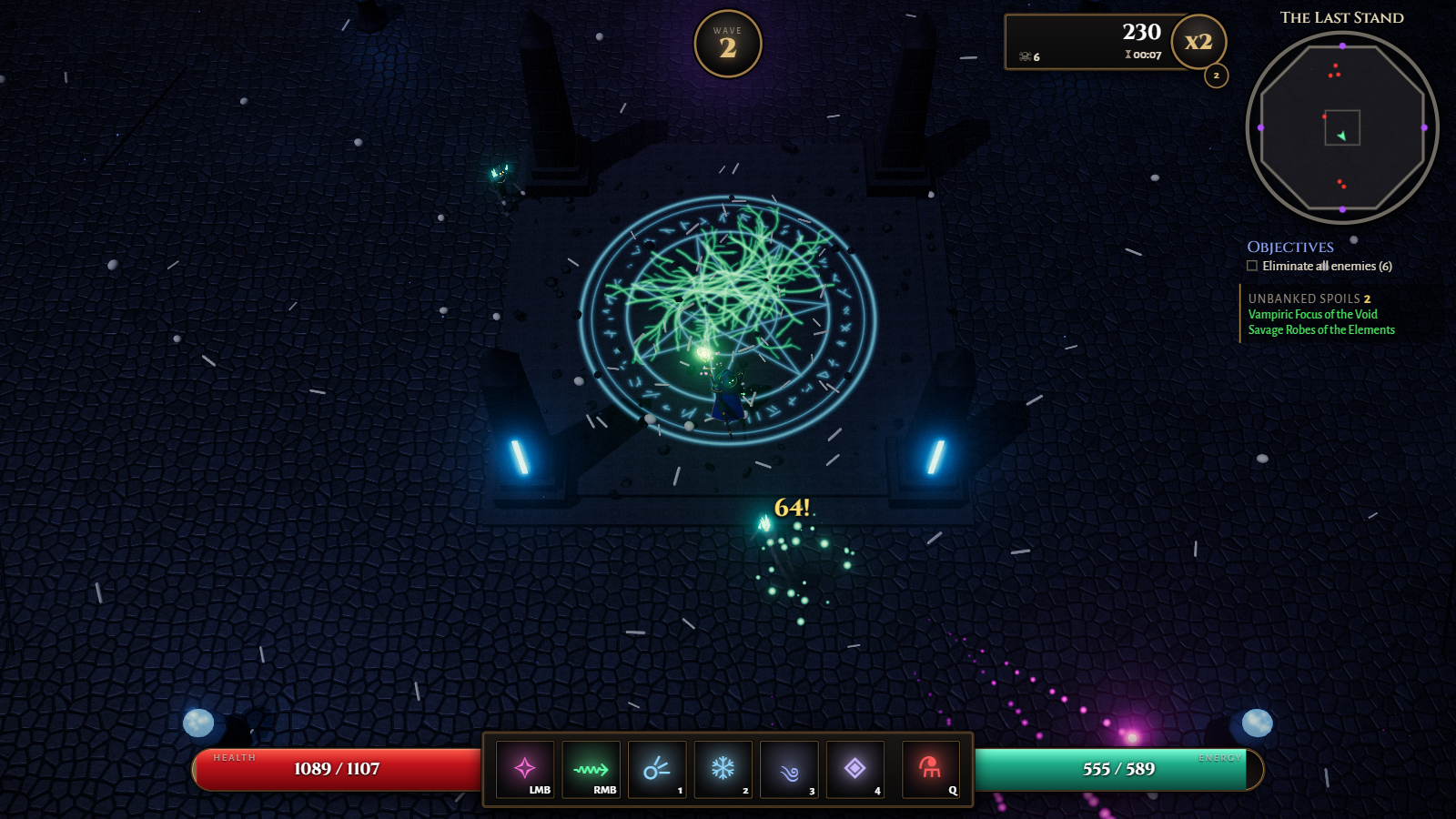
| Lobby: equipment, stash & spell loadout | Wave cleared: bank or continue? |
|---|---|
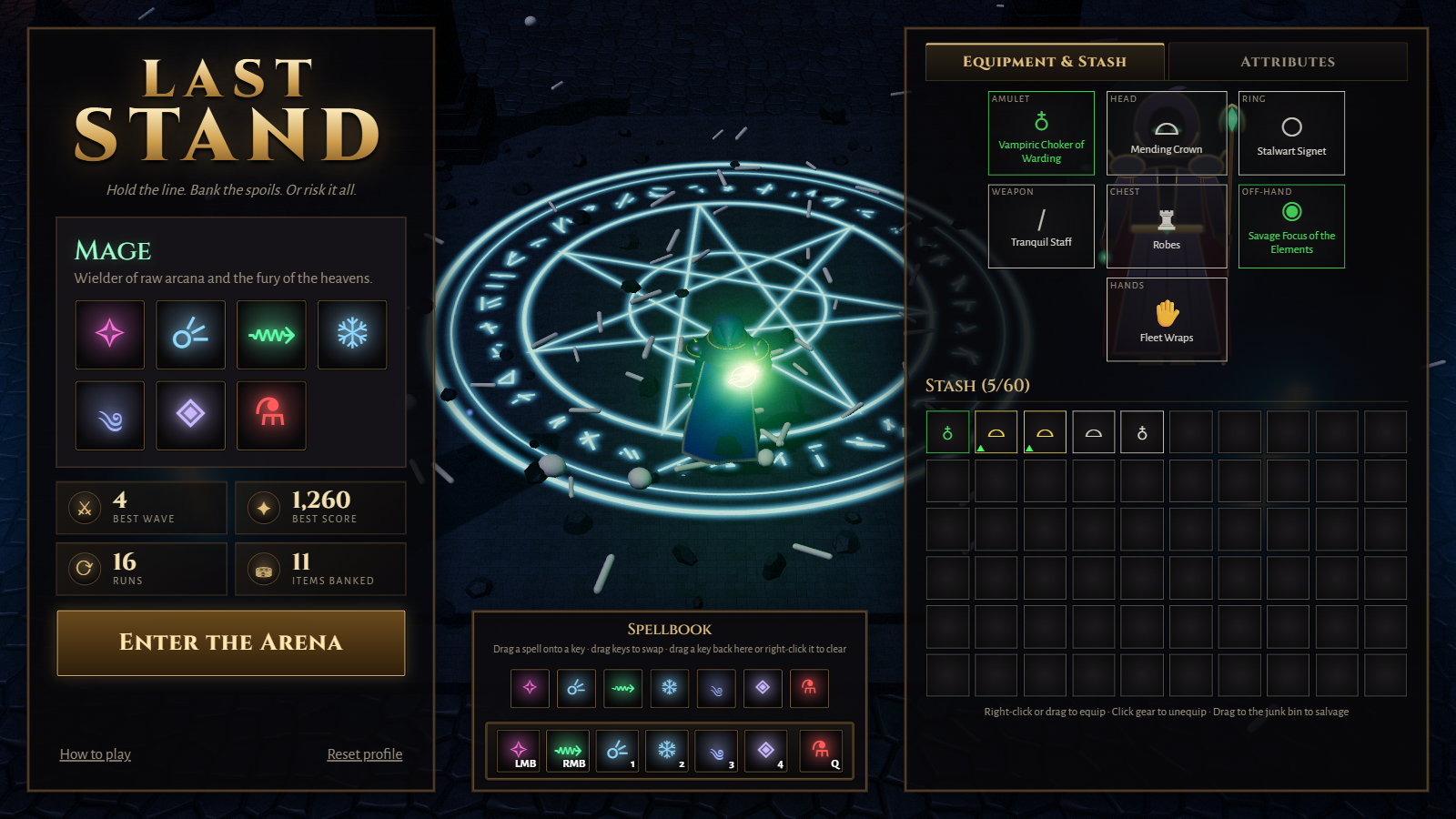 |
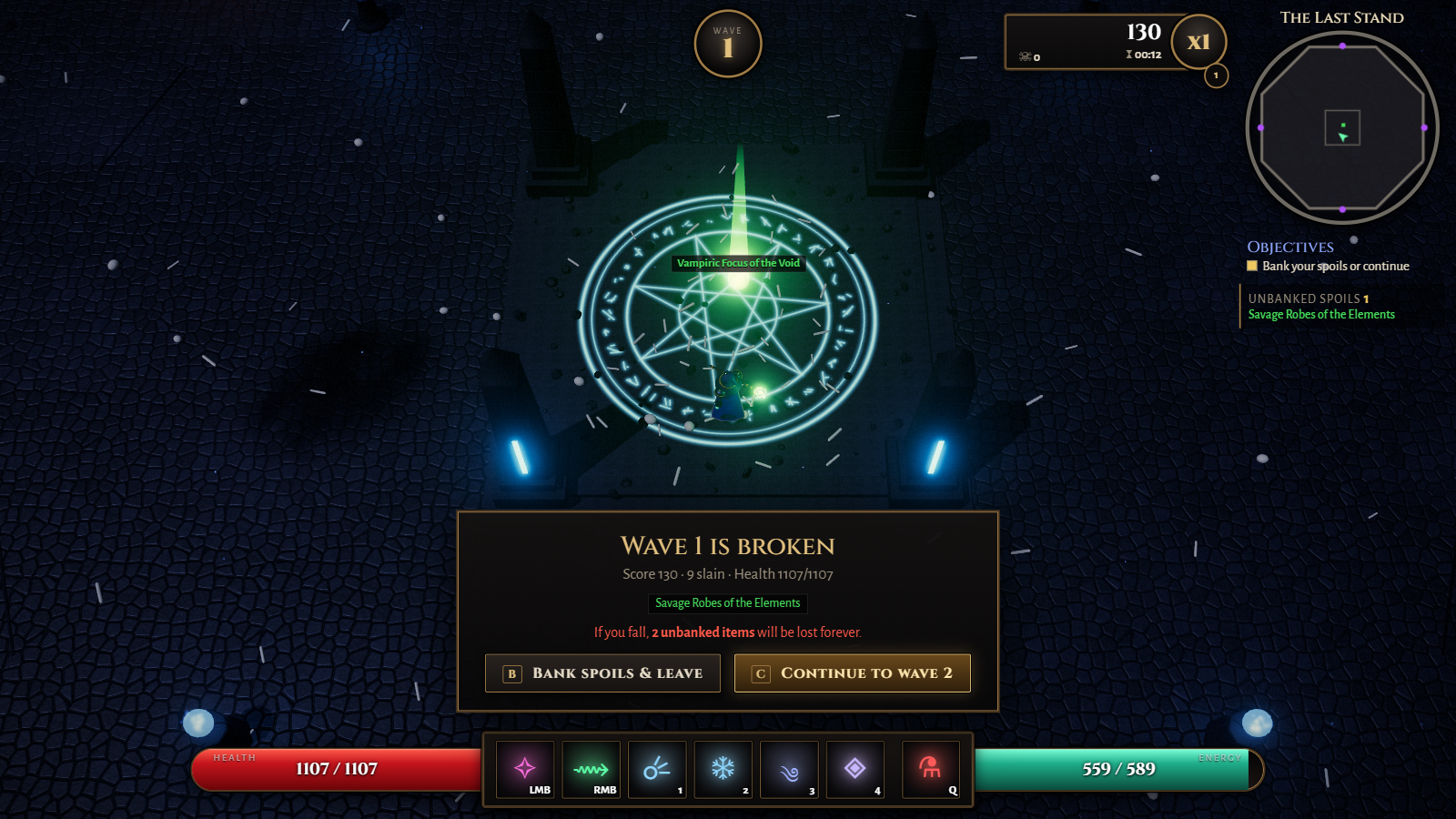 |
How to play
- Pick a battleground in the lobby, the Crypt or the Forest (or the dice for a random one each run). Each has its own enemies.
- Start a run at any wave up to the best one you cleared and banked in that battleground (the lobby defaults to it); a run you died in doesn't count. On Random, the range is the waves banked in every battleground.
- Survive each wave inside the arena. Every fifth wave, a boss arrives: the Colossus in the Crypt, the Thornheart in the Forest.
- After every wave, choose:
- Bank — leave the arena and move everything you found into your stash, or
- Continue — face a harder wave with better loot (you recover 25% health).
- Loot goes straight into your bag, unseen: you only know how many items of each rarity you carry (1 Legendary, 2 Epic...). Banking reveals what they are.
- Below half health the screen drains of colour and blood seeps in from its edges, more the closer you are to none.
- If you die, all unbanked spoils are lost, never seen.
- Equip what you find between runs; items roll random affixes across five rarities.
Play together
Two players can hold the arena together over the internet. In the lobby, Play together → Open a room gives a short code and an invite link to send a friend; opening the link (or entering the code) joins the room. The games talk through a small relay server of ours (server/relay, deployed by Dokci on every push to main), over a WebSocket that gets through any network a web page does.
- Each player brings their own hero, gear and loadout, and keeps their own spoils: loot goes to whoever lands the kill (a boss pays everyone), and each bag stays hidden until its owner banks.
- The host picks the battleground and starting wave and starts the run. A party faces more foes, each with more life.
- After every wave everyone chooses: Bank leaves the run with your spoils right away; the next wave starts once everyone staying chose Continue. Players who left watch the rest of the run.
- At 0 health you go down rather than die. A teammate can raise you by standing next to you and holding E (the Revive button on touch) for 3 seconds. If you're not raised within 20 seconds, or you're still down when the wave ends, you fall and lose your spoils. With nobody left standing, the run is lost for everyone still in it.
- The game can't pause for one player: the pause menu only stops your hero. If the host leaves mid-run, the others keep what they found, as if banked.
Install and play offline
Last Stand is an installable web app. Use the Install link in the lobby (Chrome, Edge, Android), or Add to Home Screen on iOS. Once it has loaded, it also plays without a connection. A new version downloads in the background, and the lobby offers a reload when it's ready.
Controls
Plays with a keyboard and mouse, or by touch on phones and tablets (hold a phone sideways):
- Move: a stick anywhere on the left half of the screen.
- Skills: the buttons on the right. Tap to cast at the nearest foe, or drag to aim and let go to cast there; hold the attack button or a channelled skill to keep it going.
- Other: pinch to zoom, and the ❚❚ button pauses.
- Lobby: tap items to equip them or drop them on the floor, and tap a key, then a skill, to rebind it.
Keyboard and mouse:
| Input | Action |
|---|---|
W A S D |
Move |
| Mouse | Aim |
Left click, right click, 1–4, Q |
Skills (see the classes below) |
| Mouse wheel | Zoom |
| Middle mouse (hold and drag) | Rotate the camera |
V |
Change view (in a run or the lobby): top-down, over the shoulder, first person. The close views use mouse look and aim at the crosshair |
Alt (hold) |
In the close views: a cursor for the HUD (the battle log's buttons, the skills' tooltips), the view held still |
B / C |
Bank / Continue after a wave |
E (hold) |
Revive a downed partner (co-op) |
Esc |
Pause |
Skills can be remapped in the lobby: the chevron beside the key bar (or a click on a key) opens the spellbook (the warrior's arsenal) above it. Click a key, then a skill, or drag a skill onto any key (the same skill may sit on several keys); drag keys onto each other to swap. The loadout is saved in a cookie per class and save slot. You can also walk around and try every skill for free in the lobby, and fold its panels away to make room: the hero panel to the left, the equipment to the right and the key bar down, each by the tab on its edge (the lobby remembers).
Classes
Pick a class in the lobby. Every class keeps its own profile: equipment, stash, records and the starting waves unlocked in each biome. Loot found by one class is made for it and stays with it, and each class has its own stash filter.
There are three save slots (the lobby's Save slot link), each a separate save with its own heroes, skill loadouts and stash filters. The save slots screen shows what each one holds: every hero's best wave and starting waves per battleground, gear with its item levels, skills, attributes, stash, records and time played. From there you play a slot or delete one (typing DELETE to confirm). An empty slot is a fresh start, for instance to play from the beginning with a friend. Progress from before save slots is in slot 1.
The Mage
Robes, skirt panels and a crystal staff; arcane and elemental spells from range.
| Key | Spell |
|---|---|
| Left click | Splintering Bolt — seeking arcane bolts that split on impact |
| Right click | Starfall — crystal meteors crash onto the target area |
1 (hold) |
Void Lance — channeled piercing beam |
2 |
Glacial Nova — freeze everything around you |
3 |
Maelstrom — roaming vortex that pulls enemies in and shocks them |
4 (hold) |
Veilstep — hold to choose a spot up to 15 m away, let go to cross there as a streak of arcane light, through anything in the way; foes close by as you vanish are dazed for a second |
Q |
Healing Draught |
The Warrior
Plate armour and a crested helm; tougher, and fights up close. Fights with a one-handed weapon and a shield, a one-handed weapon in each hand (the swings alternate hands; the off-hand weapon adds 60% of its damage bonus), or a two-handed weapon, and the model shows what is equipped. Each of these styles remembers its own skill bindings, with a button in the lobby to reset them to the defaults.
Shields block: each hit has the shield's Block Chance to be blocked, absorbing its Block Amount, after which the shield needs a moment to recover. Holding right click raises the shield to block every hit from the front, for three times the Block Amount; a hit bigger than that breaks the guard and staggers you: for 1.5 seconds you can only move, not block, attack or cast.
| Key | Skill |
|---|---|
| Left click | Rending Cleave — wide sweep in front of you; each hit restores energy |
| Right click (hold) | Raise Shield — block every frontal blow; with a two-handed weapon instead: Steel Tempest; with a weapon in each hand: Twin Fangs, an instant lunge and a strike with each blade (a lone one-hander leaves it free to bind; Thunder Crescent needs a two-hander) |
1 (hold) |
Steel Tempest — spin with the blade out, shredding everything around you |
2 |
Bull Rush — shield charge that tramples and hurls foes aside |
3 |
Power Strike — charge for 1.5 seconds, then a crushing overhead blow |
4 |
Iron Bellow — war cry that hurls foes back and grants a damage-absorbing ward |
Q |
Healing Draught |
Ranger
A bow hunter in a green trailcoat with a quiver, leather bracers and boots. The Ranger trades heavy armour for speed and ranged physical damage. Bows occupy both hands, and Ranger loot omits off-hands and unused arcane, elemental and block bonuses. Each class keeps its own equipment, stash, records and skill bindings.
| Key | Skill |
|---|---|
| Left click | Nockshot — hold to draw, release to loose: the further it is drawn, the faster and harder the arrow; a tap looses a quicker, lighter shot, and taps during a reload queue the next one |
| Right click | Briarflight — hold to draw five arrows across the bow laid flat, release to loose them in a broad fan |
1 |
Lancewood Shot — hold to draw, release to drive the arrow through every foe in its line, each one after the first taking less (100/80/60/40%); drawn to full it strikes half again as hard |
2 |
Hailfletch — hold to stand and shoot arrow after arrow over the target area, each splitting into a shower of 24 that lands at random across it, each arrow striking the foe it falls on, until you let go; the area follows your aim at a walk |
3 |
Quarry Mark — the foe nearest your aim takes 25% more damage from everyone; when it dies your cooldowns are refreshed |
4 |
Strawman — a scarecrow that draws every nearby foe but elites and bosses off you for 3 seconds, gathering them round it |
Q |
Healing Draught |
Tech
- Three.js 0.185 with an HDR post-processing chain (bloom, tone mapping, grading)
- The Thornwood's trees are grown by ez-tree (MIT), its geometry with our own procedural bark and leaves
- TypeScript (strict) + Vite
- Procedural textures (cobblestone, slabs, runes), procedural humanoid rigs and animation, CPU particles, pooled dynamic lights
- WebAudio-synthesized sound effects, and music for each biome: one track in its lobby and between waves, one through each wave's fight (looped by
tools/music) - Co-op through our own WebSocket relay server (
server/relay, Node and ws)
Development
npm install
npm run dev        # http://localhost:5173
npm run typecheck
npm run build      # type-check + production build into dist/
Project layout
| Path | Contents |
|---|---|
src/data/ |
Tuning data: classes & skills, enemies, biomes, items, waves, balance |
src/combat/skills/ |
Skill behaviors, referenced by name from class data |
src/entities/ |
Player, enemies, enemy AI, procedural models (models/) |
src/game/run.ts |
Wave flow, scoring, loot rolls, bank / continue |
src/world/ |
The biome arenas (crypt.ts, forest.ts), shared props, collision |
src/fx/ |
Particles, effects, pooled lights |
src/loot/ |
Items, persistent profiles (one per class and save slot: stash / equipment / records), save slots, skill loadout |
src/net/ |
Co-op: rooms and links between the games, the players' state, the host's reports of the fight |
src/ui/ |
HUD, menus, tooltips, loadout editor, skill icons |
Adding a class: create a data file in src/data/classes/, register it in src/data/classes/index.ts, add a model in src/entities/models/, and implement any new skills in src/combat/skills/.
Feedback
This is an early build — feedback, bug reports and ideas are very welcome in Issues. To contribute code, see CONTRIBUTE.md.
License
MIT.