Locken — Native Focus & Flow OS for macOS
A calmer, sovereign way to get your work done on macOS.
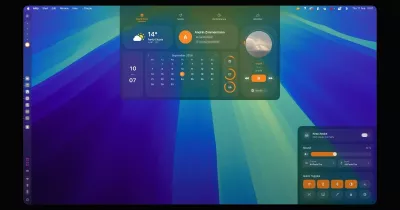
Aurora glass design, a distraction shield that closes games and social apps, and Canvas LMS study planning.

📥 How to Download & Install on Your Mac
Option 1: 1-Line Universal Installer (Fastest — Zero Setup)
Run this single command in your macOS Terminal:
curl -fsSL https://locken-app.vercel.app/install.sh | bash
What this does: Downloads
Locken.dmg, checks it against the SHA-256 published inversion.json, installsLocken.appinto/Applicationsand opens it. It never removes macOS security flags.Downloaded
Locken.dmgin a browser instead? Locken isn't signed with an Apple Developer ID yet, so the first time, right-click Locken in Applications and choose Open.
Option 2: Clone & Build from Source in 30 Seconds
- Clone your private repository:
git clone https://github.com/Daanishthaj/locken.git cd locken - Open the native Xcode project:
open KissaFocus.xcodeproj - Select KissaFocus in the top scheme bar and press ⌘ + R (Run) to compile and launch natively.
🎯 How to Use Locken (Daily Workflows)
1. ⚡️ Starting a Deep Work Focus Sprint
- Open the Focus Session tab from the left sidebar.
- Choose your focus duration (default: 25 minutes).
- Type in your current goal (e.g. "Complete Problem Set 4" or "Finish Chapter 3 Reading").
- Click Start Focus Timer.
- What happens automatically:
- macOS Focus Mode activates.
- Distracting desktop games and apps (Roblox, Steam, Discord, Minecraft) are automatically closed and blocked.
- Tabs for the sites on your block list (YouTube, Twitch, Reddit, Instagram and more) are closed in Safari, Chrome, Arc, Brave and Edge until your session ends.
2. 🎓 Connecting Your University Canvas LMS
Locken integrates directly with your university or high school Canvas portal:
- Go to the Canvas LMS section in the app.
- Choose your connection method:
- Method A (API Token — Recommended):
- Open Canvas in your browser → click your Profile avatar → Settings.
- Scroll down to Approved Integrations → click + New Access Token.
- Type
Lockenas the purpose, click Generate Token, and paste it into Locken.
- Method B (Calendar Feed URL — Zero Token Setup):
- Open Canvas → click Calendar in the left menu → scroll to bottom right → click Calendar Feed.
- Copy the URL (starts with
https://.../feeds/calendars/...) and paste it into Locken.
- Method A (API Token — Recommended):
- Your upcoming homework, quizzes, problem sets, and essays will sync live with real-time due dates, point values, and urgency badges.
3. 🧠 1-Click AI Task Deconstruction
When facing a daunting 100-point assignment or midterm study guide:
- Click the AI Steps button next to any synced Canvas assignment.
- Locken breaks the project into 3–4 Pomodoro steps. It uses the AI provider you connect in Settings, with your own API key; without one, it uses a built-in template:
- Step 1: Core Diagram & Concept Review (25m)
- Step 2: Key Problem Set Exercises 1-15 (25m)
- Step 3: Active Recall Flashcard Drills (25m)
- Step 4: Consolidation & 1-Page Summary Sheet (15m)
- Check off each milestone as you progress through your session.
4. 🎚️ Dynamic Notch Slider Check-In
Midway through a strenuous sprint:
- A subtle Dynamic Island / Notch slider descends from the top of your screen.
- Rate your current energy and flow level with a quick flick of the slider without leaving your fullscreen code editor or textbook.
5. 📊 Tracking Daily Stats & Notes
- Analytics Tab: Review your total focus minutes, weekly consistency graphs, streak counters, and app usage breakdown.
- Project Studio Tab: Write markdown scratchpads, daily to-dos, and project notes that save directly to your Mac.
⚡️ Key Features At a Glance
| Feature | Description |
|---|---|
| 🛡️ Distraction Shield | Intercepts games, video sites, and messaging apps during focus mode. |
| ⏳ Pomodoro Engine | Precision native timers with gentle chimes and macOS status bar indicators. |
| 🎓 Canvas LMS Sync | Real-time coursework, grade values, and upcoming assignment synchronization. |
| 🧠 AI Breakdown | Deconstructs complex study guides into structured 25m actionable intervals. |
| 🎚️ Notch Check-In | Unobtrusive top-of-screen slider to calibrate focus intensity. |
| 📝 Project Studio | Offline markdown notes, task checklists, and study logs. |
| 🔒 Private | No analytics or trackers. Notes and focus stats stay on your Mac. |
💎 Design System & Aesthetic
Inspired by the refined visual language of macOS Sequoia and CleanMyMac:
- Dynamic Aurora Gradients: Smooth background transitions reflecting your active workspace state (Purple for Dashboard, Magenta for Focus, Green for Calendar, Cyan for Analytics).
- Frosted Acrylic Glass: Multi-layered depth with directional rim lighting and subpixel bevel borders.
- Micro-Interactions: Magnetic cursor snapping, liquid click ripples, and spring-interpolated physics.
🏗️ Codebase Structure
├── KissaFocus/                  # Native Swift macOS Desktop Application
│   ├── App.swift                # App entrypoint, window styling, sidebar routing
│   ├── Views/                   # SwiftUI views (Focus, Canvas, Dashboard, Notes, Settings)
│   ├── Services/                # System integrations (App blocking, Canvas API, AI breakdown)
│   └── Assets.xcassets/         # Icons, colorsets, and visual assets
├── web/                         # Interactive Marketing & Sandbox Web Companion
│   ├── index.html, main.js      # The live marketing site (Vite + Three.js)
│   ├── public/                  # Robots.txt, sitemap.xml, favicon
│   └── vercel.json              # Edge security headers (HSTS, CSP, X-Frame-Options)
├── supabase/                    # Production SQL Schemas & RLS Security Policies
└── README.md                    # Project documentation & usage guide
🔒 Security & Privacy Guarantees
- Account optional: guest mode works offline. Signing in uses Supabase for your account (email and name only), and you can delete the account in Settings.
- No tracking: no analytics, ad networks or tracker pixels.
- Local storage: notes, focus logs and app usage stay on your Mac.
- AI is opt-in: AI breakdowns send the assignment text you enter to the provider you connect, using your own key. Nothing is sent until you connect one.
- Verified updates: the installer checks every download against a published SHA-256, and the in-app updater also requires Locken's release signature.
- Per-account data: two people sharing a Mac never see each other's notes, habits or linked accounts.
- For contributors: run
git config core.hooksPath scripts/git-hooksafter cloning so commits containing secrets are blocked. Security docs live indocs/.
Locken • Crafted with care for deep focus on macOS.