

Personal library cataloging for home collectors.
Status: in production since v1.1.1 (2026-05-14). 10 epics shipped; epic 11 (a built-in MCP server, #493) in progress. Current release: v1.20.1. Pre-built images on Docker Hub at gcorbaz/mybibli. See ROADMAP.md for what's coming next.
What it is
mybibli is a self-hosted web app to catalog, locate, and loan your personal library. It is designed for a single household, running on your own hardware (typically a NAS or home server). No cloud sync, no telemetry — all data stays on your local network.
Built for collectors who want more than a spreadsheet:
- Barcode-first cataloging. Scan an ISBN / EAN-13 and the title resolves asynchronously through a metadata provider chain (BnF, Google Books, Open Library, Library of Congress, K10plus, MusicBrainz, OMDb, TMDb, BDGest), with cover-image download and similar-title detection.
- Multi-media support. Books, BD/comics (with multi-position omnibus volumes), audio releases, films/series — each typed correctly and with the right metadata provider chosen automatically.
- Series + collection awareness. Gap detection on series volumes, Dewey-based browsing, similar-titles section.
- Storage-location tracking. Configurable hierarchy (room → shelf → row → …), barcode-on-shelf workflow, with a 30-second Undo on the last shelving or batch-location action.
- Loan management. Borrower CRUD, loan registration with automatic location restoration on return, overdue threshold (admin-configurable), per-borrower history.
- Multi-role auth. Anonymous (read-only), Librarian (catalog + loans), Admin (everything). Session inactivity timeout with keep-alive toast. FR/EN language toggle with per-user preference.
- Hardened by construction. Strict Content Security Policy (no
unsafe-inline/unsafe-eval), CSRF synchronizer-token middleware on every state-changing request (with a server-rendered "session expired" feedback when the token drifts — seedocs/auth-threat-model.md), scanner-guard against burst-keyboard input leaking into modals. - Admin panel. Health dashboard (entity counts, MariaDB version, disk usage, provider reachability), user management with last-active-admin guard, editable reference data (genres, volume states, contributor roles, location node types), system settings (overdue threshold, provider API keys, default language), trash view + restore + permanent delete, configurable auto-purge after 30 days.
- First-launch setup wizard. Fresh installs walk through Admin → Providers → Preferences → Done; the gate middleware redirects every route to
/setupuntil completion. Idempotent — interruptions resume at the right step server-side. - Mobile-aware + WCAG 2.2 AA accessible. Dual-surface mobile UX on data-dense pages (desktop tables collapse into mobile cards, admin tabs collapse into a
<select>dropdown), full keyboard navigation with shortcuts cheat-sheet (?), contextual help-icon tooltips, and an axe-core CI gate that covers every reachable surface including entity-detail routes and the first-launch wizard.
Screenshots
Live production install (v1.20.1, household NAS, 140+ volumes catalogued and growing):
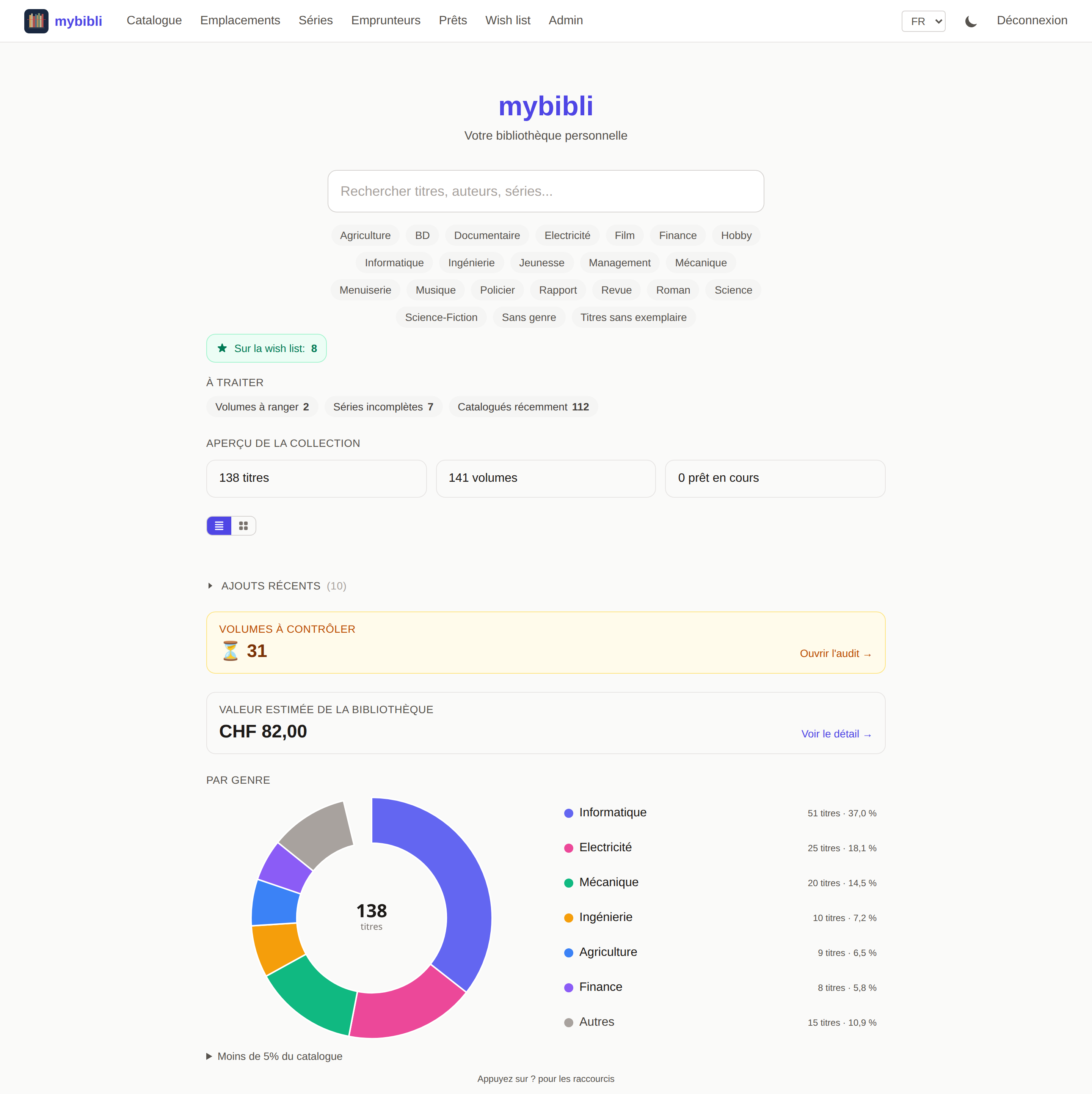
Home — search, genre filters, dashboard counters ("À traiter" / "Aperçu de la collection"), recent additions with cover thumbnails.
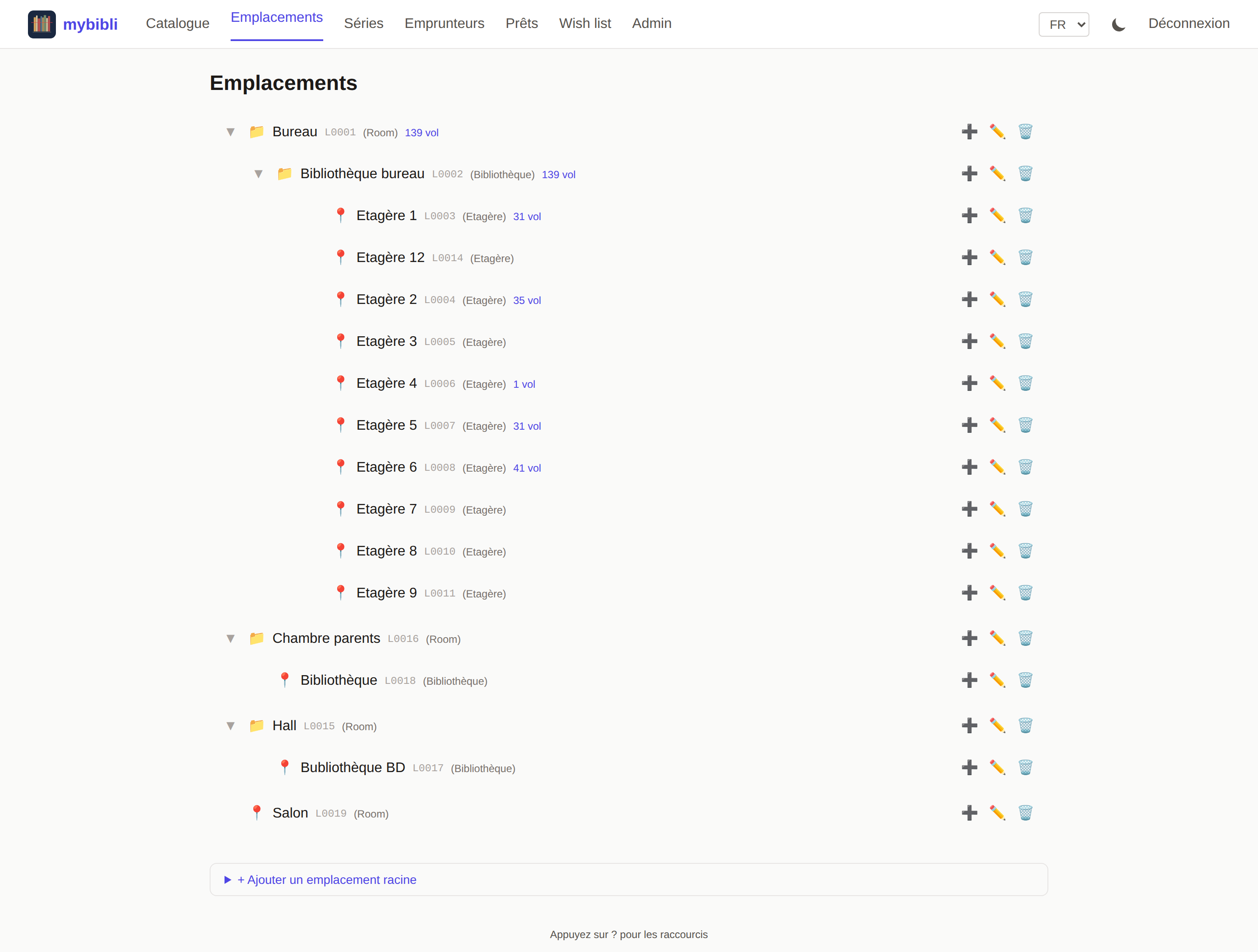
Locations — configurable hierarchy (room → bookcase → shelf …), per-node volume counts, inline create / edit / delete.
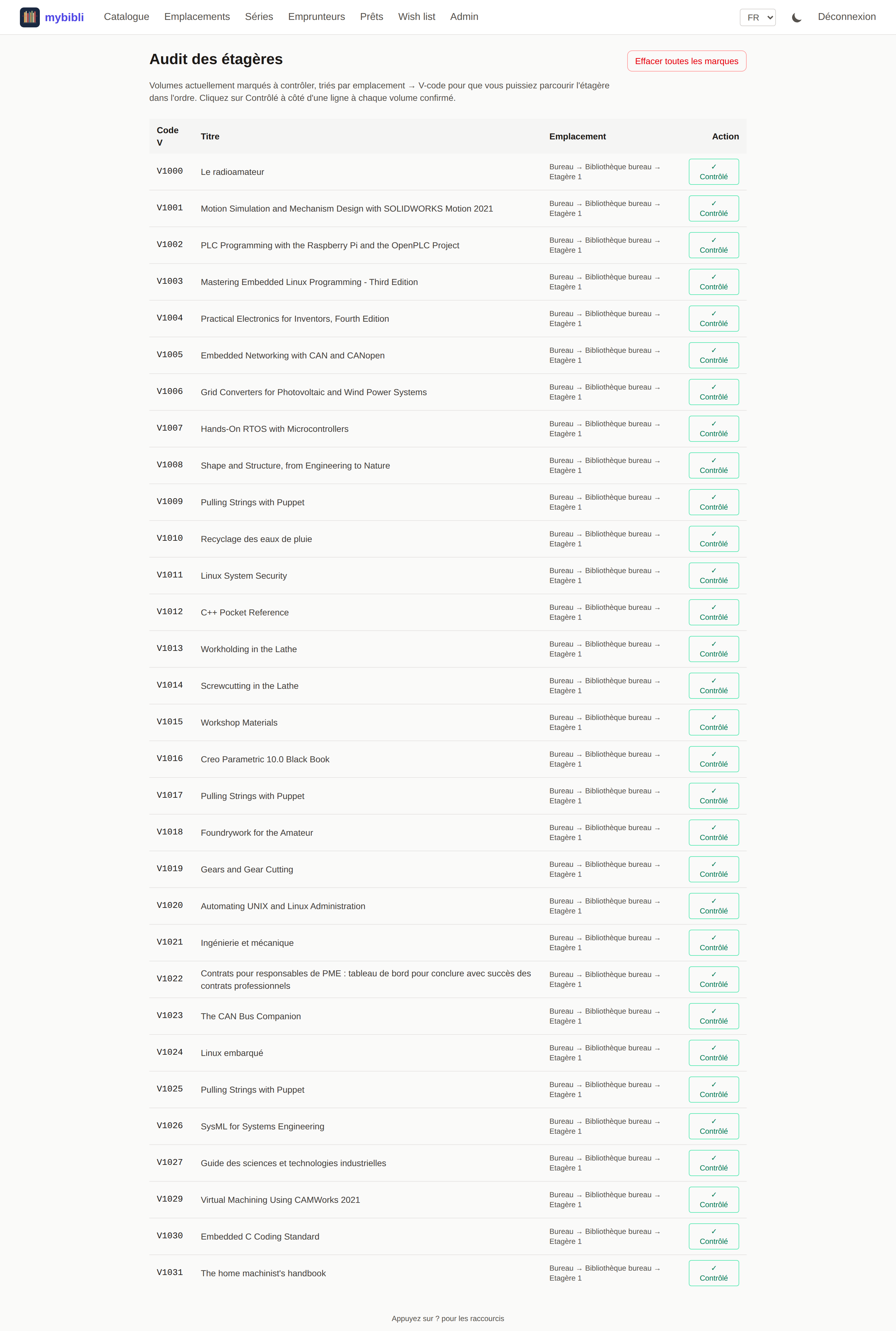
Shelf-audit — volumes flagged "À contrôler" (single or bulk-per-shelf), sorted by location → V-code, with one-click clear per row.
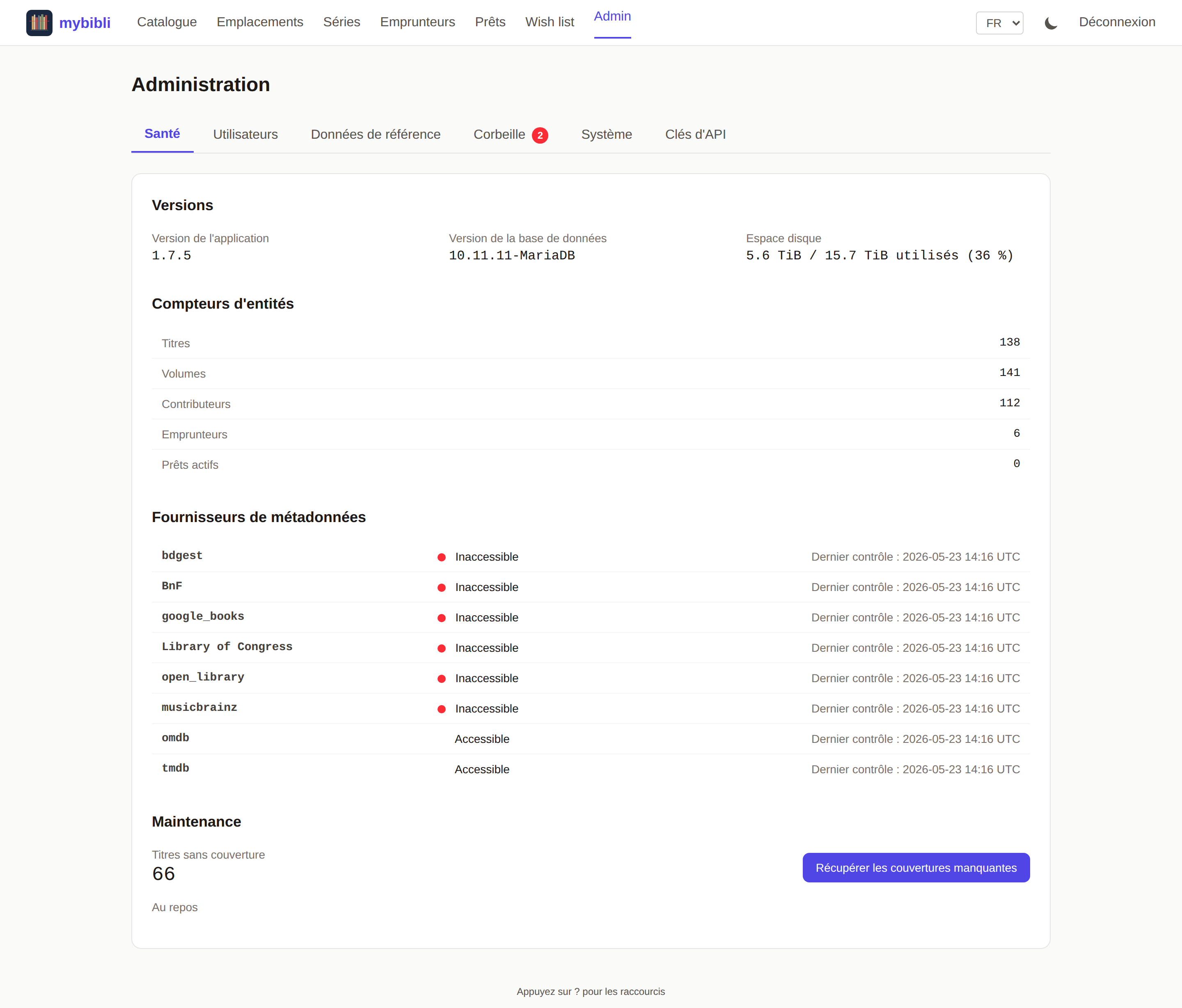
Admin > Health — entity counts, MariaDB version, disk usage, and metadata-provider reachability probes refreshed every 5 minutes in the background.
Tech stack
- Backend: Rust 2024 edition + Axum 0.8
- Database: MariaDB via SQLx 0.8 (offline query cache committed in
.sqlx/) - Templates: Askama 0.15 (compile-time type-checked)
- Frontend: HTMX 2.0 + Tailwind CSS v4 — no SPA framework, zero inline scripts/styles (CSP
script-src 'self',style-src 'self') - i18n: rust-i18n — French + English
- Auth: session cookie (
HttpOnly,SameSite=Lax) + per-session CSRF synchronizer token; argon2 password hashing - Testing:
cargo test(~525 lib unit),#[sqlx::test](~95 DB integration tests across 10+ files), Playwright (~160 E2E specs across two CI lanes — the seeded-stack suite and a dedicated wizard-E2E lane that runs on a fresh empty database)
Quick start (end users)
Pre-built images are published to Docker Hub at gcorbaz/mybibli — :latest tracks the highest semver, individual tags pin to the exact release. For development against the source tree, see Development below.
Network posture — read this before you deploy
mybibli is not built to face the open internet. It is designed for one household on one local network, and several deliberate choices follow from that: no limit on login attempts (delegated to a reverse proxy if you run one), no second authentication factor, no Secure attribute on the session cookie unless you ask for it, and a catalogue that is readable without signing in — that last one is a feature, not an oversight. The reasoning for each is written down in docs/auth-threat-model.md §5.
Do not forward a port to it. If you need your library from outside the house, two shapes are supported:
- A private tunnel — Tailscale, WireGuard, or your router's VPN. Nothing is published; the remote device joins the network instead. Recommended, and what the reference deployment runs.
- A reverse proxy terminating TLS — and then set
MYBIBLI_COOKIE_SECURE=trueas well. That second half is the one people forget: without it the session cookie is still accepted over plain HTTP, and the proxy has bought you less than you think.
Report anything that contradicts this posture through SECURITY.md — privately, not in a public issue.
Installation notes
Install v1.1.0 or later. Pre-1.1.0 images (v1.0.0 … v1.0.5) shipped seed migrations that created default admin/admin and librarian/librarian credentials on every fresh install, bypassing the first-launch wizard (#173). The seed gate landed in v1.1.0 and is the install floor; pre-1.1.0 Docker Hub tags have been removed. :latest and every published tag from 1.1.0 onwards are safe — a fresh install greets you with the setup wizard. If you happen to have an older deployment, wipe the database and reinstall before adding any data.
Skipping intermediate versions is supported. mybibli ships releases at a brisk pace; you do not need to upgrade through every intermediate tag. The migration runner applies every pending migration in timestamp order at boot, schema migrations are purely additive (no DROP COLUMN / DROP TABLE), and the few data backfills are idempotent — so a jump from, say, v1.3 directly to the latest tag is safe for the database. Take a backup before upgrading (there is no automatic rollback). See chapter 8 ("Upgrade and migration") of the user manual for the full procedure and the one pre-1.1.4 cover-JPG caveat.
Persistent storage — volumes you need
docker-compose.yml declares three named volumes. The first two MUST survive container upgrades; the third is forensic-only:
mybibli_db_data→/var/lib/mysql— your catalog (titles, volumes, loans, etc.) — mandatorymybibli_covers→/app/covers— downloaded cover JPGs (issue #213) — mandatorymybibli_logs→/var/log/mybibli— daily-rotating log files (CR #301, v1.7.0+) — optional but recommended for production debuggability; can be wiped at any time
If you deploy docker-compose.yml from the repo unchanged (v1.7.0+), you already have all three. Back the data + covers volumes up together — losing one without the other leaves DB references pointing at missing files (or vice versa). The logs volume is forensic-only; it doesn't need backup.
Upgrading from a pre-1.1.4 install? Pre-1.1.4 docker-compose.yml did not declare mybibli_covers, so the cover JPGs lived inside the container's writable layer and were lost on every docker compose up -d after a pull. Adding the volume now preserves covers fetched from this point forward, but does NOT restore the ones that disappeared on prior upgrades. To recover, re-trigger metadata fetch from each affected title's detail page (the "Re-fetch metadata" button). A bulk-fetch admin action is tracked at issue #214.
Upgrading from a pre-1.7.0 install? The mybibli_logs volume is new in v1.7.0. Without it, log files write to the container's ephemeral writable layer and are lost on every docker compose up -d after a pull — which defeats the purpose of CR #301's persistent-log feature. Add this block to your existing docker-compose.yml:
services:
  mybibli:
    volumes:
      - mybibli_logs:/var/log/mybibli   # ← add this line

volumes:
  mybibli_logs:                          # ← and this declaration
(Or use a bind mount: - /your/host/path:/var/log/mybibli if you prefer logs visible directly in DSM File Station / your journald shipper. See chapter 12 of the manual.)
Synology DSM / bind-mount users: comment out the mybibli_covers:/app/covers line in docker-compose.yml and uncomment the bind-mount line right below it, then set COVERS_HOST_PATH in your .env to the host path you want — Synology File Station / your rsync routine will see the covers directly. The same pattern applies to mybibli_logs via LOGS_HOST_PATH.
Configuration
All deployment-time settings are environment variables — there is no
config file. .env.example is the canonical reference: every variable
the Rust binary reads or that docker-compose.yml interpolates is
listed and commented there. Copy it to .env and adjust for your
deployment:
cp .env.example .env
$EDITOR .env
docker compose up
The variables are grouped in seven sections:
- Database connection —
DATABASE_URLplus theMYSQL_*parts used by the bundleddbservice. - HTTP server —
HOST,PORT,HOST_PORT(the host-side port published by Docker). - Application —
MYBIBLI_LOG_LEVEL(v1.7.0+, tracing filter; prod-safe defaultinfo; also flippable at runtime from/admin > Systemwithout a redeploy),MYBIBLI_LOG_DIR(v1.7.0+, in-container path for daily-rotating log files; default/var/log/mybibli; mapped to themybibli_logsnamed volume — see "Persistent storage" above.LOGS_HOST_PATHis an optional bind-mount override),RUST_LOG(legacy fallback, honored whenMYBIBLI_LOG_LEVELis unset),APP_LANGUAGE(en,fr,de, orit— v1.7.0 added DE + IT),COVERS_DIR(filesystem path for downloaded cover images — in Docker, the/app/coversdirectory is mapped to the persistentmybibli_coversnamed volume.COVERS_HOST_PATHis an optional bind-mount override). - Cookie & CSP hardening —
MYBIBLI_COOKIE_SECURE(set totrueonly behind HTTPS, see issue #94),CSP_REPORT_ONLY, and for the MCP endpoint/api/mcp(story 11-6)MYBIBLI_MCP_ALLOWED_HOSTS(comma-separatedHostvalues accepted; defaultlocalhost,127.0.0.1,::1; on a NAS list the LAN name/IP your AI agent uses) andMYBIBLI_MCP_ALLOWED_ORIGINS(Originvalues accepted from clients or proxies that forward one; default none — browser pages are not supported, no CORS). - Metadata provider API keys —
GOOGLE_BOOKS_API_KEY,OMDB_API_KEY,TMDB_API_KEY. Migrated ONCE into thesettingstable at boot; afterwards the admin can rotate or clear them via/admin > System > Metadata Providers. Re-set them in.envonly when you want the deployment-time value to win on the next reboot. - Metadata provider base URL overrides — used exclusively by the E2E test stack to point each provider at the in-tree mock server. Leave unset in production.
- Optional dev/test overrides —
MYBIBLI_SKIP_SETUP,MYBIBLI_SKIP_STARTUP_PURGE. Strict accept-set: only1/true/TRUEcount as "on"; anything else is ignored.
Boolean variables across the codebase use the same strict accept-set,
which avoids the classic footgun where a stale shell value like 0
reads as "set" and silently flips an opt-out.
Shell-level env vars used for build / test commands (SQLX_OFFLINE,
TEST_ADMIN_PASSWORD, MYBIBLI_SETUP_E2E, …) are documented inline
in the Development section below — they do not belong in .env.
Development
Prerequisites
- Docker + Docker Compose
- Rust toolchain (rustup, Rust 2024 edition)
- Node.js 20+ (for Playwright E2E tests)
Run the app locally
# Start the full stack (app + MariaDB + mock metadata providers).
# `MYBIBLI_SKIP_SETUP=1` is baked into the test compose so existing
# seeded specs reach their target routes without going through the
# first-launch wizard.
cd tests/e2e
docker compose -f docker-compose.test.yml up --build
The app listens on http://localhost:8080. The seed migrations create an admin user (admin / admin, role admin) and a librarian (librarian / librarian, role librarian) only when MYBIBLI_SEED_DEV_USERS=1 is set — which is baked into both docker-compose.dev.yml and tests/e2e/docker-compose.test.yml.
ℹ️ Seed users are now gated (issue #173, fixed in 1.1.0). On a fresh install where
MYBIBLI_SEED_DEV_USERSis unset, the seed migrations still apply but the gate insrc/services/seed_gate.rsimmediately hard-deletes any user whose hash still matches the documented seed value, along with the seeded session row whose token is equally public. The first-launch wizard at/setupis therefore reachable on every fresh production deployment, and nothing seeded is left in the Trash for a later Restore click to revive (issue #480 — before that fix the rows were only soft-deleted). An instance upgrading from v1.18.0 or earlier purges the leftovers on its first boot. Set the env var to1only for local development and the E2E test stack — never in production.
Fresh-install wizard. Story 8-8 introduced a first-launch wizard at /setup whose gate predicate is (active_admin_count == 0) AND (settings.setup_completed_at IS NONE). Because the seed migrations create an admin before the gate is first evaluated, the wizard never triggers in practice on a default install — the password-rotation step above is the effective onboarding flow. The wizard can still be exercised by running cargo run against an empty DB with the seed migrations skipped. MYBIBLI_SKIP_SETUP=1 (strict accept-set: 1 / true / TRUE) is the explicit bypass.
Build & check (native)
cargo check                          # Fast type-check
cargo build                          # Full debug build
cargo clippy -- -D warnings          # Lint (zero-warnings policy)
Unit tests
SQLX_OFFLINE=true cargo test --lib   # ~525 unit tests, ~5 s
cargo test config::                  # Module-scoped
cargo test <name> -- --nocapture     # Single test with output
DB integration tests
docker compose -f tests/docker-compose.rust-test.yml up -d
SQLX_OFFLINE=true \
DATABASE_URL='mysql://root:root_test@localhost:3307/mybibli_rust_test' \
cargo test --test find_similar \
           --test find_by_location_dewey \
           --test metadata_fetch_dewey \
           --test metadata_fetch_race \
           --test seeded_users \
           --test setup_wizard
Each test gets a fresh DB via #[sqlx::test(migrations = "./migrations")]. The CI db-integration job runs the same allowlist — when adding a new tests/*.rs file, append --test <name> to both this command and .github/workflows/_gates.yml::db-integration.
E2E tests
The Playwright suite has two CI lanes:
cd tests/e2e

# Lane 1 — seeded-stack (most specs). MYBIBLI_SKIP_SETUP=1 baked in.
docker compose -f docker-compose.test.yml up --build -d
npm test                             # Full suite, parallel mode

# Lane 2 — wizard E2E (story 8-8). Fresh DB, MYBIBLI_SKIP_SETUP unset.
docker compose -f docker-compose.test.yml -f docker-compose.wizard.yml up -d --build --wait
docker compose -f docker-compose.test.yml -f docker-compose.wizard.yml exec -T db \
    mariadb -uroot -proot_test mybibli_test -e "DELETE FROM sessions; DELETE FROM users;"
docker compose -f docker-compose.test.yml -f docker-compose.wizard.yml restart mybibli
MYBIBLI_SETUP_E2E=1 npx playwright test specs/journeys/setup-wizard.spec.ts

# Single spec from the seeded suite
npx playwright test specs/journeys/<spec>.spec.ts
A waitForTimeout(...) grep gate (tests/e2e only) blocks any new arbitrary-sleep call — use DOM-state assertions instead. Enforced both locally and in the CI e2e job.
Stack reset
./scripts/e2e-reset.sh does a single-command teardown + rebuild + wait-for-ready when local DB state is polluted. Use after long-running dev sessions where E2E specs see stale rows from prior runs.
Database migrations
Migrations live in migrations/. SQLx offline cache in .sqlx/ is checked into the repo and must stay in sync:
cargo sqlx prepare                   # Regenerate after query changes
cargo sqlx prepare --check --workspace -- --all-targets
i18n
Locale files in locales/{en,fr,de,it}.yml — four locales, an