PAAD — Engineering-driven AI, not AI-driven engineering

paad 2.0.0 is out. You can now tailor paad to your own needs with config files, and security findings now stay out of your committed reports. See the 2.0.0 release notes and the changelog.
PAAD (rhymes with "pad") is a set of skills that let you write production-quality code with AI. The AI does the work; you stay the engineer. PAAD reviews each stage — the spec, the plan, the architecture, the code — while you can still change it. That's Pushback, Alignment, Architecture, plus the Discipline to actually run them.
A full explanation/tutorial is here.
Quick start
In Claude Code:
/plugin marketplace add Ovid/paad
And then:
/plugin install paad@paad
Pick a scope when the details panel opens, then /reload-plugins. Run
/paad-help to see everything.
Not using Claude Code? One command installs PAAD into 70+ other agents — Cursor, Codex, GitHub Copilot, Gemini CLI, Cline, Zed, Warp, Amp, OpenCode:
npx skills@latest add Ovid/paad
See Installation for the details, including the experimental Pi package.
The skills
| Skill | What it does |
|---|---|
/pushback [document] |
Argues with your spec before anyone builds it |
/alignment [files...] |
Checks that the plan and the spec say the same thing |
/agentic-review [base-branch] [path] |
Six specialists review your branch before merge |
/agentic-architecture [path...] |
Five specialists find structural debt while it's cheap |
/fix-architecture [report] |
Works through those findings one at a time, test-first |
/agentic-a11y [path] |
Accessibility audit against WCAG 2.2 AA, by disability category |
/vibe [task] |
Small fixes, TDD guardrails still on |
/rethink [topic] |
Checks whether the premises under a recommendation hold |
/test-roadmap |
Builds a test suite that catches real regressions |
/handoff [save|resume] |
Hands this session's work to a fresh one, in writing |
/makefile |
Creates or updates a project Makefile |
/paad-help [skill-name] |
Lists the skills, or explains one |
Experimental skills
| Skill | What it does |
|---|---|
/agentic-dedup [scope] |
Finds duplicated meaning, not duplicated text — experimental |
/agentic-owasp [scope] |
Reviews code against the OWASP Top 10:2025 — experimental |
/backlog [clean|fix] |
Clears fixed bugs out of the review backlog, or fixes the next one — experimental |
Every skill can also be steered per project: drop instructions in
paad/config/paad.md (all skills) or paad/config/<skill-name>.md (one skill)
and the skill reads them on invocation. Experimental — see
Configuring skills per project.
Full descriptions are further down. The rest of this page is why any of it is worth your tokens.
"AI slop" is technical debt with better marketing
We have been accumulating technical debt since long before AI showed up, and we already know how to handle it: review the requirements, review the plan, review the architecture, review the code. Every one of those is an old, boring, well-understood engineering skill.
What AI changed is not the nature of the debt. It's the speed it arrives at.
- Vibe coding piles up debt fast.
- Spec-driven development piles it up slowly.
- Neither piles up zero.
That's the problem and it isn't new. It's just faster than the review habits most teams have, so the debt lands before anyone looks at it.
The model reads every line of your repository in seconds. It has never once heard about the outage that put that validation check there.
PAAD is how you stay on top of it — the same review layers your team already believes in, applied at the speed the assistant is working.
The four letters
Four points where the AI is about to decide something for you:
| Area | What it means |
|---|---|
| Pushback | Argues with your spec before anyone builds it |
| Alignment | Checks that the plan and the spec actually say the same thing |
| Architecture | Finds the structural debt while it's still cheap to fix |
| Discipline | Yours, not the tool's — running the first three when the deadline says don't |
The first three are reviews you run. The fourth is the one thing in the list the assistant will never bring for you.
Your team already runs specs, tests, code review, CI, QA, and incident response — layers that exist because mistakes are cheap to fix early and expensive to fix late, and because humans are stochastic. AI is stochastic too. PAAD's argument isn't that AI needs special safeguards; it's that AI needs the same safeguards, running fast enough to keep up with it.
It doesn't replace your current AI-assisted development tools; it complements them. You like Superpowers? Use it with PAAD.
PAAD supports Claude Code natively, installs into 70+ other agents with one
npx command, and ships as an experimental Pi package. Hand-copying the
pre-converted Kiro/Antigravity/Cursor tree still works and is now
deprecated.
Who's driving
Most organizations adopting AI right now have it backwards. A developer tells the AI what to do and hopes the AI can take over. The AI is happy to oblige — it always is — and the developer finds out what it decided when the code lands.
That's AI-driven engineering: the assistant sets the pace, and the engineers are downstream of decisions they never saw made.
PAAD replaces it with engineering-driven AI. Same speed, opposite direction: you see what the AI is about to do while you can still change it, and you make the calls.
| AI-driven engineering | Engineering-driven AI | |
|---|---|---|
| The spec | Whatever you typed, unchallenged | pushback argues with it before anyone builds it |
| The plan | Assumed to match the spec | alignment checks both directions |
| The code | A green CI run | agentic-review puts six specialists on the PR |
| The structure | Discovered later, expensively | agentic-architecture finds it while it's cheap |
| The decisions | The model's | Yours, on the record |
You stay in the driver's seat. That is the point, and it's also the cost: PAAD gives you visibility and control, not autopilot.
Workflow
There's a lot to take in with PAAD, so I've written an article to explain how to write production-quality code with it.
If you are new to PAAD, start with /paad-help to see the available skills and when to use them.
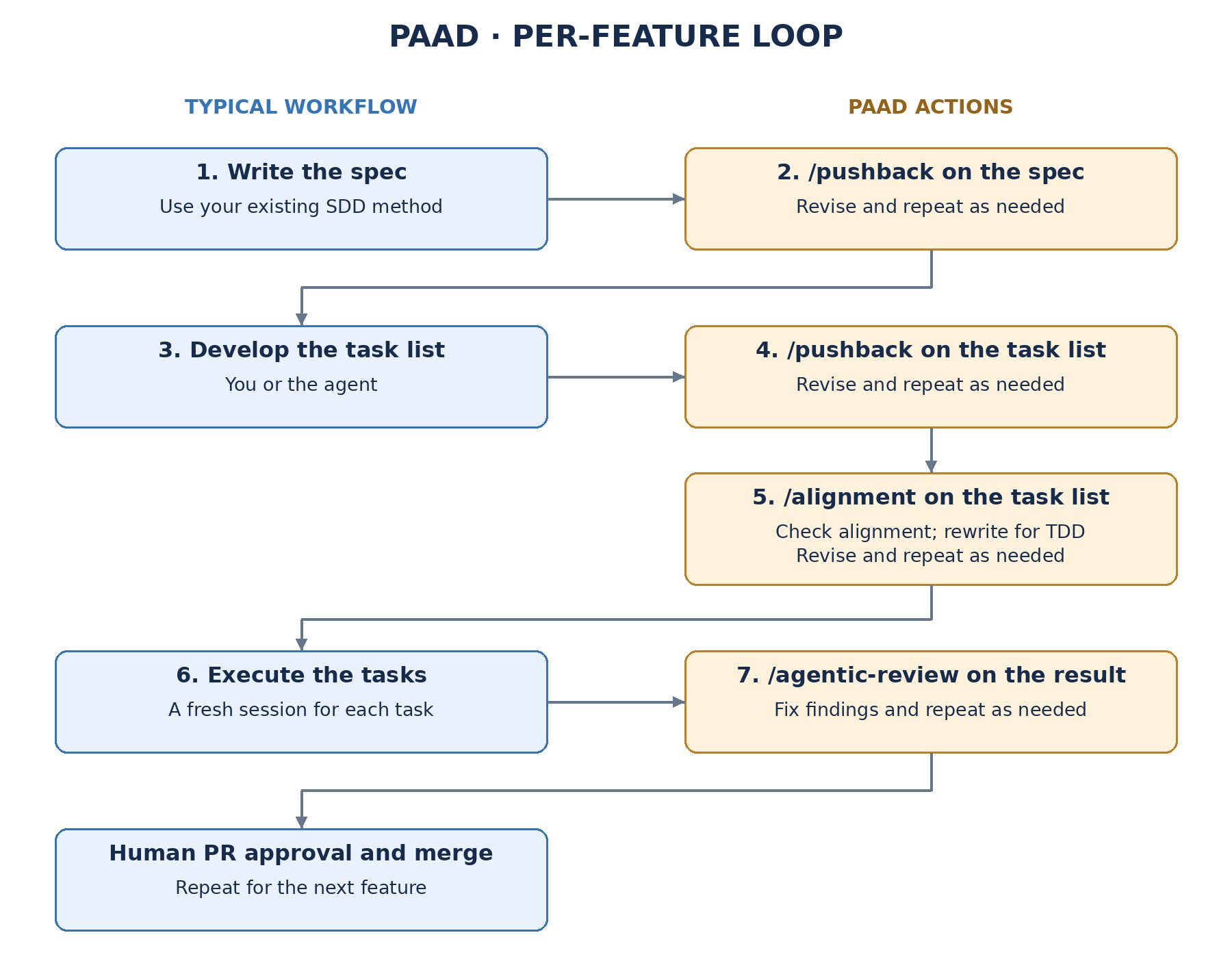
A typical workflow looks like this:
- Write the spec, using your existing spec-driven development method.
- Run
pushbackon the spec. Revise and repeat as needed. - Develop the task list (you or the agent).
- Run
pushbackon the task list. Revise and repeat as needed. - Run
alignmenton the task list to check it against the spec, and rewrite it for TDD. Revise and repeat as needed. - Execute the tasks, in a fresh session for each task.
- Run
agentic-reviewon the result. Fix findings and repeat as needed. - Human PR approval and merge. Repeat for the next feature.
That is the per-feature loop (section 10 of the tutorial). It improves the quality of each feature before it gets merged into your primary branch:
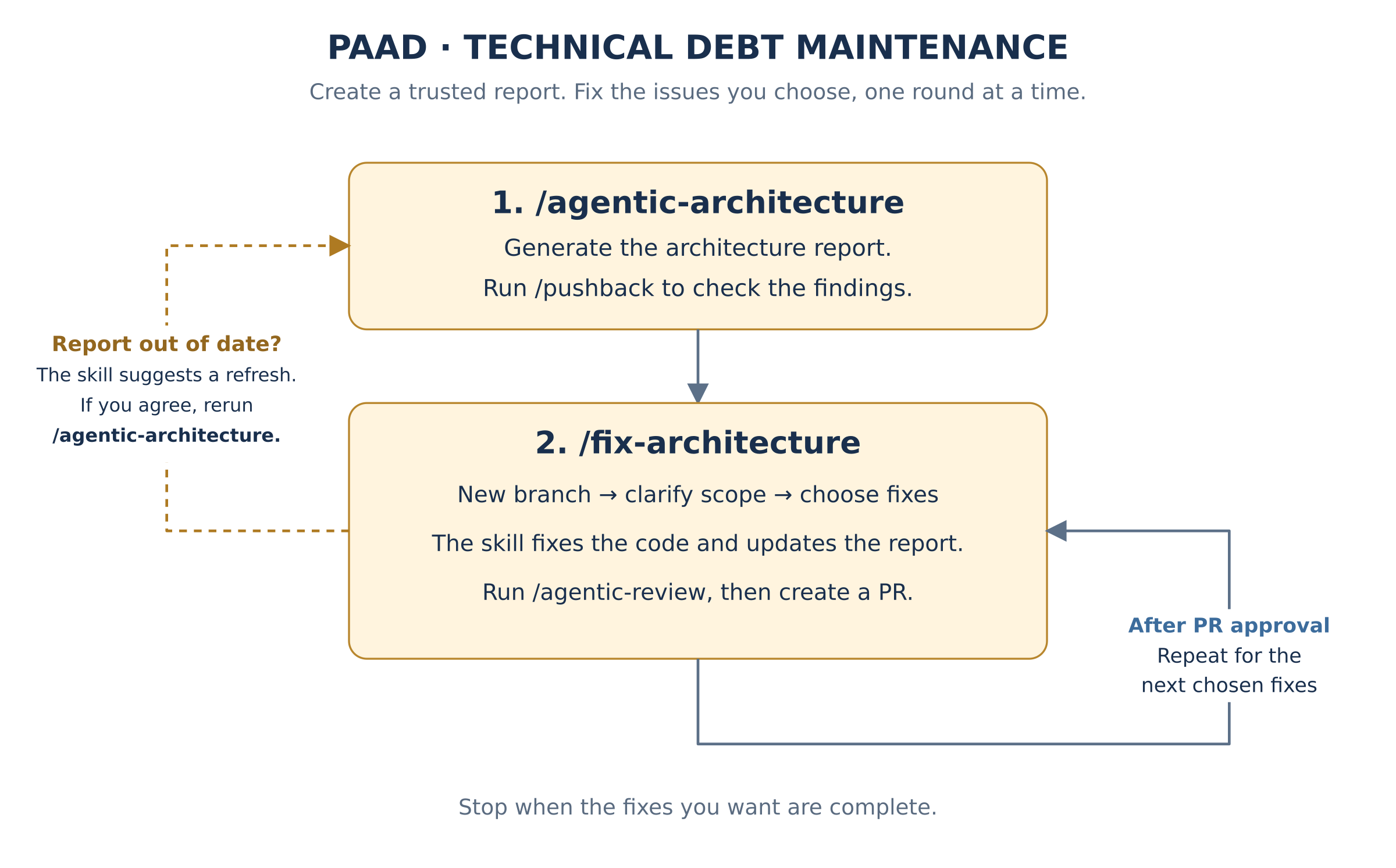
AI is now good enough that, with pushback alone, fewer issues surface in the
rest of the loop. But the loop only minimizes slop in the current task. It
can't prevent slop across the project as a whole. That takes aggressive
technical debt management: agentic-architecture to find the structural
problems, fix-architecture to work through them, and agentic-review
before the fixes merge.
Not sure if the AI is presenting you with the best options? Run rethink to
check whether the premises behind a recommendation actually hold.
Depending on the type of work, I also use (see below for full descriptions):
agentic-a11yfor UI changes and accessibility-sensitive workvibefor small fixes that still benefit from guardrails
Rerun pushback and alignment whenever the spec or the task list changes.
Configuring skills per project
Experimental. This may change or be withdrawn in any release, including a patch release. If you build on it, pin your plugin version.
Tired of typing the same extra instructions after every slash command, or of writing a wrapper skill just to add them? Put them in a file and every paad skill reads it on its own:
| File | Read by |
|---|---|
paad/config/paad.md |
every paad skill |
paad/config/<skill-name>.md |
that one skill, e.g. paad/config/agentic-review.md |
Both are optional, relative to where you run the skill (normally the repo
root). There is no schema — write plain instructions, as you would have typed
them. For example, paad/config/agentic-architecture.md:
- All output must be in simplified technical English.
- Add one more subagent that looks for over-engineering.
- Keep a log in `paad/logs/agentic-architecture.md` of every finding an
  agent raised that the verifier discarded.
The skill follows it for the whole run and passes the relevant parts to the subagents it dispatches. You know it was read because the skill's final answer opens with a line naming each file it followed:
Config: paad/config/paad.md, paad/config/agentic-architecture.md
No such line means nothing in the run came from your config.
What to watch for:
- Add, don't subtract. Config can tell a skill to skip or reorder its own safety gates, and the skill may comply. Use it for additions — an extra agent, an output rule, an artifact, a language.
- One thing is refused: config cannot change a subagent's type or give it write tools. The skill says so and carries on.
- It's untrusted input. A
paad/config/in a repo you cloned was written by someone else, and a skill will follow it. Read it before you run anything. - Results vary. If a config line matters, check the output for it.
The full details are in CONFIG.md.
What PAAD can't fix
The limits, and who has to cover them
An engineer has to drive this — including knowing when the tool is wrong.
- PAAD reports; you decide. A finding is an argument, not a verdict — see The AI sees all of your code and none of your context.
- It's non-deterministic, like the assistant it's checking. Run it twice on the same branch and you'll get overlapping, not identical, results. Run the important ones more than once.
- A report you ignore is worse than no report.
agentic-architectureon a codebase nobody has time to change just produces a document that makes everyone feel bad. - It can't fix a problem that isn't technical. No skill in here rescues a project that's short on time, short on staff, or aimed at the wrong thing.
- It's not a replacement for human review. It's a much stronger automated backstop, which is a different job.
If you want the assistant to think for you, PAAD is the wrong tool. It exists for engineers who want to stay responsible for the result and need help keeping up.
The AI sees all of your code and none of your context
Why the missing half is the expensive one
The model reads your repository faster and more patiently than any human will. That part is real, and it's why PAAD works at all.
But the expensive decisions in software rarely turn on what's in the repository. They turn on what isn't.
| The model sees | The engineer knows |
|---|---|
| Every line, in seconds | Which lines are load-bearing, and why |
| That the retry logic is duplicated | That the gateway already retries, so this layer is the bug |
| That a validation check looks redundant | That it was added after the outage nobody wrote up |
| That the design is internally consistent | That next quarter's volume breaks it |
| That two modules should be merged | That they belong to two teams and three release trains |
| That the data handling is convoluted | That the partner feed is malformed and the fix is a phone call |
None of the facts in the right-hand column are in the codebase. Most were never written down anywhere. They live in the people who were there — which is what experience actually is, once you stop treating it as a personality trait.
The failure mode isn't silence. It's confidence. An assistant missing the right-hand column doesn't stop and say it lacks context. It produces a thorough, well-reasoned, entirely plausible recommendation about the half it can see. It will tidy the retry logic instead of deleting it. It will remove the check that prevented the outage. It will hand you a tasteful list of improvements to an architecture that should be thrown away.
That advice is not obviously wrong. It's the same shape as the good advice, which is exactly why it survives review by anyone who doesn't already know better.
Why this matters to whoever is paying for it
The argument for keeping engineers in charge is usually made on feelings — trust, craft, morale. Here it's simpler than that, and it's measurable.
Seniority isn't nostalgia. It's an input the model doesn't have. The engineer who remembers the outage is not being sentimental; they are supplying a fact that is absent from every file the AI just read. Remove them from the decision and you haven't made the process leaner, you've deleted critical input and added confident output.
Which produces the line worth remembering when the reports look clean: "the AI found no problems" is not the same as "there are no problems." It means the AI found no problems in what it could see. Whether that's reassuring depends entirely on how much of the decision lived outside the repository — and only a person can answer that.
This is why PAAD reports instead of deciding, and why every skill in it ends with a human choice rather than a merge. Not because the AI is untrustworthy in some abstract way, but because it's working from a partial input and the engineer is holding the rest. Engineering-driven AI is the arrangement where those two halves actually meet. AI-driven engineering is the one where the half that was written down wins by default.
Why people are using PAAD
The four skills people reach for, and what users say about them
The strongest early adoption has come from four skills:
pushback, which critically reviews specs before implementationalignment, which checks whether the planned work actually matches the spec and designagentic-review, which performs a deeper pre-merge review than the lightweight AI review tools many developers are used toagentic-architecture, which allows you to find and fix the tech debt you're accruing over time
One user described pushback this way:
“I'm using it for every non-trivial change, and so far, I think I've argued with 2 of maybe 40 recommendations. It has improved EVERY SINGLE spec I've fed it so far.”
If English is the new programming language, pushback is the code review.
In practice, pushback consistently improves specifications, and alignment
catches gaps between the intended work and the implementation plan before
those gaps become expensive.
agentic-review serves a different but equally important role: it reviews a
working branch with multiple specialists looking for logic errors, edge cases,
security issues, and integration problems before merge. In practice, it
catches substantially more than the shallow, single-pass AI reviews now common
in tools like GitHub Copilot. It is not a replacement for human review, but it
is a much stronger automated backstop. Running it more than once is valuable.
The other skills are also valuable, especially for architecture analysis,
accessibility review, and smaller task execution with guardrails. But
pushback, alignment, and agentic-review currently form the core workflow
that delivers the most consistent day-to-day value.
What it costs you
Honest findings, paid for in tokens
PAAD is built to be honest about risk. If your spec is weak, your plan is misaligned, an architectural decision is fragile, or a change introduces problems, you hear about it early and plainly. It's for people who want the speed and still want to be able to defend the result.
That honesty has a price, and it's tokens. A single feature will cost more because you're paying to review the spec, review the plan, and review the code on top of writing it. The bet is that this is cheaper than shipping the wrong thing and rebuilding it — a good bet for software you'll maintain for years, a bad one for a prototype you'll throw away on Friday. Spend the review on the code you'll still be living with next year.
Installation
The Quick start above is the whole install for most people. This section is the long form: scopes, updating, every other agent, and the alternative routes.
What PAAD sends: PAAD runs no server and sends no telemetry. Some skills have your agent use its own web search or fetch tools, where it has them, to check facts against public sources; the skills tell it never to put your code in those requests.
Full installation instructions
Claude Code
Install the plugin
Add the marketplace:
/plugin marketplace add Ovid/paad
Install the plugin:
/plugin install paad@paad
That opens the plugin's details rather than installing straight away — you pick
a scope there: Install for you (user scope), Install for all collaborators
on this repository (project scope), or Install for you, in this repo only
(local scope). Then run /reload-plugins to activate the skills in the
session you're in. Claude Code prompts you to do that as well, so you aren't
relying on this README to know it.
If you're not using Claude Code, see other examples below.
Updating the plugin
New skills and fixes do not arrive on their own. Claude Code disables auto-update for third-party marketplaces by default, and PAAD is one, so you pull updates yourself.
Open /plugin, go to the Installed tab, select paad, and choose
Update now. Then run /reload-plugins to load the new version.
That single action already refreshes the marketplace catalog from GitHub before it looks for a new version.
To confirm which version you're on, run any skill — every skill announces its own name and v