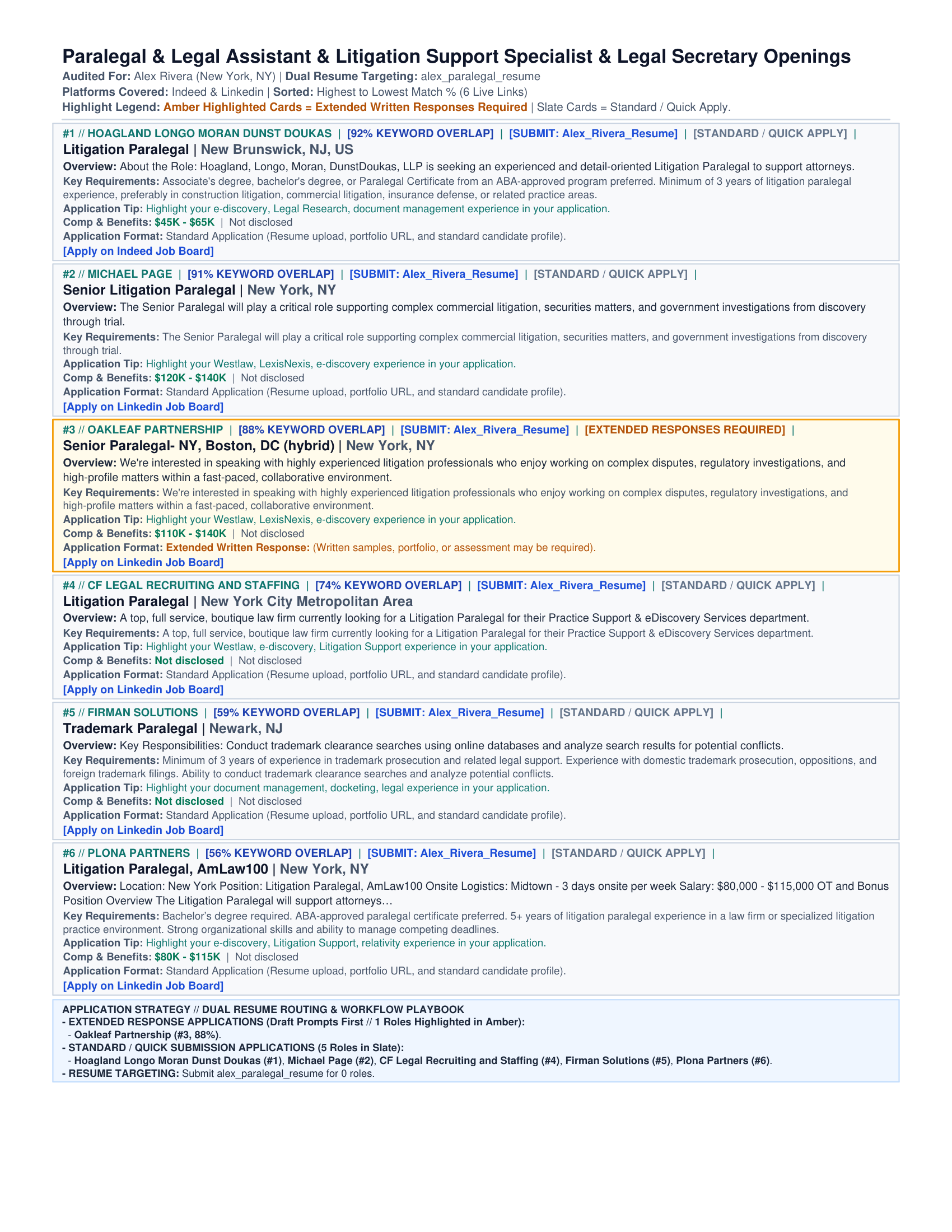
Sweepy is a free tool that searches job boards and scores each posting against your resume. It reads company career sites and job boards, drops duplicate and expired listings, then writes a ranked report. You can turn off duplicate checking for one sweep without changing your profile. The setup wizard opens a launchpad for searches, profile setup, search tuning, and Sweepy's Toolbox tasks such as engine and aggregator management.
See CHANGELOG.md for the current version and release history.
Features
- Searches many places at once. Collects postings from Greenhouse, Ashby, Lever, Workable, Built In New York City, LinkedIn, Indeed, Glassdoor, and ZipRecruiter. Each of these sources works without an API key.
- Runs every engine in parallel. Enabled engines start together. A sweep then takes about as long as the slowest engine rather than the sum of them.
- Keeps going when a board fails. Each engine gets a timeout and a circuit breaker. One failing endpoint can't stall the run or repeat the same request five times.
- Adds more engines on demand. Install HireHunt, openroles, jobdrop, or Apify from the wizard without leaving the terminal.
- Scores every posting against your resume. Reads the text of your PDF or Word resume and measures how much of it matches the posting.
- Filters out expired links. Checks each URL and removes the postings that no longer exist.
- Checks for duplicate postings across boards. Matches normalized job title, company, and location, even when boards use different URLs. Pass
--no-dedupeto keep every board's listing for one run. - Skips postings you already saw. A daily sweep reports new roles instead of yesterday's list. Sweepy suppresses reported postings for a four-day window. Pass
--include-seento bring them back for one run. - Routes you to the right resume. Sends each job to the resume track you wrote for that role, then labels the card with a color badge.
- Builds a report you can use. Produces a card-per-page PDF with clickable links, plus CSV and JSON files for your own tracking.
- Turns the CSV into an application tracker. The CSV ends with
date_applied,status,interview_stage,offer_amount,offer_date,follow_up_date,contact, andnotes. Fill them in through Excel, Google Sheets, or Notion. Sweepy copies your entries into later sweeps of the same profile. The PDF gives you one ranked reading list with apply links on each card. The spreadsheet keeps roles past the PDF card limit and records what you did about each one. Turn the columns off withexport.tracking: false.
Quick start
You need Python 3.10 or newer. On Python 3.13, some packages build from source. You may need the Microsoft C++ Build Tools first. See Installing Sweepy.
git clone https://github.com/pvega62/sweepy.git
cd sweepy
pip install -e .
sweepy
pip install -e . installs every core dependency and registers the sweepy command in your Python Scripts folder. Reopen your terminal once so your shell picks up that folder from PATH. Run sweepy to start the wizard, or add a command option such as sweepy --run. You can also run the script directly with python swee.py.
That one command gives you the two built-in engines. The wizard offers the four optional engines when you need them, and you never run a separate requirements file.
To pull every compatible engine up front instead, add one flag to the same command:
pip install -e ".[all-engines]"
That adds HireHunt, openroles, and Apify in one resolution. jobdrop stays out because its metadata can't resolve next to JobSpy. Install it with sweepy --install-engines jobdrop --allow-engine-conflicts when you want its 33 boards. The Job engines section covers both paths.
Running sweepy opens the wizard's tile-based launchpad. Use the arrow keys to move between Launch Sweep, Build Profile, Load Profile, Sweep Settings, Sweepy's Toolbox, and Exit Sweepy, then press Enter. Tile subtitles state the action in plain words, as in Run your job search now or Open a search you saved. Load Profile lets you choose a saved profile to use for the next sweep. The toolbox contains profile editing, engine management, debug logging, help, recent logs, document conversion, and updates. Build Profile collects your name, target job titles, location, and resume path. The wizard saves the profile when you finish. Run sweepy --setup --profile profiles/your_profile.yaml to edit a profile directly.
Submenus open with ← Back, which returns to the menu that opened them. Esc does the same. At a question, Esc reopens the previous answer. Inside a submenu, Esc steps up one level. At the launchpad, Esc exits. Ctrl+C quits from anywhere.
To pull new code when a version releases, run:
sweepy --update
Sweepy checks your Git remote, fast-forwards the checkout, and reinstalls requirements.txt along with any optional engines you already installed. It refuses to change a checkout with uncommitted changes. Prefer sweepy --check-update to check for a new version without changing anything.
Then run your first sweep:
sweepy --run
--run sweeps with the last profile you saved. To name a different profile, use sweepy --profile profiles/your_profile.yaml.
Turn off duplicate checking for one run without editing a profile setting:
sweepy --run --no-dedupe
sweepy --profile profiles/your_profile.yaml --no-dedupe
By default, Sweepy keeps one posting when different boards list the same normalized title, company, and location. The MCP run_sweep tool accepts deduplicate=false for the same per-run override.
Sweepy also hides postings from earlier sweeps. Review them again or start over:
sweepy --run --include-seen      # report earlier postings too
sweepy --run --reset-history     # forget them, then sweep
sweepy --reset-history           # forget the last profile's history and exit
Build or update a profile without prompts when you script Sweepy:
sweepy --setup --non-interactive \
  --name "Alex Rivera" \
  --titles "Technical Writer,UX Writer" \
  --location "New York, NY" \
  --resume C:/resumes/alex.pdf \
  --sources jobspy,openroles \
  --openroles-companies figma,stripe,notion \
  --timeout 120 --no-cache
Sweepy validates the enabled engines before it writes the file. A missing required field fails fast with the reason. In the interactive wizard, leave OpenRoles company slugs blank to skip that engine. OpenRoles only searches named company boards. Non-interactive profiles that enable OpenRoles still need --openroles-companies. Non-interactive flags cover --sources, --jobspy-sites, --hirehunt-sources, --jobdrop-sites, --openroles-companies, --apify-actor, --timeout, --cache-ttl, --no-cache, --history-days, --no-history, and --job-tracking / --no-job-tracking.
Fill in a profile file when you prefer an editor to prompts and tool calls:
cp profiles/template_custom.yaml profiles/my_search.yaml
# replace the four REQUIRED values, then run the copy
sweepy --profile profiles/my_search.yaml
The template documents every setting with its default. Sweepy prints your name, titles, and location before discovery starts. A typo shows up on the first output line.
Convert a resume or notes file to PDF without opening the wizard:
sweepy --convert path/to/resume.docx
--convert accepts .docx, .doc, .txt, .md, and .pdf files. It writes the PDF beside the original file and prints the final path.
A sweep takes 30 to 90 seconds. Sweepy prints its progress as it works:
- Loads your profile.
- Discovers openings across the platforms you turned on.
- Validates links and drops the expired ones.
- Scores each role against your resume.
- Writes your report.
What you get
Every run writes date-stamped files to the results/ folder. Earlier reports stay in place.
- A PDF report. One card per role, sorted by match score, with pay, benefits, and a link to apply.
- A CSV file. Every card field, a 1,000-character posting excerpt, and eight job-tracking columns that Sweepy copies into later sweeps. Open it in Excel, Google Sheets, or Notion.
- A JSON file. The same data in a format other tools can read.
Open the sample PDF, or view page 1 as an image.
Job engines
Sweepy includes two engines and can download four more. Every engine runs behind the same adapter. Profiles look the same no matter which one found the posting.
| Engine | Availability | What it scrapes | Proxies | User-Agent | Descriptions |
|---|---|---|---|---|---|
jobspy |
Built in | LinkedIn, Indeed, Glassdoor, ZipRecruiter, Google Jobs, Bayt, Naukri, BDJobs | Yes | Yes | Toggle |
ats |
Built in | Greenhouse, Ashby, Lever, Workable, Built In NYC | No | No | Always |
hirehunt |
Download | LinkedIn, Indeed, Naukri, Shine, Internshala, Unstop, and six company boards (Google Careers, Amazon, Meta, Apple, Netflix, Microsoft) | No | No | Always |
openroles |
Download | Greenhouse, Lever, Ashby, Workday boards you name | No | No | Always |
jobdrop |
Download | 33 boards including Google, Wellfound, Workday, iCIMS, Dice, USAJobs | Yes | Yes | Toggle |
apify |
Download | Managed actors, LinkedIn by default | Handled by actor | Handled by actor | Actor-dependent |
jobdrop reports a metadata conflict with JobSpy: it pins curl-cffi<0.8, while JobSpy requires curl_cffi>=0.16.2. The pin is stale. jobdrop runs fine on the newer library, which still includes every impersonation profile it uses (safari17_2_ios, chrome120, chrome124).
A plain pip install of both still fails. --install-engines all leaves jobdrop out. Add --allow-engine-conflicts to install it the supported way. Sweepy installs jobdrop with --no-deps, then resolves its other requirements, so curl_cffi stays at JobSpy's version and both engines run.
sweepy --install-engines all
sweepy --install-engines openroles,apify
sweepy --install-engines jobdrop --allow-engine-conflicts
pip check still reports jobdrop's stale upper bound after that install. The warning describes the metadata, not the running code.
Or open the wizard and choose Sweepy's Toolbox then Download job engines. That screen lists each engine's boards and install state. It asks before it runs pip. Pick a missing engine while building a profile and the wizard offers the same download. Sweepy never runs an install without your confirmation.
Disk footprint
Measured on Windows with Python 3.13:
| Install | Packages on disk | Notes |
|---|---|---|
Core (requirements.txt) |
283 MB | 53 packages, including pandas, pymupdf, and the MCP SDK |
hirehunt |
+13 MB | Adds rich and markdown-it-py |
openroles |
+0.3 MB | Python standard library only |
apify-client |
+14 MB | Adds impit and more-itertools |
jobdrop |
+406 MB | Led by scipy (134 MB), playwright (113 MB), tls-client (93 MB), and selenium (34 MB) |
A full install of the compatible engines takes about 310 MB. Forcing jobdrop in as well brings the package total to about 715 MB, before it downloads a browser.
Browser binaries live outside the Python environment and arrive on first use:
- Playwright's Chromium build is about 710 MB (Chromium plus its headless shell).
- A full Playwright set, including Firefox and WebKit, runs about 1.2 GB.
- Camoufox, which
jobdropuses for its stealth path, downloads a patched Firefox on first launch.
Sweepy runs every built-in engine without a browser. The core install needs none of that space.
List engines and their install state at any time:
sweepy --list-engines
openroles reads boards you name and requires company slugs. apify reads an APIFY_TOKEN environment variable and bills against your Apify account.
Installing an engine doesn't switch it on. Add it to a profile in one of three ways:
- Wizard. Run
sweepy, choose Sweepy's Toolbox, then Manage job engines, then Choose engines and settings. Installed engines show an[installed]tag. Tick one and the wizard prompts for its settings. - Profile edit. Load the profile, then pick Manage job engines from the review screen.
- Command line. Name the engine in
--sourcesand supply its settings:
sweepy --setup --non-interactive --profile profiles/your_profile.yaml \
  --sources jobspy,ats,jobdrop --jobdrop-sites linkedin,indeed,wellfound
Each route validates the engine's settings before it writes the file. A missing value, such as openroles company slugs, fails with the reason instead of saving a broken profile.
Choosing boards
The profile wizard's platform step lists every board Sweepy can search, grouped under the engine that reads it. All 63 boards appear in one place instead of only the built-in five.
| Group | Boards | Tag |
|---|---|---|
jobspy (8) |
LinkedIn, Indeed, Glassdoor, ZipRecruiter, Google Jobs, Bayt, Naukri, BDJobs | built in |
ats (5) |
Greenhouse, Ashby, Lever, Workable, Built In NYC | built in |
hirehunt (12) |
LinkedIn, Indeed, Naukri, Shine, Internshala, Unstop, Google Careers, Amazon, Meta, Apple, Netflix, Microsoft | needs download until installed |
openroles (4) |
Greenhouse, Lever, Ashby, Workday | needs download, and needs company slugs |
jobdrop (33) |
Google, Wellfound, Workday, iCIMS, Dice, USAJobs, Handshake, and more | needs download, and conflicts with JobSpy |
apify (1) |
LinkedIn through an Apify actor | needs download, and needs an APIFY_TOKEN |
Each row shows its engine and install state, such as Indeed [jobspy · built in] or Wellfound [jobdrop · needs download]. You see the tag before you commit to the choice. Tick a board from an engine with no local install and the wizard prints the command that installs it. An installed engine shows installed instead. Reopening a saved profile shows its current boards already ticked. Sweepy keeps a board from an uninstalled engine in the profile, and the sweep skips that engine with a warning until the install finishes.
Engine settings
sources:
  enabled: [jobspy, ats, openroles]
  openroles:
    ats: [greenhouse, lever, ashby, workday]
    companies: [figma, stripe, notion]
  jobdrop:
    sites: [linkedin, indeed, google, glassdoor]
    headless: true
    fetch_descriptions: true
    proxies: ["user:pass@host:port"]
cache:
  enabled: true
  ttl_seconds: 3600
history:
  enabled: true
  retention_days: 4
  match: url+role
  path: null
orchestrator:
  timeout_per_source_seconds: 180
  circuit_breaker:
    failure_threshold: 5
    cooldown_seconds: 30
Older profiles keep working. The board booleans under sources.jobspy still turn individual JobSpy boards on and off. Any profile without a sources.enabled list defaults to JobSpy plus the built-in ATS readers.
- Descriptions stay on by default. Scoring matches posting text against your resume. Turn
fetch_descriptionsoff only if you accept weaker matches for a faster sweep. - Proxies stay opt-in per engine. The wizard reads them from a file or accepts one inline, hides the password while you type, and never prints the contents.
hirehuntlacks a proxy hook, so Sweepy logs a warning when a profile configures one. - The cache starts on. A repeated query with the same engines and settings returns the previous results for an hour. Clear it with
cache.enabled: false, or shortenttl_seconds. - Timeouts stop at the boundary. Python can't stop a thread that already blocks inside a library call. Sweepy stops waiting and moves on, and each library applies its own HTTP timeouts underneath.
- The circuit breaker skips a failing engine. After five consecutive failures, Sweepy stops calling that engine for 30 seconds and reports it in
skipped_sources.
Reported postings
Sweepy records every posting it reports and skips the same posting on the next sweep. Sweepy stores the record in ~/.sweepy/history.db, scoped per profile. Set SWEEPY_HISTORY_PATH to store it elsewhere. The wizard's Sweep Settings screen exposes the on/off switch and the retention window.
history:
  enabled: true
  retention_days: 4   # 0 reports every posting on every run
  match: url+role     # url (strict) or url+role (default)
  path: null          # null uses ~/.sweepy/history.db
- Retention is a re-report cadence. Sweepy suppresses a posting until
retention_dayspass, then reports it again. A continuously live listing returns at most every four days. - Matching is forgiving by default. Sweepy compares canonical URLs after it strips tracking parameters and fragments. It then falls back to normalized title, company, and location, so a repost on another board counts as the same role. Set
match: urlto require a canonical URL match. - Only live postings count. A posting enters history after its URL passes validation. Expired links never become invisible.
- MCP callers get the same default.
run_sweepreportspreviously_seen_countandnew_count. Passinclude_seen=trueto review earlier postings, or callclear_historyto forget them.create_profileacceptshistory_config.
Adding another engine
- Create
engine/adapters/<name>_adapter.pyand subclassScraperAdapter. - Set
name, the threesupports_*flags,default_concurrency, andlibrary. - Write
preflight()to check config andscrape()to return a DataFrame. - Register it in
engine/adapters/__init__.py. - Describe it in
engine/engines.pyso the wizard can show and install it. - Add a config block to
engine/sweep_config.pyand a prompt to_ENGINE_PROMPTSinengine/config.py. - Add the package to
requirements-engines.txtand the pyproject extras. - Test the adapter on its own, then enable it alone during a sweep.
The orchestrator handles the rest. It dispatches by name and enforces the timeout. Any frame that comes back gets normalized.
Agent judgment
Sweepy scores postings by shared vocabulary, and that scoring doesn't call a model or use the network. The same inputs produce the same score, which measures wording, not fit. The MCP server treats an agent assessment as the expected path.
run_sweep doesn't call a model. It returns assessment_mode: "agent", assessment_required: true, and assessed_count: 0. The workflow continues with get_jobs, an independent assessment of each role against the resume, submit_judgments, and render_report. Pass every judgment in one judgments list to keep a 24-role assessment to one call. Assessed cards show NN% MATCH. Unassessed cards keep NN% KEYWORD OVERLAP.
render_report takes a playbook argument for the closing strategy box. Write plain prose. Sweepy escapes ampersands and turns newlines into line breaks. **bold** renders as bold text, and angle brackets become plain text. Sweepy stores the playbook with the session, and a later render reuses it instead of the generated one. Starting a new sweep clears it.
In agent mode, render_report refuses to build a mixed report. It returns an error listing the unassessed job ids. The assistant reads that list and submits judgments for the missing ids. Profiles that want keyword-only reports set report.assessment: "keyword". A command-line run also reports keyword overlap, since no agent supplies judgments. Set SWEEPY_REQUIRE_JUDGMENTS=1 when the gate must apply to every profile and to export_report as well.
A live sweep scrapes boards for a minute or longer. The MCP serv