
Token Usage
Token Usage is an Obsidian plugin that tracks Claude Code token consumption from locally stored session files.
Instead of relying on API access or external dashboards, Token Usage reads Claude Code's local JSONL files and displays real-time token statistics directly inside Obsidian — broken down by type, time range, and model.
Full documentation & manual — installation, data sources & transparency, core concepts, settings reference, and an FAQ, all on one searchable page (English, German, French).
For power users: Token Usage tracking is machine-wide by default (see How It Works) — but the Vault / Project Breakdown splits that back down by working directory, so you can see exactly which client, project, or vault consumed how many tokens and when. Export it as a standalone Markdown report to hand to a client as a usage/billing reference.
Features
- Vault/project breakdown for power users — see exactly which vault or client project consumed how many tokens and when, exportable as a standalone Markdown report for client billing (see Vault / Project Breakdown)
- Live sidebar panel with token breakdown across five time ranges
- Separate display of all four token types: Input, Output, Cache Write (C.Write), Cache Read (C.Read)
- Anchored 5-hour window matching how Anthropic actually meters: it opens with your first message and runs exactly five hours; a new one only starts once that span has elapsed, in fixed chained blocks regardless of pauses, and independently of the weekly reset
- Context sub-labels under each section title — shows scope at a glance ("Anchored window · counts toward rate limit", "Started yesterday · spans multiple days", "Calendar day · since midnight")
- Logarithmic scale for minibar widths — keeps all four token types visually proportional even across large magnitude differences
- Spike warning — amber badge when today's usage is ≥ 2× your personal recent average (window follows your Claude data retention setting)
- Collapsible sections — all five time-range sections fold individually, state persists across refreshes
- Activity heatmap of your billing week — one row per calendar day, one cell per two hours. Colour shows pace rather than volume: red marks the rate at which you would arrive exactly at the 5-hour wall as the window closes. Collapsible, with an Active Days panel beside it
- Two limits, no invented third — Anthropic enforces a 5-hour window and a weekly cap. There is no daily limit, so the Today figure is not a quota; it compares you against your own recent average per active day
- The weekly reset calibrates itself — the weekly cap resets at an hour that differs per account. The plugin reads that hour out of your own session history and says in Settings whether the value was detected or set by hand
- Rate limit tracking — session and weekly limit hits auto-detected from local JSONL files, with threshold estimates and 6-week billing chart in the dashboard
- Model distribution — usage split by Haiku, Sonnet, Opus, and Fable
- HTML dashboard with 30-day charts, model donut, top sessions table, cache efficiency analysis, and rate limit history
- Markdown report export directly into your vault
- Daily archive — compact Markdown summaries written to your vault, so long-term trends survive Claude Code's own 30-day cleanup. Backfills automatically on first install and after any gap
- Adjustable Claude data retention — read and set
cleanupPeriodDaysdirectly from Settings, no manual JSON editing - CSV export, two ways — from the sidebar header into a configurable vault folder, or via the command palette. Three files (projects, daily detail, key figures), RFC 4180 with a UTF-8 BOM so Excel opens them correctly on the first try. The dashboard additionally offers a browser download
- Activity calendar over two months instead of one, so the start of a month is no longer a nearly empty grid
- Built-in Help panel with a 21-entry glossary and cost reference, including "What counts toward a limit", "Activity heatmap", "Weekly reset" and "Archive & long-term data"
- "← Back" button in the header returns from the glossary to the data view
- Language selection — English, German, French, Italian, and Spanish (community translations welcome)
- Command Palette integration for all major actions
- No API key required — reads local files only
- Local-first and privacy-friendly
- Machine-wide by design — reads from a single global location (
~/.claude/projects/), independent of which Obsidian vault is open. Numbers reflect all Claude Code usage on your machine, not just this vault (broken back down per vault/project — see above)
Why Token Usage?
As Claude Code usage grows, understanding where tokens actually go becomes important for both cost awareness and workflow optimization.
Most existing solutions require organization-level API access or live in separate dashboards outside your daily workflow.
Claude Code already stores detailed usage information locally in JSONL session files. Those files contain all token data, timestamps, session identifiers, and model information.
Token Usage brings those insights directly into Obsidian, where many users already manage their projects, notes, and knowledge base.
Anthropic doesn't publish the actual token limit behind a rate-limit hit — it exists server-side and stays invisible. Token Usage makes it empirically visible instead: every detected rate-limit hit becomes a data point, and enough data points become an estimate of your own session and weekly limits. Not a guess, not marketing language — a number built from what actually happened on your account.
The estimate isn't static — it quietly gets more precise the longer you use Claude Code. Every new rate-limit hit refines it further, so the number you see today is more reliable than the one from your first week.
The 5-hour estimate is shown as a median together with a usual band, the middle half of your observed hits. The same limit is rarely reached at exactly the same total, because other Claude use that Token Usage cannot see (such as claude.ai in the browser) draws on the same limit, so one number alone would look more precise than it is.
How It Works
Token Usage scans Claude Code session files stored at ~/.claude/projects/ and extracts token data from every recorded interaction.
Example JSONL entry:
{
  "input_tokens": 3,
  "cache_creation_input_tokens": 16926,
  "cache_read_input_tokens": 0,
  "output_tokens": 252
}
The plugin aggregates all four token fields across sessions and time ranges. All calculations run locally on your device.
A live file watcher detects new activity the moment Claude Code writes a response. A configurable fallback polling interval runs in parallel.
This directory is global, not per-vault. ~/.claude/projects/ lives in your user profile, outside any Obsidian vault, and contains one subfolder per working directory Claude Code has ever been run in. Token Usage reads all of them and aggregates the totals. This means:
- Switching between Obsidian vaults has no effect on the numbers — the plugin doesn't read anything from the vault itself, so the same totals show up no matter which vault is open.
- If you use Claude Code in more than one place on this machine (other vaults, plain code repositories, etc.), all of that usage is combined into one number by default. The Vault / Project Breakdown below splits that combined number back down per working directory, with no extra setup.
What is measured (and what isn't)
Because the plugin reads what Claude Code writes to disk, it covers every way you run Claude Code: in a terminal, inside Obsidian, in an editor such as VS Code, and the agent mode built into the Claude desktop app (which runs Claude Code embedded and writes the same session format to its own location — Token Usage reads that too, since v1.8).
It cannot show ordinary chat — the conversations you have in the Claude desktop app or on claude.ai. Those never write token counts to your machine. The only usage signal exposed there is a rounded percentage of your current limit, not the per-request token counts this plugin is built on.
This matters for one number in particular: the rate limit estimates in the dashboard are derived from how many tokens were counted when a limit was actually hit. Chat usage draws on the same plan limit but leaves no local trace, so if you use chat alongside Claude Code, the real limit sits somewhat higher than the estimate shown. The optional status line feed below removes this blind spot, because the official percentage includes everything.
Optional: official percentages from your status line (since 2.1.0)
Claude Code knows the official rate-limit percentages of your plan, the numbers /usage shows. Two small scripts in extras/ write them to ~/.claude/ratelimit-log.jsonl. When that file exists, Token Usage anchors its limits on it:
- the 5-hour window starts when the official window starts, even if it was opened outside your logs (claude.ai, another device, another tool)
- at every reading, both limit rings show exactly the official percentage, and between readings they count on with your tokens
- the weekly limit and the 5-hour limit come from the official figures instead of from your own limit hits
Which script you need depends on where you work:
- In a terminal:
ratelimit-statusline.jsas your Claude Code status line. Free, and readings come in while you work. - Inside Obsidian or another client without a status line:
ratelimit-poll.js, run on a schedule (for example three times a day). Each run is a tiny real request, and it opens a 5-hour window if none is open at that moment.
You need: a Pro or Max subscription, Node.js (check with node --version; Claude Code installed with the native installer does not bring it along), a recent Claude Code version, and for the poll the Claude Code CLI.
The full guide with step-by-step setup for Windows, macOS and Linux, checks, troubleshooting, privacy and removal: extras/README.md. Without either script, everything works as before.
Updated 10.10.2026: the first version of this section did not mention Node.js and offered only the status line, which does not run in clients like Obsidian. Both are added.
Vault / Project Breakdown
This is the power-user feature: see exactly which vault or client project consumed how many tokens, and when — exportable for billing.
Every JSONL entry Claude Code writes already carries a cwd field — the exact working directory the request ran in. Token Usage uses that to break the machine-wide totals (see above) back down by vault, with no extra setup.
Two levels, shown in different places on purpose:
- Vault (root) — the working directory a session actually started in. This is what the Dashboard and sidebar show: one row per vault, no further breakdown. A single session's
cwdcan drift during the session itself (e.g. a tool call briefly working inside a subfolder) — Token Usage tracks the session's start directory as the stable vault anchor, so that drift never splits one vault's usage into multiple rows or misrepresents how many days you actually worked in it. - Project (sub-folder) — the finer-grained, individual
cwdvalues seen within a vault. This level is deliberately not shown in the Dashboard (it reflects incidentalcwddrift, not real per-topic effort, and gets noisy fast) — it only appears in theVault_Token_Usage_Projects.mdexport's "Project Detail" section, for power users who want to dig further (e.g. pull it into Excel).
Display name: just the last folder of the path (e.g. Thats_Me), not the full path — kept deliberately simple. If you use more than one Claude Code working directory sharing the same folder name, their usage is combined under that shared name.
Where to see it:
- Dashboard → Projects tab — an overview table (vault, total tokens, % of the whole, active days, first/last active date) plus a day-by-vault detail table that follows the header's period dropdown, same as the rest of the dashboard. Both tables are vault-level only. Click any column header to sort by it (click again to reverse). See Dashboard below.
Vault_Token_Usage_Projects.mdexport — a standalone Markdown report with the same vault-level overview and daily-detail tables, plus an additional "Project Detail" section with the sub-folder breakdown per vault. Written into your vault via the "Create Vault Token Usage Projects report" command (or the path configured in Settings). Handy to hand to a client as a usage/billing reference, separate from your personalToken Usage Report.md.
History: the per-vault (and per-project) breakdown is written into the same daily archive files (see Archive below) as a nested byRoot: block in the frontmatter, so it survives beyond your Claude data retention window exactly like the rest of the archive — no separate backfill step needed.
Screenshot
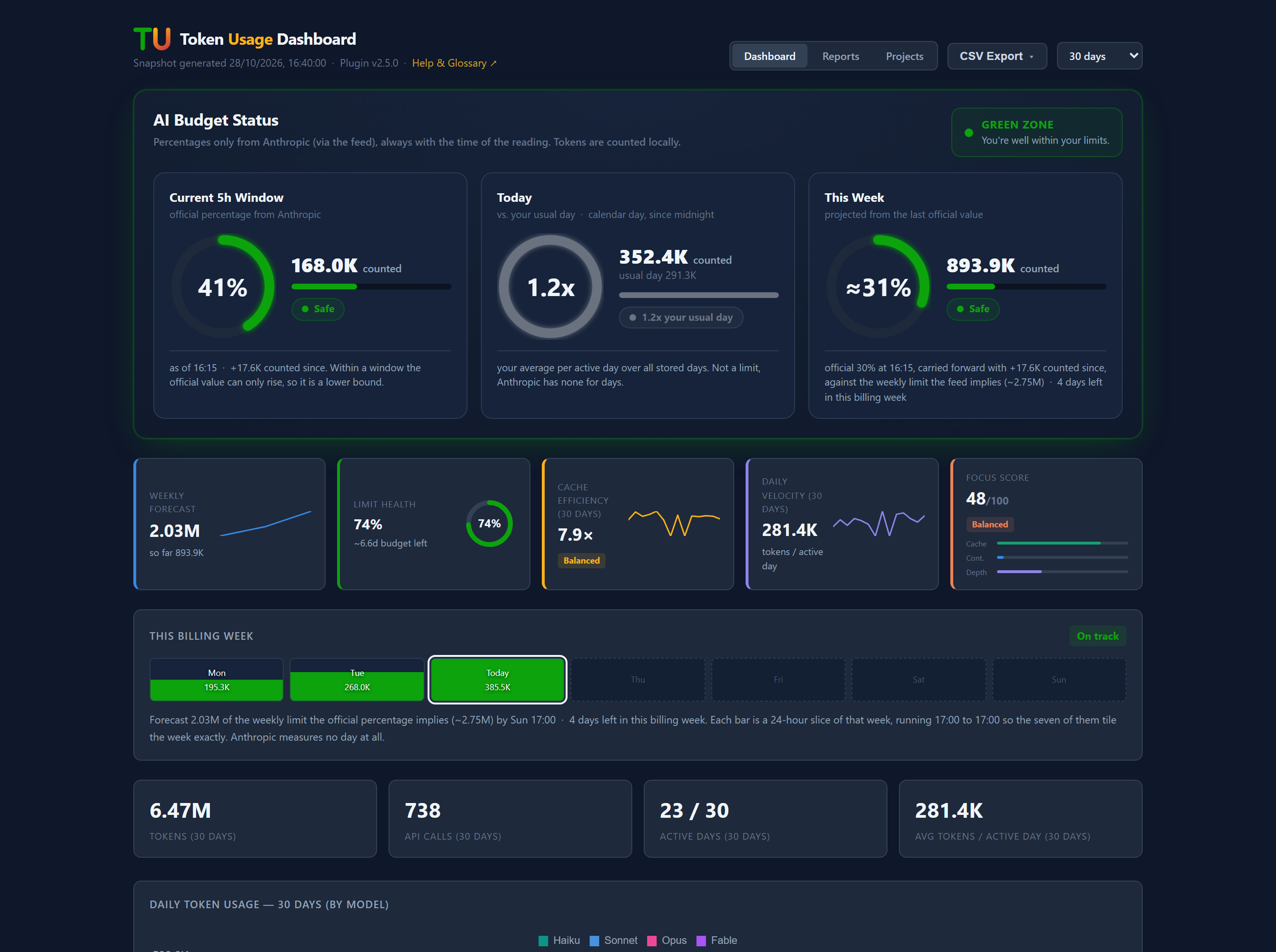
The dashboard: where you stand against your 5-hour window and your weekly limit, both estimated from your own measured history.
What You See in the Sidebar
Current 5h Window
The current anchored 5-hour window — the period Anthropic actually meters. It opens with your first message and runs exactly five hours; a new window only starts once that span has fully elapsed, chained in fixed five-hour blocks regardless of how much idle time falls in between. This is a real window with a real start time, not a sum of the last five hours — and it is independent of the weekly reset, which runs on its own schedule and does not also start a fresh 5-hour window. Shows Input, Output, C.Write, and C.Read as separate rows; the plugin counts Input and Output against the limit (officially, cache writes count as well, see the 2.1.0 changelog). Sub-label: "Anchored window · counts toward rate limit".
The sidebar is organised as an icon rail with four pages: Today, Calendar, Analytics, and Settings. The sections below live on Today; the 7-day and N-day figures sit on Analytics as KPI tiles with sparklines.
This Session / Today
Two time-range sections, each showing the same four token rows. A small logarithmic bar next to each value keeps all token types visually readable even when magnitudes differ by orders of magnitude (e.g. Input at a few hundred vs C.Read in the millions).
This Session and Today carry a dynamic sub-label explaining their scope:
- This Session — shows the session start time ("Started today at 09:27" or "Started yesterday · spans multiple days"). A session in Claude Code can span multiple calendar days — so "This Session" may be larger than "Today". This is expected.
- Today — always shows "Calendar day · since midnight".
These three views — Current 5h Window, This Session, and Today — are independent cuts through the same data. They do not automatically nest inside each other. See the help page for a full explanation.
Models (last 7 days)
A stacked percentage bar showing the model distribution across the past 7 days, colored by model family:
| Model | Color |
|---|---|
| Haiku | Teal |
| Sonnet | Blue |
| Opus | Pink |
| Fable | Violet |
| Other | Gray |
Model colours deliberately avoid green, amber, and red. In this plugin those three mean good, warning, and critical — a colour either identifies something or judges it, never both.
C.Write and C.Read
Cache Write (C.Write) and Cache Read (C.Read) are shown as separate rows throughout the sidebar because they have very different cost implications:
- C.Write (aqua) — 1.25× the input price for a 5-minute cache, 2× for a 1-hour cache. In our own logs about 90% of the cache writes from Claude Code on a subscription were the 1-hour kind, while subagents wrote 5-minute caches. Hover over a C.Write row to see the split for that period (since 2.1.0).
- C.Read (violet) — 0.1× the input price on most models, 0.05× on Opus 5.5 and Sonnet 5.5, 0.025× on Fable 5.1 (Anthropic pricing page, October 2026).
Those are cost ratios. For the limits, measurements against the official percentages show that cache writes clearly count toward the 5-hour window and cache reads a little; the 2.0.0 statement that neither counts was wrong (see the 2.1.0 changelog). The plugin's own figures still count input and output only. Thanks to a hint in the Obsidian forum for the 1-hour versus 5-minute distinction.
The ratio C.Read ÷ C.Write is the Reuse Factor. A high value means the same context is being reused efficiently across many requests.
Dashboard
The dashboard button in the sidebar header generates a self-contained HTML report and opens it in your default browser.
The dashboard includes:
-
Summary cards — total tokens, requests, active days, and average tokens per active day, all scaled to your selected Report period (30 days / 60 days / 6 months / 12 months)
-
Daily stacked bar chart — input, output, and cache tokens by day across the full Report period, blending live session data with the daily archive for anything older than your Claude data retention
-
Cache efficiency section — line chart with C.Write and C.Read across the full Report period, Reuse Factor card, and a dynamic interpretation of your usage pattern
-
Model distribution donut — share of each model family over your live data window (recent days, not the full Report period — the archive stores aggregates, not individual requests)
-
Request size histogram — distribution of tokens per individual request, live data window only, same reason
-
Top sessions table — the 10 most token-intensive sessions by date and identifier, live data window only, same reason
-
Projects tab — token usage broken down by vault/project: an overview (which vault, total tokens, share of the whole, active days, first/last active date) plus a day-by-vault detail table for the selected Report period. See Vault / Project Breakdown below.
-
CSV Export menu in the header, next to the tabs — downloads the projects overview, the daily detail matrix, or the key figures. These go to your browser's download folder, because a page opened in a browser cannot choose a target directory. For files written straight into your vault, use the CSV button in the sidebar header instead; the menu says so at the point where you click
The dashboard uses Chart.js (loaded once from CDN) and works offline after the first load.
Help Panel
The "?" button in the sidebar header toggles between the data view and a built-in glossary. A "← Back" button appears in the header while the glossary is open — click it to return to the data view without hunting for the "?" button again.
The glossary explains:
- What a token is
- The difference between Input and Output
- What C.Write and C.Read mean and why they matter
- How to read the Reuse Factor
- What the anchored 5-hour window represents and why the countdown shows a tilde (~)
- What counts toward a limit — the two real limits, why there is no daily one, and why cache tokens do not count
- How to read the activity heatmap — why it spans eight rows, and why colour means pace rather than volume
- Exporting your data — the two CSV routes an