
Wevir
A local-first desktop workspace for AI coding agents
English · 简体中文 · Downloads · Discussions
Overview
Wevir is a Codex-style, open-source desktop workspace for AI coding agents, independent of any single model provider. It supports your own API keys, any OpenAI-compatible endpoint, and existing subscriptions (most with multiple accounts), with model switching mid-session.
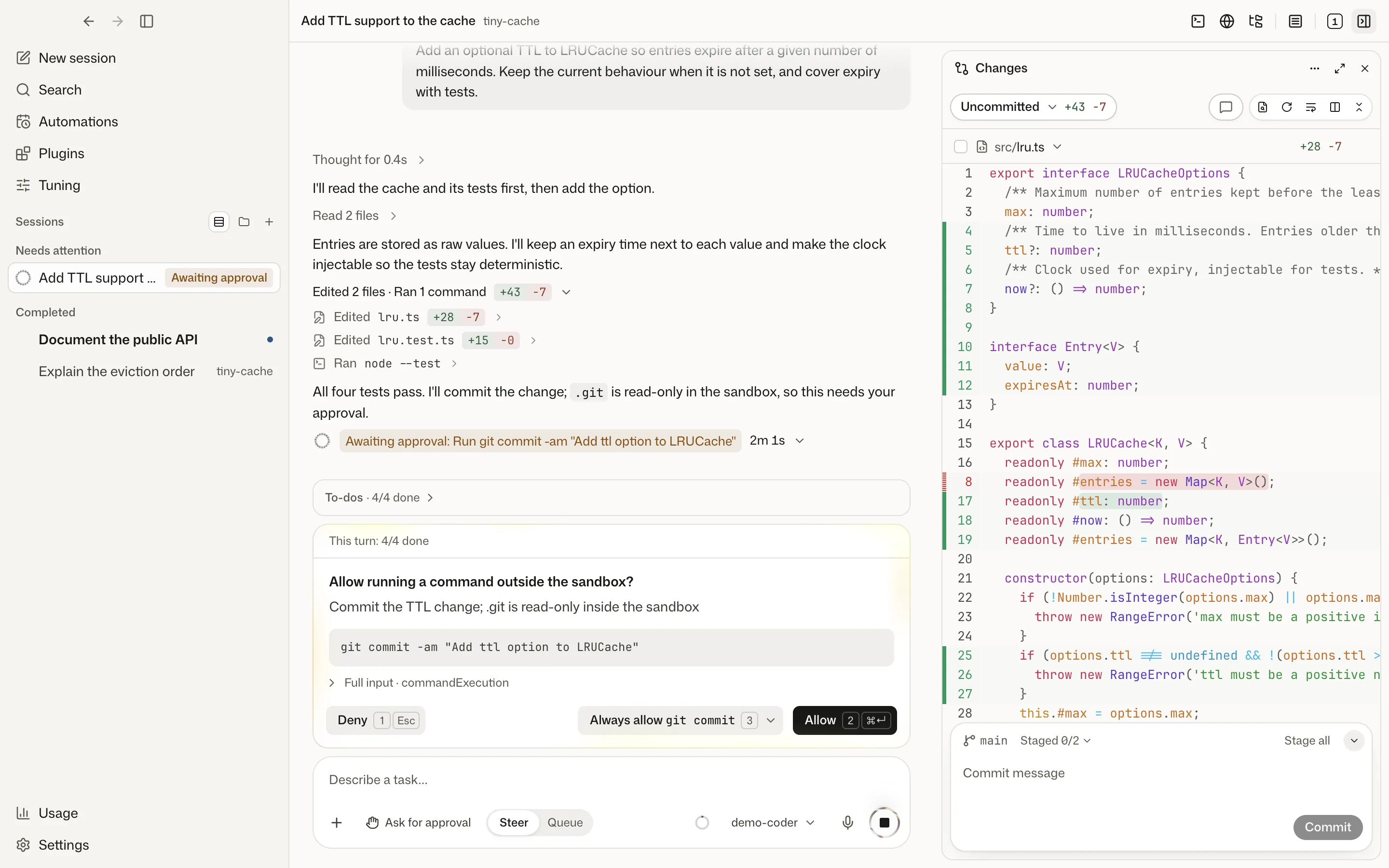

Sessions, approvals, change review, project files, and an agent-driven built-in browser live in one desktop app. A local Host runs the agents and keeps their data on your machine; the wevir CLI connects to the same Host.
Highlights
- Model per task, not per app. The open-source Codex agent runtime runs locally; Wevir's gateway translates its requests for OpenAI, Anthropic, Google, DeepSeek, a dozen other providers, local Ollama, and any OpenAI-compatible endpoint. Switch model or provider between turns within the same session.
- Multiple subscriptions, multiple accounts. Codex (ChatGPT), Claude Code, Grok, OpenCode, Antigravity, and Cursor subscriptions work side by side, each with multi-account support. Accounts have isolated sign-in and data, custom labels, and per-account usage in the sidebar; each session runs on the account you choose.
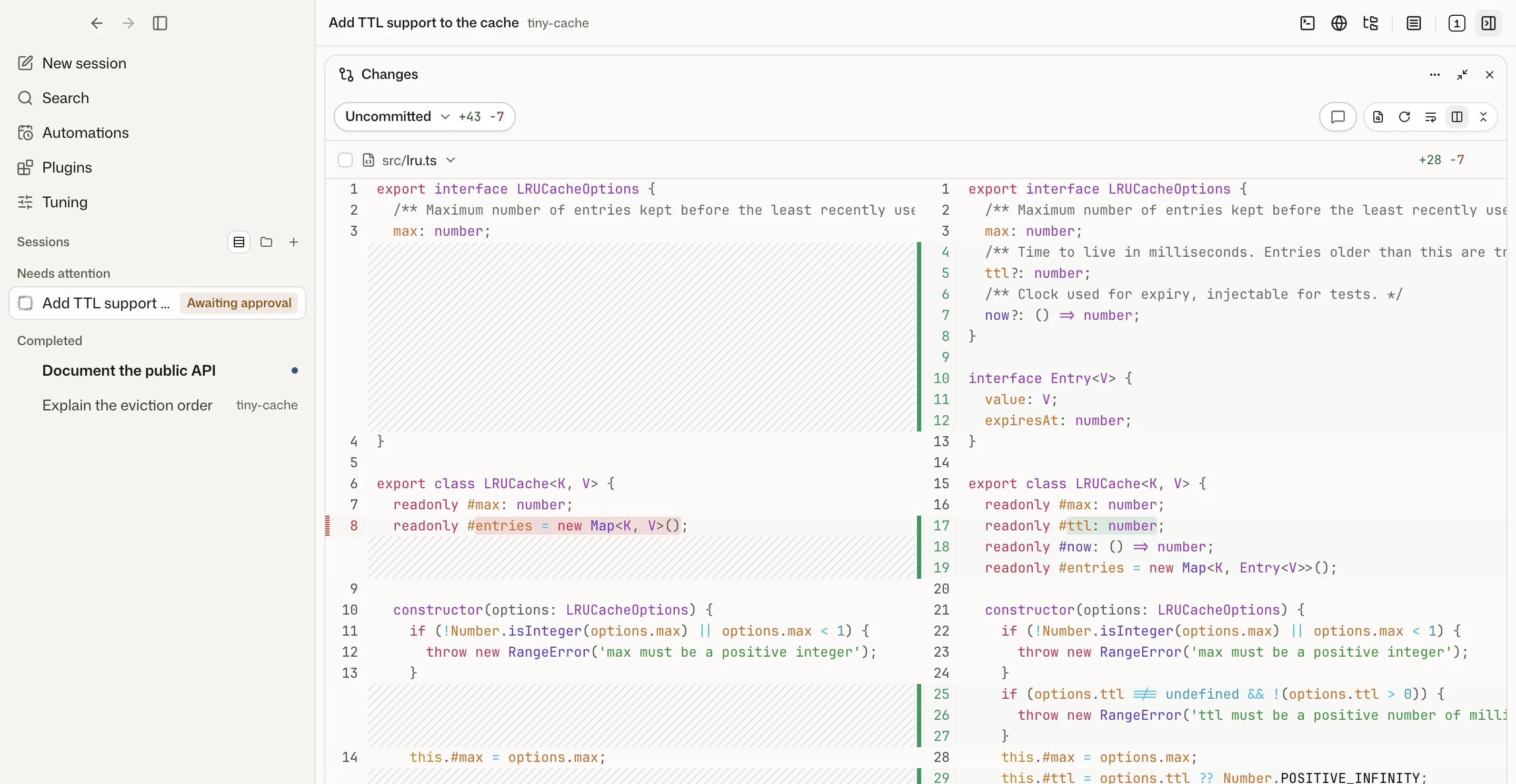
- Review before anything lands. Commands outside the sandbox require approval, every turn is checkpointed, and the changes pane shows per-turn, branch, or uncommitted diffs with comments, staging, and commits.
- Local-first. Sessions, settings, and API keys stay in a local data directory. Keys are held by the Host and never passed to the agent process.
Features
Models and accounts
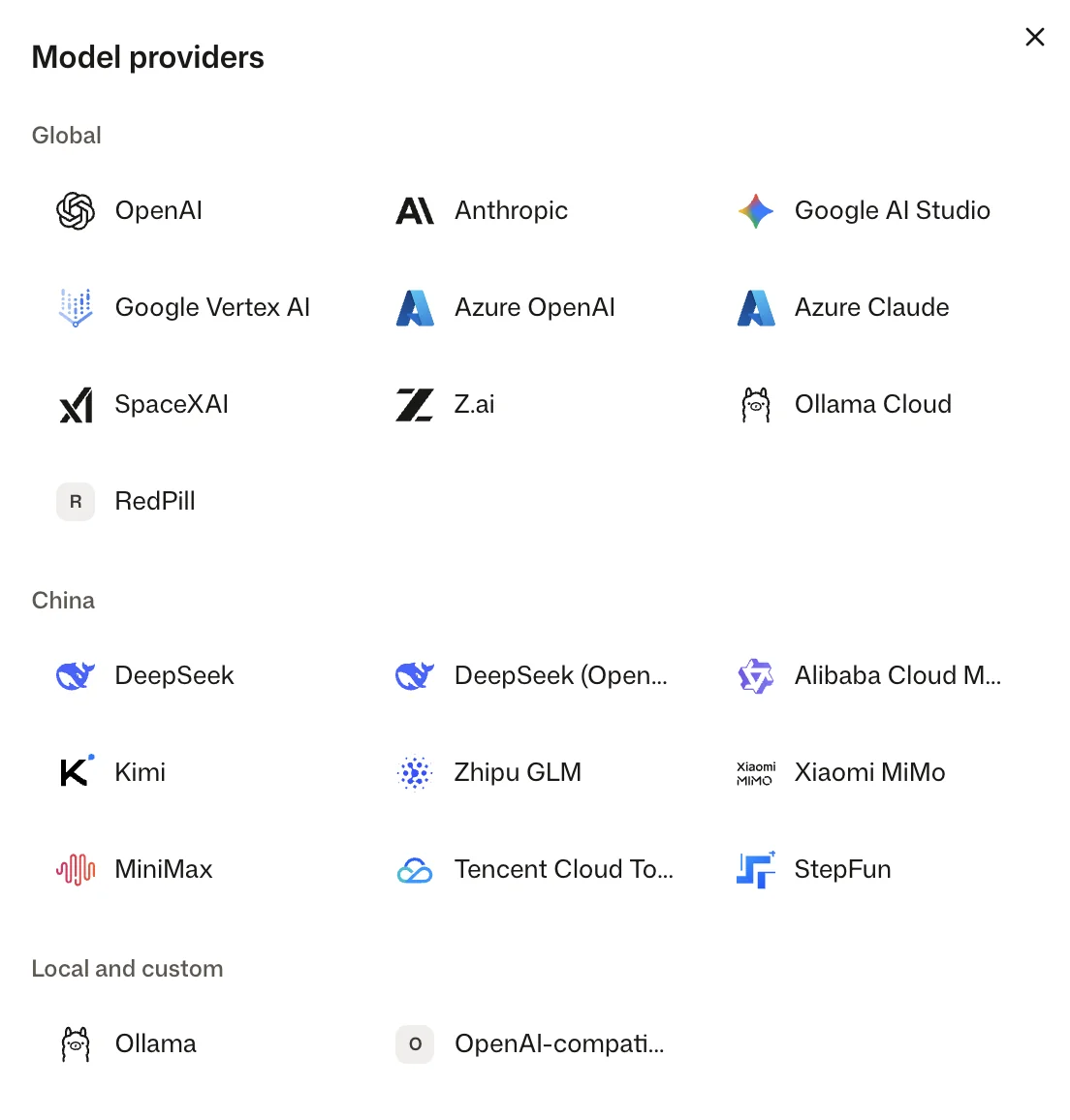
- One runtime, many providers: OpenAI, Anthropic, Google AI Studio, Google Vertex AI, Azure OpenAI / Microsoft Foundry, SpaceXAI (Grok API), DeepSeek, Alibaba Cloud Model Studio, Kimi, Z.ai / Zhipu GLM, Xiaomi MiMo, MiniMax, StepFun, Tencent Cloud TokenHub, Azure Claude, RedPill, Ollama (local and cloud), and any OpenAI-compatible endpoint. The gateway converts requests to OpenAI Responses, Chat Completions, or Anthropic Messages, including reasoning and tool calls.
- Key isolation: API keys live in the Host's secret store and are never passed to the runtime process.
- Subscriptions: ChatGPT sign-in, plus Claude, OpenCode, Grok, Antigravity, WorkBuddy, Devin, Cursor, and GitHub Copilot subscriptions. Wevir runs the vendor's own client or SDK with your existing sign-in; client download and sign-in are available in Settings. Requirements per source: Status.
- Multiple accounts: ChatGPT, Claude, Grok, OpenCode, Antigravity, Cursor, and GitHub Copilot support multiple accounts, with per-account credential and session directories, labels such as Work or Personal, and separate usage. WorkBuddy and Devin are limited to one account.
- Mid-session switching: Change model and reasoning effort between turns, or hand a session to another provider with a summary of the history it lacks.
Sessions
- Live timeline: Streaming replies, plans, tool calls, subagents (each its own session), approvals, and agent questions.
- Steering: Plan mode, long-running goals, steering or queued messages during a turn, context compaction, and code review.
- Permission modes: Ask for approval, auto-approve, or full access.
- Branch and recover: Side questions, branching into a new session, rewinding the last turn, and a recap on return.
- Isolation: Sessions in a fresh Git worktree, multi-folder environments, or project-free chat.
- Input: Image attachments; one-click start for agent-suggested follow-up tasks.
Code and files
- Change review: Checkpoints before and after every turn; diffs for uncommitted work, the current branch, or a single turn.
- Files: Search, browse, preview, and edit project files; sandboxed HTML preview.
- Code intelligence: Go-to-definition, references, symbols, call hierarchy, and diagnostics via locally installed language servers (TypeScript, Python, Go, Rust, C/C++, Swift).
Agent tools
- Built-in browser: In-app page navigation, accessibility snapshots, and page interaction.
- Web access: Web search (Bocha or Tavily) and page fetching for gateway-connected models.
- Workspace tools: Background processes, project and global memory, a shared task board, session creation and messaging, and roles that preset a model, permissions, and instructions.
- Plugins: MCP servers, Skills, and plugin packages (Wevir, Codex, and Claude formats), installable by the agent from chat after approval.
Local Host
- One Host, many clients: The desktop app and CLI share sessions, the event log, and approvals; clients reconnect and resume from where they left off.
- Local storage: Sessions and settings in a local data directory (SQLite and plain files).
- Ten languages: English, Simplified and Traditional Chinese, French, German, Italian, Spanish, Japanese, Korean, and Russian.
Status
Wevir is in preview. Supported: shipped in the builds and covered by automated tests. Beta: functional, with less test coverage, a third-party client dependency, or no real-account verification yet. Planned: not yet available.
| Area | Item | Status |
|---|---|---|
| Desktop app | macOS, Apple silicon | Supported |
| macOS, Intel | Beta | |
| Windows x64 | Beta | |
| Linux x64 and arm64 (AppImage, deb) | Beta | |
| Models | Codex runtime with API keys, OpenAI-compatible endpoints, or Ollama | Supported |
| ChatGPT sign-in | Supported | |
| Subscriptions | Claude | Beta |
| OpenCode | Beta | |
| Grok | Beta | |
| Antigravity | Beta | |
| WorkBuddy | Beta | |
| Devin | Beta | |
| Cursor | Beta | |
| GitHub Copilot | Beta | |
| Other | wevir CLI |
Beta |
| Web client | Beta | |
| Computer use | Beta | |
| Mobile app | Planned |
Known limitations
- Preview builds only. Every published build is a development build (
0.0.1-beta.N), cut automatically frommasterafter CI passes. Frequent updates; behavior may change between builds. - Update channel. In-app updates follow the development channel; the stable channel has no releases yet.
- Subscription sources. They depend on each vendor's client or SDK and your existing sign-in, are subject to vendor terms, and may break when the client changes.
- Platforms. No Windows on Arm build. Computer use is macOS only. On Linux only the AppImage updates in place; the deb build shows new versions with a link to the download page.
Bug reports: GitHub Issues. Questions and ideas: GitHub Discussions.
Downloads

| Platform | Installer |
|---|---|
 |
Download DMG |
 |
Download DMG |
 |
Download EXE |
Command line
The wevir CLI also ships on its own, with Node bundled, for Linux (x64 and arm64, glibc 2.28+, servers without a desktop included), macOS, and Windows x64. It uses the same data directory as the desktop app and attaches to a Host that is already running.
curl -fsSL https://dl.edgeweir.com/cli/install.sh | sh
Windows (PowerShell):
irm https://dl.edgeweir.com/cli/install.ps1 | iex
The script checks the package's sha256, installs to ~/.local/share/wevir-cli with a wevir link in ~/.local/bin (Windows: %LOCALAPPDATA%\Programs\wevir-cli, added to the user PATH), and installs the beta channel until a stable release exists; run it again to update. Then:
wevir host start
wevir provider add --kind deepseek-official
wevir session new -w ~/my-project "Summarize this repository"
Web client
Wevir Web is the desktop interface in the browser, connected to a computer running Wevir through an end-to-end encrypted relay. Sessions, projects, and credentials remain on that computer.
| Deployment | Address |
|---|---|
| Hosted | web.wevir.si, with the Wevir relay on the same domain |
| Self-hosted | Site and relay on one domain on your own server: deployment guide and agent prompt |
Pairing: Settings → Devices → Add web device.
Run from source
Requirements: Node.js 24.22.1+ (Node 24 LTS) and pnpm 12.6.0.
git clone https://github.com/marvinli001/wevir.git
cd wevir
pnpm install
bash scripts/fetch-codex.sh   # fetch the pinned Codex runtime
pnpm dev                      # start the desktop app
CLI: run pnpm build once, then pnpm --silent wevir --help. Commands, repository layout, and contribution rules: AGENTS.md.
Related repositories
| Repository | Contents |
|---|---|
| Wevir-Labs/wevir-marketplace | Official plugin and skill marketplace |
| marvinli001/wevir-web | Web client and official relay (web.wevir.si); self-hosting |
License
MIT License. Upstream code and third-party attributions: NOTICE.