

XTrace
Know where your coding time and money go.
An open-source macOS app for people who code with agents. See agent activity, estimated human time and API-equivalent spend from the Claude Code, Codex and Cursor history already on your Mac. Track Claude and Codex account usage and pace in the sidebar.


Download for Mac · Setup guide · Report a bug
See it in 44 seconds
https://github.com/user-attachments/assets/a8e7619c-85a3-40d7-8a0b-50d9dc94f215
Screenshots and the video show the app with made-up sample projects and account usage, not real work.
Why XTrace
You run several agents, try a new tool, or change how you prompt. XTrace helps you see what changed in your time, spend and activity:
- Where did my time go? See agent activity alongside estimated human time, the ratio between them, and how many sessions ran at once.
- What would this cost at API prices? Explore spend by day and session, estimated from published API rates rather than your subscription bill.
- What can I improve? Run scoring skills on a project, read their findings, and add your own skills or ones you discover.
- Will my usage last until the reset? See account limits, whether you are ahead of or behind even use, and a forecast at your current pace.
- What happened during a session? Inspect activity spans, prompts and recorded context compactions on a timeline.
Use the daily charts and previous-period comparisons to investigate changes after adopting a tool or workflow. Compare similar work and consider what you shipped and the review it needed: more agent hours alone do not prove a productivity gain.
Features
Time, spend and parallel work
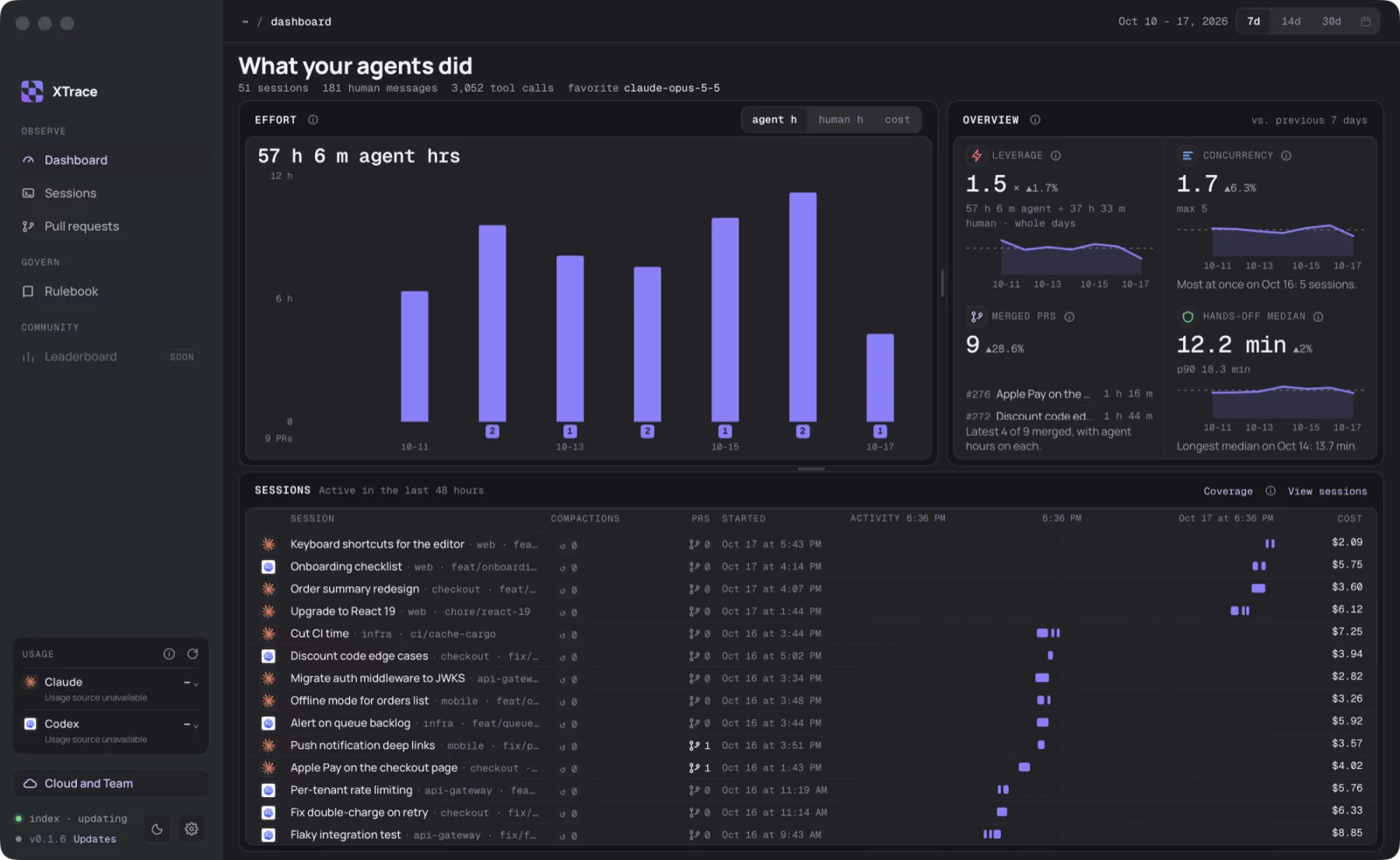
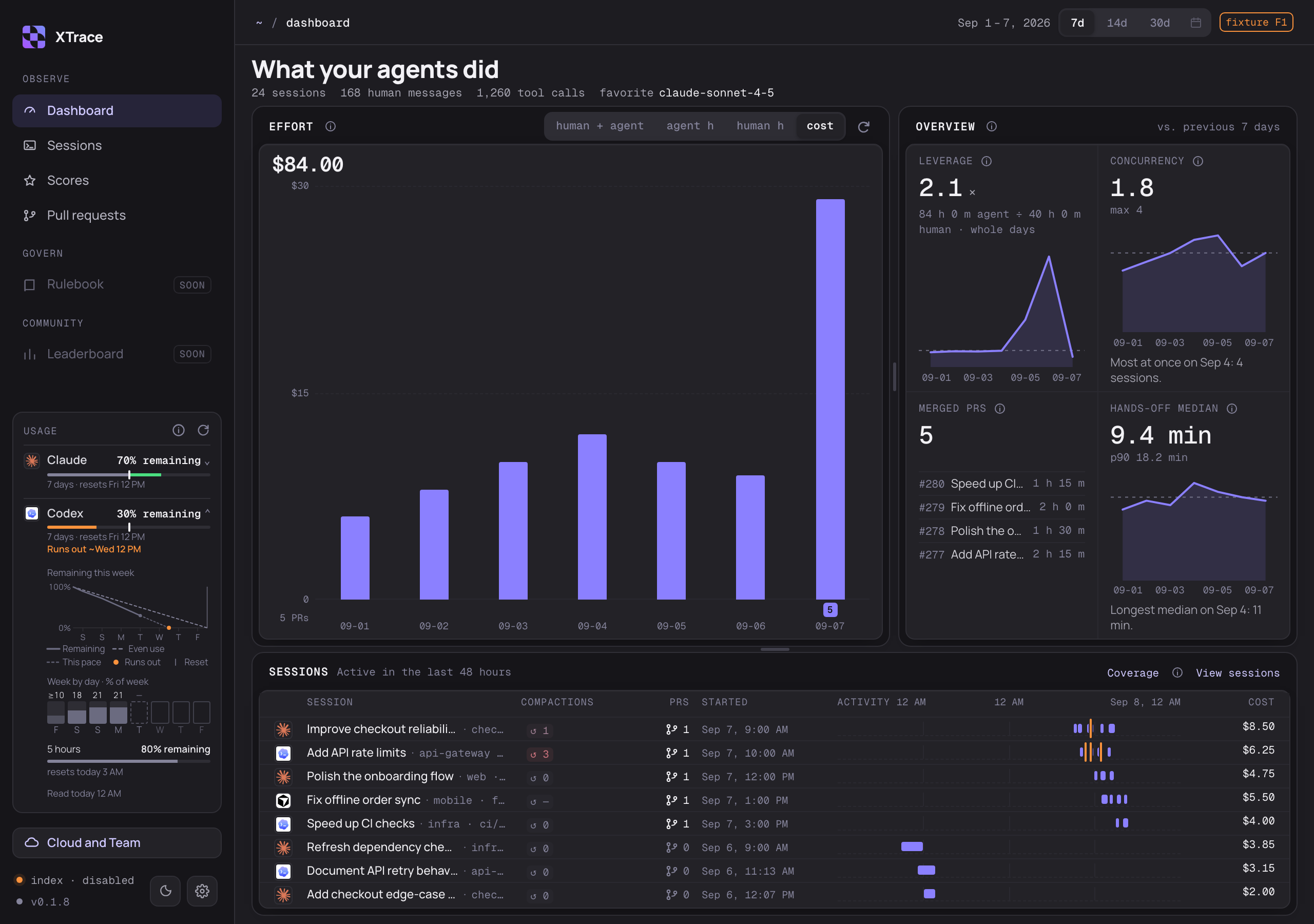
Compare estimated human time and agent activity together in the human + agent view, or switch to agent hours, human hours or API-equivalent cost for the last 7, 14 or 30 days. The overview shows leverage (agent hours divided by estimated human hours), concurrency and hands-off time, with previous-period comparisons. Definitions explain how each number is counted and what is missing. Values the app could not measure show as a dash, not zero.
Scores: find what to improve
Use scoring skills to review your project instructions, comments, repeated code, documentation and agent setup. Open a skill to grade a project and read its score, findings and suggested fixes. The screenshot shows the built-in CLAUDE.md Doctor alongside four example added skills.
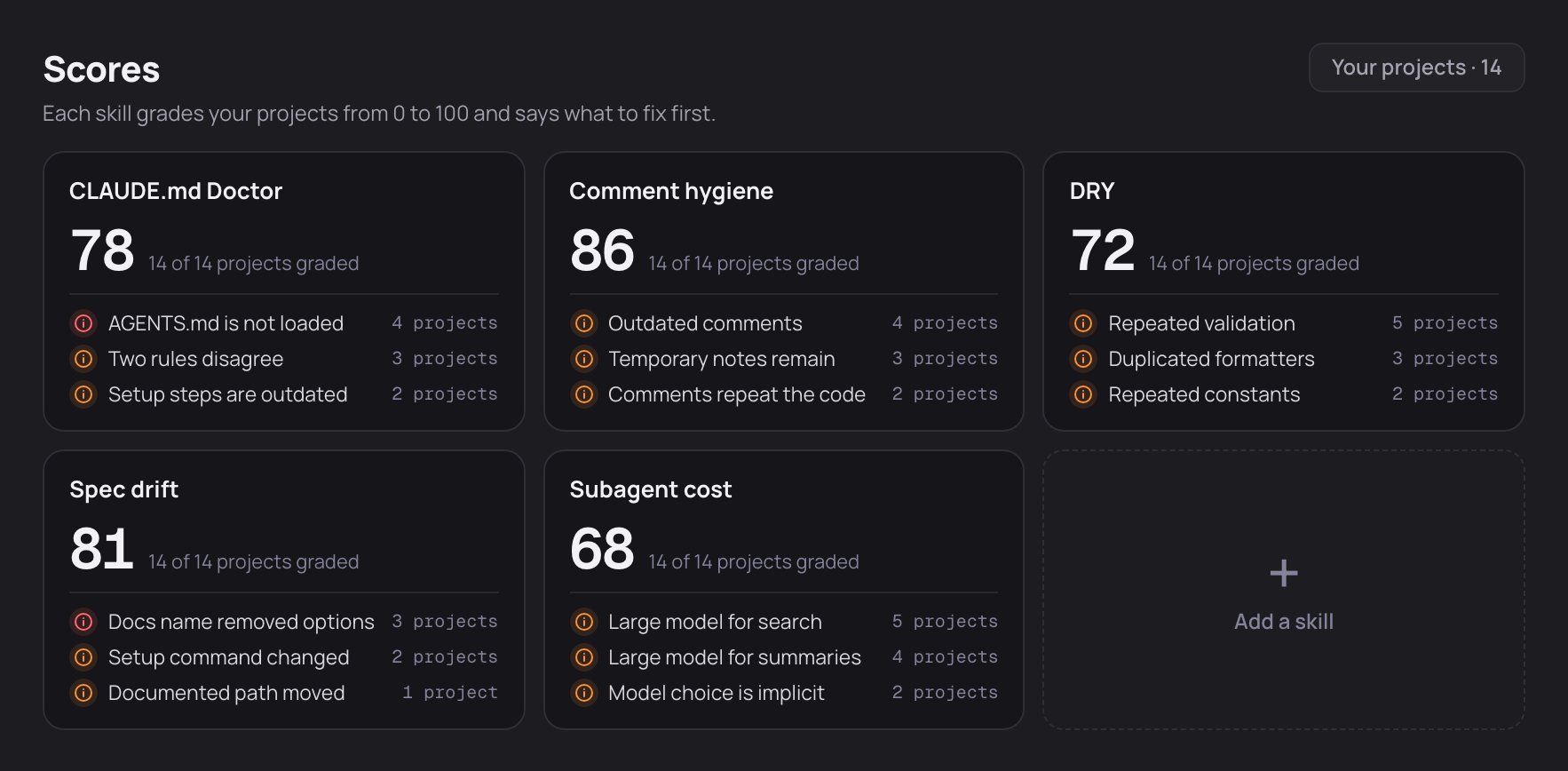
Sample scores and findings across 14 fictional projects, not measured grading results.
Add your own installed skills or discover skills through a public GitHub link. A skill needs a scoring rubric; Make a rubric can create one for a suitable review skill before you add it. Skills that need to modify a project or access the network may not be suitable. See adding skills and rubrics.
Grading and rubric creation run Claude Code on your Claude account and use your Claude usage. Grading reads project content and keeps the project read-only; these are actions you start, separate from local history indexing. See Your data for what is sent and stored.
Usage pace and forecasts
Claude and Codex usage stays in the sidebar when your local tools can report it. Green and orange indicators show usage behind or ahead of an even pace. Expand a provider to see remaining usage, daily readings and a linear forecast based on average use since the weekly window began. The forecast assumes that pace continues; it is an estimate, not a guaranteed run-out time.
Session activity and compactions
See active spans and gaps across your sessions, then hover a span for its prompt and activity details. Compaction counts show how often the saved context was summarized. Counts cover the session's saved history; timeline markers show recorded compaction times within the visible range. Hover a marker to see when it happened and its trigger, when the source provides one. Unknown or unsupported readings stay distinct from a confirmed zero.
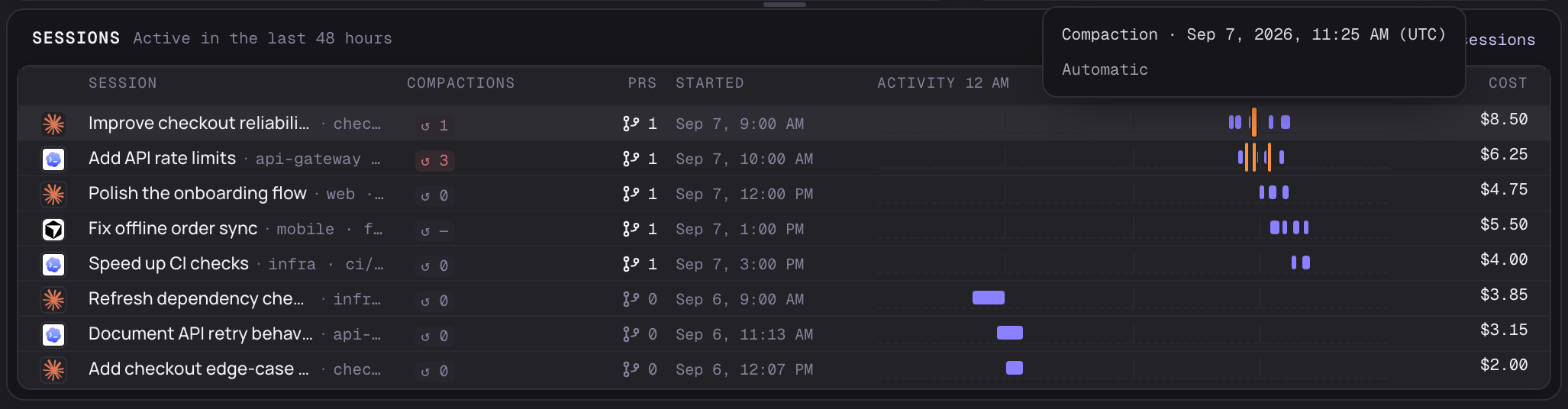
The Sessions page brings your indexed Claude Code, Codex and Cursor sessions into one list. Find a session by ID, repo or branch, filter by tool, and open its local transcript. Codex and Cursor need the bundled readers and Python 3.10 or newer; missing readers and unsupported formats show an unavailable state. Cursor SQLite transcripts are not supported. A sub-session whose parent session can't be confirmed is left out of the list.
Pull requests and quick access
Merged pull requests show the effort of their linked sessions: tokens, your
messages, agent time and hands-off time. A session linked to several pull requests
counts in full toward each of them. Pull request details come from GitHub's
command-line tool (gh) when it is installed and signed in. XTrace never posts
to GitHub.
The menu bar keeps today's activity one click away. Settings includes light, dark or system appearance, the human-time break threshold, index status, storage controls and the telemetry switch.
What the time numbers mean
How is agent time counted? XTrace groups recorded events within each session into activity spans. Gaps longer than 20 minutes are excluded. Overlapping sessions add together, so this measures session activity rather than pure model compute time or elapsed time on a clock.
How is human time estimated? XTrace uses messages classified as sent by you, excluding recognized automated messages, across conversations and tools on one timeline. Consecutive messages at most 60 minutes apart count as one working stretch. You can change that break threshold in Settings. A single isolated message adds no time; an unknown message classification makes the estimate unavailable rather than silently lowering it.
Does reviewing diffs count? Reviewing is not detected directly. If you send messages at 2:00 and 2:40 and review in between, those 40 minutes count with the default threshold. Review after your last message is not automatically included. Other activity between those messages can count too, so this is an estimate of your work with agents, not a record of every minute worked.
Does this identify who edited a file? No. Agent time measures recorded agent activity, and human time uses message timing. They can overlap. These metrics do not attribute individual edits or lines to you or an agent.
Install
- Download the
.dmgfrom the latest release. - Drag XTrace into Applications.
- Open it. The first scan reads your existing history and shows its progress.
Requires an Apple Silicon Mac with macOS 14 or newer. Claude Code history is read directly; Codex and Cursor history needs Python 3.10 or newer. Cursor conversations kept only in the Cursor app's own database are not read. The app downloads signed updates and installs them when you click Restart to update. See the setup guide for first launch and troubleshooting.
Your data
- Local history indexing. XTrace reads the history files your agents already save without editing them or automatically uploading their transcripts.
- Metrics, not full transcripts. By default the local database keeps metrics, repository paths, IDs and a preview (up to 280 characters) of each message you sent and of each recognized Claude Code background-task summary. Previews can't be turned off. Saved warning decisions can also keep a few matched message words in either storage mode. Full transcripts are saved only if you turn that on. Delete stored content clears saved text and warning decisions, even when no other saved text remains. Later imports, including older messages, can create new previews and warning decisions.
- Diagnose sends selected messages. Only after you confirm Send and diagnose, selected messages around a warning go to Claude Code's hosted model, or Codex's if Claude Code is unavailable before receiving the messages. Cursor is not tried automatically. XTrace keeps the result in the window's cache and does not save it in the database. Save as skill is a separate click that writes the suggested skill to the conversation's project.
- Scoring uses Claude. When you start a grade, Claude Code reads the selected project and skill; that content can be sent to Claude on your account. Making a rubric similarly uses the selected skill's content. Grading keeps the project read-only and blocks network access for sandboxed commands; that does not make Claude's model requests offline. The run's transcript is not saved by Claude Code; XTrace keeps the resulting scores, summaries, findings and reports. See grading and rubric details.
- Other network use. XTrace uses the network for anonymous usage telemetry (see Telemetry), account usage readings, GitHub pull request checks, app updates, and public GitHub look-ups and downloads you start with Add from a link. Keeping a skill stores it locally and links it into normal Claude Code sessions when its name is free there. Claude usage checks run your local Claude Code about every ten minutes, which adds small entries to Claude Code's own settings and history.
More about local storage and account-usage checks is in data and network.
Telemetry
XTrace sends a few anonymous usage events, such as when the app is opened
and roughly how often it is used, with the app version, the macOS version, which
coding agents have history on this Mac and a random ID. It never sends repository
names, file paths, prompts or other conversation text, pull-request links, token
counts or costs. Telemetry is on by default, and nothing is sent until the app has
shown a notice about it. Turn it off with Turn off in that notice, the switch in
Settings, or by starting the app with XTRACE_TELEMETRY=0. TELEMETRY.md
lists every event and property.
Status
XTrace is a public beta. Some numbers can be incomplete when part of your history is missing. Rulebook and Leaderboard are marked as coming soon in the sidebar. See the beta testing limits.
Build from source
You need macOS 14 or newer, Xcode command-line tools, Rust 1.94.1, Node 22.23.1 and pnpm 10.33.0.
pnpm install --frozen-lockfile
pnpm check
cargo test --workspace --locked
pnpm tauri dev
A development build reads your local history by default. DEVELOPING.md covers sample data, all required checks and native verification, and the architecture map explains how the pieces fit together.
Contributing
Issues and pull requests are welcome. Read the contributor guide for review and DCO sign-off, and the code of conduct. Security reports go through SECURITY.md.
License
Source code is licensed under Apache-2.0. The XTrace name and logo are covered by the trademark terms.