
Apple opened Siri AI to every third-party app on November 3, with a Developer Preview that ships in the iOS 27.3, iPadOS 27.3, macOS 27.3 and visionOS 27.3 betas, according to Apple's developer news post. Any app can now expose its own actions and content to Siri through App Intents, and for requests that take several steps Apple added "app skills": Markdown files named SKILL.md that tell Siri how to chain an app's actions together. If you have written an Agent Skills file for a coding agent, the format will look familiar.
What changed
The first versions of Siri AI supported a much smaller set of schemas, according to 9to5Mac. The preview documentation says Siri can now find custom content and perform custom actions, as long as the app makes them available through App Intents. A new ToolIntent protocol and an AppIntent(_:) macro turn an existing intent into a tool Siri can call. Other details from Apple's docs:
- Users don't have to name your app while it is in the foreground, while one of its Live Activities is running, or when they continue a Siri conversation that already mentioned it. With the app in the background, they do have to name it.
- Siri can take content from one app, hand it to another app and perform an action there.
- Results appear in card snippets that use your own views.
- Siri AI can now surface any entity in the Spotlight semantic index, not only ones that fit a schema.
- No new entitlement or separate developer program is required.
Apple says it has started rolling the new capabilities out across many of its own apps, including Calendar, Files, Finder, Mail, Maps, Messages, Notes, Photos, Reminders, Safari and Shortcuts.
App skills are a subset of Agent Skills
The app skills documentation states that app skills "use a subset of the Agent Skills format." Each app target gets one Skills.skillsbundle, created in Xcode from File > New > File from Template > Skills Bundle. Inside it, each skill is a folder named in lowercase letters, numbers and hyphens, holding a single SKILL.md:
Skills.skillsbundle/
└── Skills/
    ├── name-of-skill-01/
    │   └── SKILL.md
    └── name-of-skill-02/
        └── SKILL.md
The frontmatter allows exactly two fields, name and description:
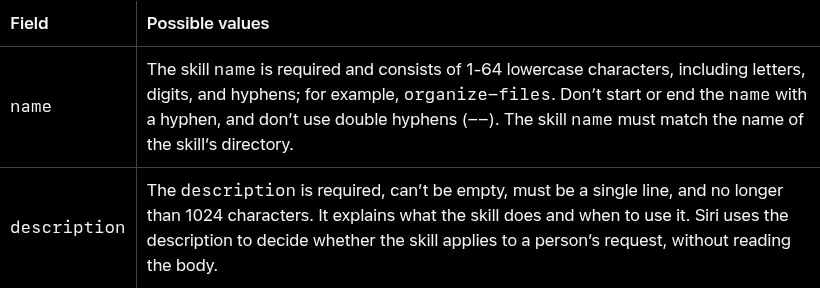
Compared with the open Agent Skills specification, Apple drops the optional license, compatibility, metadata and allowed-tools fields and forbids any other files in the bundle, so there are no scripts/, references/ or assets/ folders. The Markdown body is capped at 10,000 characters. Apple's docs describe the same two-step loading as the Agent Skills spec: Siri reads only the name and description to decide whether a skill fits a request, and reads the body only after a match.
flowchart TD
    A[User request to Siri AI] --> B{Read name and description<br/>of each app skill}
    B -- no match --> C[Siri picks tool intents<br/>without a skill]
    B -- match --> D[Load SKILL.md body<br/>up to 10,000 chars]
    D --> E[Siri calls the app's<br/>tool intents]
    C --> E
    E --> F[Answer to the user]
Apple's writing advice will be familiar to anyone who has tuned prompts: say which tool to use for which step, in what order, and what to avoid, and refer to intents by what they do ("call the get weather tool first") rather than by type name. Don't repeat what the App Intents titles and descriptions already say. The docs give a shopping example: a skill that walks Siri through searching items, adding them to the cart, choosing payment and delivery, reviewing the cart and confirming.
How to try it, and the caveats
You need the 27.3 betas and a device that supports Apple Intelligence. Apple says to verify skills on a device, not in the Simulator, or with internal TestFlight testers. The preview is not available to external TestFlight testers or to App Store builds. Xcode validates the skills bundle at build time, and if it contains errors, your app provides no skills at all. For testing, Apple added a Siri Integration Advisor in Xcode that comments on your App Intents implementation, and a Siri Evaluations framework, marked beta, that runs scripted requests against Siri and checks what it does, so you can catch regressions when you change intents. Apple engineers are holding Apple Intelligence Group Labs on November 4 and 5.
The caveats are significant:
- Shipping is months away. Apple says submissions to the App Store open "in the spring." Apple also says first shipping to customers is "a few months" away. Macworld expects the public 27.3 release near the end of November or in early December, so third-party integrations are unlikely to reach users with it.
- Terms are not out yet. Apple says it "will follow up with more details about the terms and usage policies."
- No guarantees. "You can't use app skills to enforce deterministic behavior," the docs say, and Siri doesn't necessarily run the listed intents in order. Treat a skill as a prompt, not a workflow engine.
- APIs may change. App Intents API and Siri behavior may change during the preview.
- Reach is limited. Siri AI requires an Apple Intelligence device in a supported language (English, French, Japanese, Korean, Portuguese, Spanish for now), isn't available in the EU on iOS, iPadOS or watchOS, and isn't offered to users under 13. Server-side features including Siri AI have daily usage limits, and Apple says expanded access will cost a fee in the future.
For makers who already keep agent skills for their own codebase, the practical upshot is that the same habits, short specific descriptions and plain-language instructions, now apply to how Siri drives your iOS or Mac app. Build it now, test it with Siri Evaluations, and wait for Apple's terms before planning features around it.