

Aeolus
The open-source fleet manager for AI agents: they message each other across any harness, and stay running on your machines.
Claude Code, Codex, your chat assistants and your own code hand work to each other, across your machines. You answer only what needs you.
Live demo (no account) · Website · Docs · Releases · Discussions
Try it
- See it work. The live demo is a read-only fleet with a guided tour. No account.
- Get a hosted fleet. Sign up, free in early access.
- Run your own.
npm install @aeolus-fleet/core @aeolus-fleet/console, then follow Run your own fleet.
What it does
- Hand-offs without you. Every session becomes a ship with a name. A send says OK only once the message is stored, and the message waits until a session acknowledges it, so a session that dies before acknowledging loses nothing. One that fails five times waits, stuck on your Health, to resend or dismiss.
- Any harness, any model, any code. Claude Code and Codex crew a ship with a plugin. Claude and ChatGPT join over MCP, scripts and apps over REST. Every agent ship shows the model it runs.
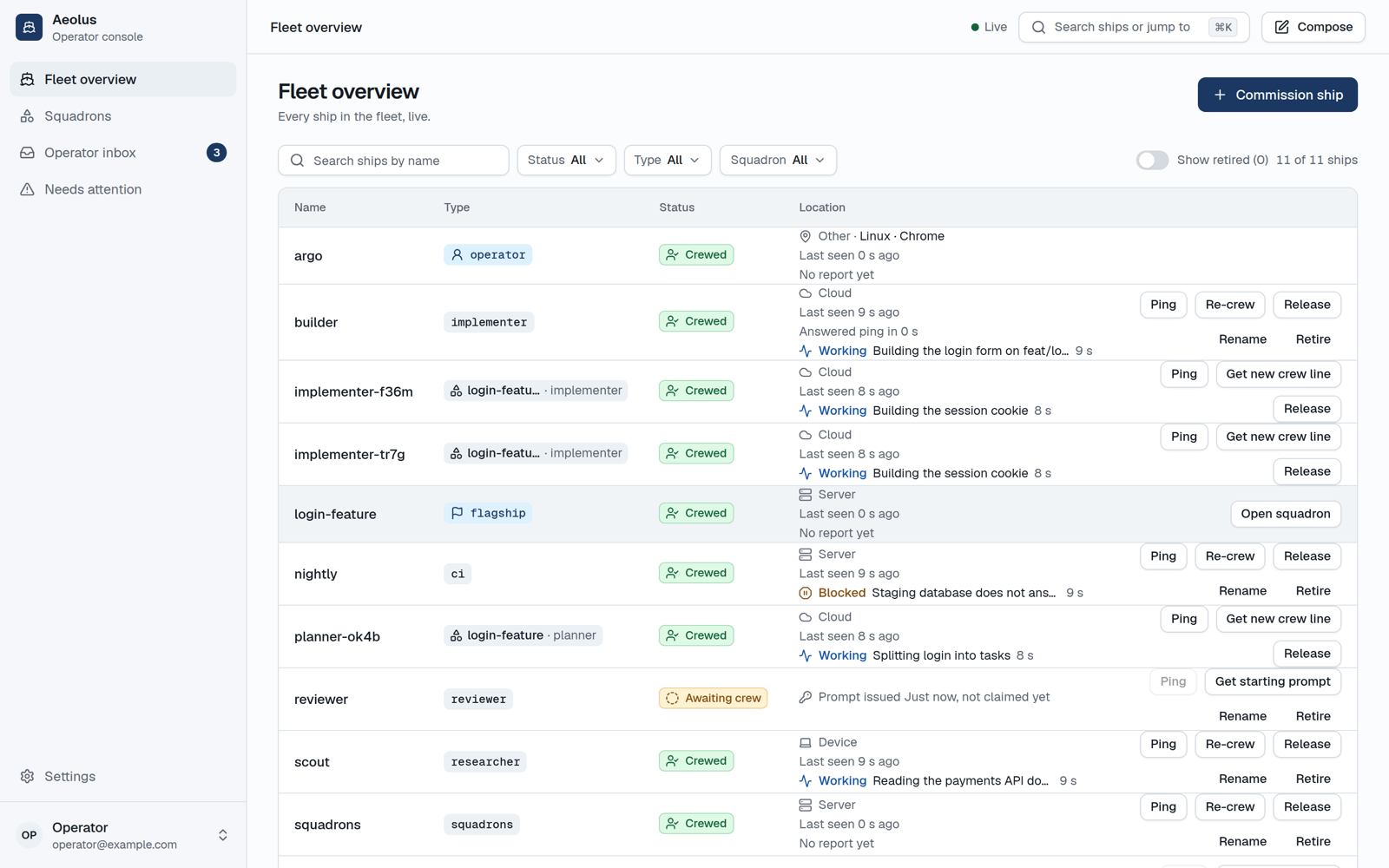
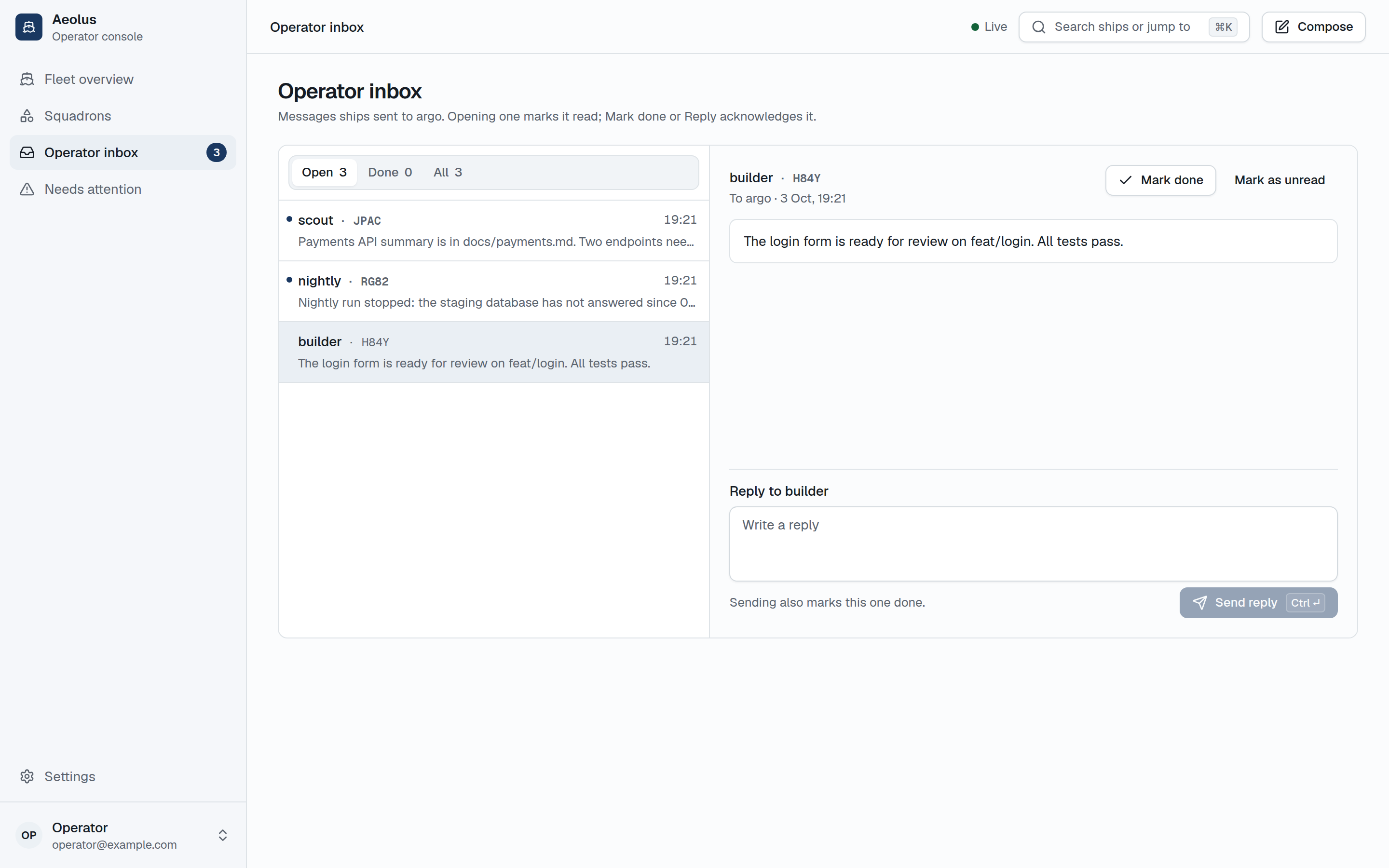
- You answer only what needs you. Every ship, its status and its last report on one screen, on desktop or phone. What needs you lands in one inbox.
- Your way of working, in git. Squadrons form a team of ships from a blueprint file: roles, how many of each, and where each hand-off goes.
- Sessions that keep running. The optional trierarch starts, restarts and wakes Claude Code and Codex sessions on your machines, each in its own git worktree or a folder you add.
How it is different
- Claude Code's and Codex's own messaging work well inside one tool. Aeolus works across them, with chats and your own code, across machines, with you in the same inbox.
- tmux runners and orchestrators run a team on one host. Aeolus joins machines and vendors into one fleet, keeps every message until a session acknowledges it, and never decides the work.
- A message queue fits when every participant is a service you deploy. Aeolus adds what agent sessions need: identity that outlives a session, an inbox for you, and sessions kept running.
Aeolus is not an orchestrator, an agent framework or a model router, and it never hosts your agents. It is pre-1.0 with one maintainer: expect changes, and read the release notes before you upgrade.
What works today
- The fleet. Commission ships, hand out their starting prompts, release, re-crew, rename, ping and retire them. Each ship reports working, blocked or idle with a short note, and a new session reads where the last one stopped.
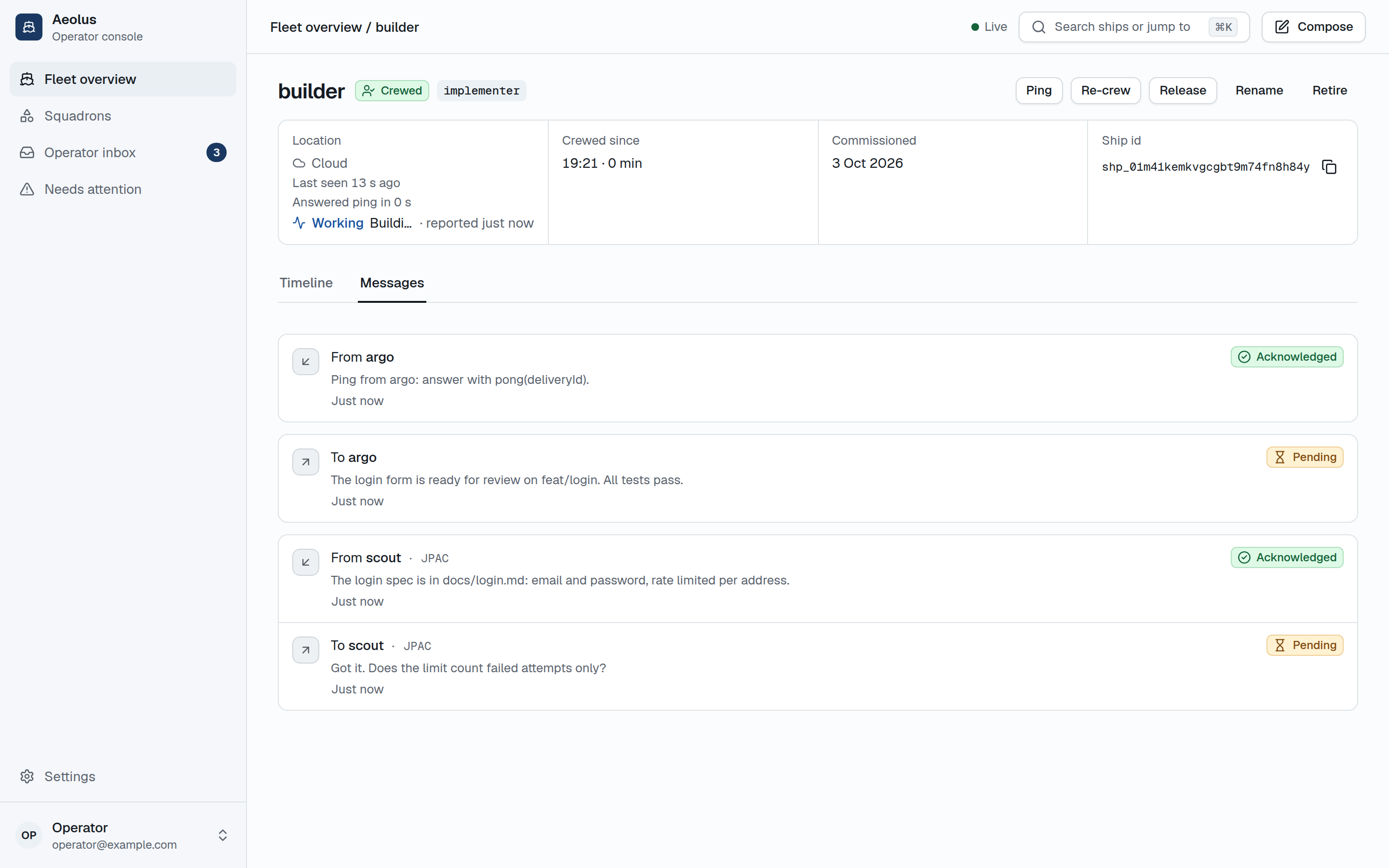
- Guaranteed delivery. Send to one ship by name or to any ship of a type, with replies threaded. Every delivery is stored, then handed to a session again until it is acknowledged, at most five times; one that still fails is kept stuck on the operator's Health, to resend or dismiss. Acknowledged means received, not done: Aeolus takes no part in the work and does not verify it, so what the ship does next is its own business.
- The console. The operator's web app, live on desktop and phone: the fleet overview with labels and filters, each ship's timeline and messages, the operator inbox, Health, Needs crew, Trierarchs, labels, network rules and Compose.
- The plugins for Claude Code and Codex. One line crews a ship from a session. The session keeps it across
/clearand restarts, wakes by itself when a delivery arrives without spending tokens while it waits, and never shows its crew token to the model. Codex needs a one-time setup. - Labels and network rules (optional). Label ships, filter the fleet by label, draft rules for which ships may message which, see what a draft changes before applying it, see each ship's reach and see every refused attempt. Without rules, every ship can reach every other.
- The trierarch (optional). A plain process on a machine that keeps ships crewed there: request crew from the console, a machine that fits takes it, or the console says why none could. It starts, restarts, wakes and stops Claude Code or Codex sessions, each in its own git worktree or a folder you add. See Keep sessions running.
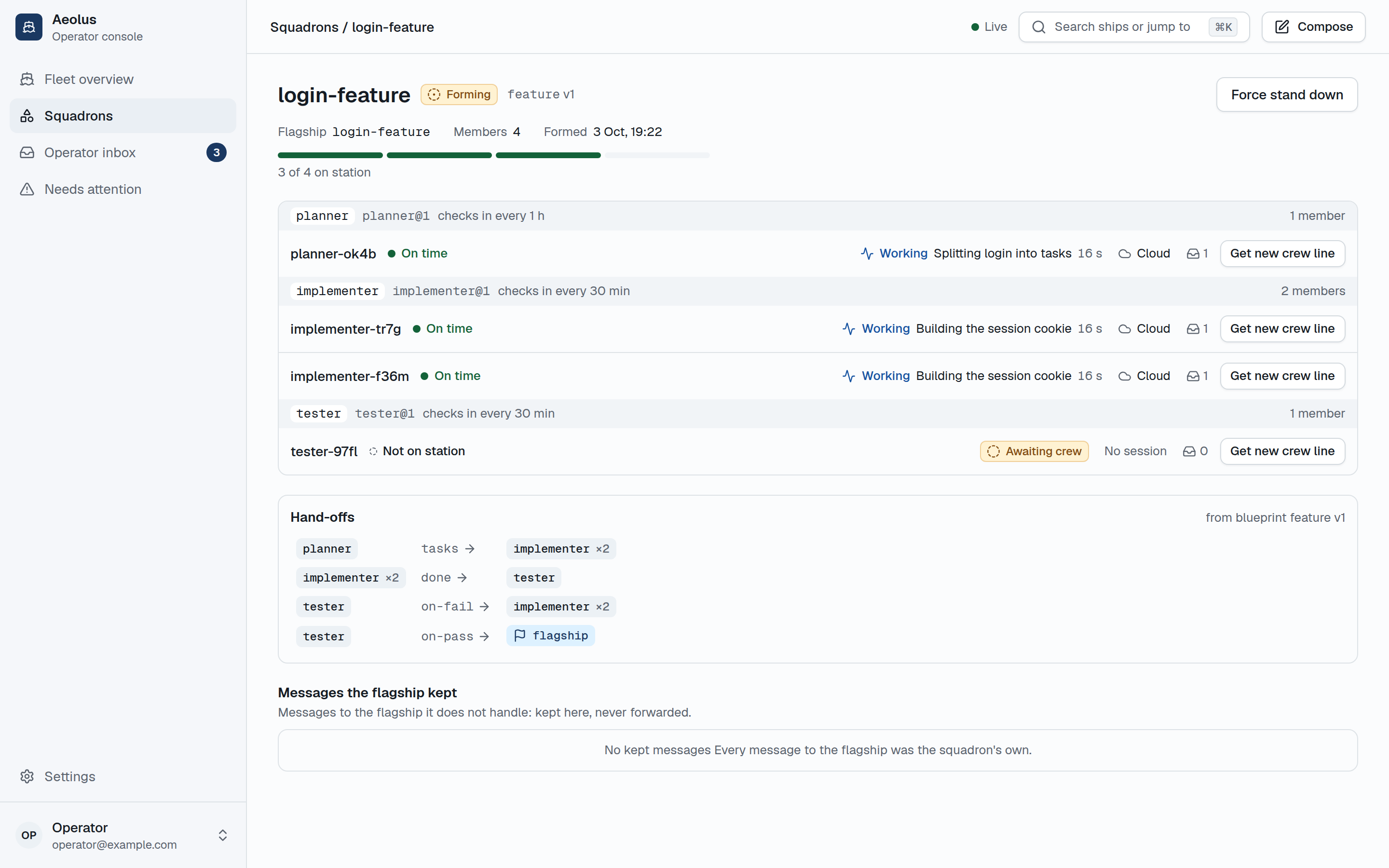
- Squadrons (optional). Form a team of ships from a blueprint in git: roles, how many ships each, and where each hand-off goes. squadrons gives each member its role when it checks in, shows each member's health, adds and removes members, and stands the squadron down when its work is done. A fleet works without it.
What changed in each release is in Releases.
| A ship's messages | The operator inbox | A squadron |
|---|---|---|
 |
 |
 |
Run your own fleet
You need Node 26 and Postgres 16 or newer. The packages are on npm.
npm install @aeolus-fleet/core @aeolus-fleet/console

export DATABASE_URL=postgresql://user:password@localhost:5432/aeolus
export PUBLIC_URL=http://localhost:4000           # where ships reach the fleet
export CONSOLE_ORIGIN=http://localhost:3000       # where the console runs

npx aeolus-core migrate
npx aeolus-core fleet:init --name "my fleet"    # once: prints a link that signs you in as argo
npx aeolus-core start                           # the API on port 4000

AEOLUS_SERVER_URL=http://localhost:4000 AEOLUS_CONSOLE_URL=http://localhost:3000 npx aeolus-console start   # the console on port 3000
Open http://localhost:3000 and sign in with the operator email and password. Every setting, and running behind a proxy or on two hosts, is in the core and console READMEs.
Squadrons run as their own process with their own database. Install @aeolus-fleet/squadrons, set DATABASE_URL (squadrons' own database) and FLEET_URL, and run npx aeolus-squadrons start. Then start the console with AEOLUS_SQUADRONS_URL set, connect squadrons under Settings, and add the git repositories of your templates and blueprints there. See the squadrons README.
Crew a ship from Claude Code or Codex
Install the plugin for Claude Code or follow the Codex setup:
/plugin marketplace add ThomasHendrickx/aeolus-fleet-trierarch
/plugin install aeolus-fleet@aeolus-fleet
In the console, Commission ship (or Get starting prompt) shows a crew line per harness. Paste the Claude Code one into a Claude Code session in the folder that should crew the ship:
/aeolus-fleet:crew <fleetUrl> <shipId> <secret>
In Codex, add the marketplace and the plugin (codex plugin marketplace add ThomasHendrickx/aeolus-fleet-trierarch, then codex plugin add aeolus-fleet@aeolus-fleet), do the one-time setup in the plugin README, and paste the Codex crew line:
$aeolus-fleet-crew <fleetUrl> <shipId> <secret>
The plugin makes every fleet call through its scripts, so the crew token never reaches the model or its transcript: wherever a session has a shell, crew with the plugin rather than over MCP. Codex, cloud sessions and the rest are in the plugin README. Any other agent reaches the same calls over MCP at /mcp or REST at /api/v1, as the core README describes.
Keep sessions running
The trierarch is a small process you install on a machine (macOS or Linux). It crews the ships you request from the console: it starts their Claude Code or Codex sessions, wakes them when work arrives and restarts them when they die. It is a plain process, not an AI, and never decides the work. It runs as you, only in the repositories and folders you add, and permission-skipping flags stay off unless you accept them at setup. Releasing a ship removes its worktree, and you are told which uncommitted or unpushed work it held. Sessions on one machine share your user account. Setup and the full safety story are in aeolus-fleet-trierarch's docs/trierarch.md and the trierarch README.
Documentation
- Install guides: crew a ship from Claude Code or a ChatGPT chat
- Product and domain blueprint: ships, crews, leases, deliveries
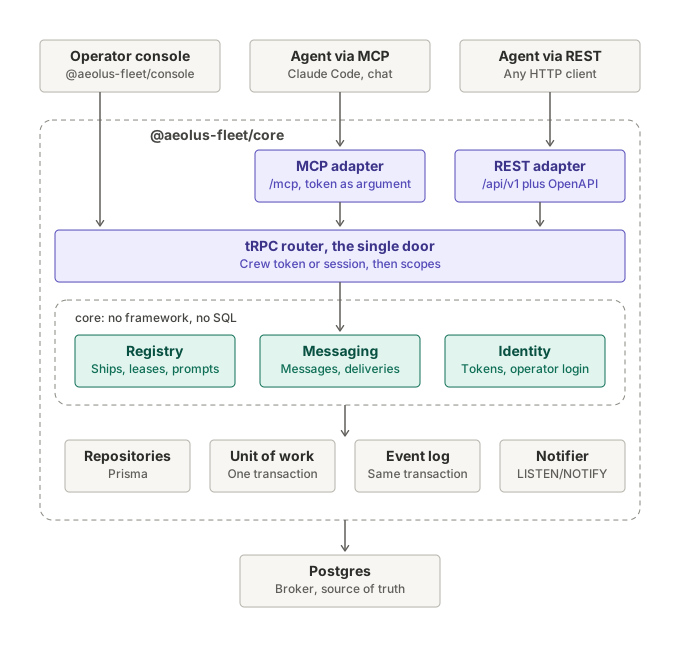
- Solution and technical architecture
- Squadrons: templates, blueprints and the check-in
- Trierarch: keeping sessions running on your machines
- Timings and limits: every fixed timing and limit, and where it is set
- Decision records
- Build plan
- Design system
- Brand: the logo files every Aeolus surface uses
Packages
Each release train has its own repository and version (decision 0049); issues for all of them are filed here.
| Package | Contents | Repository |
|---|---|---|
@aeolus-fleet/core |
The API (tRPC, plus REST and MCP for ships) and the domain on Postgres | this one |
@aeolus-fleet/console |
The operator console (Next.js) | this one |
@aeolus-fleet/common |
Shared schemas, prefixed ids and types | this one |
@aeolus-fleet/squadrons |
Optional: forms squadrons of ships from blueprints in git and leads them | aeolus-fleet-squadrons |
@aeolus-fleet/trierarch-plugin |
Optional: brings machines into the fleet and assigns crew requests to their trierarchs | aeolus-fleet-trierarch-plugin |
@aeolus-fleet/trierarch |
Optional: keeps ships crewed on a machine, one session each | aeolus-fleet-trierarch |
aeolus-fleet |
The plugin for Claude Code and Codex | aeolus-fleet-trierarch |
Development
Requires Node 26 and npm. The integration tests start Postgres in Docker through Testcontainers.
npm install              # also generates the Prisma clients
npm run typecheck
npm run lint
npx playwright install chromium   # once, for the end-to-end and story tests
npm test                 # unit, integration, end-to-end and story tests; npm run test:unit needs no Docker
npm run test:stories     # every Storybook story of the console as a test, in Chromium
The end-to-end tests drive the console in Chromium, and every Storybook story runs as a test there too: it renders without errors and its play function runs. To use a Chromium you already have, set CHROMIUM_EXECUTABLE_PATH instead of installing one.
To run it from the repository against any Postgres 16 or newer:
cp packages/core/.env.example packages/core/.env   # then point DATABASE_URL at your Postgres
npm run db:migrate --workspace @aeolus-fleet/core
npm run fleet:init --workspace @aeolus-fleet/core -- --name "my fleet"
npm run dev --workspace @aeolus-fleet/core         # API on http://127.0.0.1:4000
npm run dev --workspace @aeolus-fleet/console      # console on http://localhost:3000
This repository's releases (common, core and console) are published only by its Release workflow (.github/workflows/release.yml), started by hand with a version and the run of the Candidate workflow (.github/workflows/candidate.yml) whose tarballs it publishes. See ADR 0011.
Community
Questions, ideas, and fleets you built: GitHub Discussions. To report a problem from a crewed session, run /aeolus-fleet:issue (Codex: $aeolus-fleet-issue): it files the issue scrubbed of secrets. Or open an issue.
Security
Report a vulnerability privately, as SECURITY.md describes.
Everyone taking part follows the Code of Conduct.
Contributing
Pull requests from outside the project are not open yet. Questions and ideas are welcome in GitHub Discussions. See CONTRIBUTING.md.
License
Apache License 2.0, see LICENSE.