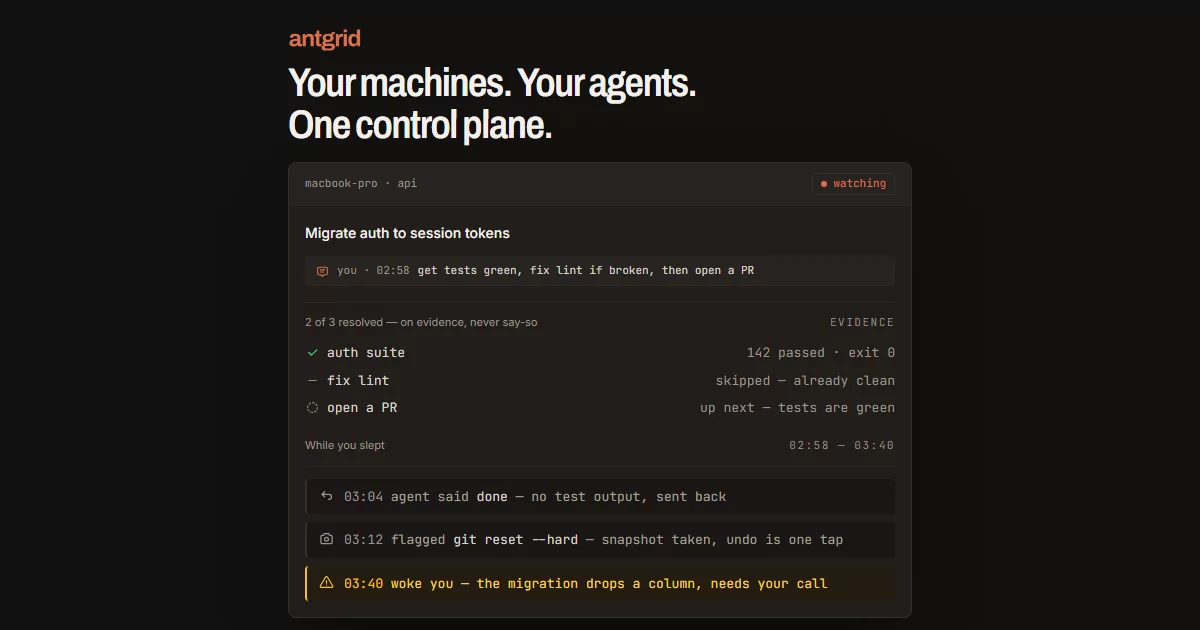

Your machines. Your agents. One control plane.
Every CLI coding agent you run, on every machine you own, in one place — end-to-end encrypted, on hardware you control.
Antgrid runs the coding agents you already use — Claude Code, Codex, Cursor and others — in real terminals on your own hardware, and puts one screen over all of them: every session on every machine you have signed in, grouped by the machine it is on. Around each agent it puts the context you need to check the work yourself — multi-session terminals, a file tree, git review with diffs, and a live browser preview. The same workspace opens on a phone, over a connection that is end-to-end encrypted between your devices. Our servers never see your code, prompts or terminal output.
Antgrid's Handler feature takes on the follow-ups for long-running coding tasks. Start with your agent and do as much as you want together. When you're ready to step away, tell Handler what's left, how to proceed and when to ask you. It checks the agent's responses against your instructions and asks for evidence before moving on. It notifies you when it needs your input or your instructions say to check with you. Its judgement can be wrong; review its decisions and cited evidence.
Handler is opt-in on a running session and included free during the beta. It is a Pro feature once paid plans are live. See pricing for current terms; your agent provider's usage charges still apply.
Antgrid does not replace your agent and ships no model of its own.
Note
Pre-release, working towards v1.
Licence — first-party distributed code is open source under MPL-2.0, except the relay and web services, which remain ELv2.
Contributing — bug reports are welcome; pull requests are not open yet (CONTRIBUTING.md).
Features
- Handler. Hand over the follow-ups on long-running tasks. Tell it what's left, how to proceed and when to ask you. Handler asks for evidence before moving on and brings questions to you when needed or instructed. It doesn't start new sessions or jobs.
- Bring your own agent. Claude Code, Codex, opencode, Cursor, GitHub Copilot,
Antigravity, Kilo, Kimi and Mistral Vibe are wired for notifications and session naming
— the current set is
AGENTSinpackages/antgrid-agents/src/agents/registry.ts. Any other terminal program still runs; it just gets no integration. - Terminal-first. The agent's terminal is the primary view — real PTYs with scrollback, ANSI colour and input. Many sessions per project, so a build watcher or a REPL runs beside the agent.
- Isolated sessions. A session can run in its own managed git worktree, so two agents on one project don't fight over the working tree. Files, search, git, commands, preview and terminals all resolve from that session's checkout, not from the project root.
- Files, git and preview. A live,
.gitignore-aware file tree with viewers for code, images, Markdown and PDFs; git status, side-by-side diffs, stage, commit, discard and branch switching; regex find-in-files; and dev-server ports auto-detected and tunnelled into an in-app browser. - Project commands and config. Project-defined build, test, lint and deploy commands
as one-tap buttons, plus an in-app editor for the project's
antgrid.yaml. - Remote control. Sign in and your machines are listed — no pairing ceremony. Read the terminal, answer a prompt, review a diff and commit from a phone. Push notifications reach you over APNs and FCM when an agent finishes or needs a decision.
- Fleet view. One account supervises projects across every machine you sign in on — laptop, workstation, a server — with each machine deciding for itself whether it is reachable from mobile at all.
Security model
Antgrid exists to let you control an agent over the internet without handing your code, prompts or terminal to a server in the middle. That is a design constraint, not a feature flag.
- Encryption is never optional. Every app↔agent message travels inside a QUIC connection (TLS 1.3) between two Iroh endpoints. There is no plaintext mode to fall back to and no setting that disables it.
- Authenticated endpoints. Each device's Iroh endpoint ID is its public key, and the
QUIC handshake proves it. The machine admits a connection only from an endpoint ID its
authorization lease names for your account, and it never trusts anything the peer
claims after that. Specification:
docs/protocol/peer-session.md. - No relay holds a key to your traffic. The central relay authenticates devices from a
single signed
helloframe and then carries only presence, policy, revocation and sealed push delivery. It closes any socket that sends it a payload frame, so terminal output, prompts, file contents and diffs never reach it. When your devices can't connect directly, a relay we operate — the stock upstreamiroh-relay— forwards the already-encrypted QUIC packets; it sees the two endpoint IDs and the size and timing of packets, never their content. The central relay's source is in this repo. - Remote execution is off until you turn it on. A machine is unreachable from mobile until you flip one per-machine switch; off is machine-wide and immediate — the machine stops advertising projects and rejects every remote verb. Note what the switch is not: a phone with access gets a real shell on that machine. It controls reachability, not containment.
Encryption protects the transport. It does not sandbox the agent, and it cannot make an untrusted agent safe to run on your machine.
And two things the list above is not. It is not an audit: there has been no external
penetration test and no certification. And it does not empty the trust boundary — it moves
the relay out of it, not our account service. Your phone learns a machine's Ed25519
identity from your account's device inventory, which app.antgrid.ai serves, so that
service is trusted to hand you the right key even though the relay never is.
None of this needs taking on trust. The peer session specification, both implementations and the relay itself are linked above and in this repo; SECURITY.md is the reporting policy if you find something wrong with them.
Architecture
| Component | Path | Stack | Role |
|---|---|---|---|
| Bridge | bridge/ |
TypeScript / Bun | Runs on your machine: agent terminals (PTY), file watching, git, port scanning, HTTP tunnelling. Ships inside the desktop app. |
| Relay | relay/ |
TypeScript / Bun | Central WebSocket control plane for authentication, presence, policy, heartbeat and encrypted push delivery; rejects application payloads. |
| App | app/ |
Flutter / Dart + Riverpod | Desktop and mobile UI: terminal viewer, file explorer, git review, browser preview. |
| Web | web/ |
TypeScript / Bun + Hono + Postgres | Accounts and sign-in, subscriptions, OAuth device flow, Ed25519 JWT minting for the relay's gate. |
Shared code lives in packages/: antgrid_relay_client (pure Dart central-control,
E2E and session protocol over native peer links), antgrid-wire (the TypeScript native peer-frame codec and central control-envelope schemas),
and antgrid_eval_client (end-to-end test fixtures).
Message flow, the shared-package breakdown and the antgrid.yaml schema:
docs/architecture.md.
Getting started
Install
The desktop app bundles the bridge that runs your agents — there is nothing else to install on the machine.
- Windows — Microsoft Store
- macOS (Apple Silicon) —
antgrid-macos-arm64.dmg - Linux —
antgrid-linux.AppImage
Every build, with release notes: github.com/antgrid-ai/antgrid/releases. iOS and Android builds currently ship to TestFlight and Google Play's internal track; public store listings are not live yet.
First run
- Sign in with GitHub, Google or a passwordless magic link. The app provisions itself as a device on your account.
- Add a project — a folder on your machine. An
antgrid.yamlin the project (or in~/.antgrid/) declares long-running terminals, on-demand commands, port proxies and layout; the schema is indocs/architecture.md. - Start a session with whichever agent CLI you already have installed.
- To drive it from a phone, install the mobile app, sign in with the same account, and turn on that machine's remote-access switch from the desktop title bar.
Build from source
The repo is one Bun workspace (bridge, relay, web, evals and the shared packages) alongside a Flutter app. Prerequisites, the setup script, and the per-workspace test and analysis commands are in DEVELOPMENT.md.
Contributing
Bug reports are welcome; pull requests are not open yet. This is a project governance decision while the pre-v1 architecture is moving quickly, not a restriction of MPL-2.0. CONTRIBUTING.md explains what does help in the meantime. Security vulnerabilities go through SECURITY.md, never the public issue tracker.
Licence
Antgrid's first-party source and documentation are licensed under the standard
Mozilla Public License 2.0, except relay/ and web/, which remain
under their scoped Elastic License 2.0 files. MPL is file-level copyleft: distributing
changes to MPL-covered files requires making those files' source available under MPL,
but it does not license or impose terms on your projects, prompts, separately written
plugins, or independent larger works.
LICENSING.md is the path-by-path map. Product-identifying artwork and application identifiers are reserved under BRAND-ASSETS-LICENSE.md and TRADEMARK.md; third-party code and assets retain the licences in THIRD-PARTY.md. Every official build links to its exact source commit and includes the notices described in SOURCE_OFFER.md.