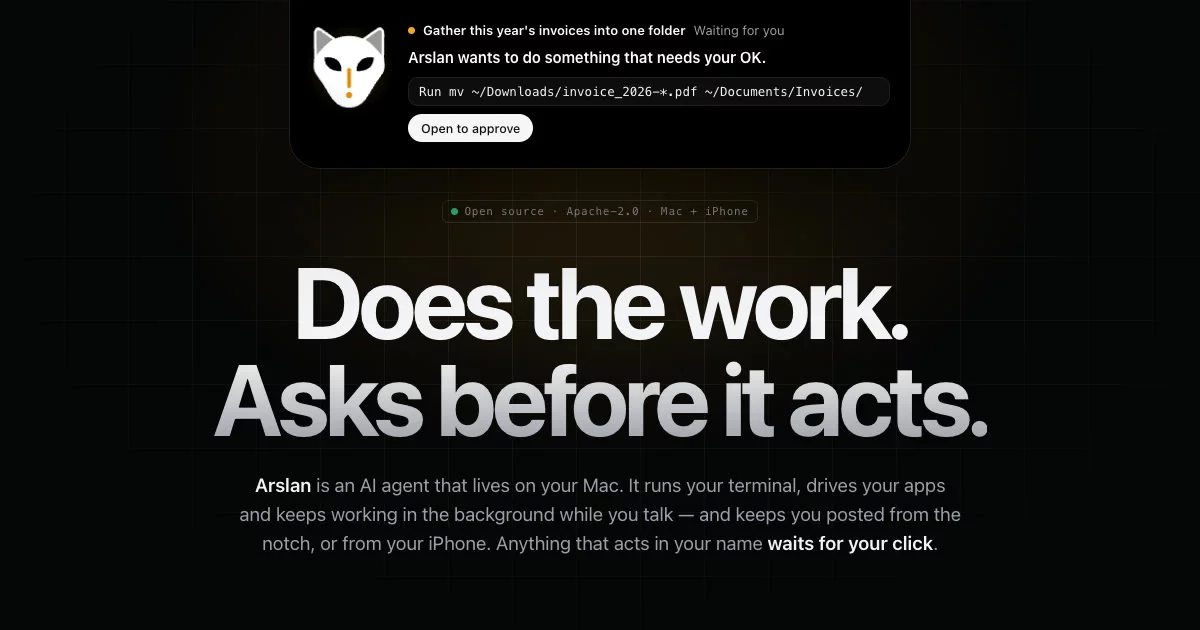

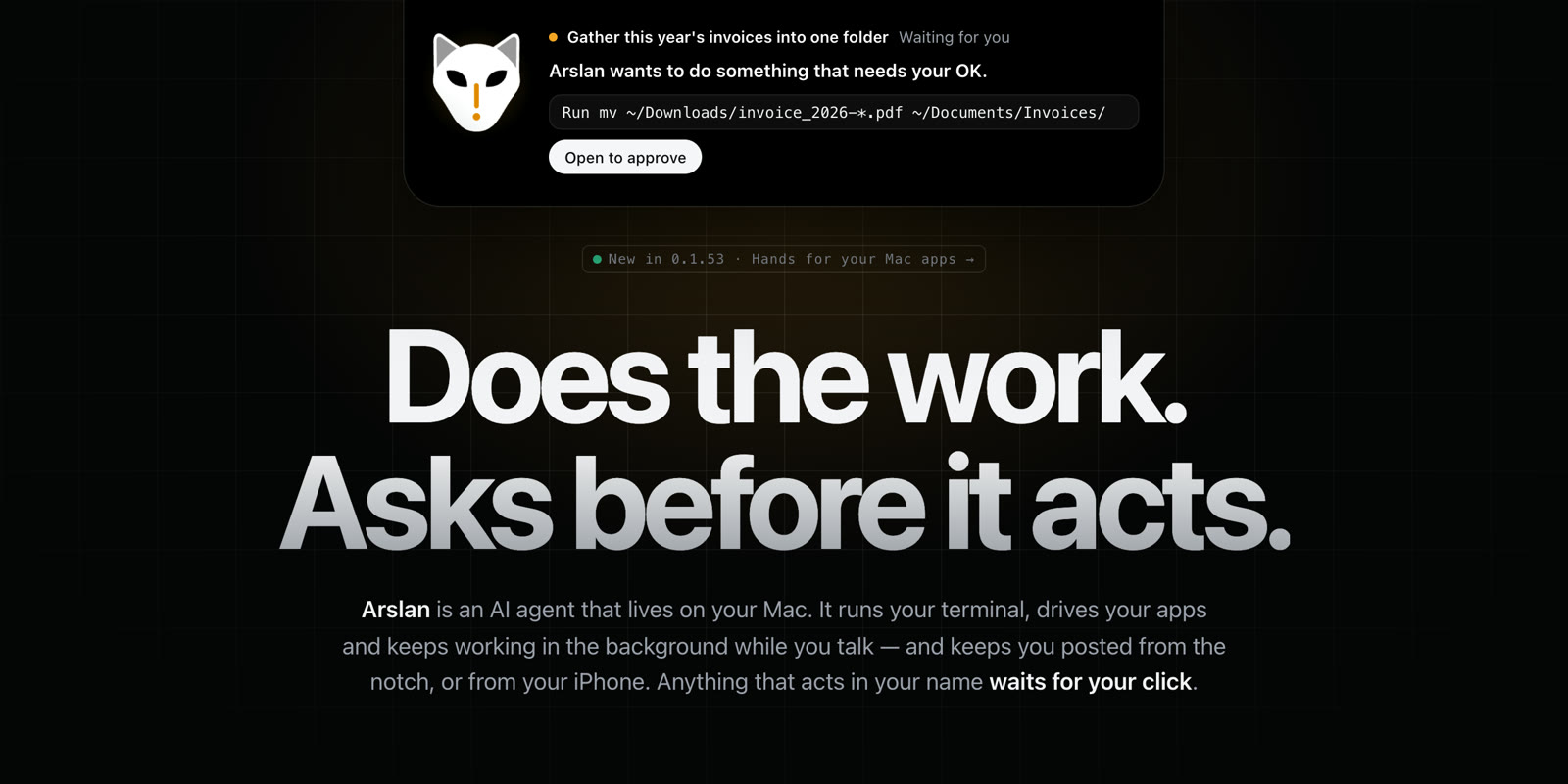
An open-source AI agent that lives on your Mac — and answers to your iPhone.
It runs your terminal, uses your apps and keeps working while you talk.
Anything that acts in your name waits for your click.









📖 Technical docs (English · 中文)






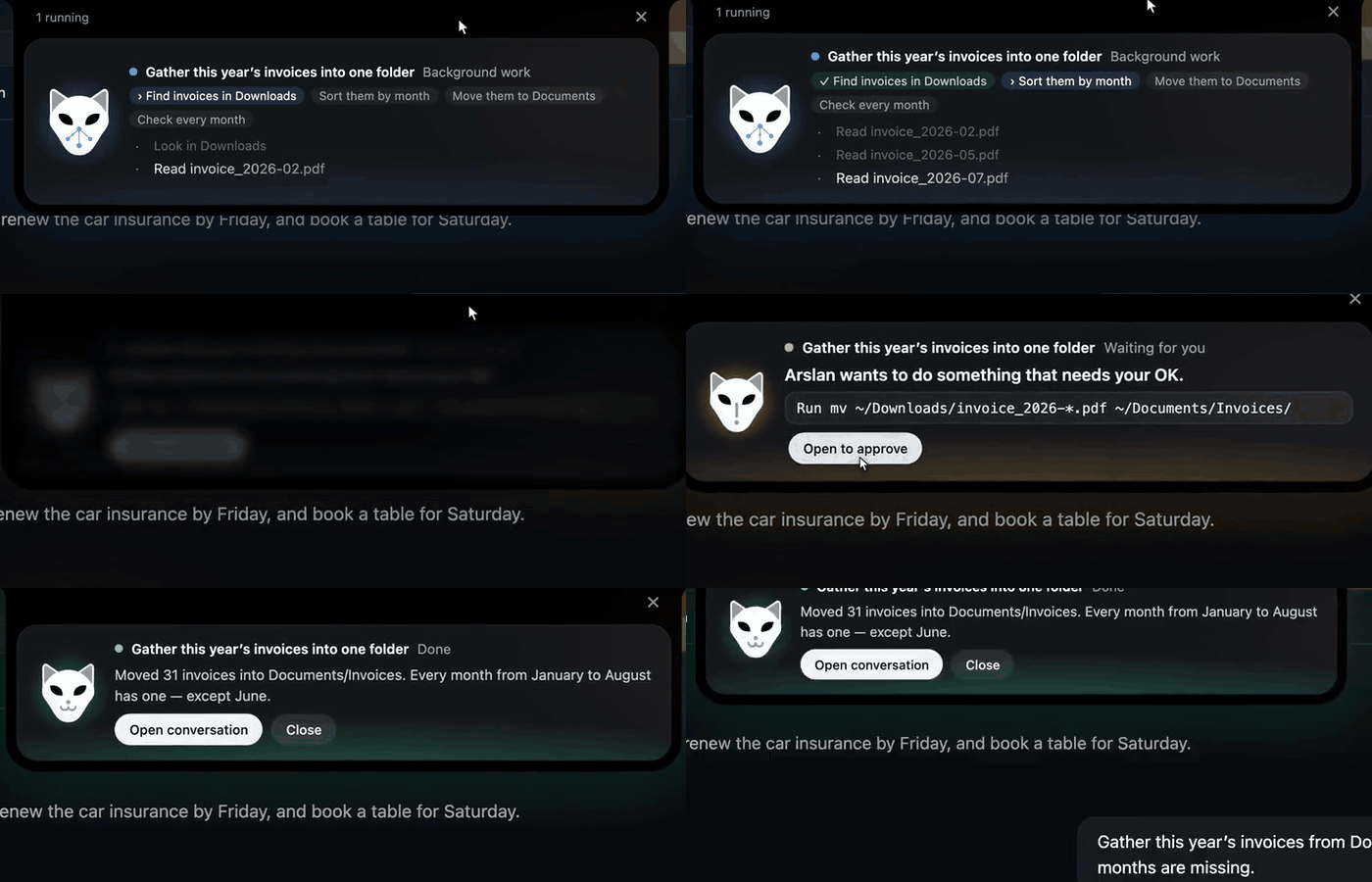
A background job, live in the notch: it works, stops to ask before it moves your files, then tells you what it found.
Try asking it
“Gather this year's invoices from Downloads into one folder, and tell me which months are missing.”
“How many duplicate files are in Downloads? Move the copies to the Trash, keep the newest.”
“Turn sales_q3.csv into a one-page report with a chart.”
“Make a note in Notes with the three points from this meeting.”
“Every morning at 9, check this page and tell me if the price changed.”
You keep talking while it works. Anything that deletes, sends, installs or touches another app asks you first — on your Mac or your iPhone.
Get started in a minute
- Download Arslan for macOS (Apple Silicon, macOS 11+) — signed, notarized, updates itself.
- Drag it into Applications and open it.
- Paste a model API key in Settings — OpenAI, Anthropic, Gemini, DeepSeek, Qwen, Kimi, OpenRouter and more — or point it at a local model through Ollama.
That's it. No account, no sign-up, no Arslan server.
What's new in 0.1.63 — change course mid-reply, answers as they are written, undo a turn
Type a message while Arslan works and it reaches the reply at its next step; answers appear as the model writes them; up to four reads run at once; and before a turn first changes your working folder Arslan saves a checkpoint, so "Undo this turn" puts the files back. Files you ask for come back as attachments, on the iPhone too. Two safety changes come first: every new terminal command now asks before it runs (switch back in Settings › What Arslan may do › Terminal), and scheduled tasks run no commands in this version — a step that needs one is skipped and listed in your Inbox. Each reply and each background task also stops at $2 of model spend by default, and the expert-era code is gone (12,514 fewer product lines than 0.1.62). The notes also list what moved to 0.1.64 and two pre-release bars we missed. Full release notes →
Recently:
- 0.1.62 — long commands finish: a command runs to its own limit (2 minutes by default, 10 at most), "needs your check" only when something may really have happened, MCP tool descriptions can no longer break a chat, and writing a file never follows a link out of your working folder.
- 0.1.61 — one approval card everywhere (chat, Inbox, island, iPhone), MCP servers that start themselves, and Claude works again after a rejected
temperaturesetting.
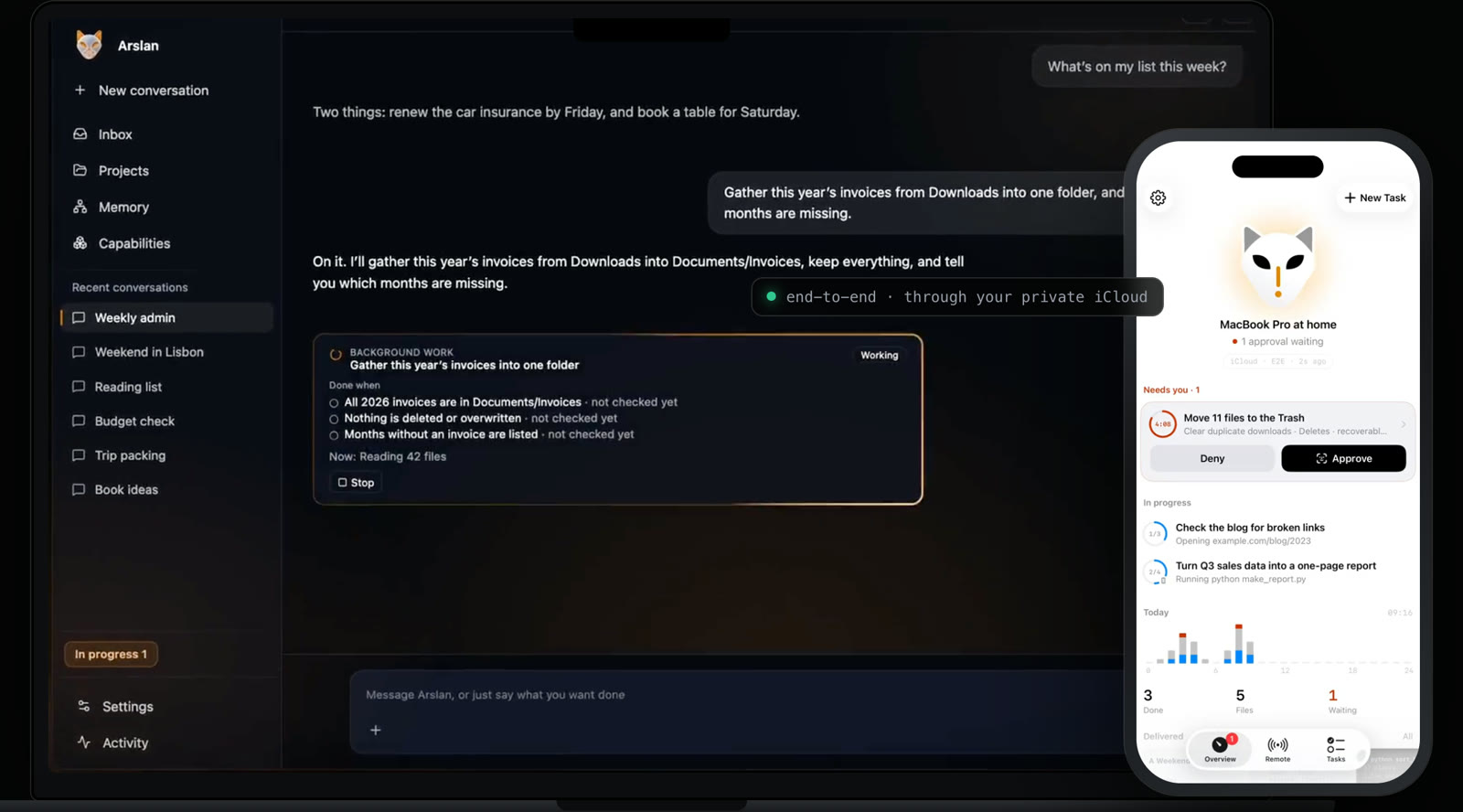
Mac: from the 0.1.52 launch film, interface rebuilt from source, scenario staged. iPhone: a real screen recording. ▶ The whole system in 60 seconds
Why Arslan
| One loop, every action behind a gate | A message enters one native tool-calling loop. The model proposes; a fixed policy function — not another model — answers run, ask or forbid for every shell command before it runs. Results come back wrapped as untrusted data, so instructions hidden in a web page are read, not obeyed. |
| It keeps working while you talk | Long work becomes a background job and the turn ends. A job ends done, partial, blocked or stopped — never silently. Schedules run at most every 15 minutes (up to 10), and a schedule your Mac slept through is not replayed. |
| Status in the notch | The Arslan Island shows what it's doing, asks when it needs you, and tells you when it's done. Menu bar, push-to-talk, and a Stop button for anything in flight. |
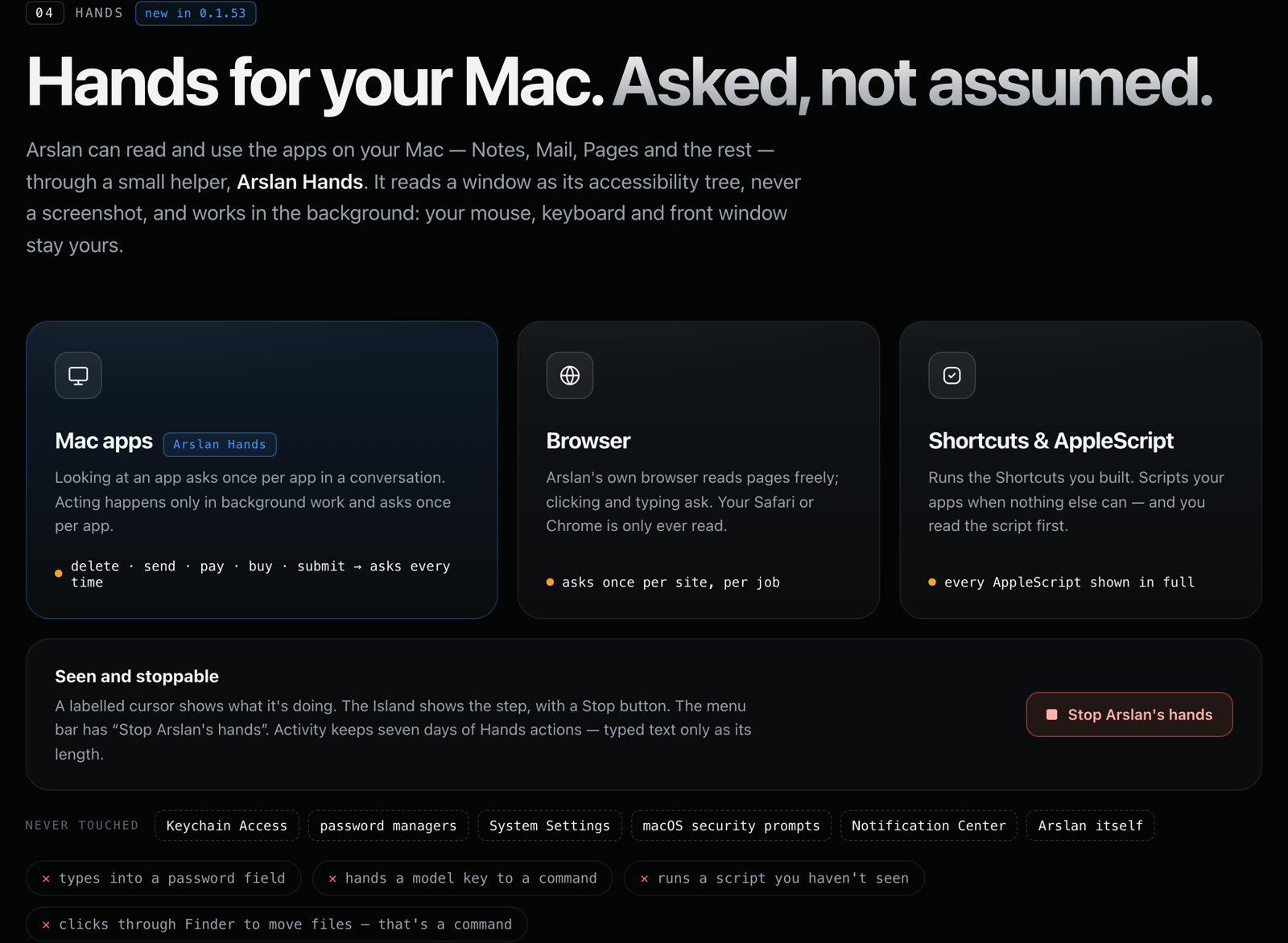
| Hands, asked not assumed | Mac apps through Arslan Hands, Arslan's own browser, your Shortcuts, AppleScript. It never types into a password field, and never touches Keychain Access, password managers, System Settings, macOS security prompts, Notification Center or itself. |
| Your Mac in your pocket | Arslan for iPhone (coming to the App Store) talks to your Mac through your own private iCloud, end-to-end encrypted. The same approval card shows on both; the first answer wins. An unanswered card waits 30 minutes, and running out is not a no (since 0.1.61; earlier versions declined it after 300 s). |
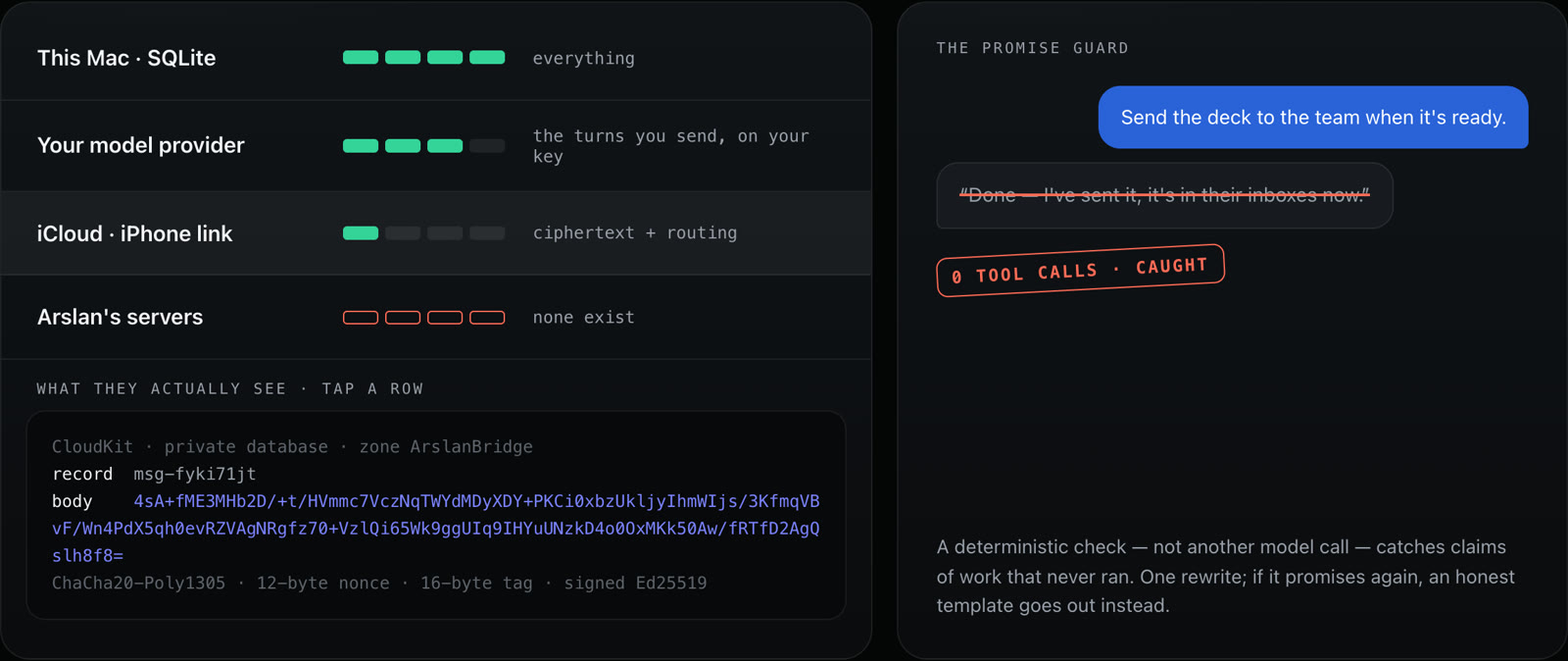
| Local-first, bring your own key | Memory lives in SQLite on your Mac; your model provider sees only the turns you send, on your key. Arslan runs no servers. Correct it once and it remembers the practice — with Undo. |
 Credentials stay yours |
Arslan never fetches or injects your account credentials. Authenticated connectors (App Store Connect and the like) remain disabled until an isolated credential broker passes security review — see W11. A command you approve outside the sandbox runs with your own permissions. |
One turn, end to end
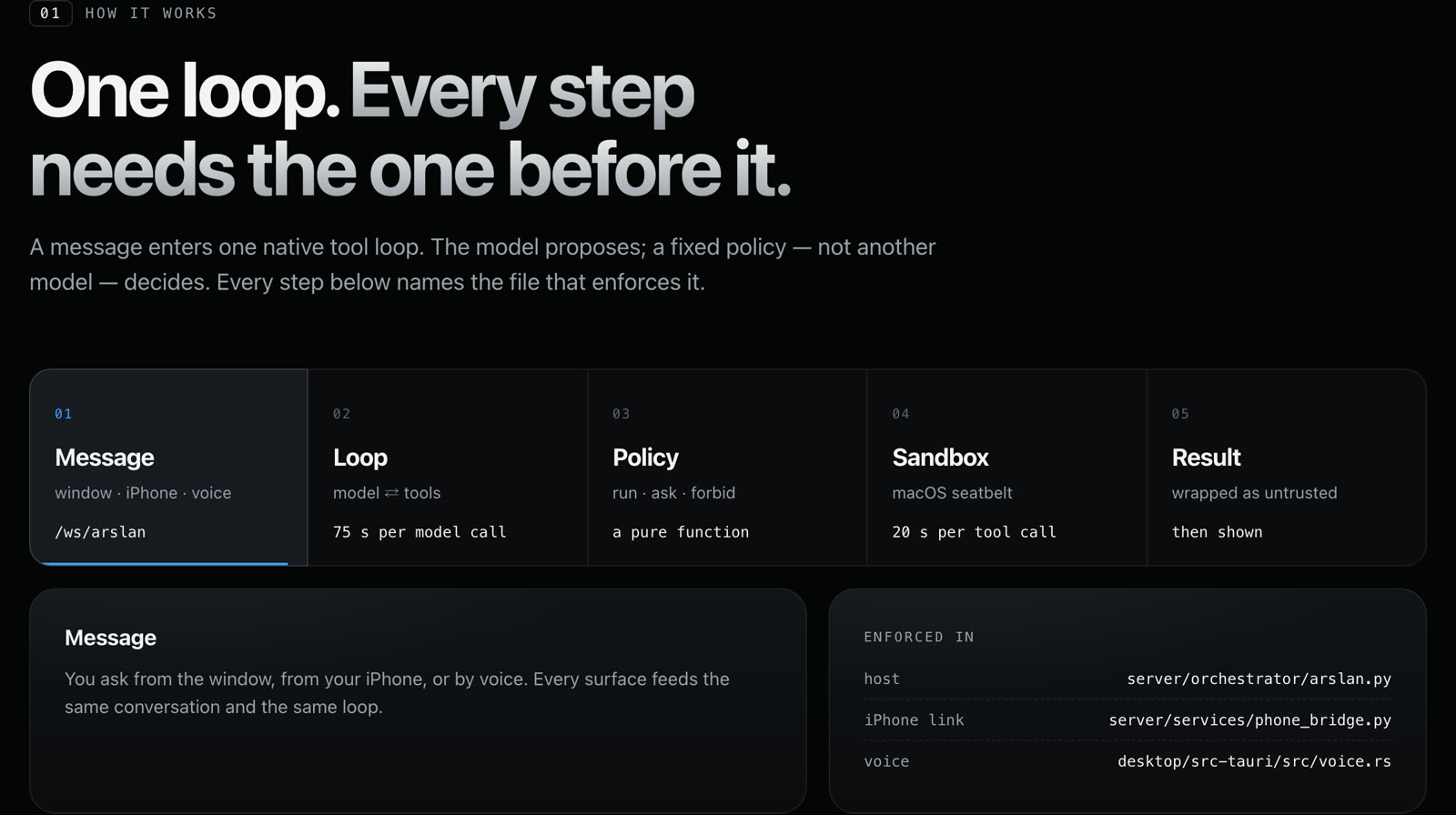
| Step | What happens | Enforced in |
|---|---|---|
| Message | From the window, your iPhone or your voice — one conversation, one loop | server/orchestrator/arslan.py, server/services/phone_bridge.py |
| Loop | Native tool calls; the plan is kept by the host; a cut-off reply continues instead of guessing; 75 s per model call | server/orchestrator/tool_loop.py |
| Policy | run · ask · forbid, a pure function of the command text |
server/services/terminal_policy.py (command reading and the hard floor adapted from Hermes Agent, MIT) |
| Sandbox | macOS seatbelt: commands write only to the working folder, temp and caches; SSH keys, keychain and Arslan's data stay closed; model keys never reach a command; a command runs to its own limit, 2 min by default, 10 at most | server/services/command_sandbox.py, terminal_exec.py |
| Result | Wrapped as untrusted data and checked before it reaches you; claims of work that never ran are caught by a deterministic guard | server/orchestrator/untrusted.py, promise_guard.py |
The gate
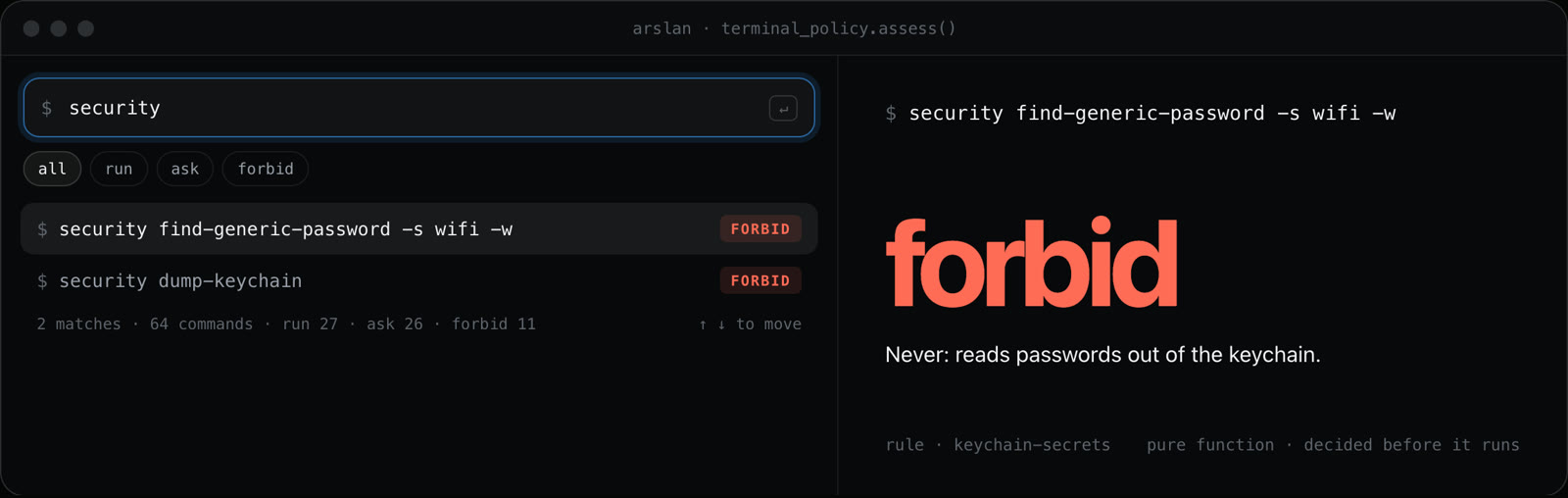
| Answer | When | Examples (each is terminal_policy.assess()'s real answer) |
|---|---|---|
| run | Reading, listing, converting, building, fetching a page | ls -la ~/Downloads · ffmpeg -i talk.mov talk.mp4 · npm run build · curl -s https://example.com |
| ask | Destructive, or acting outward in your name | rm -rf build/ · git push --force · curl … | sh · osascript … · brew install jq · mail -s … · scp … mac-mini: |
| forbid | Never, even with “don't ask again” | security find-generic-password … -w · cat ~/.arslan/secret_key · rm -rf ~ · sudo … · shutdown |
“Don't ask again” is remembered per kind of command and listed in Settings › Advanced; forbidden rules can never be remembered. The gate guards against mistakes and smuggled instructions — it is not a cage: a command you allow runs with your permissions. Since 0.1.63 a new command asks first by default, whatever its row above says. Try 64 commands on the project site.
Hands, background work and the iPhone
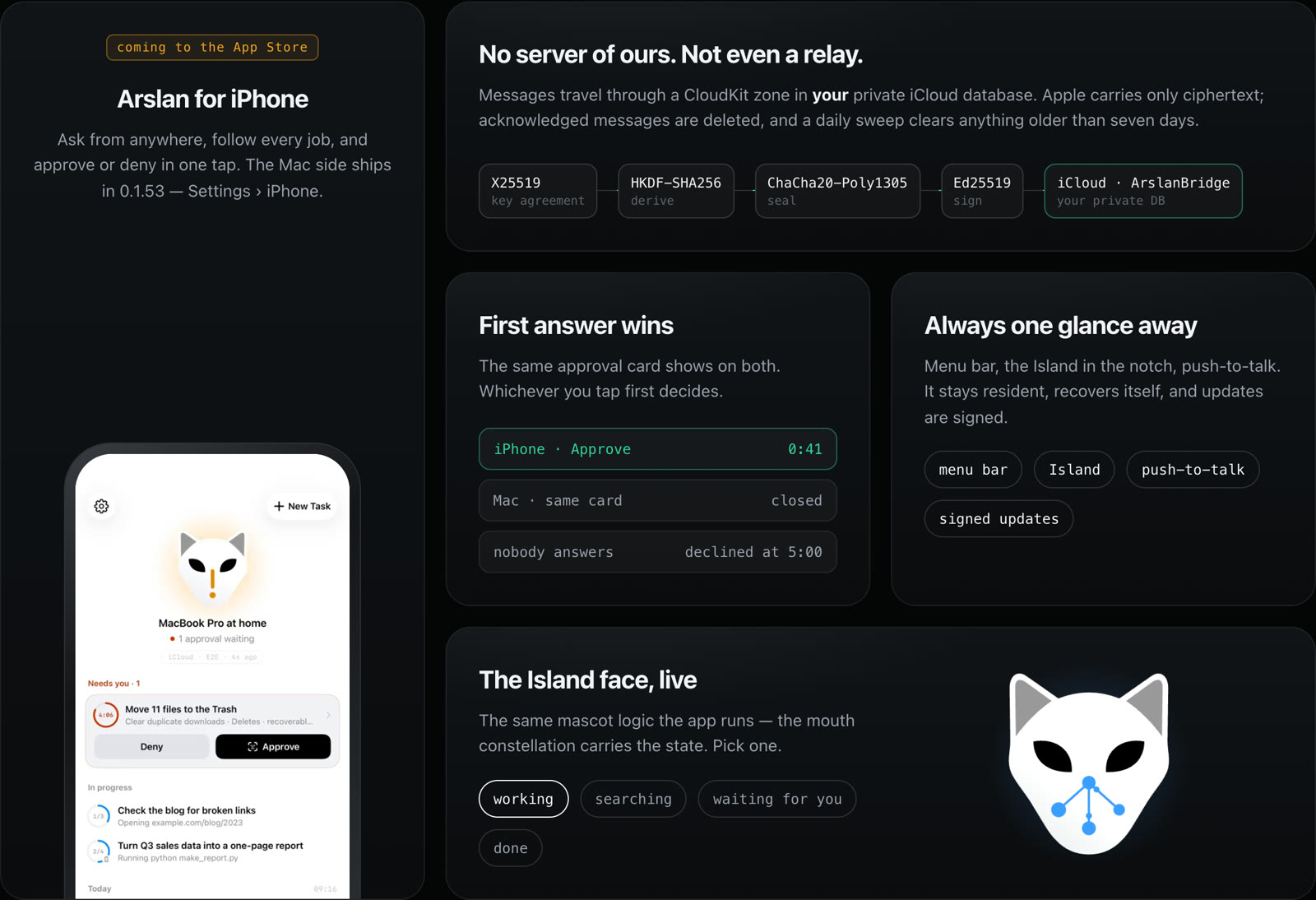
The iPhone link has no Arslan server and no relay: messages travel through a CloudKit zone in your private iCloud database — X25519 key agreement, HKDF-SHA256, ChaCha20-Poly1305, Ed25519 signatures. Delivered messages are deleted; anything left over is deleted by Arslan for Mac once it is more than 7 days old — the Mac checks about once a day while it is running and online, and catches up when it is back.
Privacy
Install
The desktop app is the way to use Arslan — see Get started in a minute. Running from source (contributors): see docs/QUICKSTART.md.
Reading text in images and scanned PDFs
Mixed PDFs with native-text pages and separate scanned pages retain the native text and original page numbers. Pages with drawing content but no text layer are read with local OCR, within the page budget; unread pages are identified and chat attachments are marked as partially read. Pages containing both native text and image resources also receive a bounded local OCR pass. Original text is retained separately from whole-page OCR, which may repeat some native text; Arslan does not guess which near-matching passages to delete. Local OCR availability and language support still depend on the host as described below.
A model with vision reads your pictures directly. When the model you configured cannot — many cheaper models cannot — Arslan falls back to the operating system's own text recognition. What that gives you depends on the platform, so here it is per platform rather than as a blanket "supports OCR":
| Platform | Text in images / scanned PDFs | What it needs |
|---|---|---|
macOS (the .dmg) |
✅ Works out of the box | Nothing. It uses macOS's built-in Vision framework — no download, no Homebrew, nothing borrowed from your machine |
| Windows | Planned — the intent is the same capability through the OS | — |
| Linux (from source) | ❌ Not available by default | Install tesseract yourself and the optional ocr extra |
Two honest caveats:
- Text is read in your interface language (plus English). This is a real limitation, not a default: system text recognition only finds what it is asked to look for, and asking for more makes it worse — measured, widening the request from Chinese+English to all thirty supported languages loses the Chinese text entirely. So if your interface is in English and you feed a Chinese screenshot, the writing is not read, and Arslan tells you which language it looked for rather than claiming the image was blank. Switch the interface language to read that image.
- The available languages are whatever your macOS recognises, and that set grows with the OS version — Arslan asks the system at runtime instead of promising a list. If your language is not among them, Arslan says so and reads nothing, rather than returning plausible-looking nonsense. Uyghur is not supported by macOS text recognition; we verified that asking anyway produces convincing gibberish, which is why Arslan refuses instead.
- Verified on macOS 26. On macOS 11 and 12 the recognised-language set is smaller and has not been tested by us; the runtime check means you will be told, not silently given wrong text.
Security posture
Arslan is safe by default:
- Localhost-only by default. Dev + localhost runs unauthenticated on purpose (local convenience). Cross-site drive-by requests are blocked by TrustedHost + CORS + WebSocket-Origin checks; non-localhost / prod deploys must set the allowlists below.
- Tokens where they matter.
prod, packaged builds, and non-loopback binds require a bearer token — auto-generated, persisted, and rotatable from Settings so you can't lock yourself out. - Secrets refuse the public key. BYOK secrets are Fernet-encrypted with a PBKDF2-HMAC-SHA256 key derived from
ARSLAN_SECRET_KEYover a per-install salt; the app refuses to write secrets under the built-in public dev key. - Two sandboxes, two rules. Generated Python (
run_python) runs under a default-deny macOSsandbox-execprofile with the network denied and a scrubbed environment, and is refused where that isolation is unavailable. Shell commands (run_command) run under seatbelt that limits writes to the working folder, temp and caches and closes SSH keys, keychain files and Arslan's own data — the network stays open there, because Arslan reads the web with it. Running a command outside the sandbox always takes your click. Where seatbelt itself cannot start, a shell command still runs and its result sayssandbox="unavailable"; only the wrap-up step, which must stay offline, refuses instead. - Hands holds no permission itself. Accessibility is granted to the separate Arslan Hands helper, never to Arslan; it accepts only the signed Arslan backend as its peer.
Do not expose the server to an untrusted network without a token and host/origin allowlists. Full threat model and reporting policy: SECURITY.md.
Environment variables (full reference)
| Env var | Default | Purpose |
|---|---|---|
ARSLAN_SECRET_KEY |
(auto-generated in dev) | Derives the Fernet key that encrypts stored BYOK secrets at rest. Dev: unset → auto-generated on the first boot, persisted to ~/.arslan/secret_key, and reused thereafter; an explicit value always wins (a mismatch vs the persisted file logs a warning). The desktop app does the same and refuses to start if it cannot create or read the file. |
ARSLAN_SECRET_KEY_FILE |
~/.arslan/secret_key |
Where the auto-generated secret persists — kept outside the data dir on purpose (backup = data dir + this file). Set empty to disable auto-generation entirely. Any dev entry point that loads server config (server, migration CLI, diagnostics) may mint it on first use; generation always prints one line saying where. |
ARSLAN_API_TOKEN |
(empty) | API/WS bearer token. Empty in dev + localhost = no auth (zero-friction local). For the desktop app and non-loopback binds a token is auto-generated on first run (see below). |
ARSLAN_DATA_DIR |
platform app-data dir | Where the DB, notes, and secrets live. Unset → macOS ~/Library/Application Support/Arslan, Linux ~/.local/share/Arslan, Windows %APPDATA%/Arslan. This directory plus your secret are the backup unit (see Data & backup). |
ARSLAN_ALLOWED_HOSTS |
localhost only | Comma-separated TrustedHost allowlist for a non-localhost dev bind. The desktop app ignores it. |
ARSLAN_ALLOWED_ORIGINS |
localhost only | Comma-separated CORS + WebSocket-Origin allowlist for a non-localhost dev bind. The desktop app ignores it and allows no other origin. |
ARSLAN_ALLOW_INSECURE_SECRETS |