

autopilot (formerly kimiflare)
= 22.23.4">
A terminal coding agent that runs on your own provider key.
OpenRouter (400+ models, per-turn billed cost), OpenAI, DeepSeek, Kimi, Z.ai, local Ollama / LM Studio, or any OpenAI-compatible endpoint.
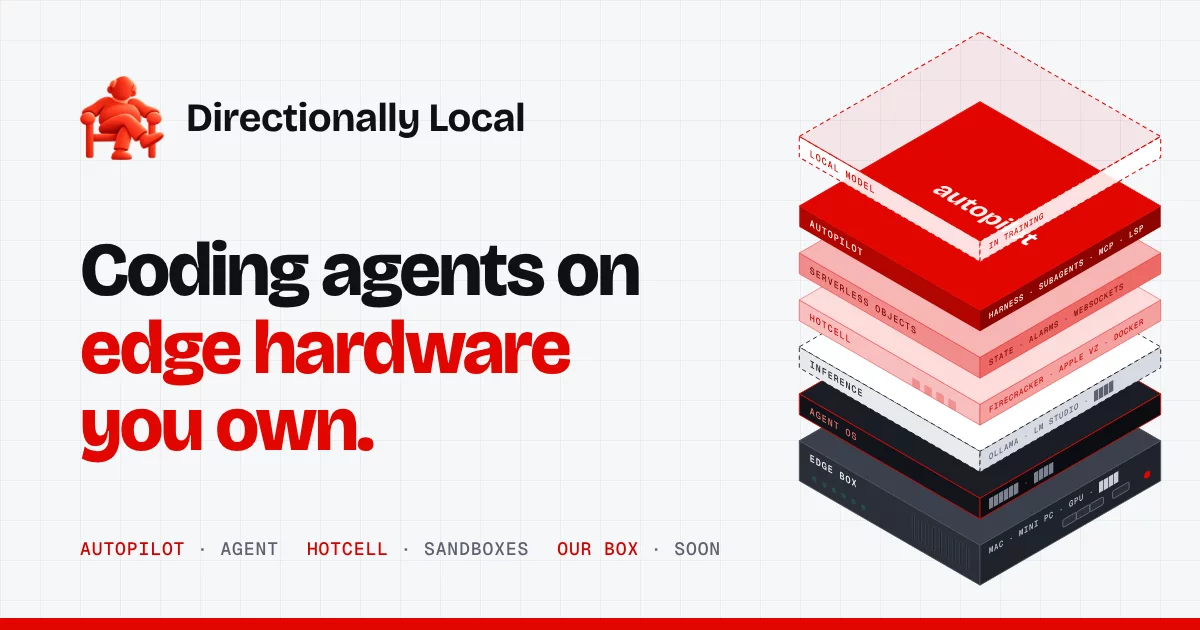
Part of Directionally Local, an open-source stack for running coding agents on your own hardware, alongside Hotcell and Serverless Objects. Product page: directionallylocal.com/autopilot.
How it works
autopilot sends every model call to the provider you choose using your own key — bring-your-own-key, nothing proxied, nothing marked up. On first run you pick a provider, connect it once (the key is checked before it's saved) and pick a model. That's the whole setup. OpenRouter is the recommended default; see Providers for the rest.
On OpenRouter you also get:
- Any model, one key. The model picker is OpenRouter's live catalog — Claude, GPT, Gemini, Grok, Qwen, GLM, Kimi, DeepSeek, free models and more — opening on the best & latest by benchmark score, with fuzzy search over everything. Switch any time with
/model. - Real cost, per turn. OpenRouter reports what each generation actually cost; the status bar shows it (a local estimate marked
≈$only until the billed number arrives)./costtotals it by session, day, month and all time. - Reliable tool calling. Requests only go to upstream providers that support every parameter autopilot sends (tools above all), and OpenRouter routes tool-calling traffic to the providers with the best tool-call success rates. The status bar shows which provider served the last turn.
- Prompt caching that stays warm. Each session pins to one upstream provider (OpenRouter sticky routing), so the long, stable prompt prefix keeps hitting the provider's cache across turns.
What to remember
- Up to 1M+ context (model-dependent) — Read entire modules, large configs, and full stack traces without the model losing track.
- Image understanding — Drop image paths (PNG, JPG, WebP, GIF, BMP up to 5 MB) into any prompt. Great for UI reviews, diagrams, and screenshots.
- Plan / Edit / Auto modes —
planis a whitelist-only research mode: only read-only tools (read, glob, grep, web search, GitHub read-only, browser fetch) are allowed. Writes, edits, mutating bash, MCP tools, and LSP renames are all blocked.edit(default) prompts per mutating call.autoapproves everything for trusted tasks. Inplanandedit, reading a credentials file (~/.ssh,~/.aws, Autopilot's own config with your provider keys,.env,/proc/*/environ) also asks first, so a prompt injection cannot quietly read a key and send it out withweb_fetch. Likewiseweb_fetchandbrowser_fetchask before reaching a local or private network address (localhost,127.0.0.1,10.x/192.168.x, cloud metadata at169.254.169.254, including names and redirects that resolve there), approved per origin, so a prompt injection cannot read metadata credentials or local services. - Subagents — By default, the coordinator assesses substantial tasks for independent research and may delegate without special phrasing. Worker calls still go through permission checks and need a configured backend. See the subagents guide for examples, controls, limits, and setup.
- Long-running unattended runs — The headless server can launch detached jobs, sleep between check-ins, and resume from saved checkpoints. Overall runtime, token, cost, and action budgets are optional; explicit budget exhaustion pauses for input. See the long-running runs guide.
- Windows support — OS-aware shell auto-detects
cmd.exe/ PowerShell on Windows,bashon Unix. Thebashtool works out of the box on all platforms. - Message queuing — Submit multiple messages while the agent is busy; they queue and auto-drain. Escape interrupts the current turn but preserves the queue.
- Smart permission modal — Denying a tool opens inline feedback so you can tell the agent what to do instead. Keyboard-native navigation (
↑/↓,j/k,Alt+1/2/3). - Loop guardrails — Agent hard-stops when all tools in a turn are blocked, preventing infinite token-burning cycles.
- Persistent all-time cost history — Append-only
history.jsonltracks daily usage forever, so/costshows true all-time and monthly totals that survive across sessions and version updates. - LSP + MCP — Semantic code intelligence (hover, go-to-definition, references, diagnostics) via Language Server Protocol. Extend with external tools via Model Context Protocol.
- Local structured memory — SQLite + embeddings cross-session memory. The agent recalls facts, instructions, and preferences across sessions via
remember,recall, andforgettools. - Web search, GitHub, and headless browser — Research the web, read GitHub repos, and fetch JavaScript-rendered pages without leaving your terminal.
Recently shipped
- OpenRouter as the model provider — Every OpenRouter model, your own key, billed cost per turn. Replaces Cloudflare Workers AI / AI Gateway (see Upgrading from Cloudflare).
- OS-aware shell with Windows support — Auto-detects
cmd.exe, PowerShell, or bash based on platform. Override withKIMIFLARE_SHELLor/shell. - Smart permission modal with inline feedback — Deny a tool and immediately tell the agent what to do instead. Keyboard-native navigation with
↑/↓,j/k,Alt+1/2/3. - True message queuing — Enter queues messages while the agent is busy; Escape interrupts and auto-drains the queue.
- Hard-stop loop guardrail — Stops token-burning cycles when all tools in a turn are blocked.
- Headless SDK — Programmatic
createAgentSessionAPI and JSONL-over-stdio RPC mode for building on top of autopilot.
See the full changelog at github.com/directionally-local/autopilot/releases.
Quick start
npm install -g autopilot-ai
autopilot
On first run, Sign in with OpenRouter: approve autopilot in your browser and a key is created for you (or paste one from https://openrouter.ai/keys). Then pick a model. That's it.
Or install with Homebrew on macOS or Linux (Homebrew installs Node.js for you):
brew install directionally-local/tap/autopilot
autopilot
Or run without installing:
npx autopilot-ai
Coming from
kimiflare? The package was renamed. Runnpm uninstall -g kimiflare && npm install -g autopilot-aiand useautopilotinstead ofkimiflare. Your settings, sessions, memory and cost history are kept (they stay in~/.config/kimiflareand~/.local/share/kimiflare), andKIMIFLARE_*environment variables still work.
Requires Node.js 22.23.4+, 24.22.1+ or 26.12.1+ (earlier releases have the Brotli bug CVE-2026-111497, and web_fetch refuses to run on them).
To pick up an earlier conversation, run autopilot resume <id> (the exact command is printed when you exit), autopilot resume to choose one from this directory, or autopilot -c for the most recent one. Inside autopilot, /resume does the same.
Providers
| Provider | id | Key | Notes |
|---|---|---|---|
| OpenRouter (default) | openrouter |
OPENROUTER_API_KEY or browser sign-in |
400+ models, billed cost per turn, sticky routing, subagents, Jev checks |
| Anthropic | anthropic |
ANTHROPIC_API_KEY |
native Messages API: extended/adaptive thinking, explicit prompt caching (API keys only — Claude Pro/Max sign-in isn't permitted for third-party tools) |
| OpenAI | openai |
OPENAI_API_KEY |
Responses API: reasoning carries across tool loops (encrypted, stateless), codex models |
| Google Gemini | gemini |
GEMINI_API_KEY / GOOGLE_API_KEY |
OpenAI-compatible endpoint; Gemini 3 thought signatures are kept with each tool call |
| ChatGPT (Plus/Pro/Team plan) | chatgpt |
autopilot auth chatgpt (browser sign-in with token sharing) |
your plan's GPT models over the Responses API; tokens refresh automatically; usage counts against your plan. Uses OpenAI's official token-sharing sign-in, not the Codex backend |
| GitHub Copilot | copilot |
autopilot auth copilot (GitHub device login; --enterprise <domain>) |
your Copilot plan's models — Claude over Messages, GPT over Responses; usage counts as premium requests. Not a documented public API, so GitHub may change it |
| Google Vertex AI | vertex |
Google credentials (gcloud auth application-default login, a service-account key in GOOGLE_APPLICATION_CREDENTIALS, or GOOGLE_VERTEX_ACCESS_TOKEN) + GOOGLE_VERTEX_PROJECT (or autopilot auth vertex --project …) |
Gemini and partner models through Vertex's OpenAI-compatible endpoint, Claude through Anthropic's Messages API on Vertex; location GOOGLE_VERTEX_LOCATION (default global) |
| Amazon Bedrock | bedrock |
AWS_BEARER_TOKEN_BEDROCK (Bedrock API key), or AWS credentials (env or ~/.aws/credentials / AWS_PROFILE; for SSO, eval "$(aws configure export-credentials --format env)"); region AWS_REGION |
Converse API with SigV4 signing; Claude thinking and prompt caching; inference-profile ids like global.anthropic.claude-sonnet-5-5 |
| DeepSeek | deepseek |
DEEPSEEK_API_KEY |
|
| MiniMax | minimax |
MINIMAX_API_KEY |
OpenAI-compatible endpoint with split reasoning (<think> tags are separated out if they appear) |
| Moonshot AI (Kimi) | moonshot |
MOONSHOT_API_KEY |
|
| Kimi Code (subscription) | kimi-code |
KIMI_API_KEY |
|
| Z.ai (GLM) | zai |
ZHIPU_API_KEY |
|
| Z.ai GLM Coding Plan | zai-coding |
ZHIPU_API_KEY |
|
| xAI | xai |
XAI_API_KEY |
Grok over the Responses API |
| Mistral | mistral |
MISTRAL_API_KEY |
tool-call ids adapted to Mistral's format; mistral-embed |
| Groq · Cerebras · Together AI · Fireworks AI · DeepInfra | groq · cerebras · together · fireworks · deepinfra |
GROQ_API_KEY · CEREBRAS_API_KEY · TOGETHER_API_KEY · FIREWORKS_API_KEY · DEEPINFRA_API_KEY |
fast / open-model hosts |
| Vercel AI Gateway | vercel |
AI_GATEWAY_API_KEY |
many vendors with one key |
| Cloudflare Workers AI | cloudflare |
CLOUDFLARE_API_TOKEN + CLOUDFLARE_ACCOUNT_ID (or autopilot auth cloudflare --account-id …) |
Cloudflare-era kimiflare configs reuse their credentials, and memory stays on bge-base-en-v1.5. For AI Gateway, use its OpenAI-compatible URL as a custom endpoint |
| Azure OpenAI | azure |
AZURE_API_KEY + AZURE_RESOURCE_NAME (or autopilot auth azure --resource <name>) |
v1 API over Responses; model ids are your deployment names, discovered from the resource. Entra ID sign-in isn't supported yet — use a key |
| Ollama (local) | ollama |
none | installed models are discovered; providers.ollama.baseUrl for another host |
| LM Studio (local) | lmstudio |
none | |
| Requesty | requesty |
REQUESTY_API_KEY |
|
| Any OpenAI-compatible endpoint | custom |
KIMIFLARE_API_KEY (optional) |
KIMIFLARE_BASE_URL — LiteLLM, vLLM, llama.cpp, a company gateway |
- First run asks which provider to use; providers with a key already in your environment are offered first and used without saving the key.
- Switch any time with
/provider <id> [key](/providerlists them and where each key comes from), or from the CLI:autopilot auth <id>(saves a key and makes it active),autopilot auth use <id>,autopilot auth status. For one run, setAUTOPILOT_PROVIDER=<id>. - Everything follows the provider: chat, compaction and memory side-calls, memory/skill embeddings, the model picker (each provider's own catalog — models.dev for hosted providers, live discovery for Ollama and LM Studio), pricing, error messages and the status page link. Nothing is sent to OpenRouter while another provider is active.
- OpenRouter-only features switch off on other providers: billed-cost confirmation (elsewhere
/costshows estimates from the provider's published prices), Hotcell subagents, and the Jev completion/triage checks. - Embeddings: providers without an embeddings API (Anthropic, DeepSeek, Moonshot, Kimi Code, the Coding Plan, LM Studio) keep memory working through text and topic-key recall. To keep vector recall, set
"embeddingProvider": "openai"(orAUTOPILOT_EMBEDDING_PROVIDER) with that provider's key, ormemoryEmbeddingModel.
Config file shape (keys can live here instead of the environment):
{
  "provider": "deepseek",
  "providers": {
    "deepseek": { "apiKey": "sk-…", "model": "deepseek-v4-pro" },
    "ollama": { "baseUrl": "http://gpu-box:11434/v1" }
  }
}
Your OpenRouter key
Three ways to provide it — the first one found wins:
- Environment:
OPENROUTER_API_KEY(orKIMIFLARE_OPENROUTER_KEY). With this set, the setup screen never appears — the way to run kimiflare headless (CI, a VM, a container). - Sign in / setup screen / CLI: "Sign in with OpenRouter" on first run, or
autopilot auth openrouter— approve in the browser and a key is created and saved (OpenRouter's OAuth PKCE flow). Over SSH or in a container it shows a link to open on any device and asks for the code OpenRouter displays (force this with--code).--pasteprompts for an existing key instead, andautopilot auth openrouter <key>saves one directly. Inside the TUI,/key set <key>replaces it. - Config file:
"openrouterApiKey": "sk-or-…"in~/.config/kimiflare/config.json(created with mode 600).
/key shows which key is in use, what it has spent and how much credit is left. Model calls — including memory embeddings and small internal side-calls (summaries, memory extraction) — are all billed to this key.
A key with no credits can still use OpenRouter's free models (the "Free" section of /model, ids ending in :free), subject to OpenRouter's daily request cap.
Upgrading from the Cloudflare version
Earlier kimiflare versions ran on Cloudflare Workers AI / AI Gateway. On the first launch after upgrading you'll be asked for an OpenRouter key once; after that:
- Your settings (theme, MCP/LSP servers, hooks, memory, sessions, cost history) carry over.
- Model ids are migrated (
@cf/moonshotai/kimi-k2.6→moonshotai/kimi-k2.6, and so on), and the retired Cloudflare fields (OAuth login, gateway, Unified Billing, provider keys) are removed fromconfig.json. - Memory keeps working unchanged: on OpenRouter, embeddings use the same
bge-base-en-v1.5model Workers AI served. /gateway,autopilot auth cloudflare,--cloudand the Cloud-only commands are gone./multi-agent(Commute) is retired; subagents now run locally through Hotcell.
Subagents
For substantial tasks, the agent can hand independent investigations to subagents: separate Autopilot instances that each explore the repository in their own local Hotcell sandbox and report back cited findings. Several subagents run in parallel behind a single approval while the main agent keeps the conversation and does the edits. You don't need to ask for them; say "don't use subagents" to opt out, or "use subagents" to insist.
Setup: install and start Hotcell, then add your OpenRouter key to its host key store (hotcell keys add openrouter). The real key never enters a sandbox. Subagents are read-only (no edits, shell, PRs, or MCP) and see your current working tree, including uncommitted changes — it is streamed into the sandbox, so private repositories work and nothing needs to be pushed (secrets like .env are never copied). The first subagent after an install builds a cached runtime (about two minutes, once per version); later ones start in seconds. See docs/subagents.md for limits and troubleshooting.
While subagents run they are listed above the prompt (Ink) or in the activity panel (/agents, Camouflage). /subagents cancel <n> stops one without interrupting the turn, and /subagents stats shows how often subagents were offered, used, and succeeded over the last week (kept locally in ~/.local/share/kimiflare/subagents.jsonl; no prompts or code are recorded).
Model
You pick the model on first run, and can switch any time with /model. The picker opens on the best & latest models — recent, tool-capable models ranked by the agentic and coding benchmark scores OpenRouter publishes (Artificial Analysis), at most two per lab — so it stays current as new models ship, with no list maintained in code. Start typing to fuzzy-search all of them (sonet finds Claude Sonnet, gpt 6 the GPT-6 family). Or set one directly:
/model moonshotai/kimi-k3          # 1M context
/model anthropic/claude-sonnet-5
/model deepseek/deepseek-v4-flash
autopilot -m moonshotai/kimi-k2.7-code -p "..."
Any OpenRouter model id works, including variants like :free and :nitro. Models OpenRouter lists without tool calling are hidden from the picker — a coding agent needs tools.
Provider routing (optional). OpenRouter serves most models through several upstream providers. autopilot always requires providers that support every parameter it sends, and otherwise leaves routing to OpenRouter (price-weighted, uptime-aware, tool-calling quality first, sticky per session for caching). To steer it, add an openrouterProvider object to the config file — any of OpenRouter's provider preferences:
{ "openrouterProvider": { "ignore": ["SomeProvider"], "data_collection": "deny" } }
Avoid order / sort unless you need them: they turn off sticky routing, which is what keeps the prompt cache warm.
Custom gateway endpoint
Point every model call at your own OpenAI-compatible endpoint instead of OpenRouter — useful when a host application (CI, an agents platform, a container) fronts model access with its own broker and doesn't want to hand autopilot a raw provider key:
export KIMIFLARE_BASE_URL="https://your-broker.example.com/v1"  # /chat/completions is appended
export KIMIFLARE_API_KEY="<bearer for that endpoint>"           # optional; header omitted if unset
autopilot -p "..."        # or --mode rpc — no OpenRouter key needed
The same pair can be persisted in ~/.config/kimiflare/config.json as baseUrl / apiKey
(env vars win over the file, field by field). When a base URL is configured:
- Chat requests go to
<baseUrl>/chat/completionsand memory embeddings to<baseUrl>/embeddings, withAuthorization: Bearer $KIMIFLARE_API_KEY(noAuthorizationheader at all when the key is unset — e.g. a local llama.cpp/Ollama server). - Model ids pass through in the request body unchanged; your endpoint owns provider dispatch.
- Cost is the local estimate only — your endpoint does its own metering.
Requesty (optional)
Requesty is another OpenAI-compatible gateway you can use with your own key instead of OpenRouter. It is opt-in: it is only used when no OpenRouter key and no custom endpoint are configured, so an existing setup never changes.
export REQUESTY_API_KEY="<your key>" # from https://app.requesty.ai/ap