
A compiler for the interface your agent already has: the shell. MCP makes an agent carry every tool's schema on every turn; declick compiles an API, an MCP server, or a database once into named verbs the model loads one at a time, and every verb returns one envelope with five exit codes. A team pushes a compiled adapter to a shared folder or git checkout once and every other machine pulls it. Ten engines, zero runtime dependencies, Node 24.
The saving is measured, not claimed: against nine real MCP servers (258 tools), the raw tool listing an MCP client puts in context is 236,818 bytes and declick describe is 58,309, a 4.1x reduction. node scripts/bench-tokens.mjs reproduces it on your own adapters; the method and the caveats are in docs/bench.md.
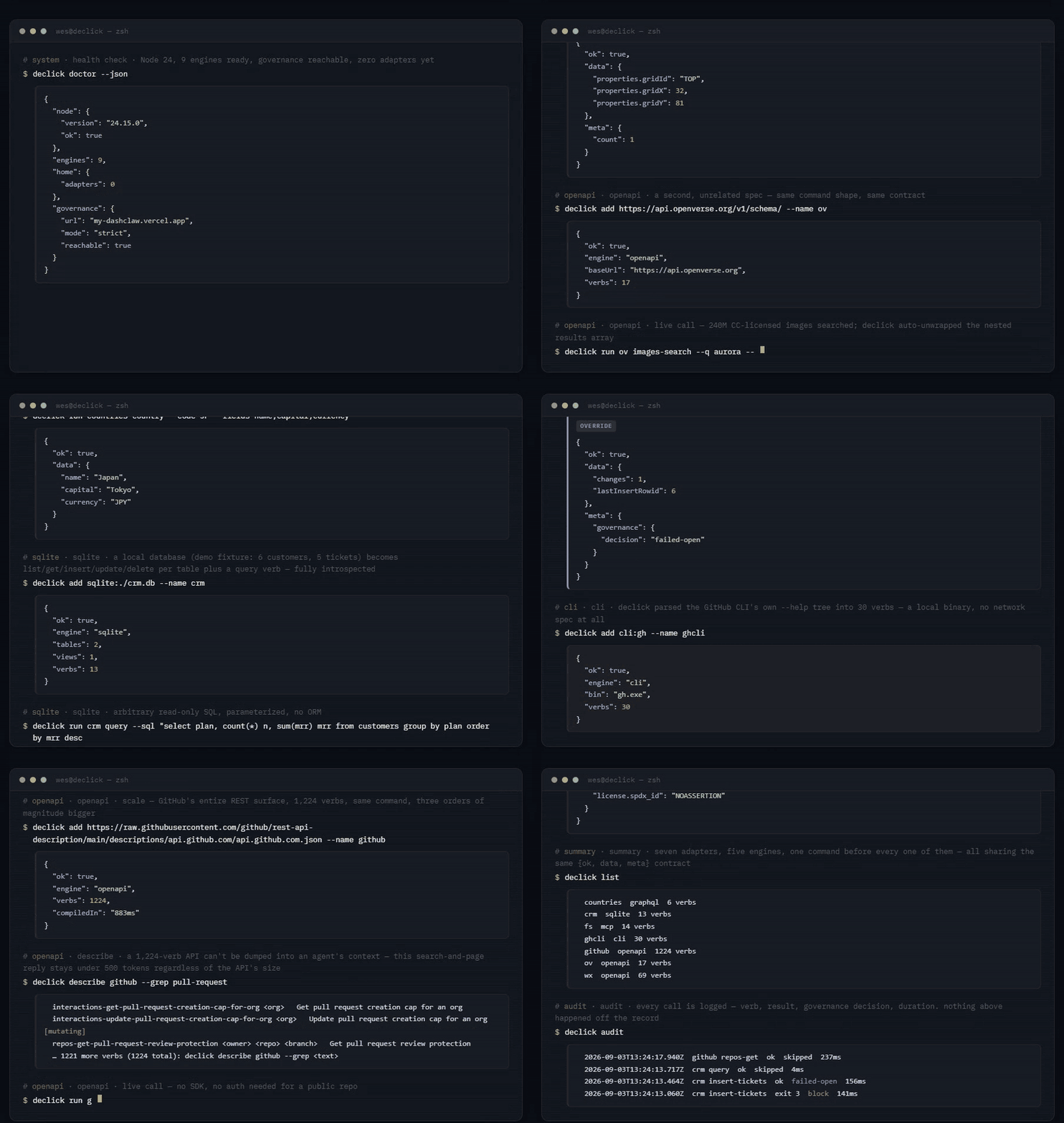
Quickstart
Requires Node 24 or newer. An older Node exits 1 with one line naming the version it found, from either entry point, instead of a stack trace.
npm i -g declick
declick setup
declick add https://petstore3.swagger.io/api/v3/openapi.json --name petstore
declick run petstore describe
declick run petstore get-user-by-name user1 --fields username,email
declick run petstore get-pet-by-id 7 --dry-run
declick setup puts ~/.declick/bin on PATH, adopts your agent's existing MCP servers as adapters, adds a rules block to its instruction file, and (Claude Code only) installs a hook that nudges the model toward the adapter; declick setup --revert puts everything back byte for byte.
The fifth line is a real call: petstore's user endpoints declare no auth, so the envelope comes back with the row. get-pet-by-id declares an API key in the spec, so without PETSTORE_API_KEY set it exits 4 and names the key; --dry-run shows the request it would send instead.
declick add writes three things: ~/.declick/petstore/manifest.json (the compiled surface), ~/.declick/bin/petstore (a two line launcher, with a petstore.cmd twin on Windows), and a petstore/SKILL.md in each agent skills directory it knows about, so agents discover it without being told. It also writes declick's own skill next to it, so an agent that finds one adapter knows how to build the next.
declick run <name> <verb> works everywhere with no setup. Once ~/.declick/bin is on PATH (declick path --install does it for new shells, declick doctor tells you whether it is), the short form petstore get-pet-by-id 7 works too. Both forms have identical output and exit codes.
Set up your agent, and undo it
Integrating declick into an agent by hand means four things. declick setup does all four in one call, and declick setup --dry-run shows the plan first:
- PATH. The same thing
path --installdoes: puts~/.declick/binon PATH for new shells. - Adopt the agent's MCP servers. Reads
.claude.json,.mcp.json, installed Claude Code plugins, and Codex'sconfig.toml, and builds an adapter for each server it finds, so they get describe,--fields,--limitand the rest of the contract for free. A server that needs a bearer token it does not have is skipped and named, not silently dropped. - A rules block. Adds a fenced block between
<!-- declick:start -->and<!-- declick:end -->markers toCLAUDE.mdorAGENTS.md, telling the agent to reach for a declick adapter before an MCP call, WebFetch, a browser read or raw curl. Running setup again replaces the block in place instead of duplicating it. - The Claude Code hook. Registers a PreToolUse hook that nudges the model, once per adapter per session, when it calls an MCP tool or WebFetch that has a declick adapter. The hook also watches the tool call right after a nudge and counts it as followed (a shell command naming declick) or ignored, in
~/.declick/hooks/nudge-stats.json;declick doctorshows the totals and the follow rate underintegration.nudge, so a nudge that is wrong too often shows up as a number. A hook entry from an older setup gets the wider matcher in place on the nextdeclick setup.
Before any of that writes anything, setup takes a byte-exact snapshot of every file it is about to touch under ~/.declick/setup/<timestamp>/. declick setup --revert reads the latest snapshot and undoes exactly what setup did:
- A file setup touched that you have not edited since is restored byte for byte (or deleted, if setup created it).
- A file you edited since setup ran keeps your edits; revert removes only the rules block or the hook entry it added, nothing else.
- A file setup created is deleted.
The snapshot is also standalone: node ~/.declick/setup/<timestamp>/revert.mjs restores files with no dependency on the declick package, so it still works after npm rm -g declick. declick uninstall --yes runs a revert, if one is available, then deletes ~/.declick entirely and prints the npm rm -g declick line.
Why
Every time an agent reads a screenshot or a DOM to find a button, it pays in tokens and latency, and it pays again in the next session because nothing was learned. declick compiles the surface once and replays it deterministically: a spec, an app window, or a server becomes a set of named verbs with stable output. The point is not the conversion. It is that every generated CLI honors the same output contract no matter which engine produced it, and that declick itself honors it too, so an agent never has to leave the shell.
Engines
Every engine is built in, with zero runtime dependencies. declick engines lists them and declick engines --source <x> says which one a source would land on before anything is written.
| Engine | Source |
|---|---|
| openapi | spec.json, spec.yaml, https://.../openapi.json (openapi 3 and swagger 2, json or yaml, through a built-in YAML parser) |
| postman | collection.json (postman v2.1), insomnia.json (v4 export) |
| har | capture.har from a browser network capture; --host api.example.com picks the API host |
| graphql | graphql:https://.../graphql, schema.json, schema.graphql; --url gives a schema file its endpoint |
| mcp | mcp:<command args> for stdio servers, mcp:https://host/mcp for streamable http |
| sqlite | sqlite:<path> or data.db: tables and views become list/get/insert/update/delete plus a parameterized query |
| cli | cli:<binary> [fixed args], compiled from the tool's own --help |
| web | web:https://<site> --recipes <dir>: a real browser over CDP, and a miss returns the elements that are there instead of a screenshot |
| desktop | app:<window title> on Windows through deskclaw UI Automation. declick engines reports it as not ready, Windows only, on any other platform |
| compose | compose:<chain.json>: a chain of verbs from adapters you already built becomes one verb with one envelope (see "Compose verbs") |
A spec-shaped URL (.json, .yaml, openapi, swagger, api-docs in the path) routes to the openapi engine even when the openapi key is not in the first 64 KB, which is the case for large specs that list components first. A spec URL that answers 404 fails naming the status (GET <url> -> 404), and a plain page URL is told it is not a spec rather than compiled as one.
Compose verbs
An agent that needs the owner behind a pet id runs two commands and remembers the join between them. Next session it works the join out again. A chain writes the join down once:
{
  "compose": true,
  "verbs": [
    {
      "name": "pet-owner",
      "description": "the owner record behind a pet id",
      "args": [{ "name": "id", "description": "pet id" }],
      "steps": [
        { "run": "petstore get-pet-by-id {id}", "as": "pet" },
        { "run": "crm find-customer --name {pet.owner.name}", "as": "owner" }
      ],
      "returns": "owner"
    }
  ]
}
declick add compose:./chain.json --name ops     # or: declick compose ops --steps ./chain.json
ops pet-owner 7
declick compose ops                              # print the chain, step by step
ops pet-owner 7 answers with one envelope, one exit code and one audit line, like any other verb; --json, --fields, --limit and --dry-run all work on the composite, and meta carries steps and ms. {id} reads the composite's own arguments and flags, {pet.owner.name} reads an earlier step's data through its as; an object or array is JSON-stringified into the argument, and a template naming nothing is refused when the chain is compiled, not when an agent first runs it. returns is a step's as, a template like {owner.email}, or, left out, the last step's data.
A step that exits non-zero stops the chain and the composite keeps that step's exit code, with an error naming it (step 1 (petstore get-pet-by-id): GET /pet/999 -> 404) and data.steps carrying every step that already ran. A step marked "optional": true records its error and lets the chain continue. --dry-run passes --dry-run to every step, so nothing is sent; a template that reads an earlier step stays literal in the preview.
Every step runs as its own declick command in a child process, so it is guarded, credentialed, defaulted and audited by its own adapter. A composite is mutating when any step's target verb is, resolved from the target manifests at compile time, so a mutating chain is put to DashClaw twice: once for the composite and once per mutating step. The audit log gets one line per step plus one for the composite. declick add refuses a chain naming an adapter or verb that is not there, and a chain that calls itself stops at eight levels deep.
The output contract
Every generated adapter, and every declick command, follows this:
| Guarantee | Detail |
|---|---|
<name> describe |
Whole surface in under 2000 characters, about 500 tokens. Verbs, one line purpose, required args, base URL or window. A surface over the 2000 char ceiling pages itself: the page ends with a footer naming how many verbs are left, the total, and the flags that reach them (--grep text, --offset N, --limit N, --verb v). --full adds flag detail plus a -> line showing each verb's compiled returns (shape and field names, or the --rows path), --json gives the same as data (verbs[].returns is always present there, null when the spec has no response schema). |
--json |
Default when stdout is not a TTY. Success: {ok:true, data, meta:{count, truncated}}. Failure: {ok:false, error, exit} plus data when the engine has a payload (an API error body, a desktop tree diff). --json false forces text. |
--fields a,b |
Project only named fields, dotted paths allowed (--fields error.code,items.0.name), resolved per row. Applies to top-level arrays and objects. A field list that matches nothing anywhere is exit 1 naming the available keys; a partial miss shows up in meta.unknownFields. |
--limit N |
Cap list output. Default 50. Must be a positive integer; anything else, including 0, is exit 1. |
--rows path |
Unwrap a dotted array field inside a response object instead of projecting the object itself. meta.rows names the path, meta.extra carries the sibling fields (cursor, total, etc). Without --rows, a verb whose compiled returns.rowsPath names one is auto-unwrapped only when --fields or --limit is passed, so an unfiltered call returns the resource as the API sent it; rowsPath is compiled only for a list-shaped property, and describe/manifest/management output is never auto-unwrapped. |
--where k=v |
Filter a list before --fields and --limit. Repeatable and comma-separable, dotted paths allowed, every condition has to hold. Operators: k=v, k!=v, k~re (case-insensitive regex), k>n, k>=n, k<n, k<=n, k=* (present and not null). meta.where is {matched, of} and meta.count is what matched. A condition on a verb that answers with one object is exit 1. See "Filter a list before it reaches the model". |
--dry-run |
Every mutating verb accepts it, prints what it would do, and sets meta.dryRun: true. Management commands that write (add, build, accept, import, skill, remove, path --install, desk arm|disarm) accept it too; author, repair and ui have no preview and refuse it. |
--each file |
Run the verb once per item in a file of inputs (- for stdin), in order, and get one envelope back: data is one entry per item, meta carries count, failed and each: true. Exit 0 when every item is ok, otherwise the exit of the first that was not. Each item is guarded and shaped on its own; --dry-run previews every item and an item can never cancel it. A failing item does not stop the rest; a blocked one does. See "Run a verb over a list". |
--no-defaults |
Ignore ~/.declick/<name>/defaults.json for this call. DECLICK_DEFAULTS=off does the same for every call. See "Flag defaults per adapter". |
--max-bytes N |
Ceiling on the bytes data may carry, default 8192, 0 off, DECLICK_MAX_BYTES moves the default. Applied after --where, --rows, --fields and --limit; never to --dry-run, --help or describe. Over the cap: meta.truncated: true, meta.capped: {bytes, max, hint}, exit still 0. See "A ceiling on one answer". |
--cache <s> |
Answer a read-only verb from the response the wire already gave, when one is younger than <s> seconds. meta.cache is {hit, age} or {hit: false, stored}. Exit 1 on a mutating verb; --dry-run, --cache 0 and DECLICK_CACHE=off bypass it. See "Cache a read". |
| Streams | A text/event-stream response is read as it arrives instead of buffered whole: data is an array of parsed events, and when the timeout budget runs out mid-stream you get every event that already came in, meta.stream.truncatedByTimeout: true, meta.truncated: true and exit 0, not an error. |
| Flags | --flag value and --flag=value both work. Boolean flags (--json, --dry-run, --full, --help) never consume the next argument, so order does not matter. Unknown flags are exit 1, never ignored. -- ends flags. |
| Request flags | Verbs on the engines that speak HTTP (openapi, postman, har) also take --header 'K: V' (repeatable), --base-url <url> or --server <index|description> (or DECLICK_<NAME>_BASE_URL), --content-type <type> to pick among the declared body types, --body @file / --body-file <path> / --body - for stdin, --output <path> for a binary response, --retry N and --timeout <ms>, --verbose (meta.request, meta.response, meta.status) and --curl (a runnable line with every secret masked as its env name). describe --full lists them. Each takes a value, so a bare --retry is exit 1, not a silent default. |
| Exit codes | 0 ok, 1 error, 2 not found (adapter, verb, window or element), 3 blocked (governance, deskclaw unarmed or STOP), 4 auth needed. |
| Mutating flag | The manifest marks each verb mutating: true/false. The runtime and the authoring replay route mutating verbs through the DashClaw guard when DASHCLAW_API_KEY is set (see Governance). With no key set they run normally, nothing is written to stderr, and the envelope records governance: {enabled: false, decision: "skipped", reason: "no guard configured"}. |
| Auth | The manifest names required env keys only. At runtime declick reads process.env first, then ~/.creds/vault.env (CREDS_VAULT overrides), for just those names. declick auth <name> reports which keys are present and from where. Secrets never land in a manifest. |
| SKILL.md | Generated from the manifest: when to use, the describe output, three runnable examples, the declick run fallback, the exit codes that apply to that engine. Never overwrites a skill declick did not write. |
| Lint | declick lint <name> fails the build on: describe over 2000 chars, duplicate or reserved verb names (describe), flags or args that collide with the contract flags, descriptions over 80 chars or spanning lines, a relative or templated base URL, a path parameter with no arg, an invalid desktop recipe, or a value that looks like a secret. A failed build prints the first eight errors and a count of the rest. |
Run a verb over a list
--each <file> runs one verb once per input and answers with a single envelope. The file is NDJSON, one JSON object per line; a file that starts with [ is a JSON array of the same objects, and --each - reads from stdin. An item is either {"args": [...], "flags": {...}} or a flat object whose keys are the verb's argument and flag names. Whatever you type on the command line is the default for every item, and each item overrides it key by key.
$ cat pets.ndjson
{"petId": 7}
{"petId": 8}
{"args": ["9"], "flags": {"fields": "name"}}

$ declick run petstore get-pet-by-id --each pets.ndjson --dry-run
{"ok":true,"data":[
  {"input":{"petId":7},"ok":true,"exit":0,"data":{"method":"GET","url":"https://petstore3.swagger.io/api/v3/pet/7","headers":{"accept":"application/json","api_key":"<PETSTORE_API_KEY>"}}},
  {"input":{"petId":8},"ok":true,"exit":0,"data":{"method":"GET","url":"https://petstore3.swagger.io/api/v3/pet/8","headers":{"accept":"application/json","api_key":"<PETSTORE_API_KEY>"}}},
  {"input":{"args":["9"],"flags":{"fields":"name"}},"ok":true,"exit":0,"data":{"method":"GET","url":"https://petstore3.swagger.io/api/v3/pet/9","headers":{"accept":"application/json","api_key":"<PETSTORE_API_KEY>"}}}],
 "meta":{"count":3,"truncated":false,"failed":0,"each":true,"governance":{"enabled":false,"decision":"skipped","reason":"read-only verb"}}}
Every entry carries the item it came from, so a result is never separated from its input. A failing item is {"input":..., "ok":false, "exit":N, "error":"..."} and the batch keeps going; the process exits with the first failing item's code and meta.failed says how many there were. Governance is the one thing that stops a batch: after an item is blocked, the rest are reported as not run: item N was blocked rather than sent to the guard one by one. A file that cannot be read at all (a missing path, a line that is not JSON, an item that is neither shape) is exit 1 naming the line number, and nothing runs. The run log gets one line for the batch.
Filter a list before it reaches the model
--where k=v narrows a list on the machine that has it. It runs before --fields and --limit, so a page of two hundred rows becomes the four that matter without any of the other one hundred and ninety six passing through the context.
$ declick run shop list-pets --where status=sold --where price>20 --fields id,name
{"ok":true,"data":[{"id":4,"name":"Cleo"}],
 "meta":{"count":1,"truncated":false,"where":{"matched":1,"of":200}, ...}}
| Operator | Means |
|---|---|
k=v |
equal. A number compares as a number (id=7), a bool as a bool (done=true), everything else as an exact string |
k!=v |
not equal, which includes a row with no value at that path |
k~re |
case-insensitive regex (name~^a, url~github) |
k>n k>=n k<n k<=n |
numeric comparison; a value that is not a number fails the condition |
k=* |
present and not null |
The flag repeats and splits on commas (--where status=sold,price>20), every condition has to hold, and a dotted path resolves per row (--where owner.city=Oslo). A regex cannot contain a comma, the same limit --fields has. meta.where is {matched, of} and meta.count is what matched, so a filtered call still says how big the page was. A condition alone unwraps a response object's rows the way --fields does. A condition on a verb that answers with one object is exit 1: `wh