 rich-ui
The Claude Code interface I wished for, as add-ons you can switch on one at a time.
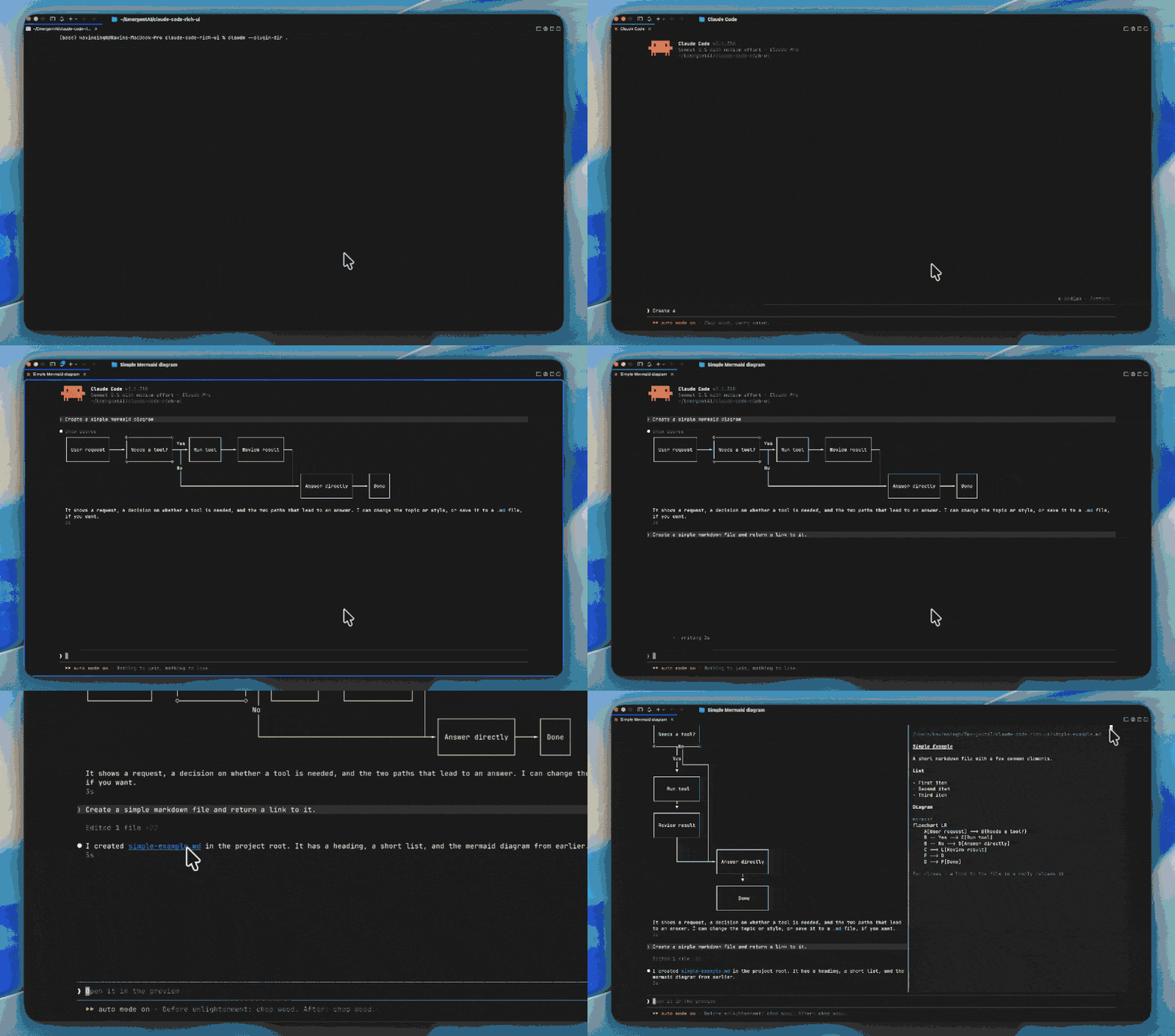
rich-ui is a Claude Code mod: the interface changes I kept wishing for, built as add-ons. Some are real upgrades (mermaid diagrams drawn in the transcript, markdown files opened rendered in a pane), some are just touches I enjoy (a quieter spinner, a welcome greeting). It never changes what Claude says or does, only how it looks, and every feature has its own switch, so take what you like and leave the rest.
Start with: mermaid diagrams, drawn right in the transcript instead of dumped as code.
📦 Install
/plugin install rich-ui --marketplace emergentai/claude-code-rich-ui
That adds this repo as a marketplace and installs the plugin. Mods are on by default in the terminal from Claude Code 2.1.287, so there is nothing else to enable. Works in the terminal only (not the desktop app or the IDE extensions), and the mods API is still early access, so it can shift between Claude Code releases. Tested on 2.1.311.
Marketplaces like this one don't auto-update by default; turn it on in /plugin
(Marketplaces tab) if you want new features as they land.
✨ What you get
| Feature | What it does |
|---|---|
| Mermaid diagrams | Complete mermaid blocks in Claude's replies are drawn as text diagrams. A dim show source line above each one swaps it back to the code. |
| Status band | A line under the prompt shows context and plan usage, only when they run high. |
| Markdown preview | Click a link to a markdown file in a reply and it opens, rendered, in a pane. |
Flowcharts (subgraphs included), sequence, class, state, ER, XY chart, pie, C4 and architecture diagrams are drawn. Any other type stays the code block it always was, and so does anything too big for your window.
🧪 Experimental
Newer and more of a taste. They sit under Experimental in /rich-ui, on by default
unless noted, and any of them may change or be removed in a future version.
| Feature | What it does |
|---|---|
| Attachment peek | A small tile above the prompt for each image you drop, showing the picture. |
| Welcome greeting | A big orange "welcome" sweeps in above the prompt once per session. You can change the word in /rich-ui. |
| Zen spinner | A quiet one-line spinner with the seconds and a dim turn-end time. |
| Zen footer | A random zen saying in place of the hint line under the prompt. Off by default. |
It all runs locally. No network calls, no telemetry.
🎚️ Switch things off
/rich-ui opens the feature list. Click a row, or Enter, to flip it; your choices are
remembered. Turning a feature off puts the transcript back exactly as stock Claude Code
draws it, including diagrams already on screen.
Uninstall
/plugin uninstall rich-ui
That removes the plugin. Your on/off choices are kept in Claude Code's plugin store
(~/.claude/plugins/store/rich-ui_*.json), which an uninstall leaves alone, so a
reinstall picks them up again. Delete that file if you want a clean slate.
🗺️ Coming next
Planned, not promised: more useful links, a status cost segment, more diagram types. The bar for anything new is that it should help in
most sessions and add no clutter; the longer version is in
docs/FEATURES.md.
📚 Docs and help
Usage, troubleshooting and FAQ · Report an issue
MIT licensed. Third-party notices are in THIRD_PARTY_NOTICES.md.