📎 Clippy for Claude Code + Codex
By AI Socratic.
Download the latest Apple-silicon DMG · Compatibility · Troubleshooting · Privacy
Current packaged release: Apple silicon, macOS 11+. Intel users can build
from source. The official v0.3.1 release and later are Developer ID signed
and Apple-notarized; they should open normally without a Gatekeeper bypass.
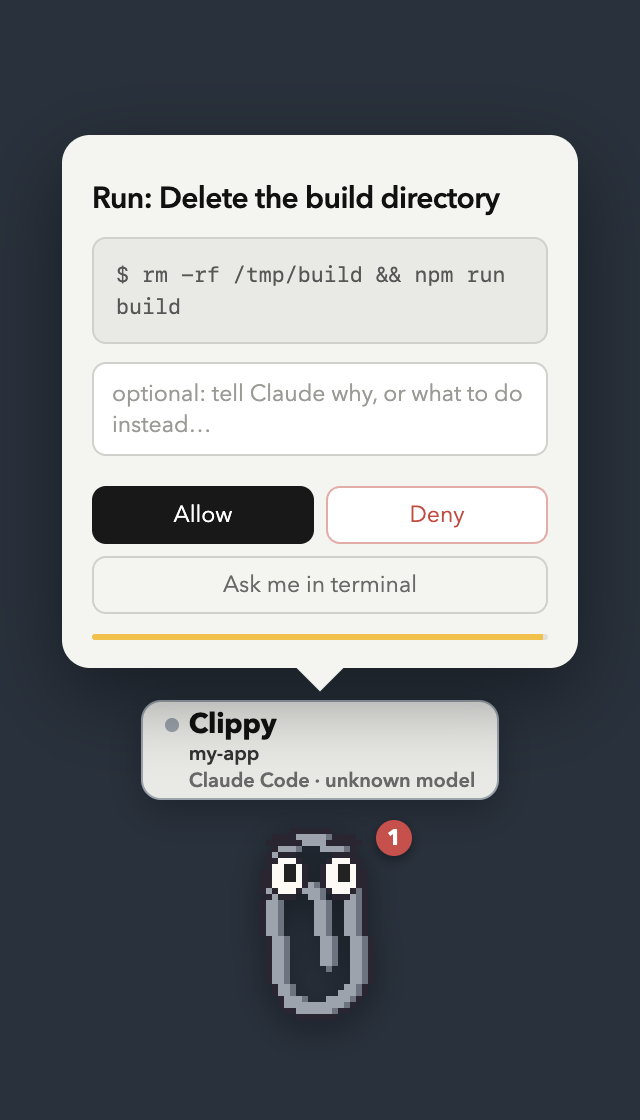
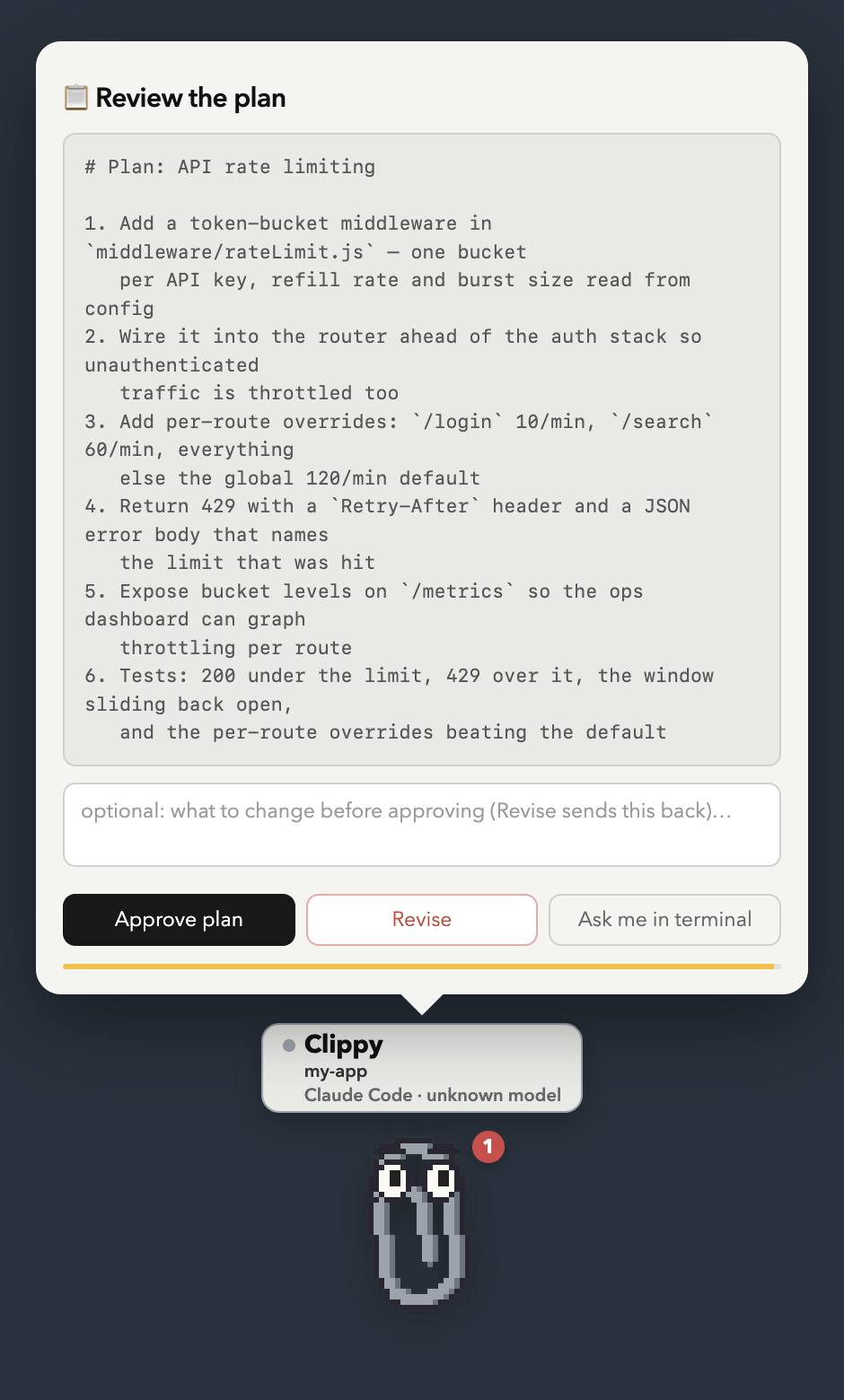
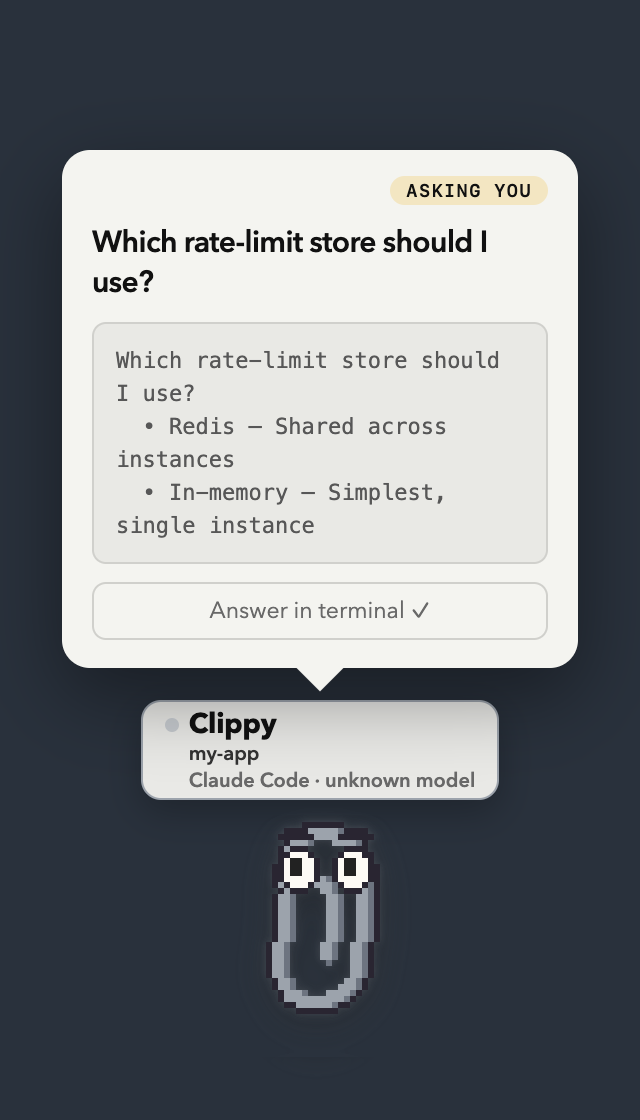
One little Clippy per Claude Code or Codex session, living on your MacBook, each one knowing what its session is doing right now — and letting you answer it right there: approve or deny permission requests, approve or revise a plan, pick an answer to Claude's question, and review the work when it finishes. No hunting through terminal tabs.
"Hey! Claude wants to run
rm -rf /tmp/buildin “my-app” — allow it?"
| Approve or deny | Approve or revise a plan | Answer a question |
|---|---|---|
 |
 |
 |
Each buddy wears an RPG-style name plate in its own colour: hover and it
names just the project; open any popup and the full plate appears — an energy
bar of how much context this session has left, the buddy's own pet name
(Biscuit, Nori — dealt from the session id, so it sticks), and the quest
details in small print (my-app · gpt-5.5). Concurrent agents in the same folder are assigned different available buddy
animations, so five parallel agents are distinguishable characters rather than one confused paperclip. A live
activity line under each shows what that session
is doing — ⚙ my-app — Running: npm test, ✏ Editing server.js,
✓ done — your turn, ⚠ Bash failed.
(Real captures of the app driven by simulated hook events — regenerate with
npx electron scripts/demo-screenshots.js, or under xvfb-run on Linux. The
dark backdrop stands in for your desktop: the real window is transparent.)
You kick off a long coding-agent task, switch to Slack, and twenty minutes later discover it's been sitting at a permission prompt the whole time. Clippy fixes that: floating, draggable paperclips (always on top, on every Space) that know the live state of every session — and they don't give up, re-nudging every 90 seconds until you respond, snooze, or dismiss.
Clippy stays hidden while Claude works. A buddy only appears when its session actually wants you — it finished a turn, needs a permission or plan approved, or is asking a question — and slips away again the moment you've answered or typed a new prompt in the terminal. Nothing pops up for ordinary tool activity. Show any buddy on demand from the 📎 menu bar (it then stays put until you hide it).
And it shows up where the session lives: when a buddy has something to say it appears on that session's own terminal/editor window — top-right corner, following the window as you move it — rather than in a corner of the screen. Every card carries a button that brings that window to the front, so you land in the right session instead of hunting for it — and it is named after whatever that session actually lives in: go to Ghostty ↗, go to ChatGPT ↗, go to Claude ↗, or attach a terminal ↗ for a tmux session Clippy started. Each card also says who is asking, as project · agent · app, which is what tells two sessions of the same agent apart.
And when you are already in that window, Clippy says nothing at all: the agent's own prompt is right there on the screen you are typing on, so a held question is handed straight back to it rather than answered here. Turn it off under 📎 → Stay quiet when I'm already in that window.
Clippy is a small buddy by default and only grows a window when there's
something to read — as tall as that thing needs, no more. Click him and he
goes straight to the useful thing: a message you haven't seen yet, or — when
there's nothing waiting — one panel that answers "how is this session doing?":
what the agent is doing right now, how much context it has spent (660k left of 1.0M · 340k used (34%) over a progress bar) and, under that, the real allowance
bars covering the rolling 5-hour block, the week, and Opus's own week once you
tell Clippy your plan. 📊 in the bar under the buddy opens the same panel,
whole — there is no fold to open first. It is a panel of numbers and nothing
else; the bar has just 📊 and hide. Typing to the buddy (or, picking its name
from the row above the box, into that session's own terminal) has no button of
its own: a chat you parked mid-sentence comes back with a click on the buddy.
Right-click for everything else — the same stats, Settings, and hide.
Double-click just says hi back, for about a second. The built-in buddies are
all drawn in code: Clippy, the cat, and Clod are generated pixel art; Orbit and
Loopy are live SVG that stays smooth at every size. Any sprite pack you drop in
is swappable from the menu too.
How it works
Claude Code / Codex session(s)
   │  hooks: PermissionRequest / Stop / Pre+PostToolUse / Notification / SessionEnd
   ▼  curl POST → http://127.0.0.1:43117/hook/<event>   (response = hook decision)
Clippy app (Electron)
   ├─ session tracker: who's working, waiting, blocked — and what they're doing now
   ├─ decision broker: holds interactive hooks open until you click (or timeout)
   ├─ one floating Clippy per session (hidden until it needs you): name plate, activity line,
   │    approval/plan/question/review cards, snooze
   ├─ native macOS notifications (clickable)
   └─ menu bar item 📎 with a count of sessions waiting on you
Claude Code and Codex lifecycle hooks fire shell
commands on lifecycle events, and a hook's stdout JSON can answer the event.
The installer registers tiny curl hooks in ~/.claude/settings.json and
~/.codex/hooks.json that POST each event's JSON to the app on localhost. Interactive hooks are
interactive — their HTTP response is the hook's decision:
| Hook event | Clippy reaction |
|---|---|
PermissionRequest |
🛂 Approval card — Allow / Deny (with a reason Claude sees) / send to terminal. For ExitPlanMode it becomes a plan card: Approve / Revise (your note sends Claude back to planning) |
Stop |
✅ Review card — answered immediately, the chat is never held. "Looks good" puts Clippy away; typed feedback is typed into that session's terminal as your next prompt |
PreToolUse (AskUserQuestion) |
❓ Question card — Claude's options as buttons. What you pick is fed straight back, so the terminal picker never appears |
PreToolUse (Bash, Edit, Write, Web, Task, …)* |
⚙ Activity line — what Claude is doing now |
PostToolUse (same tools) |
✓ marks the action done |
PostToolUseFailure (same tools) |
⚠ turns the activity line red with the tool name — no popup. A failed command is routine inside a session; the agent sees the error and carries on |
Notification (permission_prompt) |
🔴 Urgent bounce — a prompt is waiting in the terminal |
Notification (idle_prompt) |
🟡 Reminder — Claude has been waiting for your reply |
SubagentStart / SubagentStop |
a helper the session spun up: listed under it in Settings → Sessions, and the activity line says "Delegating to Explore" and then "Explore: Running: npm test" while it works |
UserPromptSubmit |
clears alerts & pending cards for that session (you're on it) |
SessionEnd |
the session's buddy leaves the screen. (There's deliberately no SessionStart hook: a session announces itself with its first real activity) |
statusLine (Claude Code only) |
a small 📎 tucked against the right edge of the line under the input box — cmd+click it (iTerm2, Ghostty, kitty, WezTerm) to open this session's buddy. Installed only if you don't already have a statusline of your own |
The activity hooks match only meaningful tools (Bash|Edit|Write|…|mcp__.*)
— Read, Grep, Glob, and TodoWrite are excluded, so the noisy read-only
tools never even fire a hook (no latency, no spam).
How answering a question works: the PreToolUse hook can rewrite a tool's
arguments before it runs (permissionDecision: "allow" + updatedInput). An
AskUserQuestion whose input already carries an answers map has nothing left
to ask, so filling it in is the answer — Claude Code prints
User answered Claude's questions: · Which store? → Redis and the terminal
picker never appears. Multi-select answers are the chosen labels comma-joined,
and an answer that isn't one of the offered options is read as a typed "Other".
If you don't answer in Clippy (dismiss, timeout, app not running), the hook
returns {} and the normal terminal picker comes up exactly as before.
Safety properties of the interactive hooks:
PermissionRequestfires only when Claude Code would actually show a permission prompt — allowlisted commands run at full speed, untouched.- If you don't answer in time (60s for approvals, 90s for questions — typing
extends the hold), Clippy answers "no decision" and the normal terminal
prompt takes over. Nothing is ever auto-approved. Reviews hold nothing at
all: the
Stophook is answered the moment it fires. - When the app isn't running, the hooks fail instantly
(
--connect-timeout 1 … || true) and Claude Code behaves exactly as if Clippy didn't exist. - Both behaviors can be toggled from 📎 menu bar → Quick settings ("Permission requests" / "Review when Claude finishes"), and the toggles persist.
Codex support
Codex uses its native lifecycle hooks and reports into the same local server. Clippy tracks Codex sessions, tool activity, permission requests, completed turns, terminal windows, review feedback, and token/context totals from local rollout transcripts. The permission decision format is compatible with the Claude path, so Allow and Deny work from the same cards — and reviews behave identically too, since feedback is typed into the terminal for both.
There are three deliberate differences in the current Codex integration:
- Codex has no
NotificationorPostToolUseFailurehook. Clippy detects non-zero shell exits fromPostToolUse, while idle reminders rely on the turn/question/permission hooks it does have. - A Codex
request_user_inputcall is held by its own interactivePreToolUsehook and rendered with the same option buttons as Claude. Submitting consumes the tool call and gives Codex the selected values as its model-visible result; moving to the terminal, dismissing, or timing out returns no decision and leaves Codex's native picker in charge. - Drive mode and Claude plan/allowance calibration remain Claude-specific. Codex context and token totals are shown from its rollout files without pretending they are account-limit percentages.
OpenClaw support
OpenClaw sessions get a buddy too, in watch mode only: the buddy shows an activity line while the gateway works and nudges you when a reply lands, but there are no interactive cards (no permission/review/question buttons) in this integration yet.
npm run hooks:install -- --agent openclaw
This copies a dependency-free handler to ~/.openclaw/hooks/clippy-hook.mjs and registers it in
~/.openclaw/openclaw.json (hooks.internal.handlers, for the message and command event
families). Restart the OpenClaw gateway to load it. The plain npm run hooks:install also picks
OpenClaw up automatically when ~/.openclaw exists. The handler fires and forgets with a 1s
timeout, so a stopped Clippy never slows the gateway down.
Quick start
npm install            # pulls Electron
npm run hooks:install  # registers Claude + Codex hooks in both user config files
npm start              # Clippy appears bottom-right; 📎 appears in the menu bar
Restart any already-running agent sessions so they pick up the hooks. Codex requires one extra
trust step: open /hooks, review the new Clippy definitions, and trust them. Then ask either agent
to do something that needs permission — Clippy will let you know.
Start an agent through Clippy
Clippy can start Claude Code or Codex in a persistent tmux session instead of waiting for an existing terminal to report through hooks. Install tmux first:
brew install tmux
Click the 📎 menu bar icon → New agent. Pick Claude Code or Codex and
a local folder, or choose Over SSH… and enter an SSH host plus the project
path on that machine. An SSH config alias works anywhere user@host would.
The agent CLI must already be installed and authenticated on the machine where
it will run.
The tmux session lives on the Mac running Clippy, even for an SSH target. It keeps running when Clippy quits, accepts prompts directly from the buddy, and can be opened at any time from the session's Attach in Terminal menu item. If SSH needs a first-time host-key/password answer, or the agent asks whether to trust the folder, attach once and answer it in the terminal. Remote transcripts are then read over the same multiplexed SSH connection.
Mobile companion
The Expo-based iOS and Android companion lives in mobile/. It
brings Clippy's sessions, approval inbox, activity timeline, context usage, and
prompt composer into a touch-first interface. The current milestone includes a
deterministic demo workspace while the secure Mac-to-phone relay is developed.
cd mobile
npm install
npm run ios       # or npm run android / npm run web
Use npm run hooks:install -- --agent claude or --agent codex to install only one integration.
The matching options also work with hooks:status and hooks:uninstall.
Installing the app
npm start is fine for development, but you can also build a real, installable
app — still with zero dependencies, the way Electron's docs describe manual
distribution:
npm run package # dist/Clippy for Claude Code.app + dist/Clippy-for-Claude-Code.dmg
That command intentionally makes an ad-hoc local build. Maintainers producing
a public artifact must follow the release checklist and
use npm run package:release, which fails unless Developer ID signing and
Apple notarization are configured.
That copies the prebuilt Electron.app out of node_modules, puts this app's
source into Contents/Resources/app/ with the buddy art pre-drawn, rewrites
the bundle's name/identifier/icon, ad-hoc signs it, and wraps it in a .dmg
with an Applications shortcut. Open the .dmg, drag the app across, done.
Two things worth knowing:
-
The app is unsigned (ad-hoc only — no Apple developer certificate), so the first time a downloaded copy is opened Gatekeeper will object. Right-click the app → Open → Open to get the "open anyway" button, or clear the quarantine flag yourself:
xattr -dr com.apple.quarantine "/Applications/Clippy for Claude Code.app"A copy you built on your own machine was never quarantined and opens normally.
-
The permission rows finally make sense. Run from source, macOS attributes everything to Electron's own bundle — which is why the Accessibility and Automation lists say "Electron" and nobody can find Clippy in them. The packaged app is its own bundle (
dev.aisocratic.clippy), so those rows say Clippy for Claude Code, and its grants don't disappear when Electron updates undernode_modules.
The hooks are still registered from the checkout (npm run hooks:install) —
they just POST to a local port, and the packaged app listens on the same one,
so the two are interchangeable. Run one at a time, though: whoever binds the
port first wins.
Using it
- Hidden by default: a buddy is only on screen when its session is done or has something to ask (approval, plan, question, review, or a terminal prompt waiting on you). Answer it — or type a new prompt in the terminal — and it hides itself again.
- Activity line: the small line under Clippy shows what each session is
doing right now (
⚙ Running: npm test,✏ Editing server.js,✓ done,⚠ Bash failed). Ambient — it never pops the window; you'll see it on the buddies you've brought up yourself. - Approval card: when Claude asks for permission, the card shows the exact command/edit. Allow runs it, Deny blocks it (anything you typed in the box is sent to Claude as the reason — "use rg instead", "wrong dir"), Ask me in terminal hands it back to the normal prompt.
- Plan card: when Claude presents a plan (plan mode), the card shows the plan. Approve plan lets it start; type a change and Revise to send it back to planning with your note.
- Question card: when Claude or Codex asks a multiple-choice question, its options become buttons. Pick one per question (multi-select takes several), hit Submit answer, and the agent carries on with your choice — no terminal round-trip. Move to terminal ↗ hands the question back to the normal picker and brings that terminal to the front. (A held question can't be in both places at once: while Clippy holds the hook, the agent hasn't run the tool yet, so there is no picker in the terminal to look at. Releasing it is what makes one appear.) If answering from Clippy is off — or the question arrives malformed — you get a read-only card with the question and a go to …↗ button instead, named after the app it is waiting in.
- Review card: when Claude finishes, the card shows what it just said and waits as long as you like — the chat is already free. Looks good puts Clippy away; type what's missing and Send feedback and your note is typed into that session's terminal as the next prompt.
- Perched on your window: a buddy pops up on the top-right corner of the window its session runs in (its editor or terminal), follows it around, and leaves when you've answered. Turn it off under 📎 menu bar → Quick settings → Perch on the session's own window if you'd rather they always sit in the screen corner.
- Click Clippy and he does the one useful thing directly, no menu in the
way: reopens a message you haven't seen yet, or — if there's nothing
waiting — opens the session panel, which is one click for the three
things you'd otherwise go looking for separately:
- what the agent is doing — its state and the tool it's on right now
(
working… · ⚙ Running: npm test), kept live while the panel is open. - what it has spent — how much context is left in this conversation
(progress bar turning amber past 60% and red past 85%, 1M window detected
automatically), then three bars for what every session on this machine has
spent in the windows
/usagereports on — the rolling 5-hour block, the week across all models, and Opus's own week — plus the models you leaned on most. When Claude Code has cached its own/usagepercentages, Clippy reads them and shows the real allowance bars automatically — nothing to configure. Until then the bars are hatched shares of the week: spend, with nothing to compare it to. Claude Code keeps the real 5-hour/weekly allowances server-side, so/usageis the source of truth either way. - a box to keep chatting — type what you want and hit Enter: Clippy raises that session's
- what the agent is doing — its state and the tool it's on right now
(