
🌐 Read this in: English · हिन्दी · 中文 · 日本語 · 한국어 · Español · Português · العربية · اردو · தமிழ் · বাংলা · Русский
You need to ship 30 articles this quarter that sound human, cite real sources, link into your funnel, and survive an editor who checks. Your team is three people. You have nine weeks. Your last "AI-written" batch got flagged for hallucinated stats — and the batch before that quietly went stale and nobody noticed.
Run /contentforge:create-content against each topic. The 10-phase pipeline produces a publication-ready .docx with a 43-pattern humanizer, a fact-checker subagent, three-category internal linking, and C2PA provenance for EU AI Act compliance — in 30–60 minutes per piece. Then the part single-shot tools skip: the lifecycle loop. Every published piece is measured (cf-aeo-check), audited for decay (cf-audit), and fed back into the next calendar and the next brief — through durable file contracts, so what the system learns about your brand survives the session that learned it.
Open-source enterprise content production system — 22 skills · 13 specialist agents · 10 quality gates · 43-pattern AI-detection humanizer · a run auditor that re-derives every gate before a run may call itself finished · 30 Python scripts (stdlib; the few optional packages are pinned and never auto-installed). Built for marketing teams producing high volumes of long-form content that needs brand voice consistency, citation integrity, and an internal-link strategy that turns content into a funnel. Installs on Claude Code (CLI + IDE), Anthropic Cowork, OpenAI Codex, Cursor 2.5+, GitHub Copilot CLI, Google Antigravity 2.0, Hermes Agent, OpenClaw, and Grok (xAI Build CLI) + 35+ Agent Skills platforms — with hero skills uploadable to claude.ai (web) as .skill release assets. Created by Indranil Banerjee · LinkedIn · X.


🆕 Just shipped — v4.6.0 (October 28, 2026): A code audit closes the paths that left a run, the keys that would follow a redirect, the brands that shared a folder and the loops that never stopped, and the guidance now agrees with the vendors' own pages. Release notes · Changelog
# Install in Claude Code 2.1.292 or newer (one command, run in your terminal):
claude plugin install contentforge --marketplace indranilbanerjee/neels-plugins

# Older Claude Code, or inside a session (CLI or VS Code/JetBrains extension):
/plugin marketplace add indranilbanerjee/neels-plugins
/plugin install contentforge@neels-plugins

# Install in Cowork: use the Plugins panel in the UI -- /plugin slash
# commands DON'T work in Cowork (or Claude.ai / Claude Desktop).
# Open Plugins panel -> Add marketplace -> paste indranilbanerjee/neels-plugins
# -> Install ContentForge from the listed plugins.

# Install on Hermes Agent (Nous Research):
hermes plugins install indranilbanerjee/contentforge

# Install on OpenClaw:
openclaw plugins install git:github.com/indranilbanerjee/contentforge

# Install on Grok (xAI Build CLI):
grok plugin install indranilbanerjee/contentforge
If ContentForge saves your team time, give it a star ⭐ — it's the single thing that helps other marketing teams find it.
Try this first
Install, then ask in plain words. Each of these kinds of request reached the right skill in our trigger tests.
| You type | What happens |
|---|---|
| "write a blog post on your topic" | One fact-checked, brand-compliant article through the full pipeline, delivered as a real .docx with its scorecard |
| "brief me on this topic" | A research-backed content brief: search intent, competitors, outline |
| "which posts need refreshing" | An audit of your library: what is stale, what to refresh, what to retire |
| "turn this article into LinkedIn posts" | Platform-native social posts from a finished piece; it shows the scope and waits for your yes |
| "translate this into Spanish" | A translation that keeps brand voice and citations; it shows the scope and waits for your yes |
What ContentForge will never do
- Install a package on its own. A missing one prints the exact pinned install command;
CONTENTFORGE_INSTALL_DEPS=1consents for a single run. - Publish, translate or post without your typed
yes. Each of those skills shows what it will do first; any other reply cancels. - Mark a run complete without its audit on the record.
finalize --status completedrefuses a missing, failed or stale audit; the--skip-auditescape stampsaudit_skipped: trueinto the run. - Ask for an API key in the chat, or connect a service you did not set up. Keys come from environment variables; no MCP server ships enabled and no hooks run.
- Remove or hide AI watermarks. AI involvement is disclosed, with C2PA provenance (a sidecar manifest for
.docx).
What it costs
- The plugin is free (MIT-licensed).
- Model usage (tokens). On a subscription (Claude Pro, Max, Team or Enterprise in Claude Code or Cowork; a ChatGPT plan in Codex; a Cursor or Copilot plan; the same goes for other hosts' plans) the tokens count against your plan's usage limits instead of being billed per token; check your plan for any optional extra-usage billing. Only pay-as-you-go API-key users pay per token. Context (the skill listing, the pipeline's prompts) uses context window and usage allowance for everyone, and money only for API users.
- Services you connect with your own keys (Google Drive and Sheets, Airtable, an image tool) are billed by those providers, whatever plan you are on. ContentForge charges for none of it.
How it works
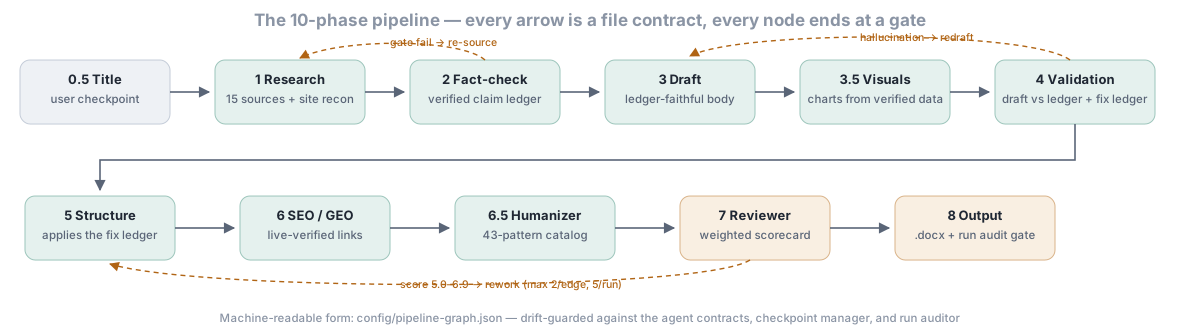
Ten phases, each ending in a quality gate that the orchestrator checks with scripts, never from an agent's self-report. A failed gate loops back to the offending phase, with a budget: at most 2 loops per edge and 5 per run. Every phase, in order, is under What ContentForge does.
Quick start
1. Install the plugin
In Claude Code 2.1.292 or newer, one command in your terminal:
claude plugin install contentforge --marketplace indranilbanerjee/neels-plugins
On an older version, or inside a session (CLI or VS Code/JetBrains extension):
/plugin marketplace add indranilbanerjee/neels-plugins
/plugin install contentforge@neels-plugins
In Anthropic Cowork:
- Open the Plugins panel in the Cowork UI (sidebar / settings)
- Click Add marketplace, paste
indranilbanerjee/neels-plugins - After the marketplace syncs, find ContentForge in the listed plugins and click Install
- Then run
/contentforge:cf-cowork-setuponce to wire Google Drive as your team's output destination
⚠
/pluginslash commands work only in Claude Code (CLI + IDE extension). They do NOT work in Cowork, Claude.ai web, or Claude Desktop — use UI navigation in those environments. The/contentforge:*skills (like/contentforge:create-content) work in all environments where plugins are loaded; only the/pluginmanagement family is Claude-Code-only.
2. Turn on auto-update (one-time, recommended)
Third-party marketplaces — including this one — have auto-update OFF by default in Claude Code. When a newer version is on the marketplace and you're still running an older one, nothing tells you. There's no banner, no badge, no notification. So the first thing to do after install is enable updates:
Open /plugin, go to the Marketplaces tab, find neels-plugins, and toggle Enable auto-update. Done — Claude Code will refresh and pull new ContentForge releases at startup from now on, prompting you to run /reload-plugins to pick up changes mid-session (no full restart, conversation context preserved).
If you'd rather update manually each time instead, see the Updating section below.
3. Set up your first brand
/contentforge:brand-setup
The agent walks you through brand voice, terminology, guardrails, citation rules, internal-linking site structure, and (if you want commercial impact) the brand_pages block — your product/service URLs, conversion CTAs, and authority pages. When you give it a website, it runs a robots-respecting crawler and harvests a verified page inventory in one confirmation step. It saves a brand-profile.json to ~/.claude-marketing/<brand-slug>/.
4. Generate content
/contentforge:create-content
The skill prompts you for content type, brand, topic, target word count, and audience. It then runs 10 phases via specialized subagents (research → fact-check → draft → visuals → validate → proofread → SEO → humanize → review → output), enforces a quality gate after each phase, audits the finished run against its own artifacts, and writes a real .docx you can hand to your editor or design team.
5. Find your output
ContentForge writes the finished .docx to two places:
User-visible copy — this is the one to open:
~/Documents/ContentForge/<brand-slug>/<content-type>/<YYYY-MM>/<slug>.docx
This lives in your normal Documents folder, visible in Windows Explorer / macOS Finder / Linux file managers by default. Override the root with the CONTENTFORGE_PUBLISH_DIR env var (e.g. point at a Dropbox or team-share path). Run /contentforge:output-folder any time to print the absolute path and open the folder in the OS file manager.
Internal tracking copy — the system-of-record for analytics/audit skills:
~/.claude-marketing/<brand-slug>/tracking/outputs/<YYYY>/<MM-MonthName>/
└── <slug>_v1.0.docx
The intermediate phase artefacts (research brief, fact-check report, draft, SEO scorecard, review report, etc.) plus rendered chart PNGs land alongside the tracking copy in the run directory. The .docx includes the body, references, and four appendices — A SEO Scorecard, B Quality Scorecard, C Production Details, D Internal Link Map.
Historical note (fixed in v3.12.3): earlier versions only wrote to the hidden
~/.claude-marketing/dotfolder, which Windows Explorer hides by default. Multiple users reported "the file isn't saving on local drive" — it was saving, just somewhere they couldn't see. The dual-copy design is the resolution;/contentforge:output-folderis the quick-reveal command.
6. If the run gets interrupted, resume it
The 10-phase pipeline runs 20–60 minutes end to end. If the session terminates partway through (context-window exhaustion, network blip, Ctrl-C, machine sleep), every completed phase is saved to disk via scripts/checkpoint-manager.py. Resume the run with:
/contentforge:resume                 # auto-picks the most recent in-progress run for the active brand
/contentforge:resume <run-id>        # pick a specific run from `checkpoint-manager.py list`
The resumer reloads the saved Phase 1..N outputs and continues from Phase N+1 — no re-running phases that already completed. It also reports orphaned artifacts (a phase whose artifact exists but was never checkpointed — precisely the window a crash creates), so finished work is verified rather than re-run blind or trusted blind.
7. Close the loop
After you've published a few pieces, three commands turn production into a lifecycle:
/contentforge:cf-aeo-check      # did AI engines cite the piece? appends to per-brand history
/contentforge:audit-content     # score the library for decay; findings recorded durably
/contentforge:cf-calendar --from-audit=latest   # next period's plan, fed from the recorded audit
Each one writes or reads a durable per-brand file — the loop works across sessions, across weeks, and (with Cowork + Drive) across your whole team. Details in The content lifecycle loop.
Who this is for
| If you're a... | Run this | What you get |
|---|---|---|
| Content team shipping long-form at volume | /contentforge:brand-setup once, then /contentforge:create-content per topic |
Fact-checked, brand-compliant pieces as real .docx files, each with its scorecards and internal-link map |
| Content lead with a published library | /contentforge:audit-content, /contentforge:cf-aeo-check, then /contentforge:cf-calendar --from-audit=latest |
The library scored for decay, AI-engine citations tracked over time, and the next period's plan built from the recorded audit |
| Agency or consultancy with several clients | /contentforge:brand-setup per client, /contentforge:cf-cowork-setup for a shared Drive |
Each brand keeps its own voice, terminology and link inventory; on Cowork with Drive, the output and the lifecycle stores are team-shareable |
| Social or international marketer | /contentforge:cf-social-adapt, /contentforge:cf-translate |
A finished piece turned into platform-native posts, or translated with voice and citations kept; each shows its scope and waits for your yes |
Why ContentForge
Most AI writing tools produce one draft, in one tone, with no quality gates, and forget the piece the moment it ships. The output reads like AI, factual claims are unverified, internal links don't exist, brand voice drifts, the file format is markdown when the editor wants Word — and six months later nobody knows which pieces went stale. ContentForge fixes this end to end:
| Capability | Why it matters |
|---|---|
| 10-phase pipeline with a quality gate after every phase | Bad output is caught and re-run before it propagates downstream |
| 43-pattern AI-detection humanizer + self-critique meta-pass | Fewer AI-drafting habits, measured by an offline scan of 43 patterns (text-metrics.py --ai-tell-scan, advisory) plus burstiness metrics |
| Fact-checker subagent verifies URLs and cross-references claims | Citations work and aren't hallucinated — every statistic traces to a verified ledger entry |
| Three-category internal linking (topical / commercial / authority) | Content becomes a funnel, not a stranded page |
Real .docx output with embedded SEO + Quality + Production + Internal-Link appendices |
Editor / design team gets a working Word file, not markdown |
| A run auditor that re-derives every gate from the artifacts | "The pipeline says it finished" and "the artifacts prove it finished" can never drift apart silently — finalize --status completed refuses without a fresh CLEAN verdict |
| The lifecycle loop (v4.0) — audit → refresh → measure → plan, joined by file contracts | Published content stops being fire-and-forget: decay is detected, refreshes are prioritized from data, and what the pipeline learns about your brand compounds |
| C2PA content provenance signing for EU AI Act Article 50 compliance | Long-form AI-assisted content distributed in EU markets needs provenance from 2 Aug 2026 |
Supported surfaces (v4.6.0)
| Platform | Install command | Manifest path | Status |
|---|---|---|---|
| Claude Code CLI + IDE extension | /plugin install contentforge@neels-plugins |
.claude-plugin/plugin.json |
Full support (canonical for solo devs) |
| Anthropic Cowork | Plugins panel in UI → Add marketplace → indranilbanerjee/neels-plugins → Install ContentForge |
same .claude-plugin/ files |
Recommended for teams — /contentforge:cf-cowork-setup wires Google Drive for team-shareable output (and, in 4.0, for the lifecycle stores that make the loop compound across sessions) |
| OpenAI Codex CLI + IDE + App | codex plugin marketplace add indranilbanerjee/neels-plugins then codex plugin add contentforge@neels-plugins |
.codex-plugin/plugin.json (published OpenAI schema) |
Full skills + MCP support |
| Cursor 2.5+ | In any Cursor Agent chat: /add-plugin contentforge@https://github.com/indranilbanerjee/contentforge |
.cursor-plugin/plugin.json (verified Cursor 2.5+ JSON Schema) |
Full skills + agents + commands support |
| GitHub Copilot CLI | copilot plugin marketplace add indranilbanerjee/neels-plugins then copilot plugin install contentforge@neels-plugins |
.github/plugin/plugin.json (Copilot also recognizes .claude-plugin/plugin.json as fallback) |
Full skills + MCP support |
| Google Antigravity 2.0 CLI + IDE | agy plugin install https://github.com/indranilbanerjee/contentforge |
gemini-extension.json (at repo root, per Google's reference pattern) |
Full skills + hooks support |
| Hermes Agent (Nous Research) — Desktop + CLI on macOS / Windows / Linux | hermes plugins install indranilbanerjee/contentforge |
plugin.yaml + __init__.py at repo root (Hermes native spec) |
Native plugin — adapter walks skills/ at register time and exposes all 22 skills via ctx.register_skill(). Targets Hermes Desktop v0.15.2+ (public preview June 2 2026). |
| OpenClaw (formerly Clawdbot / Moltbot) | openclaw plugins install git:github.com/indranilbanerjee/contentforge |
openclaw.plugin.json at repo root (also auto-detects .claude-plugin/plugin.json as Claude-compatible bundle) |
Native plugin via openclaw.plugin.json; skills field points at ./skills. |
| Grok (xAI Build CLI) | grok plugin install indranilbanerjee/contentforge — or add the marketplace: grok plugin marketplace add indranilbanerjee/neels-plugins then grok plugin install contentforge (append --trust to skip the install confirmation) |
.grok-plugin/plugin.json + .grok-plugin/marketplace.json (Grok Build also reads the .claude-plugin/ manifests for compatibility; the native pair is the first-class lane) |
Full skills support; the pipeline runs via the portable execution lane |
| claude.ai (web) | Download a hero skill from the latest release (e.g. cf-brief.skill) → claude.ai → Settings → Capabilities (enable Code execution and file creation) → Customize → Skills → Upload skill |
built from config/skill-assets.json by scripts/build-skill-assets.py |
Hero skills only — cf-brief, |