
GitHub Copilot Agentic Harness on VS Code
Make GitHub Copilot carry a task from start to finish the way your team works: it follows the rules, stays inside its boundaries, and leaves a record you can review.
What you get · Get started · See it · What you must plug in · Docs · Release notes
New here? Read the overview first: the problem, the way of working, what you see in the browser, and how it is built, with pictures.
What you get
- A task, not a chat. Every piece of work is a folder: the requirement, the plan, the steps, the log and the changes are files. A new chat reads
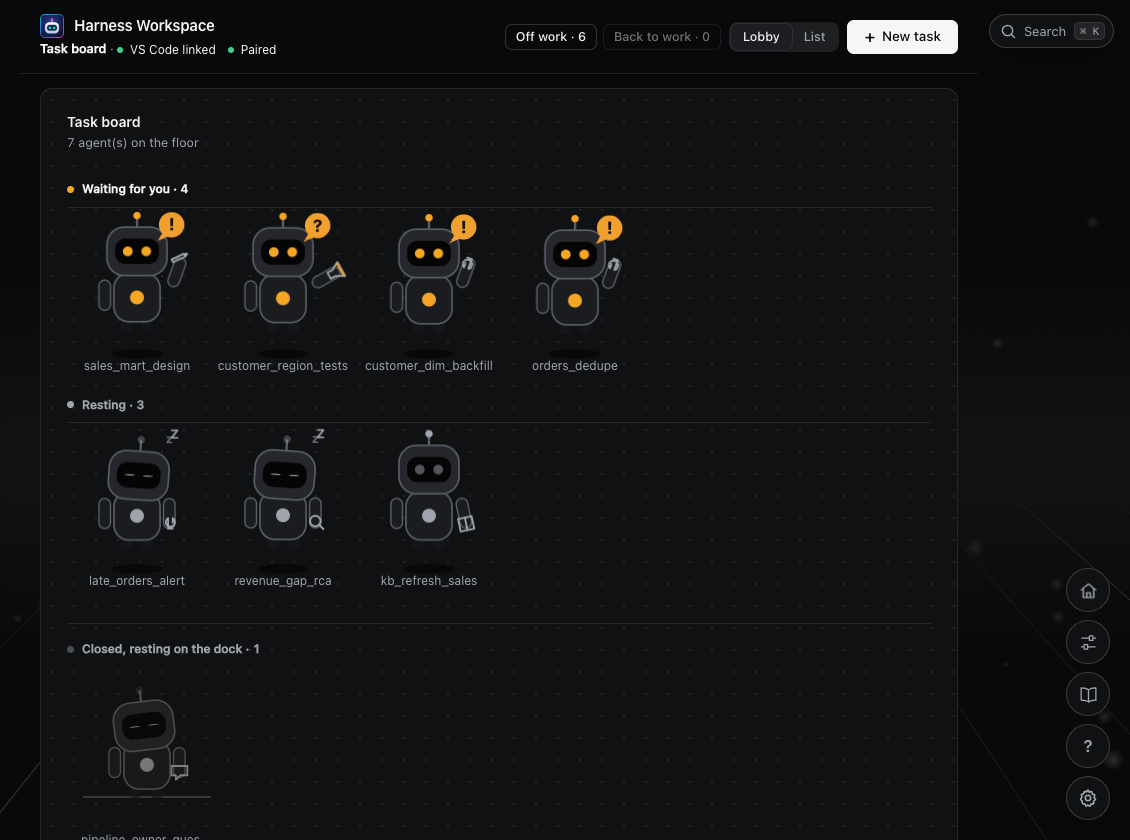
TASK.mdand goes on. Kinds: question, root cause analysis, design, development, testing, knowledge base update. - A board you follow in the browser. Every open task, what it waits for you for, and since when. The lobby shows each one as a small agent: at work, waiting for you, resting. A click opens the task as pages: stages, requirement, plan, TODO, changes, checks, test results, history.
- Approvals only you can give. The requirement, the plan and the write-back to a repository each wait for a code you type on the page or in your terminal. The agent cannot approve for you, and
pushcan never be approved. - Business documents in, no tokens spent. Drop Word or Excel files on the Intake tab (old Excel and PDF need one Python package): a program turns them into Markdown and CSV, and reports what it left out (hidden sheets, comments, pictures). You trim them; the agent reads the small files and asks only what does not fit.
- Independent checks, counted by code. Write
[review]=2and the work must pass two checks in a row by a reviewer that never saw the author's reasoning. Every round, its findings and its verdict are on the Review tab. - Tests that leave evidence. A test task has one guide with a section per environment (DEV, IST, UAT). You run it, paste the output and screenshots on the page, and the agent judges each criterion against what you brought. Run 1, Run 2: all kept.
- Safe write-back. The harness writes only the files to change, to a new branch, uncommitted. It keeps a patch, a snapshot and a restore command.
- Time and cost in view. Where the time went (working, waiting for you), every prompt, every tool, the usage Copilot records. Per task, from the hook log, not from the agent's word.
- Moves with you.
/harness-reinstallcarries tasks, runtime settings and the knowledge base to a new copy of the harness.
What it is
Teams that get Copilot often use it only to complete code or change a few lines. There are three reasons:
- It doesn't know your work. How tables are named, how a metric is defined, where to look first when a job fails: it knows none of this.
- It has no workflow. A task that takes several days is forgotten as soon as you open a new chat.
- It has no boundaries. Nobody dares to let it change a repository that feeds production.
This repository is a framework (a harness) that wraps Copilot and fixes the second and third problems. The first is fixed by the knowledge base and skills you plug in.
1. Copilot agent                  thinks and calls tools                    provided by GitHub
2. Knowledge base + domain skills what your work and code look like         you plug these in
3. Harness                        rules, boundaries, checks, observability  this repository
4. Targets                        code repositories, databases and so on    your environment
The harness carries no business knowledge. It makes the agent safe to use and possible to manage; the knowledge base and skills make it do the work correctly. See the overview.
Get started
You need VS Code with GitHub Copilot Chat, Python 3.9 or later, and git. Nothing is required to pip install: Word and Excel (.xlsx) files are read with the standard library. Old Excel (.xls) and PDF files need one small package each (xlrd, pypdf). The setup skill has you install both, and if the install fails you ask your administrator: see Python packages.
Clone this repository, or download the zip from GitHub and extract it (git is optional; on Windows extract to a short path such as C:\dev\harness). Open it in VS Code and type these in Copilot Chat:
| Type | What it walks you through |
|---|---|
/harness-rookie-get-me-ready |
Setup: the short command, knowledge base, company skills and target repositories, then a self-check. Do this first |
/harness-rookie-quick-start |
Introductory lesson: a story from a request to a branch, what the harness gives you, the two places you work in (the Chat window and the board), and one practice task. About 20 minutes |
/harness-rookie-new-knowledgebase |
Build your knowledge base from your code: the agent leads you step by step, you give a few facts only you know and approve each step. Come back any time with "continue the knowledge base" |
/harness-rookie-wondering |
Understand it first: an interactive explanation of the principles and implementation, 16 topics, ask anything |
The agent leads all four, so you don't need to read the docs first. To do it by hand, see the quickstart.
To move to a newer copy of the harness later, type /harness-reinstall in the new copy: it carries your tasks, settings and knowledge base over.
After that, daily use takes one sentence: tell Copilot what you want done, and it asks until the request is clear, then opens a task. You don't write long prompts or paths. See what to say day to day.
What it does
| The problem with Copilot | What the harness does |
|---|---|
| Rules are only requests. A model can ignore a rule written in a prompt, edit files it shouldn't, and run dangerous commands | Rules are enforced by code. A hook checks every tool call before it runs. Out-of-scope writes, changes to .git and dangerous commands are rejected |
| Progress lives only in the chat. Once the context is compacted or you start a new session, nobody knows where the task stood | One directory per task. The requirement, plan, progress and results are files. A new session reads TASK.md and continues |
| It grades its own work. Ask it to check its own output and it always says everything is fine | Independent checks, counted by code. You write [review]=n and the result must pass n checks in a row. The reviewer never sees the author's reasoning |
| Confirmation pop-ups can't be trusted. One click on "Allow in this Session" and there is no confirmation any more | A person approves the key actions. The plan, write-back to a repository and git write commands are confirmed in your own terminal. push can never be approved |
| Changing a company repository is risky. It may commit or push by mistake | Safe write-back. The harness takes only the files to be changed and writes to a new branch without committing. It keeps a patch, a snapshot and a restore command |
| "Done" comes without evidence. What changed and who checked it are hard to trace afterwards | Visible and reviewable. Every session has a log and every task has a report. harness task list shows which tasks are waiting for you |
| Cost is hard to control. Small tasks go through the same heavy process | Saves time and money. Commands do the deterministic work instead of the model, the agent reads only what it needs, and small tasks skip the heavy process |
There is more: queued write-back when several tasks target the same repository, tasks that update the knowledge base, parallel chunked reading (/generic-mapreduce), and autorun, which works through a checklist unattended (beta). See features for the full list.
The gate checks the text of a command. It prevents mistakes; it does not stop someone who is trying to get around it. Do not treat it as a sandbox.
See it
All pictures are from a made-up team's tasks, on the real board.
 A task page. Stages, the reviewer's checks, and what waits for you with a button for each answer. |
 Intake. Drop Word, Excel and PDF files; paste a table; trim, pick and delete files before the agent reads them. |
 Independent checks. Each round: what the reviewer was given, what it found, its verdict. |
 Testing. One sub-tab per environment, each run with its commands, your words, screenshots and the verdict. |
 Write-back. The diff, and exactly what goes into the repository when you approve. |
 Where the time went. Working and waiting, every prompt, the tools, the checks. |
More pictures, in the order of a task's life, are in the overview.
What you must plug in
The harness is generic and carries no business content. Without the two items below it cannot do your daily work. /harness-rookie-get-me-ready helps you set them up.
- Company knowledge base. Put the knowledge base in
knowledge-base/, and put the instructions that come with it in .github/instructions/knowledgebase.instructions.md. This file ships empty. Without it the agent doesn't know how to read the knowledge base through its index.doctorreminds you. - Target repositories. In
target.override.json, setrepos_rootto the folder that holds your code repositories. Until this is set, the agent cannot change your code. Once it is set, a target repository can be written only through a promote that you approve.
The harness is designed for the git repositories of data engineering teams: no entry point, cannot be run on a laptop, and a large number of Python, SQL, .json, .sh and PowerShell files organised by domain. The agent cannot verify its work by running it, so it depends more on the knowledge base. See configuration.
Docs
If you'd rather not read docs, the four commands above are enough: the agent leads you.
| Doc | What you will find |
|---|---|
| 00 Overview | Read this first. The problem, the task way of working, the board, the Intake, Test and Review pages in pictures, how it is built, and what is not solved yet |
| 01 Quickstart | Run it by hand. Requirements, setting up the harness short command, the doctor self-check, a first task, and what to say day to day |
| 02 Features | What it can do. Tasks, the gate, the two approvals, independent checks with [review]=n, logs and reports |
| 03 Configuration | Plug in your own material. Overrides, target repositories, the knowledge base, domain skills, choosing a model |
| 04 Reference | For lookup. All commands, policy fields, task file templates and hook events |
| 05 Design | Why it is built this way. The layers, and which work goes to code and which to the model |
| 06 Cost | How it saves time and money, and where it is still expensive |
| 07 Release notes | What changed in each version. Additions, changes and retirements |
| 08 Knowledge base | Build it from your code and keep it true. The idea, the steps, how you know the map is right, what you can change |
| 09 Preparing an intake | Business documents as files the agent can read. Word and Excel to Markdown and CSV without AI, INTAKE.md, trimming, pasting a table, the review of the requirement |
| 10 Skills | Which skill is for what. All 33 skills sorted by who uses them: the ones you start, the ones the agent picks, the knowledge base ones |
| 11 Tool calling check | Before the agent reaches outside systems. A probe folder and a list of checks for your work computer: do hooks run, can an MCP server start, do MCP, extension and terminal calls reach a hook, can a hook refuse them |
Directory layout
Show the directory tree
This repository (the harness)
├── AGENTS.md                      core rules every agent must follow
├── README.md, docs/               documentation for people
├── LICENSE, NOTICE                Apache License 2.0, and the copyright and third-party notice
├── .github/
│   ├── copilot-instructions.md    repository-level rules
│   ├── instructions/              rules by category; knowledgebase.instructions.md belongs to the company
│   │                              knowledge base and must be plugged in (ships empty)
│   ├── skills/                    skills: harness-*, generic-* (companies add their own domain-*)
│   ├── agents/                    reviewer, mapper
│   └── hooks/harness.json         hook configuration
├── .harness/
│   ├── INDEX.md                   path index (for the agent)
│   ├── engine/                    hooks and the command line (the engine)
│   ├── policies/                  policies; companies override with *.override.json,
│   │                              target repositories are set in target.override.json
│   ├── contracts/, eval/, tests/  task file templates, fixed scenarios, tests
│   ├── bin/                       short commands: harness, harness.cmd
│   └── runtime/                   state and logs (not in git)
├── .workspace/
│   ├── sandbox/tasks/<task>/      task directory: TASK.md, REQ.md, PLAN.md, results,
│   │                              DEV/, REVIEW/, SNAPSHOT/ (not in git)
│   └── reports/                   task reports (not in git)
└── knowledge-base/                where the company knowledge base goes (ships empty)

Outside the harness: target repositories (the company's code)
<repos_root>/                      the folder set in target.override.json
├── a_repo/                        each subfolder with a .git is one target repository
└── b_repo/                        main is read-only; an approved promote writes to a new branch
For what each path is for, see .harness/INDEX.md. That index is written mainly for the agent.
License
Copyright 2026 Smars Hu. Licensed under the Apache License, Version 2.0. The copyright notice in NOTICE must be kept in every copy and every derived work.
Version 1.5.53 · Release notes · Check your installed version with harness --version