
dart-pdf: Flutter PDF editor and renderer
Tip
Want the app, not the SDK? DartPDF is the official PDF editor built on this library. Edit, annotate, sign, and fill PDFs entirely on your device, with no account and no uploads. Get it at dart-pdf.com or open it in your browser.
Need to complete a form? Fill and sign a PDF with DartPDF explains existing fields, flat forms, drawn signatures, and saving a checked copy.

An open-source Flutter PDF editor, viewer, and renderer written entirely in Dart. No PDFium, no platform channels.
The goal is a PSPDFKit-class SDK built natively for Flutter: a fast viewer, a full annotation suite with appearance-stream generation, AcroForm filling, page manipulation, and editing that preserves digital signatures.
Feature parity is only the foundation. The UX vision defines the product north star, the journeys that matter, how their quality is measured, and the definition of done for user-facing work.
Status: the roadmap below is complete. COS parsing with xref recovery, signature-preserving incremental updates with encrypt-on-write, a content-stream interpreter with TrueType/CFF/Type3 font rendering, mesh shadings, ICC color, pure-Dart CCITT/JBIG2/JPEG 2000 decoders, a zoomable Flutter viewer with text selection and search, inferred text reflow, annotation authoring and flattening, AcroForm filling, page manipulation, digital signatures with trust-store chain validation, content editing, and the full editing UI: tools, panels, forms, touch/stylus input, theming, and a sync surface for collaborative annotation stores.
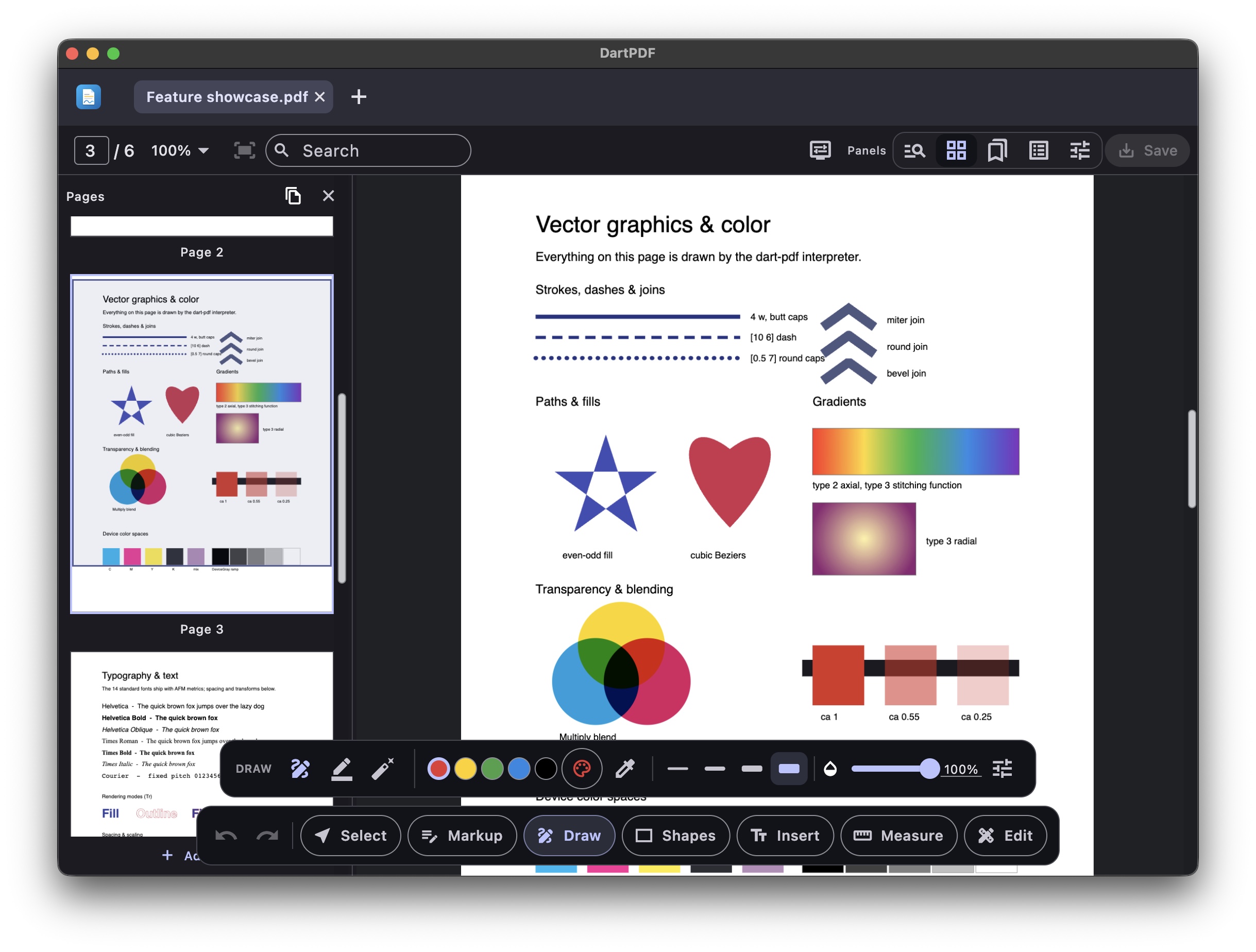
Live demo: https://dart-pdf-demo.web.app (the example app built for the web; it opens onto a six-page feature showcase, and the open button loads your own PDF).
Developer overview: Flutter PDF editor
Step-by-step integration: How to add PDF editing to a Flutter app with installation, architecture, supported editing features, and benchmarks.
Visual render results, browsable directly in GitHub: the checked-in PDF.js corpus comparison gallery shows PDF.js baselines, Dart renders, and diffs side by side, and the Ghent Output Suite render gallery shows every print-conformance page we rasterize (our own renders, which are the baselines - so no diff column).
Merge PDFs
import 'package:pdf_document/pdf_document.dart';

final mergedBytes = PdfMerger.merge([firstPdfBytes, secondPdfBytes]);
The bytes-only API runs on desktop, mobile, and web. It preserves the first PDF's encryption and viewing settings, imports form fields and bookmarks, and remaps named links. See merge options and collision rules.
In DartPDF, choose Insert document… from the app menu to insert a PDF after the current page. Dropping PDFs on the thumbnail strip inserts at the marked position; dropping on the document offers Insert pages to append them. Each inserted file is one undo step and uses the existing save/recovery session.
Reduce file size
In DartPDF, choose Reduce file size… from the app menu. Start with Lossless, or choose Screen, eBook, or Print to trade image resolution for a smaller file. Advanced settings control individual passes, target DPI, and JPEG quality. Review the before/after sizes and category breakdown, then Save copy using the platform's save/download/share flow.
The library exposes the same optimiser through PdfCompressor.optimize and
PdfEditor.compress. See compression options and supported content.
Performance
The default viewer has not reached PDFium interaction parity yet. The most
recent real-document checkpoint (2 October 2026, commit fadf7760) used five
interleaved DartPDF/PDFium runs in Chrome 154 on an M1 Pro, a 1400×1000
viewport, and the default JS/CanvasKit web build. The input was a locally
supplied 62-page, 24.1 MB illustrated PDF; the journey opened it, jumped to
pages 3 and 47, zoomed to 1.72×, and drove matched wheel gestures. Lower
ratios are better.
| user-visible metric | DartPDF p50 / p95 | PDFium p50 / p95 | ratio p50 / p95 |
|---|---|---|---|
| open to stable visual | 711 / 757 ms | 1264 / 1411 ms | 0.56× / 0.54× |
| page first visual change | 24 / 31 ms | 19 / 22 ms | 1.26× / 1.39× |
| page stable visual | 271 / 357 ms | 118 / 121 ms | 2.30× / 2.95× |
| zoom stable visual | 44 / 47 ms | 19 / 25 ms | 2.32× / 1.92× |
| wheel journey | 413 / 919 ms | 972 / 1022 ms | 0.42× / 0.90× |
| wheel rAF interval p95 | 83 ms | 17 ms | 4.96× |
| peak browser RSS p50 | 2167 MiB | 1887 MiB | 1.15× |
The wheel journey completes sooner, but its worse rAF tail means it is not yet as smooth; total duration alone would be a misleading win. Headless Chrome 154 appears to pace frames at 60 Hz on this host (PDFium's rAF p95 is 17 ms, where it was 10 ms in August), so the cadence ratio is not directly comparable with earlier checkpoints. Open and memory are inside the current provisional budgets (memory with less headroom than in August), while stable navigation, zoom, and scroll cadence are not. These numbers describe desktop web only and are not a native-desktop or mobile parity claim. See the full methodology and historical experimental results in the PDFium parity notes.
The offline corpus benchmark remains useful as a subsystem diagnostic, not as
evidence of viewer latency: over the 52-file / 268-page common subset at scale
2, pure-Dart interpretation takes 10.3 ms/page, PDFium rasterization takes
31.1 ms/page, and the complete Flutter raster plus readback takes 54.0 ms/page.
Reproducible offline harnesses and file-by-file diffs live in
benchmark/.
Architecture
Strictly layered packages; Flutter and dart:ui stay in the editor and its
optional Flutter companions, so the core runs on servers and in plain Dart tests. Published packages use their
directory name on pub.dev.
| Package | pub.dev | Role |
|---|---|---|
pdf_cos |
 |
The PDF file format itself: tokenizer, parser, filters (incl. CCITT/JBIG2/JPX), encryption, cross-reference machinery, serializer, crypto primitives. |
pdf_document |
 |
Document semantics: page tree, annotations, AcroForm, digital signatures, and the incremental-save PdfEditor. |
pdf_graphics |
 |
Content-stream interpreter, device interface, font engine, ICC color, text extraction. |
dart_pdf_cli |
— | Pure-Dart dartpdf command line and stdio MCP server for bounded document inspection, text extraction, form listing, and annotation listing. |
dart_pdf_editor |
 |
Flutter viewer and editing UI: canvas device, PdfViewer, tools, panels, forms. |
dart_pdf_printing |
Initial release pending | Optional print preview, sheet layout and native system printing on all six Flutter platforms. |
dart_pdf_editor_flutter_gpu |
 |
Experimental opt-in Impeller/flutter_gpu tile renderer for supported native targets, with exact Canvas fallback for unsupported pages. |
dart_pdf_editor_assets |
 |
Optional bundled editor fonts + web render worker (~4.2 MB package download); depend on it and call registerBundledEditorAssets() for the full editor, omit for a size-minimal viewer. |
pdf_ocr_ondevice |
 |
Optional on-device OCR engine for native Flutter apps; downloads a small PP-OCR model once and adds searchable text layers offline. |
pdf_ocr_vlm |
 |
Optional HTTP OCR engine for web, mobile, and desktop; talks to dots.ocr/vLLM or any service returning text boxes. |
pdf_test_fixtures |
 |
Programmatic, structurally-correct PDF builders for tests. |
Quick start
For shell, CI, and local agent workflows, run the pure-Dart CLI directly from the workspace:
dart run packages/dart_pdf_cli/bin/dartpdf.dart inspect document.pdf --json
dart run packages/dart_pdf_cli/bin/dartpdf.dart text document.pdf --pages 1-5 --json
The same handlers are exposed as bounded, read-only MCP tools through
dartpdf mcp. See the dart_pdf_cli guide for
installation (including the copy bundled in desktop app builds), filesystem
roots, password handling, and host registration.
For a Flutter app, add the editor package:
flutter pub add dart_pdf_editor
Then give the drop-in shell PDF bytes and bounded space:
import 'package:dart_pdf_editor/dart_pdf_editor.dart';

PdfEditorView(
  bytes: pdfBytes,
  onSave: (bytes) => saveBytesSomewhere(bytes),
)

PdfReader(bytes: pdfBytes)
To open a large PDF hosted remotely without downloading the whole file first,
use the asynchronous byte-source API. PdfHttpByteSource fetches over HTTP
Range requests (forwarding auth headers, with cancellation and progress), and
falls back to a plain download when the server does not support ranges:
final source = PdfHttpByteSource(
  Uri.parse('https://host/big.pdf'),
  headers: {'Authorization': 'Bearer $token'},
  cancelToken: cancelToken,
  onProgress: (received, total) => report(received, total),
);
final document = await PdfDocument.openSource(source);
For an even faster first paint on a big, image-heavy document (a scan, a CAD
sheet), pass firstPaintPages so the loader fetches only the first page's
bytes, paints it, and lets you stream the rest in behind it:
final preview = await PdfDocument.openSource(
  source,
  options: PdfSourceLoadOptions(
    firstPaintPages: 1,
    onProgress: (received, total) => report(received, total),
  ),
);
// `preview` renders the first page immediately, but its buffer is deliberately
// incomplete - render-only, never edit or sign from it. Read the whole source
// in the background and reopen for the full document when you need every page.
PdfByteSource is network-agnostic (length + readRange), so any random-
access transport works - including a local file. PdfDocument.open(Uint8List)
and the byte-based widgets are unchanged. See
doc/progressive-loading.md for the full guide
(local files, the fast-first-paint pattern, Flutter viewer wiring) and
doc/dev-log for the loader design.
For OCR, add one engine package and call PdfEditor.applyOcr before opening
or replacing the document in your viewer:
flutter pub add pdf_ocr_ondevice   # native offline OCR
# or
flutter pub add pdf_ocr_vlm        # HTTP OCR, including Flutter web
pdf_ocr_ondevice is the simplest native path: it downloads the default model
once, caches it in app support storage, then runs offline. pdf_ocr_vlm is the
simplest web/server path: point it at a CORS-enabled OCR service. Both write the
same invisible text layer, so scanned pages become selectable, searchable, and
copyable without changing how the PDF looks.
Splitting PDFs
pdf_document can generate multiple standalone PDFs directly from bytes:
final parts = PdfSplitter.splitExpression(bytes, '1-3, 7, 10-12');
// Three outputs: pages 1–3, page 7, and pages 10–12.
final firstThree = PdfSplitter.splitRange(bytes, 0, 2); // zero-based, inclusive
PdfEditorView(onSplitPages: ...) adds a validated Split PDF… dialog to the
thumbnail page-actions menu. The example opens each result in a new editable tab.
Existing single-range and thumbnail-selection exports remain available.
Page annotations/resources and document information are retained; bookmarks, the document-level AcroForm field list, and named destinations are omitted. Links between pages retained in one output are remapped. Copied widgets are not registered in an AcroForm. Resources remain shared within an output where possible; each output owns its copies. Encrypted sources yield unencrypted outputs. See the splitting guide for indexing, password handling, validation, and extraction semantics.
Roadmap
- ✅ COS reader: lexer, parser, FlateDecode + predictors, xref tables, xref streams, object streams
- ✅ Incremental-update writer (signature-preserving); first edits: metadata, page rotation
- ✅ Encryption: opening RC4/AES-128/AES-256 documents (user and owner passwords) and encrypt-on-write, so encrypted documents are editable and signable (the signature's /Contents stays plain per ISO 32000 §7.6.1; every other string in the signed revision is encrypted).
- ✅ Content-stream interpreter with an abstract device interface
- ✅ Font engine: TrueType/CFF glyph outlines, CID fonts, CMaps, ToUnicode
- ✅ Flutter rendering device + viewer widget
- ✅ Text extraction with positions, feeding selection and search plus paragraph/reading-order inference for text reflow
- ✅ Annotations: model, appearance-stream rendering, authoring with generated appearances (highlight/underline/strike-out/squiggly, ink, shapes, free text, callouts, notes, stamps, measurements, count, and redaction), and flattening
- ✅ AcroForm: field model (text, check box, radio, choice), filling with regenerated appearances (auto-size, multiline wrap, quadding, /MK decorations), and template editing: field metadata, creating fields on any document, renaming, deleting, retyping, image-filled push buttons, and fault-tolerant whole-form flattening
- ✅ Page manipulation: reorder/move, remove, merge with cross-document
object copying (
appendPagesFrom), and split (extractPageswrites a standalone file; extracting from an encrypted document decrypts) - ✅ Digital signatures: validation (CMS/PKCS#7 with RSA and ECDSA
P-256/384/521 and RSASSA-PSS, byte-range and revision-coverage checks)
and signing (
saveSigned, adbe.pkcs7.detached, RSA-SHA256, verified interoperable with OpenSSL and poppler) - ✅ Content editing: stamping (
stampPage, text, shapes, JPEG and PNG images over existing content), element deletion (PdfPageElements+deleteElements), and text editing (replaceText, across a line's shown strings with width-compensated re-measurement;reflowTextrewraps supported single-column paragraphs, including compatible embedded Type0 fonts)
Deliberately deferred: JBIG2 Huffman/refinement variants and JPX subsampling/PCRL-CPRL progressions.
Features
Viewer
- Zooming/panning viewer with fit-page and fit-width modes, and deep-zoom detail rendering past the raster caps.
- Text selection with mouse or touch (long-press, then drag handles), full-text search, link navigation, outlines.
- Reader reflow mode infers visual lines, columns, reading order, and paragraphs from positioned text, then presents a continuous selectable text view for narrow screens.
- Custom always-visible scrollbars that stay usable while zoomed; a horizontal bar appears for panning the zoom window. Scroll metrics are computed from real page heights, so the thumb doesn't jump around on long documents with mixed page sizes.
- Trackpad pinch and scroll don't fight each other (each gesture commits to one or the other), touch pinch zoom works with a tool armed, and flings keep their momentum, including finger scrolls while an editing tool owns the gestures.
- Navigation (search results, links, thumbnails) accounts for the zoom window, so jumps land where the user is looking.
- During fast flings, pages show low-resolution cached previews rather than blank paper; full rendering resumes when scrolling settles, keeping heavy CAD documents smooth.
- Rendering is progressive: the default worker records pages off the UI thread, streams partial page records as they are produced, and reveals complex pages top-down instead of waiting for the whole page.
- The renderer supports print-oriented overprint and spot-color behavior, including image colorants, rather than approximating every overprint draw with a blend mode.
- Dark mode, arbitrary page background colors (
PdfViewer.pageColor), chrome theming viaPdfViewerTheme, and a hide-all-annotations toggle.
Annotation editing
PdfEditingControllersaves incrementally on every edit, so revisions are byte prefixes of one buffer and undo/redo is essentially free.- Tools: text markup (highlight/underline/strikeout/squiggly), ink, freehand highlighting, shapes (including polylines, polygons, and revision clouds), free text, Bluebeam-style callouts, notes, stamps (including saved custom stamps), hyperlinks (URI and in-document), placed images with interactive cropping, and a saved ink signature.
- Callouts pair an editable text box with a leader line and arrowhead. The terminus and its attachment to the box can be repositioned independently, while moving the body keeps the whole callout together.
- A stamp on the page goes back into the stamp collection from its