
Flisk: your whole app, running on your computer with one command
What is Flisk? · Key features · Quick start · Commands · Configuration · With your AI agent · FAQ · Docs
👋 Welcome · 欢迎 · 歡迎 · ようこそ · 환영합니다 · Bienvenue · Bienvenido · Bem-vindos · Willkommen · Benvenuti · Bun venit · أهلًا · Hoş geldiniz · Ласкаво просимо · Witamy · خوش آمدید · Selamat datang · Chào mừng · ยินดีต้อนรับ · Καλώς ήρθατε · സ്വാഗതം
What is Flisk?
Flisk is a command-line tool for local development. It runs every part of your app (API, website, workers, AI agents, database) on your computer behind one local address, and reloads a part when you save it. You describe each part in a small service.json; Flisk writes the Dockerfiles, the Compose file and the Tiltfile from it, and keeps them in sync. It does not deploy: production stays with your own tools.
npm install -g @flisk-sh/flisk
mkdir my-shop && cd my-shop
flisk project --yes
flisk resource orders-api --type backend --stack shop --yes
flisk resource shop-web --type frontend --stack shop --yes
flisk up shop
That starts an orders API and a storefront behind one gateway, with Postgres and live reload, and prints their URLs. It needs Docker, Tilt, Node.js 22.12+ and Bun 1.2+; flisk doctor says what is missing. A small app can skip Docker and run as local processes.
One small file per service
flisk resource wrote a service.json for each part. This is the whole file for the orders API, and the only configuration you edit for it:
{
  "$schema": "https://flisk.sh/schema.service.json",
  "schemaVersion": 1,
  "appName": "orders-api",
  "appType": "backend",
  "stack": "shop",
  "port": 4000,
  "healthCheckPath": "/health"
}
From it Flisk writes the Dockerfile, the Compose entry, the gateway route, the health check and the DATABASE_URL, and refuses to start if one of those files was edited by hand. Every field · Everything Flisk writes
Already have a docker-compose.yml?
flisk import . writes one service.json per Compose service and keeps its ports, names and env values:
flisk import .
flisk up
A plain Compose app (a Node API and Postgres) answered through Flisk's router 49 s after flisk import on a clean Ubuntu CI runner, images pulled and built from scratch, install not counted (run, claims). CI repeats it on every pull request.
Rather ask your AI helper? It runs these commands for you: copy a prompt. Never written code? Start here, step by step · Words you'll see
Key features
- One
service.jsonper service. Flisk generates the Dockerfile, the Compose entry, the Traefik routes, the health check and the Tiltfile from it. You do not hand-write adocker-compose.ymlornginx.conf. - One command, one address.
flisk upstarts Postgres, your services and a local gateway, starts services in health-checkeddependsOnorder, and prints a*.localhostURL for each. - Hot reload while you code. Tilt live-updates a container when you save its files; there is no rebuild step.
- Wired for you.
DATABASE_URL, the API URL your frontend calls, and missing secrets such asJWT_SECRETare generated and injected, never copied by hand. - Generated files you can check. Flisk records what it wrote, refuses to start when a generated file was edited by hand, and
flisk config verifyreports drift (generated files and drift checks). - Built for AI helpers.
flisk mcpgives Claude Code, Codex, Cursor and other agents 21 tools, andflisk projectadds the Flisk skills and anAGENTS.md. - Runs AI agents too. Agent services get durable checkpoints, sticky
x-session-idrouting, and/healthand/readychecks (below). - No Kubernetes; no Docker for small apps. Docker and Tilt run the stack without a local cluster such as kind or minikube, and services that each declare a
commandrun as plain local processes. - Quick to start. With warm image layers, a one-backend stack is healthy in 12.8 to 13.8 seconds (timing notes). An 8-service stack settles in 32 to 42 seconds warm and about 4.5 minutes on its first cold build (benchmark).
- Free core. The CLI is MIT and needs no key to run
flisk up; Premium extras are optional (license matrix).
Is Flisk right for your team?
Three quick questions; click the answer closest to your team. Not technical? Pick "not sure" where you need to. You get a score and a plain-English why.
1. What is the app written in?      |
2. How do developers start the app on their laptop today?         |
3. How many parts does the app have? (website, API, background jobs, …)   |
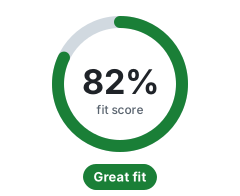
Great fit. Flisk was made for teams like yours. Why this score → · Full calculator on flisk.sh
Trusted by
 |  |  |  |
Teams that run flisk up on their own code, listed with their consent. See all adopters or add yours.
Use Flisk with your AI agent
AI helpers are good at writing the app and bad at the setup around it: every time one rewrites a Dockerfile, a Tiltfile or an nginx.conf by hand, something breaks, and you pay in time and tokens to fix it. Flisk writes that setup the same way every time, so you and your helper stick to the app.

An illustrative Claude Code session in the Warp terminal. The Flisk commands, their output, and the URLs Flisk prints come from a real run.
Install Flisk, then paste the prompt into Claude Code, Codex, Cursor or any other AI helper that can run commands:
npm install -g @flisk-sh/flisk
Build me a small online shop with a storefront and an orders API, and run it on my laptop with Flisk.
The helper creates the project, adds each part and starts it, then gives you the links to open. If something is missing, flisk doctor says what, in plain words.
More prompts to copy
Add a service to a project you already have
Use Flisk to add a backend service called payments-api to my shop stack, then start the stack and give me the URLs.
Build an AI agent with tools and a database
Use Flisk to scaffold an AI agent, an MCP tools server, and a database in one stack called shop, then start it and tell me how to talk to the agent.
Something is not working
Run flisk doctor, explain every problem in plain words, and fix what you can. Then start my stack with flisk up.
See what is running
Use flisk status to tell me which services are running, which are unhealthy, and what URL each one has.
Stop everything
Stop my Flisk stack with flisk down and confirm nothing is left running.
Pick your agent
Each helper installs a little differently; pick yours for the exact steps. Already have a project? flisk connect claude (or cursor, codex) adds the flisk mcp server (21 tools) and the Flisk skills where that agent reads them; add --dry-run to see the files first. What the agent can then do: Flisk for AI agents.
 |
    |
Then start Claude Code by typing |
 |
Any other agent that can run terminal commands works too: point it at AGENTS.md, or connect it to flisk mcp, which runs an MCP server over stdio. flisk project adds the Flisk skills (build a stack, recipes for a shop, a SaaS, an AI agent and a blog, doctor, up, resource, status, troubleshoot; source in .agents/skills) and an AGENTS.md to your project, so the agent checks your setup and explains failures instead of guessing at Docker or Tilt configuration. More prompts by category are in the prompt gallery.
No terminal at hand? Open the Flisk starter in GitHub Codespaces or Gitpod, or pick