
⚠️ Disclaimer
Everything below (and in this repo) is unapologetically vibecoded. Expect vibes, not guarantees. Proceed with good humor and version control.
Contributions are welcome. Open a pull request for fixes, features, or docs. Not sure where to start? Open an issue and we'll chat. Small improvements are great.
Found a bug or have an idea? Open an issue. Include steps to reproduce, expected vs. actual behavior. Screenshots or logs help.
Fork, branch, and submit a focused PR. Add or update tests and docs as needed. Explain the "why" and link related issues. Make sure checks pass.
Be kind. Be clear. Assume good intent. Keep feedback constructive.
🃏 PokéCollector
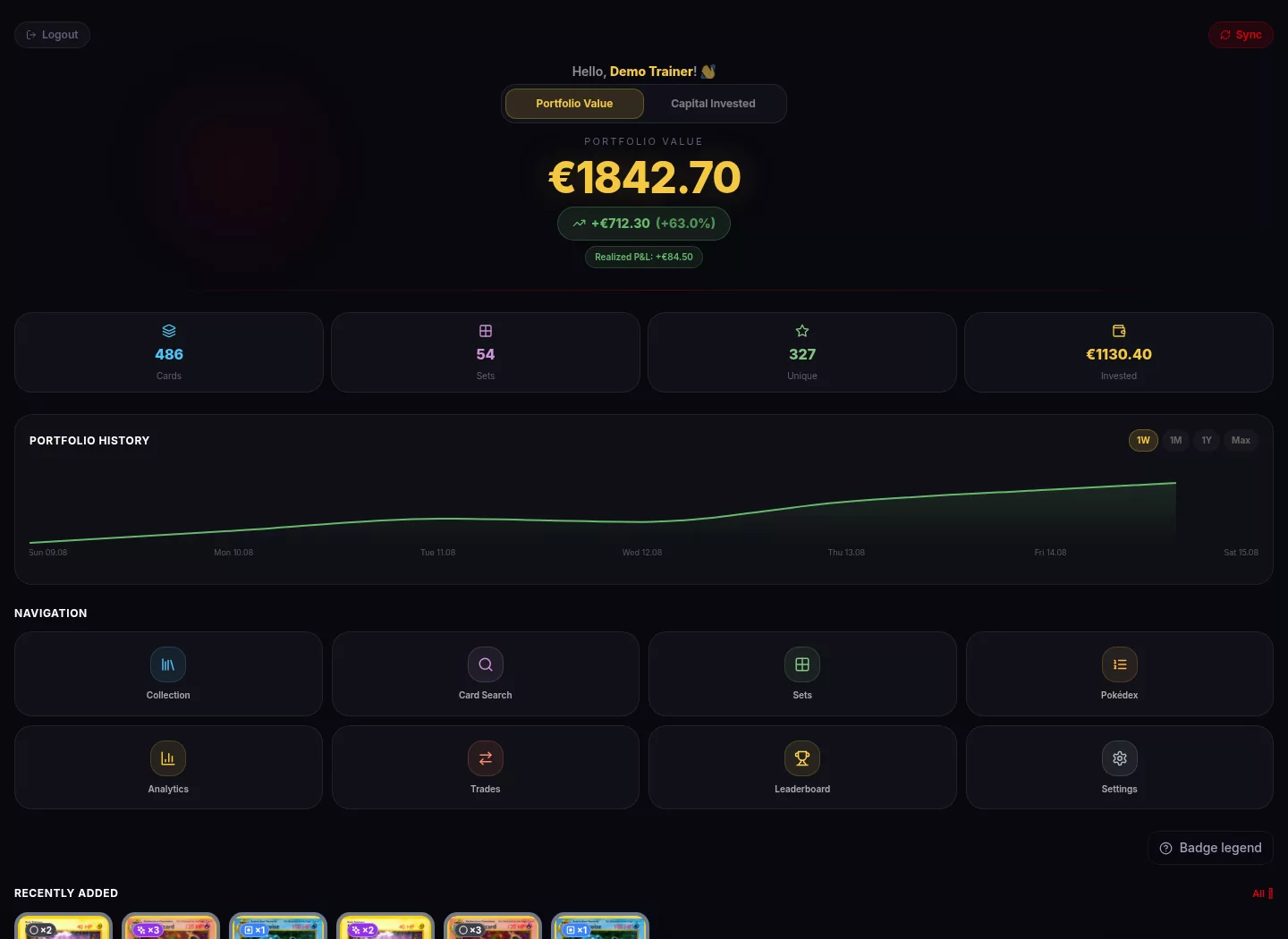
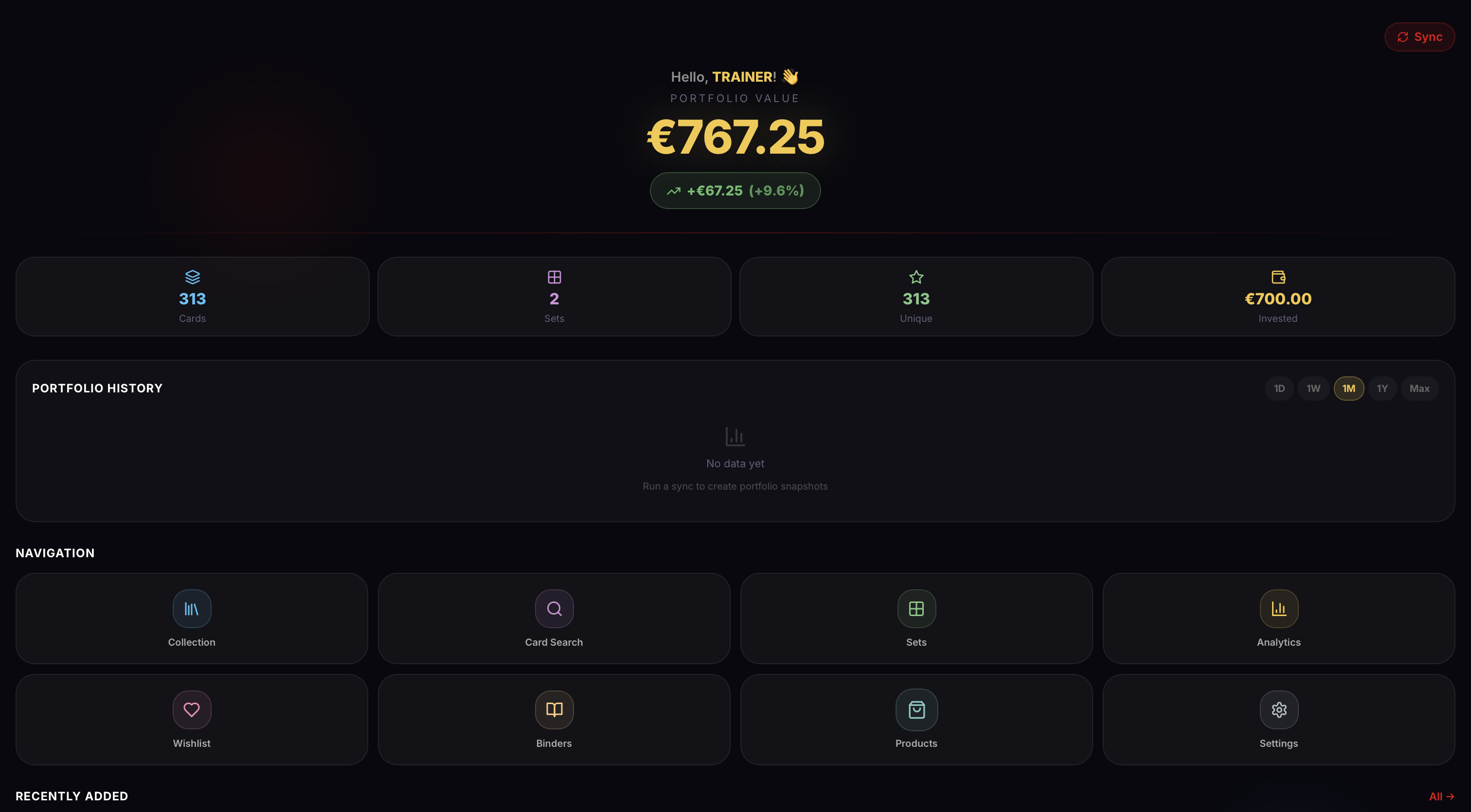
A self-hosted, full-stack Pokémon TCG collection manager for cards, sealed products, binders, analytics, scanning, and multi-user collections.
- 🌐 Website: pokecollector.romerg.de
- 👤 Creator: Gilles Romer
- ✉️ Contact: info@romerg.de







Current version: v1.55.1 · Releases are tracked on the GitHub Releases page.
📑 Table of Contents
- Features
- Quick Start
- Reverse Proxy Authentication
- Managing Users
- Environment Variables
- Sync Behavior
- Architecture
- Tech Stack
- External Sources
- Documentation
- Configuration Reference
- Updating
- Community Projects
- Support
- License
✨ Features
📦 Collection Management
- Add cards with quantity, condition, variant, and purchase price
- Variants are now limited to
Normal,Holo,Reverse Holo, andFirst Edition - Add reusable, owner-scoped printing-detail tags such as signed, stamped, misprint, or altered; tags follow the physical copy through products and trades
- Keep one private owner photo per owned card identity; use it as an artwork fallback by default or prefer it everywhere
- Card rarity is read-only from TCGdex and displayed separately from variant
- Track localized TCGdex card rows separately by language code, including all supported TCGdex languages
- Manually create owner-scoped custom cards not present in TCGdex
- Share manual cards as copy-only templates so other trainers receive independent cards and portfolio values
🔍 Search & Scanning
- Search the locally cached card database by name, number, set, category, type, subtype, rarity, HP range, artist, and attack/ability/rule text
- Short-code search like
PFL 001 - Accent-insensitive, URL-backed filters make advanced searches bookmarkable and preserve them across navigation
- Multi-select search results and bulk-add matching cards to the collection
- Unified persistent scanner with individual and composite batch recognition, via Gemini or any OpenAI-compatible vision endpoint
- Persistent, restart-safe scan queue with a review inbox, 14-day expiry, and automatic retries that do not consume recognition attempts for rate limits
- Shared provider quota handling honors reset metadata and prevents queued scans from repeatedly hitting a blocked key or local endpoint; Gemini keeps its existing daily-quota classification and pacing
- Deterministic matching ranks local number, printed total, set code, regulation mark, artist, and HP before optional visual verification
- Conservative local pHash matching can resolve exceptionally clear candidates without a second Gemini request and safely abstains on ambiguous photos
- Native camera and gallery capture with an optional positioning guide; queued photos are sanitized and deleted after confirmation or dismissal
- When a confirmed card has no catalogue or custom fallback artwork, its sanitized scan is retained as that user's private card photo on a best-effort basis
- Scanner strips suffixes like
ex/GX/VSTARfor broader matching - Optional consent-controlled scanner diagnostics for installations that enable
SCAN_TRACE_DIR; disabled per user by default with a separate delete action - Card modal auto-preselects a likely variant from TCGdex variant flags
🗂️ Sets, Card Lists & Wishlist
- Set overview with completion progress and per-set checklist
- National Pokédex #001–1025 with compatible grouped completion plus separately tracked Mega, Alolan, Galarian, Hisuian, and Paldean forms
- Unified Card Lists for physical Binders, Planned Binders, and playable Decks
- Exact owned-copy allocation across physical Binders and Real Decks, with shared capacity limits and total/unique counts
- Planned Binders track future collection projects without allocating owned copies
- Persistent Deck Builder for 20-, 40-, and 60-card lists, with editable targets, ownership totals, shortage warnings, validation, analytics, and probabilities
- Explicit actions send missing Planned Binder or Deck copies to the global Wishlist
- Convert between Planned and physical Binders, import/export Binder CSV files, and populate a physical Binder from an owned set
- Wishlist with Telegram price alerts and profile-wide Private, Trade matches, or Public visibility
📈 Prices, Portfolio & Analytics
- Cardmarket EUR pricing and TCGPlayer USD pricing via TCGdex
- Price history charts and portfolio snapshots
- Dashboard, duplicates, top movers, rarity stats, and investment tracker
- Sealed product tracking with batch creation, lifecycle states, product images/Cardmarket links, linked pulls, a realized-gains ledger, and realized/unrealized P&L
- Trade journal with incoming/outgoing cards and cash, automatic collection updates, editable trades, valuation, and trade analytics
👤 Single-User & Multi-User
- Single-user mode: no login required, auto-auth as admin
- Multi-user mode: JWT login, admin/trainer roles, separate user data
- Per-user settings for language, currency, Telegram keys, and scanner provider keys
- Force password change support on first login
- Profile avatar and profile name editing
- Optional public trainer directory, profiles, shared Binders, Wishlists, Decks, and value visibility, all opt-in and admin-gated
- Cascade deletion of user-owned data
🃏 Deck Builder
Decks are user-owned Card Lists with a target size of 20, 40, or 60 cards (60 is the default). They are private by default and may be shared individually through an enabled public profile. A Planned Deck may contain owned or unowned catalogue cards, shows shortages against the available collection, and can add missing copies to the global Wishlist. Required quantities may exceed current ownership, so the list can be completed before every physical card has been acquired.
A Real Deck represents cards that have actually been set aside. It accepts only free copies from the collection and reserves those exact copies automatically, using the same shared allocation limits as a physical Binder. A Planned Deck can become a Real Deck once every required copy is available; converting it back releases all reserved copies without changing the planned card quantities.
Binders, Planned Binders, Planned Decks, and Real Decks share the existing binders and binder_cards tables and common Card List components. Planned rows store the localized Card.id printing identity, while Real Deck allocations link to exact collection rows. The compatibility API remains available at /api/decks with CRUD routes and nested /entries operations.
🏆 Social & Community
- Leaderboard, trainer comparison, and achievements in multi-user mode
- View other trainers' collections from the Leaderboard
- Optional public trainer profiles with trainer-name URLs, a public directory, individually shared collection Binders and Decks, configurable Wishlist visibility, and opt-in market values
- Public Wishlists expose catalogue details and requested quantities only; public Decks reuse the read-only Deck composition, validation, analytics, and probability views without exposing ownership or allocation data
- Admin-controlled public sharing switch, disabled by default on new and upgraded installations
- Community section in Settings with GitHub contributors and PokéCollector supporters
🎨 UX & Localization
- Compact portal navigation with 6 primary home items and grouped tab navigation
- App UI translations for all supported TCGdex languages, plus Swedish
- 9 Pokemon-type color themes: Default, Fire, Water, Grass, Electric, Psychic, Dragon, Dark, Fairy
⚙️ Utilities
- CSV and PDF export
- Strict CSV collection import with a downloadable template; required row values are
set_codeandnumber, whilequantity,condition,variant,lang,purchase_price, andprinting_detailsmay be blank - Admin-only sync endpoints and scheduler controls
- Full SQL backup and atomic restore, plus selective backup groups for targeted exports
- Backend image proxy/cache for cards and sets
For complete recovery, use a full backup. Selective groups are intended for targeted exports, may depend on rows outside their group, and do not currently cover every newer feature table, such as trades and private collection-card photos.
CSV Collection Import
The Collection page includes an Import CSV action and a downloadable template. CSV imports are intentionally strict. The preferred header is exactly:
set_code,number,quantity,condition,variant,lang,purchase_price,printing_details
All columns must be present, but only set_code and number need values in each row. The legacy seven-column header without printing_details is still accepted and imports rows without printing-detail tags. Use the card code shown in PokéCollector/card lists, for example ASC 152: ASC goes into set_code, and 152 goes into number.
| Column | Required value? | Notes |
|---|---|---|
set_code |
Yes | First part of the card code shown in the app, e.g. ASC from ASC 152. |
number |
Yes | Second part of the card code shown in the app, e.g. 152 from ASC 152. |
quantity |
No | Defaults to 1; must be 1-999 when provided. |
condition |
No | Defaults to NM; allowed: Mint, NM, LP, MP, HP. |
variant |
No | Leave blank or use Normal, Holo, Reverse Holo, First Edition. |
lang |
No | Defaults to en; accepts any supported TCGdex language code. |
purchase_price |
No | Optional per-card purchase price. |
printing_details |
No | Reusable tags separated by |, for example Pokémon stamp|Cracked ice. Up to 10 unique tags are allowed per row; each tag may contain up to 80 characters and cannot itself contain |. |
Example:
set_code,number,quantity,condition,variant,lang,purchase_price,printing_details
ASC,152,2,NM,,en,,Pokémon stamp|Cracked ice
PFL,001,1,LP,Reverse Holo,de,1.25,
If any row contains a wrong value or an unknown card code, the import does not add any cards. The response shows the affected row number, so the CSV can be corrected and uploaded again.
🚀 Quick Start
Prerequisites
1. Download & Configure
mkdir pokecollector
cd pokecollector
curl -fsSL -o docker-compose.yml.new https://github.com/Git-Romer/pokecollector/releases/latest/download/docker-compose.yml
mv docker-compose.yml.new docker-compose.yml
curl -fsSL -o .env.new https://github.com/Git-Romer/pokecollector/releases/latest/download/pokecollector.env.example
mv .env.new .env
Edit .env and set a secure POSTGRES_PASSWORD. You may also set
JWT_SECRET_KEY yourself; leaving it empty generates and persists a strong key
under data/auth/:
POSTGRES_PASSWORD=your_secure_password
JWT_SECRET_KEY=some_long_random_string

# Optional
ADMIN_USERNAME=admin
ADMIN_PASSWORD=your_admin_password
GEMINI_API_KEY=your_gemini_key
GEMINI_MODEL=gemini-flash-latest
TELEGRAM_BOT_TOKEN=your_bot_token
TELEGRAM_CHAT_ID=your_chat_id
TCGDEX_SYNC_LANGUAGES=en,de
PUBLIC_MODE=false
CORS_ORIGINS=https://yourdomain.com
# Host ports, if 8000 or 3000 are already taken on this host
BACKEND_PORT=8000
FRONTEND_PORT=3000
The release Compose file pulls the published amd64 or arm64 frontend and
backend images from GitHub Container Registry automatically. Source code is not
required for a normal installation. Contributors who want to build locally can
clone the repository and use the build override documented in
CONTRIBUTING.md.
2. Start
mkdir -p data/pokedex-images backups
docker compose up -d
3. Open
| Service | Default URL | Host port variable |
|---|---|---|
| App | http://localhost:3000 | FRONTEND_PORT |
| API docs | http://localhost:8000/docs | BACKEND_PORT |
4. First Sync
On first launch, trigger a sync from the app to populate sets and cards from TCGdex.
After upgrading an existing catalogue, the backend automatically runs the one-time Pokédex metadata backfill in the background and records completion in the database. If you need to retry or inspect it manually, run:
docker compose exec backend python -m scripts.backfill_pokedex_metadata --limit 5000
Repeat the metadata command until attempted is 0. You can optionally pre-cache all species images:
docker compose exec backend python -m scripts.cache_pokedex_images
See National Pokédex documentation for the data model, routes, cache behavior, and Cardmarket links.
See Card Lists and Decks for Binder, Planned Binder, Planned Deck, and Real Deck behavior, including shared owned-copy allocation.
See Deployment and releases for image names, supported platforms, version pinning, updates, rollback, and the automated release flow.
For scanner keys, hosted OpenAI, Ollama, and other compatible vision servers, see the scanner provider setup guide.
5. Login
- In single-user mode, login is skipped and the app auto-authenticates as admin
- In multi-user mode, use the admin account created from
ADMIN_USERNAME/ADMIN_PASSWORD - If
ADMIN_PASSWORDis omitted, a random password may be logged during bootstrap
Warning
Single-user mode has no authentication: every client that can reach the app is treated as the administrator. Use it only on a trusted local network. Do not expose a single-user installation to the internet; enable multi-user mode and protect public deployments with HTTPS and an appropriately configured reverse proxy.
🔐 Reverse Proxy Authentication
If PokéCollector is protected by Authentik, Authelia, oauth2-proxy, or another forward-auth layer, the proxy checks requests before they reach PokéCollector. Enabling public profiles inside the app is therefore not enough on its own. The proxy must also allow the public pages, their public API calls, and the assets those pages use.
See Reverse proxy authentication for the complete route list, Authentik examples, and a verification checklist. Do not bypass authentication for all /api routes.
👥 Managing Users
User management is available from the app UI when multi-user mode is enabled.
- Log in as an admin user.
- Go to Settings.
- Enable Multi-User Mode if it is not enabled yet.
- Open the Users tab in Settings.
From the Users tab, admins can:
- add new users
- edit existing users
- change user roles between
adminandtrainer - activate or deactivate users
- delete other users
- force new users to change their password on first login
The Users tab is only visible to admin users and only while multi-user mode is enabled. In single-user mode, PokéCollector skips login and uses the bootstrap admin account automatically.
Enabling multi-user mode without locking yourself out
Turning on multi-user mode enforces the login screen immediately and signs you out, and you then sign back in as the bootstrap admin. In single-user mode you never had to enter that password, so if you did not set ADMIN_PASSWORD it is the random one from the first-run log and you may not know it. Set a known password before enabling multi-user mode. From the host:
# Docker
docker compose exec backend python -m scripts.set_admin_password
# Native install (run in the backend virtualenv, from the backend working directory)
python -m scripts.set_admin_password
The script prompts for the new password (add --username <name> for a non-default admin, or --make-admin if the only admin was demoted).
Recovering from a lockout
If you are already locked out of multi-user mode, set USER_MODE=single in the environment and restart. That pins single-user mode and disables the login screen regardless of the stored setting, so you regain local admin access; reset the password with the script above, then remove the variable and restart to return to multi-user mode. While USER_MODE is set, the Multi-User Mode toggle in Settings is disabled and shows that the environment controls it. Because USER_MODE=single disables the login screen, treat it as a local/LAN recovery tool and do not leave it set on an internet-facing install. (USER_MODE=multi pins multi-user mode instead, which is safe to leave set.)
🔧 Environment Variables
Required
| Variable | Description | Default |
|---|---|---|
POSTGRES_PASSWORD |
PostgreSQL database password | changeme |
Recommended
| Variable | Description | Default |
|---|---|---|
JWT_SECRET_KEY |
Secret that signs login tokens. Anyone who knows it can forge a session for any account, including admin, so treat it as sensitive. Leave it unset to have a strong key generated and persisted automatically (under data/auth/); set it only if you want to control the value or share it across replicas. An empty value is ignored rather than used. |
Generated and persisted |
Optional
| Variable | Description | Default |
|---|---|---|
ADMIN_USERNAME |
Username for the bootstrap admin account | admin |
ADMIN_PASSWORD |
Password for the bootstrap admin account | Random, optionally logged |
GEMINI_API_KEY |
Initial Gemini key for the admin user; other users configure their own key in Settings | (empty) |
GEMINI_MODEL |
Gemini model used by the card scanner. Change this if Google retires the default model for new API keys. | gemini-flash-latest |
OPENAI_SCANNER_ENABLED |
Exposes the OpenAI-compatible provider in Scanner Settings. It stays hidden until deliberately enabled by an administrator. | false |
OPENAI_PROVIDER_LABEL |
Friendly name shown |