
EasyEcs is a high-performance archetype Entity Component System (ECS) for C# and .NET 10,
for anything that updates many entities every frame or tick: game servers, Godot 4 games, simulations and real-time
backends. It runs a Minecraft-style server (chunks, flowing
water, zombies, replication) and a Godot 4 game the same way. A warmed-up world of 100,000 entities runs nine simulation
systems in 1.72 ms with 0 B allocated. Across 37 head-to-head benchmarks against Friflo.Engine.ECS, Arch and
DefaultEcs, EasyEcs leads in 24, is within measurement error in 11 and trails in 2
(full comparison). Write plain structs and
[ForEach] methods; a source generator builds the iteration jobs and an analyzer catches mistakes at compile time.
Documentation: ecs.xgamedev.net (English · 中文)


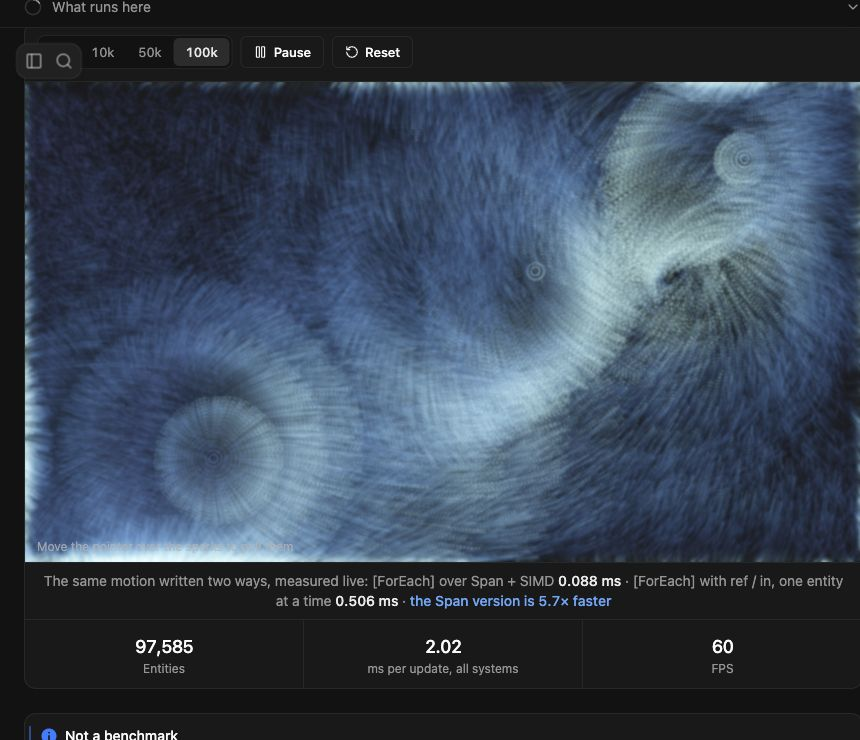
Try it in your browser: set the live particle demo to 100k, then
move your pointer across the particles. The demo's C# runs through Mono AOT to WebAssembly; its batched drag and
movement systems took about 0.1 ms on an M4 during this capture. The rest of the systems and rendering are separate
from that reading. The batch system source shows the
[ForEach] + Span + SIMD path.
One server tick of 9 systems (movement, AOI, combat, status effects, death, respawn, projectiles):
| Tick | Entities | Time | Allocated |
|---|---|---|---|
| One world | 100,000 | 1.72 ms | 0 B |
| Four worlds, one per thread | 100,000 | 0.92 ms | 0 B |
| Battle server, every feature | 100,000 | 2.97 ms | 0 B |
BenchmarkDotNet 0.15.2 (EasyEcs.Benchmark), 4-core Intel Xeon VM at 2.1 GHz (Ubuntu 24.04), .NET 10.0.13; entities spawn, die, gain and lose components every tick.
The battle server turns every feature on: parallel steering and systems, replication, indexes, relations, timings.
A [ForEach] system adding Velocity to Position costs 0.9 ns per entity (one archetype), faster than two
plain arrays.
Details.
dotnet add package EasyEcs # net10.0 · source generator, analyzer and Nino included
Why EasyEcs
- Fast and garbage-free. Archetype tables with 64-byte-aligned columns that iteration and SIMD walk front to back, 16-byte entity records (4 per cache line), JIT-inlined struct jobs instead of delegates, lock-free queries. After warm-up nothing allocates: a unit test guards the 0 B budget of updates, queries and structural changes on every run.
- Structural changes are immediate and cheap. Add and remove components, spawn and destroy, even in the middle of a pass; no command buffer to flush. Removing a status effect and adding it back flips a presence bit, the entity never moves. State can be tags, not flags.
- Write the logic, not the plumbing. A
[ForEach]method is the whole system; filters are attributes ([With<T>],[Without<T>],[WithAny<T>]), singletons are parameters, and attributes on a type declare what it is ([Sum]for a total,[UniqueKey]for an index key,[Group],[UpdateInterval(n)]on a system): the generator writes the rest. - Every core and every SIMD lane, without writing either. A
[ForEach]method over numbers becomes a vector loop, the way Burst compiles a job, with the same results bit for bit.Parallel = truespreads it over the cores, and its parameters do the work that usually needs locks:Reduce<T>for totals,Emit<T>for records out of a pass,Lookup<T>for other entities,Scratch<T>for working memory,EntityRandomfor random numbers that do not depend on the thread count. A grid (water, light, heat) is shaded like a GPU draws: tiles, a halo, a stencil. - Built-in change tracking, removal detection, indexes and relations.
[Changed<T>]visits only the rows written since a system last ran, including writes throughref(or only the rows whose value changed, throughMut<T>),[ChangedAny<A, B>]those where any of several changed,[Removed<T>]the entities that lost a component, and a destroy log the entities destroyed since each client's tick;IIndexed<TKey>components are found by value, and anIIndexed<EntityId>component or anIRelationbuffer (Link) makes a relation, kept current by everySet. No events and nothing to keep in sync by hand. - Prefabs that stay out of your queries. A
Prefabis a recipe of component values that belongs to no world:world.Instantiate(prefab)spawns from it (a whole wave in one pass), and no system ever has to filter templates out.entity.Clone()copies a living entity. - Mistakes fail the build, slow code gets a hint. The bundled analyzer (EECS002-EECS089, with code fixes) reports
invalid
[ForEach]methods and systems, class components, stateful systems, systems that reference each other, parallel code that would race, writes through read-only parameters, copied dynamic buffers, structural changes off the owner thread, indexed components written behind their index's back and ordering cycles. It also names the code that works but costs: a method that lost its vector loop and why, per-row lookups, allocations per update, a hand-written total, key or job that an attribute or a parameter declares. - Decoupled by construction. Systems cooperate only through data, in registration order unless
[UpdateBefore<T>]/[UpdateAfter<T>]say otherwise; system groups give you separate cadences (input on every wake, simulation on a fixed tick). - Built for processes that run for months. Ids are recycled behind version-checked handles, memory is bounded by the peak entity count, a structural change off the owner thread throws or is reported at compile time instead of tearing the tables; the supported model is one owner thread per world (see Threading), and one world per thread scales across cores.
Features
Every feature has a guide page with a full example; Features lists them all with what each costs and when to use it, and API and complexity lists every call.
- Entities and data: worlds, entities, components and tags, prefabs and cloning, singletons, dynamic buffers, immediate structural changes, bulk changes, cleanup components and disable.
- Systems and queries: systems of
[ForEach]methods with filters,Maybe<T>, batch methods, slices,[UpdateInterval],[Consume], groups, ordering and generic systems; ad-hoc queries and struct jobs,[ForEntity]for one entity. - Compute: vector loops, parallel passes and batch methods; reductions, scratch, lookups, emitted records, deterministic random numbers; grids shaded by tiles.
- Change tracking:
[Changed<T>],[ChangedAny<..>],Mut<T>,[Removed<T>]and the destroy log. - Finding entities: value and unique indexes, ordered ranges, relations, hierarchy, table groups.
- State over time: snapshots, saves and restarts, migration, records and plugin unloading.
- Threads: one owner thread per world, parallel systems and parallel
[ForEach]methods, Native AOT. - Tools: per-system timing, schedule, introspection, trimming, the analyzer (EECS002-EECS089, with code fixes).
Example
Data is plain structs, each system is one [ForEach] method, and systems cooperate only through the data they write:
using EasyEcs;

public record struct Position(float X, float Y) : IComponent;
public record struct Velocity(float X, float Y) : IComponent;
public record struct Health(int Value) : IComponent, ITracked;         // tracked: rows record their last write
public struct Dead : IComponent;                                       // a tag
public record struct Clock(float Dt) : ISingletonComponent;           // one value per world

[EcsSystem]
public ref struct MovementSystem
{
    [ForEach, Without<Dead>]                                           // in reads, ref writes
    static void Move(ref Position p, in Velocity v, in Clock clock)
    {
        p.X += v.X * clock.Dt;
        p.Y += v.Y * clock.Dt;
    }
}

[EcsSystem, UpdateAfter<MovementSystem>]                               // registration order otherwise
public ref struct DeathSystem
{
    [ForEach, Without<Dead>, Changed<Health>]                          // only healths written since its last run
    static void Die(Entity unit, in Health hp)
    {
        if (hp.Value <= 0) unit.SetDead();                             // immediate: later systems see it this tick
    }
}
The host owns the world and ticks it:
using var world = new World();
world.SetClock(1 / 30f);                                               // singletons before the first update
world.AddSystem<MovementSystem>();
world.AddSystem<DeathSystem>();

var hero = world.CreateEntity(new Position(0, 0), new Velocity(1, 0), new Health(100));
world.Update();                                                        // 0 B per update once warmed up
hero.SetHealth(0);                                                     // a tracked write: DeathSystem sees it
world.Update();
System.Console.WriteLine(hero.IsDead);                                 // True
A full battle server uses every feature (parallel steering, replication by change tracking and removal detection, NPC kinds as prefabs, bags of loot in dynamic buffers, indexes, relations, snapshots, system groups, struct jobs) in one world; it is the battle server benchmark below and the world of the scenario tests. The step-by-step tutorial is Getting started.
When to use it
| Good fit | Probably not |
|---|---|
| Game servers and simulations on .NET 10: MMO maps and zones, AOI, combat, voxel worlds, grids of water or heat | Unity or other runtimes below .NET 10 (net10.0 only; Unity support is being evaluated) |
Godot 4 .NET games: the project targets net10.0 (sample) |
|
| Worlds where state flips constantly (buffs, deaths, spawns): structural changes are immediate and cheap | Code that needs structural changes recorded from many threads at once (use one owner thread and a queue) |
| Long-running processes where GC pauses and unbounded growth matter | Code that wants objects with behavior, or systems calling each other |
One world per thread, many worlds per process; ParallelSystems for heavy independent systems |
Many threads mutating one world's component values without coordination |
Performance
BenchmarkDotNet 0.15.2 with the repository's job (BenchmarkConfig.cs), 4-core Intel Xeon VM at 2.1 GHz (Ubuntu 24.04), .NET 10.0.13, project EasyEcs.Benchmark. The headline benchmark is a realistic server tick,
not a toy loop (what it simulates). "Allocated" is per tick.
| Benchmark | Entities | Mean | Allocated |
|---|---|---|---|
| WorldSimulationBenchmark.Tick | 10,000 | 158 μs | 0 B |
| WorldSimulationBenchmark.Tick | 100,000 | 1.72 ms | 0 B |
| MultiWorldBenchmark.TickAllWorlds (4 worlds × 25k) | 100,000 | 0.92 ms | 0 B |
| BattleServerBenchmark.Tick (the battle server example, every feature) | 100,000 | 2.97 ms | 0 B |
More benchmarks, the micro benchmarks and how to run them are in Performance:
dotnet run -c Release --project benchmarks/EasyEcs.Benchmark -- --filter '*'
Compared with other ECS libraries
37 head-to-head benchmarks (project EasyEcs.Comparison, same VM) port the same work to Friflo.Engine.ECS 3.6, Arch
2.1 and DefaultEcs 0.17, each library its own idiomatic way, and check in setup that every library computes the same
result. EasyEcs is faster in 24, within the measurement error in 11 and slower in 2. "Its time vs EasyEcs" is the
time of the fastest other library over the time of EasyEcs (2× = it takes twice as long); the site sorts the same
data live (feature by feature).
Clear leads, where the next-fastest library takes at least 1.25 times as long:
The 13 close results and the 7 where another library is faster, with the reason for each
Close, EasyEcs ahead by less than that. The full server tick is one of these: most of a tick is iteration over dense columns, bound by memory more than by the library, and Arch and DefaultEcs take 3.42× and 3.71× as long there and allocate 535 KB and 61 KB per tick (EasyEcs and Friflo: 0 B):
