Overview
Elastickv is an experimental distributed key-value store backed by Raft. It exposes gRPC, Redis-compatible, DynamoDB-compatible, S3-compatible, and SQS-compatible APIs, plus an optional FUSE filesystem. Sharded storage, durable route management, and several operator tools are implemented; automatic cross-group data relocation and node scaling remain future work.
THIS PROJECT IS CURRENTLY UNDER DEVELOPMENT AND IS NOT READY FOR PRODUCTION USE.
Implemented Features
- Raft-based Data Replication: KV state replication is implemented on Raft, with leader-based commit and follower forwarding paths.
- Shard-aware Data Plane: Static shard ranges across multiple Raft groups with shard routing/coordinator are implemented.
- Route Management and Load Distribution: A durable route catalog, versioned route snapshots, watcher-based refresh, and manual
ListRoutes/SplitRangeare implemented. Opt-in--autoSplitdetects hot ranges and splits them within the same Raft group; opt-in--leaderBalancedistributes Raft-group leadership among existing voters. - Protocol Adapters: gRPC (
RawKV/TransactionalKV), Redis-compatible server, DynamoDB-compatible HTTP API, S3-compatible HTTP API, and SQS-compatible HTTP API implementations are available (runtime exposure depends on the selected server entrypoint/configuration). - Redis Compatibility Scope: Strings, hashes, lists, sets, sorted sets, HyperLogLog, streams (
XADD/XREAD/XRANGE/XREVRANGE/XTRIM/XLEN), Pub/Sub (PUBLISH/SUBSCRIBE), transactions (MULTI/EXEC/DISCARD), TTL/expiry (EXPIRE/PEXPIRE/TTL/PTTL), key scanning (KEYS/SCAN), and Lua scripting (EVAL/EVALSHA) are implemented. A Redis-protocol reverse proxy (cmd/redis-proxy) supports phased zero-downtime migration from existing Redis deployments. - DynamoDB Compatibility Scope:
CreateTable/DeleteTable/DescribeTable/ListTables/PutItem/GetItem/DeleteItem/UpdateItem/Query/Scan/BatchWriteItem/TransactWriteItemsare implemented. - S3 Compatibility Scope: Bucket and object operations, bucket-level
private/public-readACLs, and multipart uploads are implemented for path-style requests. AWS Signature Version 4 authentication with static credentials is supported. The server exposes this endpoint via--s3Address. - SQS Compatibility Scope: Standard and FIFO queues support queue management, send/receive/delete (including batch operations), visibility timeouts, long polling, tags, and dead-letter queue redrive. JSON and Query/XML request protocols are supported. The public endpoint is opt-in via
--sqsAddressand supports static SigV4 credentials. - FUSE Filesystem: An opt-in mount (
--filesystemMount) exposes regular files and directories backed by the sharded KV store. It supports offset reads/writes, sparse files, truncation, directory listing, same-directory rename, and unlink while a file is open. File data uses fixed-size chunks placed on one home shard per file in normal operation; see Working with the FUSE filesystem for setup and limits. - Backup and Encryption Operations: Live point-in-time logical backup and offline snapshot conversion tools are available. Opt-in storage and Raft envelope encryption paths are implemented, while the overall encryption design remains partial. See the backup runbook and encryption status before operating these features.
- Basic Consistency Behaviors: Write-after-read checks, leader redirection/forwarding paths, and OCC conflict detection for transactional writes are covered by tests.
- Timestamp Issuance: The default path uses a 64-bit hybrid logical clock (HLC) with a Raft-committed physical-time ceiling. An optional dedicated group-0 timestamp oracle supports staged
legacy,shadow,cutover, andphase-dmodes; see Centralized TSO Operations.
Planned Features
- Dynamic Node Scaling: Adding/removing nodes and groups automatically based on load is not yet implemented.
- Cross-group Hot Spot Re-allocation: Automatic splitting currently keeps both ranges in the same Raft group; automatic cross-group data migration and placement are not yet implemented.
Development Status
Elastickv remains experimental. Protocol and POSIX compatibility are limited to the operations documented below. Contributions and feedback are welcome.
Graceful shutdown
The production server (go run .) handles SIGTERM and SIGINT by transferring
leadership of every locally led Raft group before stopping its servers and
closing storage. Transfers run in parallel with a shared five-second deadline;
groups are rechecked for leadership acquired during another handoff. The Raft
transport stays available until they finish. Only active voting
replicas can receive leadership; learners are excluded.
If a group has no eligible successor or a transfer times out, the server logs a warning and continues shutdown. Followers shut down without initiating a transfer. gRPC requests then have up to ten seconds to drain before remaining streams are closed, using the common bounded shutdown path. Allow the five-second handoff window in addition to the listener and FUSE drain budgets and storage cleanup when setting the supervisor's termination grace period. During startup, signals cancel immediately; repeated signals are ignored throughout cleanup.
Architecture
Architecture diagrams are available in:
docs/architecture_overview.md
Deployment/runbook documents:
docs/docker_multinode_manual_run.md(manualdocker run, 4-5 node cluster on multiple VMs, no docker compose)docs/etcd_raft_migration_operations.md(offline HashiCorp-to-etcd cutover runbook and verification checklist)docs/redis-proxy-deployment.md(Redis-protocol reverse proxy for zero-downtime Redis-to-Elastickv migration)docs/operations/backup_restore.mdanddocs/operations/snapshot_restore.md(backup and restore procedures)docs/filesystem.md(enabling, mounting, and operating the FUSE filesystem)docs/centralized_tso_operations.mdanddocs/raft_learner_operations.md(timestamp oracle and cluster membership operations)
Design documents:
docs/design/2026_03_22_implemented_s3_compatible_adapter.md(S3-compatible object storage adapter design, data model, routing, and rollout plan)docs/design/2026_04_24_implemented_sqs_compatible_adapter.md(SQS-compatible queues)docs/design/2026_02_24_implemented_filesystem_on_elastickv.md(filesystem operations, FUSE, placement, and limitations)docs/design/2026_06_11_implemented_hotspot_split_milestone3_automation.md(automatic same-group range splitting)
Metrics and Grafana
Elastickv now exposes Prometheus metrics on --metricsAddress (default: localhost:9090 in main.go, 127.0.0.1:9090 in cmd/server/demo.go single-node mode). The built-in 3-node demo binds metrics on 0.0.0.0:9091, 0.0.0.0:9092, and 0.0.0.0:9093, and uses the bearer token demo-metrics-token unless --metricsToken is set.
The exported metrics cover:
- DynamoDB-compatible API request rate, success/system-error/user-error split, latency, in-flight requests, and per-table read/write activity
- Raft local state, leader identity, membership, leader changes seen, failed proposals, last-log/commit/applied/snapshot index, FSM backlog, and leader contact lag
- Redis, SQS, filesystem, automatic split, leader balancing, TSO, and encryption operational signals
Provisioned monitoring assets live under:
monitoring/prometheus/prometheus.ymlmonitoring/grafana/dashboards/elastickv-cluster-overview.jsonmonitoring/grafana/dashboards/elastickv-dynamodb.jsonmonitoring/grafana/dashboards/elastickv-raft-status.jsonmonitoring/grafana/dashboards/elastickv-redis-summary.jsonmonitoring/grafana/dashboards/elastickv-sqs.jsonmonitoring/grafana/dashboards/elastickv-filesystem.jsonmonitoring/grafana/dashboards/elastickv-pebble-internals.jsonmonitoring/grafana/provisioning/monitoring/docker-compose.yml
The provisioned dashboards are organized by operator task:
Elastickv Clusteris the landing page for leader identity, cluster-wide latency/error posture, and per-node Raft healthElastickv DynamoDBis the DynamoDB-compatible API drilldown for slow operations, noisy nodes, and hot/erroring tablesElastickv Raft Statusis the control-plane drilldown for membership, leader changes, failed proposals, node state, index drift, backlog, and leader contactElastickv Redisis the Redis-compatible API drilldown for per-command throughput/latency/errors, with a collapsibleHot Pathrow for GET fast-path (PR #560) verificationElastickv SQSshows queue depth, in-flight and delayed messages, and FIFO partition activityElastickv Filesystemshows file placement, chunk I/O, open-handle leases, orphan cleanup, and move activityElastickv Pebble Internalsis the storage-engine drilldown for block cache, L0 pressure, compactions, memtables, and store write conflicts
If you bind --metricsAddress to a non-loopback address, --metricsToken is required. Prometheus must send the same bearer token, for example:
scrape_configs:
  - job_name: elastickv
    authorization:
      type: Bearer
      credentials: YOUR_METRICS_TOKEN
To scrape a multi-node deployment, bind --metricsAddress to each node's private IP and set --metricsToken, for example --metricsAddress "10.0.0.11:9090" --metricsToken "YOUR_METRICS_TOKEN".
For the local 3-node demo, start Grafana and Prometheus with:
cd monitoring
docker compose up -d
monitoring/prometheus/prometheus.yml assumes the demo token demo-metrics-token. If you override --metricsToken when running go run ./cmd/server/demo.go, update authorization.credentials in that file to match.
Admin Dashboard
Elastickv ships an optional admin dashboard — a React SPA plus JSON API served from a separate HTTP listener (default 127.0.0.1:8080). It is disabled by default; enable the listener with --adminEnabled and configure authentication as described in docs/admin.md. The dashboard inspects cluster/Raft state, includes a key visualizer and data browser, and manages DynamoDB tables, SQS queues, and S3 buckets without hand-rolling SigV4 requests. Any node with --adminEnabled can serve it: writes against a follower are transparently forwarded to the leader. See docs/design/2026_04_24_implemented_admin_dashboard.md for the design rationale.
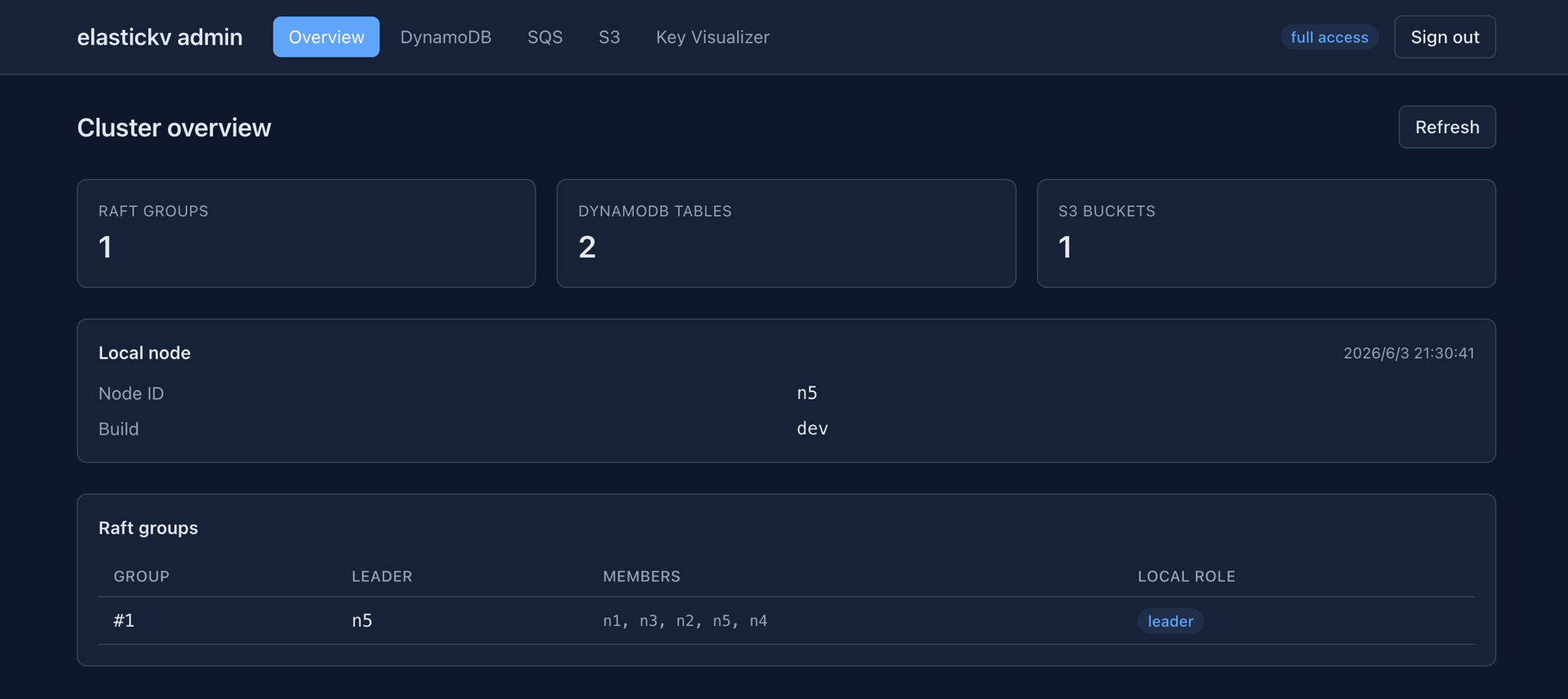
Cluster overview — leader identity, Raft group membership/local role, and resource counts.
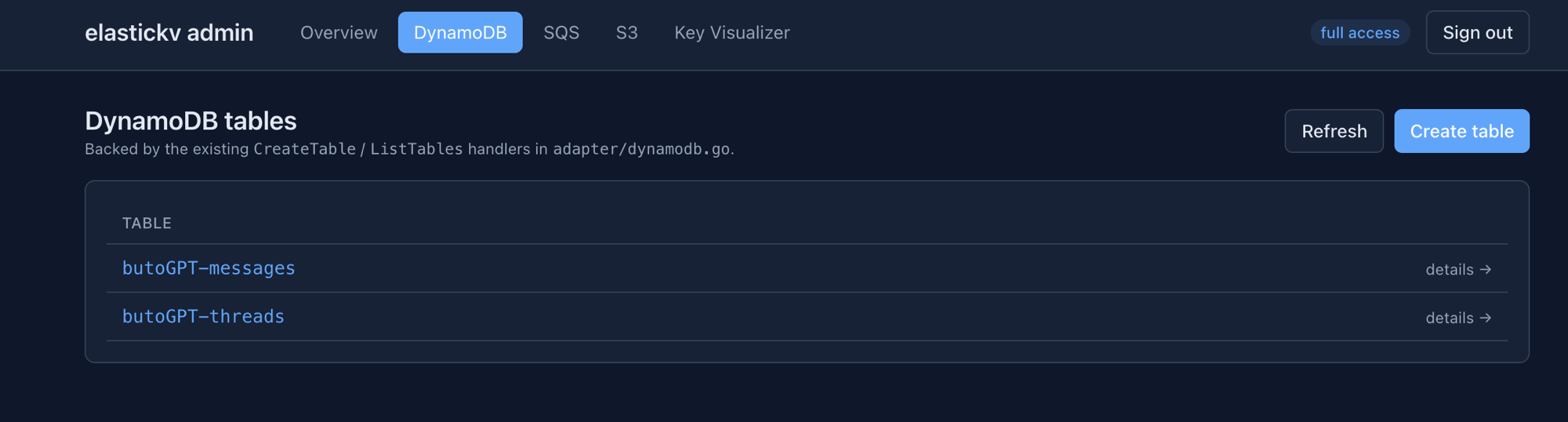
DynamoDB tables — list, create, and inspect tables backed by the existing CreateTable / ListTables handlers.
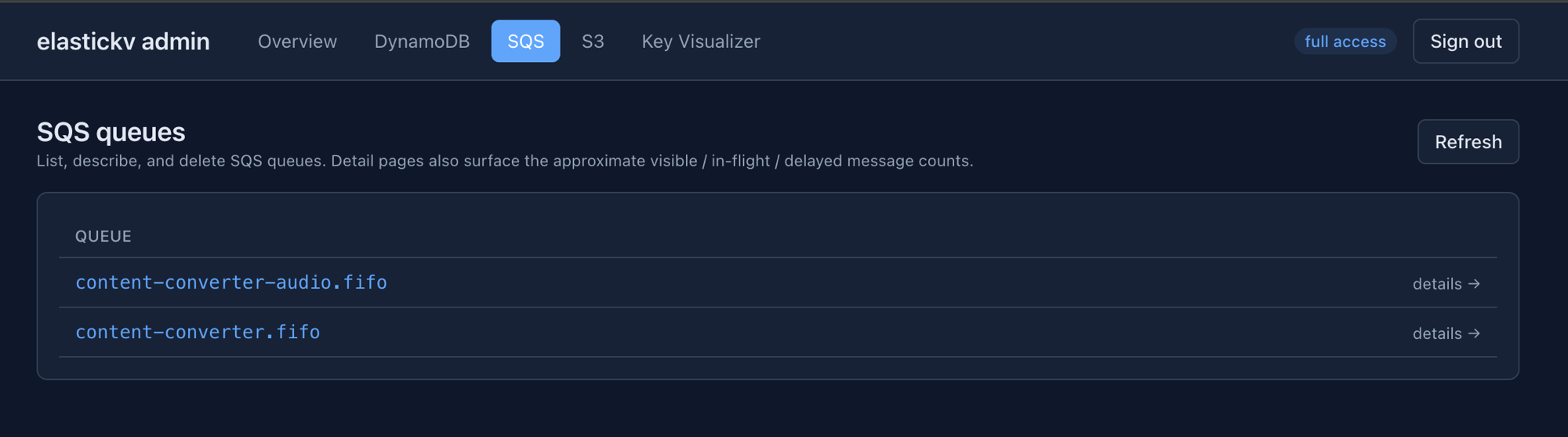
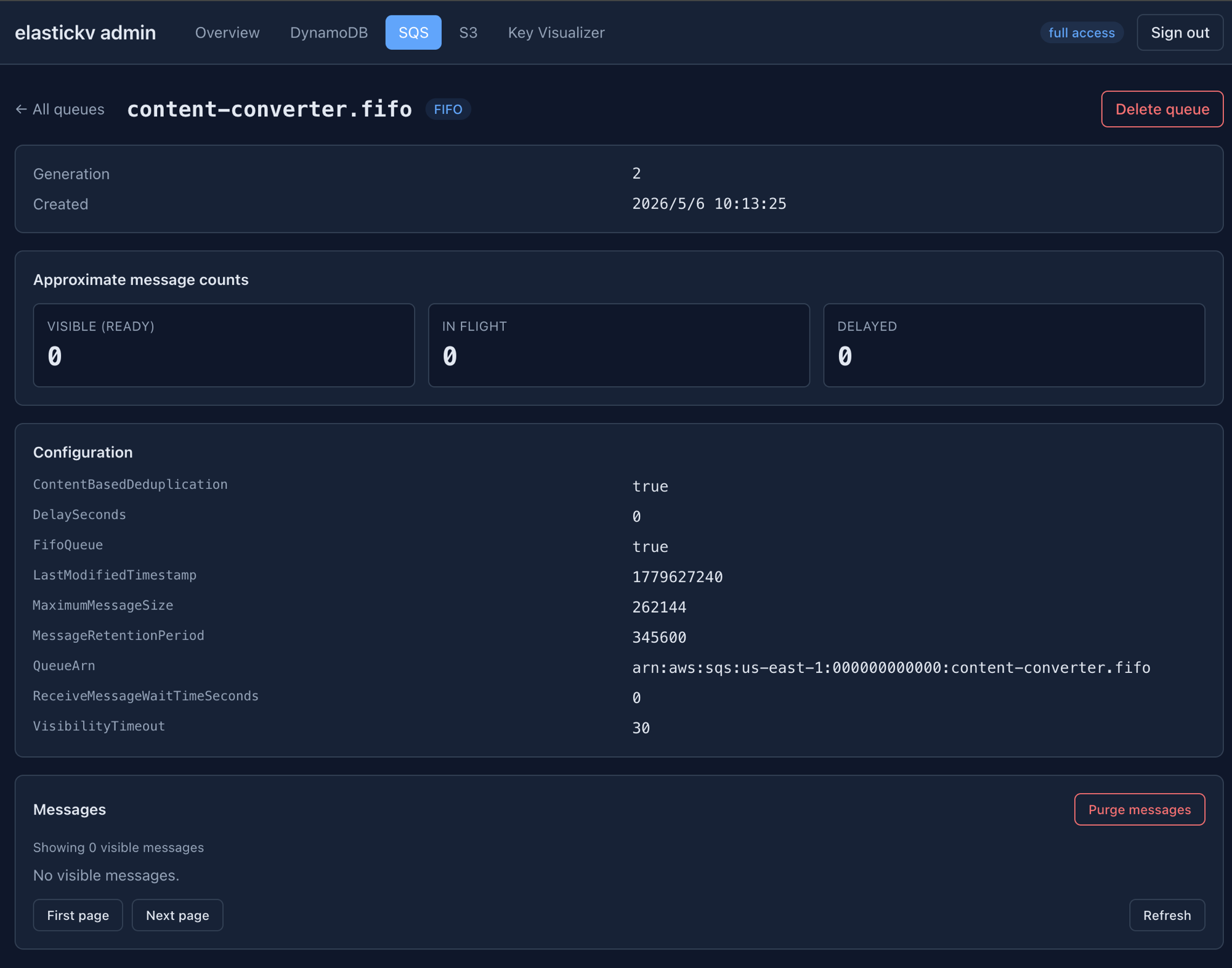
SQS queues — list, describe, and delete queues; detail pages surface approximate visible / in-flight / delayed message counts and queue configuration.
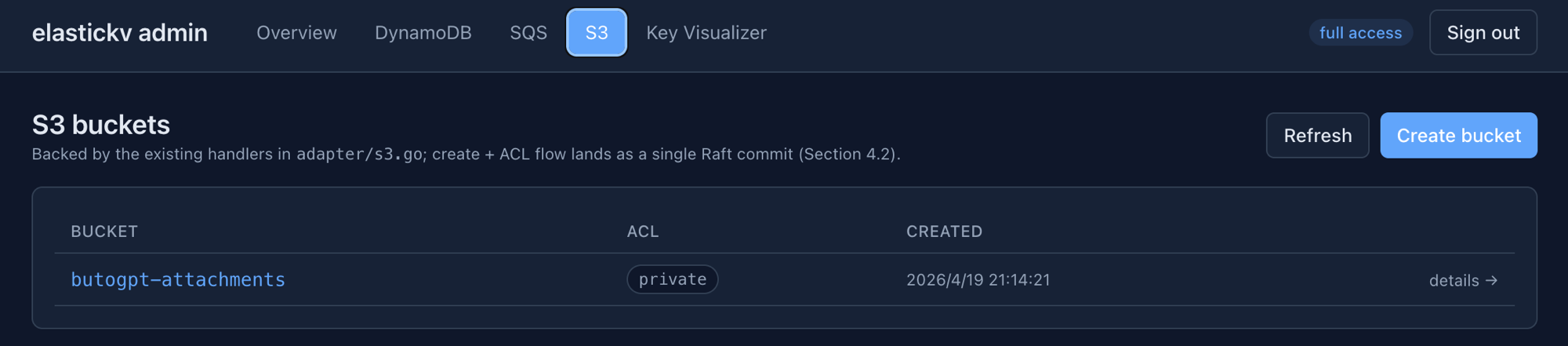
S3 buckets — list and create buckets, with ACL and creation metadata.
Example Usage
This section provides sample commands to demonstrate how to use the project. Make sure you have the necessary dependencies installed before running these commands.
Starting the Server
These commands bootstrap a fresh single-node cluster. For a multi-node deployment, follow the manual deployment runbook. To start a single node with the default etcd/raft runtime, use:
go run . \
  --address "127.0.0.1:50051" \
  --redisAddress "127.0.0.1:6379" \
  --raftId "n1" \
  --raftBootstrap
To enable the S3 and SQS endpoints alongside metrics:
go run . \
  --address "127.0.0.1:50051" \
  --redisAddress "127.0.0.1:6379" \
  --dynamoAddress "127.0.0.1:8000" \
  --s3Address "127.0.0.1:9000" \
  --s3Region "us-east-1" \
  --s3CredentialsFile "/etc/elastickv/credentials.json" \
  --sqsAddress "127.0.0.1:9324" \
  --sqsRegion "us-east-1" \
  --sqsCredentialsFile "/etc/elastickv/credentials.json" \
  --metricsAddress "127.0.0.1:9090" \
  --raftId "n1" \
  --raftBootstrap
The S3 and SQS listeners can share a static credentials file. Create /etc/elastickv/credentials.json before starting the server, with credentials matching the client configuration:
{"credentials":[{"access_key_id":"YOUR_ACCESS_KEY","secret_access_key":"YOUR_SECRET_KEY"}]}
Running with the etcd/raft backend
etcd/raft is the default backend:
go run . \
  --address "127.0.0.1:50051" \
  --redisAddress "127.0.0.1:6379" \
  --raftId "n1" \
  --raftBootstrap
etcd is the only supported engine; --raftEngine accepts no other value.
Elastickv writes a raft-engine marker into each Raft data directory and refuses
to reopen a directory with a different backend. A node also refuses to start on a
directory that still holds legacy HashiCorp Raft artifacts (raft.db).
The legacy HashiCorp Raft backend and its offline migrator
(cmd/etcd-raft-migrate) were removed in commit a35245a once the one-time
migration to etcd/raft was complete. If you still need to migrate an old
HashiCorp-backed store, run the migrator by checking out the whole repository at
the commit before a35245a (a35245a^) — extracting a single file will not
build, because the migrator links against module dependencies that were dropped
along with it. See docs/etcd_raft_migration_operations.md for the historical
procedure.
Starting the Client
To start the client, use this command:
go run cmd/client/client.go
Working with the FUSE filesystem
On a host with FUSE support, create a mount directory and start a fresh single-node server with the filesystem enabled:
mkdir -p /tmp/elastickv-mount
go run . \
  --address "127.0.0.1:50051" \
  --redisAddress "127.0.0.1:6379" \
  --raftId "n1" \
  --raftBootstrap \
  --filesystemMount "/tmp/elastickv-mount" \
  --filesystemRootUID "$(id -u)" \
  --filesystemRootGID "$(id -g)"
In another terminal, use normal file commands:
mkdir /tmp/elastickv-mount/docs
printf 'hello\n' > /tmp/elastickv-mount/docs/hello.txt
cat /tmp/elastickv-mount/docs/hello.txt
The root owner and mode flags apply when the filesystem root is first created; the defaults are UID/GID 0 and mode 0755, and the mount enforces default_permissions, so set them to the user that will write to the mount. --filesystemClientID defaults to --raftId and identifies open-handle leases. --filesystemCapacity and --filesystemMaxFiles set values reported by statfs; they do not enforce write quotas. The server mounts through fusermount3 (package fuse3) after its network listeners are up. The server unmounts the filesystem when it stops, including on SIGTERM/SIGINT, and a restart after SIGKILL or a crash detaches the dead mount it finds at the mount point before mounting again. See the FUSE filesystem guide for details.
This FUSE implementation supports regular files and directories, but not cross-directory rename, hard links, symbolic links, extended attributes, or full POSIX locking. Concurrent modifications from different mounts are resolved optimistically: the loser gets EAGAIN. Most operations can simply be retried, but close must not be, and an O_APPEND write that other mounts may also be appending to must not be either; the guide's Concurrency section has the per-operation rules. See the FUSE filesystem guide for prerequisites, multi-node setup, semantics, monitoring, and troubleshooting, and the filesystem design for the supported operations and placement model.
Working with Redis
To start the Redis client:
redis-cli -p 6379
The separate three-node demo (go run ./cmd/server/demo.go) uses Redis ports 63791–63793.
Setting and Getting Key-Value Pairs
To set a key-value pair and retrieve it:
set key value
get key
quit
Sorted Sets, Streams, and Other Data Structures
The Redis adapter supports the full range of Redis data structures including sorted sets (ZADD/ZRANGE/ZSCORE), HyperLogLog (PFADD/PFCOUNT), streams (XADD/XREAD/XRANGE), sets (SADD/SMEMBERS), hashes (HGET/HSET/HGETALL), and Pub/Sub (PUBLISH/SUBSCRIBE). Lua scripts can be executed via EVAL and EVALSHA.
Migrating from Redis
A Redis-protocol reverse proxy (redis-proxy) enables phased zero-downtime migration. It supports dual-write, shadow-read comparison, and primary cutover modes. See docs/redis-proxy-deployment.md for the full deployment guide.
# Run redis-proxy in dual-write mode (writes to both Redis and Elastickv)
# The proxy listens on :6479 inside the container, exposed as :6379 on the host
# so existing clients can connect without changing their configuration.
docker run --rm \
  -p 6379:6479 \
  ghcr.io/bootjp/elastickv/redis-proxy:latest \
  -listen :6479 \
  -primary redis.internal:6379 \
  -secondary elastickv.internal:6380 \
  -elastickv-pool-size 192 \
  -secondary-write-concurrency 96 \
  -secondary-script-concurrency 3 \
  -secondary-blocking-replay-concurrency 32 \
  -mode dual-write
Working with SQS-compatible Queues
Set --sqsAddress and --sqsCredentialsFile on the server as shown above, then use matching AWS CLI credentials and region:
aws configure set aws_access_key_id YOUR_ACCESS_KEY
aws configure set aws_secret_access_key YOUR_SECRET_KEY
aws --endpoint-url http://localhost:9324 --region us-east-1 sqs create-queue \
  --queue-name jobs
aws --endpoint-url http://localhost:9324 --region us-east-1 sqs list-queues
Standard and FIFO queues support the JSON and Query/XML SQS protocols. See the SQS adapter design for the supported operation list and limitations.
Working with S3-compatible Storage
Elastickv exposes an S3-compatible HTTP API when --s3Address is set (for example 127.0.0.1:9000). Any S3 client or SDK that supports path-style requests and AWS Signature Version 4 can connect to it.
# Configure the AWS CLI to point at Elastickv
aws configure set aws_access_key_id YOUR_ACCESS_KEY
aws configure set aws_secret_access_key YOUR_SECRET_KEY
aws configure set region us-east-1

# Create a bucket
aws --endpoint-url http://localhost:9000 s3api create-bucket --bucket my-bucket

# Upload an object
aws --endpoint-url http://localhost:9000 s3api put-object \
  --bucket my-bucket --key hello.txt --body hello.txt

# Download an object
aws --endpoint-url http://localhost:9000 s3api get-object \
  --bucket my-bucket --key hello.txt /tmp/hello.txt

# List objects
aws