
A self-hosted expense tracker that turns receipts and bank statements into a clean, reconciled ledger.
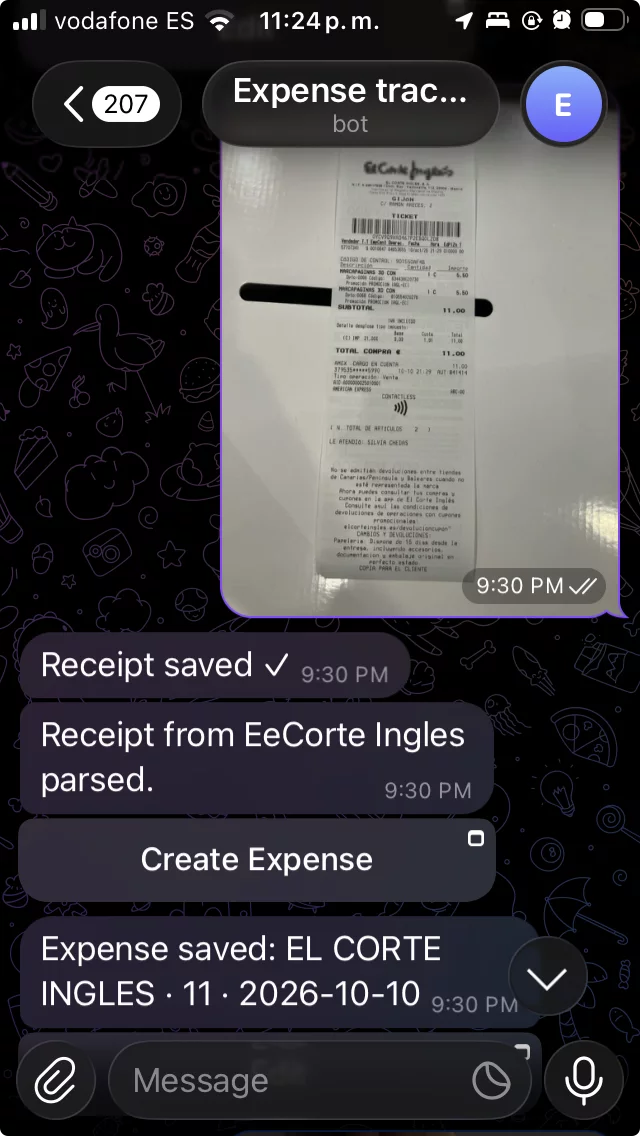
Snap a receipt or upload a PDF bank statement and the app extracts the transactions, classifies and matches them to your expenses, and verifies the numbers add up, the goal is to kee your ledger complete and trustworthy with little manual entry.
Why this exists
I want to understand my spending: where my money goes and where I could save. The app turns my receipts and bank statements into a ledger I can trust. One question I want it to answer: "I want to buy this, can I?"
It is also an experiment in building a real app with AI. I don't write the code. I direct the AI and review its output, and when it gets something wrong I fix the workflow rather than patch the code myself. Having the AI plan before it writes code is a big part of how this works. I want to see how far this goes while keeping the code decent, and that friction shows me where my AI workflows need work.
AI is used in two places: building the app, and features inside it such as receipt OCR and bank statement extraction, with more planned.
It is self-hosted, so my financial data stays on my own instance.
I build it in public on purpose. If the AI pushes bad code it is visible to anyone, and the risk of embarrassment keeps the bar higher.
Status
Experimental, with frequent breaking changes. It is not optimized for performance. The goal is a decent, working app. No fixed end goal, though handling small company expenses later would be nice.
Features
- Expenses with categories (including split-across-categories), merchants, and refunds.
- Import rules to auto-assign a merchant or ignore noise as data comes in.
- Receipt OCR — upload a photo/PDF; AWS Textract extracts the amount, date, merchant and line items, and the parser picks the charged total (handling discounts, gift cards, taxes, FX).
- Bank-statement import with AI extraction — upload a PDF statement; the app extracts every
transaction + metadata and reconciles them against the statement's own balances (running-balance
chain, or opening ± Σ = closing). Robust to credit-card
CHARGES/CREDITScolumns,CRmarkers, foreign-currency rows, multiple cardholders, and header/footer noise. Extracted rows link back to your expenses so nothing is double-counted. - Telegram bot — submit expenses and receipts from your phone.
- MCP server — an API token lets AI assistants query your data over the Model Context Protocol.
- Accounts, email verification, password recovery, and captcha (from the template).
AWS-backed features (Textract, Bedrock, Bedrock Data Automation, S3) default to mock mode, so the
app runs end-to-end locally with no cloud account; set them to real for production.
Long-term goals
- Saving goals: define a purchase you're saving for and track progress as you cut back on other spending.
- Expected refunds: register refunds you're waiting on, see what's pending, and have them matched automatically when they reach your account.
- Subscription detector: find recurring charges, flag price increases, and surface subscriptions you may have forgotten.
- Warranty & return tracker: use receipts to remind you before return windows or warranties expire.
- Price tracking: compare what you pay for the same items over time using receipt line items.
- Insurance inventory: export receipts and a report of what you own when you need to file a claim (e.g. flooding, theft).
- Chat over your data: ask questions in plain language, like "How much did I spend on restaurants last quarter?"
- Monthly digest: an AI-written summary of your month covering what changed, what was unusual, and how your goals are going.
Getting started
Requires JDK, sbt, Node, and PostgreSQL. See docs/guide/local-setup.md for the full setup, then:
sbt server/run     # backend  (http://localhost:9000)
sbt web/dev        # frontend (http://localhost:8080)
Database schema is managed by Play Evolutions and applied on startup. API docs (Swagger UI) are served
at /api/docs/index.html.
Testing
sbt server/test    # backend (needs Docker for a throwaway Postgres)
sbt web/test       # frontend
Run with Docker
Runs the whole app locally: Postgres, backend, and web with no extra setup:
docker compose up --build
Then open http://localhost:8080. The web dev server proxies /api/* to the backend
container, so the frontend reaches the backend with no reverse proxy. The first start is slow
(it links the Scala.js bundle and boots webpack); later starts are fast.
What comes up:
| Service | Port | What it runs |
|---|---|---|
postgres |
— | Postgres 16 (schema applied automatically by Play Evolutions) |
backend |
9000 | Play backend in dev mode (sbt server/run) |
web |
8080 | Scala.js webpack dev server (sbt dev-web), proxies /api → backend |
Stop with Ctrl-C; docker compose down -v also removes the database volume.
AWS-backed features
Receipt OCR and bank-statement extraction use AWS. They default to mock (no AWS calls), so the
app runs fully without an AWS account. To enable the real services, copy .env.example to .env,
set the relevant *_MODE to real, and fill in credentials, docker-compose propagates these into
the backend container:
| Variable | Purpose |
|---|---|
TEXTRACT_MODE / BEDROCK_MODE / BDA_MODE |
mock (default) or real per feature |
AWS_REGION, AWS_ACCESS_KEY_ID, AWS_SECRET_ACCESS_KEY |
credentials for Textract + S3 |
AWS_S3_BUCKET |
bucket for stored documents |
BEDROCK_REGION, BEDROCK_ACCESS_KEY_ID, BEDROCK_SECRET_ACCESS_KEY |
statement extraction (Amazon Bedrock) |
BDA_PROFILE_ARN, BDA_STANDARD_PROJECT_ARN, BDA_BANK_STATEMENT_BLUEPRINT_ARN, BDA_OUTPUT_S3_URI |
statement-extraction fallback (Bedrock Data Automation) |
JEV_MODE |
mock (default, placeholder picks, no document classification) or real for bank-statement row category/merchant suggestions and the document classifier (JEV) |
JEV_API_KEY (optional JEV_BASE_URL, JEV_MODEL, JEV_MIN_CONFIDENCE) |
JEV API credentials for the suggestions and the classifier; JEV_MIN_CONFIDENCE (default 0.85) is the lowest document-type confidence the classifier acts on |
Deployment
Ansible playbooks under infra/ deploy to a managed server behind nginx. Admin API routes are intended
to sit behind the reverse proxy's HTTP basic auth — keep that in place.
Credits
Bootstrapped from the wiringbits Scala web-app template.
License
MIT — see LICENSE.