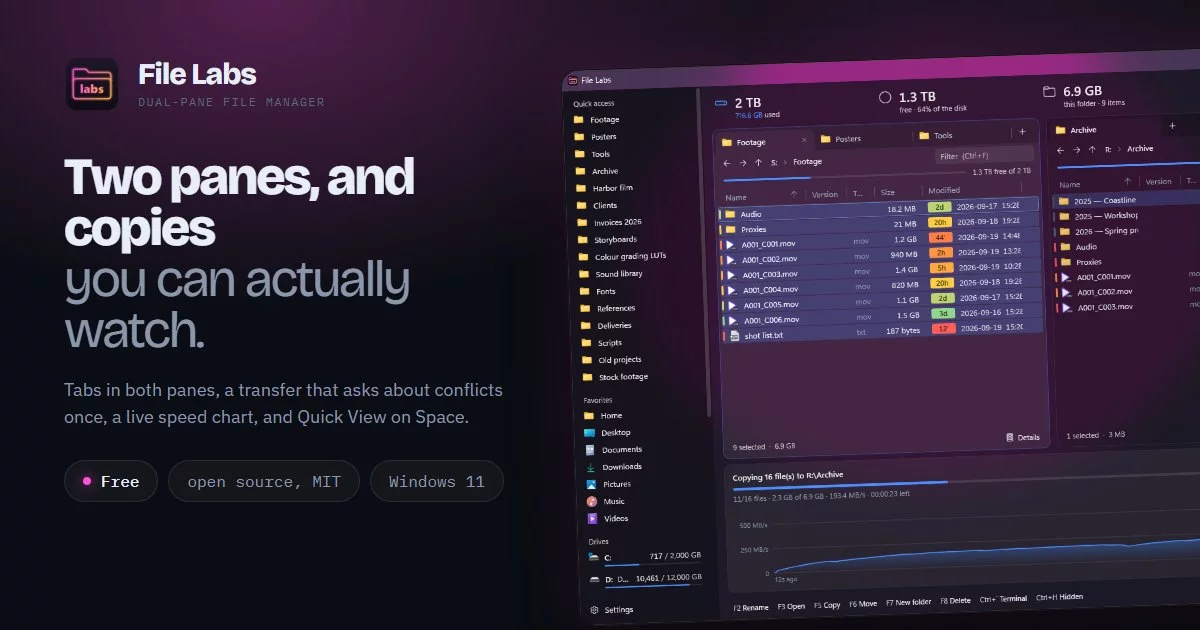

A free, dual-pane file manager for Windows 11, with a copy engine that shows what it is doing.
- Two panes, with tabs — browser-style tabs in each pane,
Tabto switch panes,Ctrl+Uto swap them, drag and drop between panes and to/from Explorer (the wheel scrolls the list under a drag). - Transfers you can watch — copy and move run through the Ferry engine: one scan up front (totals and every conflict at once), one conflict decision per job, pause and cancel, a live speed chart, one queue per destination drive. Same-drive moves are renames.
- Optional verification — reads source and copy back and compares xxHash3 digests; on a move, a source whose copy doesn't match is kept.
- Quick View —
Spacepreviews images, video, audio, PDF and text without opening anything. - Stash and Backup Labs backups (
.stash,.bkl, and their older.zipnames) — the preview shows what is inside without restoring anything: apps, profiles and mail folders with their message counts, or files, size and where they came from. Enter opens one in its app when that is installed (Stash 2.1+, Backup Labs 1.3.0+). - Films from Reel — with Reel (1.13.0+) installed, a video in its library gets a line above the preview: poster, title and year (or series and episode), watched or not, and a link to Reel.
- Folder sizes in the list, file versions for
.exe/.dll, and a recency tint on dates. - Views — Details, List and three icon sizes with Explorer's own thumbnails (
Ctrl+Shift+1…5). Shortcuts to folders can be sorted with the folders (Settings → Files). - The real right-click menu when you want it — Send to, Open with, 7-Zip and other shell extensions, with a View submenu on the folder's own menu — or a compact one that matches the app. Paste on a folder, or on a shortcut to one, puts the files in it.
- Default file manager (optional) — folders, drives and
Win+Eopen in File Labs. Switching it off (or uninstalling) hands them back to whatever had them before. "Win+E opens File Labs" can be switched off on its own, to keep Win+E for File Explorer. - Acrylic, tint or solid backdrop, with an opacity floor so text stays readable.
No account, no telemetry, nothing it talks to online.
Keys
| Key | Action |
|---|---|
Ctrl+F5 / F6 |
copy / move to the other pane |
F5, Ctrl+R |
refresh |
F7 |
new folder |
F2 |
rename |
F8, Del |
delete (to the Recycle Bin) |
Space |
Quick View |
Ctrl+T / Ctrl+W / Ctrl+Tab |
new / close / next tab |
Ctrl+L |
edit the path |
Ctrl+F |
filter the list |
Ctrl+D |
pin to Quick access |
Ctrl+H |
show hidden files |
Ctrl+Shift+C |
copy the selected paths |
Ctrl+` |
terminal here |
Alt+Enter |
Properties |
Ctrl+P |
one pane or two |
F1 |
every key and feature |
Building
Needs the .NET 8 SDK; the installer needs Inno Setup 6.
.\build.ps1                 # dist\FileLabs-<version>-setup.exe
.\build.ps1 -SkipInstaller  # self-contained app in dist\app
FileLabs.exe --selftest runs the copy engine on real files in a temp folder; exit code 0 = pass.
The version lives only in FileExplorer.csproj.
Licence
MIT. Made by Protagonist Labs.
More from Protagonist Labs
- Backup Labs: scheduled, versioned folder backups, free.
- SpaceScan: shows what takes the space on a drive, free.
- All apps: Windows apps that each do one job properly.