Search inside every document on your Mac.
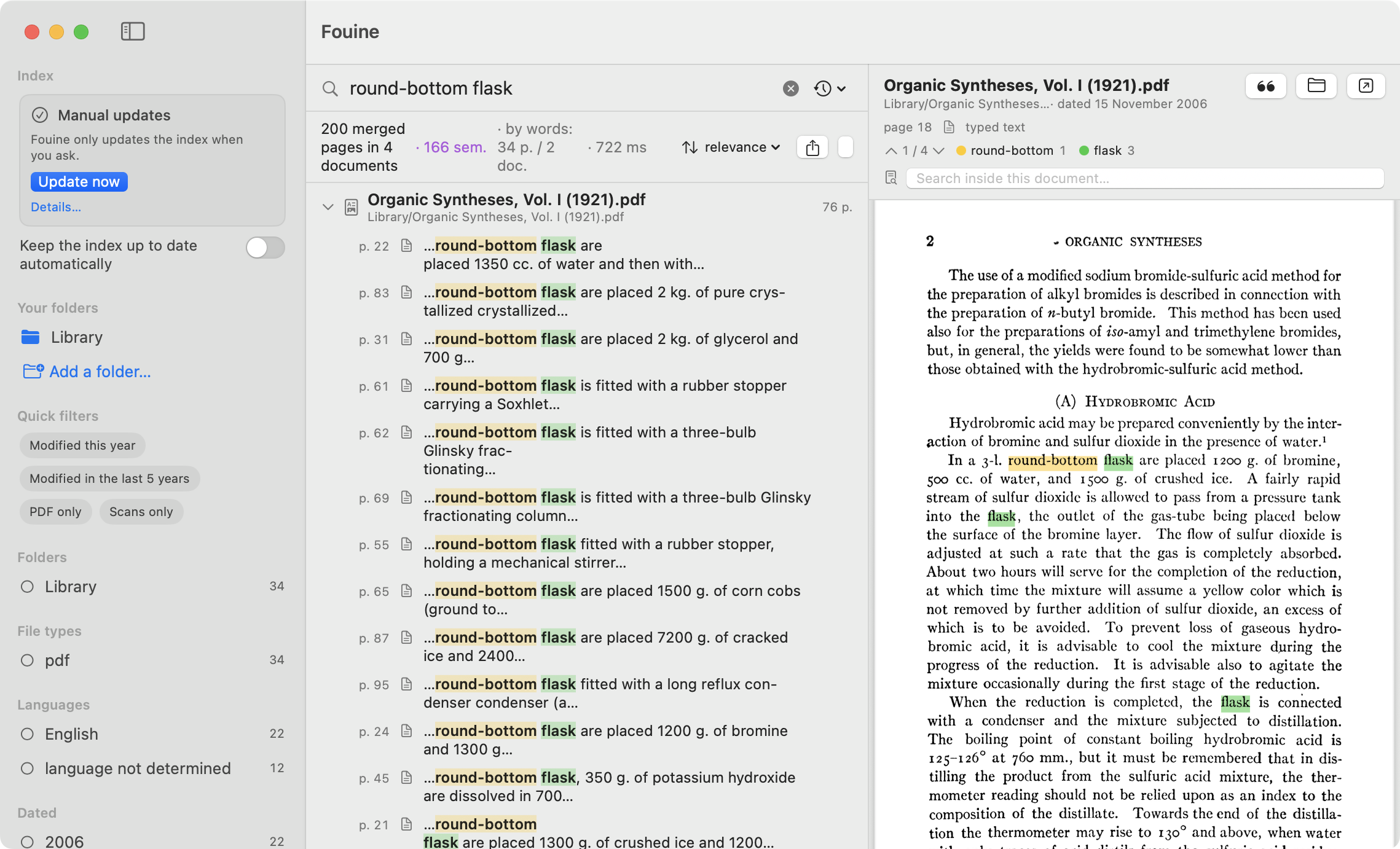
Fouine is a full-text search app for macOS. Point it at your folders and it
reads every document in them, page by page. Pages that carry no text layer
(scanned PDFs, comic pages, photographs pasted into a .docx) go through
Apple's text recognition. Type a few words: each result is a passage with its
page number, and the document opens at that page. Everything happens on your
Mac, and none of your documents, searches or usage data goes out on the
network.
Start in five minutes
- Download the disk image from the latest release. The product page is basedpolymer.eu/fouine.
- Open the disk image and drag
Fouine.appontoApplications, then leave it there. macOS files privacy permissions by path and signature, so an app that moves around asks for them again every time. - Open Fouine. Nothing is indexed until you choose a folder.
- Click Add a folder…, or drop a folder into the window: a thesis, a library of PDFs, an archive drive.
- Accept the macOS prompt. It appears when the folder is under Documents, Desktop or Downloads, or on a removable volume or a network share, and this is the only moment it can appear. If you refuse, the folder is not added and an alert offers Open System Settings and Retry. See permissions.
- Search. Indexing starts on its own, results arrive as they are found, and you can search while the index is still being built.
To keep the index current without thinking about it, turn on Keep the index up to date automatically under the Index card. Fouine then watches your folders in the background, and reads scanned pages when the Mac is plugged in and idle. See the background agent.
Fouine needs macOS 13 or later, on Intel or Apple Silicon (universal binary).
The app follows the system language and is available in English and French,
macOS permission prompts included. The fouine command and the agent's log are
in English, like git or brew.
What Fouine reads
PDF, EPUB, Word (including the old .doc), Excel, PowerPoint, ODF, RTF, Pages,
Numbers, Keynote, HTML and web archives, mail (EML, MBOX), plain text, Markdown,
CSV, LaTeX, subtitles, Jupyter notebooks, comic archives (CBZ, CBR), DjVu, and
source code. Old .doc, .xls and .ppt files are identified by their first
bytes, never by their extension, so a file that has lost its name is still read.
Images, audio and video are indexed too: photos go through text recognition and
recordings are transcribed, both on your Mac. Each of these has its own checkbox
in Settings ▸ Indexing, ticked by default.
The full list, family by family, with what each one needs: formats. The text recognised on a page with no text layer is stored in Fouine's own database. None of your files is ever modified.
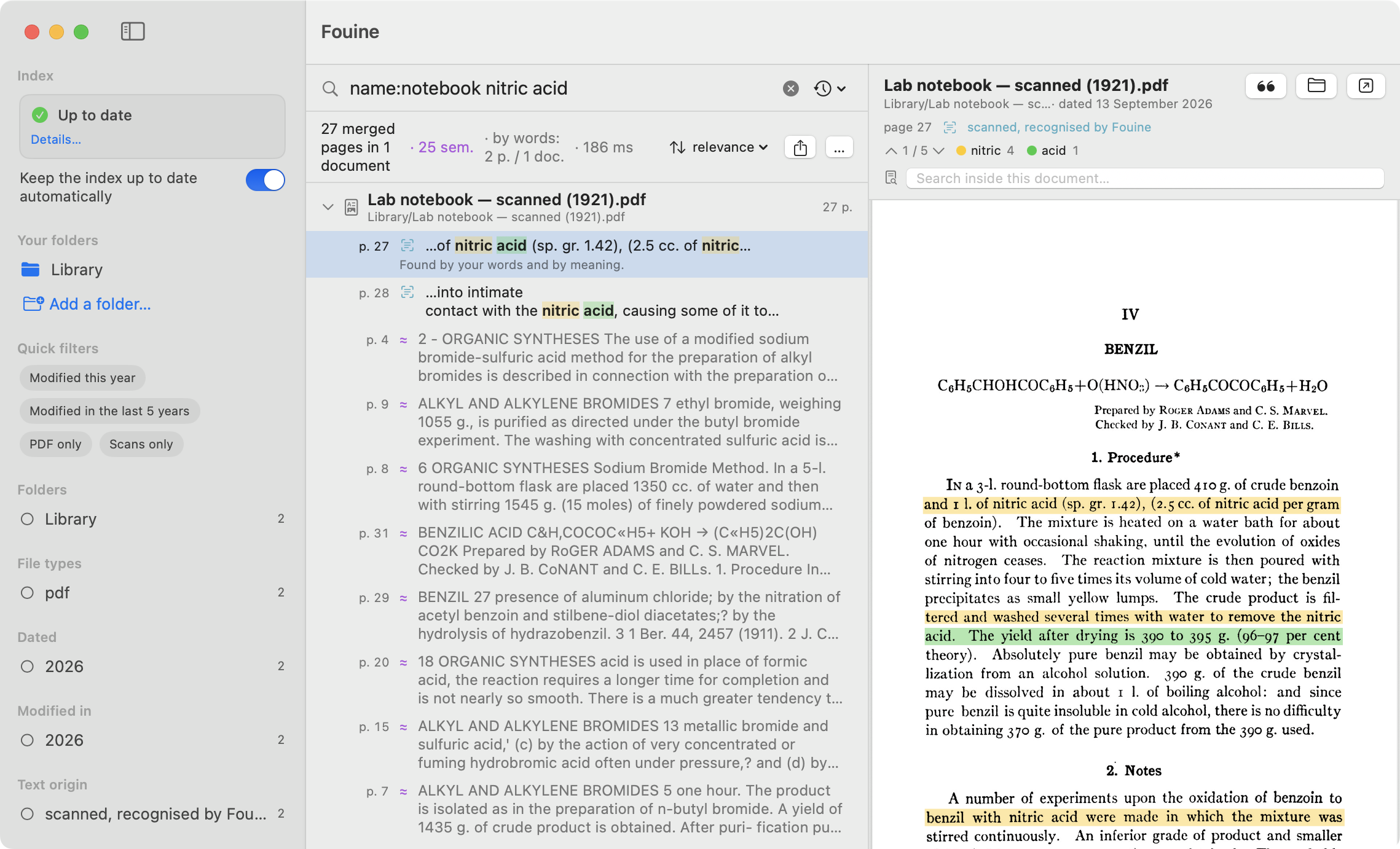
The search tolerates typing mistakes and recognition errors: a word typed with a letter wrong, or misread on a scanned page, still finds its page. See searching.
What Fouine does not do
| Document management | Fouine does not file, sort or rename anything. It reads your folders where they are. If you want a library with tags, notes and attachments, Fouine is not that app. |
| Syncing | There is one index per Mac. Nothing goes to a cloud, so nothing arrives from another device. |
| PDF editing | The preview is read-only. Fouine never writes into your documents, not even to add the text layer it recognised. |
| Chat | Fouine has no built-in assistant and writes no summaries. It finds the pages that carry your words, or a close spelling of them. |
| Other systems | Fouine runs on macOS 13 and later only: text recognition uses Vision, the background agent uses SMAppService. There is no Windows or Linux version, and there will not be one. |
| Notion and Craft | Their notes cannot be read on this Mac: Notion keeps an encrypted cache, and Craft keeps files with no readable name. Export your pages as Markdown and add the export folder. |
Price
Fouine is free. Download it, use it at home or at work, on as many Macs as you like. There is nothing to buy and no account to create, and updates stay free.
Everything is included: every format, every folder, scanned page recognition, the assistant server and the command line.
Privacy
None of your documents, searches or usage data leaves your Mac. There is no account and no password to create, and Fouine sends no telemetry and no crash reports.
Fouine makes one kind of outgoing connection: checking for updates, which is off by default and happens only if you turn it on or click Check for updates…. It sends nothing about your documents, and nothing goes out while Fouine indexes, reads or searches.
An automated test checks that last sentence on every change to the code:
NetworkSilenceTests runs a local server while an indexing pass reads
deliberately booby-trapped fixtures, and fails at the first connection the
server accepts.
The index is one SQLite file, ~/Library/Application Support/Fouine/fouine.db. It holds the text extracted from your documents, so
it is as confidential as they are: back it up and encrypt it the same way.
Details, and how to check all of this yourself: privacy.
Command line
fouine does everything the app does, plus JSON export. It ships inside the app
and works on the same index. To install it, open Settings ▸ Advanced and click
Install the command line tool…, which creates a symlink at
/usr/local/bin/fouine.
fouine root add ~/Documents/Thesis --label Thesis   # add a folder
fouine search '"ideal gas" -biology'                # exact phrase, exclusion
fouine search 'catalysis' --json                    # JSON output
Every command and option: the command line.
fouine mcp --stdio lets an AI assistant read your index. It serves Claude
Code, Claude Desktop, Cursor, Codex or Antigravity, read-only and with no
network, through four tools to check the index, search, read a page and see
what is indexed. The server cannot change the index, start indexing or hand
over your original files.
fouine mcp install configures those five clients in one command. Until you
install the command line from Settings ▸ Advanced, it lives inside the app, at
/Applications/Fouine.app/Contents/Helpers/fouine. On the welcome screen,
Copy the request for your assistant puts the whole request on the
clipboard. For Claude Desktop you can skip the command: the
.mcpb file attached to each
release installs with a
double-click. See the assistant server.
Building from source
git clone https://github.com/basedpolymer/fouine.git
cd fouine
make release ARCHS=$(uname -m)     # Fouine.app, ad-hoc signed
You need Xcode (Swift 5.10 or later) and nothing else. There are three SwiftPM
dependencies: GRDB.swift (MIT),
swift-argument-parser
(Apache-2.0) and Sparkle (MIT).
Without a Developer ID certificate the signature is ad hoc, and the app runs
only on the machine that built it. See CONTRIBUTING.md.
Troubleshooting
| Symptom | What to do |
|---|---|
| Anything at all | Run fouine doctor first. It tests the effective read of every folder, names unmounted volumes, counts the scanned pages still to read and reports a missing djvulibre. |
| "Fouine is damaged and can't be opened" | Gatekeeper shows this for an app that is not notarised, typically one you built yourself. An official release opens without it. |
| A folder you added stays empty, with no error | Almost always a refused macOS permission. The warning banner offers Open Settings, and the Index card offers Allow access…. See permissions. |
| A folder under Downloads stays empty | Same cause, another checkbox: Privacy & Security ▸ Files and Folders ▸ Fouine ▸ Downloads Folder. |
.djvu files are "skipped" |
djvulibre is missing: brew install djvulibre, then index again. It is optional, like ffmpeg for a few video containers. |
| A drive is unplugged | This is not an error. Search keeps working on what is indexed, and fouine doctor names the missing volume. |
Trickier cases are in docs/pitfalls.md.
Licence
Fouine is source-available under LICENSE (Fouine Source-Available
Licence 1.1, held by Mathis Demory).
You may read all the code, compile it, modify it for your own use and propose a contribution. You may install Fouine on the Macs you use, at home or at work, and keep backups.
You may not redistribute Fouine, as source (modified or not) or as a binary, including one you compiled yourself. You may not rent it, lend it or offer it as a service. The code is open to read, and the app costs nothing, but it is not free software in the FSF sense: the licence keeps the right to distribute it.
By proposing a contribution, you grant the holder the right to use and
redistribute it under any licence (article 4, and
CONTRIBUTING.md). There is no separate agreement to sign.
GRDB.swift (MIT), swift-argument-parser (Apache-2.0) and Sparkle (MIT) ship with
the app. Their notices are in THIRD_PARTY_LICENSES.md, and fouine licenses prints them in a terminal. Which licence covers which part, the MCP
server included: LICENSING.md.
To report a vulnerability, follow SECURITY.md rather than
opening a public issue. Release notes: CHANGELOG.md.
Documentation
Everything else is listed in docs/README.md: the app guide,
the background agent, search syntax, formats, the command line, the assistant
server, privacy, permissions, updates and installation, then the documents for
people who read the code.