GladeKit MCP
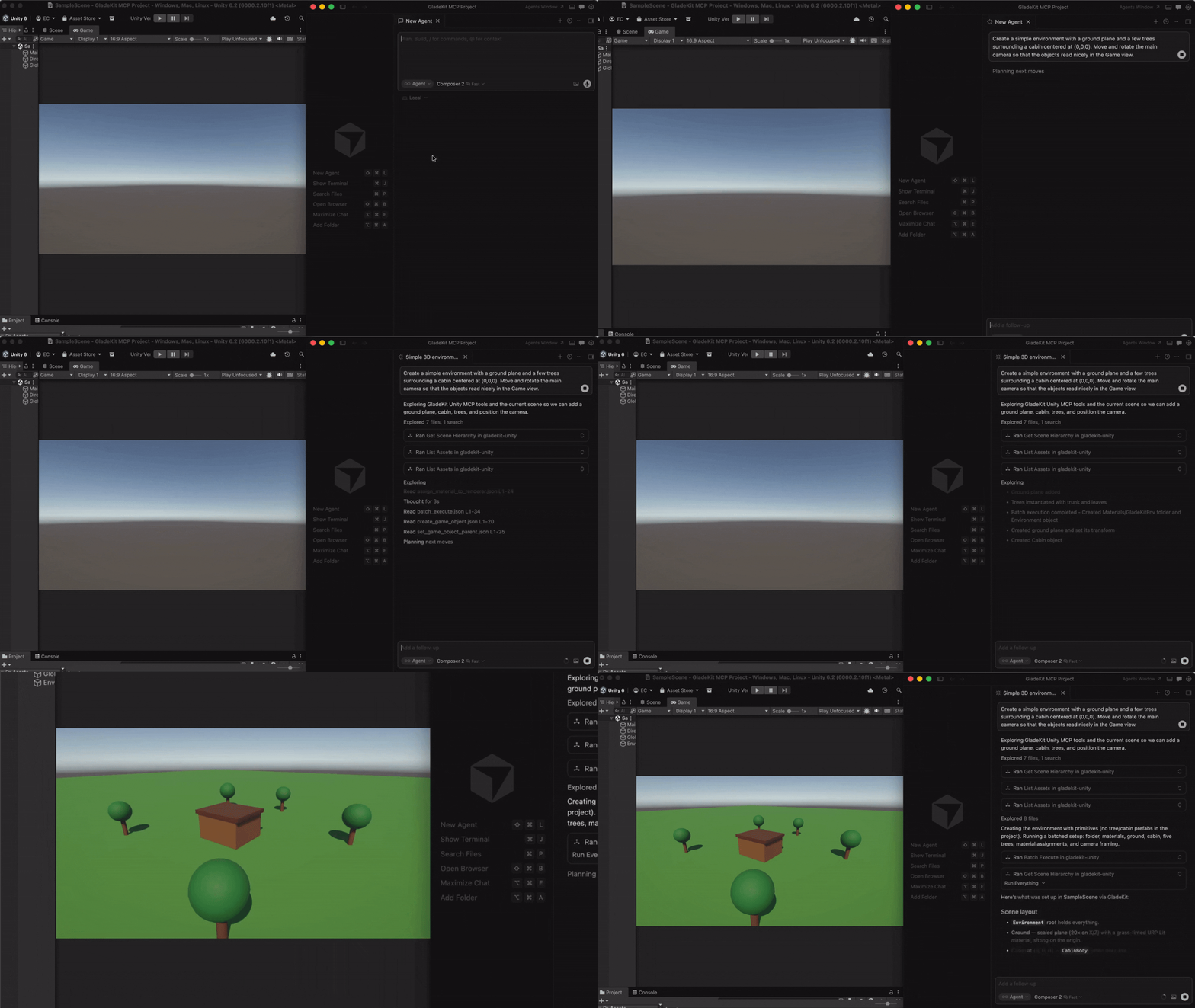
Connect Cursor, Claude Code, Windsurf, Claude Desktop, and other AI clients directly to your Unity or Godot editor.
Unity (2021.3+): 275 tools across 20 categories, full Unity-aware system prompt, GLADE.md project context, script semantic search, skill calibration, free CC0 asset pipeline, cloud intelligence layer with RAG and cross-session memory.
Godot (4.3+): 115 native tools across 17 categories - scene/node, scripts, resources, signals, physics and edit-time spatial queries, 2D (sprites, tilemaps, parallax), audio, particles, animation and AnimationTree, camera, navigation, UI, lighting and WorldEnvironment, runtime, export, and project introspection.
Both engines: one-call vetted gameplay scaffolders (controllers, enemies, combat, menus, save system), a verification loop (look_at_game_view screenshots, runtime-event observation, playability probes), surgical script editing with true find_references / rename_symbol, and build/export tools so the agent can ship what it built.
The MCP server auto-detects which editor is running (Unity on :8765, Godot on :8766) and exposes the matching tool set.
Quick Start
1. Install the editor bridge
GladeKit MCP supports both Unity and Godot. Both bridges live in this repo: unity-bridge/ is a UPM package, godot-bridge/ wraps the editor addon at godot-bridge/addons/com.gladekit.mcp-bridge/. Install the one for your engine.
Unity (2021.3+)
In Unity, open Window > Package Manager > + > Add package from git URL...
https://github.com/Glade-tool/glade-mcp.git?path=/unity-bridge
The Unity bridge starts automatically on localhost:8765. Window > GladeKit MCP shows bridge / client status and has one-click Copy MCP Config and Copy Unity AI Gateway Config buttons.
Godot (4.3+)
- Download
com.gladekit.mcp-bridge.zipfrom the latest Godot bridge release. (Grab the zip asset under Assets - not "Source code".) From source instead: copygodot-bridge/addons/com.gladekit.mcp-bridge/out of this repo. - Move the
com.gladekit.mcp-bridge/folder into your project'saddons/directory, so the final path is<your-godot-project>/addons/com.gladekit.mcp-bridge/plugin.cfg. - In Godot: Project → Project Settings → Plugins → enable GladeKit MCP Bridge.
The Godot bridge starts automatically on localhost:8766. You should see a confirmation line in the editor Output panel:
[GladeKit MCP Bridge] listening on ws://127.0.0.1:8766 (v0.7.14, 115 tools registered, thread-polled at 200Hz)
The bridge writes a per-session auth token to ~/.gladekit/godot-bridge-8766.token; the MCP server picks it up automatically, so a web page can't drive your editor through the local socket.
Supported: Godot 4.3+ GDScript projects, Forward+ and Compatibility renderers, 2D and 3D. Not yet supported: Godot Mono / C# projects. The bridge is editor-only; it never runs in exported games.
Engine auto-detection: the MCP server probes both ports on startup and exposes the matching tool set. Running both editors at once? Set GLADEKIT_MCP_FORCE_ENGINE=unity or =godot to pin a specific engine.
2. Connect your AI client
Install uv (one-time):
- Mac/Linux:
curl -LsSf https://astral.sh/uv/install.sh | sh - Windows:
powershell -ExecutionPolicy ByPass -c "irm https://astral.sh/uv/install.ps1 | iex"
Then add the MCP config to your AI client. The client launches the MCP server automatically - no manual server step.
Claude Code
Option A: one-liner (recommended)
- Mac/Linux:
claude mcp add --transport stdio gladekit-mcp --scope user -- uvx gladekit-mcp - Windows:
claude mcp add --transport stdio gladekit-mcp --scope user -- cmd /c uvx gladekit-mcp
Option B: manual config
If you cloned this repo, the .mcp.json auto-connects. Otherwise add to your Claude Code MCP settings:
{
  "mcpServers": {
    "gladekit-mcp": {
      "command": "uvx",
      "args": ["gladekit-mcp"]
    }
  }
}
Cursor
Cursor Settings > MCP > Add new MCP server:
{
  "mcpServers": {
    "gladekit-mcp": {
      "command": "uvx",
      "args": ["gladekit-mcp"]
    }
  }
}
Claude Desktop
Edit ~/Library/Application Support/Claude/claude_desktop_config.json (Mac) or %APPDATA%\Claude\claude_desktop_config.json (Windows):
{
  "mcpServers": {
    "gladekit-mcp": {
      "command": "uvx",
      "args": ["gladekit-mcp"]
    }
  }
}
Cline (VS Code extension)
Open Cline's MCP settings file (auto-created on first MCP use):
- Mac:
~/Library/Application Support/Code/User/globalStorage/saoudrizwan.claude-dev/settings/cline_mcp_settings.json - Windows:
%APPDATA%\Code\User\globalStorage\saoudrizwan.claude-dev\settings\cline_mcp_settings.json - Linux:
~/.config/Code/User/globalStorage/saoudrizwan.claude-dev/settings/cline_mcp_settings.json
Add:
{
  "mcpServers": {
    "gladekit-mcp": {
      "command": "uvx",
      "args": ["gladekit-mcp"]
    }
  }
}
Windsurf
In Windsurf, open Windsurf Settings → MCP Servers → Open MCP Registry, then click the settings (gear) icon to open mcp_config.json. Add the snippet below (or edit ~/.codeium/windsurf/mcp_config.json directly):
{
  "mcpServers": {
    "gladekit-mcp": {
      "command": "uvx",
      "args": ["gladekit-mcp"]
    }
  }
}
Unity AI Gateway (native in-editor)
Unity's built-in AI Assistant can connect to GladeKit via MCP. This gives you GladeKit's 275 tools directly inside the Unity Editor - no external AI client needed.
Requires: Unity 6000.3+ with AI Gateway package (com.unity.ai.assistant@2.x)
- In Unity, go to Edit > Project Settings > AI > MCP Servers
- Click Open Config File and paste (or use Window > GladeKit MCP > Copy Unity AI Gateway Config):
{
  "enabled": true,
  "path": "",
  "mcpServers": {
    "gladekit-mcp": {
      "type": "stdio",
      "command": "uvx",
      "args": ["gladekit-mcp"]
    }
  }
}
- Under Path Configuration, paste your terminal's PATH into User Path so Unity can find
uvx. To get your PATH:- Mac/Linux:
echo $PATH - Windows:
echo %PATH%
- Mac/Linux:
- Click Refresh Config File and Reload Servers
- Verify the server shows StartedSuccessfully in the Servers section
Tip: If
uvxisn't found, add the directory containing it to thepathfield in the config (e.g.,"/opt/homebrew/bin"on Mac or"C:\\Users\\<you>\\.local\\bin"on Windows). Alternatively, usepip install gladekit-mcpand set"command": "python"with"args": ["-m", "gladekit_mcp"].
Troubleshooting: If the server shows FailedToStart, click Inspect for error details. The most common cause is PATH - Unity's PATH differs from your terminal's PATH. See the Troubleshooting section below.
Paid tier (
GLADEKIT_API_KEY): To enable RAG knowledge base and cross-session memory on any client, add the key to theenvfield of your config. See Cloud intelligence below.
VS Code (GitHub Copilot)
Add to .vscode/mcp.json in your workspace:
{
  "servers": {
    "gladekit-mcp": {
      "type": "stdio",
      "command": "uvx",
      "args": ["gladekit-mcp"]
    }
  }
}
Why GladeKit?
| Feature | GladeKit MCP | unity-mcp (CoplayDev) | godot-mcp (Coding-Solo) |
|---|---|---|---|
| Engines | Unity and Godot, auto-detected from one server | Unity | Godot |
| Tools | 275 Unity + 115 Godot, granular | 48 consolidated (action enums) |
14 |
| Editor link | Live editor session (HTTP :8765 / WebSocket :8766) |
Live editor session | Spawns godot --headless per call, edits .tscn on disk |
| Gameplay scaffolders | One-call vetted templates - controllers, enemies, projectiles, health + HUD, game manager, menus, moving platforms, save system | None | None |
| Verification loop | look_at_game_view screenshots, runtime-event stream, playability probe, play-verify heal gate, compile_scripts |
Screenshots, console read, test runner | run_project + raw stdout |
| Script editing | Outline / partial reads, anchor edits, true find_references / rename_symbol (lexical scanner) |
Anchor / regex edits, Roslyn validation | No script tools |
| Build / export | Both engines (build_player, export_project) |
Unity | None (MeshLibrary only) |
| Assets | Free CC0 pipeline with license audit | AI generation (BYO Tripo / Meshy / fal keys) | None |
| Project context | GLADE.md + live prompt (render pipeline, input system, skill level) | Static instructions | None |
| Script search | Semantic search via OpenAI embeddings (bring your own key) | Regex find_in_file |
None |
| Memory | In-session (remember_for_session) + cross-session (cloud) |
None | None |
| Safety | Undo-registered edits, pre-mutation backups, overwrite guards, per-session token auth, read-only mode | SHA-guarded script edits | None |
| Tests | 269 pytest + 37-case eval on 3 MCP SDK versions, schema↔bridge parity guards, Unity NUnit + Godot GUT suites | Unity CI matrix + NL suite | None |
| License | MIT | MIT | MIT |
Verified against the unity-mcp v10.1.2 and godot-mcp 0.1.1 sources on 2026-08-29. godot-mcp is the most-starred Godot server; the closest active in-editor alternative, godot-ai (46 tools), has screenshots and batch execution but no scaffolders, refactoring, asset pipeline, export, or memory.
All core features are free and local. The cloud intelligence layer is optional and requires a GLADEKIT_API_KEY.
Features
275 Unity tools + 115 Godot tools
Unity (20 categories): Scene • GameObjects • Scripts • Prefabs • Materials • Lighting • VFX & Audio • Animation • IK • Physics (3D & 2D) • Tilemaps • Camera • UI • Input System • Terrain & NavMesh • Profiler • Gameplay scaffolders • Runtime & diagnostics • Build • Asset pipeline
All 275 tools are dispatchable. Claude Code sees ~90 curated core tools by default (Claude Code has a practical 128-tool limit; Unity AI Gateway has a cloud token budget). Use get_relevant_tools to discover extended tools for specialized work (blend trees, NavMesh, IK, Cinemachine, etc.).
5 meta-tools: get_relevant_tools (task-based tool discovery + RAG context), remember_for_session (store facts), recall_session_memories (retrieve facts), batch_execute (multi-step tool dispatch), search_project_scripts (semantic code search, Unity only). The first four work on both engines.
9 MCP resources (Unity): bridge health, project context, project info, scene hierarchy, project scripts, current selection, GLADE.md, session memory, and batch-discipline telemetry.
Godot (17 categories): all 115 tools are exposed directly (no core filtering needed), plus the four engine-agnostic meta-tools. Read-only tools carry the MCP readOnlyHint annotation so clients can auto-approve them.
One-call gameplay scaffolders
Vetted, self-wiring templates that write known-good scripts verbatim and assemble the scene around them - carrying the game-feel details a from-scratch script tends to drop (coyote time, jump buffering, variable jump height, normalized diagonals). Re-running one reuses what already exists instead of duplicating it.
- Players:
create_third_person_controller(3D, both engines),create_platformer_controller/create_top_down_controller(Unity),create_2d_controller(Godot). - Combat:
create_projectile,create_health,create_health_bar,create_enemy(Unity) /create_enemy_2d+create_enemy_3d(Godot),create_hit_vfx. - Game loop:
create_game_manager(score, lives, win/lose),create_collectible,create_hazard,create_level_system,create_loot_drop,create_save_system. - Flow and feel:
create_main_menu,create_pause_menu,create_scene_transition,create_moving_platform,create_screen_shake,create_juice,create_particles_2d/_3d,create_sound_effects.
Batch layout tools (set_transform_batch, set_node_transform_batch, arrange_nodes, snap_to_ground) place dozens of objects in one call instead of one round-trip each.
Verify what you built
- See it:
look_at_game_viewreturns a screenshot of the rendered view so the model catches invisible, missing, or mispositioned objects that inspection alone cannot. - Watch it run:
start_runtime_observation/get_runtime_eventsstream a cursored, fingerprinted error feed from the play session;get_unity_console_logs/get_godot_console_logsfor the raw log. - Play-test it:
start_playability_probe(Unity) andrun_gameplay_probe(Godot) drive the player with input and report PASS/FAIL; Godot'srun_projecthas averifymode that runs, captures, and reports. - Compile and ship it:
compile_scripts(Unity);build_player+get_build_status(Unity) andcreate_export_preset+export_project(Godot, including Web). - Diagnose stalls (Godot): an editor main-thread watchdog turns "timed out" into "editor wedged for 12s - dismiss the modal dialog" with
possible_solutions.
Surgical script editing
get_script_content supports outline mode (a structural map of a large file) and line-ranged partial reads; modify_script applies anchor-based edits. find_references and rename_symbol use a lexical scanner (C# and GDScript) that matches whole identifiers only, so a rename shows its real blast radius before it happens. create_script / modify_script refuse to clobber existing project scripts unless asked.
GLADE.md
Create a GLADE.md file in your Unity project root. The MCP server reads it and injects it into every request. Works as a permanent context layer: your game's design intent, conventions, and constraints are always in scope.
# My Game

Genre: 3D platformer
Player: CharacterController, double jump enabled
Art style: pixel art, 16x16 sprites
Naming: PascalCase for scripts, snake_case for folders
Script semantic search
Set OPENAI_API_KEY in your MCP config's env field and the server ranks project scripts by semantic similarity to your query. Ask "how does the enemy spawn?" and the right script surfaces, even if it's not named EnemySpawner.
Everything needed ships with the package; no install flags or extras required. Get a key at platform.openai.com/api-keys (pay-as-you-go, pennies per search via text-embedding-3-small).
{
  "mcpServers": {
    "gladekit-mcp": {
      "command": "uvx",
      "args": ["gladekit-mcp"],
      "env": { "OPENAI_API_KEY": "sk-..." }
    }
  }
}
Without the key, search_project_scripts still returns scripts - just unranked. Keys are never sent anywhere except OpenAI's embedding endpoint.
Skill calibration
The server tracks vocabulary across your messages and detects whether you're a Unity beginner or expert. Beginners get plain-language explanations and encouraging framing. Experts get terse, technical responses. Calibration persists to .gladekit/skill_level.json in your project.
Asset pipeline (free CC0 imports)
Three tools for finding and importing free, commercially-usable assets directly from your AI client, on both engines. All assets are CC0 (public domain, no attribution required). v1 ships Kenney.nl packs (catalog refreshed weekly); additional providers (Freesound, Quaternius, AI generation) are on the roadmap.
| Tool | Purpose |
|---|---|
find_asset |
Search ranked candidates by description, asset type, style, and license. Read-only, no editor dispatch. |