
Home Assistant Tesy integration
⚠️ WARNING: This integration does not currently support BiLight Cloud B15 as it uses different hardware lacking local API.
This unofficial Tesy integration allows you to control smart wifi devices based on external esp32 wifi module (black pcb). It won't work if you have older device based on Atheros AR9331 chipset since the local API is different. In this case the module could be replaced with esp32 replacement module as they are compatible with most of Tesy water heaters, even if not comming with WiFi from the factory.
Tested with:
- Tesy Modeco Cloud GCV 150 47 24D C22 ECW
- BilightSmart
- BelliSlimo
- Tesy BelliSlimo Cloud GCR 80 27 22 E31 ECW
Highlights
This integration allows you to change modes of the water heater as well as controlling the temperature setpoint in manual mode (defined as Performance in HA).
Energy counter is also working. It uses long term counter from the device that counts the seconds the heater was on. In order for this to work properly you need to enter your heater power rating in the setup dialog. This information could be found on the device's label. For double tank devices this is read from the device and leaving it as zero is recommended.
The integration provides two energy sensors: Energy Consumed tracks total lifetime usage. Energy Consumed (Resettable) uses the device's built-in resettable counter - a Reset Consumed Energy button is provided to reset it, like a trip odometer.
This integration exposes boost mode of the heaters as a switch. It can be switched on and off, but in order to work the heater should on.
Child lock switch prevents accidental changes (if supported by the device).
Temperature setpoint is only used in manual (Performance) mode. In any other modes it is ignored. If setpoint is manually changed operation mode will jump to performance in case the heater is powered on.

Poll interval
The heater is read every 30 seconds by default, so changes made on its panel or in the MyTESY app show up in Home Assistant within that time. To make it faster, open the integration → Configure and set Poll interval (5-300 s); 10 s is a good value for a local device. Heaters on the old API (Atheros module) are not polled more often than every 30 s, since the module chokes on bursts of requests.
On models where it was verified (the ModEco 2 so far, see Weekly programs) the heater is also read again ~2 s after any command from Home Assistant, so the heating state and target follow right away. Other models are read at the regular interval only.
Changing the IP address or heater power
If the heater gets a new IP address (for example after a router change), open the integration, click the three dots next to the heater and choose Reconfigure (Home Assistant 2024.4 or newer). Enter the new address and, if needed, the heater power. The integration checks that the same heater (same MAC address) answers there, then reloads; entities and their history are kept. A static DHCP lease for the heater on your router avoids the problem altogether.
Diagnostics
When reporting a problem, attach the diagnostics file: open the integration, click the three dots next to the heater and choose Download diagnostics. It contains the integration settings and the heater's last reply, with the MAC and IP addresses, the MyTESY email, the Wi-Fi network name and the cloud device name removed.
Installation
Via HACS

- Search for "Tesy" on HACS tab in Home Assistant
- Click on three dots and use the "Download" option
- Follow the steps
- Restart Home Assistant
Manual Installation (not recommended)
- Copy the entire
custom_components/tesy/directory to your server's<config>/custom_componentsdirectory - Restart Home Assistant
Entities
Water Heater
| Entity | Attributes |
|---|---|
water_heater.heater |
is_heating, target_temp_step |
Operation Modes
| Mode | Description |
|---|---|
| Off | Heater is powered off |
| Manual | Direct temperature control (default) |
| Program 1 | Schedule-based heating preset 1 |
| Program 2 | Schedule-based heating preset 2 |
| Program 3 | Schedule-based heating preset 3 |
| Eco Smart | Energy-saving mode |
| Eco Comfort | Balanced comfort and efficiency |
| Eco Night | Overnight energy-saving mode |
Custom icons are provided for Program 1-3 and Eco modes. Standard modes use core HA icons.
Sensors
| Entity | Description | Device Class | Unit |
|---|---|---|---|
sensor.temperature |
Current temperature | temperature |
°C |
sensor.energy_consumed |
Total energy consumed | energy |
kWh |
sensor.ready_in |
Minutes until target is reached | duration |
min |
sensor.target_temperature |
Active target temperature | temperature |
°C |
sensor.error_status |
Error code (00 = no error) |
- | - |
sensor.wifi_signal |
WiFi signal strength | signal_strength |
dBm |
sensor.uptime |
Device uptime | duration |
s |
sensor.energy_consumed_resettable |
Energy consumed (since last reset from device) | energy |
kWh |
Shower models (BelliSlimo)
BelliSlimo (2002) and BelliSlimo Lite (2005) report hot water in showers, not degrees. With the new API they get these entities instead of the temperature ones:
| Entity | Description | Unit |
|---|---|---|
number.target_showers |
Showers to heat in manual mode, 0 up to the maximum the heater reports (tmpMX) |
showers |
sensor.hot_water |
Hot water available | showers |
sensor.active_target |
Target the heater is working towards in the current mode | showers |
- The water heater entity keeps operation modes and on/off, but has no temperature.
- Setting Target Showers switches the heater to manual mode if it is on, like the temperature setpoint on other models.
- The old
sensor.temperatureandsensor.target_temperatureentities are removed. Automations that calledwater_heater.set_temperatureon these models need to usenumber.set_valueonnumber.target_showersinstead. - Devices set up with the old API keep the temperature entities.
- Downgrading to an earlier version brings back the temperature entities and leaves Hot Water, Active Target and Target Showers as orphaned entities; remove them from Settings > Devices & services > Entities.
Switches
| Entity | Description |
|---|---|
switch.boost |
Boost mode |
switch.child_lock |
Child lock (if supported) |
Weekly programs
Weekly programs (and the time zone sync and read-back after commands) are enabled per model, for models where they were verified: so far the ModEco 2 (id 2004, firmware 200407 / Wi-Fi 0.29). Other models keep the previous behaviour; the list is in features.py, and a model is added there once it has been tested. A feature is enabled only if the heater also reports the fields it needs (prgP1MO … prgP3SU).
On those heaters the water heater entity gets extra attributes:
| Attribute | Description |
|---|---|
schedule_p1 … schedule_p3 |
{"mo": [24 values], …, "su": [...]}, °C per hour from 00:00; 14 = heating off for that hour (snowflake in MyTESY), null = no program entry (not stored in history) |
active_program |
1-3 while a program runs, otherwise null |
manual_temperature |
Setpoint kept for manual mode (tmpT) |
tesy_features |
Extended features enabled for this heater, e.g. ["schedule", "timezone"] (not stored in history) |
While a program runs, the target temperature (entity and Target Temperature sensor) is the one the heater reports in tmpR; it can already be the next hour's value while the heater warms up ahead of it. When the heater is idle in a program, the firmware reports a placeholder (9) there instead, and the target is taken from the program for the current hour of the device clock.
Programs can be written with the tesy.set_schedule action. Use 15-75 °C for a setpoint and 14 to switch heating off for an hour:
action: tesy.set_schedule
target:
  entity_id: water_heater.heater
data:
  program: 3
  days: [mo, tu, we, th, fr]   # optional, all days if omitted or empty
  temperatures: [14, 14, 14, 14, 14, 14, 60, 60, 60, 14, 14, 14, 14, 14, 14, 14, 14, 14, 60, 60, 60, 60, 14, 14]
Each day is a 24-byte hex string on the device and is written with /api?name=prgP3MO&set=<48 hex chars>.
Clock and time zone
Weekly programs run on the heater's own clock. The module takes UTC from the network and converts it to local time with a POSIX TZ string in tz (e.g. EET-2EEST,M3.5.0/3,M10.5.0/4); the time itself cannot be set over the API, only tz.
On models with time zone sync enabled (see Weekly programs) the integration keeps tz in step with Home Assistant's time zone: on start-up and whenever the HA time zone changes it writes the matching POSIX string (taken from the tz database) if the heater differs.
The sync is on by default and can be turned off in the integration → Configure → Sync the heater time zone with Home Assistant, for example if Home Assistant's time zone is not the heater's local time (left at UTC, say): the programs would otherwise shift by hours. The Sync time zone button still writes it on demand.
Zones whose rules cannot be expressed in one POSIX string the heater understands are not synced; set the clock on the panel instead. That includes zones whose switch times are negative or past 24:00 (America/Nuuk, Asia/Jerusalem, Asia/Gaza), which the firmware is not known to handle.
| Entity | Description |
|---|---|
binary_sensor.clock_problem |
On if tz differs from HA's zone or the heater clock is more than 5 minutes off HA (e.g. no internet). Attributes: problems, device_time, offset_seconds, timezone, expected_timezone |
button.sync_timezone |
Writes HA's time zone to the heater now |
If the clock is off with the right time zone, the module has no internet; set the time on the panel (hold i in standby) or restore the connection.
Buttons
| Entity | Description |
|---|---|
button.energy_reset |
Reset the resettable energy counter |
Dashboard card
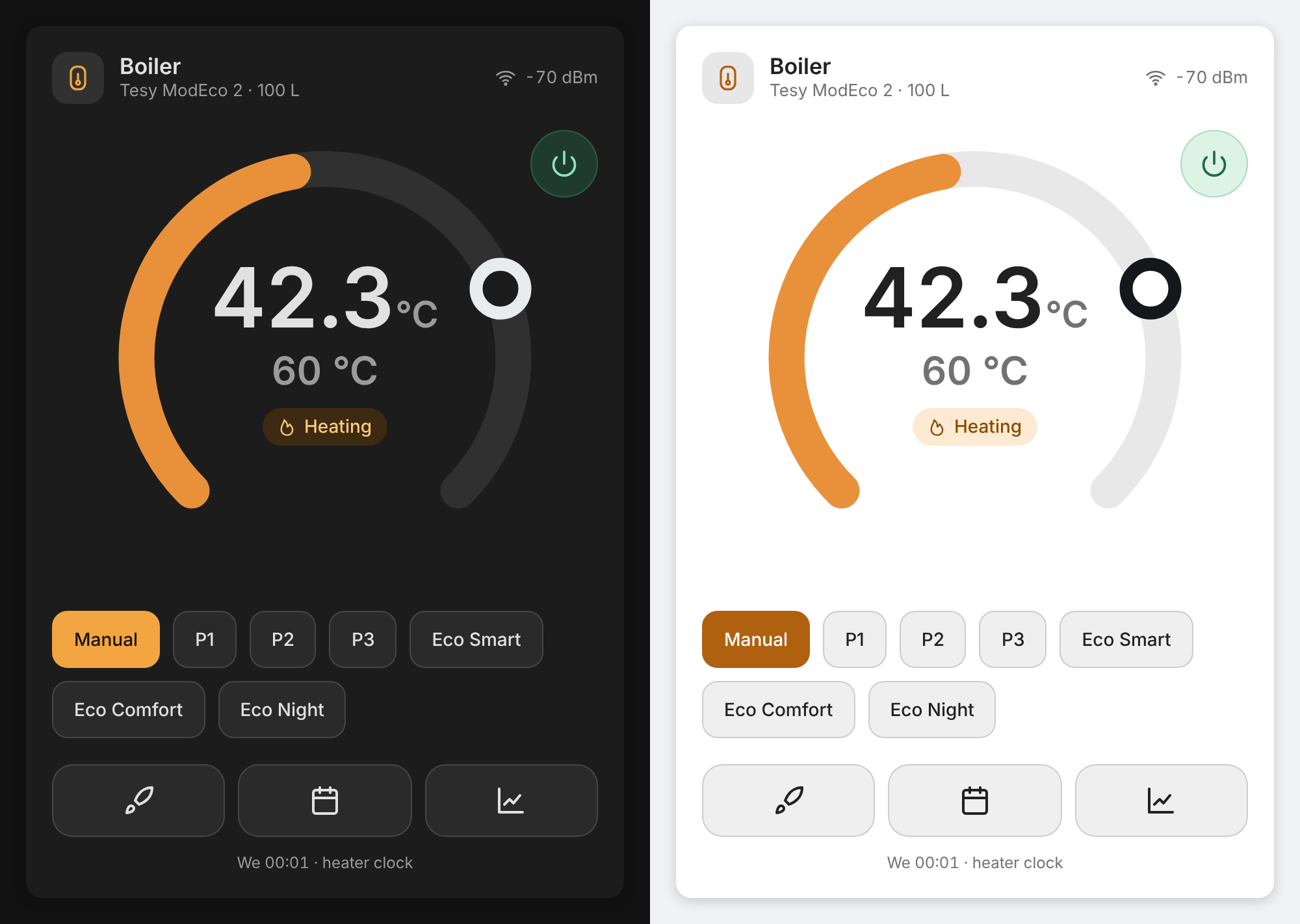
tesy-boiler-card by @pollstar is a thermostat card for this integration, with a weekly program editor. Add it to HACS as a custom repository of type Dashboard. It builds on the weekly programs and time zone sync, so for now it works on the ModEco 2 only.
Device API Parameters
| Field | Description | Used By |
|---|---|---|
pwr |
Power state | Water heater |
mode |
Operation mode | Water heater |
tmpC |
Current temperature / showers | Temperature / Hot Water sensor |
tmpT |
Target temperature / showers setpoint | Water heater / Target Showers |
tmpR |
Active target temperature / showers (in a program it can be the next hour's value; placeholder 9 while idle) |
Target Temperature / Active Target sensor |
date |
Device local time (read-only, only in _all) |
Program target lookup, clock check |
tz |
POSIX time zone used for local time (writable) | Time zone sync |
prgP{1-3}{MO..SU} |
Weekly programs, 24 bytes hex per day, °C per hour, FF = empty |
Schedule attributes, tesy.set_schedule |
ht |
Heating element active | is_heating attr |
bst |
Boost flag | Boost switch |
cdt |
Countdown timer (minutes) | Ready In sensor |
err |
Error code | Error Status sensor |
wdBm |
WiFi RSSI | WiFi Signal sensor |
wup |
Uptime (seconds) | Uptime sensor |
lck |
Child lock | Child Lock switch |
pwc_t |
Runtime counter | Energy calculation |
pwc_u |
Resettable runtime counter | Resettable Energy sensor |
parNF |
Additional parameters | Dual-tank energy calculation |
id |
Device type ID | Device detection |
MAC |
MAC address | Unique ID |
tmpMX |
Maximum showers | Target Showers maximum, Eco target |
wsw |
Software version | Device info |
hsw |
Hardware version | Device info |
API Details
The device exposes a local HTTP API at http://{device_ip}/api. You can retrieve all device parameters in a single request:
http://{device_ip}/api?name=_all
This returns a JSON object with all fields listed in the table above.
Supported Devices
| ID | Model | Range | Extended features |
|---|---|---|---|
| 2000 | ModEco | 15-75°C | — |
| 2002 | BelliSlimo | 0-4 showers | — |
| 2003 | BiLight Smart | 15-75°C | — |
| 2004 | ModEco 2 | 15-75°C | weekly programs, time zone sync, read-back after commands |
| 2005 | BelliSlimo Lite | 0-4 showers | — |
Extended features are enabled per model in features.py, once verified on that model; other models keep the basic behaviour.
Translations
Available in 9 languages: English, Bulgarian, German, French, Dutch, Spanish, Italian, Turkish, Ukrainian. Operation modes, sensors, switches, buttons, and config flow are all translated.
Contributors
