
SEO Console - the technical/content/research/opportunity SEO audit MCP server for Claude
A technical SEO audit you can hold a conversation with - built from your own Search Console data and a live crawl of your site, run inside Claude.
Almost every technical SEO audit I've been handed in twenty years is a crawler's opinion, and a crawler only ever sees half the picture. It tells you what your site says. It has nothing to say about what Google did about it: which queries you rank for, which pages earn the impressions, where the clicks land.
This one brings the other half. SEO Audit Console runs inside Claude, pulls your Google Search Console history, crawls your site properly, and joins the two so every finding carries the traffic at stake. A hundred and eleven checks, ranked by the clicks the fix could recover rather than how alarming the check sounds, and it writes the fix for you: the 301 rule, the JSON-LD, the internal links. The core audit needs nothing but your own Search Console; DataForSEO and Majestic slot in later, when your questions grow into competitors and link building. Your data stays on your machine.
Built by Houtini. We build automation for the grunt work of digital marketing - the data collection, the crawling, the merging, the checking - so your team's time goes on the thinking, the strategy and the client work that needs a human. This plugin is that idea applied to the technical SEO audit.
New to MCPs, or not sure where to start? The Getting started guide takes you from a completely fresh machine (no Node, no Git, never heard of a service account) to your first audit - every step screenshotted, including the one everyone misses. Ten minutes, honestly.
you  › run an SEO audit on mysite.com

     ⣾ search console  1.8M rows synced (19s - incremental)
     ⣾ crawl           868 pages · HTTP/2 · robots-polite · 8 parallel
     ⣾ link graph      internal PageRank · click depth · in-degree
     ✓ 143 checks · 220 findings · ranked by expected clicks per dev-hour

     #1  CTR far below position-expected     /pricing                   XL
     #2  Page losing clicks (trend)          site-wide                  XL
     #3  Keyword cannibalisation             "project management app"   L
     #4  Robots-blocked page earning traffic /category/guides           L

you  › generate the fix for #1 ▍
Quick start
It's on npm, so there's nothing to clone or build. You need Node.js 20 or newer and a Search Console property you own.
Claude Desktop - add this to claude_desktop_config.json, then restart Claude:
{
  "mcpServers": {
    "seo-audit-console": {
      "command": "npx",
      "args": ["-y", "@houtini/seo-audit-console"],
      "env": {
        "GOOGLE_APPLICATION_CREDENTIALS": "C:/path/to/service-account.json",
        "DATAFORSEO_USERNAME": "",
        "DATAFORSEO_PASSWORD": "",
        "MAJESTIC_API_KEY": "",
        "CRUX_API_KEY": ""
      }
    }
  }
}
The first line is required. The others are optional: paste your key between the quotes, or leave them empty to switch the tier off. DataForSEO and Majestic are paid tiers; CRUX_API_KEY is field Core Web Vitals from a free Google API key restricted to the Chrome UX Report API. Empty means off. Template text such as your-key-here, <your key> or changeme is treated as empty too, and the server's log says so in one line (e.g. MAJESTIC_API_KEY looks like a placeholder; Majestic tier disabled.), so a tier you expected that stays off is worth a look at the log.
Claude Code - one command (add --env DATAFORSEO_USERNAME=… and the others the same way if you use them):
claude mcp add seo-audit-console --env GOOGLE_APPLICATION_CREDENTIALS=C:/path/to/service-account.json -- npx -y @houtini/seo-audit-console
GOOGLE_APPLICATION_CREDENTIALS alone is the whole core audit. The step everyone misses: the JSON key belongs to a Google Cloud service account, and that account's email has to be added as a user on your property in Search Console, or the tool can't see any of your data. Getting started walks through it with screenshots, plus the one-click Claude Desktop extension and the build-from-source route.
Then ask Claude: "list properties", "refresh mysite.com", "run an SEO audit".
Opening the dashboard
Once a property has been refreshed or audited, there are three ways to see it:
| You want | Ask Claude | What you get |
|---|---|---|
| A quick look in the chat | "show me the dashboard for mysite.com" | The dashboard drawn inside the conversation (get_dashboard) |
| The full dashboard in your browser | "open the dashboard for mysite.com" | A link such as http://127.0.0.1:53817/dashboard?siteUrl=… (open_dashboard). Click it. It reads the local database live, so reload after each refresh |
| Something to send a client | "export the report for mysite.com" | One self-contained HTML file (export_report) |
You often don't need to ask: when a refresh, crawl, sync or audit finishes, the reply says the dashboard is updated and includes the browser link. The link is local to your machine (it only answers on 127.0.0.1), and the port changes each time the server starts, so use the link from the latest reply. Add &theme=dark for dark mode, or &redact=1 to blur the numbers for a screenshot.
Running it under Docker or the Docker MCP gateway? The browser link points at a port inside the container, which your browser can't reach. Run the dashboard as its own small container on a fixed port instead, on the same data volume:
docker run -d --name seo-audit-dashboard --restart unless-stopped -p 127.0.0.1:8788:8788 -e SAC_DATA_DIR=/data -e SAC_DASHBOARD_BIND=0.0.0.0 -e SAC_DASHBOARD_PORT=8788 -v seo-audit-data:/data node:22-slim npx -y -p @houtini/seo-audit-console seo-audit-dashboard
Then open http://127.0.0.1:8788/dashboard?siteUrl=sc-domain:mysite.com. Use the volume name your MCP server writes to. In Git Bash on Windows, put MSYS_NO_PATHCONV=1 in front of the command so /data isn't rewritten as a Windows path. More in dashboard.md.
The manual
This README is the story and the quick start. The detail lives in the manual:
| Page | What's in it |
|---|---|
| Getting started | Install, the GSC service-account setup (and the step everyone misses), Claude Desktop and Claude Code config, your first audit, troubleshooting |
| Tool reference | Every tool: what it does, inputs, joins, an example prompt |
| The check registry | All 143 checks with what each catches, its D/N label, and the fix |
| Composition | The join keys, the grains, and fourteen recipes for asking your own questions across the data |
| Competitive analysis | The competitive workflows, DataForSEO setup, link intersect with the Majestic Trust Flow tier, and the real costs |
| SEO Recon | Why a page is losing: the live SERP + AI-Overview citation verdict, the competitor diff, and the trackable to-do ledger |
| DataForSEO functions | Every DataForSEO-backed tool grouped by API module - Keywords, SERP, Labs, Backlinks, OnPage - each with its endpoint and cost |
| Majestic functions | The optional Trust Flow tier - what it adds, and how link_intersect and pull_backlinks use it |
| The portfolio | Every domain you look after on one page (owned + watched): measured vs estimated, Domain Rank, AI mentions, needs-attention, the domain overview, and quoted, budget-capped refreshes |
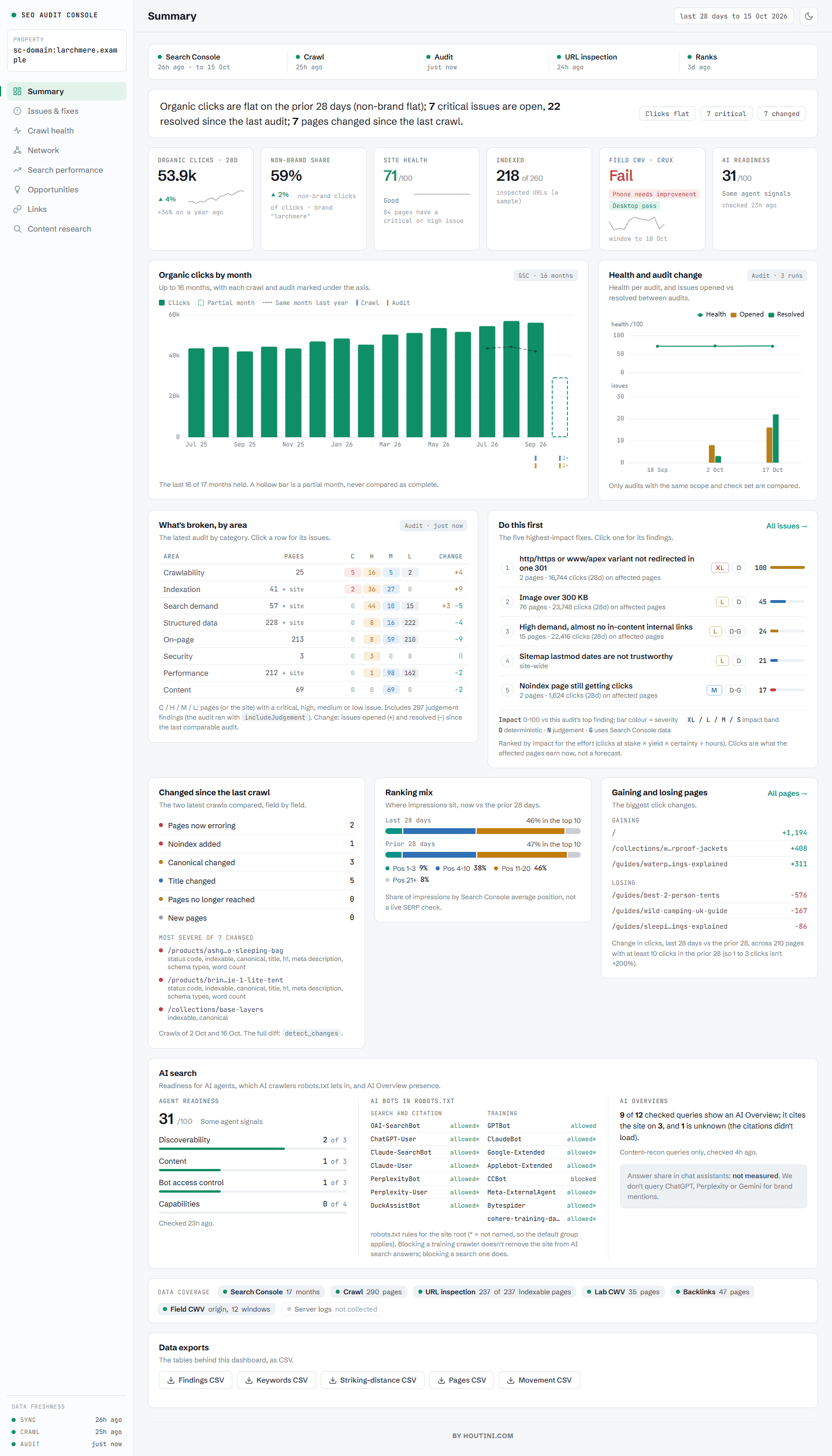
| Dashboard & reports | The eight tabs, what each chart shows, the browser dashboard (and its standalone version for Docker), and the shareable export |
Surprisingly little has changed in twenty years
The technical audit I was writing for clients in 2006 is, structurally, the audit most agencies still sell today. A crawler runs, a template fills, a 60-page PDF lands. Everything a crawler could find, in severity order, with no idea which findings are worth money and which are cosmetic.
What has changed is what's possible. Google gives every site owner a complete record of its search reality - which queries, which pages, how many impressions, where you ranked. Your crawl tells you what your site says. Search Console tells you what Google did about it. And in my experience, the gap between those two datasets is where nearly all of the recoverable traffic hides.
So that's what I built. SEO Audit Console is a Model Context Protocol server that merges your Search Console history with a first-party crawl of your site (and, when you want it, DataForSEO) into one thing: a prioritised, evidence-backed audit you can interrogate inside Claude Desktop. It hands you paste-ready fixes. Every finding traces back to a real datapoint.
One idea underneath all of it:
Your crawl is intent. Search Console is reality. The money is where they diverge.
A flat crawler tells you a page 404s. Useful, but only just. This tells you the 404 is draining 15% of your homepage's internal PageRank, that the page used to earn 10,000 clicks a month, and it writes the 301 rule to fix it. It finds the page at position #3 on 150,000 impressions with a 0.2% click-through rate - a title rewrite probably worth thousands of clicks - and ranks that above the cosmetic findings. Severity is what crawlers sell you. Yield is what moves the numbers.
Who is this for?
The SEO consultant who wants the collection and checking automated so the thinking time survives. The in-house marketer who's been quoted four figures for a commodity audit. And anyone newer to this who wants to learn what a good audit looks at - because every finding shows its evidence, the tool doubles as a teacher.
A note on where to run it. Claude Desktop is the easy start, but in my view Claude Code is the best home for this tool - because it closes the loop. In a chat client the audit hands you a 301 rule to paste somewhere. In Claude Code, the same session has your site's repo, a terminal and git: the audit finds the issue, writes the fix, applies it to the codebase, commits it, and re-crawls to verify. Finding to deployed fix, one conversation.
You don't need to learn an interface. You type "run an SEO audit on mysite.com" into Claude and it happens. Forget what's possible? Ask "run seo_audit_help" and you get the full menu with example prompts.
Does the approach work?
Yes. The crawl-plus-GSC merge is not a novelty; it's the method. On one property, seeding the crawl from Search Console URLs took coverage of GSC-known pages from 29% to 70% - every one of those extra pages is a page a conventional crawl silently missed, and several were earning traffic with no internal links pointing at them at all. On the same property the incremental sync turned a 33-minute data refresh into 19 seconds, which is the difference between "audit quarterly" and "audit whenever you're curious".
What the audit checks
run_audit executes 143 checks over the joined data and returns a ranked list - not a wall of everything, a priority order with the traffic at stake attached to each finding. The families, briefly:
| Family | What it catches |
|---|---|
| Crawlability & indexation | Broken links, redirect hygiene (chains, loops, temporary redirects carrying equity, redirects onto non-indexable pages or the homepage, live pages removed without a redirect), URLs that don't exist answering 200 (soft-404 setup) and http/https or www/apex twins not redirected in one 301, orphans, index bloat, spider-traps, robots-blocked pages still earning traffic, canonicals that hand indexing to another host, hreflang that Google would ignore (invalid codes, no self-reference, duplicate locales, canonical conflicts), and the reason every URL isn't indexable |
| On-page & structured data | Titles, metas, H1s, alt text - plus a local validator covering ~30 rich-result types, required fields only, so it never nags about properties Google ignores. For stores: product pages that went from 200 to 404, and Product markup missing what merchant listings need |
| Page weight & assets | What every page loads, from the crawl: CSS, JavaScript and font files that return errors, render-blocking scripts and stylesheets in <head>, static files with no cache lifetime, broken images, images over 300 KB and JPEG/PNG where WebP would be smaller (measured as a browser is served them). Real-user Core Web Vitals come from CrUX |
| Trends (GSC over time) | Pages losing clicks, rankings slipping, vanished queries, rising pages worth doubling down on, stale content decaying year-on-year |
| The merged questions | Cannibalisation, striking distance, ghost pages, traffic to dead URLs, internal authority wasted on no-click pages, titles missing the query you already rank for |
| AI-search readiness | Phrases you rank for but never say, queries your copy never answers in one passage, content that doesn't chunk cleanly for retrieval |
| Accessibility | A deterministic subset of the axe-core rules read straight from the HTML - links and buttons with no accessible name, unlabelled form fields, pinch-zoom disabled, positive tabindex, duplicate ids - alongside alt text, heading order and missing lang |
| JavaScript rendering & duplication | On demand: Response vs Render (render_pages) crawls each page in headless Chromium and flags content and links that exist only after JavaScript, and what JavaScript changes (canonical, title, noindex in either direction, server-rendered copy it removes), and semantic near-duplicate detection (find_duplicates) finds pages that say the same thing - both run locally, no API cost |
Every check is labelled D (deterministic - here are the bytes) or N (judgement - off by default, ask for "the judgement findings" to see them). In my view a wrong finding is worse than no finding at all, so the heuristic checks have to ask permission. The full registry, check by check, is in the manual.
And if you grew up on the classic desktop SEO crawlers, the dashboard's Crawl health tab will feel like home - response codes, indexability reasons, crawl depth, the heaviest images, server errors and slow pages, all as clean stat bars. Same diagnostics, except each one is sitting next to the Search Console numbers for the same URL. The tab-by-tab tour is in dashboard.md.
The crawl, properly explained
The crawl is where audits usually go wrong, so it's worth understanding what this one does differently. I've spent enough of my career cleaning up after crawlers that fooled themselves. This one is a proper SEO crawler - it just happens to have your Search Console history sitting next to it.
It discovers pages three ways. Following links, reading your XML sitemaps, and - the important one - starting from every URL Google is already sending traffic to, straight out of your GSC data. Coverage stops depending on your sitemap being honest. It's also exactly how ghost pages get caught: if Google ranks a URL your own site structure can't reach, that URL still gets crawled, and the mismatch becomes a finding.
It records why, not just what. For every URL that isn't indexable it stores the reason - 404, noindex, X-Robots header, canonicalised elsewhere, robots-blocked, non-HTML. "This page won't rank" is a fact; "this page won't rank because a plugin set an X-Robots header nobody remembers" is a fix.
It refuses to be fooled. A redirect that leaves your site (Shopify OAuth flows, I'm looking at you) is recorded as a redirect-out, never stored as a page. It always uses GET rather than HEAD, because a HEAD request can return a different status than the real request would - but it abandons the body for images, PDFs and assets, so it records status and size without downloading the bytes.
It's quick without being rude. HTTP/2 where your origin supports it, gzip and brotli negotiated, keep-alive connections reused. The speed comes from efficiency, not from hammering your server. It respects robots.txt properly (a bot-specific group replaces *, per the spec, which plenty of commercial crawlers get wrong), and skips the junk: internal search, faceted filter combinations, login flows. This is a crawler for sites you own. Being a good guest is the point.
It slows down when your host asks it to. A 429 (or a 503 with Retry-After) halves the crawl's concurrency, waits out the Retry-After, and puts the URL at the back of the queue for two more tries; clean responses add workers back. Shopify stores are spotted from their headers and start gently. A URL still rate limited at the end is stored as rate limited with no status, never as a broken page, and the crawl status tells you how many.
It tests what a crawl can't find on its own. Each crawl ends with up to five site probes: two URLs that can't exist (does the site answer 404, or 200 and a soft-404?) and the http/https and www/apex twins of the homepage and a deep page (one 301 to the canonical host, or a split?). It also records what every page loads - stylesheets, scripts, fonts, images, first or third party, in the head or the body - without downloading any of it; headResources:true adds a header-only pass for their status, size and caching.
It says what it didn't measure. A check whose data was never collected - the asset checks before a headResources crawl, the render checks before render_pages, field Core Web Vitals before sync_crux - is listed in the audit as not collected, with the step that collects it. An empty table never reads as a clean bill of health.
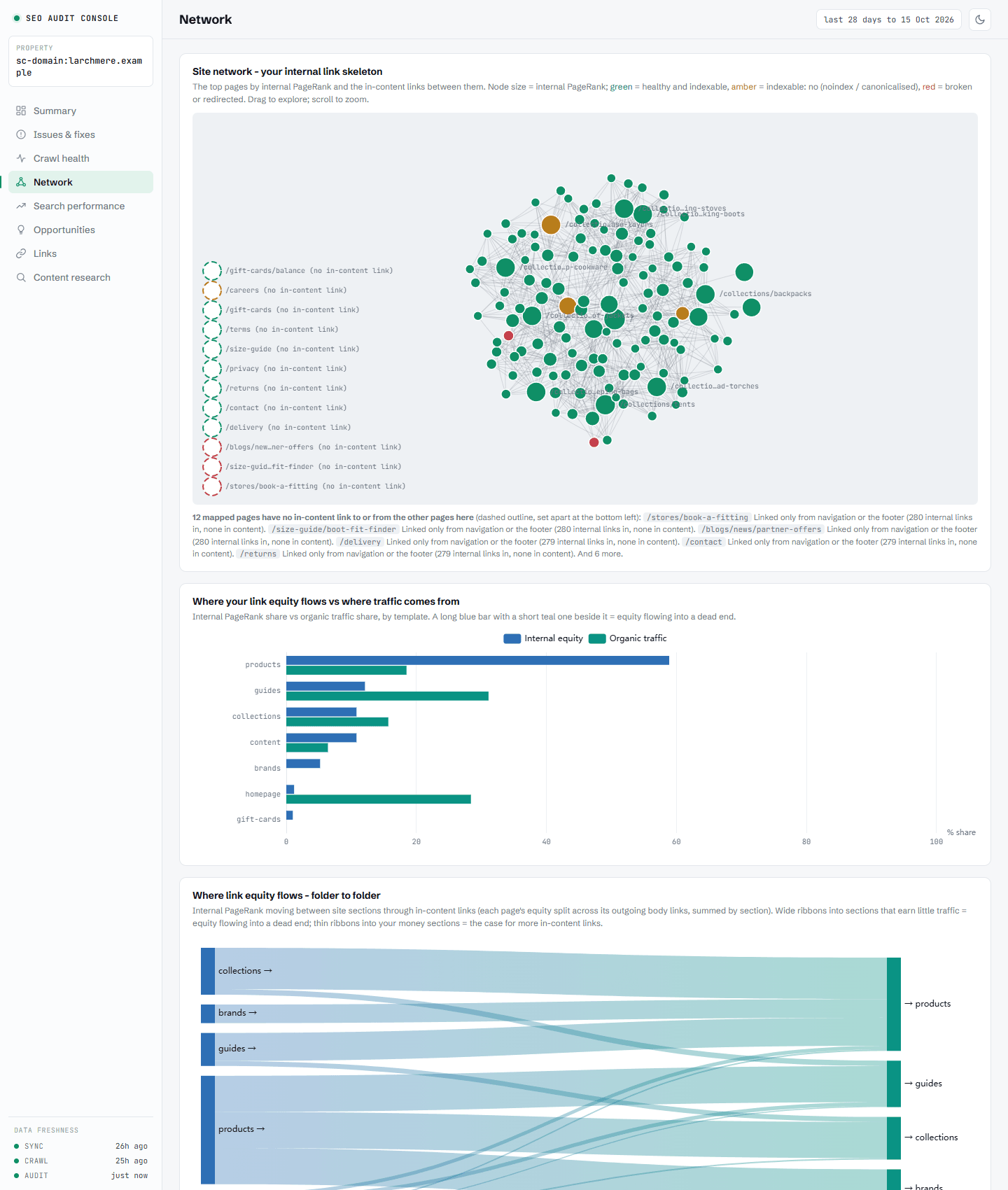
After the crawl it computes a real link graph: internal PageRank with nav and footer links down-weighted, click depth from the homepage counting body links only, in-degree per page. That graph powers the orphan, equity-leak and underlinked-page checks - and the donor rankings when the tool suggests internal links.
[![The Crawl health tab - the canonical, redirect and not-found breakdown, then classic crawl diagnostics as stat bars](https://ra