
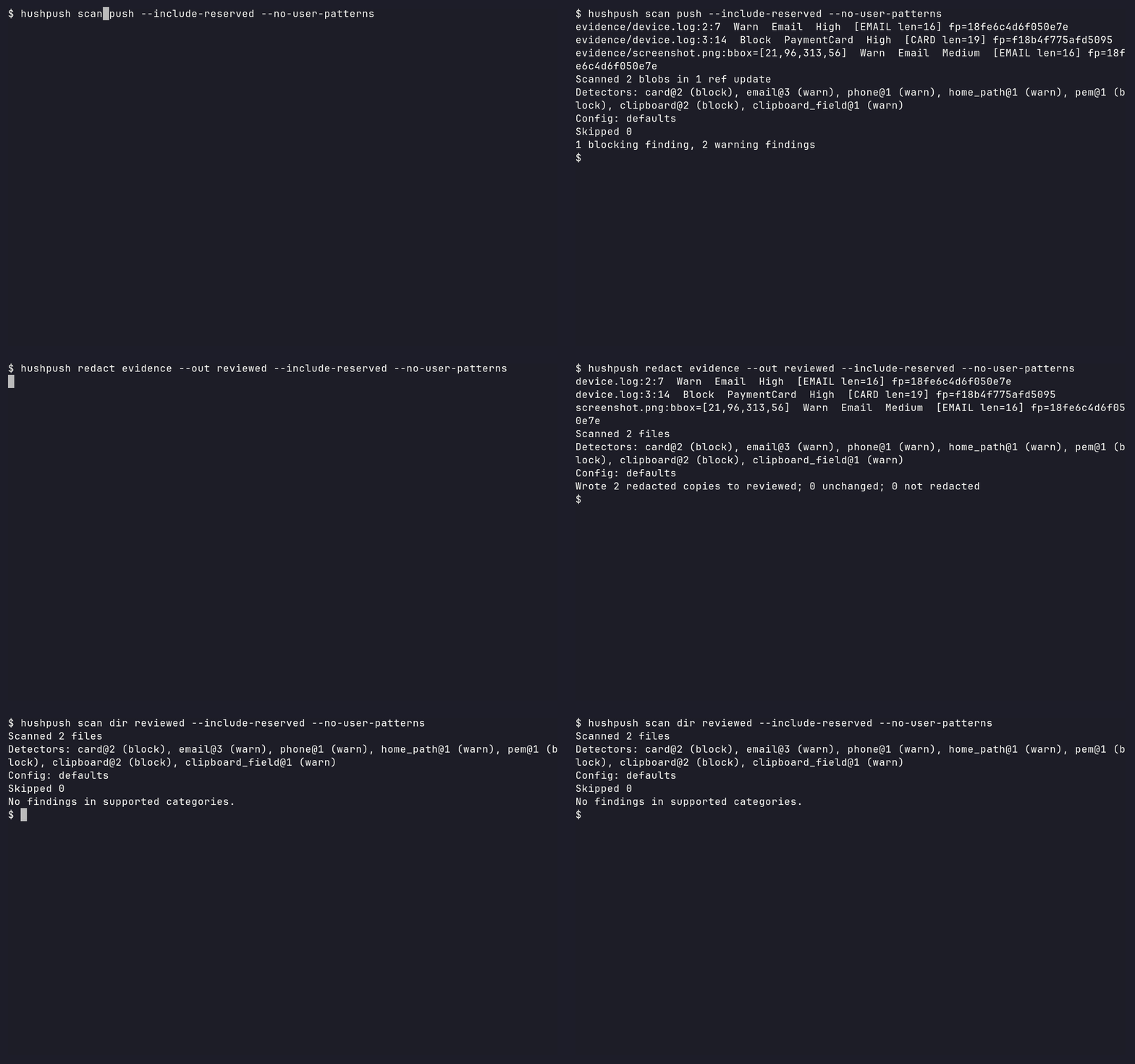
A local, offline privacy check for logs and screenshots before a Git push.
What hushpush is / is not
hushpush finds likely personal data, shows masked findings, and makes redacted copies you review and stage yourself. It complements a secret scanner such as Betterleaks or gitleaks. It cannot certify publication: “No findings in supported categories” still needs your review.
Pre-alpha: release acceptance and further detectors remain in progress.
No stable release exists yet; v0.1.0-rc.1
is a release-rehearsal pre-release. Renamed from LeakLens on 2026-10-27.
Install and quickstart
Prerequisites: Windows 10 1903+ with the
Visual C++ 2015–2022 x64 Redistributable,
or Linux with glibc ≥2.35. Without the Windows runtime, the loader reports
missing MSVCP140.dll / VCRUNTIME140.dll before hushpush can start.
macOS packaging is configured but not locally verified. Git is needed for Git modes.
1. Install and check the binary
Public installers, Homebrew and npm are pending the first stable release;
pre-releases are not published to them. hushpush is not published on crates.io,
so cargo install hushpush-cli and cargo binstall do not work. For a
pre-release trial, download the archive for your platform from the
v0.1.0-rc.1 assets,
place it in an empty trial directory, and unpack it there. Do not clone just to
obtain the sample.
Windows PowerShell:
Expand-Archive ./hushpush-cli-x86_64-pc-windows-msvc.zip -DestinationPath ./hushpush-bin
$env:PATH = (Resolve-Path ./hushpush-bin).Path + ';' + $env:PATH
hushpush --version
Linux x86_64 (POSIX shell):
mkdir hushpush-bin
tar -xJf hushpush-cli-x86_64-unknown-linux-gnu.tar.xz -C hushpush-bin
export PATH="$PWD/hushpush-bin:$PATH"
hushpush --version
Both should exit 0 and show:
hushpush 0.1.0
OCR models embedded (det a431985659dc, rec da72dc72ca4d, dict 1ea296369561)
Release builds embed the pinned OCR models and statically link ONNX Runtime; scanning downloads nothing. See packaging status and source-build instructions for other platforms and model lookup. Review installer scripts before running them once releases become available.
With Node.js and npm installed, these npmjs.com commands become available only after the first non-pre-release publish:
npm install -g @gerrithoskins/hushpush
hushpush --version
# Or run without a global install:
npx @gerrithoskins/hushpush --version
The npm installer downloads the matching binary archive from GitHub Releases;
subsequent scans stay offline. Pre-releases are not published to either npm registry.
For the optional GitHub Packages route, configure .npmrc and a read token first
(required even for public packages); see installer instructions.
2. Download the synthetic sample
Start with a new evidence directory. mkdir should succeed; the download
should create one log without printing its contents. This URL is pinned to T14.
Windows PowerShell:
mkdir evidence
Invoke-WebRequest https://raw.githubusercontent.com/GerritHoskins/hushpush/624054997bc051264d07ffffd6ea82ba6b2e7652/demo/evidence/synthetic.log -OutFile evidence/synthetic.log
Linux / macOS:
mkdir evidence
curl --proto '=https' --tlsv1.2 -fsSL https://raw.githubusercontent.com/GerritHoskins/hushpush/624054997bc051264d07ffffd6ea82ba6b2e7652/demo/evidence/synthetic.log -o evidence/synthetic.log
3. Scan it
Same command on both shells:
hushpush scan dir ./evidence --include-reserved --no-user-patterns
Actual Windows and Linux output excerpts (the detector/configuration footer is omitted here):
synthetic.log:2:7  Warn  Email  High  [EMAIL len=16]
synthetic.log:3:14  Block  PaymentCard  High  [CARD len=19]
Scanned 1 file
1 blocking finding, 1 warning finding
Exit 1 is expected: the sample contains a published sandbox card number.
--include-reserved enables reserved example.com email data (and fictional
phone numbers); otherwise these are ignored. --no-user-patterns keeps this
trial independent of personal patterns. In a Git repository, findings also
include repository-local fp=… fingerprints. Nothing prints a detected value.
Check the exit immediately with $LASTEXITCODE (PowerShell) or echo $? (POSIX).
Measured extraction-to-first-result timings are in the
T15 validation record; public installation remains unverified.
4. Make and review a copy
Use a new, empty output directory:
hushpush redact ./evidence --out ./evidence-redacted --include-reserved --no-user-patterns
It repeats the masked findings and exits 0 with:
Wrote 1 redacted copy to ./evidence-redacted; 0 unchanged; 0 not redacted
Review evidence-redacted/synthetic.log in your editor. For this synthetic
example only, you can use Get-Content ./evidence-redacted/synthetic.log on
PowerShell or cat ./evidence-redacted/synthetic.log on POSIX. Expect:
Synthetic installation smoke fixture; no real personal data.
email=[REDACTED:EMAIL]
payment_card=[REDACTED:CARD]
Rescan the copy:
hushpush scan dir ./evidence-redacted --include-reserved --no-user-patterns
It exits 0 and ends with No findings in supported categories. Check for lost
context and unsupported content yourself. Originals are untouched, copies are
rescanned before being kept, and nothing is staged automatically.
In a standalone trial directory, git init first.
Inside your intended Git repository, stage only the reviewed copy yourself:
git add ./evidence-redacted/synthetic.log
Expect no output from git add; git diff --cached --stat should list the reviewed log.
Do not stage the original sample.
5. Optional hooks
Print and review the native pre-push hook:
hushpush hook print
This only prints a script. To opt in, save it yourself as .git/hooks/pre-push
(or your configured hooks path), preserve any existing hook, and make it
executable on Unix. The native hook scans every ref in a push.
With pre-commit, use pre-commit 3.2+ and an installed
hushpush on PATH. These language: system hooks run that binary:
repos:
  - repo: https://github.com/GerritHoskins/hushpush
    rev: 624054997bc051264d07ffffd6ea82ba6b2e7652 # existing T14 commit; no stable release tag yet
    hooks:
      - id: hushpush           # staged index, not working-tree files
      - id: hushpush-pre-push  # first eligible ref only
Opt in yourself with pre-commit install --hook-type pre-commit --hook-type pre-push.
The adapter validates all six PRE_COMMIT_* variables, never reads stdin or
fetches objects, and exits 2 if variables are missing/invalid. pre-commit
passes only the first eligible ref
of a multi-ref push; whole-history pushes can omit FROM/TO and therefore exit
2. Use the native hook when every pushed ref must be checked.
What it checks
scan dir reads disk files; scan staged reads index bytes, including Git's
temporary commit index. scan push, scan commits A..B, and the native hook
include new blobs in intermediate commits, even if later removed.
PNG/JPEG screenshots use local PP-OCRv5 mobile OCR with bounding boxes.
Current categories: cards, email, phone, home-path usernames, private PEM, clipboard records/fields, and external user patterns. See the detector reference for exact formats and defaults. Supported-content failures default to exit 3; unsupported content warns by default. Review coverage even after exit 0. See reports, exit codes, configuration and allowlists.
Limitations
- Latin-only OCR: non-Latin, rotated, stylized and low-resolution image text can be missed.
- No PDF, archives, video, GIF/WebP/BMP/TIFF/HEIC/AVIF scanning.
- National phones without country codes, undocumented clipboard keys, free-form names/addresses/messages, split values and most encoded content can be missed.
- Broad secret detection needs a companion scanner.
- Platform prerequisites and pre-commit coverage restrictions above apply.
- A passing rescan covers supported categories; always review the copy.
Detailed limitations and security boundaries cover image limits/orientation, lossy UTF-8, symlinks, LFS, redaction retries, metadata removal, concurrent-writer risks, and fuzzing. Images receive opaque masks and are re-encoded as PNG without original metadata; failed/residual copies are discarded.
Contribute and evaluate
CONTRIBUTING has setup, checks, privacy rules and four entry points: detectors, log recognizers, seeded corpus samples and OCR backends. Independent corpus evaluation preserves the measured-gate, baseline and sealed-test guidance. Corpus measurements are not real-world accuracy.
Outside-tester guide · Demo reproduction · Plan · Agent rules
License
MIT OR Apache-2.0, at your option. OCR models: Apache-2.0 (PaddlePaddle); ONNX Runtime: MIT.