You can share your Claude and Codex subscriptions!
Self-hosted · Linux server · macOS & Windows client


Quick start · Docs · Is this safe? · Website
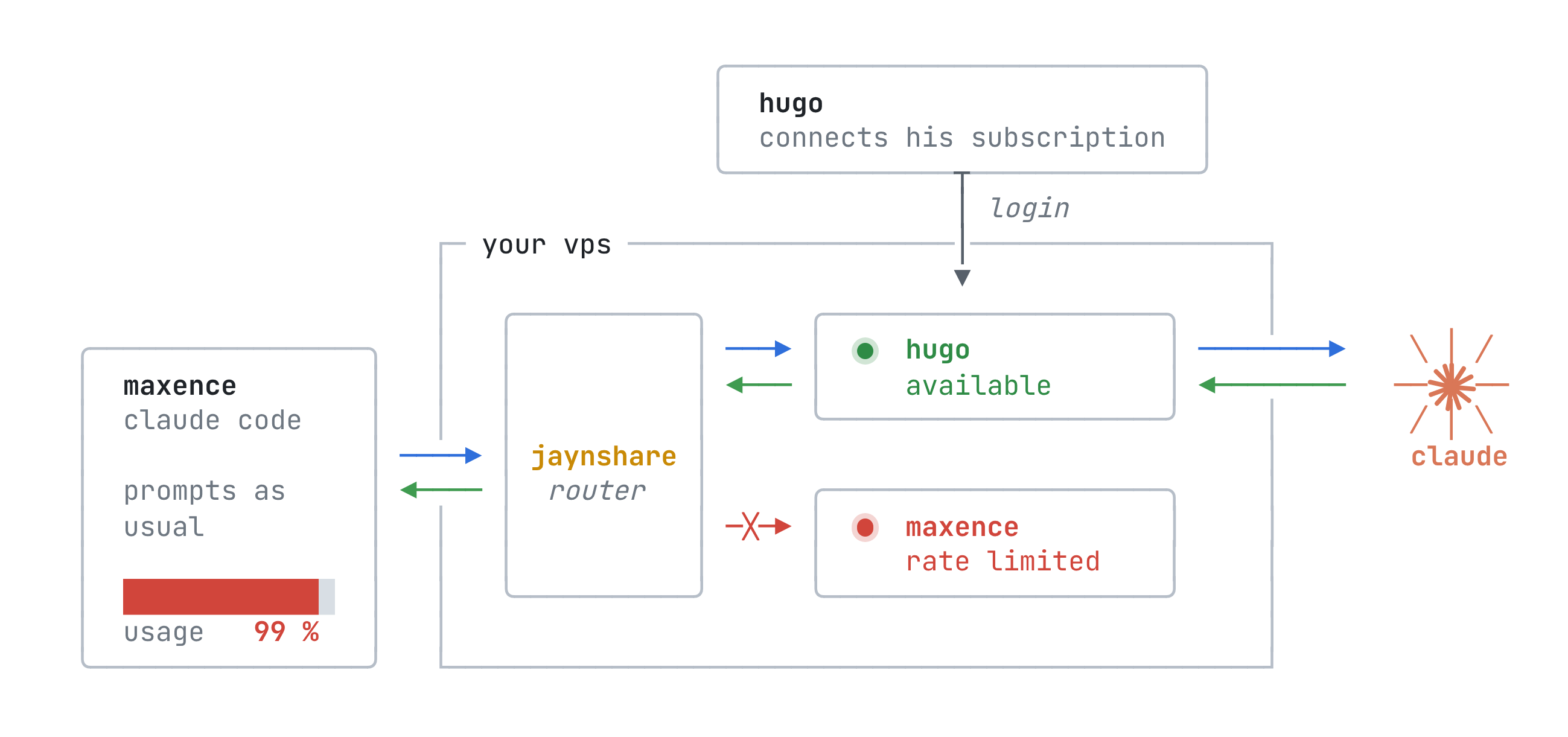
jaynshare is a self-hosted proxy for Claude Code, Codex and Claude Desktop on macOS.
Just replace claude by jaynshare claude (or codex by jaynshare codex,
or open Claude Desktop with jaynshare desktop) and you can draw from your
friends' subscriptions when yours is rate limited.
PS : It also works if you pool several accounts of your own.
Warning
Pooling Claude subscriptions conflicts with Anthropic's terms and can lead to suspension or termination of every account involved. Same for OpenAI. Whether a particular deployment also raises legal issues depends on its facts and jurisdiction; this project does not claim that it is legal or authorized. Read the subscription-sharing risk summary, the security and privacy model, and the operator obligations before deploying.
How it works
Try it on your Mac
Before having to set up a server, you can spin up one on your own Mac easily using this (it downloads the latest release, runs it, joins a client and offers to add your accounts).
It needs python3, and Claude Code, Codex or Claude Desktop installed.
curl -fsSLO https://github.com/jaynlabs/jaynshare/releases/latest/download/quickstart.sh
bash quickstart.sh          #sets up everything
bash quickstart.sh claude   #launches claude
bash quickstart.sh codex    #launches codex
bash quickstart.sh desktop  #launches Claude Desktop
bash quickstart.sh down     #stops the server
desktop uses your real Claude Desktop: it asks to trust the quickstart's CA
in your keychain, then points Desktop at the quickstart until down.
bash quickstart.sh client trust-ca remove removes the CA.
Demo
Purpose and disclaimers
This is a project by Jayn Labs started by my friend and I cause we were sick of getting rate limited while the other had plenty leftover quota.
PLEASE, yes this was GREATLY done with AI. Reworking everything from the ground up is not something frightening us. So truly feel free to give any feedback (even to roast us), as long as it helps us improve.
Shout out to TeamClaude on github. We were more than inspired by their work cause our v1 was mostly a fork.
This was not made by, endorsed by, or affiliated with Anthropic; Claude Code is a product of Anthropic.
Highlights
- OAuth subscription and API-key accounts
- Account picker at launch
- Claude Code status line naming the serving account
- Claude Desktop on macOS, with account switching from its terminal
- One-line join for macOS and Windows from a single-use invite
- Anthropic and OpenAI accounts added by their owners when joining
- Private-network listeners only, TLS pinned to the server's own identity, and an audit log that never holds a body or a credential
- Signed releases, a one-command systemd install, optional nightly updates, and clients that follow their server's version
- One Rust binary for the server and the client
Requirements for self hosting
- A Linux server with systemd
- A private network between the engineers and the server, such as a tailnet (but I'm sure you can make it work with other clever solutions)
- Claude Code, Codex or Claude Desktop (macOS) already installed on each engineer's machine
Quick start
Server
On the server, as a user with sudo:
curl -fsSL https://github.com/jaynlabs/jaynshare/releases/latest/download/install.sh | sudo sh
It installs the newest release as a systemd service on the host's Tailscale
address (or its only private address; otherwise it asks), and ends with an
invite for you: jaynshare join jsi1_…. Run it again to update. From a clone,
tools/install-server.sh does the same with your own build.
Operator commands run on the server as its service account:
alias js='sudo -u jaynshare -H jaynshare'
js client invite bob                   # → jaynshare join jsi1_…
js status
sudo jaynshare server auto-update on   # update every night; clients follow
An invite works once and expires after a day. Send it through a private channel.
The server installation notes cover the operator trust boundary, the decision record every pooled account needs, and the private-network rules jaynshare cannot enforce for you.
Engineer
With the invite from your operator, on macOS:
curl -fsSL https://github.com/jaynlabs/jaynshare/releases/latest/download/install.sh | sh -s -- join jsi1_…
On Windows, in PowerShell:
& ([scriptblock]::Create((irm https://github.com/jaynlabs/jaynshare/releases/latest/download/install.ps1))) jsi1_…
The join checks that the server is the one the invite names, installs that
server's client and offers to add each of your accounts to the pool, Claude
and ChatGPT alike. Then run jaynshare claude wherever you would have run
claude, and jaynshare codex wherever you would have run codex. The client
updates itself whenever the server does.
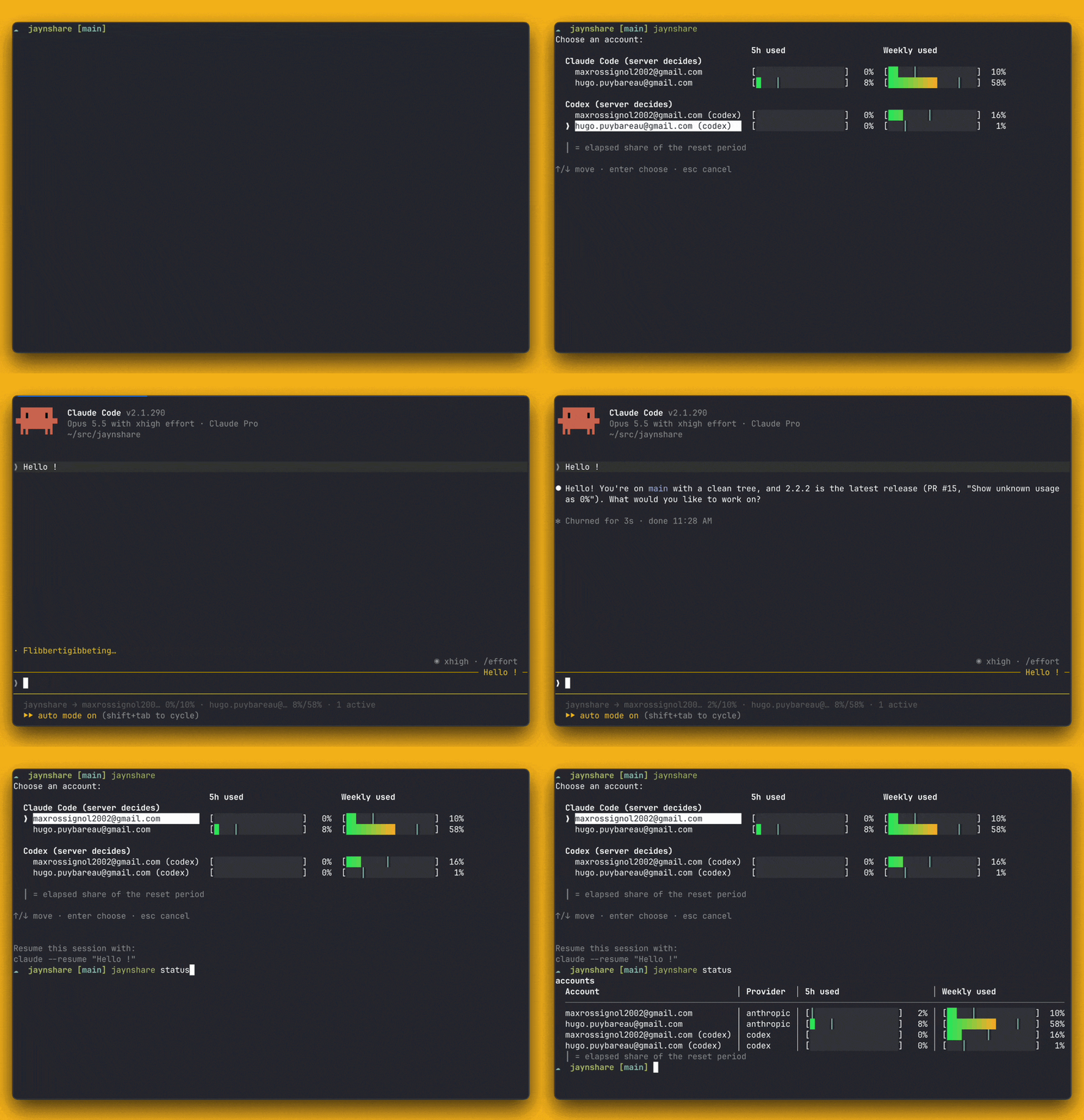
jaynshare claude and jaynshare codex open a picker when the pool cannot
choose for you; --account <name> names the account, --auto lets the pool
pick and move the session to another account when its own runs out, and
--direct runs the tool outside the pool under your own login.
jaynshare alone opens one picker over every pooled account, grouped by tool
with each account's five-hour and weekly usage, and launches the tool of the
account you pick.
Arguments after -- go to the tool unchanged. jaynshare status checks enrollment
and connectivity and shows every pooled account's five-hour and weekly usage
in a colored table; --verbose adds the other status details. A cyan ┃
marks the elapsed share of the reset period when the reset time is known.
jaynshare account login adds your account later, and jaynshare alias prints
a shell alias so that claude itself goes through the pool.
jaynshare codex does the same for Codex over the pool's ChatGPT accounts,
added with jaynshare account login --provider codex. Codex still needs your
own codex login; the pool replaces it on every request. On macOS, Codex's
own updater also works through the pool.
Claude Desktop on macOS
On an enrolled Mac, install Claude Desktop in /Applications or
~/Applications and quit the app fully, then start the connection from a
terminal. When the pool's CA is missing from macOS trust, the command shows its
fingerprint and asks Install CA globally (needed for Claude Desktop) [y/N].
Answer y to install it in your login keychain and continue; Enter or n
cancels the launch. During a CA rotation, the same confirmation also lists the
staged replacement CA if it is not trusted yet, and installs both.
jaynshare desktop                       # Anthropic account picker
jaynshare desktop --account <reference> # pin new sessions to that account
jaynshare desktop --auto                # automatic selection
jaynshare desktop --log                 # one line per request, no monitor
The command opens Desktop once its local Gateway is ready. Keep it running:
q, Ctrl-C or closing its terminal stops the connection. Its terminal shows
the account in use, each Anthropic account's 5-hour and weekly usage, and the
last message. The arrow keys and Enter switch every conversation, open ones
included, from its next message, without quitting Desktop; a moved
conversation starts without its prompt cache. With --log, or when standard
error is not a terminal, it prints one line per request instead. A second
command with the same account and enrollment reuses the running one. With
--auto, a conversation whose account runs out moves to another one by
itself, without its prompt cache; a pinned account returns an error instead.
Chat and Code go through the pool, with the models its accounts offer. Attachments, Cowork, Chrome, connectors, projects, memory and artifacts are untested.
Desktop versions are checked automatically: each launch reads the managed runtime's version and checksum from Desktop's bundle, checks the matching verified runtime and runs a synthetic streaming exchange against a temporary local gateway, with no pooled account and no prompt of yours. Invalid bundles, failed checks, untrusted pool CAs and managed device policies stop with a clear error. A new Desktop can still change its private profile or startup contracts and need a jaynshare update. The Jaynshare profile disables Desktop's auto-updates: after installing a newer version by hand, an app or runtime replacement, or a CA rotation, quit Desktop fully and run the command again.
Quit Desktop and stop the command before removing the integration; your other Gateways, preferences and conversations stay:
jaynshare desktop --restore
Claude Desktop details covers how the connection works, its limits and recovery.
Roadmap / Ideas
- Rust v2
-
jaynshare codex - Claude Desktop on macOS
- Claude Desktop on Windows
- OpenAI API-key accounts for
jaynshare codex - API-key subscriptions from other providers, like OpenCode Go
- Account features (settings, plugins, skills, MCP servers) when you draw from your own account (the pool refuses them for everyone today)
- Owner limits: cap what the pool draws from you, and pause it yourself
- Draw credits: what you can draw from others' accounts follows what you give the pool
- Linux client installer
Documentation
- Is subscription sharing safe?
- Security and privacy model
- Server installation and operator obligations
- Claude Desktop details
- Release tooling
jaynshare helpandjaynshare help <verb>: every verb, its options, exit codes and examples
Development
Rust 1.95 (rust-toolchain.toml pins it). Nothing in the build or the tests
needs credentials or network access to Anthropic.
cargo build --release
cargo test --bins                      # unit tests
JAYNSHARE_BIN=target/release/jaynshare cargo test --test acceptance -- --test-threads=8
cargo clippy --all-targets -- -D warnings
cargo fmt --all -- --check
CI runs the above; see .github/workflows/ci.yml. The acceptance tests that
need Linux run in Docker and are skipped where no Docker daemon answers.
CI caches Cargo's registry and build directories, including incremental
compiler data but excluding acceptance outputs. Its optimized test binaries
disable LTO; published releases keep the release profile in Cargo.toml.
CI builds the Linux musl binary through this cache and sets
JAYNSHARE_LINUX_BIN to reuse it in Docker. Locally, set that variable to an
existing musl build to avoid the container build. A focused
cargo test --test acceptance <scenario> uses the debug binary without
needing a release build.
Where things live:
src/— the server, the client and the CLIdeploy/— the server notes, the release key (release-key.pub) and the client kit's README (kit/)tools/release/— packaging, signing, publishing and theinstall.sh/install.ps1bootstraps
Issues and pull requests are welcome; open an issue before a large change. Report security issues privately as described in SECURITY.md.
License
MIT, © Jayn Labs. See LICENSE, and NOTICE.md for the Rust crates Jaynshare links.