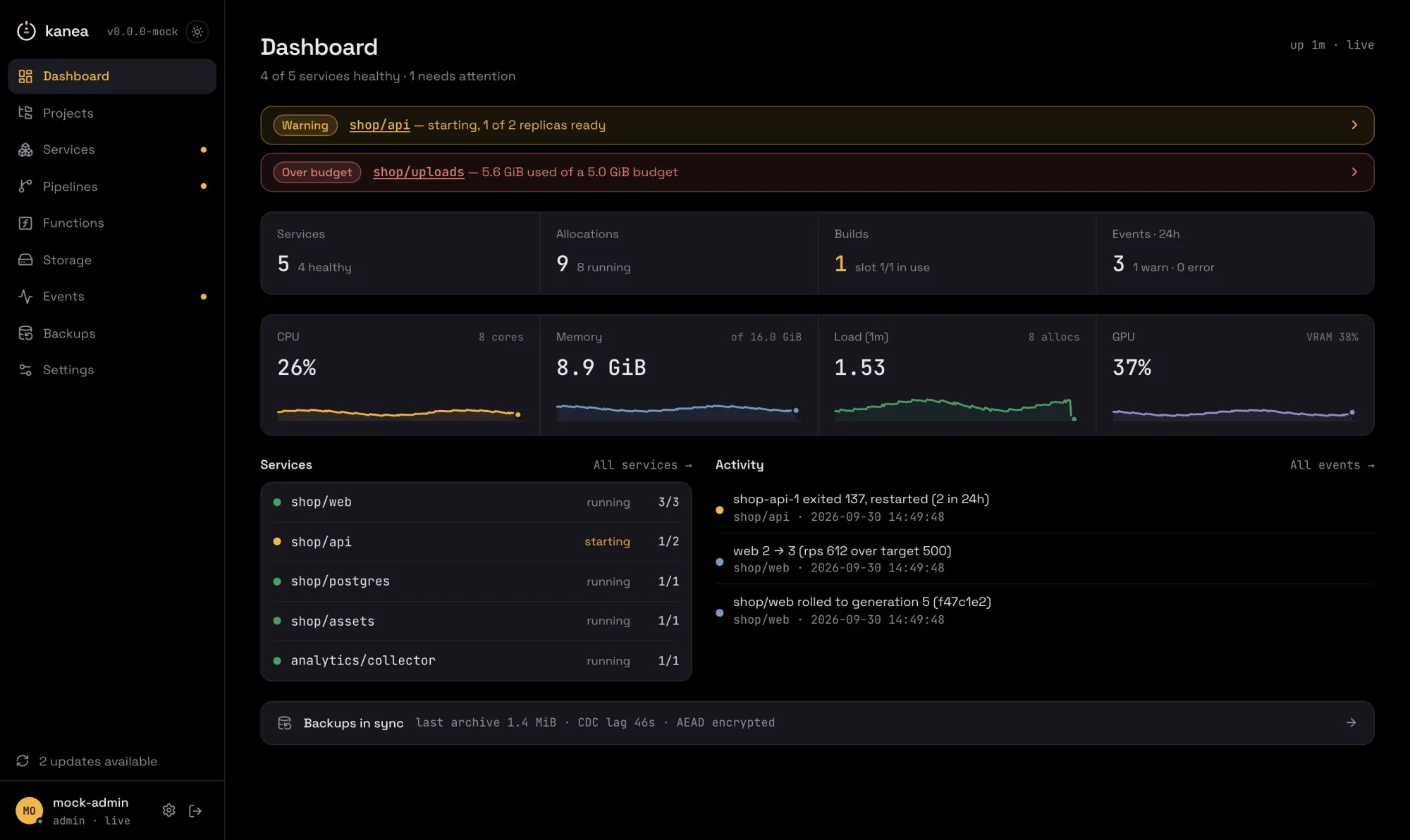
Kanea is a lightweight container orchestration platform written in Go. Services run on containerd, networking and load balancing are Kanea's own eBPF datapath, TLS comes from Let's Encrypt, a per-node CA, or certificates you already have, and it ships a real-time shadcn/ui dashboard, an MCP server for AI agents, GitOps pipelines (rootless BuildKit and an embedded build registry, so build { context = "." } needs no registry of yours), eBPF-driven autoscaling, and encrypted S3-backed state replication with backup and restore.
The installer fetches the binary, verifies it, and stops. Checksum verification is
mandatory and there is no flag to skip it; the Sigstore signature is verified too
when cosign is on PATH - and a signature that is present and invalid is
fatal, not a warning. It generates no keys, starts nothing, and writes no units.
It takes no arguments. The three knobs are environment variables, and sudo does
not forward them by default, so pass them to bash itself:
A non-Linux kernel, an architecture outside amd64/arm64, and a repository with no
published release are all refused before anything is downloaded. The full
walk-through - an annotated kanea init run, what a re-run keeps, the host
components, upgrades and air-gapped nodes - is in the
installation docs.
kanea init then installs the runtime (containerd, runc and rootless
buildkitd) at versions pinned by SHA-256 in the binary (PRD §5.2.12). The
network layer needs no component: the eBPF datapath is compiled into kanea
itself (§5.2.5). It installs under its own prefix on its own socket, so a node that
ran Docker yesterday runs it tomorrow.
Prefer to do it by hand? Every release publishes
kanea_<version>_linux_<arch>.tar.gz, an SPDX SBOM beside each archive
(plus kanea_<version>_source.spdx.json for the build's own graph, which is
where the embedded dashboard's npm dependencies are listed), checksums.txt,
and a keyless cosign signature over the checksums. The SBOMs are listed in
the checksums, so that one signature covers them too:
There is no long-lived signing key to guard: the signature is bound by Sigstore to
the release workflow in this repository, and the proof is in a public transparency
log.
Homebrew (CLI)
brew tap m18h/kanea
brew trust m18h/kanea   # brew ≥ 6 refuses formulae from untrusted third-party taps
brew install kanea
Homebrew ships the CLI, not the node (PRD §5.2.12) - but the CLI is not the
authoring half any more. kanea plan still validates job specs with
file-and-line diagnostics and needs no daemon at all, and with KANEA_URL and
a token the same binary drives a remote node completely: deploy, ps, logs,
exec, scale. A Mac is a first-class client; it is just never the node, which
belongs to the script above: root-owned at /usr/local/bin, where
kanea upgrade owns the swap. A brew-owned binary upgrades with brew upgrade kanea, then
sudo kanea upgrade --no-fetch for the restart-and-migrate half. The formula
lives in its own tap repository, m18h/homebrew-kanea,
and is regenerated from each release's checksums.txt by a workflow there;
the macOS install works from the first release that ships darwin archives.
Container image (CI)
docker run --rm ghcr.io/m18h/kanea:latest version

# the shape a pipeline uses: the spec on a mount, the node over the network
docker run --rm -v "$PWD:/workspace:ro" \
  -e KANEA_URL -e KANEA_TOKEN \
  ghcr.io/m18h/kanea:vX.Y.Z run shop.hcl   # pin it; that is what tags are for
linux/amd64 and linux/arm64 in one manifest list, tagged vX.Y.Z and
latest; latest moves only for a plain vX.Y.Z, so a prerelease never
becomes what everyone pulls by default. Like Homebrew, it ships the CLI and not
the node (PRD §5.2.12): it is for the pipeline that deploys to a node, so
agent, edge, init, install, doctor and upgrade - every verb that
acts on a host, its systemd and its own binary - are not what it is for.
The image carries the binary out of the release archives above, not a separate
build of them, so the checksums.txt you can verify by hand describes what is
inside it. The image digest is cosign-signed with the same keyless identity and
carries an SPDX attestation:
It runs as an unprivileged user (uid 65532) out of /workspace. If your
network terminates TLS with its own CA, drop the root into
/usr/local/share/ca-certificates and run update-ca-certificates in a
derived image - or pass the node's own CA with KANEA_CA_CERT, which replaces
the system pool rather than adding to it.
Quickstart
# 1. Check the node, install the runtime, run the master-key ceremony,
#    write the units, start kanead, and create your admin account. Init
#    asks for a dashboard address (loopback by default) and a username,
#    then prints where everything is. The master key is shown once, so
#    have somewhere to record it before you start.
sudo kanea init

# 2. Deploy something.
kanea run --image nginx:1.27-alpine --name web --project demo
kanea ui
The CLI talks to kanead over a root-owned socket. To use it without sudo, join
the kanea group init created and log in again. Membership is root-equivalent,
exactly like docker's group:
sudo usermod -aG kanea $USER
Init ends with the node summary: the dashboard URL, your admin account, the
internal DNS address and the subnet layout. TLS is required beyond loopback,
and init provisions it by default: a public listen address - answered at the
prompt or passed as a bare --listen - mints a 10-year self-signed pair at
/etc/kanea/api.crt and serves the API and dashboard with it. Bring your own
with --listen-cert/--listen-key, or override the default at any time via
the server config below. --admin-user and a piped
password make it scriptable; --no-start writes the files and stops, which is
the pre-v0.5 behaviour.
The listener can live in the server config instead of the unit (PRD §15.1),
with its TLS in the same vocabulary services use:
self-signed issues the listener's certificate from the node's own CA (the
one kanea ca show installs on your devices) with a real IP SAN, renewed
automatically; acme gets a Let's Encrypt certificate for api_domain
through the same account and renewal loop your services use; provided is
your own api_cert/api_key pair; plaintext is explicit HTTP, allowed
beyond loopback because you typed it and logged loudly. Init then skips the
listen question and renders no listen flags. Moving the API and dashboard later
is an edit to the file plus systemctl restart kanead, never a re-init. An
explicit --listen always wins, and --listen none keeps the node
socket-only regardless.
On a home network
No public name, no port 80 reachable from the internet, and still real HTTPS. Point
a wildcard DNS record (*.home.lan) at the node on your local resolver, run the
control plane with a local CA, and install that CA once on each device.
--base-domain and --tls-default are daemon flags that kanea init does not write into the unit, so they go
in a drop-in (sudo systemctl edit kanead), which also survives re-running init:
[Service]
ExecStart=
# copy the existing line from `systemctl cat kanead`, then append:
ExecStart=/usr/local/bin/kanea agent … --base-domain home.lan --tls-default self-signed
sudo systemctl daemon-reload && sudo systemctl restart kanead
kanea ca show > kanea-ca.crt      # install on your phone, laptop, TV
Every service then answers at <service>.<project>.home.lan over HTTPS, with no
CA to reach and no rate limit to spend. --tls-default also takes acme,
provided (certificates you put on the node, granted per project through
--tls-certs-config) and plaintext. A spec can override the node with
expose { tls { mode = "…" } }. A mode names a source, never a path.
Prefer a port to a name? Publish one, with or without a domain:
The full DNS story - internal <service>.<project> names, the public records you
create, HTTP-01 versus DNS-01, and split-horizon setups - is in the
names and DNS docs.
mode = "tcp" relays bytes instead, for Postgres, a game server, or anything
else that is not HTTP. Which ports a spec may claim is the node's decision
(--publish-ports, unprivileged by default), because a repository anyone can
push to must not be able to take :22.
Granting what specs may use
Host directories and device/GPU passthrough are off until the node's owner says
otherwise: a spec names what it wants, and the node decides what is allowed.
Both grants live in one file, /etc/kanea/kanea.hcl, read once at daemon start
(kanea init already created the directory; no unit editing, and re-running
init never touches it):
# /etc/kanea/kanea.hcl: the node's, never the repository's
storage {
  allowed_host_paths = ["/srv/kanea", "/dev/shm"]  # parents `host` volumes may use
}

device "gpu" {
  nodes = ["/dev/dri/card0", "/dev/dri/renderD128"]
  allow = ["media"]                                # projects that may claim it
}
sudo systemctl restart kanead # read once, at startup
Keep it root-owned and 0644, because kanead refuses a policy file anyone else
could have written. A spec then mounts with storage "x" { type = "host" path = … }
and claims the GPU with device "dri" { grant = "gpu" }; a grant the node does
not hold fails the alloc rather than starting without it.
A host path must already exist, so a typo cannot become a silently empty volume.
Add create = true to the storage block when you would rather Kanea made it,
still only inside a prefix you allowed above.
The server config
/etc/kanea/kanea.hcl is the file both of the blocks above live in: the node's
settings, as opposed to a job spec's. A spec can reference what it permits and
can never add to it, which is the point - GitOps deploys specs automatically, so
anything a spec could declare, anyone who can push to a synced repo could
declare. It does not exist by default, and kanea init never writes it.
Seven stanzas are read:
Stanza
What it decides
bind
Where the API and dashboard listen, and how that listener gets its certificate
storage
Which host directories a host volume may mount (allowed_host_paths)
dns
Which resolvers the internal DNS forwards to (upstreams)
variables
Node-wide defaults for spec variables - never secrets: GET /v1/vars serves them to any authenticated caller
images
The node default for where images come from (pull_policy), and the image GC's gc block
device
A named device grant: nodes, allow, optional mode
socket
A named socket grant: path, allow
Four rules are worth knowing before you edit it:
Read once, at daemon start. No poll, no reload, no SIGHUP.
Absent is off; malformed is fatal. There is no keep-last-good and no
partial load, so a typo stops kanead starting. Fix the file and restart, or add
--config off to the unit to get the node up without it.
It is trust-checked before it is parsed - a regular file, owned by root or
the daemon's uid, writable only by its owner. World-readable is fine; it is
policy, not a secret.
An unknown stanza is a warning (named at startup, so a future version's
settings can sit there), but an unknown attribute inside a read stanza is an
error - there it is almost always a typo, and a silently ignored
allowed_host_path would be a security control that quietly did nothing.
Applying an edit is the same for every stanza:
sudo systemctl restart kanead
daemon-reload is not part of it: that is for unit changes. The restart is
cheaper than it looks - running workloads keep running (KillMode=process)
and ingress keeps serving (kanea-edge is a separate process with no
After= either way). What pauses is change: deploys, scaling, certificate
renewal, the API and dashboard. Afterwards, journalctl -u kanead | grep 'server config' shows whether it loaded, whether a stanza is being ignored, and whether
a flag on the unit is overriding it.
Every half has a flag that wins over the file, and the disable words are not the
same - --listen none, but off for --config, --allowed-host-paths and
--passthrough-config. The full reference, with every field and refusal, is in
the node configuration docs.
Seeing what an apply would do
kanea plan renders one block per service and one row per resource that would
be added, changed or removed - volumes, routes, published ports, config files,
device and socket grants, env keys, init steps, the health check, the
autoscaler - and marks the rows that replace running containers, because
that is the difference between a config edit and a rolling restart:
kanea run prints the same block from the same code - so what you confirm is
what you were shown - and then asks:
Apply? [Y/n]
Enter applies. --yes (or -y) skips the question, and stdin that is not a
terminal is never prompted: a piped or redirected stdin is a script, so every
CI recipe and pipeline written before this keeps working exactly as it did.
Two things never appear in the output whatever changed: an env value, since
it may be a secret-env: reference, and a config file's content, since it
carries secret placeholders. Keys, paths and a short content digest are what
make an edit visible without printing the secret.
Removing a service
An apply is additive: deleting a service block and re-applying leaves the
service running, so kanea run web.hcl can never delete what db.hcl
declares. To drop what a spec no longer declares:
kanea plan --remove-orphans app.hcl   # `- destroy` lines for what would go
kanea run  --remove-orphans app.hcl
The spec becomes authoritative for the projects it declares a project block
for; projects it does not mention are never touched. It is refused with a
selector or --image - a selector sends part of the spec and --image
declares no project, so neither can claim to be the whole of one. For a single
service:
kanea remove shop/web # alias: rm; asks [y/N] on a terminal, --yes/-y skips
(kanea stop shop/web --rm does the same, behind the same confirmation. A
piped stdin is never prompted, so scripted removals work unchanged.)
Volume data is never deleted. A service pruned by mistake comes back with
its data by re-applying it; a deliberate prune frees no disk. What does go: the
containers, the alloc records, the VIP, routes and mounts. Each removal emits
service.removed and is named in the audit log. The log files survive too:
kanea logs --previous shop/web reads what a stopped or removed service last
wrote, straight from disk.
Volumes
kanea volume list shows every storage resource with the mounts using it, their
measured usage and mount state. A volume block may declare size = "10GiB",
which is a budget rather than a quota: Kanea measures the volume against it
and emits volume.over_budget (and volume.under_budget when it recovers), but
nothing enforces it: no quota mechanism exists on the node, and nfs, smb
and s3 could not carry one anyway. Mounts notify too: volume.mount_failed
when one will not establish or stops answering, volume.mount_recovered when
the supervisor gets it back.
Setup before a service starts
A schema migration, a chown of a directory Kanea just created, a config
render: an init block runs to completion before the workload starts.