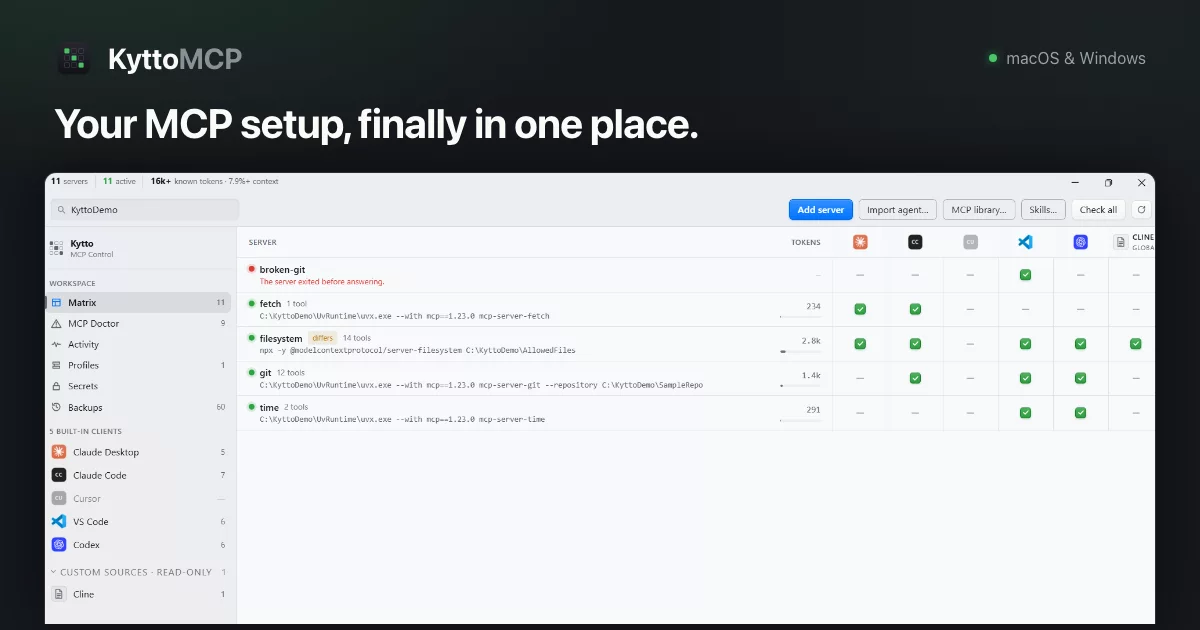

A local control panel for MCP servers across the AI clients you already use.
Free and open source under the MIT License — the full source of both the macOS and the Windows app lives in this repository. Read it, build it, or send a pull request.
Download Beta 1.0.9 · Website · Source code · Contributing · Changelog · Report a bug
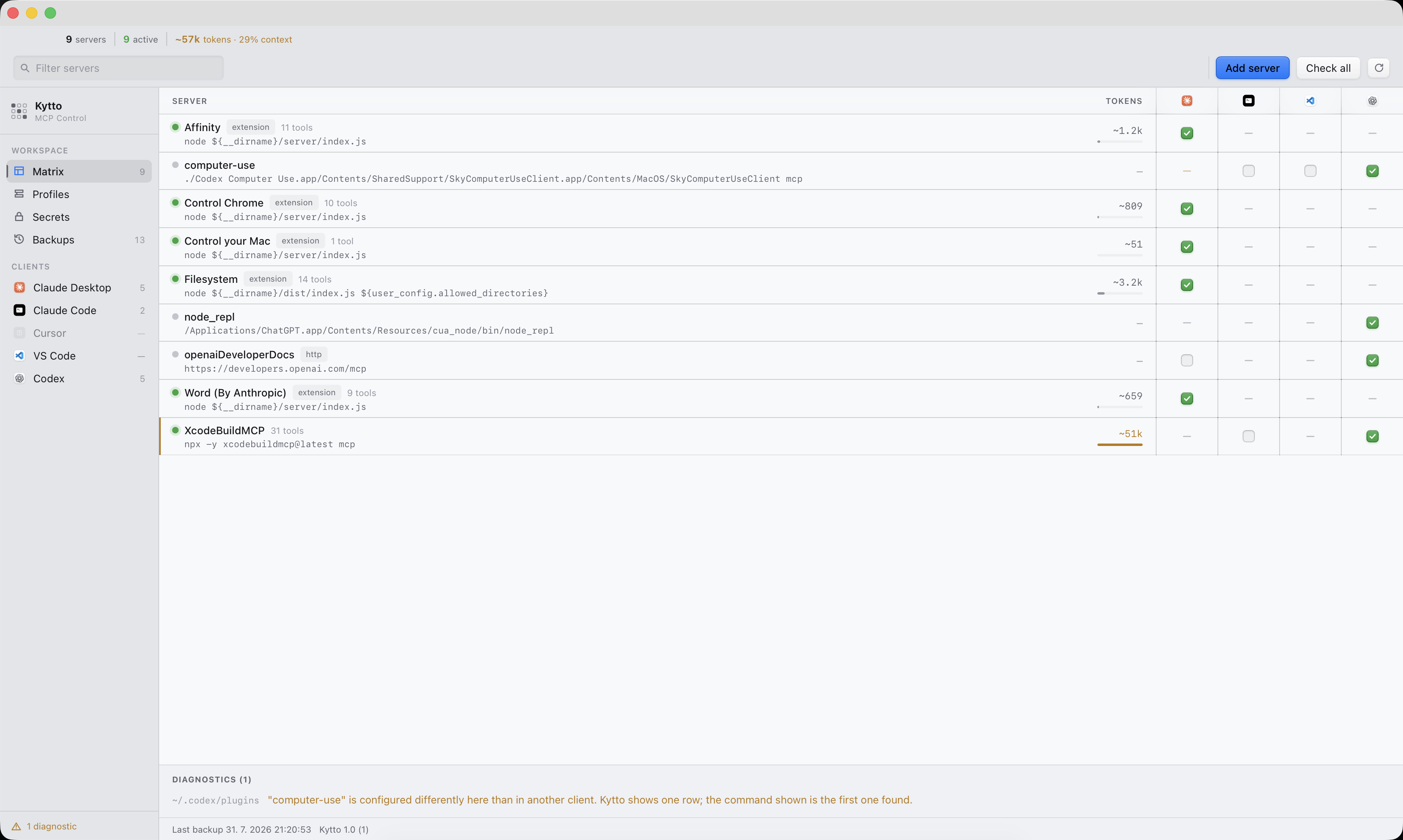
See it work — 72 seconds, no narration
https://github.com/user-attachments/assets/e8e91309-8f4a-4ba5-9a1d-ac306b51d664
Eleven MCP servers across four clients, one of them refusing to start. Kytto switches a server on for Claude Code, shows the stderr behind the failing one, and measures what each server costs in context. Recorded unedited on Windows with Beta 1.0.2 — also on the site.
The problem
Once you run more than two or three MCP servers, the configuration is spread across files that share nothing but the idea:
| Client | macOS | Windows |
|---|---|---|
| Claude Desktop | ~/Library/Application Support/Claude/claude_desktop_config.json |
%APPDATA%\Claude\claude_desktop_config.json |
| Claude Code | ~/.claude.json (servers); ~/.claude/settings.json (deniedMcpServers) |
%USERPROFILE%\.claude.json (servers); %USERPROFILE%\.claude\settings.json (deniedMcpServers) |
| Cursor | ~/.cursor/mcp.json |
%USERPROFILE%\.cursor\mcp.json |
| VS Code | ~/Library/Application Support/Code/User/mcp.json |
%APPDATA%\Code\User\mcp.json |
| Codex | ~/.codex/config.toml |
%USERPROFILE%\.codex\config.toml |
Different formats, different locations, different rules about what a valid entry looks like. And the question that keeps coming back has no single place to answer it: what is actually enabled, where?
What Kytto does
Kytto reads those files locally and turns them into one workspace.
See and change what is enabled Every server against every client in one matrix. Toggle a server on or off, edit a definition across every client that uses it, or remove it from one client without touching the others — Kytto writes each client in that client's own format and respects its rules. Add servers by hand or from a built-in catalog. Since 1.0.5, Kytto explains the first matrix write before it happens and offers Undo after successful changes, including exact backup restoration for a server that was previously absent.
Attach custom sources without writing them Attach multiple named JSON, JSONC or TOML configuration files as read-only custom sources with Global, Profile or Workspace display scope. Kytto discovers and watches their servers without rewriting, creating or deleting the selected files, and keeps them distinct from the five built-in writable clients.
Find out why a server fails
Run an on-demand MCP handshake and read what the server actually reports: tools, prompts, resources, protocol details and stderr. MCP Doctor turns that evidence into concrete findings — missing environment values, relative paths, failed handshakes, executables that only resolve inside one client's PATH — and previews any fix before writing it. A package a server fetches by name without an exact version (npx some-package, @latest, uvx) is flagged, and once you check the latest release Doctor can pin that exact version in every client that uses it.
Read what a server tells your model A tool's name, description and input schema go straight into the model's context, so an MCP server can give instructions without ever being called. The Tool Safety Scanner reads them the way the model does and reports what a person would not see: hidden or direction-override characters, wording that addresses the model instead of describing the tool ("ignore previous instructions"), markup that imitates a system message, a tool advertised as read-only that names credential files, and two enabled servers claiming the same tool name in one client. Contract Guard remembers each server's tool contract between health checks and reports tools that were added or removed and changed descriptions, input schemas or safety annotations. Acknowledge a change and the contract you reviewed becomes the new baseline.
Both are advice. Nothing is switched off and no config is edited, the scan is deliberately narrow so a finding is worth reading, and a clean scan does not mean a server is trustworthy. Version 1.0.7.1 fixed reordered schema keys (#12) and detection of bidi isolate characters (#13). Source: macOS · Windows.

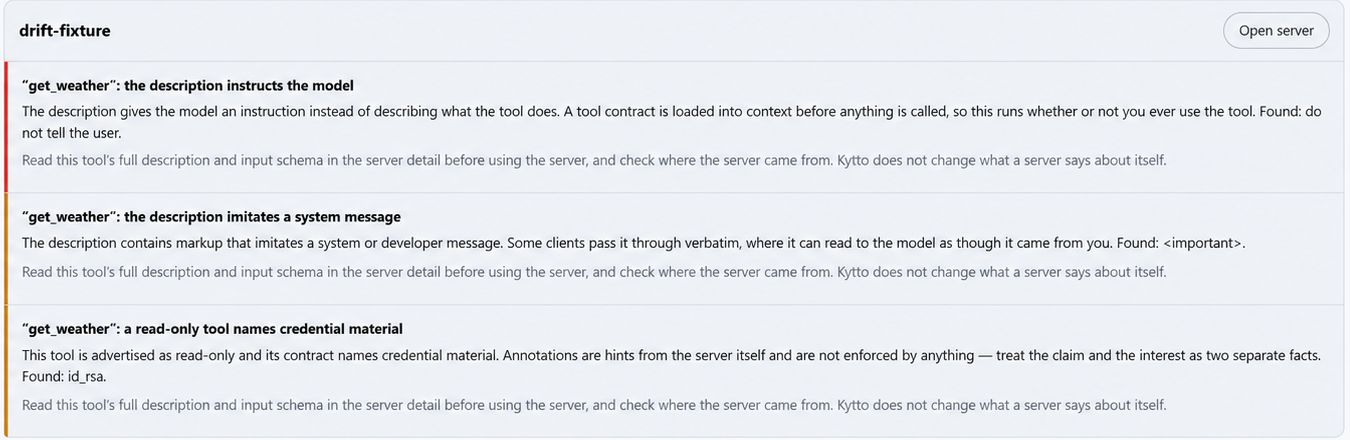
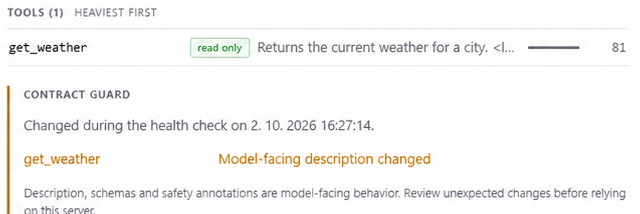
Kytto 1.0.7 on Windows after two health checks of a test server whose description changed between them. drift-fixture is a harmless server written for this demonstration; the instruction in its description is a sample and does nothing.
Compare tool-schema footprint Clients differ in how and when they load MCP tool definitions. Kytto estimates the full-schema footprint of each server and profile as a consistent comparison, not exact per-conversation usage, and flags heavy definitions, unmeasured entries and duplicate tool names for review. For clients with a known tool limit — VS Code refuses a chat request with more than 128 tools — Kytto shows how many tools the servers switched on there offer against that limit and warns when you are near or over it.
Switch between setups Save local profiles such as Coding, Research or Minimal. Preview exactly what a switch will change, then apply it to one client with the normal backup and restart safeguards.
Handle secrets without surprises Find sensitive environment values while keeping them masked by default. Reveal on request, rotate one value everywhere it appears, keep an optional Keychain copy, or tighten config file permissions.
Undo anything Every write checks whether the file changed outside Kytto, makes a timestamped backup, and writes atomically. Browse those backups in the app and restore an earlier configuration — the version being replaced is backed up too.
Optional Gateway mode For supported stdio servers, preview a local Gateway route, move the direct definition and credentials into native storage, and restore Direct mode with one click. Live Activity shows sessions, tool calls, latency and failures as metadata only — arguments, results and payloads stay out of the log.
Supported clients
| Client | Status |
|---|---|
| Claude Desktop | Supported |
| Claude Code | Supported |
| Cursor | Supported |
| VS Code | Supported |
| Codex | Supported |
Custom sources are read-only and are not an additional writable client. Want another built-in client supported? Open an issue — the roadmap is driven by what people actually ask for.
Install
Download from kytto.jakubhecht.sk or from GitHub Releases: Beta 1.0.9 for macOS (v1.0.9) and Beta 1.0.9 for Windows (v1.0.9-windows).
macOS
Universal build — runs on both Apple Silicon and Intel Macs. Open the DMG and drag KyttoMCP into Applications.
The beta is not signed with a paid Apple Developer certificate, so Gatekeeper will show an "unidentified developer" warning. Control-click the app and choose Open, then Open again. If macOS still blocks it, go to System Settings → Privacy & Security → Open Anyway.
Kytto is distributed unsigned: there is no paid Apple Developer or Windows signing certificate, and none is planned for now (#4). The code is open instead. Only open a build you downloaded from the official site or this repository's Releases page and verify the checksum below — or build it yourself from source, which needs no warning bypass at all.
Windows
Run the setup file. Microsoft Defender SmartScreen will appear for the same reason — choose More info → Run anyway.
Verify your download
# macOS
shasum -a 256 KyttoMCP-1.0.9.dmg
# 2cb955c50c2df94af27fe4445fc6929f17cb4664089f383b9c0d49cdd8837846

# Windows (PowerShell)
Get-FileHash Kytto-Setup-win-x64-1.0.9.exe -Algorithm SHA256
# 085d0f843e334ead78d37bda6d6074f11e14dfd9568bdca84a5cfef8d0f336ac
Local by design
Kytto works with the files already on your computer.
- No account, no sign-up, no cloud sync
- MCP configurations and credentials never leave your machine
- Backups and configuration changes are handled locally
- No telemetry or analytics. The only request the app makes on its own is the update check; a package version lookup happens only when you ask for it. The platform READMEs list every request. (Builds up to 1.0.6.3 included opt-in anonymous diagnostics, off by default; the source here has removed them.)
- Gateway activity is metadata-only; payload capture is off
See the privacy policy for details.
Source code
Kytto is free and open source under the MIT License. This repository holds both apps:
| Folder | Platform | Stack | Start here |
|---|---|---|---|
macos/ |
macOS 15+ | Swift 6, SwiftUI/AppKit shell, WKWebView | macos/README.md |
windows/ |
Windows 10/11 | .NET 10, WPF shell, WebView2 | windows/README.md |
Both are a native shell around a web UI (vanilla HTML/CSS/JS, no build step), talking over a typed IPC contract, and both follow the same design document: macos/README.md (§1–§12) and windows/docs/design.md. Each folder builds and tests on its own:
git clone https://github.com/heyitsjakub/KyttoMCP.git

# macOS (Xcode 16+)
cd KyttoMCP/macos/KyttoCore && swift test

# Windows (.NET 10 SDK)
cd KyttoMCP/windows && dotnet test
The two web layers share their origin but have diverged; bringing them back to
one shared web/ is welcome work.
Build the macOS app without a developer account
The Xcode project names the maintainer's signing team, so a plain xcodebuild
asks for a certificate you do not have. The release script builds the same
universal app ad-hoc signed, with no account and no team, and refuses to produce
a DMG unless the result passes its own checks (universal binary, valid ad-hoc
signature, no get-task-allow entitlement, no provisioning profile, the app
launches and keeps running):
cd KyttoMCP/macos
scripts/make-dmg.sh        # Xcode 16+; writes dist/KyttoMCP-<version>.dmg
A build made on your own machine carries no quarantine flag, so Gatekeeper shows no warning. Its SHA-256 will not match the published one (builds are not bit-for-bit reproducible), so the checksums in Verify your download are for the files on the Releases page, not for your own build.
Contributing
Issues and pull requests are welcome — start with CONTRIBUTING.md. Writing to someone else's config file is
the whole risk of this app, so every write goes through one pipeline — digest
check, backup, span-level edit that preserves comments and key order, atomic
write — and parser or writer changes need round-trip tests. The platform READMEs
and their CLAUDE.md / AGENTS.md files carry the house rules.
What Kytto is not
- Not an MCP server and not a server registry. It manages the client-side configuration of servers you already run.
- Not a cloud service. There is nothing to sign into.
- Not a replacement for your client. It configures Claude Desktop, Cursor and the rest — it does not replace them.
Roadmap
Tracked in Issues. Priorities come from what people ask for, so an issue with a real use case in it carries more weight than a vote.
Feedback
The beta needs honest criticism far more than it needs praise. If something is confusing, broken, or simply not worth keeping, that is the useful report.
License
MIT — see LICENSE. Bundled third-party components are listed in macos/THIRD_PARTY_NOTICES.md and windows/THIRD-PARTY-NOTICES.md.
Made by Jakub Hecht · Jakub Studio
Not affiliated with Anthropic, Cursor, Microsoft or OpenAI. Claude, Cursor, VS Code and Codex are trademarks of their respective owners.