LeetCode Coach(刷題教練)
A local-first study coach for LeetCode interview prep. It decides what to practice today, schedules reviews with spaced repetition, keeps structured notes, and runs timed mock interviews with think-aloud recording. To keep you coming back, an algorithm tree grows from your practice and a capybara practices with you. You can use it without an account; signing in syncs your data across devices.
You still solve problems on LeetCode. This app handles the parts around solving: planning, remembering, and explaining.
Live app: https://leetcode-coach-f6q7.onrender.com — it runs on free hosting that sleeps when idle, so the first visit after a while can take about a minute to wake up. After that it's fast, and once loaded it keeps working offline.
No account needed to look around: on the Today page, press Try it with demo data to fill the app with six weeks of made-up practice (reviews due, a streak, a growing tree, explanation drills, stuck patterns). It stays in your browser, is never synced, and Clear demo data removes it.
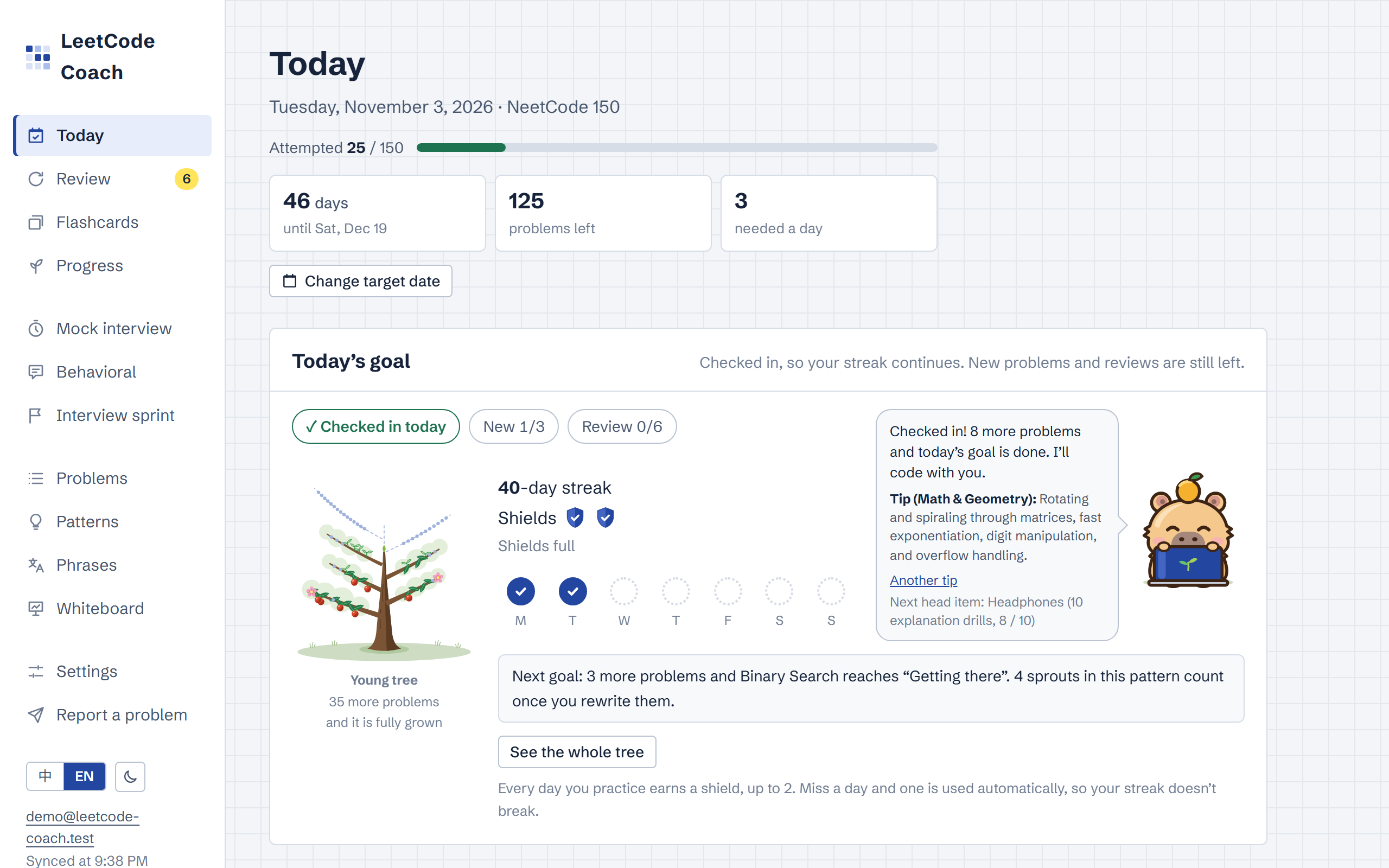
Screenshots
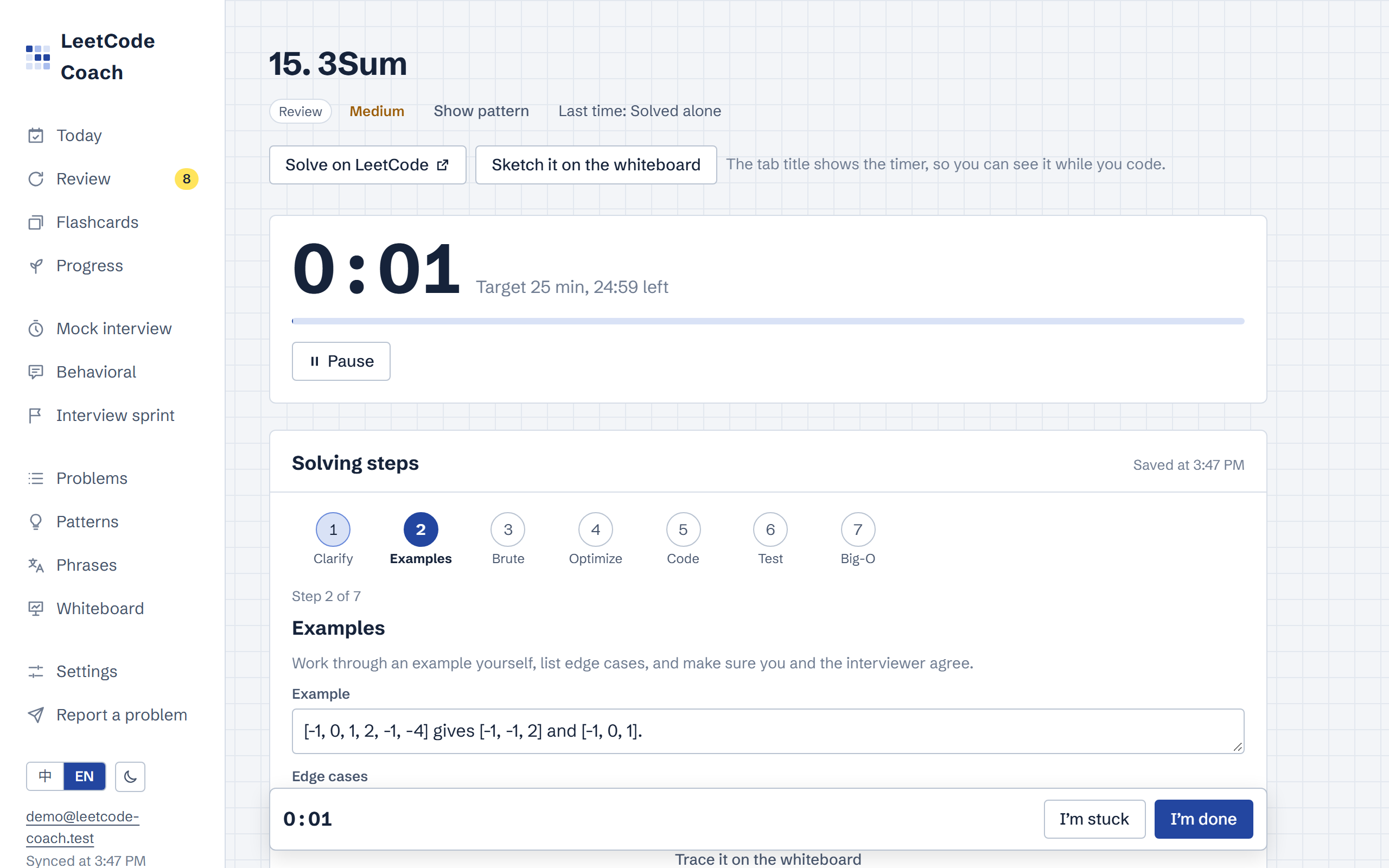 Timed practice: a timer, the interview steps one at a time with a line of notes each, and I'm stuck and I'm done always at hand. |
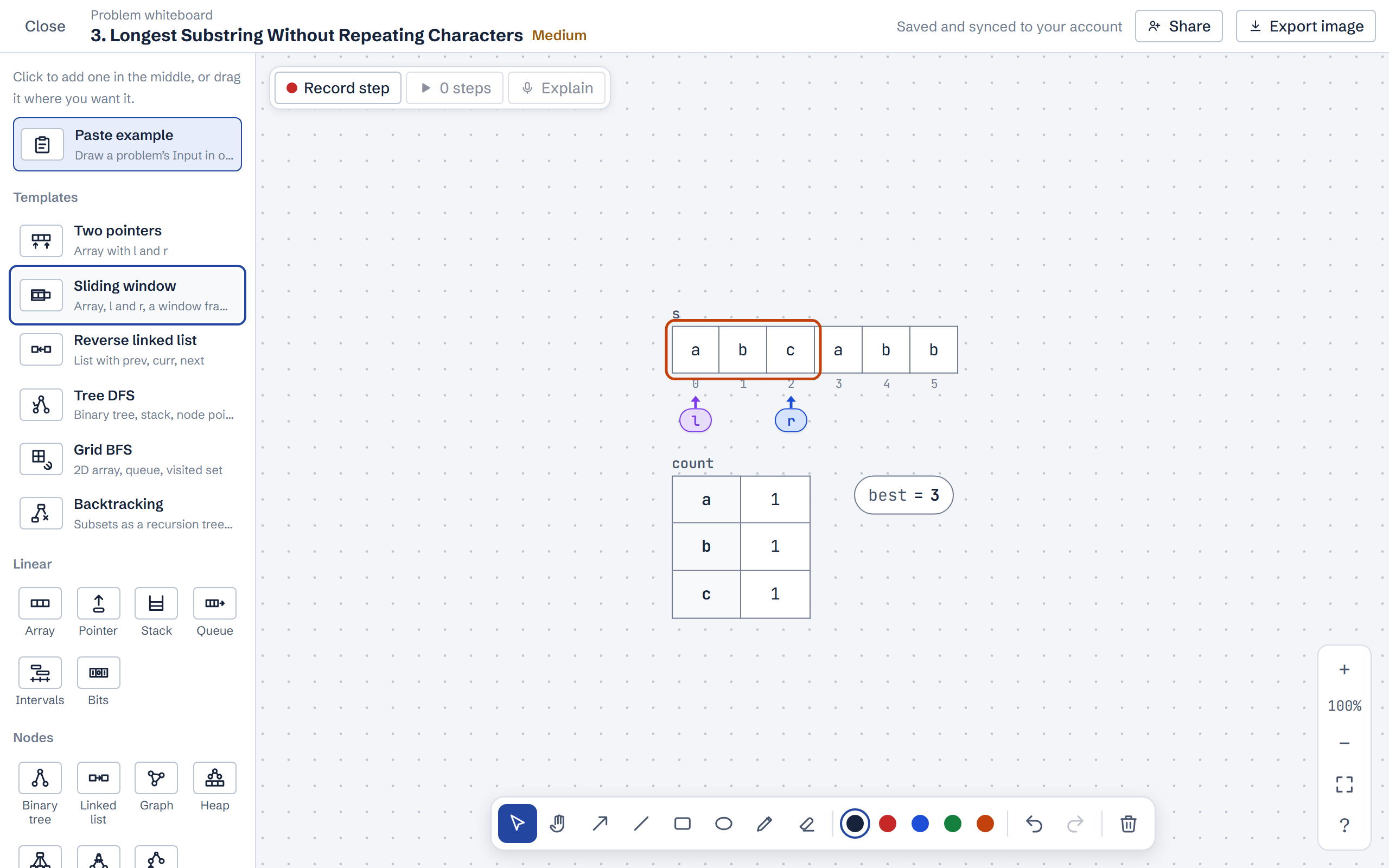 Whiteboard: arrays, pointers, a window frame, and a count dict, from a template in one click. |
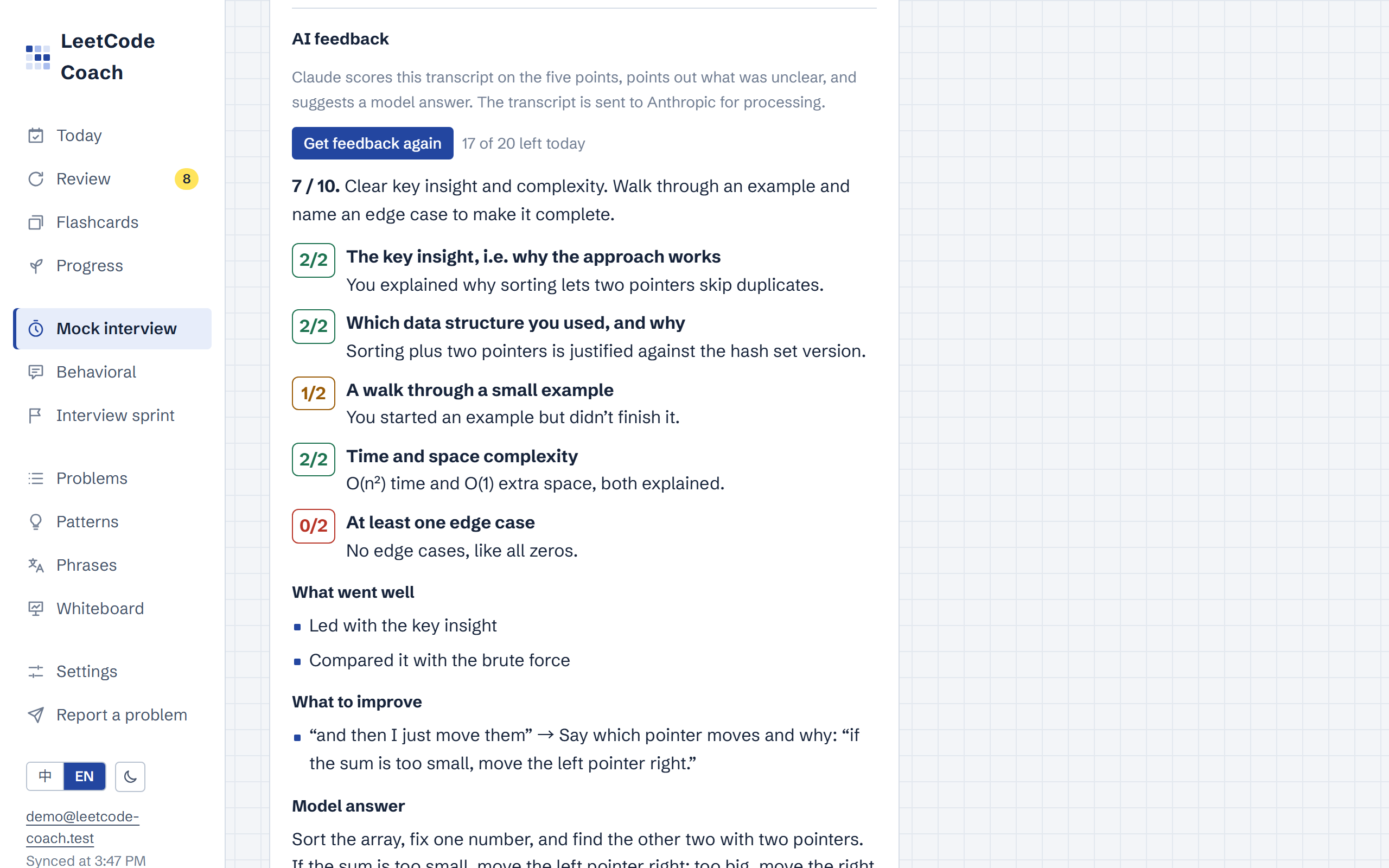 Explaining out loud: a live transcript, then Claude scores it on five points and suggests a model answer. |
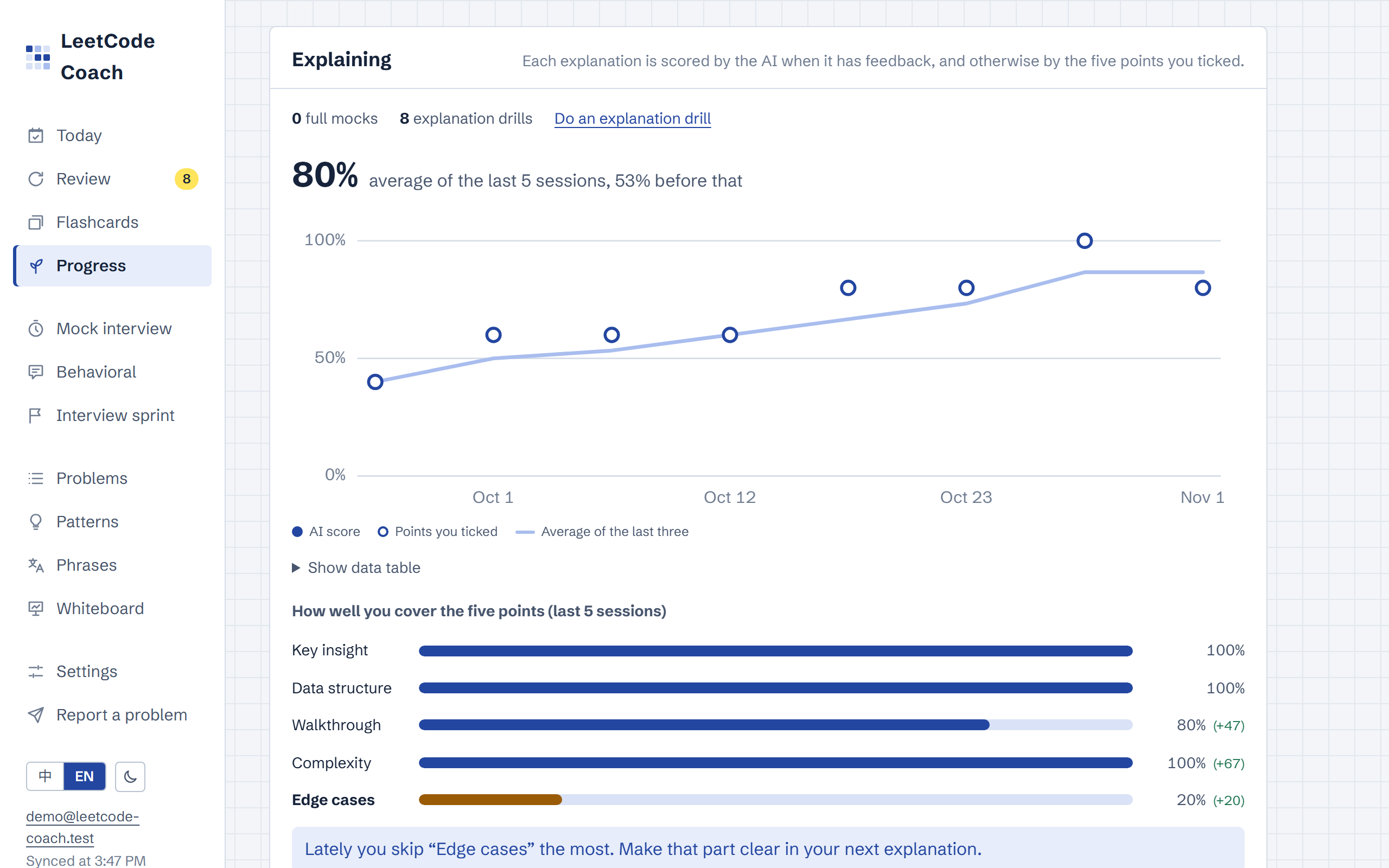 Explaining progress: every drill's score over time, how well you cover each of the five points, and the one you skip most. |
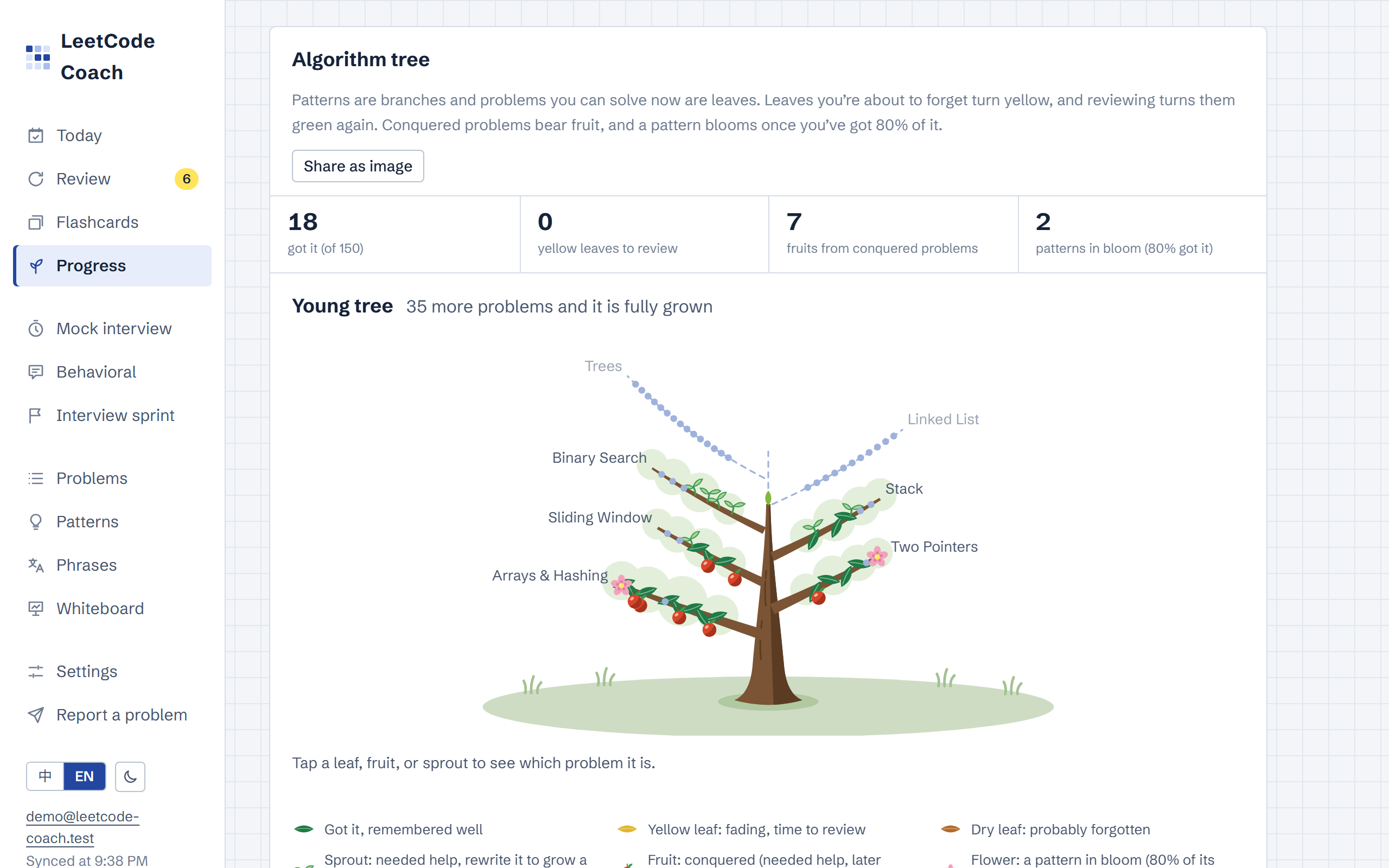 Algorithm tree: patterns are branches and problems you can solve are leaves. Leaves fade as you forget, conquered problems bear fruit, and mastered patterns bloom. |
 Capybara: it naps until you practice, codes along until today's goal is done, then celebrates. It grows with you and collects head items. |
Screenshots use generated demo data and are regenerated with npm run screenshots. They follow your GitHub theme (light or dark). The capybara animation is an SVG drawn from the app's own component and text.
Features
- Study lists: NeetCode 150, Blind 75 and Grind 169 (213 unique problems), grouped into 18 patterns. You can add any other LeetCode problem. Without LeetCode Premium, one switch leaves out the Premium problems you haven't started, from the daily plan, the sprint, mock interviews, and the problem list.
- Interview sprint: enter the interview date, the company (optional), and how many minutes you have on weekdays and weekends. Every day until the interview gets a plan, and the last days (2 by default) are review only.
- New problems come in priority order: problems tagged with the company, then one problem from each pattern you haven't touched, then two more from each weak pattern (average mastery under 40%, or stuck at least twice in the last 30 days), then the rest of your list. Each day takes as many as fit after its reviews, using rough times (Easy 20, Medium 35, Hard 50 minutes, 10 per review, 45 for a mock interview, 15 for behavioral practice). Problems that don't fit are listed instead of crammed in.
- Reviews are forecast with FSRS, including the first reviews of problems you'll learn during the sprint. A problem you'd remember with less than 90% chance on the interview day is pulled into the review-only days.
- One full mock interview two days before (and every week before that), and behavioral practice every three days ending the day before. Today shows the countdown, today's minutes, and these to-dos.
- Paste problem numbers, links, or titles to tag a company's problems in one go, which also works for noting what came up after the interview.
- Nothing is stored except the settings: the plan is recalculated from your progress every day, so a missed day spreads over the days left.
- Timed practice with tiered hints:
- Starting a problem starts a timer against a target time for its difficulty (Easy 15, Medium 25, Hard 40 minutes). The browser tab title shows the timer, so you can see it while you write code on LeetCode.
- The timer survives a page reload. A bar at the bottom keeps the timer, I'm stuck, and I'm done in reach while you scroll.
- If you get stuck, open hints one layer at a time: which pattern to use, a hand-written key insight for each of the 213 problems, the edge cases to check, then the pattern template. A link to the LeetCode solutions comes last.
- When you finish, the minutes are filled in (you can adjust them) and a self-rating is suggested based on how many hints you used.
- Solving steps: practice, mock interviews, and the problem page share the seven interview steps (clarify, examples, brute force, optimize, code, test, complexity), and you write one line per step. On the practice page the steps open one at a time, and you can jump to any of them. Examples split into an example and its edge cases, and Optimize asks three questions: what's slow, what's repeated, and what to keep. The lines are saved with the problem's notes and synced, so a review starts from how you thought it through, not just the code. In a mock interview they sit under each step's checklist.
- Write the script from your steps: a dialog lays out the five sentences of the English explanation script, each with the step notes that feed it (for example, the edge-case sentence shows your edge cases). You write each sentence yourself, which is the practice, and save it as the problem's script.
- Hints that start from where you're stuck: pick the step you're stuck on to see how to think about it, next to what you wrote in the step before. This doesn't count as a hint. Some steps jump straight to the matching layer: Examples and Test to the edge cases, Optimize to the key insight, and Code to the template.
- Spaced repetition with FSRS: after each attempt you rate yourself (solved alone / needed a hint / read the solution / still stuck), and FSRS, the scheduler Anki uses, picks the next review date.
- Each problem has a stability (days until your chance of remembering it drops to 90%) and a difficulty from 1 to 10. Solved alone counts as Good, a hint as Hard, and reading the solution or still being stuck as Again. A review that came late but still went well grows the interval more.
- Problems come back when you're about as likely to remember them as the target retention in Settings (90% by default; 80–95%). Changing it reschedules every problem.
- Time counts too. Each attempt's minutes are compared with the problem's target time. Within the target it counts fully; past it, the memory gain shrinks steadily, down to 0.6 at twice the target (about what FSRS gives Hard). Finishing early adds nothing extra.
- So do hints and where you got stuck. The deeper the hints went, the less the attempt counts: compared with solving alone, about 0.8 after the pattern hint, 0.6 after the key insight, 0.5 after the edge cases, and 0.4 after the template. Missing the pattern, the optimization, or how to code it means part of it is forgotten (×0.75); missing an edge case or having a bug is more of a slip (×0.9). These weights multiply.
- Shaky solves come back within a week. After needing a hint, taking twice the target or longer, or getting stuck on the pattern, the optimization, or the code, the next review is at most 7 days away, so you confirm it before the interval grows. FSRS's memory estimate is kept, so solving it on time then stretches the next interval out again.
- The review queue puts the problem you're most likely to have forgotten first. Problem pages show how likely you are to remember it now, how long it holds, its difficulty, and where it sits on the algorithm tree.
- Past records can be edited or deleted, from Done today on Today or the problem's history, and the schedule is rebuilt from what's left.
- The scheduler is written from the FSRS-6 formulas with the default parameters, and the tests compare it with the official
ts-fsrs(a test-only dependency) on hundreds of random review histories.
- Daily plan: the Today page lists the reviews that are due plus N new problems. By default the new problems are interleaved: mostly the pattern you're learning, plus one from another pattern so you practice recognizing which approach fits, and a pattern you've been stuck on lately (solutions read, still stuck, or stuck reasons ticked) gets an extra, easier problem. The pattern isn't shown until you ask, as in an interview. Settings can switch to strict roadmap order or to focusing on one pattern, and the day's list is planned from the morning's state so it doesn't reshuffle as you work. At the top, a progress bar and three numbers show how much of the list is left, your daily pace, and when you'll finish the first pass. With a target date set, they show the days left and how many new problems a day you need, flagged when your daily goal is too low.
- Any new problem you start counts toward the daily goal, wherever you start it. One more problem adds the next one in roadmap order.
- Settings can cap how many Medium and Hard problems and how many reviews come each day; the review page lists what's up next beyond today's cap.
- Adjust difficulty automatically (on by default, off during a sprint): when most recent Mediums needed a hint, new problems include fewer Mediums and no Hards until you solve them on your own again.
- A review whose last attempt needed a hint or the solution is marked Rewrite: write it from scratch, without your notes, until it passes.
- Record another problem finds a problem by number, title, or LeetCode URL. If it isn't in your lists yet, you add its details and record it in the same dialog.
- Mark problems I solved before (on Problems) schedules problems you solved before using the app for review in one go. A big batch is spread out so no more than five problems come due on any day, counting reviews already scheduled. They don't count toward streaks or session totals.
- Staying motivated: everything here is calculated from your practice records, so nothing extra is synced; only small choices, like which head item the capybara wears, stay in the browser.
- Today's goal: one problem or one round of flashcards checks you in, and new problems and reviews are counted separately. Every day you practice earns a streak shield (up to two); miss a day and one is used automatically, so the streak doesn't break.
- Algorithm tree: each pattern is a branch and each problem you can solve now is a leaf, colored by how likely you still remember it (FSRS): yellow when it's fading, dry when it's probably forgotten. A problem that needed a hint or the solution is a sprout until you rewrite it on your own. Conquered problems bear fruit, and patterns where 80% of the problems are solid bloom. The tree grows from a seed: it sprouts at the first problem and becomes a sapling at 5, a young tree at 20, and a grown tree at 60. Today shows a small one, Progress the whole tree, and Share as image draws it with this week's numbers.
- Capybara: it grows from a baby to a young (7 days of practice) and a grown-up capybara (21 days), and collects ten head items for goals like a 7-day streak, 100 flashcards, or 10 explanation drills. On Today it naps in bed until you practice, codes on a laptop until today's goal is done, then drinks bubble tea or soaks in a hot spring (one or the other each day). On wide screens a speech bubble next to it has an encouraging line, a daily tip (a Python tip or a pattern summary), and the head item you're closest to.
- Wins and next goals: a message celebrates conquering a problem, a pattern leveling up, a new personal best time, the tree's next stage, and new head items. Today names the next goal, such as "3 more problems and Binary Search reaches Got it", and for the first three days of each week it shows last week's numbers until you dismiss them.
- Progress also shows your interview readiness (problems you can solve now, overall, by difficulty, and by company tag), a pattern map with each pattern's level, and a weekly recap compared with last week.
- Daily reminders: when signed in, pick an hour in Settings, and on days you haven't practiced by then you get a notification (Web Push). Today walks you through turning it on, including adding the app to the home screen on iPhone.
- Notes: for each problem you can keep a one-line idea, an English explanation script, time and space complexity, pitfalls, and your code (Python or one of eight other languages). Notes save automatically.
- Pattern cards: each pattern has recognition signals, common mistakes, and a Python template you can edit.
- Interview phrases: English phrases for each stage of a coding interview, with a self-quiz that hides each phrase until you've tried saying it, and the five-part outline for explaining a solution.
- Reference explanations: a hand-written model answer in English for each of the 213 problems, in five sentences (key insight, data structure, example, complexity, edge case). It stays collapsed, with a nudge to try explaining it yourself first, and it's shown next to your own attempt after an explanation drill.
- Flashcards for spare minutes: five tap-only cards per round, about a minute, sized for a phone between gym sets.
- Cards are generated from your own data:
- which pattern a problem uses
- its key insight and its complexity (distractors come from the same pattern, and patterns a clue could also fit are never offered against each other)
- an "explain it out loud, then flip" card
- the pattern signals
- 59 Python tips whose answers were checked by running the code
- Problem cards start with a one-line reminder of what the problem asks, written so it doesn't give away the technique.
- I don't know shows the answer instead of rewarding a lucky guess.
- Missed cards come back at the end of the round with reshuffled options until you get them right, and the summary lists them with their answers.
- Practice everything, only problems you've done, only clues, only Python tips, or one pattern.
- A rest timer (60–180 seconds) counts down between sets. When it ends it beeps, vibrates where supported, and shows an alert, and it asks the browser to keep the screen on while it runs.
- Answers save one at a time, sync like attempts, and count toward the streak.
- Cards are generated from your own data:
- Whiteboard: DSA Whiteboard, which I built from scratch for this app and later split into its own open-source package (try it standalone). Drag arrays, pointers, stacks, queues, dicts, sets, 2D arrays, variables, binary trees, linked lists, graphs, heaps, union-find, tries, bits, recursion trees, DP tables, intervals, tables, text, code, and sticky notes onto a pannable, zoomable canvas to trace an idea by hand. It has templates for common patterns, Build from text (paste a problem's example), range frames for sliding windows, a LeetCode-style code box with line-by-line tracing, step-by-step playback, and PNG export. See its README for the full list.
- Explain mode (this app only): walk through your steps out loud in English. The current step's note shows as a prompt while a timer, audio recording, and live transcript run. Afterwards you see how long you spent on each step (the slow one is usually the part you can't explain smoothly yet), play back the audio, and fix the transcript. On a problem's whiteboard you can also tick which of the five points you covered, get AI feedback, save the transcript as the problem's script, and save the run as an explanation drill, marked "Whiteboard" in the mock interview history.
- Each problem has its own board, plus a scratch board. My whiteboards lists them and says where they're stored; boards save automatically and sync.
- Share a board for a mock interview or study session: everyone who opens the link edits it together, with each person's cursor and name. Joining doesn't need an account. Your own board isn't touched, and "Save a copy to my board" keeps the shared one. Rooms run on the package's Cloudflare Worker.
- On the practice page the board opens on top, so the timer keeps running.
- The app installs the package from GitHub at a release tag and plugs in its own storage, sync status, toasts, and explain mode. The server validates boards with the package's zod schema before storing them.
- Behavioral interviews: a STAR story bank for the non-coding round.
- Write each story as Situation, Task, Action, and Result, and tag what it can answer: conflict, failure, leadership, deadlines, ambiguity, influence, learning, proudest work, feedback, or teamwork. Stories autosave and sync like notes.
- The editor offers English opening phrases for each part (click one to add it), estimates how long the story takes to say at about 140 wo