Type what you ate in plain Spanish. Get a macro table (kcal, protein, carbohydrate, fat) that you can copy into a calorie-tracking app (Zepp and others).
"sepia Hacendado, el paquete de 403 g, algo de aceite en la sartén, huevos cocidos, 2, 130g"
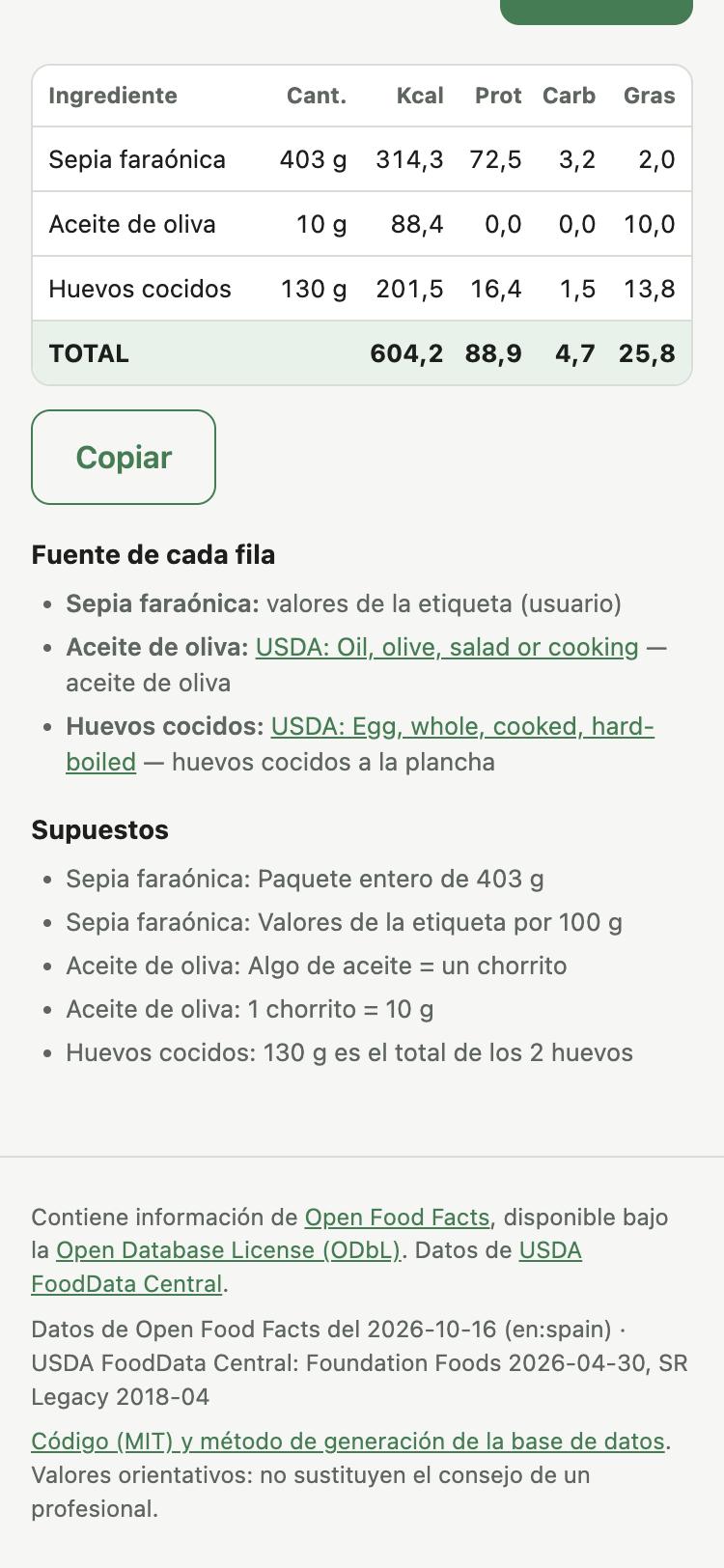
The LLM never calculates and never invents nutrition values. It only reads the text and chooses a food from a list that the backend gives it. The backend does all the arithmetic with deterministic code and the open data of Open Food Facts and USDA FoodData Central.
Single use: no accounts, no history, no stored requests. Each request is independent.
Resumen en español
Macro Translator es una aplicación web autoalojable. Escribes en lenguaje natural lo que has comido y recibes una tabla de macros (Ingrediente | Cantidad | Kcal | Prot | Carbs | Grasas, con fila TOTAL) optimizada para el móvil, con un botón para copiarla.
- El LLM solo interpreta el texto (ingredientes, cantidad tal como la escribes, estado y supuestos) y elige el alimento entre los candidatos que le da el programa.
- El programa convierte las cantidades a gramos, escala los valores por 100 g, suma y redondea. Un alimento sin candidato válido sale como "no encontrado": no se estima.
- Los datos vienen de Open Food Facts (productos envasados, filtrados por país) y de USDA FoodData Central (alimentos genéricos). Cada usuario genera su base de datos con el ETL.
- Funciona con cualquier endpoint compatible con OpenAI, también con modelos locales pequeños (probado con Qwen3.5-9B y gpt-oss-20b).
Inicio rápido: copia .env.example a .env, configura el LLM, ejecuta
docker compose --profile etl run --rm etl y después docker compose up -d.
Abre http://localhost:8000.
How it works
text ──► 1. Interpret (LLM call 1) ──► ingredients, quantity as written, state, assumptions
                                         │  backend: quantity -> grams (10 ml oil -> 9.2 g)
                                         ▼
         2. Search (DuckDB full-text) ──► 5 candidates from the preferred source
                                         │  brand -> Open Food Facts first, generic -> USDA first
                                         ▼
         3. Select (LLM call 2) ────────► one candidate key or null for each ingredient
                                         │  null -> second round with the other source
                                         ▼
         4. Calculate (backend) ────────► value_100g × grams / 100, totals, coherence check
- Label values that the user types ("78 kcal, 18 g de proteína por 100 g") win over the database.
- "huevos, 2, 130g" is 130 g in total. Only a marker ("2×130 g", "cada uno", "de 130 g") makes a weight per piece. The backend checks this rule in code, because small models sometimes read "2, 130g" as 2 × 130 g.
- Assumptions of the choice. When the chosen food fixes something that you did not write (fat percentage, skin, cooking method, variant), the app shows it in "Supuestos" under the table. The reason for the choice then never says "exact". The LLM writes these assumptions, and the code adds the fat percentage, the skin and the cooking method when the LLM forgets them.
- Sensitivity warning. When another plausible variant of the same food differs by more than 25 % in kcal (and by 10 kcal or more), the row shows it: "≈ Si es picada magra (95 %): unas 230 kcal menos". The LLM names the variant, and the code calculates the difference. For fat variants (ground meat), the code finds the variant itself when the LLM gives none. The warning never changes the total.
- The LLM output is always validated with Pydantic. On an error the backend asks again (max 2 times) and gives the error to the model.
- No native tool calling. The backend uses
response_format(JSON schema or JSON object) when the server supports it, and extracts the JSON from the text when it does not. - The prompts are in
backend/prompts/as Markdown files.
Requirements
- Docker with Docker Compose 2.24 or later.
- About 10 GB of free disk for the first ETL run (the Open Food Facts dump is 7.95 GB).
- An OpenAI-compatible LLM endpoint: a local server (LM Studio, Ollama, llama.cpp, vLLM, mlx-lm) or a hosted provider.
Quick start
-
Get the code and make your configuration:
git clone https://github.com/ivanol55/macro-translator.git cd macro-translator cp .env.example .env -
Set
LLM_BASE_URLandLLM_MODELin.env(see Configure the LLM). -
Build the database. The first run downloads about 8 GB and takes about 5–10 minutes:
docker compose --profile etl run --rm etl -
Start the app:
docker compose up -d -
Open http://localhost:8000.
Configure the LLM
The API key stays in the backend. The browser never receives it.
| Server | LLM_BASE_URL (from Docker) |
LLM_MODEL example |
Notes |
|---|---|---|---|
| LM Studio | http://host.docker.internal:1234/v1 |
qwen3.5-9b |
Start the server in LM Studio (Developer tab). |
| Ollama | http://host.docker.internal:11434/v1 |
qwen3.5:9b |
ollama serve, then ollama pull the model. |
| llama.cpp | http://host.docker.internal:8080/v1 |
gpt-oss-20b |
llama-server -m model.gguf --jinja |
| llama.cpp on another PC | http://192.168.1.50:8081/v1 |
qwen3.5-9b |
Set LLM_API_KEY if the server has --api-key. See the Colima note below. |
| mlx-lm | http://host.docker.internal:8081/v1 |
full model path | mlx_lm.server --model <path> --port 8081 |
| Hosted (OpenAI example) | https://api.openai.com/v1 |
gpt-5-mini |
Set LLM_API_KEY. Any OpenAI-compatible provider works. |
Leave LLM_API_KEY empty for local servers.
Thinking models. Models such as Qwen3/Qwen3.5 can "think" for a long time before they
answer. If your server supports it, turn thinking off with LLM_EXTRA_BODY. The backend
adds this JSON to each request:
LLM_EXTRA_BODY='{"chat_template_kwargs":{"enable_thinking":false}}'
Use single quotes. Then the same .env works for Docker Compose and for set -a; . ./.env.
With Qwen3.5 9B on llama.cpp, thinking off gave the same results about 5 times faster.
LLM on another machine, Docker on macOS with Colima. The containers may not reach other machines on your LAN: macOS can block local-network access for the Colima helper process. Then run the app without Docker (see Development), or run it on the machine of the model.
Servers without JSON mode. LLM_RESPONSE_FORMAT=auto tries json_schema, then
json_object, then plain text. Set it to none if your server fails in an unexpected way.
Open it from your phone
- Set
BIND_ADDRESS=0.0.0.0in.env. - Run
docker compose up -dagain. - On the phone, open
http://<IP of the computer on your LAN>:8000.
The "Copiar" button works on plain HTTP too: the page uses a fallback when
navigator.clipboard is not available.
Security. The app has no login. By default it listens only on
127.0.0.1. Open it only on a network that you trust. For the internet, put it behind a reverse proxy with HTTPS and authentication, and read the obligations in DATA_LICENSES.md.
Settings for one machine
Put the changes for one machine in docker-compose.override.yml next to docker-compose.yml.
Docker Compose reads it automatically, and git ignores it. Example: the app joins the Docker
network of an LLM stack on the same host, and shows on a Homepage dashboard.
services:
  app:
    labels:
      homepage.group: Containers
      homepage.name: Macro Translator
      homepage.icon: mdi-food-apple
      homepage.href: http://192.168.1.50:8000
    networks: [default, llm]
networks:
  llm:
    name: local-ai_default   # the network of the LLM stack
    external: true
Then set LLM_BASE_URL=http://llama:8080/v1 (the container name of the LLM server).
Refresh the data
Run the ETL again. It downloads only the files that changed, then builds the database from zero and replaces it in one step. The running app opens the new file on its next request.
docker compose --profile etl run --rm etl
Every Monday at 04:00 with cron:
0 4 * * 1 cd /path/to/macro-translator && docker compose --profile etl run --rm etl >> etl.log 2>&1
Open Food Facts updates its dump often. USDA publishes Foundation Foods about twice a year. SR Legacy does not change.
Configuration
All settings are environment variables. .env.example lists all of them.
| Variable | Default | Use |
|---|---|---|
LLM_BASE_URL |
http://host.docker.internal:1234/v1 |
OpenAI-compatible endpoint |
LLM_API_KEY |
empty | Key for hosted providers |
LLM_MODEL |
qwen3.5-9b |
Model name |
LLM_TIMEOUT_SECONDS |
180 |
Time limit for one LLM request |
LLM_RESPONSE_FORMAT |
auto |
auto, json_schema, json_object or none |
LLM_MAX_RETRIES |
2 |
Extra attempts after a validation error (0–2) |
LLM_MAX_TOKENS |
empty | Optional max_tokens |
LLM_EXTRA_BODY |
empty | JSON added to each LLM request |
BIND_ADDRESS |
127.0.0.1 |
0.0.0.0 opens the app to the LAN |
APP_PORT |
8000 |
Port on the host |
MAX_INPUT_CHARS |
2000 |
Maximum text length |
DEBUG |
0 |
1 logs request text and LLM output |
DATA_VOLUME |
macro-data |
Docker volume name, or a host path such as ./data |
OFF_COUNTRY_TAG |
en:spain |
Open Food Facts country filter (countries_tags) |
OFF_LANG |
es |
Preferred product-name language |
OFF_PARQUET_URL |
Hugging Face dump | Open Food Facts source |
USDA_FOUNDATION_URL |
newest release | Empty = newest release on the FDC download page |
USDA_SR_LEGACY_URL |
2018-04 release | SR Legacy source |
ETL_FORCE_DOWNLOAD |
0 |
1 downloads everything again |
DUCKDB_MEMORY_LIMIT |
empty | Optional ETL memory limit, for example 4GB |
The app logs no request content unless DEBUG=1.
The data
The ETL (etl/build_db.py) is a Python script with DuckDB. It has no
orchestrator. It caches the downloads in the data volume, continues interrupted downloads,
checks the SHA-256 of the Open Food Facts dump, and builds the database from zero on each run.
Cleaning rules (both sources):
- Keep only rows with kcal, protein, carbohydrate and fat per 100 g.
- Remove rows with kcal > 900 per 100 g or with negative values.
- Remove rows where |P×4 + C×4 + F×9 − kcal| > 20 % of kcal. A floor of 5 kcal per 100 g keeps foods near 0 kcal (water, diet drinks).
- Remove rows where protein + carbohydrate + fat > 100 g per 100 g.
- USDA energy: nutrient 1008. If 1008 is missing (Foundation Foods), Atwater specific factors (2048), then Atwater general factors (2047).
Tables: alimentos (the foods), indice_off and indice_usda (one DuckDB full-text index
for each source: Spanish and English stemming), metadata (download date, source URL,
country filter, rows before and after cleaning).
Acceptance test results
Run on 2026-10-16 on an Apple M5 MacBook with 24 GB, with the full data and the app in Docker.
Input:
sepia faraónica Hacendado, el paquete entero de 403 g, la etiqueta pone por 100 g 78 kcal, 18 g proteína, 0,8 g hidratos, 0,5 g grasa. Algo de aceite de oliva en la sartén. Huevos cocidos, 2, 130g
Result (identical with both models):
| Ingrediente | Cantidad | Kcal | Prot | Carbs | Grasas | Source |
|---|---|---|---|---|---|---|
| Sepia faraónica | 403 g | 314,3 | 72,5 | 3,2 | 2,0 | label values (user) |
| Aceite de oliva | 10 g | 88,4 | 0,0 | 0,0 | 10,0 | USDA: Oil, olive, salad or cooking |
| Huevos cocidos | 130 g | 201,5 | 16,4 | 1,5 | 13,8 | USDA: Egg, whole, cooked, hard-boiled |
| TOTAL | 604,2 | 88,9 | 4,7 | 25,8 |
Expected: ~604 / ~88.9 / ~4.6 / ~25.8. All values are within ±2 % (carbohydrate: +1.7 %).
| Model | Server | JSON mode | Reference case | tests/test_live_llm.py |
|---|---|---|---|---|
| gpt-oss-20b (MXFP4) | llama.cpp llama-server |
json_schema |
pass, 32 s | 3/3 pass |
| Qwen3.5-9B (MLX 8-bit) | mlx_lm.server, thinking off |
none: JSON extracted from text | pass, 42 s | 3/3 pass |
| Qwen3.5-9B (IQ4_XS) | llama.cpp Vulkan on an AMD RX 6600 PC on the LAN, thinking off | json_schema |
pass, 29 s | 3/3 pass, 2 runs |
| Qwen3.5-9B (IQ4_XS) | same PC, thinking on (budget 1024 tokens) | json_schema |
pass, 166 s | not run |
The RX 6600 ran at 17 tokens/s in this test (screen off, low memory clock), not its usual 38.
The live tests also check: "huevos, 2, 130g" = 130 g, "2×130 g" = 260 g, "10 ml de aceite" = 9.2 g, and "unicornio a la plancha" = "no encontrado".
Database built from the full data:
| Source | Rows in the source | With the 4 values | After cleaning |
|---|---|---|---|
Open Food Facts (en:spain) |
359,818 | 261,506 | 239,947 |
| USDA Foundation Foods (2026-04-30) | 469 | 377 | 342 |
| USDA SR Legacy (2018-04) | 7,793 | 7,793 | 7,474 |
- Database size: 25.4 MB (
macros.duckdb, 247,763 foods with search indexes). - Download: 7.95 GB in about 5 minutes. Build from the cache: about 5 s (native) or 20 s (Docker on Colima).
Limitations
- Alcoholic drinks fail the coherence rule (alcohol gives 7 kcal/g), so the ETL removes them.
- Many Spanish oils give values per 100 ml in Open Food Facts. For generic oil the app prefers USDA (per 100 g).
- The quality of the food choice depends on the model. Read the "Fuente de cada fila" list under the table.
- The app has no login and no rate limit.
Development
uv sync
uv run pytest                      # tests with fixtures and a fake LLM
uv run ruff check . && uv run ruff format --check .

# Build the database without Docker (writes ./data/macros.duckdb)
uv run python etl/build_db.py

# Run the app without Docker on http://127.0.0.1:8000
LLM_BASE_URL=http://127.0.0.1:1234/v1 LLM_MODEL=qwen3.5-9b \
  PYTHONPATH=backend uv run python -m macro_translator

# Run the pipeline from the terminal
LLM_BASE_URL=http://127.0.0.1:1234/v1 LLM_MODEL=qwen3.5-9b \
  uv run python scripts/cli.py "huevos cocidos, 2, 130g"

# Acceptance tests against a real model
LIVE_LLM=1 DB_PATH=data/macros.duckdb LLM_BASE_URL=http://127.0.0.1:1234/v1 \
  LLM_MODEL=qwen3.5-9b uv run pytest tests/test_live_llm.py
See CONTRIBUTING.md. Before optimizing latency, read
bench/FAILED_EXPERIMENTS.md: per-ingredient parallel
selection, speculative round 2, short JSON keys and short motives were measured and
rejected on the current single-GPU architecture.
Licences
- Code: MIT, see LICENSE.
- Open Food Facts data: Open Database License (ODbL) 1.0 and Database Contents License (DbCL) 1.0. The database that the ETL makes is a derivative database under the ODbL.
- USDA FoodData Central data: public domain (CC0 1.0).
- This repository does not contain or distribute the database or the dumps. Each user builds them with the ETL. The footer of the app always shows the attribution of both sources.
DATA_LICENSES.md has the details, the USDA citation, and the obligations for a public instance.
Values are approximate. They do not replace the advice of a health professional.