MayaSabha (मायासभा)
Created by Dr. Atul Tiwari
In the Mahabharata, the architect Maya built the Pandavas a hall of illusions, where polished floors looked like pools of water and pools looked like floors.
MayaSabha turns your living room into a hall of illusions. A projector, a browser and a phone are all it takes: characters live on your real walls and hop between your picture frames, and a window opens in the ceiling to the sky, the sea or the stars. It's made for small children and their families, and runs fully offline on your home Wi-Fi.
▶ Play online: atultiwari.github.io/mayasabha. Built-in characters, keyboard controls. For the phone remote and your own characters, run it at home.
- Plain web pages, no install for players. Fullscreen black pages run on the computer connected to the projector. Black projects as no light, so only the magic shows on the wall.
- Corner-pin warp fits the picture to any wall, floor or ceiling, even with the projector tilted.
- Draw ledges over real objects (frame tops, shelves, door frames) and characters walk and hop on them.
- Your phone is the remote: scan the QR code on the home page; buttons appear for whatever is running.
- Clap to play: the microphone detects claps and shouts (no audio leaves the computer).
- Your own characters: swap in pictures of your child's favourites, kept private and out of git.
- Plain JavaScript ES modules, no build step, one small Node server, 60+ unit tests.
Room Map: set up your wall once
Open Room Map, fit the picture to the wall (E) and trace the real objects (T): picture frames, a shelf, the door, a clock. Every wall activity then uses the same map:
- Maya Masks lights the objects up.
- Room Pet walks along the tops of frames, shelves and the door.
- Cushion Physics (wall mode, W) makes them solid, so fruit lands on the frame and slides off.
Tag a framed puja picture (or any picture you'd rather not cover) as picture: activities only decorate
around it (gold glow, diyas on top, a marigold garland) and never project over it or bounce things off it.
This is enforced by a unit test across every scene.
Activities
Room Pet 🐶
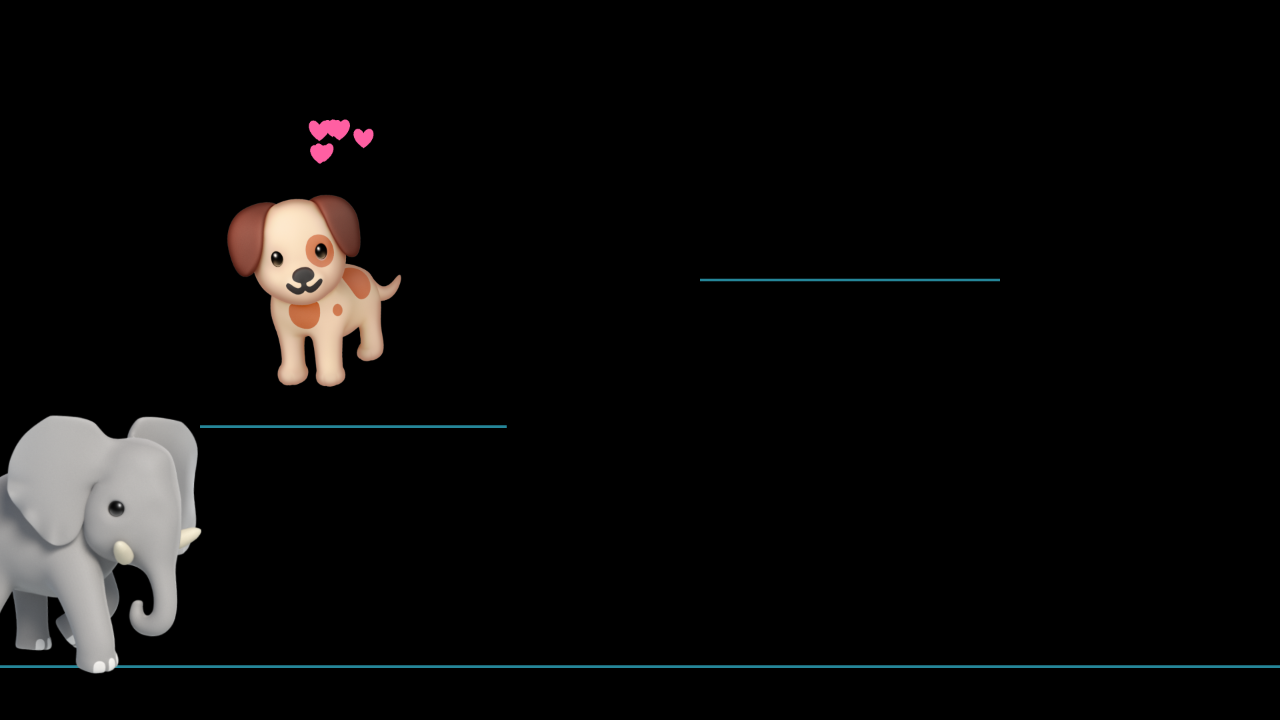
A puppy lives on your wall. It walks along the ledges you drew over your frames, hops between them, eats fruit you drop from the phone, jumps for joy when someone claps, follows visiting friends (an elephant, a monkey on a vine, a mouse it chases, a waddling penguin) and falls asleep when left alone.
| Key | Phone | What happens |
|---|---|---|
| 1 2 3 | 🍌 🍎 🍊 | Fruit falls, often onto a frame; the puppy climbs up and eats it |
| 4 5 6 7 | 🐘 🐒 🐭 🐧 | A friend visits: elephant, monkey, mouse (chase!), penguin |
| Space | 🎉 | Jump for joy |
| C B S Z | 🐶 🔊 🪑 💤 | Come / woof / sit / sleep |
| M | – | Microphone on: clap and the puppy jumps |
| E | – | Edit: fit the corners, draw ledges over real objects (G sets the floor line) |
| D | 🎬 | Demo sequence for filming |
| [ ] | – | Puppy smaller / bigger |
Tip for little ones: start with the puppy asleep (Z) and let your child clap to wake it, then let them choose the fruit on the phone.
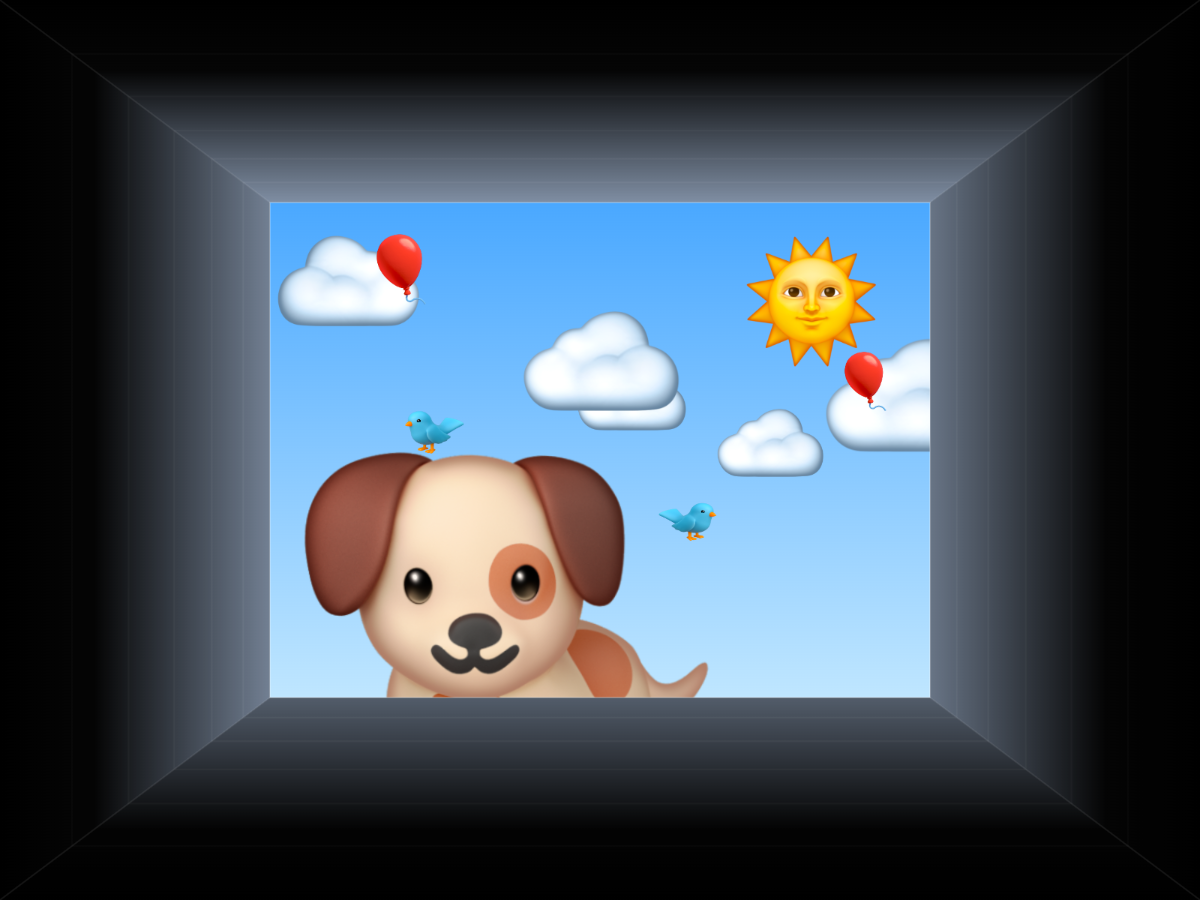
Ceiling Window 🪟
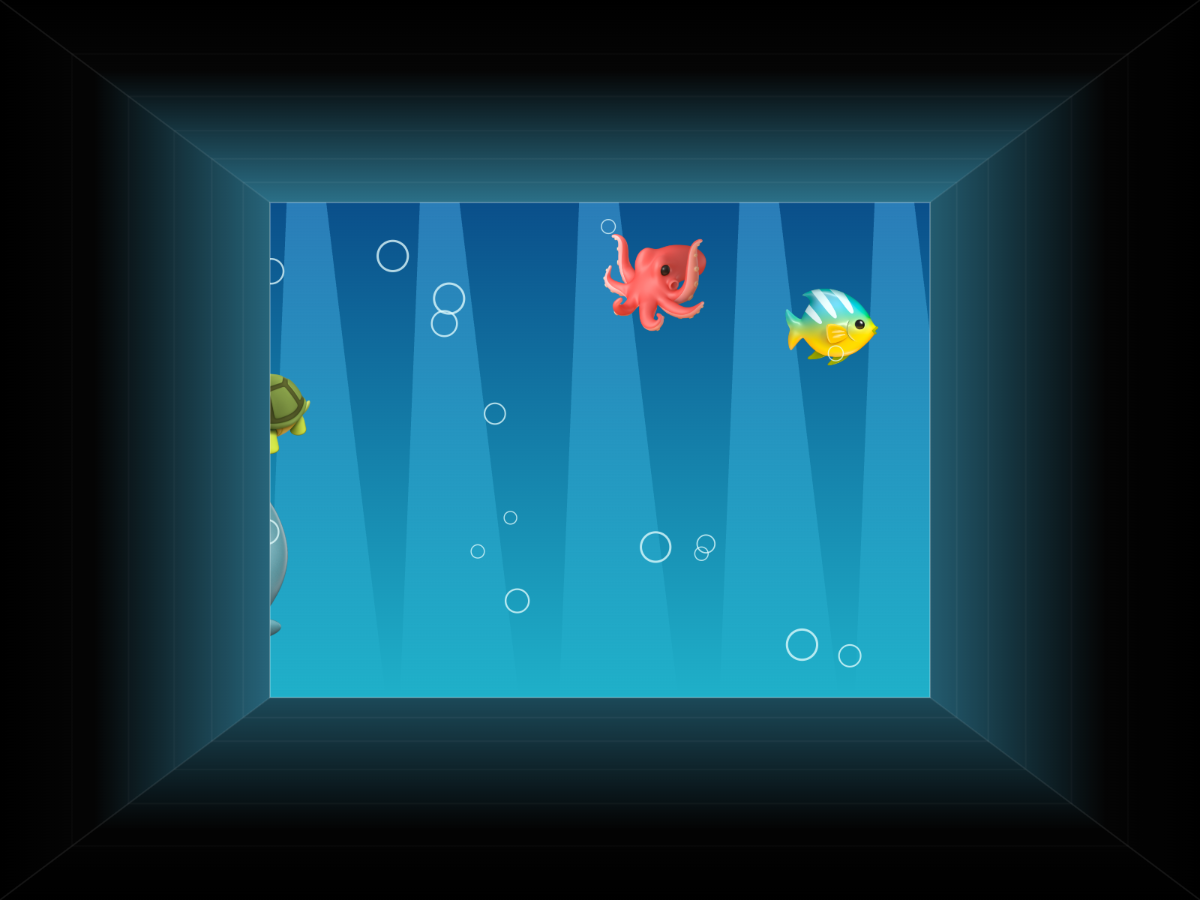
A hole opens in the ceiling. Lie down below it and look up into a sky (clouds, birds, balloons that float away), an aquarium (fish, octopus, whale, bubbles) or a starry night, while friends peek down over the edge. Bedtime mode fades the stars to black over ten minutes.
| Key | Phone | What happens |
|---|---|---|
| 1 2 3 4 | ☁️ 🐠 🌙 🙈 | Sky / aquarium / stars / peek-a-boo (someone peeks every few seconds) |
| P, Space | per character | Someone peeks in, with a spoken "Peek-a-boo!" |
| N | 😴 | Bedtime: starry night that fades to black over 10 minutes |
| ← → ↑ ↓ | – | Aim the depth at where the viewer lies (the illusion works from one spot) |
| [ ] | – | Hole shallower / deeper |
| O | – | Turn the picture around so faces look upright from where the viewer lies |
| E | – | Fit the 4 corners on the ceiling |
Switch ceiling fans off while projecting. The shaft walls fade to black at the rim, so the border of the projection melts into the real ceiling.
Bubbles & Butterflies 🫧🦋 (camera)
Giant soap bubbles float up the wall and pop wherever a child touches them; some hide a favourite character or a fruit that pops out and says its name. Butterflies land on a hand held still and scatter when someone swipes. Tracking uses the camera (MediaPipe pose with a body mask, all on-device); the mouse works as a hand too.
| Key | Phone | What happens |
|---|---|---|
| 1 2 3 | 🫧 🦋 ✨ | Bubbles / butterflies / both |
| Space | 🎁 | A big bubble with a surprise inside (phone: choose who) |
| [ ] | ➕ ➖ | Fewer / more |
| C | 📷 | Camera on/off |
| K | – | Calibrate: click the 4 projected dots in the camera view |
| X | – | Mirror (camera faces the players instead of the wall) |
| I | – | Show what the camera sees (body mask, hands) |
Camera setup: put the camera next to the projector, facing the wall, then press C and K. Run
npm run setup once to keep tracking fully offline (otherwise it loads from a CDN). To try it without a
camera, open apps/bubbles/?video=<path-to-a-video>.
Antariksh 🪐 (अंतरिक्ष, the solar system)
The real solar system on your ceiling or wall: a glowing Sun, the eight planets with real textures, tilts and spins, Earth's Moon, Mars's Phobos and Deimos, Jupiter's four big moons, Saturn's rings and Titan, all orbiting at their true relative speeds (sped up). Fly to any body and hear its name and one simple fact in English or Hindi, see how the planets' true sizes compare to each other and to the Sun, or take a guided tour.
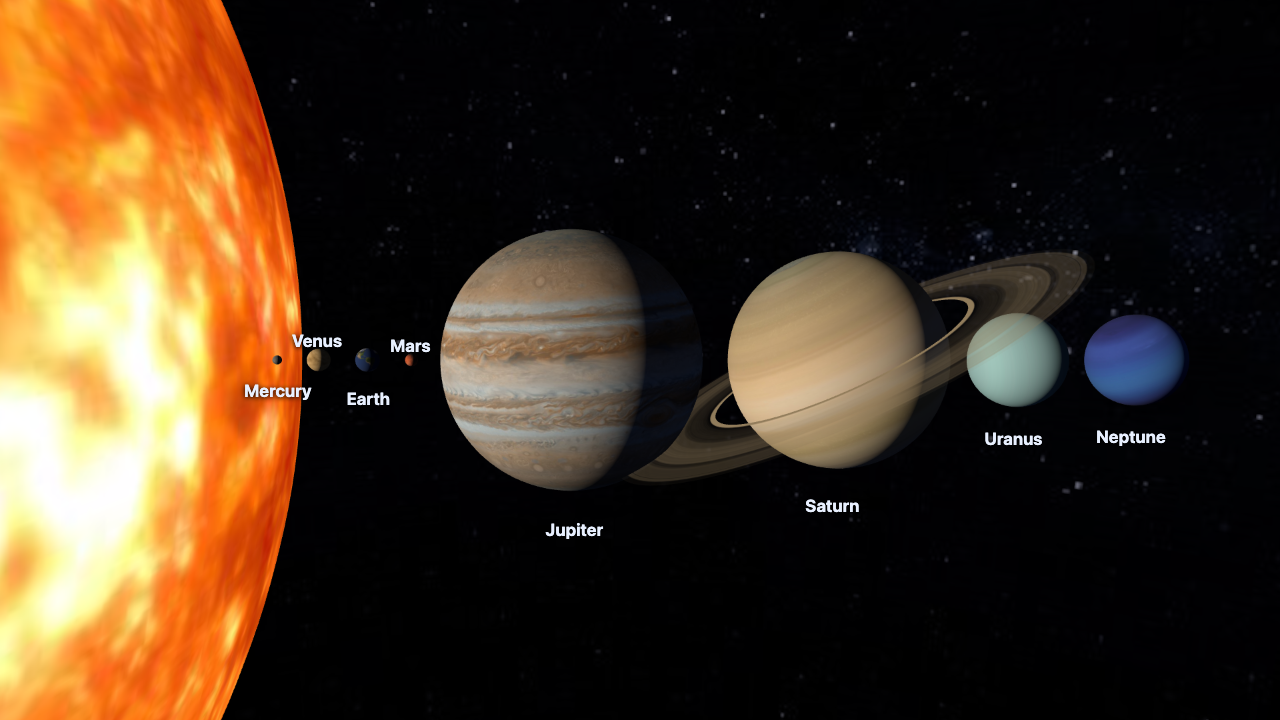
| Key | Phone | What happens |
|---|---|---|
| S 1–8 M | ☀️ 🌍 🪐 🌙 … | Fly to the Sun, a planet (in order from the Sun), or the Moon |
| Space / T | 🌌 | Whole system / straight up (best on a ceiling) |
| Z | 📏 | True sizes compared |
| A | 🚀 | Guided tour with narration |
| L | 🔤 | English / हिन्दी |
| [ ] P | 🐢 🐇 | Slower / faster / pause time |
Spoken words (character names, story narration) are off by default; tick "Spoken words" on the homepage to turn them on. Hindi narration uses your computer's Hindi voice (on macOS: System Settings → Accessibility → Spoken Content → add a Hindi voice such as Lekha).
Rocket Ride to Chanda Mama 🚀🌝 (bedtime story)
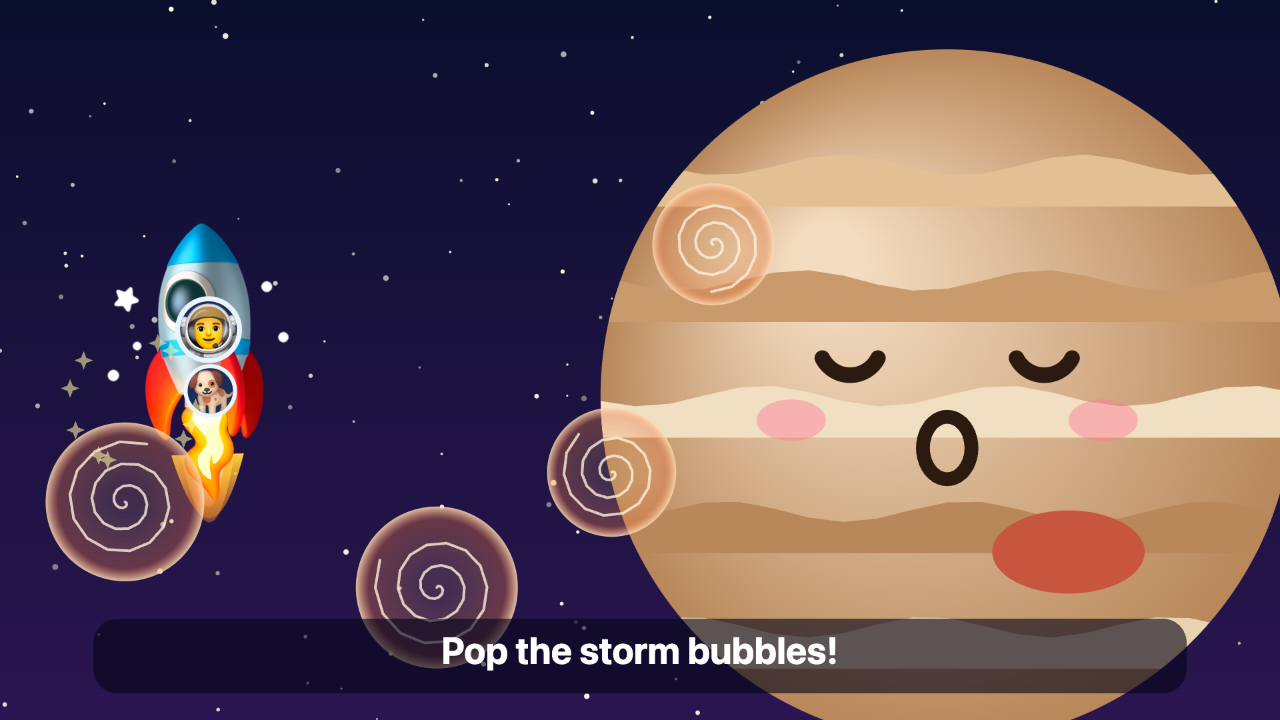
A 8–10 minute bilingual (English / हिन्दी) bedtime story where your child is the hero (press N to type their name; it stays in that browser). A co-pilot (the pet character) flies along. Each stop needs one small action, from a real clap (microphone), a wave (camera or mouse), a pop or a count, or from the phone:
- Launch: clap three times to count down, then blast off.
- The Moon (Chanda Mama): clap to jump high and leave footprints.
- Mars: wave away the dust storm to find a little robot.
- Jupiter: pop the storm bubbles.
- Saturn: slide around the rings and count the moons.
- The Sun: sunglasses on! Wave goodbye.
- Home: every planet says goodnight and falls asleep, then the screen fades to dark.
Nobody can fail: every action also finishes by itself after a while, and the phone has a Help button. ← → skip chapters, R restarts, L switches language.
Maya Masks 🪔 (projection mapping)
Real projection mapping, in the browser. Trace the objects in your room once (picture frames, the door, a clock, balloons, a patch of floor) as rectangles, ellipses or polygons, and tag each one. Every scene then paints each object to its exact outline, so the objects themselves seem to change:
- Diwali: gold-lit frames with diyas on top and fireworks inside, a marigold toran and a glowing "शुभ दीपावली" on the door, lantern balloons, a diya in the clock, a rangoli that draws itself on the floor.
- Magic: aquarium frames, a swirling portal door (your pet character steps out), googly-eyed balloons that follow you, a rainbow clock, a starry floor.
- Party: every object pulses to the music (microphone) with confetti.
- Align: plain white shapes, for lining the outlines up with the real objects.
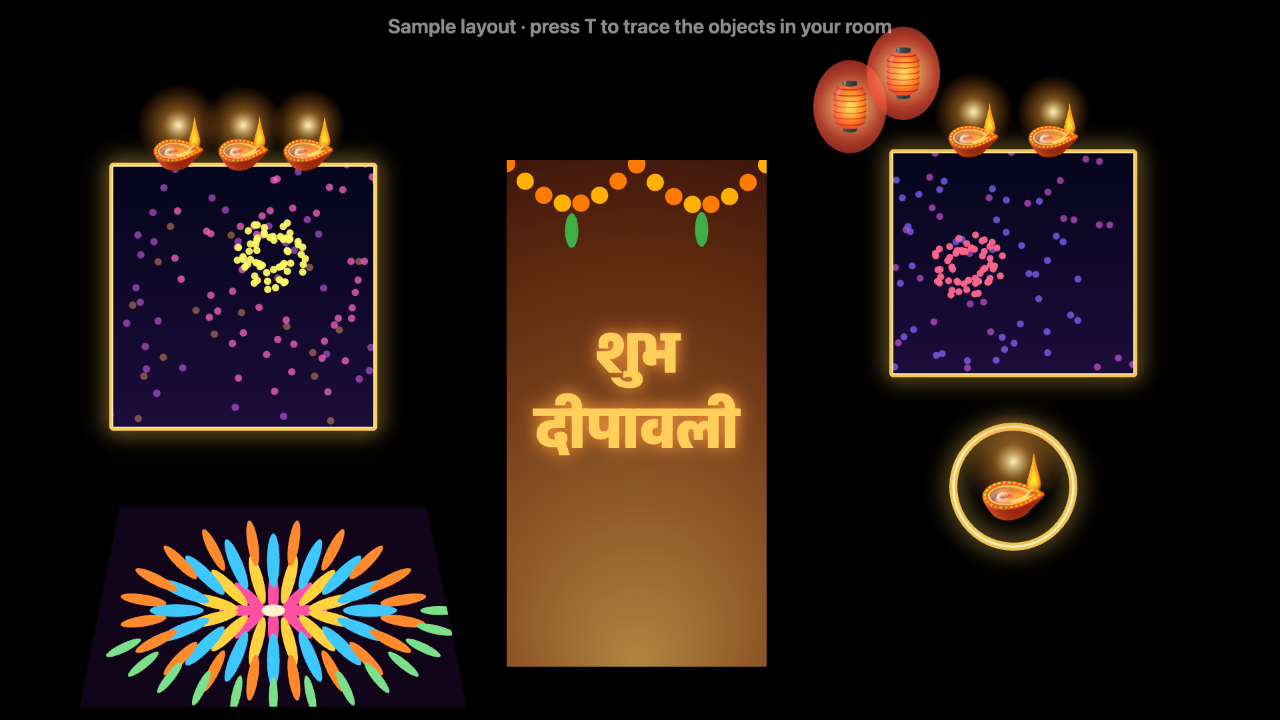
| Key | Phone | What happens |
|---|---|---|
| T | – | Trace mode: 1 rectangle, 2 ellipse, 3 polygon; Tab sets the tag; drag to adjust |
| 1 2 3 4 | 🪔 ✨ 🎉 📐 | Diwali / Magic / Party / Align |
| Space | 🎆 | Fireworks in every frame |
| M | 🎤 | Microphone for Party mode |
| B | ⚫ | Blackout |
No dedicated mapping software is needed for one projector on flat-ish objects: the browser does the warp, the masks and the content. (Multi-projector blending or curved 3D surfaces are where tools like MadMapper, HeavyM or the free MapMap come in.)
Cushion Physics 🛋️ (camera + real objects)
Put a few red cushions (or sticky notes, or any brightly coloured objects) on the floor or against the wall. The camera finds them by colour and they become solid in a physics world: fruit tumbles down, bounces off the real cushions, and has to reach Hathi waiting at the bottom. Slide a cushion to change the path. In Marbles mode every bounce plays a note, so the cushions become a musical toy. Without a camera, drag the virtual pillows with the mouse (that is also how the online version plays).
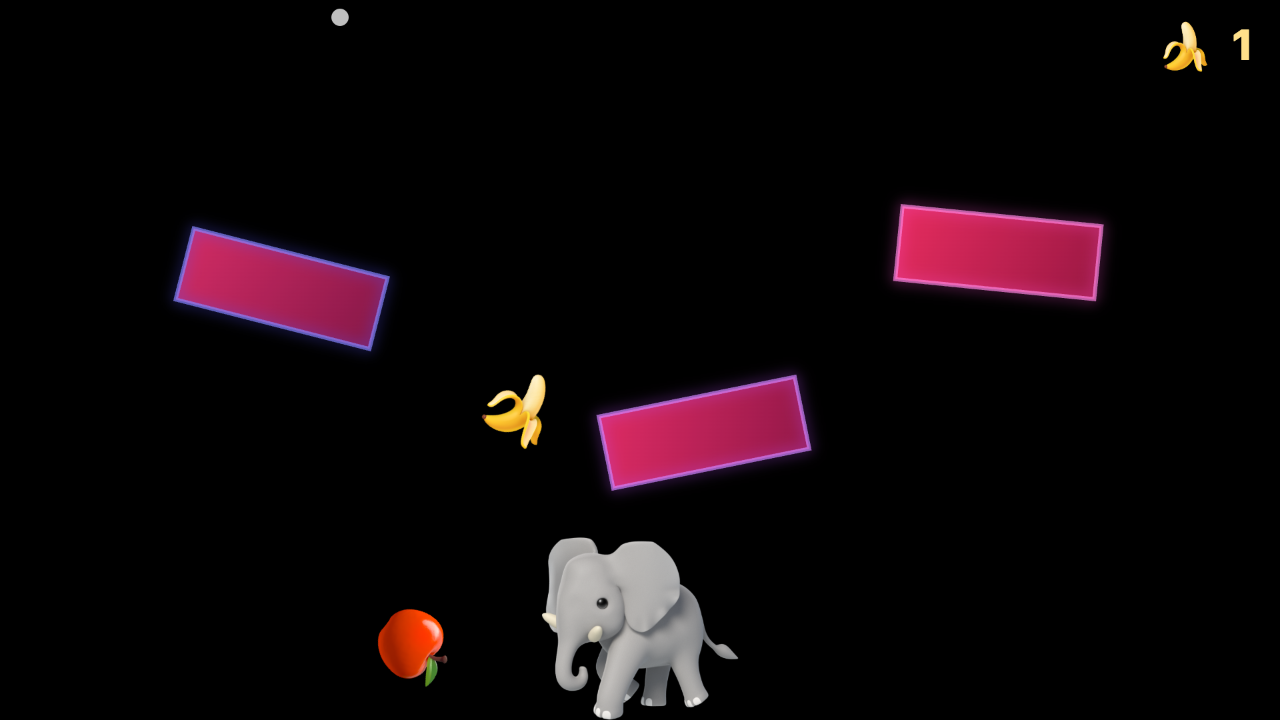
| Key | Phone | What happens |
|---|---|---|
| 1 2 | 🍌 🎵 | Feed Hathi / Marbles |
| Space | ⬇️ | Drop one more |
| ← → | ⬅️ ➡️ | Move Hathi |
| C K X | 📷 | Camera on, calibrate to the projection, mirror |
| O | 🎨 | Object colour: red / pink / orange / yellow / green / blue |
The colour detector is a few lines of plain JavaScript (no OpenCV): colour mask → connected blobs → convex outlines, tested on photos of real cushions.
Kona 🧊 (कोना, corner illusion)
Anamorphic projection mapping on an inside corner. Point the projector at a corner where two walls meet. Mark six points (the top and bottom of the corner line, and the outer edges of each wall), type in the rough size of the projected area, and say where the viewer stands. Each wall is then rendered with an off-axis camera from the viewer's eye (Kooima's generalised perspective projection) and pinned onto its wall with a per-pixel homography, so from that spot the two walls stop looking like walls:
- Break the Wall: the corner turns to bricks that tumble out into the room, revealing Earth in space.
- Floating Cube: a glowing cube hovers out of the corner, neon lines run back into the walls.
- Aquarium Corner: both walls become glass with fish swimming deep behind them.
- Saturn Rising: Saturn drifts out from behind the corner into the room.
The illusion is exact from the viewer spot, which is perfect for filming: put the phone there.
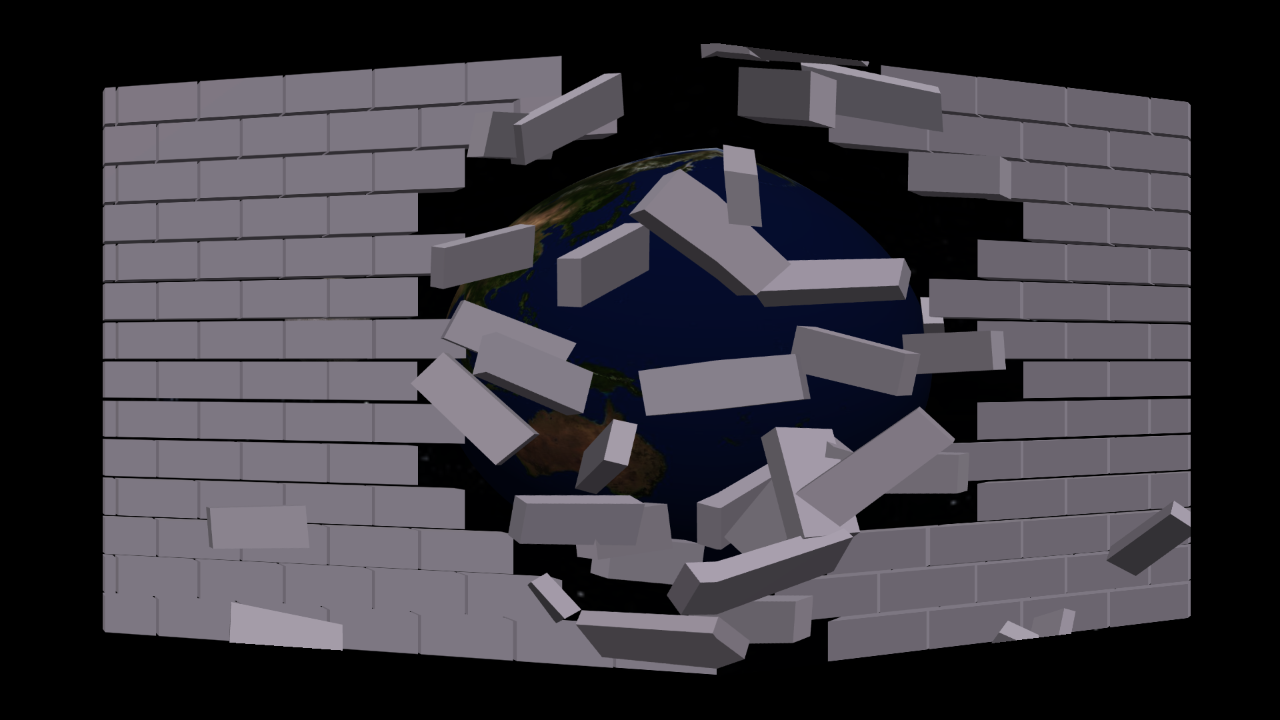
| Key | What happens |
|---|---|
| K | Mark the corner (drag 6 dots); a 10 cm grid shows on both walls |
| M / P | Measurements (m) / viewer spot (distance, eye height, angle) |
| B | Brighten the right wall (when the projector hits it at a steep angle) |
| 1–5 / Space | Planet Parade (the Moon comes every other turn) / Break the Wall / Floating Cube / Aquarium / Saturn; play again |
Kadam Taal 👣 (कदमताल, a floor rhythm game)
Step on glowing pads as the notes arrive. Project onto the floor: a lane board runs from the far edge to a row of big pads at your feet. The camera finds your heels and toes (MediaPipe pose), and a foot arriving on a pad is a step. Keys, a click on a pad, or the phone remote work too.
- Little feet (2–3 years): three pads with favourite characters; fruit floats down and waits on its pad until it's stepped on. Nothing is ever missed, and every step sparkles and plays a note.
- Grown-ups: four lanes on a generated beat, Perfect / Good / Miss timing, +600 at a 10 streak, and the tempo climbs as you keep hitting.
| Key | What happens |
|---|---|
| M | Little feet / grown-ups |
| Space / R | Start or pause (grown-ups) / restart |
| 1 2 3 4 or ← ↓ ↑ → | Step on a pad |
| C / K / I | Camera on / calibrate / show what it sees |
| O / E | Turn the picture round / fit the corners on the floor |
Happy Birthday 🎂 (जन्मदिन)
A birthday show round the real room, made for Dadu from his grandson. The picture frame turns into a
bright birthday card (a gift box that pops open, a beating heart with the name, then your own photos if
you list them as "photos": ["dadu-1.jpg"] in the private janamdin.json), ringed with diyas; "Happy Birthday" bunting drops in above it, the
name bounces in in gold, and a cake appears on the real sofa back. The Happy Birthday tune plays on a
loop from the start, with the words shown karaoke-style. From the very start, balloons and fruit float up
either side of the picture and Masha, Bear and their friends wander about the wall, never over the
picture or the cake. Blow at the candles (a steady breath into the microphone; a clap doesn't count) or
press B for fireworks and confetti; the candles stay lit throughout. A sign on the sofa back says who
the wishes are from, from the start.
Set it up in the address:
apps/janamdin/?name=Dadu&candles=7&sign=Love you, Dadu!&lang=hi. Who the wishes are from goes on the
sign's second line; keep it private in assets/custom/janamdin.json (git-ignored), e.g.
{ "from": { "en": "…", "hi": "…" } }, or pass &from=….
| Key | What happens |
|---|---|
| Space | Start the show (again) |
| M / B | Microphone: blow the candles out / blow them out by key |
| S / L | Sing the song again / English or हिन्दी |
Bhalu Bachao 🐻🚂 (भालू बचाओ, "save the Bear!")
A rescue story on the sofa. A railway runs along the real sofa back (the longest ledge in the Room Map). Bear walks on and his leg gets stuck; a toy train driven by the Penguin puffs out of a tunnel. Your child saves him: touching Bear on the wall, raising both arms ("STOP!"), holding up something red, or clapping (any of them works; each round suggests one). The train always brakes in time and waits, so nobody ever gets hurt; then Bear hops clear, Masha runs in, and everyone cheers.
It uses your own 3D models (GLB), kept private in assets/custom/models/: bear.glb and
masha_rig.glb (rigged), and toy_train.glb (its oval track is hidden; old-style materials get their
colours back). Without them the page says which file is missing.
| Key | What happens |
|---|---|
| Space / Enter | Save Bear |
| C / M | Camera (touch, arms up, red) / microphone (claps) |
| K / I | Calibrate the camera / show what it sees |
| R | Start again |
Daraar 👁️ (दरार, "crack"): grown-ups only
A horror for the ceiling, bright enough for daylight. Glowing cracks spread from one point and race round into the outline of a hole (no frame needed on the ceiling), the ceiling falls out in shards, a shaft crackling with electricity opens onto a portal, a giant eye peers down and stares at you, and a long-fingered hand reaches out over the edge. A projector can't show black, so everything is neon and the hole glows instead of going dark. It starts from the Ceiling Window's corner fit.
| Key | What happens |
|---|---|
| Space / N / R | Start / skip to the next part / stop |
| 1 2 3 4 | Jump to the cracks / shaft / eye / hand |
| A | Repeat on its own |
| O / E | Turn the picture round / fit the corners on the ceiling |
Roshandaan 👻 (रोशनदान, the old skylight): grown-ups only
True 3D on a ceiling light box. The box's real frame becomes the rim of a deep shaft. The scene is rendered in 3D from the camera's spot (an off-axis projection onto the ceiling, as in Kona) and pinned to the ceiling through the box's four corners, so from that spot it looks like a real hole: the light flickers and dies, cracks spread, the panel falls out towards you, and hands rise out of the dark, curl over the real frame and lunge. Turn the room lights (and the box) off. The setup (the box's corners in projector pixels, its size, and the camera's position) comes from a camera calibration.
| Key | What happens |
|---|---|
| Space / N / R | Start / next part / stop |
| 1 2 | Jump to the shaft / the hands |
| A | Repeat on its own |
| B | Light the ceiling round the box (shows the hands' shadows) or keep it dark |
Quick start
git clone https://github.com/atultiwari/mayasabha.git
cd mayasabha
npm install
npm run setup   # once: offline body tracking for camera activities
npm start
- Stage: open
http://localhost:5190/on the computer connected to the projector. Uselocalhostthere, because browsers only allow the microphone onlocalhostor https. - Phone remote: the home page shows a QR code and the address (e.g.
http://192.168.x.x:5190/remote/). Scan it with your phone on the same Wi-Fi.
Needs Node 20+ and a modern browser (Chrome, Edge, Safari or Firefox).
Fitting it to your room (once per spot)
- Open an activity and press F for fullscreen.
- Press E. Drag the 4 numbered corners until the picture sits where you want it.
- Room Pet only: drag a line along the top of each real object characters can stand on (picture frames, door frame, shelf). Right-click a line to delete it. Hover where the wall meets the floor and press G.
- Press E again. Everything is saved in the browser.
Projection looks best in a dark room. Bright, saturated characters on black read well even with a modest projector.
Your own characters
Every role (the pet, the visitors, the fruit) can be played by your own picture, with its own name and
icon on the phone buttons. Put pictures in assets/custom/; that folder is git-ignored, so private images
stay on your computer. A helper script trims pictures, removes stray specks and plain white backgrounds:
python3 -I scripts/prepare_character.py assets/custom/incoming/cat.png assets/custom/cat.png --remove-white
See assets/custom/README.md for the characters.json format.
Sharing videos? Cartoon characters belong to their studios. The built-in characters (Google Noto Emoji, Apache 2.0) are always safe to post.
How it's built
kit/              shared modules every activity uses
  stage.js        black 1920x1080 stage, corner-pin warp (CSS matrix3d), fullscreen, frame loop
  editor.js       edit mode: corner handles, draw/delete ledges, floor line
  warp.js         homography maths (screen <-> stage), geometry.js solves it
  ledges.js       surfaces on the wall, landing, hop rules, route finding
  characters.js   character slots: built-in art or your own pictures
  mic.js clap.js  microphone loudness -> clap events
  sound.js        synthesised sound effects (no audio files)
  remote-link.js  phone remote over a LAN WebSocket relay (protocol.js validates every message)
  vision/         camera, MediaPipe pose + body mask, colour blobs, camera-to-wall calibration, hand tracking
  speech.js fx.js spoken names, particle bursts
apps/room-pet/    the puppy: pure state-machine brain, fruit physics, visitors, renderer
apps/ceiling-window/  shaft perspective, scenes,