

MELRA
Modular Execution Layer for Reliable Autonomy
Your AI agent decides what to do. MELRA governs how tool calls are authorized, verified, and recovered.
An open-source local execution runtime for agent tool calls you route through MELRA. It checks each call against policy, requests approval when needed, verifies declared evidence, and keeps a redacted receipt of what runs to an outcome. For each task, MELRA dispatches mutations at most once; uncertain outcomes are parked for reconciliation instead of replay. Exactly-once external effects still depend on the provider. Calls made through other tools remain outside MELRA's control.












Works with





26-second demo · Quick start · How it works · See what it is doing · Docs · Contribute · Discussions · Product Hunt launch

26-second demo
https://github.com/user-attachments/assets/e5cf895d-7ea6-4797-a1ef-e69cc5860d3f
Warning
MELRA is alpha software. The local runtime is tested end to end, but APIs may change before
1.0. Use an isolated workspace, keep domain and command allowlists narrow, and read every approval before you give it.
Quick start
You need Node.js 22.13 or newer, or 23.4 or newer. From the project the agent should work in, one command sets everything up:
cd ~/project
npx @melra/cli@alpha setup
That directory becomes the agent's workspace, the boundary for its file and command
operations. setup shows it, and asks before making your home directory, a directory
holding it, or / the workspace; set MELRA_WORKSPACE to choose another.
In a terminal, setup is a short wizard. It writes a safe local policy, finds the
agent apps on your machine, asks which one should use MELRA, and writes MELRA into
that app's own config file, keeping everything else in it (and saving a .bak first):
Which MCP client should use MELRA?

  1)   Claude Code                      detected: 'claude' on PATH
  2)   Cursor                           detected: config file found
  3)   Gemini CLI                       detected: config folder found
  ...

Choose 1-26 [1]: 1
Write it into ~/project/.mcp.json? [Y/n]

  ✓  Workspace    ~/project
  ✓  Policy       ~/.melra/policy.json
  ✓  Claude Code  ~/project/.mcp.json

Next: Start claude in this workspace and approve the 'melra' server when it asks; 'claude mcp list' then shows it connected. Or start it with 'melra launch claude-code', so MELRA's are the only tools it has that change anything.
Then restart your agent app (Claude Code asks you to approve a project's server once) and ask it to do something, for example "use melra to show me the system info". That's it.
Prefer flags, a container, or building from source?
| How | Command |
|---|---|
| One client, no questions | npx @melra/cli@alpha setup --client cursor --write |
| Print the config instead of writing it | npx @melra/cli@alpha setup --client codex |
| Install globally | npm install -g @melra/cli@alpha && melra setup |
| Container (no Node needed) | docker run --rm ghcr.io/xagi-lab/melra:alpha doctor |
| Prebuilt release | download from releases, verify against SHA256SUMS, then node melra/dist/bin.js doctor |
| From source | git clone https://github.com/XAGI-Lab/melra.git && cd melra && corepack enable && pnpm install --frozen-lockfile && pnpm build && pnpm melra setup |
| One file, no Node needed (experimental) | from a checkout: pnpm build:sea, then ./dist-sea/melra setup; see single executable |
| Check what you installed | npm audit signatures verifies registry signatures; npm provenance links each package to its GitHub Actions build (see npm packages) |
Every command prints readable output in a terminal and plain JSON when piped or with
--json, so scripts keep working. MELRA creates <MELRA_HOME>/payload.key with
private permissions on first start; back it up with the SQLite files, because losing
it makes persisted payloads unreadable. See installation for
every install path, environment variable, and the hardened Docker invocation.
Caution
This project publishes only under the
@melra/npm scope (@melra/cliis the CLI) and on its releases, where the Python SDK's wheel is. An unscoped npm packagemelraor a PyPI packagemelrais not this project's. Install from that scope, from this repository, or from the releases.
If MELRA helps, star the repository so other
agent builders can find it. Trying it in Cursor or another client? Share the client
and its version, your OS, and your MELRA version (npx @melra/cli@alpha version) in
issue #184; partial test results are
useful too.
What is MELRA?
AI agents no longer just talk. They edit files, run commands, click through websites and call APIs on your behalf. Four questions come with that, and most agents answer them differently, or not at all:
🛡️ Is it allowed?Every action MELRA receives is checked against your policy, and checked again at the moment it runs. Risky changes wait for your exact approval. |
✅ Did it really work?"No error" is not success. An action counts only when the evidence you declared holds: the file exists, the exit code is 0, the page says what it should. For a file change or a memory delete MELRA also checks the end state itself: a written file holds exactly the bytes sent. |
🔁 What if it crashes?Every mutation MELRA dispatches is recorded before it runs and runs at most
once. After a crash, MELRA settles it from its evidence or the provider; what it
cannot settle waits in |
🧾 What happened?Every action MELRA runs to an outcome leaves a redacted, append-only receipt and a certificate that carries its own digest, so you can audit what ran, who asked, and why it was allowed. |
MELRA answers those questions in one place for tool calls routed through it, across supported agents. It sits underneath your agent for those calls, the way an operating system sits underneath your apps:
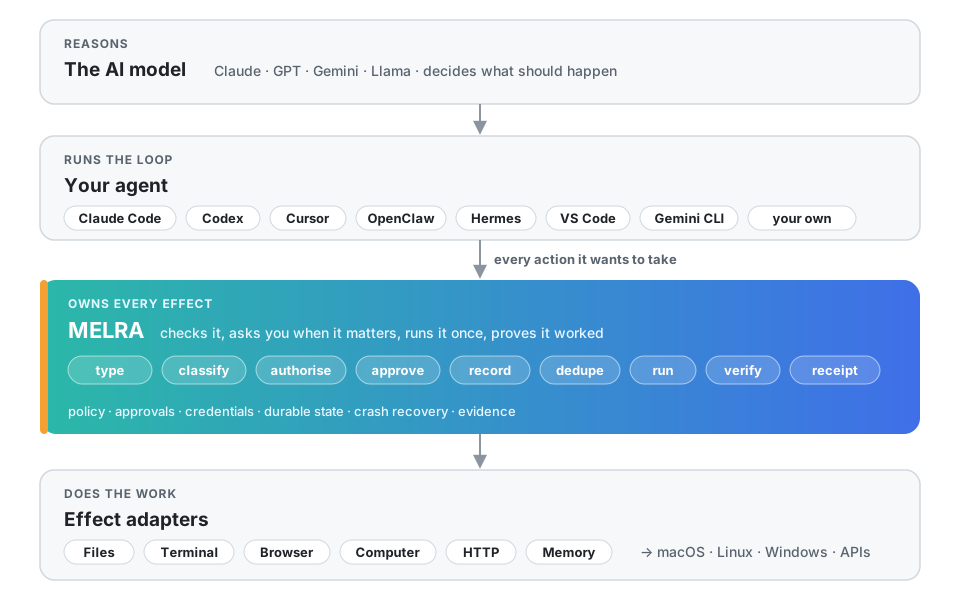
The LLM reasons. The harness manages the loop. MELRA governs the effect lifecycle for calls routed through it. Swap the model or the agent; MELRA's policies, approvals, credentials, history and receipts can stay in place.
Works with your agent
MELRA speaks the Model Context Protocol, so any MCP
client can use it. For these, melra setup --client <name> writes the config in the
client's own format and location, and melra doctor tells you whether each one is
pointed at MELRA:
| Agent | --client |
Config it writes | Tested |
|---|---|---|---|
 Claude Code Claude Code |
claude-code |
<project>/.mcp.json |
connected by hand |
| Claude Desktop |
claude-desktop |
claude_desktop_config.json |
config checked against docs |
 OpenAI Codex CLI OpenAI Codex CLI |
codex |
~/.codex/config.toml |
config checked against docs (its own CLI parsed it) |
 Cursor Cursor |
cursor |
~/.cursor/mcp.json |
config checked against docs |
| 🟦 VS Code (Copilot agent mode) | vscode |
<project>/.vscode/mcp.json |
config checked against docs |
 Gemini CLI Gemini CLI |
gemini |
~/.gemini/settings.json |
config checked against docs |
 Windsurf Windsurf |
windsurf |
~/.codeium/windsurf/mcp_config.json |
config checked against docs |
 Zed Zed |
zed |
Zed settings.json (comments kept) |
config checked against docs |
| 🧩 Cline | cline |
Cline's cline_mcp_settings.json |
config checked against docs |
| ⬛ OpenCode | opencode |
~/.config/opencode/opencode.json |
connected by hand |
| 👻 Kiro | kiro |
~/.kiro/settings/mcp.json |
config checked against docs |
| 🪿 Goose | goose |
~/.config/goose/config.yaml |
config checked against docs |
| ▶️ Continue | continue |
<project>/.continue/mcpServers/melra.yaml |
config checked against docs |
| ⚡ Amp | amp |
~/.config/amp/settings.json |
config checked against docs |
| 🦞 OpenClaw | openclaw |
~/.openclaw/openclaw.json (mcp.servers) |
config checked against docs |
| ⚕️ Hermes Agent (Nous Research) | hermes |
~/.hermes/config.yaml (mcp_servers) |
connected by hand |
 GitHub Copilot CLI GitHub Copilot CLI |
copilot |
~/.copilot/mcp-config.json |
config checked against docs |
| 🐉 Qwen Code | qwen |
~/.qwen/settings.json |
config checked against docs |
| 🅰️ Auggie (Augment) | auggie |
~/.augment/settings.json |
config checked against docs |
 Warp Warp |
warp |
~/.warp/.mcp.json |
config checked against docs |
 Junie (JetBrains) Junie (JetBrains) |
junie |
~/.junie/mcp/mcp.json |
config checked against docs |
| 🤖 Factory Droid | droid |
~/.factory/mcp.json |
config checked against docs |
| 🌙 Kimi Code | kimi |
~/.kimi-code/mcp.json |
config checked against docs |
| 🪁 Kilo Code | kilo |
~/.config/kilo/kilo.jsonc (comments kept) |
config checked against docs |
| 🧪 LM Studio | lmstudio |
~/.lmstudio/mcp.json |
config checked against docs |
| 🔌 Anything else | generic |
prints the standard mcpServers block |
documented only |
Tested says how far each one has been taken: run in CI (an automated suite drives it), connected by hand (its own CLI connected to a packed release over MCP, but no task was run from inside it; see COMPATIBILITY.md), config checked against docs (the file and format come from its documentation or source, and the CLI tests write and read them back), or documented only.
Building your own agent? Use the TypeScript SDK or the Python SDK. Both can spawn MELRA or connect to one that is already running over loopback HTTP or a private Unix socket. For agent frameworks, see the framework examples: the official MCP SDKs' snippets run in CI with no model; the LangChain / LangGraph, OpenAI Agents SDK and Vercel AI SDK ones are documented only.
Note
A named client is marked verified only after the released package, not a source checkout, passes discovery, planning, approval, execution, cancellation and receipt retrieval in that client. Per-client status lives in COMPATIBILITY.md.
How it works
An effect is one bounded operation an agent routes through MELRA: file.write,
terminal.run, browser.click, http.request, and so on. MELRA handles each routed
effect in nine stages, split between a plan step and an execute step (for a single
task, melra_plan then melra_execute) so that nothing runs at planning time:
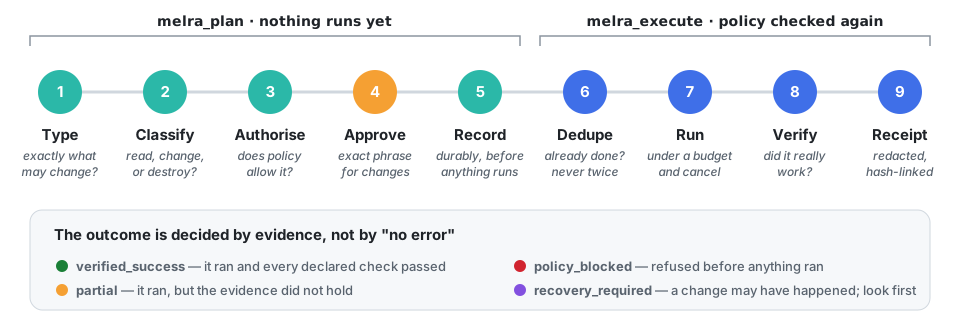
Here is one change from start to finish, in developer mode. In
enforced mode the challenge carries no
phrase: you approve with melra approve <task-id> outside the conversation,
and the agent's melra_execute sends no approval at all.
sequenceDiagram
    autonumber
    participant A as Your agent
    participant M as MELRA
    participant You
    participant W as Your system
    A->>M: melra_plan: write notes.md, evidence "file contains 'done'"
    M->>M: type, classify, check policy, record
    M-->>A: awaiting_approval + challenge "APPROVE 3f9c…"
    A->>You: May I write notes.md?
    You-->>A: yes
    A->>M: melra_execute with the exact phrase
    M->>M: policy again, not already done?
    M->>W: write the file (under a budget)
    M->>W: read it back, independently
    M-->>A: verified_success + receipt
What the final status means, and what an agent should do next:
| Status | Meaning | Next step |
|---|---|---|
🟢 verified_success |
It ran and every declared check passed, and so did MELRA's own for a file change or memory delete | Done |
🟡 partial |
It ran, but the evidence, declared or MELRA's own, did not hold, or a semantic question was answered no |
Look at the evidence, then decide; a change answered no stays in place, so fixing it takes a new plan |
🔴 policy_blocked |
Refused before anything ran | Read the reason; the same request will be refused again |
🔵 awaiting_approval |