
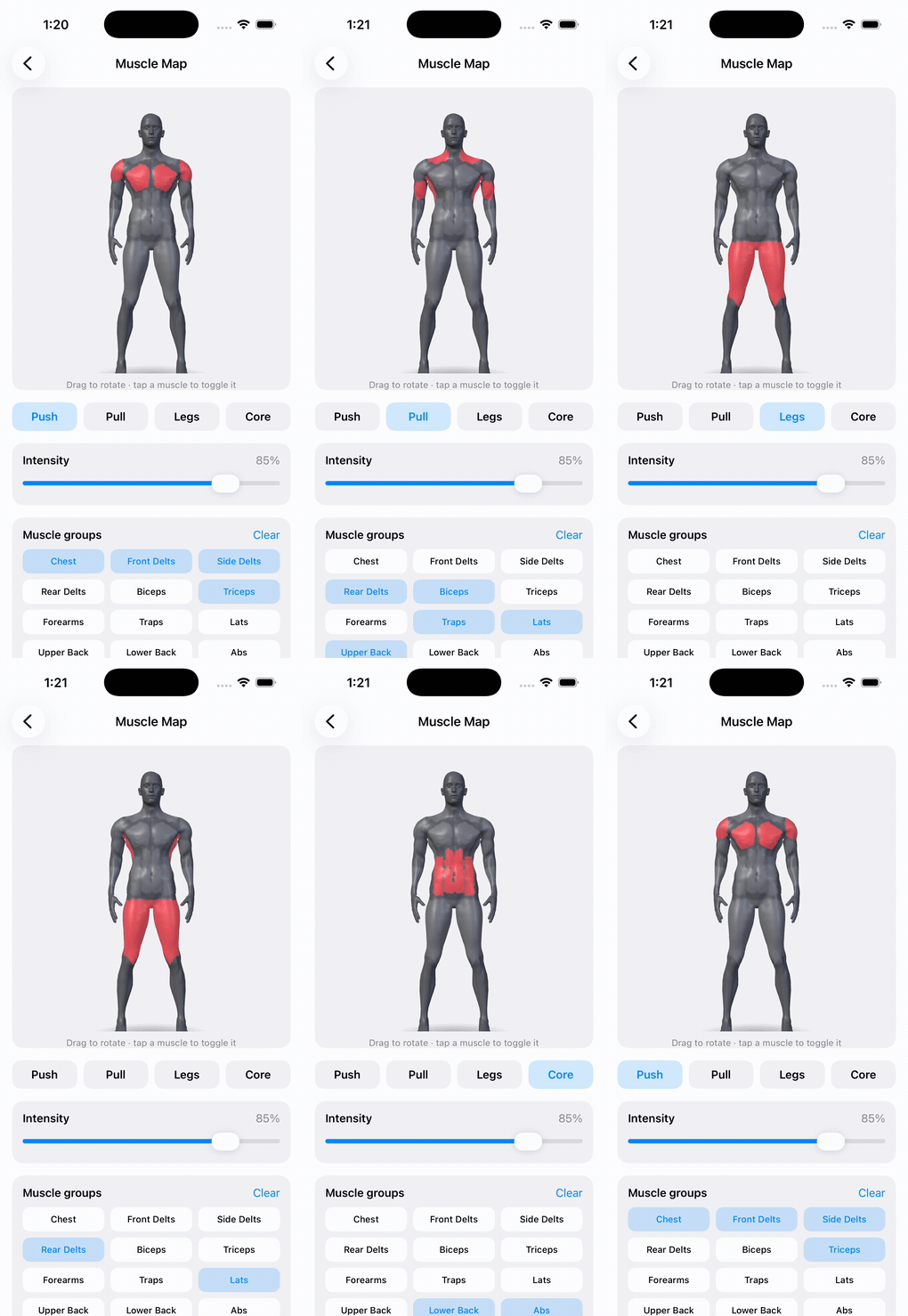
An interactive 3D muscle map for iOS that shades each muscle by how hard it was worked, spins under your finger, and reports taps back by muscle group.

If MuscleMapKit is useful to you, a coffee keeps it going.
Install
.package(url: "https://github.com/haplollc/MuscleMapKit.git", from: "1.0.0")
Try it
import MuscleMapKit

MuscleBody3DView(
    intensities: [.chest: 1.0, .frontDelts: 0.6, .triceps: 0.45]
)
.frame(height: 380)
If this is useful, a star helps others find it.
Built for Cinder, where it answers the question you actually have after a session: not did I train, but what did I actually hit.
Install
.package(url: "https://github.com/haplollc/MuscleMapKit.git", from: "1.0.0")
.target(name: "YourApp", dependencies: ["MuscleMapKit"])
Requires iOS 17+.
Use it
import MuscleMapKit

MuscleBody3DView(
    intensities: [.chest: 1.0, .frontDelts: 0.6, .triceps: 0.45]
)
.frame(height: 380)
intensities is [MuscleGroup: Double] in 0…1. Anything you leave out
renders untrained, so you only pass what was worked.
Reacting to taps
MuscleBody3DView(
    intensities: intensities,
    onTapMuscle: { muscle in
        print("tapped \(muscle.displayName)")
    }
)
Inside a scrolling list
Gestures are opt-out, because a body that spins under your finger will fight
a ScrollView for the same drag:
MuscleBody3DView(
    intensities: intensities,
    autoRotate: false,
    interactive: false,        // let the scroll view win
    initialYaw: .pi / 5        // rest at a 3/4 angle
)
Turning exercises into muscles
ExerciseMuscleMap maps exercise names to the muscles they work, so you can
go straight from a logged workout to a shaded body:
let result = ExerciseMuscleMap.workoutIntensities(
    exercises: [("Bench Press", 4), ("Squat", 5), ("Barbell Row", 3)]
)

MuscleBody3DView(intensities: result.intensities)
Volume drives the shading: more sets on a muscle means a stronger tint.
Names are matched loosely, so "bench press", "Bench Press" and
" BENCH PRESS " all resolve to the same thing.
Exercises it doesn't know
The table is deliberately finite, and it tells you what it couldn't place rather than guessing:
let result = ExerciseMuscleMap.workoutIntensities(
    exercises: [("Bench Press", 4), ("Zercher Good Morning", 3)]
)

result.unresolved   // ["Zercher Good Morning"]
Resolve those however you like - a prompt, your own table, a model - and pass them back in:
ExerciseMuscleMap.workoutIntensities(
    exercises: exercises,
    resolved: ["Zercher Good Morning": [.hamstrings: 1.0, .lowerBack: 0.7]]
)
In Cinder this fallback is a local LLM that classifies unknown names in one batched call and caches the answer forever. That model isn't part of this package - the hook is, so you can plug in whatever you already have.
Muscle groups
Seventeen, in gym vocabulary rather than medical nomenclature, because that's how lifters log:
chest · frontDelts · sideDelts · rearDelts · biceps · triceps
forearms · traps · lats · upperBack · lowerBack · abs · obliques
glutes · quads · hamstrings · calves
Every case has a displayName fit for a label.
How the body is made
It's one continuous mesh, not seventeen separate props.
The MakeHuman base mesh (CC0) is morphed toward an athletic build, normalized to a fixed height and orientation, and then every vertex is classified into one of the seventeen groups using limb-axis frames. That gets baked to a compact binary blob - position, normal, muscle id, and a blend weight per vertex - which ships in the package.
At runtime SceneKit tints by muscle id. Recoloring swaps a vertex-color source and nothing else, so switching muscles costs no geometry work.
Two consequences worth knowing:
- The order of
MuscleGroup.allCasesis the mesh's id order. Reordering the enum silently repaints the body onto the wrong muscles. - Blend weights soften the seams, so neighbouring groups fade into each other instead of ending at a hard edge.
Tools/bake_body.py is the baker, kept in the repo so the mesh is
reproducible rather than a mystery binary.
Demo
The showcase in the screenshot lives in HaploUI under Muscle Map - presets, an intensity slider, and a toggle per group.
License
MIT for the code. The bundled mesh derives from MakeHuman's CC0 base mesh; see LICENSE.
More from Haplo
More open source from Haplo, built by the same solo developer:
- ThinkingOrbs: dotted, honestly-3D loading indicators for AI and agent interfaces in SwiftUI. Nine hand-tuned designs, two tuned sizes.
- Minted: turn any SVG into a physically-lit 3D gold medallion for SwiftUI.
- Vesalius: a map of your codebase for Claude Code, an on-device code graph with an MCP server, a CLI, a Mac app and a VS Code extension.
- ProcessingField: a SwiftUI progress field, a grid of marks whose sizes describe one soft shape that drifts, folds and breathes while your app is busy.
- Gepetto: a browser agent for iOS and macOS that a person can take over at any time. Real WKWebView, small on-device models, a native SwiftUI panel.
- ClayGlobe: a claymorphic 3D globe for SwiftUI that plants a waving flag on every country you visit.
- Mirage: one-stop on-device diffusion image-generation engine for iOS / macOS / visionOS.
- SiriGlass: the Siri drop from iOS 27, for SwiftUI. Liquid Glass that pours out of the Dynamic Island and lights up with your voice.
- Scrubbers: twelve sliders you will want to touch, for SwiftUI. One view, one enum.
- KoiPond: a living koi pond for SwiftUI. Koi glide over any view, lily pads drift on top, and a Metal shader ripples and refracts it all.