

Night Shift
Draw your agent pipeline as a flow. Night Shift runs it on your machine while you sleep.
You wake up to a stack of pull requests and a short list of decisions that need you.
Quick start · How it works · Starter flows · Plan · Contributing
Why
If you work with coding agents, you probably run the same pipeline again and again: build, check, retry, rescue, open a pull request, review. Most of the time that pipeline is a script. Nobody can see it, and every change to it is a code change.
Night Shift turns the pipeline into a flow that you draw. The engine owns the order, the retries, the loop limits, and the stop time. Agents do the work. You step in only at a gate.
- Local first. Every session, branch, and token stays on your own computers. Agents run with your own CLI logins.
- The engine decides, the model advises. A model never adds a node or changes the graph. Every loop has a maximum count.
- Flows stay out of your repo. Night Shift keeps your flows and schedules, so a team repo needs no Night Shift files. Every save is a revision: you see who changed what, and you can restore an earlier one (ADR 2).
- No built-in method. Spec-driven, issue-driven, or one file at a time: each method is just another flow.
How it works
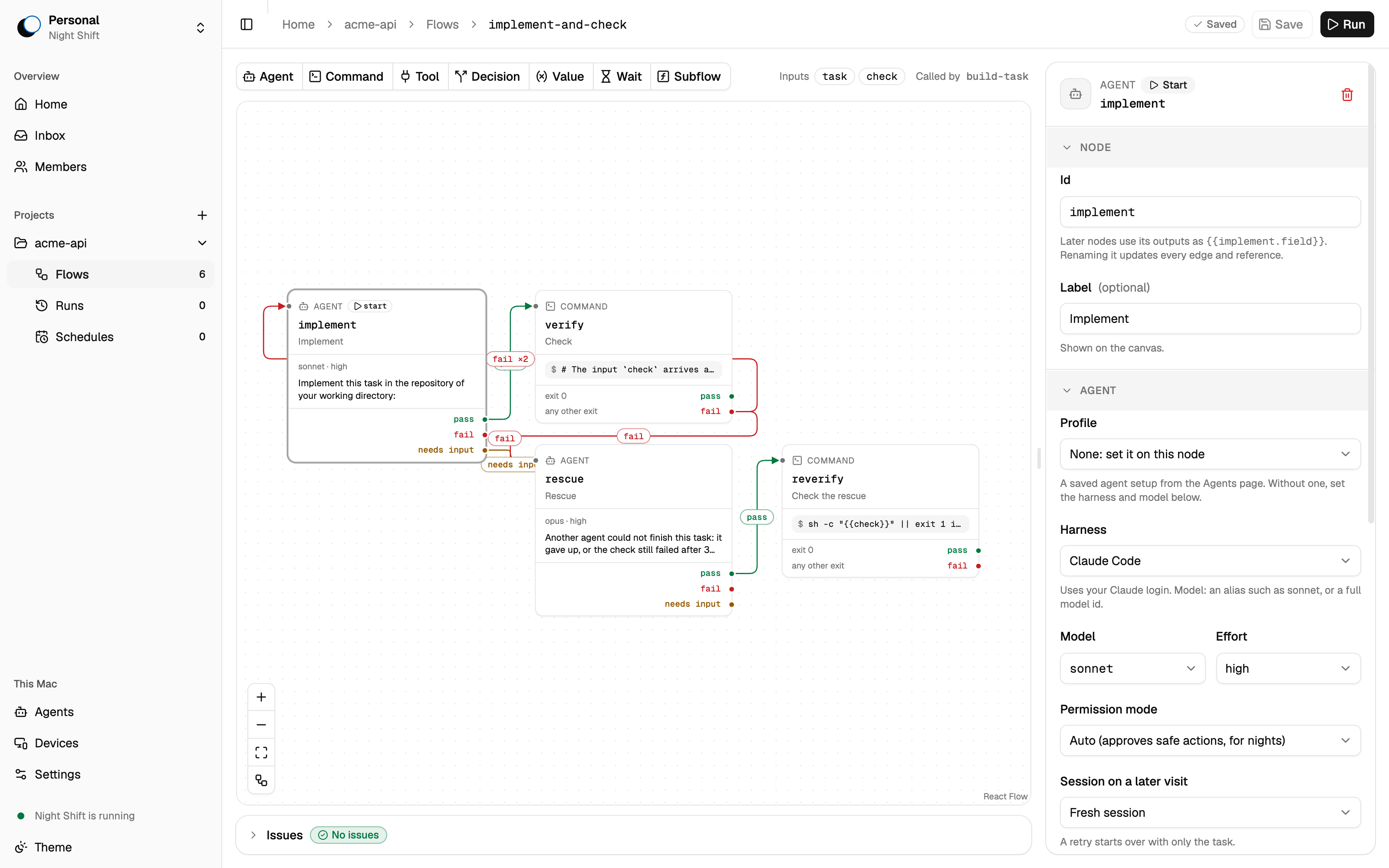
A flow is a graph of steps. Each edge leaves a step on a named outcome. This is the implement-and-check starter:
flowchart LR
  implement["🤖 Implement<br/><sub>Claude Code · Sonnet</sub>"]
  verify["▶ Check<br/><sub>bun test</sub>"]
  rescue["🤖 Rescue<br/><sub>Claude Code · Opus</sub>"]
  reverify["▶ Check the rescue"]

  implement -- pass --> verify
  verify -- "fail (max 2)" --> implement
  verify -- fail --> rescue
  implement -- "fail / needs-input" --> rescue
  rescue -- pass --> reverify
Steps are nodes. Each node type does one job:
| Node | Does |
|---|---|
| Agent | Runs one coding-agent session with a prompt or a skill. Ends with an outcome and, if you ask, data that matches a JSON schema. It can ask you a question and go on with your answer. |
| Command | Runs a shell command in the project, for example the tests. Template values arrive as environment variables, never as shell text. JSON it writes to $NS_OUTPUT is its data, and can pick its outcome. |
| Tool | Calls one tool of an MCP server with typed arguments. No model in the loop. |
| Decision | Picks one of its options. Who picks is up to you: a person (a Gate in your inbox, with an optional deadline), a rule (a Branch, a JSONata expression), or a model. |
| Value | Makes data that matches a JSON schema, from a rule or a model. |
| Wait | Waits for a duration, a time, a command that passes, or a signal, for example from a webhook. |
| Call | Runs another flow or a kit, once or once per item in a list. The list can come from a planner's output or a command such as gh. |
| Join | Waits for the branches that run at once, all of them or the first. |
| End | Ends the run on purpose: done, nothing to do, or failed, with one line that says why. |
A flow declares inputs and outputs, like a function. Steps read earlier values through templates such as {{verify.log_tail}} or {{planner.data.tasks}}. Two or more edges on one outcome run their branches at once. A variable can keep its value from one run to the next.
Agents on your own logins
An Agent node names the coding agent it runs on. One flow can mix them.
| Agent | Status |
|---|---|
| Claude Code | Verified |
| OpenCode | Needs a 1.x build |
| Codex | Not yet verified |
| Grok Build | Not yet verified |
| pi | Through the Agent Client Protocol. Needs pi 0.81 or later. Runs local models through Ollama |
| Any other agent that speaks the Agent Client Protocol | Add it as a custom agent with its command, for example goose acp |
| GitHub Copilot, Gemini CLI, Cursor | Through the Agent Client Protocol, not yet verified |
A node can add connections (MCP servers) and CLI tools such as gh. Profiles hold an agent's setup, or the model of a Decision, under one name. You make them on the Agents page of each computer. A profile belongs to that computer, and a node names the profile and its computer, for example "builder on LE2316" (ADR 3).
Night Shift knows no issue tracker: GitHub, Linear, or Jira is a command in your flow. Kits are small flows that ship with Night Shift, on git, gh and acli: create a branch, open a draft pull request, wait for CI, finish the pull request, move a Jira work item. A Call runs one as kit:github/publish-draft-pr.
Runs that survive the night
- Schedules start a flow at a set time and stop it at a stop time, for example 22:00 to 07:00. A schedule can also start when a webhook arrives, for example when a pull request opens, or wake a Wait when CI is done.
- Run policy handles fresh retries with the failure log, a rescue by a stronger model, network grace, and usage-limit waits that resume the same session.
- Each run works in its own copy of your project, so your checkout stays clean.
- Gates wait in a "Needs you" inbox. An unattended run never blocks on a question in the middle of a session. A Gate with a deadline picks an option for you when nobody answers in time.
Quick start
You need macOS or Linux, Bun 1.3, git, and at least one coding-agent CLI that you have logged in to (for example claude).
git clone https://github.com/xiduzo/nightshift.git
cd nightshift
bun install
bun run db:push
bun run dev            # web UI and API with hot reload
Then open the web UI, add a project, and give it the starter flows. Night Shift keeps flows itself, so do not copy the files into your project. Choose Import in the project's flow list, or import them from your project's folder:
# from your project's folder, with the dev daemon on port 3000:
for file in <this checkout>/examples/starters/flows/*.json; do
  bun <this checkout>/apps/server/src/cli.ts flows import "$file"
done
Open a flow in the editor, change the prompts and the check to fit your project, and start a run.
| Command | Use it to |
|---|---|
bun run dev |
Work on Night Shift itself, with hot reload. Data stays in .nightshift-dev/. |
bun run night |
Run real nights from a stable build that does not reload. Data stays in the OS app data folder. |
bun run dev:desktop |
Start the desktop app. |
bun run build:desktop |
Build the desktop app in apps/desktop/build/. Releases are in docs/releasing.md. |
Tip
Run nights with
bun run nightand develop in a separate git worktree. A code change then never reloads Night Shift in the middle of a night.
Starter flows
| Flow | Does |
|---|---|
implement-and-check |
An agent builds a task, a command checks it, retries with the log, then a rescue on a stronger model. |
plan-and-build |
A planner splits a goal into tasks. Each task gets its own stacked branch, in dependency order. A reviewer ends it. |
review-pr |
An agent reviews a pull request. A gate asks you before the review is posted. |
per-file |
Applies one instruction to every file that matches a glob. |
Details are in examples/starters/.
Flows from a terminal
A person or an agent in a terminal reads and saves flows through nightshift, never as files. Night Shift must run on this computer. Each save is a new revision of the flow, and Night Shift checks it.
nightshift flows list                        # name, steps, errors, description
nightshift flows get fix-issue > fix.json    # the flow as JSON
nightshift flows save fix-issue fix.json     # or from stdin; prints its problems
nightshift flows export fix-issue --out ./   # a file to import elsewhere
nightshift flows import fix-issue.json       # a new flow; a taken name gets a suffix
nightshift flows revisions fix-issue         # who saved what, newest first
The commands work in the project of the folder you run them in. --project <id, name or folder> picks another one. For an agent, nightshift mcp serves the same reads and saves as MCP tools: claude mcp add nightshift -- nightshift mcp.
Run it on a server
nightshift is Night Shift in one file: the server, the web UI, and the database. It runs on Linux (x64, arm64) and macOS (arm64), with Docker and systemd recipes. Your laptop can pair with it over your LAN, Tailscale, a public server, or a tunnel. See docs/deploy/. When it is your home Host, your Personal is one Space on all your computers and on your phone (ADR 1).
Status
Night Shift is pre-alpha. It is built in public, for its author first, and it changes fast. Expect breaking changes to the flow format and the database.
- One flow runs a full Epic overnight and replaces the script it grew from.
- Night Shift builds Night Shift: its own work runs through its own flows.
- One person runs Night Shift on several computers: a laptop and a server pair, and each step runs where you place it.
The concept, the decisions, and the delivery order are in docs/PLAN.md.
Documentation
| Document | What is in it |
|---|---|
| docs/PLAN.md | The concept, the settled decisions, the architecture, and the setup. |
| docs/glossary.md | One name for one thing: flow, run, step, node, gate, and more. |
| docs/steering/ | The vision, and the technical, QA, and design rules every change follows. |
| docs/deploy/ | Run Night Shift on a server and reach it from your other computers. |
| docs/research/ | Spikes and design notes behind the bigger decisions. |
Built with
Bun · TanStack Start and TanStack AI · React Flow · LangGraph · Hono · oRPC · Drizzle on libsql · Better Auth · shadcn/ui · Electrobun
Contributing
Issues and ideas are welcome. Read CONTRIBUTING.md before you open a pull request. To report a security problem, see SECURITY.md.