




The thirty second version
You are four menus deep in a piece of software nobody ever wrote a tutorial for. A school portal. A lab instrument's control panel. An accounting package a small business has run since 2009. Something is wrong and you cannot look up the fix, because you do not know what the thing is called. Describing it is the hard part.
So you hold Ctrl + Alt + Space and just say it out loud. "Why did my export come out blank?"
Let go.
Inside about a second and a half Nimbus is already talking, and your pointer is already moving. It looked at the same screen you are looking at, so you never had to describe anything. It tells you what you are looking at and why the thing you tried did not work, then walks you through the fix, moving the pointer to each control as it talks about it. When words are the wrong tool it draws instead: a box around the thing you need, the rest of the screen dimmed, numbered steps for a sequence, an arrow from the mistake to the fix. It keeps going until the task actually works, and it will tell you when your whole approach is wrong rather than politely pointing at the next button in a plan that was never going to succeed.
Then the rest of it. It remembers per application, so what you asked in Excel stays with Excel, as
plain Markdown you can open and edit. Drop your own PDFs and notes in a folder named after the .exe
and it treats them as authoritative for that program, which is the only real answer to in-house
tools with no documentation. Say "quiz me" and it starts asking you questions against your live
screen, which no flashcard app can do. Privacy Guard notices a password manager or a sign-in page
in front and refuses to take the screenshot at all, then shows you a running count of how many times
it has refused. Your licence is Ed25519-signed and verified offline, with a fourteen day grace
period, so it does not die on a flight. And the whole stack can run fully local, model, speech
recognition and voice, with no API key and nothing leaving the machine.
One thing it will never do is click for you. That is not a missing feature. It is the point.
Start here
| What it is | A Windows desktop application, plus the website and licence backend that go with it. A personal project, built by two people |
| Who built it | Emad Qureshi and Arham Khan. See contributors |
| Built with Kiro | Written in Kiro day to day, using spec-driven development. Nine specs, sixteen agent hooks, eight steering files and four MCP servers, all committed in .kiro/. Each spec ends in a dependency graph and numbered waves, so Kiro ran up to five subagents in parallel with every wave reviewed and re-tested by hand before it counted. See how Kiro was used, then what building this way requires |
| See it working | The demo video is the fastest way in. The site, the application, then real tasks run live, no editing tricks |
| Try it in ten seconds | Run it locally. Clone, install, paste a Gemini key, hold the chord |
| Deployed | The live site carries accounts, the trial, licence signing and the download. /api/health signs a token and verifies it, so a mismatched key pair fails a health check rather than an activation |
| Payments | Stripe and a manual-transfer rail are integrated but not connected. The code paths exist and are covered by tests. Nothing is charged and no money has moved through them |
| Model | Gemini via google-genai, bring your own key. config.DEFAULT_LLM_PROVIDER = "gemini-native". OpenAI, Anthropic and a fully local Ollama stack are selectable, and Vertex AI is a one-setting switch for anyone who needs inference inside their own cloud project |
| The bet | That the software people are genuinely stuck in is a native Windows window, not a browser tab. See why a desktop application |
Nothing in this repository is derived from another codebase. Every line was written for this project.
On testers. Through the build we had a small group of people running it on their own machines,
mostly close friends, who reported bugs and asked for features. Several of the fixes recorded in
IMPROVEMENTS.md and SHELL_AND_CHAT.md came from watching them get stuck rather than from a test
failing.
The problem, and the moment it became obvious
Someone is inside a piece of software, a spreadsheet, a coding environment, a school portal, a lab tool, and is stuck. Not stuck on the concept. Stuck because they do not know the word for the thing they are looking at.
You cannot search for it. You cannot ask a chatbot, because describing it is the hard part. So a tutorial video gets opened, scrubbed through, and the moment passes.
Every existing answer to this assumes you can already name the problem. Nimbus removes that requirement: it looks at the same screen you are looking at, so you never have to describe anything.
From there it does what a person sitting beside you would do. It tells you what you are looking at and why the thing you tried did not work. It suggests the next step, and the one after that. It draws on the screen when words are the wrong tool. And it moves your pointer to whatever it is talking about, so there is never a gap between the explanation and the thing being explained.
Pointing is the part people notice first, and it is the smaller half of it. "Click the publish button, top right" is advice you still have to act on. A pointer landing on the publish button while you are told what publishing will do to your draft is being taught. The difference matters most on the tasks that are not one click: exporting with the right settings, fixing a formula that references the wrong sheet, getting a lab tool to talk to a sensor. Those need a guide through several steps, not a signpost.
What it actually does
| Guides, does not just point | Explains what you are looking at, suggests what to do next, and keeps going through a multi-step task, moving your pointer to each thing as it talks about it |
| Teaching mode | Draws on screen when words are the wrong tool: a box around the control you need, everything else dimmed, numbered steps for a sequence, an arrow from the mistake to the fix |
| Knows your software | Drop notes and PDFs in a folder named after the .exe and Nimbus treats them as authoritative for that program. The answer to in-house tools with no documentation |
| Remembers per application | What you asked in one program stays with that program, as plain Markdown you can read, edit or delete |
| Quizzes you back | Say "quiz me" and it asks you questions against your live screen, which a flashcard app cannot do |
| Chat panel | A windowed chat HUD for follow-ups, excluded from screen capture at the OS level so it never appears in its own screenshots |
| Runs fully offline | Model, speech recognition and voice can all be local. Nothing leaves the machine, no API key needed |
| Privacy Guard | Refuses to screenshot password managers and sign-in pages, answers anyway by voice, and shows you the count |
| Activation | Device-bound licences, Ed25519-signed, verified offline with a fourteen day grace. Two devices per licence |
| Trial | Seven days, no card, one per machine. Needs an email and a six-digit code to confirm it, and it is bound to the device, so a second address earns nothing |
How one turn works
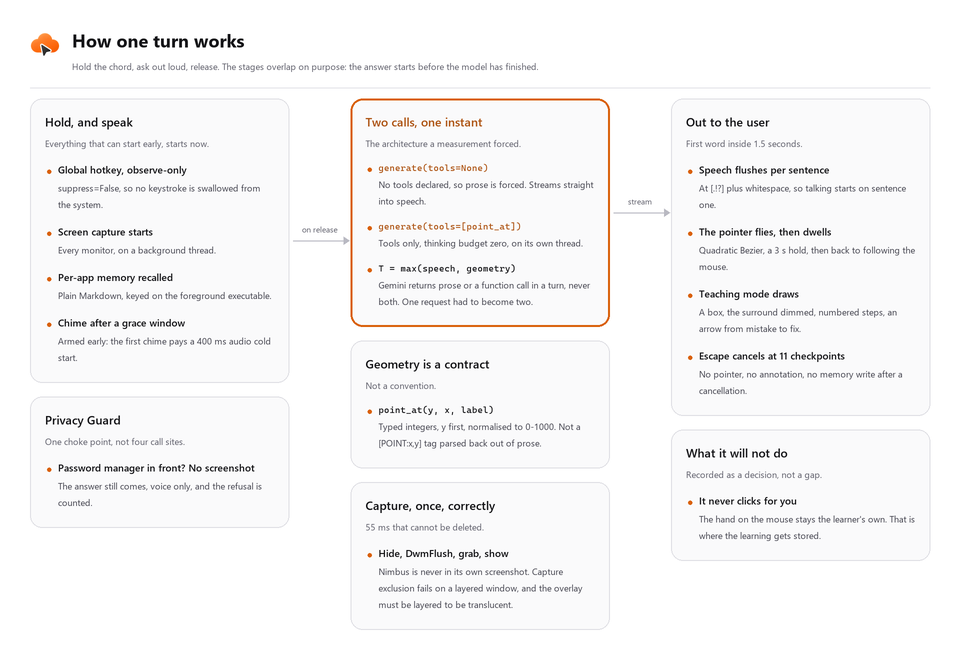
Perceived latency target is 1.5 s from key release to the first audible word, and the pipeline is
built around that number. Speech finalises while the screen is being captured, so the wall clock is
max(speech, capture) rather than their sum. The answer streams. Text-to-speech starts on the first
complete sentence rather than the full response.
Why the native Gemini path is the default
gemini_native.py talks to the Gemini API through google.genai, and that choice is load-bearing
rather than branding.
- Coordinates come back as a structured function call.
point_at(y, x, label)anddraw_box(...)are declared tools, so the pointer target is a typed value, not a[POINT:x,y]tag parsed back out of prose. That is the difference between a contract and a convention, and it is why the pointer lands. - Two calls, one instant. Gemini returns prose or a function call in a single turn, never both. We measured that, and it is the reason one request had to become two: an untooled call streams the answer into speech while a tooled call with a thinking budget of zero fetches the geometry on its own thread.
- Thinking budgets per question class. "Where is the export button" gets a budget of zero. "Why is this failing" gets the most. Both correctness and cost.
- Search grounding, Agentic Vision and context caching for the knowledge-base files, which cuts the token cost of resending a user's own notes on every question.
Other providers stay selectable: OpenAI, Anthropic, or a fully local Ollama plus faster-whisper plus Kokoro stack for users who want nothing to leave the machine. That is what bring-your-own-key means here, and proxying inference through our own servers is a recorded non-goal rather than a to-do.
Why a desktop application
The decision most people would have made the other way round.
Desktop, not web. A browser extension cannot see the application someone is actually stuck in. The software that has no tutorial is a native Windows window. A web product is structurally unable to help with any of it. Choosing the desktop meant Win32, DPI-aware overlays and a PyInstaller build, and it also meant the entire category of "software nobody wrote a tutorial for" became addressable.
Windows specifically, because that is where the desktop is. Windows leads and macOS is a distant second (StatCounter, roughly 62% against 15% in June 2026), and the long tail of untutorialised line-of-business software is almost entirely Win32. A Mac-first product cannot reach it.
The cost of that choice is most of the hard engineering in this repository: three coordinate spaces, per-monitor DPI, click-through overlays, a global hotkey that must not swallow every key on the system, and a frozen build where a missing lazy import fails on someone else's machine rather than ours.
How Kiro was used
Everything in .kiro/ is in this repository and is the honest record of how the work was directed.
Four mechanisms, each doing a different job.
Reviewing one thing? Open
.kiro/specs/voice-screen-pipeline/. It is the oldest spec and the one that shaped the other eight: fifteen requirements in EARS form, a design whose correctness properties each name the requirement they validate, and a task list whose leaves cite the criteria they satisfy. Read it alongsideIMPROVEMENTS.md, where the same decisions appear under their original task IDs, and the paper trail closes.
Specs: nine of them, requirements to design to tasks
.kiro/specs/ holds nine feature specs, one per subsystem: voice-screen-pipeline,
gemini-native-backend, teaching-annotations, privacy-guard, knowledge-and-memory,
application-shell, chat-hud, licensing-and-activation, commerce-and-delivery. Each is three
documents plus a .config.kiro recording that it is a feature spec on the requirements-first
path.
requirements.mdholds numbered requirements, each with a user story and acceptance criteria in EARS form (WHEN ... THEN THE ... SHALL,IF ... THEN,WHERE ...). 131 requirements across the nine specs.design.mdholds architecture, component contracts and data models, then a Correctness Properties section: 236 numbered properties, each stating what must hold for any input and each carrying a**Validates: Requirements N.M**back-reference.tasks.mdholds a Mermaid dependency graph, an execution-waves JSON block, and hierarchical checkboxes where every leaf cites the criteria it satisfies with_Requirements: N.M_. The graph and the waves are what let Kiro run several tasks at once; see the next section.
Every reference in every direction resolves, and we check that with a script rather than by eye. The
status marks are load-bearing and there are three of them: [x] done, [-] decided against with
the reason recorded, and [ ] genuinely open. Twenty-four leaves are [ ] and each says what
blocks it, which is usually a measurement rather than effort.
The specs were written up from the engineering logs (IMPROVEMENTS.md, SHELL_AND_CHAT.md) as the
work went, and each carries a Provenance note saying so. The original task IDs, T0-3, S-9,
T4-7b, are preserved in both places so any decision can be grepped from spec to log and back.
Parallel execution: a dependency graph, then up to five agents at once
A task list is not a queue. Most of the work in a subsystem does not depend on the rest of it, and the
part that does depends on it strictly. So every tasks.md ends with two things a machine can act on:
- A Mermaid dependency graph. All nine specs have one.
T2[2. Capture geometry] --> T4[4. Overlapped capture]is an edge that says the coordinate maths has to be real before the thread handover can be written. - An execution-waves block, as JSON. 65 waves across the nine specs. Each names the tasks that can
run together and carries a
rationaleexplaining why they are independent. Wave 1 of the pipeline is five tasks with the note "Pure functions and self-contained I/O layers. No shared state, so all five can proceed in parallel." Wave 2 is a single task, because the guarded-capture choke point needs wave 1's geometry and must exist before any worker calls it.
Kiro reads that and dispatches a wave at a time, up to five subagents concurrently, each owning one task. A subagent implements its task, writes the tests for it, runs them, and reports back; the wave does not close until every agent in it is green. The widest wave in this repository is five tasks, which is the concurrency ceiling we ran at. The graph is what makes that safe: two agents never touch the same contract, because if they would, there is an edge between their tasks and they land in different waves.
That is the leverage. It is also where the honesty has to come in.
The agents did not finish anything on their own. Every wave came back to us before it counted, and the pattern was consistent: the code an agent produced usually worked, and the thing it had quietly decided was often wrong. We read every diff. We ran the suites ourselves rather than trusting a report that they passed. We ran the built app on our own machines and handed it to testers on theirs, which is the only way some of these bugs were ever going to surface.
A representative sample of what human review caught, all of it recorded in IMPROVEMENTS.md and
SHELL_AND_CHAT.md:
- A licence gate that never ran. The code was correct and the import was at module scope, so the gate was constructed before the thing it gated. No test failed. It took reading it.
- The pointer landing two buttons off, but only on a tester's monitor layout. Correct maths, wrong assumption about which coordinate space the window manager reports.
- A fix that changed nothing observable, because a stale value in a local env file overrode the corrected fallback. The diff was right and the behaviour did not move. Only running it showed that.
- A translucent fill that punched a hole through an opaque panel, because the drawing API replaces rather than composites for shapes. It looked plausible in code and was visibly wrong in the output.
- Four "failures" that were not failures, where our own verification scripts flagged English idiom, a provider's free-tier quota and test fixture data as pricing claims. Reading the flagged lines mattered more than the count of them.
So the split is: Kiro planned the waves and wrote most of the code, and we decided what to build, what to refuse, which measurement to trust, and which of its confident reports were actually true. The drift-guard tests in the suite exist because of that last one. They are the part of the review we could automate after learning what to look for.
One thing we did not use, and it is worth naming. Kiro Crew was open sourced under Apache 2.0 partway through this build, and it is the piece that would run waves unattended: a persistent workspace on your own hardware that keeps agent memory and task state across sessions, driven by a schedule or a webhook rather than by someone sitting in the IDE. Every wave in this repository was dispatched from an interactive session with one of us watching it, so there is no Crew configuration here and we are not claiming otherwise. The waves are already shaped for it, which makes it the obvious next step rather than a rewrite, and it is on the roadmap as exactly that.
Steering: eight always-on context files
.kiro/steering/ is what stops the agent re-deciding a settled question in a fresh session.
| File | What it holds |
|---|---|
product.md |
What Nimbus is, who it is for, and a Refusals table of things not to implement |
invariants.md |
30 numbered invariants every change is measured against |
tech.md |
The stack, and the settings-resolution chain with its consequences |
structure.md |
Every module and what it owns, including the two modules that are deliberate |