
sage is a Claude Code and Codex plugin for developers who want a team of agents to build, review and prove their work, while they review results instead of code. You say what you want in a session; the agents design, build, review and test it, and you get a pull request with evidence.
Status: early, used every day by its author to build sage itself. Claude Code is supported; in Codex, sage mode and autopilot now work through the sage plugin, and the lead and the board phrases do not work there yet (sage in Codex). Tested on macOS, and in CI on Ubuntu (Linux); Windows is not supported.
Start with the Quick start. Then follow one task from start to merge in Learn sage in 5 minutes.

Why "sage"?
In Naruto, a sage stays still to gather natural energy. In Sage Mode, the sage sees and senses more than in normal combat. sage mode works the same way:
- The chief of staff stays still. It changes no files. It frames the work, writes the briefs and keeps the logbook.
- It gathers natural energy. Here, that energy is the team's work: agents work in parallel, each in its own git worktree.
- It sees the whole. It groups the tasks of one goal into a program, makes a task wait for the tasks that it builds on, and gives a mistake that comes back a lasting fix.
The idea of a mode that you turn on by name comes from pstack's poteto mode.
And the toad? In the story, toads teach Sage Mode. So sage's mascot is a toad sage: an original drawing of a hooded toad that meditates while its team works.
Quick start
For Claude Code. For Codex, see In Codex below. Before you start:
- Install Claude Code and sign in, with a Claude plan or API credits (install Claude Code).
- Install Node.js 20 or later (the minimum; CI runs the tests on Node 24), and git.
- Install
ghand log in (gh auth login). sage uses it for pull requests and the merge check. - Give your project a GitHub remote, if you can: without one, work stops at a verified branch.
- Install sage, in a terminal:
claude plugin marketplace add erickb336/sage
You seeclaude plugin install sage@sageSuccessfully installed plugin: sage@sage (scope: user). - Start a new session in a project folder: run
claude. The first time, Claude Code asks you to trust the folder. A session that was already open does not get sage. - Send the on phrase, the words below, as a message of its own, with no other words:
You see: the chief says that sage mode is on, and waits for your request.sage mode - Say what you want in the next message, for example
Fix the crash on an empty search.You see: the chief frames the task, asks its product questions in one batch, then brings evidence and a pull request.
To stop a task or uninstall sage, see Using sage. To update sage, run this in a terminal, then start a new session:
claude plugin update sage@sage
Warning: before you use programs (tasks of one goal) or tasks that wait for other tasks, update sage and restart every session that was already open. An older session still merges a waiting task, or a task of a program that you did not approve.
In Codex
Use the Codex CLI 0.160 to 0.164; the desktop app should work the same way, but it is not checked yet, and it needs the CLI for these commands. You also need Node.js 20 or later, gh logged in, and a GitHub remote for the project (see What you need).
- Add the sage marketplace and install sage, in a terminal:
codex plugin marketplace add https://github.com/erickb336/sage.gitcodex plugin add sage@sage - Run
codexin a project folder, choose Trust all and continue at the "Hooks need review" screen, and sendsage modealone (sage in Codex). The chief starts the implementer, the reviewers and QA itself (no lead yet), and saves each report in the task's pages folder. - With autopilot on, Codex still asks you 4 times in each task: before the worktree, the commit, the push and the pull request. Choose Yes, and don't ask again the first time each one comes, or Yes, proceed to be asked each time; read the trade-off first (The approval prompts of each task).
The board
Send show board to see what needs you, the agents at work, and each task in its column. On the Mac, it also starts the board page and gives its address. The board server, and Remote Control (sessions from your phone), need macOS.
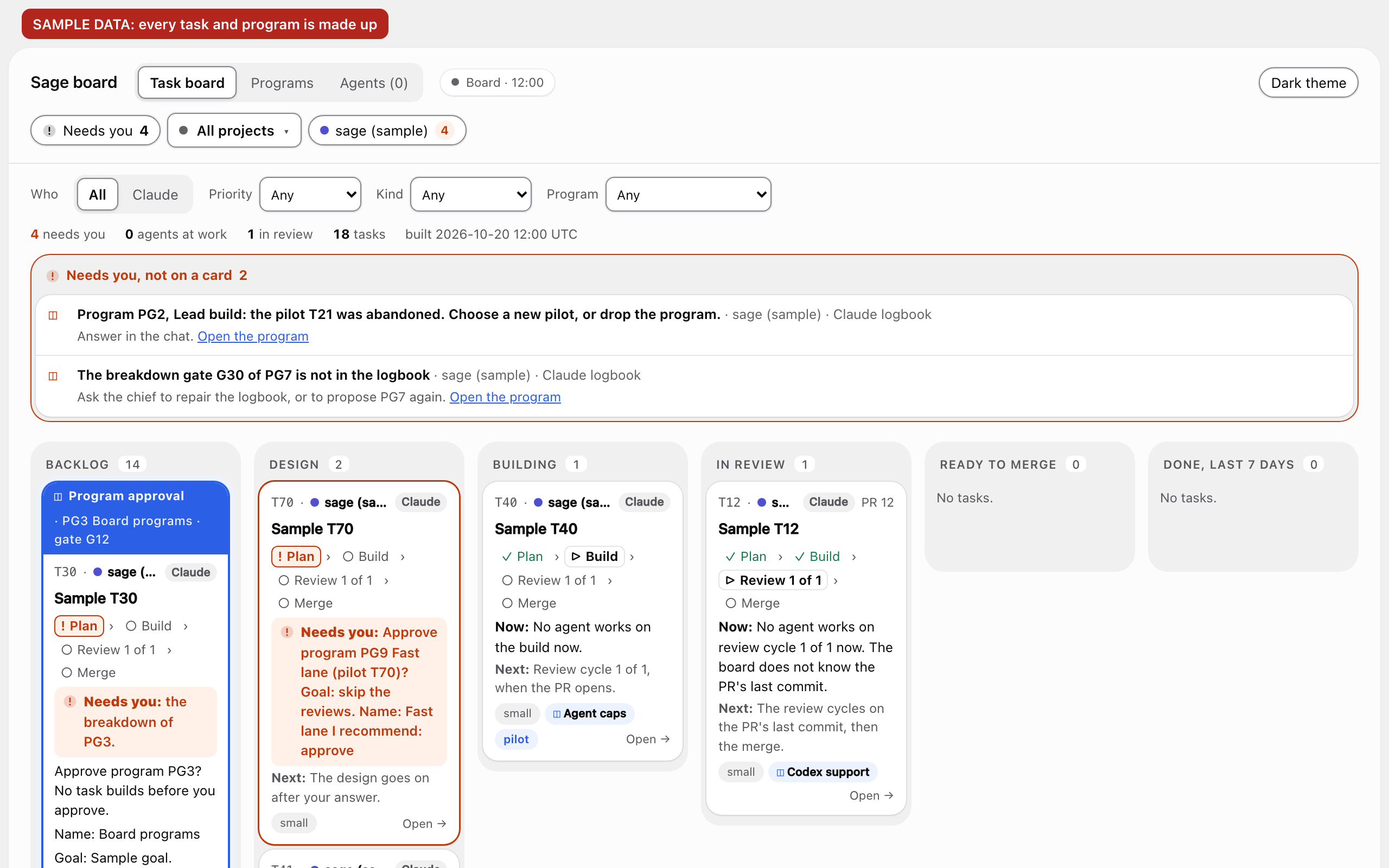
Sample data: every task and program in the screenshot is made up. The screenshot shows the first screen of the board on a laptop (1280 by 800 pixels): the project picker, the filters, the Needs you box and the columns, from Backlog to Done. The board guide describes the full board.
What to say
| Say | What happens |
|---|---|
sage mode |
The session becomes your chief of staff. Send your request next. |
show status |
Where each task is: running, waiting for you, verified. It names each open task with no priority. |
| Ask the chief to adopt another provider's task and PR | The chief uses task adoption. The branch, PR and spent repairs stay; reviews and QA start fresh. |
show board |
The board in the chat, and the address of the board page. |
autopilot on / autopilot off |
Verified pull requests merge by themselves, or wait for you again. Off by default. |
sage mode off |
A normal session again, for the rest of the session. Autopilot goes off too. |
sage help |
Every phrase, and whether sage mode and autopilot are on. |
Send each phrase alone, as the whole message. Every phrase, also the board forms, and the exact rules: Every phrase. In Codex, the mode phrases and sage help work, and the board phrases do not yet (sage in Codex).
How sage works
You talk only to the chief. The chief frames each task and asks you the product questions; a team of agents designs, builds, reviews and tests the work.

- Two loops. The inner loop turns a request into a verified pull request; findings and a QA fail go back to the build. The outer loop seals the lesson: a mistake that comes back twice gets a lasting fix, a test or a check in code first.
- The chief changes no files. It runs the design and the PE check (principal engineer), keeps the logbook, and merges when autopilot is on.
- One lead for each pull request runs the build, the reviews, QA and the repairs, with up to 9 helpers at once, and reports to the chief once. In Claude Code, a project runs at most 10 agents at once by default (
max_agents), so one lead and its 9 helpers fit, and all projects 20 (cap_total). - One writer for each branch. Only one agent writes on a branch at a time: the designer, the implementer or the arena judge, each in its own git worktree. Reviewers start fresh.
- Each task has a priority, P0 to P3, and the least route for its size; a risk flag adds the security review. A cycle is one full set of fresh reviews and QA on one commit; a new commit starts again from cycle 1.


Learn more
- Learn sage in 5 minutes: one small task, from your first message to a merged pull request.
- How sage works: the long version, with the arena.
- Rules held in code: every rule that the hook and the state tool hold, why, and what the hook does not stop.
- SECURITY.md: how to report a vulnerability, and the known limits.
- Using sage: phrases, questions, update, stop, uninstall and troubleshooting. Also Concepts, principles, and the FAQ and credits.
- What's new: every change for users, newest first. Each pull request writes its entry in
changes/(Contributing); the docs index lists every page.
Credits and licence
Built on pstack and poteto mode by Lauren Tan (poteto). The name nods to Sage Mode in Naruto; the drawings are original (all credits). MIT licence (LICENSE); pstack's text keeps its MIT licence.