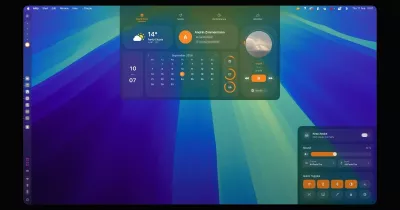

A Listary-style KeePass picker for Omarchy. Press a key anywhere, type a few letters of an entry, and press Enter to copy its password, or Ctrl+Enter to have OmaKeePick type the username, Tab and password into the window you were in. A padlock in the bar shows whether the database is unlocked.
https://github.com/user-attachments/assets/d7c362f3-6354-4d96-acbe-30396dc28392
- One search box in the middle of the screen. Fuzzy full-text search over title, username,
URL, group path, tags and notes. It ignores case and diacritics (
zilinafindsŽilina) and ranks the entries you use often and recently first. - Auto-type with KeePass sequences:
{USERNAME}{TAB}{PASSWORD}{ENTER}by default, or the sequence set on the entry or its group. - Copy the username, password, URL or current TOTP code. Copied values are hidden from clipboard history and cleared after 15 seconds.
- Quick unlock with a short PIN after the screen locks or after an idle timeout. The PIN only works in the current session: after a reboot or suspend you need the full master password again.
- Read-only. OmaKeePick never writes to your database. Keep using KeePassXC (or anything else) to edit it, and the picker reloads the file when it changes.
Install
omarchy plugin add https://github.com/mirecad/omakeepick.git --enable
On first start the plugin installs its helper, omakeepickd. It downloads the prebuilt binary
from this repository's releases and checks its SHA-256. If it can't, it builds the helper from
source, which needs Rust (omarchy pkg add rust). To run the installer yourself:
~/.config/omarchy/plugins/mirecad.omakeepick/bin/install            # download, or build
~/.config/omarchy/plugins/mirecad.omakeepick/bin/install --source   # always build
Then bind a key in ~/.config/hypr/bindings.lua:
o.bind("SUPER + SHIFT + K", "KeePass picker", "omarchy-shell shell toggle mirecad.omakeepick")
Optionally, to make the picker pop up without a fade, like the stock pickers, add this to
~/.config/hypr/hyprland.lua:
hl.layer_rule({ match = { namespace = "^omakeepick$" }, no_anim = true, animation = "none" })
Auto-type uses wtype, and the clipboard uses wl-clipboard. Both ship with Omarchy.
Use
The first time, the picker shows an unlock card:
- Database: click it or press Ctrl+O to choose the
.kdbxfile. - Key file: optional. Click it or press Ctrl+K.
- Master password.
- PIN: optional, at least 4 characters. It enables quick unlock for this session.
Enter unlocks, and Tab moves between the fields. Both paths are remembered for next time.
Once the database is open, the picker searches it. The main keys are listed at the bottom of the picker:
| Key | Action |
|---|---|
| typing | search |
| ↑ ↓ PgUp PgDn Home End | move the selection |
| Enter | copy the password (so does a double click) |
| Ctrl+Enter | auto-type the entry into the previously focused window |
| Ctrl+Shift+Enter | type only the password |
| Ctrl+B | copy the username |
| Ctrl+C | copy the password |
| Ctrl+T | copy the current TOTP code |
| Ctrl+L | copy the URL |
| Ctrl+U, Ctrl+Backspace | clear the query or the last word |
| Esc | clear the query; press it again to close |
Search also understands fzf syntax: 'exact, ^prefix, suffix$, !exclude.
The bar padlock:
- A dim padlock means no database is open, a closed one means it is locked, and an open one means it is unlocked.
- Hovering shows the time left until the auto-lock.
- Left click opens a small panel with the status, a countdown and buttons to Open picker, Lock, Close database and Open database….
- Right click locks right away. Middle click opens the picker.
Locking:
- The database locks after 30 minutes without use, when the screen locks, and before suspend or hibernate.
- After an idle or screen lock, the PIN opens it again.
- After 3 wrong PINs, after suspend or hibernate, or after Close database, the PIN no longer works and you need the master password.
Settings
The settings live on the plugin's entry in ~/.config/omarchy/shell.json:
{ "id": "mirecad.omakeepick", "idleLockMinutes": 15, "autotypeSequence": "{USERNAME}{TAB}{PASSWORD}{ENTER}" }
| Setting | Default | Meaning |
|---|---|---|
idleLockMinutes |
30 | lock after this many minutes without a search or action (0: never) |
clipboardClearSeconds |
15 | clear a copied value after this long, if it is still there (0: never) |
autotypeSequence |
{USERNAME}{TAB}{PASSWORD}{ENTER} |
default auto-type sequence |
typeDelayMs |
8 | delay between typed characters; raise it if apps drop keys |
autotypeStartDelayMs |
250 | wait before typing, so focus can return to the target window |
recentCount |
8 | recent entries shown before you type |
notifyOnCopy |
true | show a notification with the countdown when something is copied |
Auto-type syntax
The syntax is the KeePass/KeePassXC subset that matters for logins:
- Fields:
{USERNAME}{PASSWORD}{TITLE}{URL}{NOTES}{TOTP}, and custom fields with{S:Field name}. - Keys:
{TAB}{ENTER}~{SPACE}{BS}{DEL}{UP}…{F1}–{F16}. Add a count to repeat a key:{TAB 2}. - Modifiers:
+(Shift),^(Ctrl) and%(Alt) apply to the next key or character, as in^a. - Timing:
{DELAY 500}pauses, and{DELAY=20}sets the delay between keystrokes. - Other:
{CLEARFIELD}, plus the literal escapes{+}{^}{%}{~}{{}{}}.
In XWayland windows (old Electron and Java apps), text is pasted via the clipboard instead of typed. The clipboard is cleared afterwards.
TOTP works with KeePassXC's otp field (otpauth:// URIs, including Steam), KeePass 2's
TimeOtp-* fields and the legacy TOTP Seed/TOTP Settings fields.
Security
- All key handling is in
omakeepickd. It is a small Rust daemon, and it is the only process that opens the database. The shell plugin (QML inside your desktop shell) only ever sees entry titles, usernames and group names. Passwords, notes and TOTP secrets never reach it: the daemon types and copies them itself. - Passwords never appear on a command line. The master password and PIN go from the unlock
field straight to the daemon, and the field is cleared. Secrets go to
wtypeandwl-copyon stdin, never as arguments, so other processes can't read them from/proc/<pid>/cmdline. - The daemon is locked down.
- It listens on
$XDG_RUNTIME_DIR/omakeepick/sock. The socket's directory is mode0700, and connections from other users are refused (checked withSO_PEERCRED). - Core dumps are off, and the process is marked non-dumpable, so other processes of yours
can't
ptraceit or read its memory. - Its memory is not pinned, so while unlocked the kernel may swap it. Locking, including the automatic lock before suspend or hibernate, wipes the decrypted database first.
- It listens on
- How the PIN works. With a PIN, the daemon keeps the database credentials in memory,
encrypted with
ChaCha20-Poly1305under a key derived from the PIN withArgon2id(64 MiB). Three wrong PINs, suspend, hibernate, Close database or the daemon exiting destroy that copy. A short PIN is only as strong as this process's memory isolation. If that worries you, don't set one. - Not stored anywhere: passwords or PINs.
~/.local/state/omakeepick/state.jsonholds only the last database and key-file paths, plus per-entry use counts (by UUID) for ranking.
Found a vulnerability? Please report it privately, as described in SECURITY.md.
Limitations
- KDBX 3.1 and 4.x with a password and/or a key file are supported (XML v1/v2, 32/64-byte and arbitrary key files). YubiKey challenge-response is not supported yet.
- Screen-lock detection asks Omarchy's lock screen every 10 seconds, so a very short lock may
not lock the database. Suspend and
loginctl lock-sessionare detected instantly. - One database at a time.
Development
bin/dev-install     # build the daemon and sync this tree into ~/.config/omarchy/plugins
tests/run           # manifest, JS model tests, qmllint against the shell, cargo tests
Changes to Service.qml need omarchy restart shell, because the service stays loaded. Other
QML hot-reloads. The daemon protocol is documented in docs/PROTOCOL.md, and
omakeepickd ctl status, ctl lock and ctl search '{"query":"git"}' talk to it directly.
The test databases in daemon/tests/fixtures come from fixture.xml via make.sh. Their
password is test-password.
Releasing:
- Bump
versionin bothmanifest.jsonanddaemon/Cargo.toml, then runcargo checkindaemon/soCargo.lockfollows. The workflows build with--locked. - Commit, and tag the commit
vX.Y.Z. - Push only the tag:
git push origin vX.Y.Z. The release workflow attachesomakeepickd-x86_64-linuxand its.sha256. - Once the release is published, push
main.omarchy plugin updatefollowsmain, and a plugin whose version has no release yet builds the daemon from source instead.
License
MIT