

An open-source, local-first Electron desktop app for discovering frontend-developer vacancies, tracking applications, and preparing CVs and cover letters. It uses no external database, no cloud account, and no API key held by this project. Application data lives in an embedded SQLite workspace on the user's own machine; AI features run through the reusable AgentDock runtime, which drives AI agent CLIs already installed and authenticated on the user's computer (starting with Claude Code and Codex), without this project ever receiving a password, token, or API key.
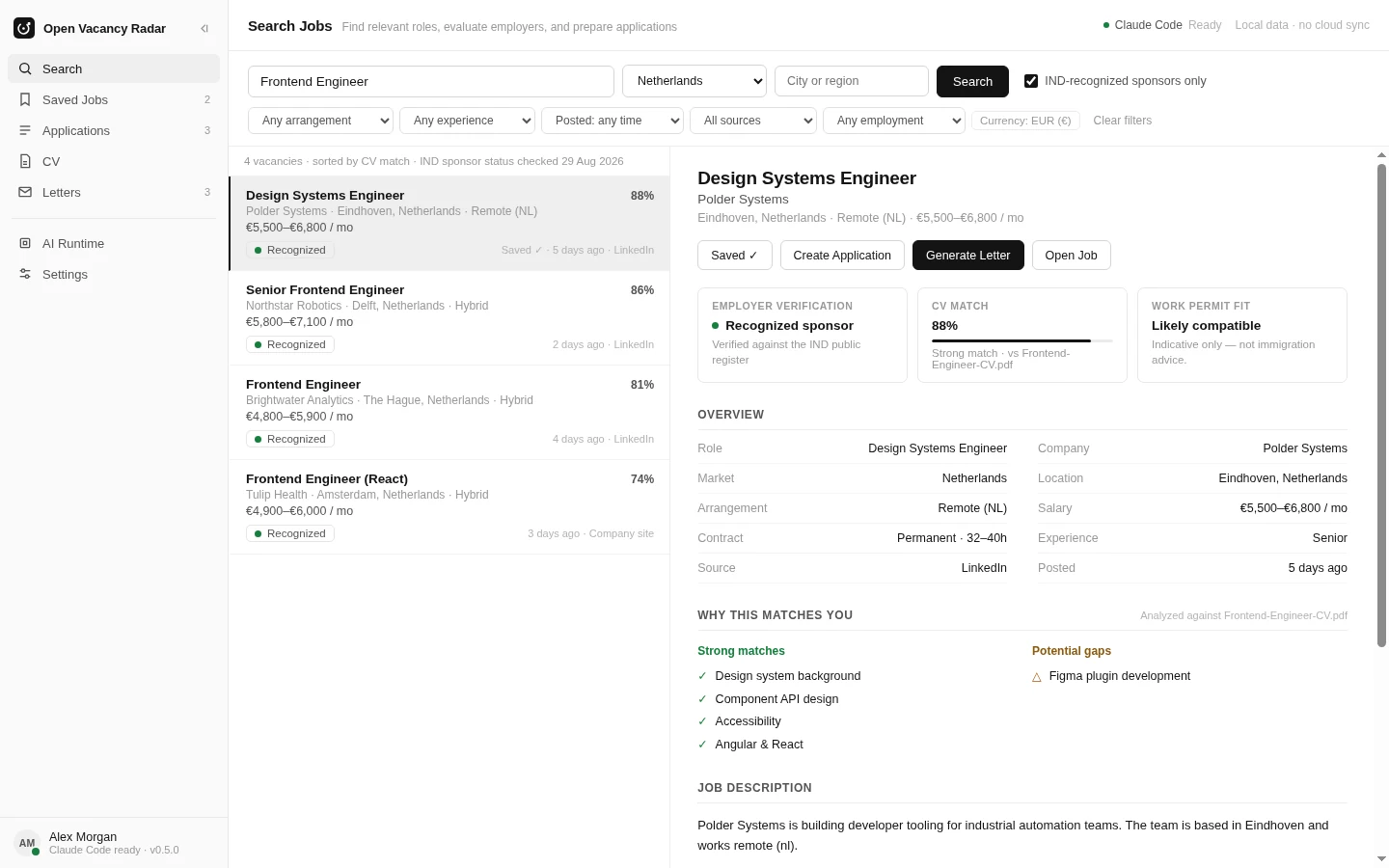
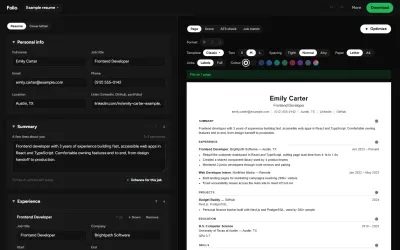
Reference interface shown with sample data; production behavior comes from the Electron source in this repository, not the bundled prototype used to prepare the image.
30-second overview
If the player above doesn't render, watch/download the video directly. Illustrative UI recreation with sample data, not screen-captured footage of the live app.
What this is
A personal job-search workspace built around one worldwide/remote discovery pipeline: frontend-only roles from roughly 40 researched public sources (ATS APIs, RSS feeds, keyed job-board APIs), filtered for genuinely remote, non-US-only eligibility, with no default country, role, or salary bias baked in.
For any vacancy that normalizes to a Netherlands location, a best-effort check additionally looks up the employer by name against the IND's official recognised-sponsor register. This is a name-keyed, unverified lookup, not a curated evidence chain, so a match is always reported as a "possible sponsor match" rather than a confirmed one -- confirm the legal entity yourself before relying on sponsorship. Like every discovery source, it runs on a bounded budget: one scan resolves a capped number of distinct employers against Wikidata rather than one lookup per listing, and any employer it did not reach is reported as unchecked, never as unmatched.
The pipeline is deterministic-first: official ATS APIs and structured feeds before plain HTTP,
before JSON-LD, before HTML parsing, with a narrowly-scoped headless-browser fallback only where
nothing else works. See packages/vacancy-engine for the engine itself,
vendored from the standalone ind-job-radar CLI project and ported from PostgreSQL to an embedded
better-sqlite3 database so the desktop app needs no external services at all.
On top of that deterministic pipeline, an opt-in "Include AI web search" checkbox on the Search page
can add one budget-capped session of your configured Claude CLI (its WebSearch/WebFetch tools
only, no filesystem access) to look for further candidate vacancies. It only runs once a search
profile is configured, runs alongside the job-site sources rather than before them (their results
appear while it is still searching, and its own results are merged in before the scan is scored and
saved), never blocks the rest of a scan if it fails or times out, and every candidate
it returns is schema-validated and checked against the same blocked/prohibited source list as the
deterministic sources before being accepted.
The AI step searches for what you submitted for that scan, not for your saved profile. When you run a search, the role, country, employment type and minimum salary you entered are captured once as the scan's intent and given to both the AI step and the job-site sources, so editing your profile while a scan runs cannot change it. A role, country or employment type is passed to the AI as wording for its web searches; a minimum salary cannot be searched on the web, so the AI is told that and the same local filter that checks every other source applies it afterwards (salaries the AI reads from a page are unverified, so with "hide unknown salaries" on they do not pass). Your saved profile only adds background (skills, years of experience, and your home country when you did not pick one) and its target roles are never searched. "Browse all" stays browse-all: no role is searched. "Unspecified location" is not a place: the AI is told you want vacancies that name no country, is not asked to search for it, and the local filter keeps only such rows. The scan panel shows what the run is searching for, and "Copy diagnostics" lists how each criterion reached the AI step, using search terms and counts only, never CV text or the prompt. The local filter still decides what is kept.
Search plan. Under "What you are looking for" you can approve a search plan: a primary function, an ordered list of equivalent titles (for example React developer, Frontend engineer, UI engineer), the working language each title is written in, and the markets you care about. It describes the work you want, not facts about you, and it works by hand with no AI. Titles suggested by the CV tools ("Best-fit roles") or an AI answer wait in a separate list and are searched only after you add them. When a plan has titles, the Search page offers "Also search my N approved titles"; it starts off, shows the titles it adds, and remembers your choice. The title you type is searched first, exactly as before; then each approved title is asked only of the job sources that can filter by title (the others return one feed whatever the title, so they are not asked again and the title is matched locally).
The whole plan -- the typed query's discovery pass, including fixed feeds and the company-roster batch,
and every approved title -- runs inside ONE declared allowance: a number of network requests counted at
the HTTP client before each request is made (every retry and redirect counts), one deadline that also
cuts a request still in flight, and one limit on matching rows. The allowance covers the search stage
only, and the limit applies to the rows that stage returns. These run the same with or without a plan
and are outside it: the Workable and MPSV bulk snapshots (their attempts are reported as
usage.outsideEnvelopeAttempts), official employer checks (counted in the run statistics) and sponsor
lookups (reported as sponsor counts). Rows from those snapshots, and from the AI web search, that match
an approved title are kept but are not counted against the result limit, and the run's wall time is the
search stage plus those fixed stages, not the allowance alone. Titles the allowance did not reach are
listed as deferred, and each source row says whether that title really reached it, was only partly
asked, or was not asked, with the reason, in the results notice and in "Copy diagnostics". A call that
reached a source and was then stopped (a retry the allowance refused, or a request cut by the deadline)
is counted as a request and said to have been "stopped after asking"; only a call refused before any
network contact is "not asked" and counts as zero. A row is kept when the typed query matches
it as before, or when an approved title appears in its title (a title only mentioned in a description
does not count); each job says which query found it and whether the typed query matched only its
description. Most of what extra titles add comes from that local matching: a source with no title
filter returns one feed whatever it is asked, so the feed the typed query already fetched is matched
against every approved title for free, and an extra title request helps only at sources that filter by
title and only when the allowance reaches it. In the repository's synthetic, author-labelled
measurement the extra jobs at the tight and moderate allowances all came from that local matching and
no extra title request fetched one; title requests added jobs only at a generous allowance. Markets and the primary function are
kept with the plan but do not filter searches (use Country for that); the report and diagnostics say
so per source. The language you pick for a title is a label kept for provenance and display only: no
source is filtered or queried by language, and it never makes a job count as requiring that language,
which only an explicit statement in the advert does. A job whose title matches an approved title is
treated as in scope by the engine's pre-classification, so the usual language, location and salary
checks apply to it -- but only when its title carries none of the role families the product always
excludes (full-stack, back-end, manager, director, mobile, QA and the like): "Frontend Engineering
Manager" stays a role mismatch. A run takes a frozen copy of the plan when it starts, so editing or
removing a title changes the next search only, and finished reports keep their own copy. If the plan
was empty or could not be read when a run started, the results say so. A damaged plan file, or one
written by a newer version, is never overwritten by an ordinary save: the editor says which it is and
offers "Start a new plan", which first keeps the file's exact bytes as a timestamped backup next to
it. The unattended background scan uses the same plan and allowance in one run instead of scanning each
saved role (falling back to the first saved role, and saying so, when the plan cannot be used); the
background company-board scout checks only the first approved title, with no plan allowance of its own.
Without approved titles, or with the switch off, a search is the single typed query it always was.
Same-requisition duplicates are merged by the existing identity rules; different requisitions with the
same company and title stay separate.
Vacancy coverage is a product requirement: a lawful public source is integrated by default in the broadest mode its evidence supports. Sources that take longer to implement remain planned. Unclear republication rights use a factual linked index; explicit prohibitions, authentication or partner boundaries, and technical access controls stop ingestion. See the job source policy.
On top of that, the desktop app is a full personal tracker:
- Search: run the pipeline on demand, optionally add the AI web search pass above, save leads, or open the CV assistant on any result.
- Saved Jobs / Applications: track status end to end, with confirm-before-delete and a short undo window on every delete. An application in recruiter-screen or interview stage can also generate a review-only interview-prep pack (likely questions, claims to defend, gaps, STAR candidates) built only from data already in the workspace, never invented and never auto-saved.
- CV Library: upload or hand-enter multiple CVs, one marked default, each usable for AI gap-analysis against a specific vacancy. A scanned or image-only PDF with no selectable text can fall back to AI transcription with your explicit consent; you review and correct the text before it's saved, and the CV record keeps track of which source produced it.
- Letters: generate motivation letters, cover letters, recruiter messages, or short application-form blurbs from a CV + vacancy pair, in a chosen tone and length, with a library of saved drafts.
- Settings: theme (light/dark/system), density, default market, application-data reset, documented manual backup, and (under Workspace) saved answers to recurring application-form questions that are reused only when you explicitly click "Use this answer," all persisted locally.
- AI Runtime: the AgentDock provider panel: see each installed CLI's authentication, version, and capabilities, set one as the default AI features run through, and verify it without spending a model call.
This desktop app relies on CLIs the user already has installed and authenticated, not its own
subscription or API key: if a user already has claude or codex installed and logged in, Open
Vacancy Radar can use that existing session for local AI workflows (gap analysis, letter drafting).
The installed CLI stays the sole authentication and provider boundary; this project never receives
a password, token, or API key for those AI CLIs. (A separate MCP job-source layer exists in the
daemon; it ships with one reviewed, no-auth provider registered — InfoSec Job Board, a public
vacancy-search MCP server that needs no credential — while generic credential-bearing/OAuth MCP
providers remain a future, separately reviewed integration. There is currently no screen in the app
that surfaces this provider; see SECURITY.md.)
Renderer (React) ──IPC──▶ Electron main ──@agent-dock/client──▶ Local Daemon (Fastify, protocol v1)
                              │                                          │
                    embedded SQLite (workspace +               Unified Agent Runtime
                    vendored vacancy-engine)              ├── Claude Code adapter ──▶ claude CLI
                                                           └── Codex adapter ────────▶ codex CLI
The renderer never calls the daemon directly. Only Electron's main process does, through the
typed @agent-dock/client SDK. See
SECURITY.md for why, and
Client SDK below for what that package looks like from the outside.
See docs/architecture.md for the full breakdown, and SECURITY.md for exactly what protects the daemon and why.
Where do I start?
- Just want to run it? Getting started below.
- Want to contribute to this repo? DEVELOPMENT.md: setup, an "I want to change X" map of the codebase, and the common architectural rules that keep the security model intact.
- Want to add a provider (a third CLI besides Claude/Codex)? docs/providers.md#adding-a-new-provider: self- contained, no daemon/client/desktop changes required.
- Something's not working? docs/troubleshooting.md.
What this is not
- Not an unofficial authentication bypass. Every CLI call goes through the real
claude/codexbinary using its own login state. Nothing here reads, copies, or reverse-engineers credential storage. - Not a token extractor or an API proxy. This project never makes a direct Anthropic/OpenAI API call and never asks a user for an API key in CLI mode.
- Not a hosted job portal or cloud account service. Application data stays in the local desktop workspace, and the AI runtime remains provider-neutral infrastructure.
- Not a replacement for Claude Code or Codex. It's a thin, provider-neutral shell around them.
Repository layout
apps/
  desktop/          Open Vacancy Radar Electron + React application
                       src/components/{search,saved,applications,cv,cv-library,letters,runtime,settings}/
                       electron/workspace/  : the personal-data SQLite schema, IPC, repository
  daemon/           Standalone local Node.js service (Fastify), runnable without Electron
packages/
  vacancy-engine/   The worldwide/remote discovery engine (plus a best-effort IND sponsor check),
                     vendored from the standalone `ind-job-radar` CLI and ported to embedded SQLite
  agent-runtime/    Provider-neutral runtime: process management, adapters, normalized events
  client/           @agent-dock/client: typed daemon SDK (HTTP+SSE, auth, protocol version check)
  shared/           Types, Zod schemas, and the protocol v1 AgentEvent contract everything else uses
  application-executor/  CDP-based application-form field mapping, readiness, and submission-outcome
                     primitives behind the desktop app's auto-apply review pipeline, currently
                     hidden from the UI pending further scoping
Design tokens and shared UI primitives live in apps/desktop/src/styles/tokens.css (the single
source of theme/color/spacing truth, see DESIGN-TOKENS.md) and
apps/desktop/src/components/shell/ (ConfirmDialog, UndoToast, EmptyState, and the app
shell), reused across every page rather than redefined per feature.
Requirements
- OS: Windows 10 or later, 64-bit (x64). The packaged installer is Windows-only for now; see docs/packaging.md#platform-matrix.
- Node.js:
>=22if you're running from source (seeenginesinpackage.json). Not needed to just run the packaged installer. - An AI provider CLI, for AI features only (search, saved jobs, applications, and letters work without one): install Claude Code and/or Codex first, then authenticate the CLIs you want to use, independently of this project:
# Claude Code
claude auth login
claude auth status

# Codex
codex login
codex login status
This project never automates account signup or handles credentials on your behalf, and never installs a CLI for you. Do all of that directly with each CLI first; see docs/troubleshooting.md#claudecodex-not-detected-installed-false if the app doesn't detect a CLI you've already installed.
Getting started
pnpm install

# Run the daemon on its own (no Electron required)
pnpm daemon

# In another terminal, verify it's alive
curl http://127.0.0.1:<port>/health
The daemon prints its listening URL and where it wrote its discovery file (port + auth token) on startup. See SECURITY.md for what that file is and why the token exists, and docs/daemon.md for everything else about running it standalone.
To run the full desktop app (spawns the daemon automatically):
pnpm dev:desktop
No database server or setup step is required: both the vacancy-engine's own database and the
personal workspace database are embedded SQLite files under Electron's per-user app-data directory,
created and migrated automatically on first launch. pnpm install's postinstall step also
rebuilds better-sqlite3's native binding against Electron's ABI (electron-rebuild). A plain
node_modules install alone is not sufficient for the desktop app to run.
Everyday commands
pnpm build       # build every package
pnpm typecheck   # strict TypeScript across the whole workspace
pnpm test        # unit + integration tests (no real CLI calls; see docs/providers.md)
pnpm lint        # ESLint
To run vacancy-engine's discovery pipeline standalone, without the desktop app or daemon: copy
packages/vacancy-engine/config/.env.example to .env and fill in the keys you need, then
pnpm scan # global-remote:scan -- the full worldwi