A self-hosted, zero-dependency restaurant booking system. Customers browse restaurants, hold tables in real-time, and book instantly. Admins manage reservations, tables, floor sections, branding, and booking pauses from a dedicated dashboard - all from a single Docker Compose command with no external services required beyond optional SMTP.
Documentation · Live Demo - admin: example@example.com / password · resets every 2 hours, feel free to play around and change anything
Philosophy
The Restaurant business has changed. Indie restaurants run on razor thin margins, and the cost of SaaS booking platforms only adds to the burden. Users don't want to install another app, give up their phone number to the cloud, or create another account to remember. OpenResto was designed to be as simple as possible for both customers and restaurant owners, while still being fully self-hosted, secure and customisable. Owners can manage bookings easily without friction. Customers book instantly without giving up any personal information, and can easily save their reservations to their calendar. Nothing in between.
See it in action
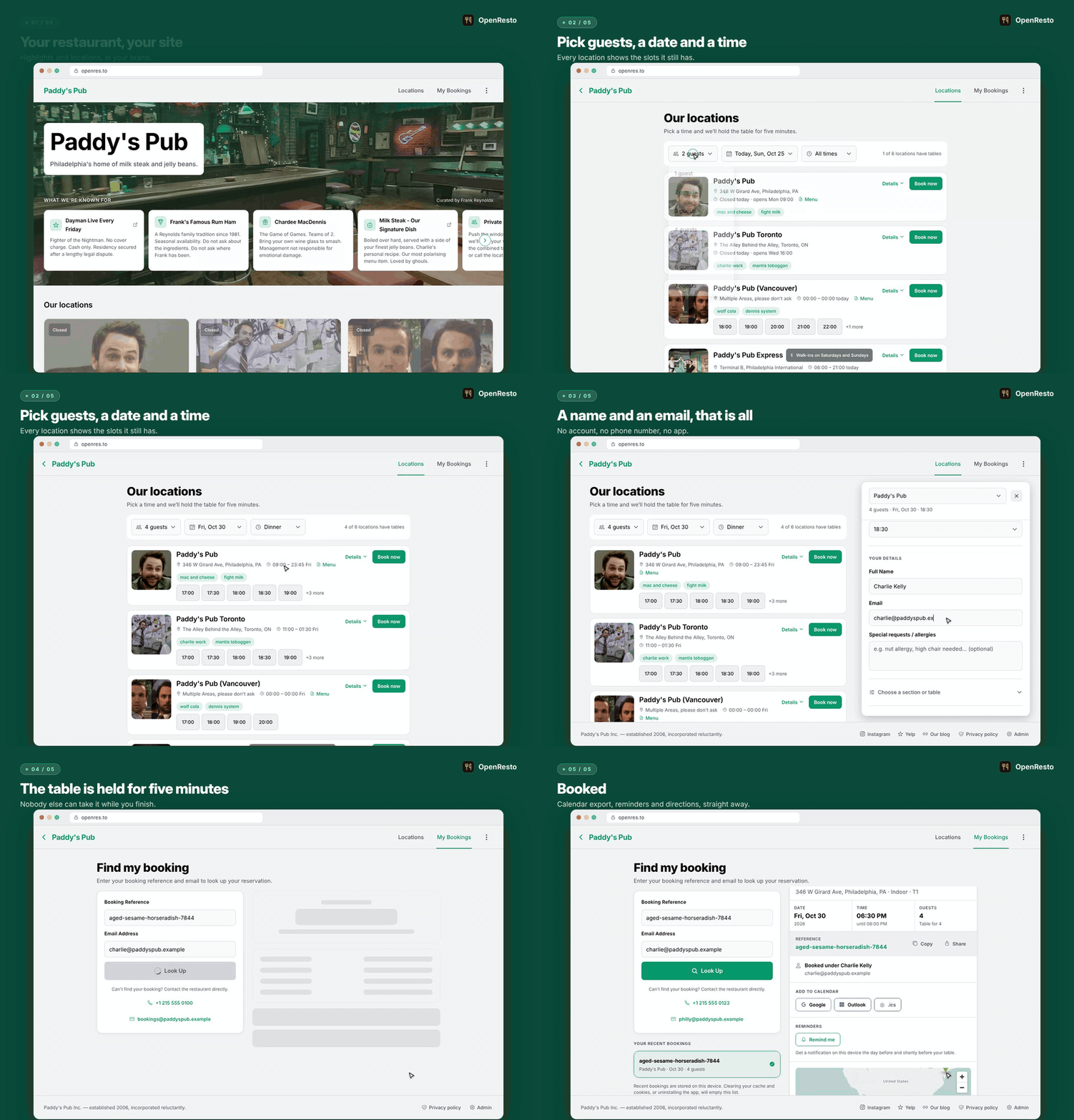
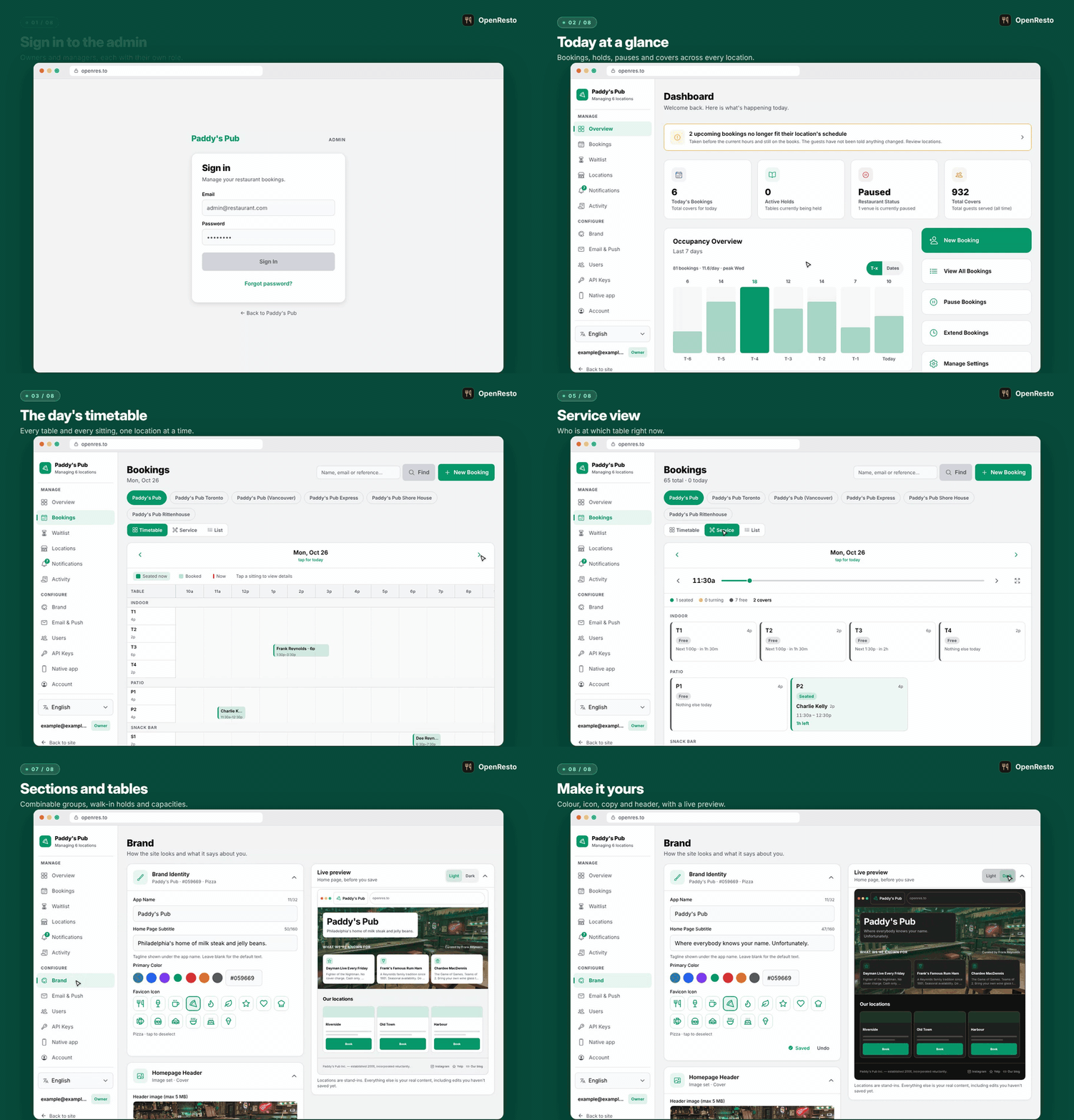
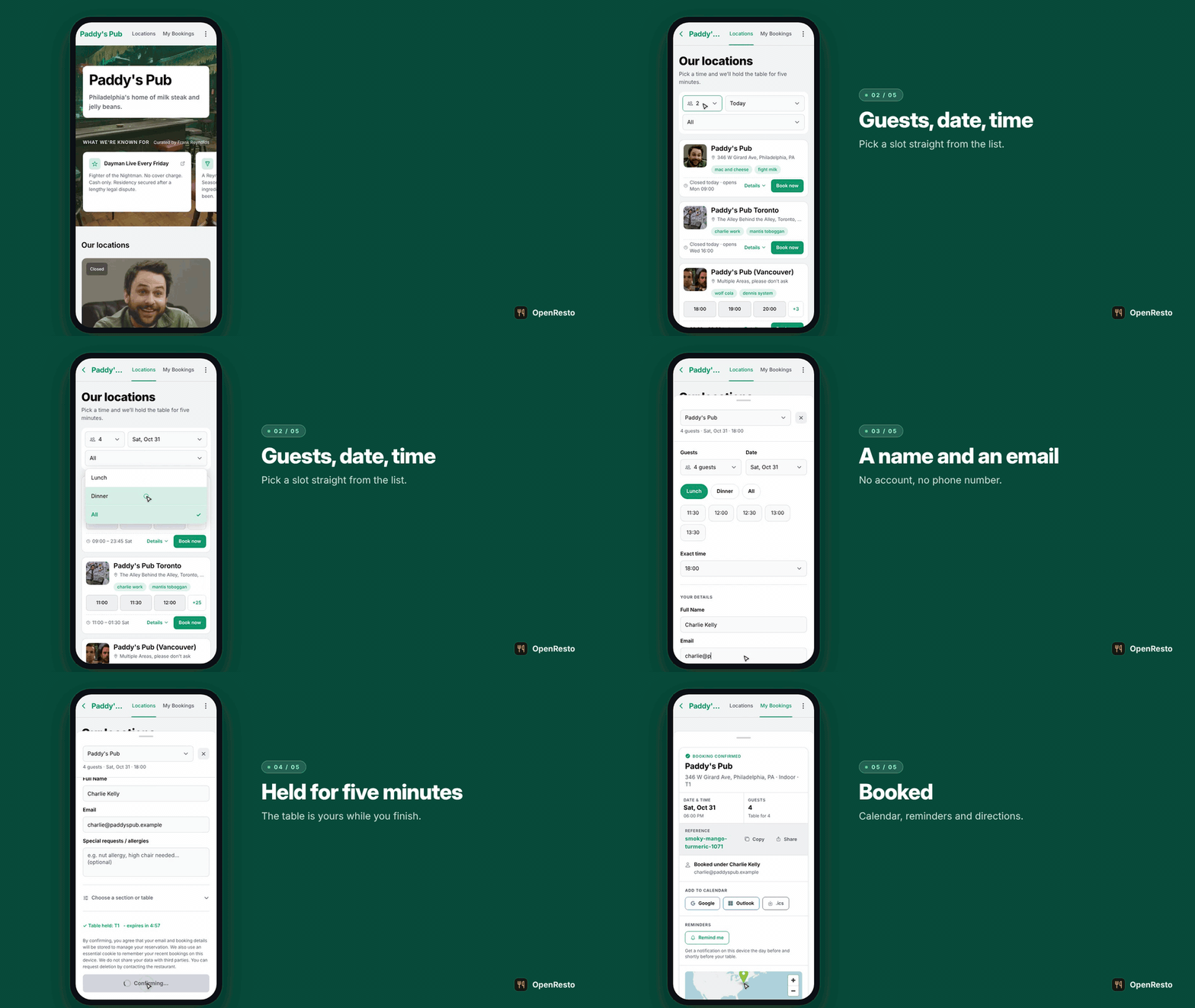
Everything below is the real app, recorded with Playwright against the live demo and its seed dataset. The first set frames each flow with step captions; the plain recordings follow underneath.
Booking a table
Browse the locations, pick a party size, a date and a time, and the table is held while the guest types their details. Confirming lands on a page with calendar export, reminders and directions.
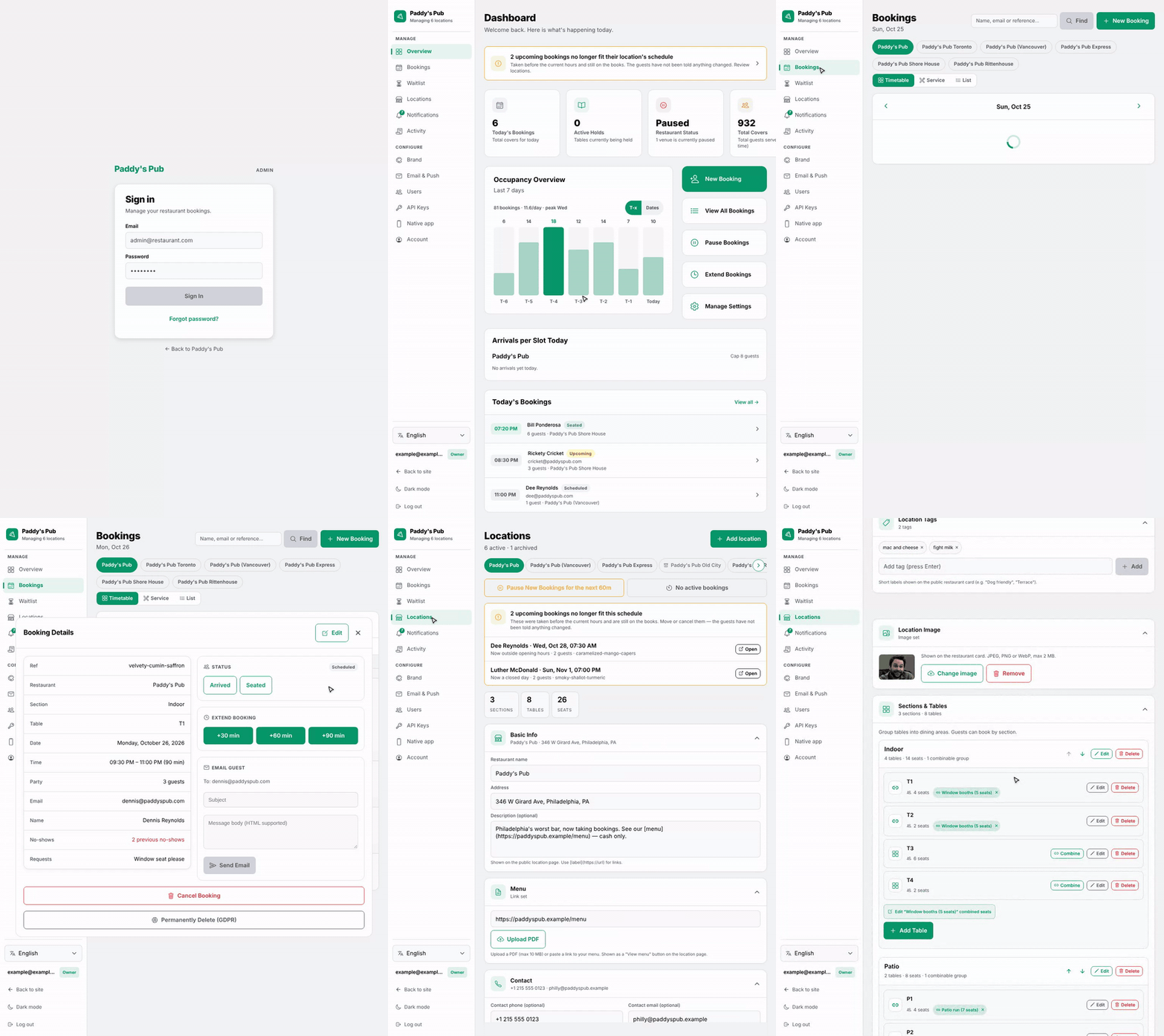
Running the restaurant
Sign in to the dashboard, open the day's timetable and a booking's details, switch to the service view, scroll a location's policies, hours and tables, then edit the brand with the live preview updating as you type.
On a phone
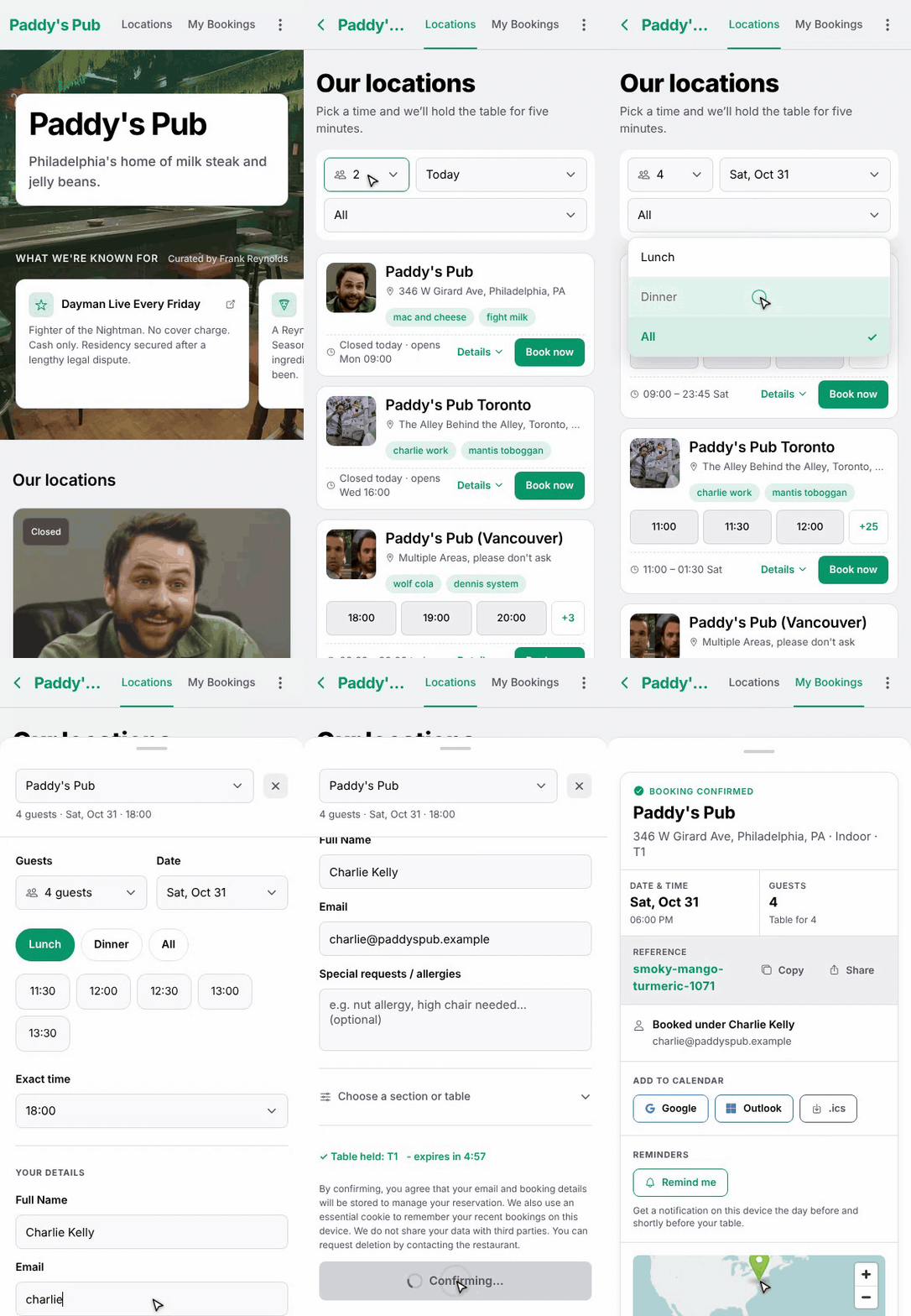
The same site on a phone, nothing to install.
Plain recordings (no frame, no captions)
Desktop


Phone and tablet
 |
 |
Tech Stack
| Layer | Technology |
|---|---|
| Backend | ASP.NET Core 10, C#, Entity Framework Core, SQLite |
| Frontend | React Native (Expo Router) — web + mobile from one codebase |
| Auth | JWT Bearer Tokens (HS256), encrypted HttpOnly cookies |
| Image gen | Magick.NET-Q8-AnyCPU (cross-platform, no native deps) |
| MailKit (SMTP) | |
| Infra | Docker Compose, Nginx reverse proxy |
| Security CI | OWASP ZAP API scan on every push (OpenAPI-driven, rules in .github/.zap-rules.tsv) |
| Code mappers | Mapperly (source-gen, zero reflection) |
Quick Start
Self-hosted install (pre-built images — recommended for production)
Download the docker-compose.yml from the latest release, create a .env file based on .env.example, then:
docker compose up -d
Pre-built linux/amd64 and linux/arm64 images are pulled from GHCR — no build step, works on Pi/NAS boxes out of the box. The backend applies any pending database migrations automatically before accepting traffic.
The full self-hosting guide (install, configuration, HTTPS, email, upgrading, troubleshooting) is at docs.openres.to. For backup and restore, see the backup and restore guide. To drive the admin API from your own scripts with an API key, see API guide. To publish the guest booking app to the Play Store or App Store under your own developer account, see native app guide.
Docker (build from source)
For local development:
docker compose up
- App: http://localhost:5062
- API: http://localhost:8080
- Frontend dev: http://localhost:8081
Local Development
Prerequisites: .NET 10 SDK, Node.js 20+
# run from the repo root
npm run dev
The SQLite database is created automatically on first run. Since this is not running via docker, Images and other media will not work, however HMR is enabled.
Configuration
Backend
Set via environment variables or appsettings.json:
| Variable | Description | Default |
|---|---|---|
JWT_KEY |
JWT signing key (min 32 chars) | Dev key in appsettings |
CONNECTION_STRING |
SQLite connection string | Data Source=./openresto.db |
CORS_ORIGINS |
Comma-separated allowed origins | localhost ports |
Admin:Email |
Default admin email | Set in appsettings |
Admin:Password |
Default admin password | Set in appsettings |
Optional integrations are configured the same way and stay switched off until they are: Apple
and Google Wallet passes (Wallet__Apple__*, Wallet__Google__*) and guest booking reminders
(Vapid__* on the web, an EAS project on native) each hide their own button while unset.
Running from a clone, put them in OpenRestoApi/appsettings.Local.json, which the backend
loads when present and .gitignore keeps out of commits — see
native app guide for the issuer setup either needs.
The API Keys settings screen links out to the CLI package, the HTTP API guide and the source
repository. Those three URLs default to this project's and are overridable per deployment with
OPENRESTO_CLI_PACKAGE_URL, OPENRESTO_API_DOCS_URL and OPENRESTO_REPOSITORY_URL (or the
Links:CliPackage, Links:ApiDocs and Links:Repository configuration keys) — useful if you
run a fork with its own client or docs.
Frontend
| Variable | Description | Default |
|---|---|---|
EXPO_PUBLIC_API_URL |
Backend API base URL | http://localhost:5062 |
The VAPID key variables are also required for push notification support, but are optional for developing.
Testing
# Backend tests
dotnet test

# Frontend tests (100% coverage target)
cd openresto-frontend && npm test

# Full frontend coverage report
cd openresto-frontend && npm test -- --coverage
Note: VSCode may not pick up on the Jest config, unless you use the command palette to activate all the test runners.
Key Features
Booking flow
- Real-time table holds — when a customer selects a time slot, a 5-minute hold is placed on the specific table via a thread-safe in-memory
ConcurrentDictionary. TheholdIdmust be echoed back at booking time, preventing any other customer from snatching the same table during checkout. Holds auto-expire and are released atomically if the customer changes their selection. - Popular-times categorisation — every 30-minute slot is tagged
Lunch,Dinner, orOff-Peakusing restaurant industry data (Toast/Square/Yelp benchmarks). The frontend groups available slots into labelled pill tabs so customers can quickly jump to the time period they want. - Paused bookings — admins can halt new reservations until a specific date/time (e.g. during a private event) without touching any configuration files. The availability API checks
BookingsPausedUntilbefore returning slots. - IANA timezone awareness — all
DateTimevalues are stored in UTC. Restaurant-local open/close hours and slot generation are computed using the restaurant's IANA timezone (America/New_York,Europe/London, …), so the availability calendar is always correct regardless of where the server runs.
Admin & management
- Multi-restaurant support — manage multiple locations from one instance; each has its own tables, sections, hours, timezone, and branding.
- Floor sections — tables are grouped into named sections (e.g. "Patio", "Bar", "Main") so admins can organize seating and customers see which section they're booking.
- Admin dashboard — live bookings list with status filtering (active / past / cancelled), extend or cancel reservations, and a customer-name field for front-of-house use.
- Booking pause — temporarily suspend new reservations for a restaurant without taking it offline or editing config.
- Activity trail — every state-changing admin action, plus sign-ins and failed sign-in attempts, is recorded append-only with who did it, when, from which IP, and a before/after diff. Coverage is structural rather than a maintained list: any mutating request behind an admin policy is recorded, so a new endpoint is audited the day it ships. Owner-only to read, with no delete endpoint at any role — entries leave only through a configurable retention pass (365 days by default). Credentials and customer identity are masked, so an entry can record that a password or a guest's name changed without recording what it changed to.
- API keys & headless CLI — Owners can mint long-lived, individually revocable API keys (Settings → API Keys), each scoped to exactly the resources it needs (
bookings,locations,tables,brand,users,audit,guests) — a key without theguestsscope reads bookings with customer identity redacted, so a POS or marketing integration never sees guest contact info.openresto-clidrives the same admin API from scripts and cron jobs: named profiles,--jsonon every command, and confirmation gates on destructive operations. Every key request lands in the activity trail under the key's name.
Branding & UI
- Full white-label branding — app name, primary color, favicon icon, and PWA identity are all stored in the database and configurable from the admin settings panel. Choose from 15 Lucide icons (utensils, wine, coffee, pizza, flame, leaf, star, heart, chef-hat, fish, hamburger, sandwich, soup, cake, ice-cream-cone); the favicon updates live in the browser tab without a page reload. The frontend fetches brand settings on boot and applies them globally via
BrandContext. - Dynamic PWA icons —
GET /api/brand/pwa-icon.svgreturns an SVG with the brand-colored background and white icon on the fly.GET /api/brand/pwa-icon-{192|512}.pngrasterizes it with Magick.NET (cross-platform, no ImageMagick apt package needed) for PWA manifest compliance. - Skeleton loaders & splash screens — branded loading states throughout the app; no blank white flashes.
Security & privacy
- OWASP ZAP API scan in CI — every push runs a ZAP API scan against the full Docker stack, using the OpenAPI spec (
/openapi/v1.json) to discover all endpoints automatically. Ignored rules are tracked in.github/.zap-rules.tsv. - Rate limiting — ASP.NET Core built-in rate limiting on sensitive endpoints.
- Encrypted recent-bookings cookie — HttpOnly cookie using ASP.NET Core Data Protection so customers can look up their recent reservations without an account.
- Hard-delete — admins can permanently erase booking records for GDPR compliance. A GDPR notice is shown on the booking form.
- No accounts needed — customers identify via a short
BookingRefcode; no email verification loop. - Publish your own guest app — the same guest screens build as a native iOS/Android app under your own store accounts, pointed at your own instance:
npm run native:initreads your brand,eas builddoes the rest (native app guide).
Developer experience
- Single command dev —
npm run devstarts the .NET backend (hot reload) and Expo frontend concurrently. - 100% frontend coverage target — Jest + React Native Testing Library; Playwright E2E tests against the live Docker stack.
- Mapperly source-gen mappers — zero runtime reflection, compile-time DTO mappings.
- Self-hosted — runs on any VPS, Pi, or NAS with Docker; SQLite included, no managed database or CDN required.
- Auto-migrations on startup — the backend runs
Database.Migrate()before accepting traffic; upgrading isdocker compose pull && docker compose up -d. - Migration safety CI — every PR that adds an EF Core migration generates SQL for both a fresh install and an upgrade from the previous state, applies both to SQLite, and asserts the schemas are identical. Catches migration bugs before they reach self-hosters.
- Multi-arch releases —
linux/amd64andlinux/arm64images published to GHCR on every semver tag; Pi/NAS users get native binaries.
Cutting a release
-
Update
CHANGELOG.md— add a## [x.y.z] - YYYY-MM-DDsection at the top of the file. -
Merge to main — all CI must be green before tagging.
-
Tag and push:
git tag v1.0.0 git push origin v1.0.0 -
That's it. The
release.ymlworkflow triggers automatically and:- Builds
linux/amd64+linux/arm64Docker images for the backend, frontend, and nginx proxy - Pushes them to GHCR as
ghcr.io/karanshukla/openresto-{backend,frontend,nginx}:v1.0.0(and:latest) - Creates a GitHub Release with the
[x.y.z]section fromCHANGELOG.mdas the release notes - Attaches a pinned
docker-compose.yml(with the exact image tag baked in) as a downloadable release asset — this is what self-hosters download
- Builds
License
MIT, do what you want with it