A tool that fetches contribution data from the GitHub API and produces a rich markdown report for one user or a whole team. Designed for developers and organizations who want a centralized, automated view of their open-source activity.
Features
Tracks the following metrics across all configured repositories for each user, within a configurable date range:
| Metric | Description |
|---|---|
| Commits | Commits merged into the default branch |
| Pull Requests (Open / Closed) | PRs authored by each user |
| Issues (Open / Closed) | Issues opened by each user |
| Code Reviews | Unique PRs formally reviewed (reviewed-by:) |
| Lines Added / Removed | Line-level changes for merged commits and open PRs, with optional refactor filtering |
The report includes:
- Overall summary table with totals for every metric
- Per-project and per-user contribution breakdowns with pie charts
- Detailed row-level table (project / repository / user / rank / all metrics)
- Activity detail section listing every individual PR and issue with status, dates, and labels
You control which metrics count toward the Overall Contribution score via contribution_config.
How it works
- Data retrieval — fetches commits, PRs, issues, code reviews, and (optionally) per-commit/per-PR line stats from the GitHub REST API, handling pagination and rate-limit headers automatically.
- Data processing — aggregates raw counts per user per repository, applies the
contribution_configscoring weights, and optionally filters large refactor commits/PRs viarefactor_threshold. - Report generation — writes
output/github_contributions_report.md(markdown),output/github_contribution_data.csv(raw data), and two PNG pie charts. - Automated execution — a GitHub Actions workflow runs the report on a schedule and commits the output. See GitHub Actions.
Quick start (fork & go)
- Fork this repository.
- Edit
input/github.json— setstart_date, add your GitHub usernames, and either map projects to repositories or leaveproject_to_repo_dictempty to have them auto-detected. See Configuration for all options. - Push the changes — the GitHub Actions workflow will run automatically on the next scheduled cycle, or you can trigger it manually.
- View the report — open
output/github_contributions_report.mdin the repository.
Local run: skip steps 3–4 and run
python generate_report.pyafter completing the Local Setup.
Demo
A live sample report is available at output/github_contributions_report.md. It shows the full report structure: summary table, pie charts, per-project and per-user breakdowns, and the activity detail section with individual PRs and issues.
Dashboard
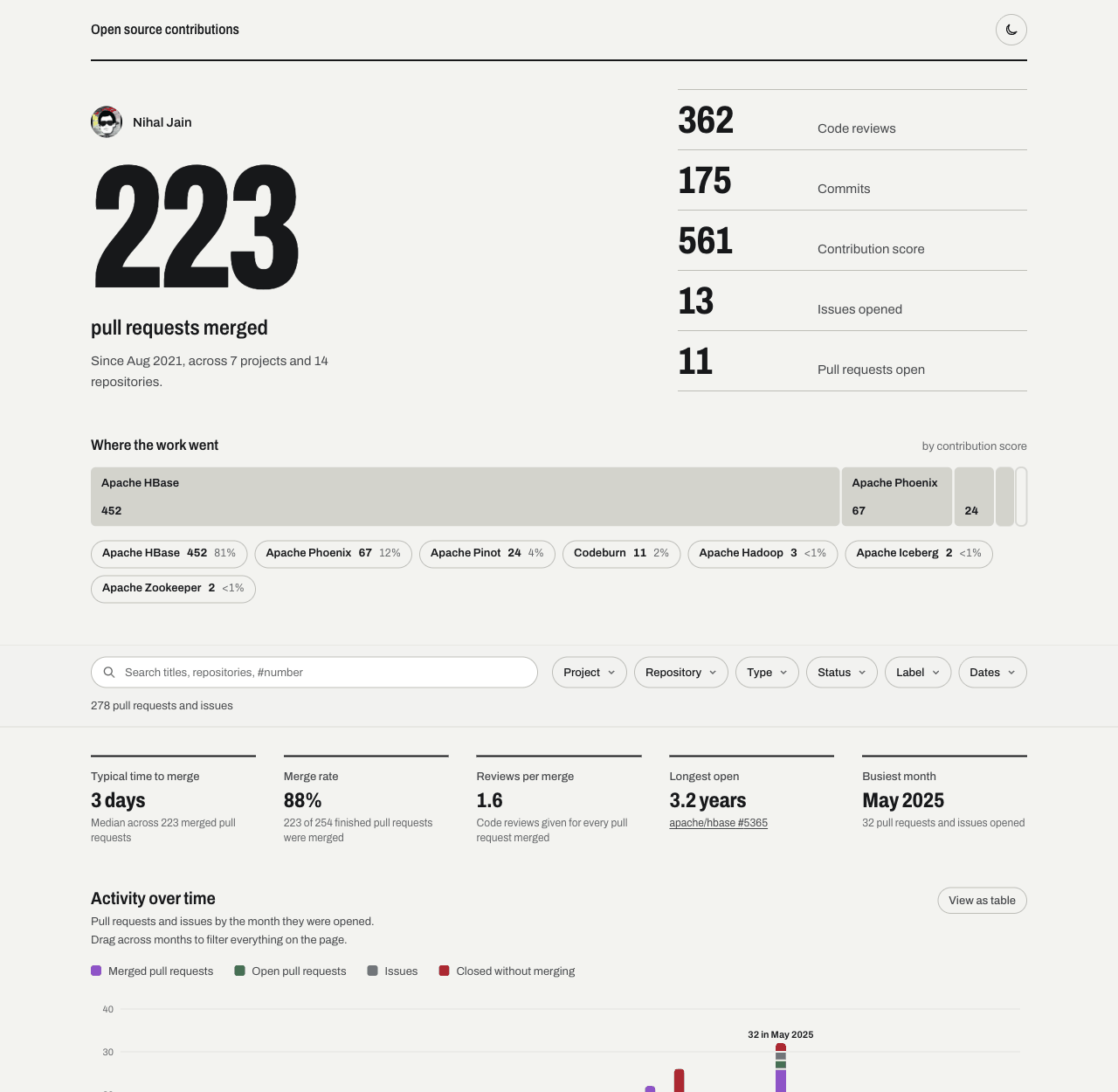
An interactive web dashboard for the same data lives in dashboard/. It leads with the
headline numbers (merged pull requests, code reviews, commits, contribution score), shows where the work went and how
it moved over time, and lets you filter and share any view as a link.
It is a static site built from the report in output/, so it can be hosted on any static host. The repository
publishes it to GitHub Pages by default, with an optional Cloudflare deploy. See the
dashboard README for local development and hosting your own copy.
Local Setup
Prerequisites
- Python 3.10+
- A GitHub personal access token that can read public repositories (a fine-grained token with no extra
permissions, or the classic
public_reposcope). Set it as theGITHUB_TOKENenvironment variable. Do not give it access to private repositories unless you need them: see Private repositories.
Installation
-
Clone the repository:
git clone https://github.com/NihalJain/opensource-contributions-tracker.git cd opensource-contributions-tracker -
Install dependencies:
pip install -r requirements.txt -
Set environment variables:
export GITHUB_TOKEN=your_personal_access_token
# Optional — only needed if behind a corporate proxy:
export HTTP_PROXY=http://proxy.example.com:8080
export HTTPS_PROXY=http://proxy.example.com:8080
Configuration
The input file is input/github.json. The only required fields are start_date and users.
Minimal structure (single contributor, all repositories auto-detected):
{
    "start_date": "YYYY-MM-DD",
    "users": ["user1"]
}
Auto-detected repositories (empty project_to_repo_dict)
Leave project_to_repo_dict out, or set it to {}, and the generator finds the repositories itself. Both of these
are equivalent:
{
    "start_date": "2024-01-01",
    "users": ["user1", "user2"],
    "project_to_repo_dict": {}
}
For every user it searches the pull requests they authored, collects the repositories those pull requests were opened against, and turns each repository into a project named after itself. With the configuration above the effective mapping could look like this (illustrative):
{
    "owner-a/repo-one": ["owner-a/repo-one"],
    "owner-a/repo-two": ["owner-a/repo-two"],
    "owner-b/tool":     ["owner-b/tool"]
}
Use this for a quick look at everything a person has worked on. When you want repositories grouped under meaningful project names (for example several repositories under one product), list them explicitly as in the full structure below.
Notes on auto-detection
- Explicit wins. As soon as
project_to_repo_dicthas at least one entry, only the repositories you list are tracked. Discovery is not mixed in.- Found through authored pull requests only. A repository where a user only committed directly, reviewed or filed issues is not discovered. List it explicitly if it matters.
- Up to 1 000 pull requests per user. The GitHub Search API returns at most 1 000 results, so a very prolific user can have some repositories missed. List those explicitly.
- The date range does not limit discovery, it limits what is counted. A discovered repository with no activity in the range simply does not appear in the report.
- Every repository is its own project, so the project pie chart and project list have one entry per repository.
- Private repositories are left out of the discovered set under the default
private_repos: "exclude"; see Private repositories.
Full structure:
{
    "start_date": "YYYY-MM-DD",
    "end_date": "YYYY-MM-DD",
    "contribution_config": {
        "commits":       { "enabled": true,  "count_towards_score": true  },
        "open_prs":      { "enabled": true,  "count_towards_score": true  },
        "closed_prs":    { "enabled": true,  "count_towards_score": false },
        "open_issues":   { "enabled": true,  "count_towards_score": true  },
        "closed_issues": { "enabled": true,  "count_towards_score": true  },
        "code_reviews":  { "enabled": true,  "count_towards_score": true  },
        "line_stats":    { "enabled": false, "refactor_threshold": 0.1   }
    },
    "private_repos": "exclude",
    "users": ["user1", "user2"],
    "project_to_repo_dict": {
        "Project1": ["owner/repo1", "owner/repo2"],
        "Project2": ["owner/repo3"]
    }
}
This block lists every key the generator reads. Only start_date and users are required; everything else
can be left out. Where the block differs from the defaults:
end_dateis optional and defaults to tomorrow.private_reposdefaults to"exclude"; the other values are"redact"and"include". See Private repositories.project_to_repo_dictcan be left out, or set to{}, to auto-detect repositories.- In
contribution_configevery metric defaults toenabled: trueandcount_towards_score: true. The block showsclosed_prswithcount_towards_score: false, which is a choice, not the default. line_statsdefaults toenabled: falseand has norefactor_threshold;0.1is an example value.
Field reference:
| Field | Required | Default | Description |
|---|---|---|---|
start_date |
Yes | — | Start of the reporting period (YYYY-MM-DD) |
end_date |
No | Tomorrow | End of the reporting period (YYYY-MM-DD, inclusive) |
users |
Yes | — | List of GitHub usernames to track |
project_to_repo_dict |
No | Auto-detected | Maps project display names to lists of owner/repo strings. If omitted or {}, repositories are discovered from each user's PR history (capped at 1 000 results by the GitHub Search API) |
private_repos |
No | exclude |
exclude leaves private repositories out of every output and log; redact counts their work without naming anything; include keeps them as they are. See Private repositories |
contribution_config |
No | All enabled | Per-metric configuration object. Omitting it or any key within it uses the defaults shown below |
commits |
No | — | Config for merged commits |
enabled |
No | true |
Collect and display this metric |
count_towards_score |
No | true |
Add to the Overall Contribution score |
open_prs |
No | — | Config for open pull requests |
enabled |
No | true |
Collect and display |
count_towards_score |
No | true |
Add to score |
closed_prs |
No | — | Config for closed pull requests |
enabled |
No | true |
Collect and display |
count_towards_score |
No | true |
Add to score |
open_issues |
No | — | Config for open issues |
enabled |
No | true |
Collect and display |
count_towards_score |
No | true |
Add to score |
closed_issues |
No | — | Config for closed issues |
enabled |
No | true |
Collect and display |
count_towards_score |
No | true |
Add to score |
code_reviews |
No | — | Config for PRs formally reviewed |
enabled |
No | true |
Collect and display |
count_towards_score |
No | true |
Add to score |
line_stats |
No | — | Config for lines added/removed. Expensive: one extra API call per commit and per open PR |
enabled |
No | false |
Fetch and display line stats. Set to false to skip (recommended for large datasets) |
refactor_threshold |
No | Disabled | Float (0–1). Commits/PRs where net-change ratio is below this are excluded from line counts |
Notes
- Cost of a run. A run makes a few search requests per user, then a handful of requests for each repository
someone was active in (its details, its contributor ranking and, only for users who committed there, the
commit listing). Repositories with no activity cost one lookup, to check that they are public. The production
configuration (1 user, 16 repositories) takes about 70 requests and a minute.
line_statsis the expensive option: it adds one request per commit and per open pull request, which is why it is off by default. - Search API limits. The GitHub Search API returns at most 1 000 results per query. When a user's results are truncated the generator notices and falls back to per-repository queries, so counts stay exact but the run is slower. The log says when this happens.
- Dates are inclusive. Both
start_dateandend_dateare included, andend_datedefaults to tomorrow so that today's activity is counted. - Usernames are case-insensitive. They are lower-cased before use.
- Misconfiguration fails early. A missing
start_dateorusers, an unknownprivate_reposvalue, or a configuration with nothing public left stops the run with a message before the report is written.
Private repositories
The report, the data files and the dashboard are normally committed to a public repository and published as a
public site, so private repositories are excluded by default ("private_repos": "exclude"):
- A repository is kept only when GitHub reports it as public. One the token cannot see, or whose visibility is missing from the answer, is excluded too.
- Excluded repositories are not searched, counted, ranked or named anywhere: not in the report, the CSV, the activity JSON, the charts, the dashboard or the logs (CI logs of a public repository are public). The log only says how many were excluded.
- This applies to repositories listed in
project_to_repo_dictas well as to auto-detected ones. - Excluded work does not count towards anyone's totals or rank.
Two other modes exist for the case where your private work should be reflected in the report:
"redact"counts private work without naming it. Each user gets one row,Private repositoriesin the projectPrivate work, with the commits, pull requests, issues and reviews of all their private repositories summed. Their numbers count towards that user's totals and score. Nothing else about them is written: no repository or owner names, titles, links, labels, descriptions, avatars, rank or contributor names, and no activity records, so private work does not appear on the dashboard timeline or in the pull request explorer. The same names are removed from log output, including failed requests and error messages."include"keeps private repositories exactly as they are, names and titles included. Use it only when the output stays private, for example a private repository with private hosting.
redact needs a token that can see your private repositories, which the workflow's built-in GITHUB_TOKEN
cannot, so it matters for local runs or for a personal access token stored as a secret. A value other than
exclude, redact or include stops the run before any API call.
What redact does not hide: that you have private work at all, and how much of it there is. Both appear in the
totals and the Private repositories row. Leave the default exclude if that matters.
Running with a token that can see private repositories is safe with the default, but a token without that
access is better still: the GitHub Actions workflow's built-in GITHUB_TOKEN already sees only public data.
Independent check. check_output_visibility.py looks up every repository named in output/ and fails if any
is not public. The nightly workflow runs it before committing, so a leak is stopped before anything is published,
and pull requests run it on the output they commit.
python check_output_visibility.py            # checks output/, prints counts only
python check_output_visibility.py --show-names   # locally: also prints which repositories
python check_output_visibility.py --allow-private  # report them but exit 0, for output published privately
It prints counts and file names but not repository names, because CI logs of a public repository are public. A repository the token cannot see counts as not public, so one that has been deleted is reported until it is removed from the output.
Output files written to output/:
| File | Description |
|---|---|
github_contributions_report.md |
Full markdown report |
github_contribution_data.csv |
Raw per-user-per-repo numeric data |
github_activity_data.json |
Cached PR and issue objects used for the Activity Details section |
project_wise_contribution.png |
Pie chart of contributions by project |
user_wise_contribution.png |
Pie chart of contributions by user |
Re-generate the report from cached data (no API calls) — both output files must exist:
python -c "from tracker.cli import generate_report_with_local_data; generate_report_with_local_data()"
GitHub Actions (Automated workflow)
The repository includes a GitHub Actions workflow at .github/workflows/main.yml that:
- Runs automatically on a schedule (default: every 24 hours — adjust the
cronexpression to suit your needs). - Commits the generated report and CSV back to the repository.
To update the configuration, edit input/github.json and push — the next workflow run picks up the changes automatically.
Steps to trigger the workflow manually
- Go to the Actions tab of your forked repository.
- Select the Open Source Contribution Tracker Job workflow.
- Click Run workflow, choose the branch, and confirm.
- Once the run completes, the updated report is committed to the
output/directory.
Contributing
The generator is the tracker package; generate_report.py is its entry point.
| Module | What it does |
|---|---|
tracker/cli.py |
Builds a report from the API (generate_report) or from earlier data files (generate_report_with_local_data) |
tracker/config.py |
Reads input/github.json and its per-metric settings |
tracker/privacy.py |
Keeps private repositories out of the report (private_repos) |
tracker/collect.py |
Collects every user's contributions to every repository |
tracker/github.py |
The GitHub queries: commits, pull requests, issues, reviews, line stats, repository details |
tracker/api.py |
HTTP session, pagination, retries and rate limits |
tracker/aggregate.py |
Per-project and per-user totals |
tracker/report.py |
The markdown report, pie charts and data files |
tracker/log.py |
The shared logger and the filter that hides private names |
- Fork the repository and create a feature branch:
git checkout -b feature/my-improvement - Make your changes and verify the script runs correctly:
export GITHUB_TOKEN=your_token python generate_report.py - Run the tests (they use stubbed GitHub responses and need no token):
pip install -r requirements-dev.txt pytest - Commit, push, and open a pull request against
main. The Python checks (unit tests, a live run of the generator, and the public-repositories check) run in CI only when the pull request touches the generator, its tests,input/,output/, the requirements or a workflow. A change to the dashboard or the documentation skips them.
License
This project is licensed under the Apache License 2.0. See the LICENSE file for details.
Contact
For questions or suggestions, please open an issue or reach out to the repository owner Nihal Jain.